
C-707CHX - CD Player ONKYO - Free user manual and instructions
Find the device manual for free C-707CHX ONKYO in PDF.


| Product Type | Compact Disc Changer |
| Brand | Onkyo |
| Model | C-707CHX |
| Disc Capacity | 3 discs (stocker changer) |
| D/A Converter | Linear single-bit 1 bit D/A converter |
| Frequency Response | 5 Hz - 20 kHz |
| Total Harmonic Distortion | 0.005% (at 1 kHz) |
| Channel Separation | 85 dB (at 1 kHz) |
| Dynamic Range | 96 dB |
| Signal-to-Noise Ratio | 90 dB |
| Output Level | 2 V r.m.s. |
| Power Consumption | 14 W |
| Power Supply | AC 120 V, 60 Hz (US model) |
| Dimensions (W x H x D) | 205 x 91 x 334 mm (8-1/16" x 3-9/16" x 13-3/16") |
| Weight | 3.0 kg (6.6 lbs) |
| Playable Discs | Audio CDs (12 cm, 8 cm CD singles) |
| Digital Outputs | Two optical (DLA LINK 2 compatible) |
| Analog Outputs | RCA (L/R) |
| Remote Control | Compatible with RC-414S/RC-456S (supplied with R-805X amplifier) |
| Special Playback Modes | Normal, Memory (up to 40 selections), Random, Repeat, TR-1 (first tracks only), 1 DISC |
| Other Features | DLA LINK (peak search data), CD Synchro Recording, CD Dubbing, Music Calendar display, Auto Power On, Direct Change |
| Accessories Included | RI remote control cable, audio connection cable |
| Safety | Class 1 laser product |
Frequently Asked Questions - C-707CHX ONKYO
User questions about C-707CHX ONKYO
0 question about this device. Answer the ones you know or ask your own.
Ask a new question about this device
Download the instructions for your CD Player in PDF format for free! Find your manual C-707CHX - ONKYO and take your electronic device back in hand. On this page are published all the documents necessary for the use of your device. C-707CHX by ONKYO.
USER MANUAL C-707CHX ONKYO
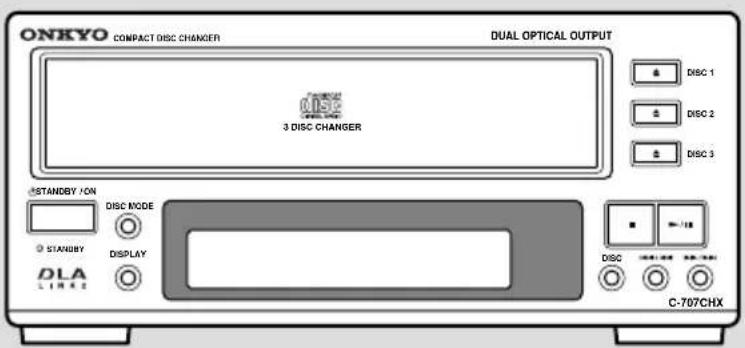
Compact Disc Changer C-707CHX
Instruction Manual

Thank you for purchasing ...
Thank you for purchasing the Onkyo C-707CHX Compact Disc Changer.
Please read this manual thoroughly before making connections and plugging in the unit.
Following the instructions in this manual will enable you to obtain the optimum performance and listening enjoyment from your new Compact Disc Changer.
Please retain this manual for future reference.
Main Features
• 3-disc stocker changer lets you change two discs while the third plays
- Incorporates a linear single-bit D/A converter for high-quality playback
- TR-1 play mode for recording of only the first tracks of CD-singles
- Two optical outputs supporting DLA LINK 2
WARNING:
TO REDUCE THE RISK OF FIRE OR ELECTRIC SHOCK, DO NOT EXPOSE THIS APPLIANCE TO RAIN OR MOISTURE.
CAUTION:
TO REDUCE THE RISK OF ELECTRIC SHOCK, DO NOT REMOVE COVER (OR BACK). NO USER-SERVICEABLE PARTS INSIDE. REFER SERVICING TO QUALIFIED SERVICE PERSONNEL.


The lightning flash with arrowhead symbol, within an equilateral triangle, is intended to alert the user to the presence of uninsulated “dangerous voltage” within the product’s enclosure that may be of sufficient magnitude to constitute a risk of electric shock to persons.

The exclamation point within an equilateral triangle is intended to alert the user to the presence of important operating and maintenance (servicing) instructions in the literature accompanying the appliance.
Important Safeguards
-
Read Instructions – All the safety and operating instructions should be read before the appliance is operated.
-
Retain Instructions – The safety and operating instructions should be retained for future reference.
-
Heed Warnings – All warnings on the appliance and in the operating instructions should be adhered to.
-
Follow Instructions – All operating and use instructions should be followed.
-
Water and Moisture – The appliance should not be used near water – for example, near a bathtub, washbowl, kitchen sink, laundry tub, in a wet basement, or near a swimming pool, and the like.
-
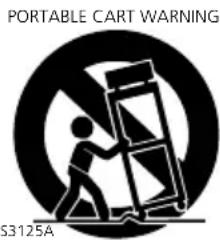
Carts and Stands – The appliance should be used only with a cart or stand that is recommended by the manufacturer.
6A. An appliance and cart combination should be moved with care. Quick stops, excessive force, and uneven surfaces may cause the appliance and cart combination to overturn.
-
Wall or Ceiling Mounting – The appliance should be mounted to a wall or ceiling only as recommended by the manufacturer.
-
Ventilation – The appliance should be situated so that its location or position does not interfere with its proper ventilation. For example, the appliance should not be situated on a bed, sofa, rug, or similar surface that may block the ventilation openings; or if placed in a built-in installation, such as a bookcase or cabinet that may impede the flow of air through the ventilation openings, there should be free space of at least 5 cm (2 in.) and an opening behind the appliance.
-
Heat – The appliance should be situated away from heat sources such as radiators, heat registers, stoves, or other appliances (including amplifiers) that produce heat.
-
Power Sources – The appliance should be connected to a power supply only of the type described in the operating instructions or as marked on the appliance.
-
Polarization – If the appliance is provided with a polarized plug having one blade wider than the other, please read the following information:
The polarization of the plug is a safety feature. The polarized plug will only fit the outlet one way. If the plug does not fit fully into the outlet, try reversing it. If there is still trouble, the user should seek the services of a qualified electrician. Under no circumstances should the user attempt to defeat the polarization of the plug.
-
Power-Cord Protection – Power-supply cords should be routed so that they are not likely to be walked on or pinched by items placed upon or against them, especially near plugs, convenience receptacles, and the point where they exit from the appliance.
-
Cleaning – The appliance should be cleaned only as recommended by the manufacturer.
-
Nonuse Periods – The power cord of the appliance should be unplugged from the outlet when left unused for a long period of time.
-
Object and Liquid Entry – Care should be taken so that objects do not fall and liquids are not spilled into the enclosure through openings.
-
Damage Requiring Service – The appliance should be serviced by qualified service personnel when:
A. The power-supply cord or the plug has been damaged; or
B. Objects have fallen, or liquid has been spilled into the appliance; or
C. The appliance has been exposed to rain; or
D. The appliance does not appear to operate normally or exhibits a marked change in performance; or
E. The appliance has been dropped, or the enclosure damaged.
- Servicing – The user should not attempt to service the appliance beyond that described in the operating instructions. All other servicing should be referred to qualified service personnel.
Precautions
1. Warranty Claim
You can find the serial number on the rear panel of this unit. In case of warranty claim, please report this number.
2. Power
WARNING
BEFORE PLUGGING IN THE UNIT FOR THE FIRST TIME, READ THE FOLLOWING SECTION CAREFULLY.
The voltage of the available power supply differs according to country or region. Be sure that the power supply voltage of the area where this unit will be used meets the required voltage (e.g., AC 230 V, 50 Hz or AC 120 V, 60 Hz) written on the rear panel.
Turning off the standby button does not shut off the power completely. So the power cord should be removed from the AC outlet when the unit is not used for a prolonged time.
3. Do not touch this unit with wet hands
Do not handle this unit or power cord when your hands are wet or damp. If water or any other liquid enters the case, take this unit to an authorized service center for inspection.
4. Location of this unit
Place this unit in a well-ventilated location.
Take special care to provide plenty of ventilation on all sides of this unit especially when it is placed in an audio rack. If ventilation is blocked, this unit may overheat and malfunction.
Do not expose this unit to direct sunlight or heating units as this unit's internal temperature may rise and shorten the life of the pickup.
Avoid damp and dusty places and places directly affected by vibrations from the speakers. In particular, avoid placing the unit on or above one of the speakers.
Be sure this unit is placed in a horizontal position. Never place it on its side or on a slanted surface as it may malfunction.
Do not place near tuners or TV sets.
If placed next to a TV or tuner, it may cause reception interference resulting in some noise in the TV or tuner output.
5. Care
From time to time you should wipe the front and rear panels and the cabinet with a soft cloth. For heavier dirt, dampen a soft cloth in a weak solution of mild detergent and water, wring it out dry, and wipe off the dirt. Following this, dry immediately with a clean cloth.
Do not use rough material, thinners, alcohol or other chemical solvents or cloths since these could damage the finish or remove the panel lettering.
6. Points to remember
If this unit is brought from a cold environment to a warm one or is in a cold room that is quickly heated, condensation may form on the pickup, preventing proper operation. In this case, remove the disc and leave the power ON for about one hour to remove the condensation.
When transporting this unit, be careful not to bump it.
DANGER:
INVISIBLE LASER RADIATION WHEN OPEN AND INTERLOCK FAILED OR DEFEATED. AVOID DIRECT EXPOSURE TO BEAM.
CAUTION:
THIS PRODUCT UTILIZES A LASER. USE OF CONTROLS OR ADJUSTMENTS OR PERFORMANCE OF PROCEDURES OTHER THAN THOSE SPECIFIED HEREIN MAY RESULT IN HAZARDOUS RADIATION EXPOSURE.
For U.S. model
The laser is covered by a housing which prevents exposure during operation or maintenance. However, this product is classified as a Laser Product by CDRH (Center for Devices and Radiological Health) which is a department of the Food and Drug Administration. According to their regulations 21 CFR section 1002.30, all manufactures who sell Laser Products must maintain records of written communications between the manufacturer, dealers and customers concerning radiation safety. If you have any complaints about instructions or explanations affecting the use of this product, please feel free to write to the address on the back page of this manual. When you write us, please include the model number and serial number of your unit.
In compliance with Federal Regulations, the certification, identification and the period of manufacture are indicated on the rear panel.
FCC INFORMATION FOR USER
CAUTION:
The user changes or modifications not expressly approved by the party responsible for compliance could void the user's authority to operate the equipment.
NOTE:
This equipment has been tested and found to comply with the limits for a Class B digital device, pursuant to Part 15 of the FCC Rules. These limits are designed to provide reasonable protection against harmful interference in a residential installation. This equipment generates, uses and can radiate radio frequency energy and, if not installed and used in accordance with the instructions, may cause harmful interference to radio communications. However, there is no guarantee that interference will not occur in a particular installation. If this equipment does cause harmful interference to radio or television reception, which can be determined by turning the equipment off and on, the user is encouraged to try to correct the interference by one or more of the following measures:
- Reorient or relocate the receiving antenna.
- Increase the separation between the equipment and receiver.
- Connect the equipment into an outlet on a circuit different from that to which the receiver is connected.
- Consult the dealer or an experienced radio/TV technician for help.
For Canadian model
NOTE:
THIS CLASS B DIGITAL APPARATUS COMPLIES WITH CANADIAN ICES-003.
For models having a power cord with a polarized plug:
CAUTION: TO PREVENT ELECTRIC SHOCK, MATCH WIDE BLADE OF PLUG TO WIDE SLOT, FULLY INSERT.
This unit contains a semiconductor laser system and is classified as a "CLASS 1 LASER PRODUCT". So, to use this model properly, read this Instruction Manual carefully. In case of any trouble, please contact the store where you purchased the unit. To prevent being exposed to the laser beam, do not try to open the enclosure.
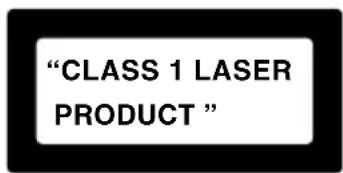
- This unit is a CLASS 1 LASER PRODUCT and employs a laser inside the cabinet.
- To prevent the laser from being exposed, do not remove the cover. Refer servicing to qualified personnel.
For British model
Replacement and mounting of an AC plug on the power supply cord of this unit should be performed only by qualified service personnel.
IMPORTANT
The wires in the mains lead are coloured in accordance with the following code:
Blue : Neutral
Brown : Live
As the colours of the wires in the mains lead of this apparatus may not correspond with the coloured markings identifying the terminals in your plug, proceed as follows:
The wire which is coloured blue must be connected to the terminal which is marked with the letter N or coloured black.
The wire which is coloured brown must be connected to the terminal which is marked with the letter L or coloured red.
IMPORTANT
A 5 ampere fuse is fitted in this plug. Should the fuse need to be replaced, please ensure that the replacement fuse has a rating of 5 amperes and that it is approved by ASTA or BSI to BS1362. Check for the ASTA mark or the BSI mark on the body of the fuse.
IF THE FITTED MOULDED PLUG IS UNSUITABLE FOR THE SOCKET OUTLET IN YOUR HOME, THEN THE FUSE SHOULD BE REMOVED AND THE PLUG CUT OFF AND DISPOSED OF SAFELY. THERE IS A DANGER OF SEVERE ELECTRICAL SHOCK IF THE CUT OFF PLUG IS INSERTED INTO ANY 13 AMPERE SOCKET.
If in any doubt, please consult a qualified electrician.
Declaration of Conformity
We, ONKYO EUROPE
ELECTRONICS GmbH INDUSTRIESTRASSE 20 82110 GERMERING, GERMANY
declare in own responsibility, that the ONKYO product described in this instruction manual is in compliance with the corresponding technical standards such as EN60065, EN55013, EN55020 and EN61000-3-2, -3-3.
GERMERING, GERMANY
ONKYO EUROPE ELECTRONICS GmbH
Table of contents
Before Using
Checking the supplied accessories .... Below
Connections
Connecting to Onkyo Separate Collection series components...... 8
Connecting to the other components.... 9\~11
Operations
Playing CDs 12\~17
Memory play 18\~20
Other play modes.... 21\~22
Other Information
Handling CDs 23
Troubleshooting 24
Specifications 25
Indexed to parts and controls 26\~27
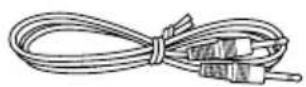
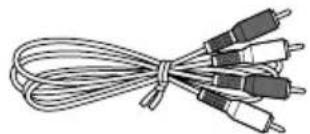
Supplied accessories
Check that the following accessories are supplied with this unit.
RI remote control cable × 1
Audio connection cable × 1
natural_image
Coiled cable with multiple black and white connectors (no text or symbols visible)Connecting to Onkyo Separate Collection series components
This section introduces you to the other Onkyo Separate Collection series components and their convenient system functions, followed by instruction on how to connect the system.
The following Onkyo Separate Collection series components are commercially available:
• R-805X ..... FM Stereo/AM Tuner Amplifier
• A-905X ..... Integrated Stereo Amplifier
• T-405X ...... Stereo Tuner
• K-505X ...... Stereo Cassette Tape Deck (Not available in U.S and Canada)
• MD-105X ... Minidisc (MD) Recorder (Not available in U.S and Canada)
- CDR-205X .. CD Recorder (Not available in U.S and Canada)
Note that the available components may vary according to the area.
Combining the C-707CHX Compact Disc Changer with the above system components enables you to operate the following convenient functions:
The instructions in this manual are based on using the C-707CHX along with the R-805X. If you wish to use the A-905X, refer to the instruction manual for the A-905X and connect the C-707CH or C-705X (instead of the C-707CHX).
- Auto Power On
- You can turn on the power to the tuner amplifier by pressing the STNADBY/ON button on one of the system components.
- To enable the Auto Power On function, make sure that all devices are connected correctly.
- Direct Change
The R-805X's INPUT SELECTOR automatically switches to CD, MD or TAPE when these components are played.
- Remote Control Operation
This component can be operated using the remote controller included with the R-805X. The buttons on the remote controller can be used to send signals to this unit. (Refer to the R-805X's instruction manual for details.)
- Program Timer
You can use the Timer Play. (Refer to the R-805X instruction manual for details.)
- Sleep Timer
You can fall asleep to a music/radio program with the timer. (Refer to the R-805X instruction manual for details.)
• CD Synchro Recording
With the cassette deck, MD recorder or CD recorder in recording standby, starting CD playback causes the cassette deck or MD recorder to start recording. (Refer to the K-505X, MD-105X and CDR-205X instruction manuals for details.)
- CD Dubbing
Simple CD dubbing using a stereo cassette tape deck, MD recorder or CD recorder is possible with the pressing of a single button. (Refer to the K-505X, MD-105X or CDR-205X Instruction Manual for more information).
- DLA LINK
The Peak Search Data function of the C-707CHX enables the MD recorder or CD recorder to automatically set the digital recording level. (Refer to the MD-105X or CDR-205X Instruction Manual for details.)
Connecting to the other components
Before connecting
- Do not connect the AC power cord (mains lead) until you complete all the other connections including the RI connections on the next page.
- On each pair of connectors, a red connector (marked R) corresponds to the right channel, and a white connector (marked L) to the left channel. Connect white plugs of audio connection cables to L connectors and connect red plugs of audio connection cables to R connectors.
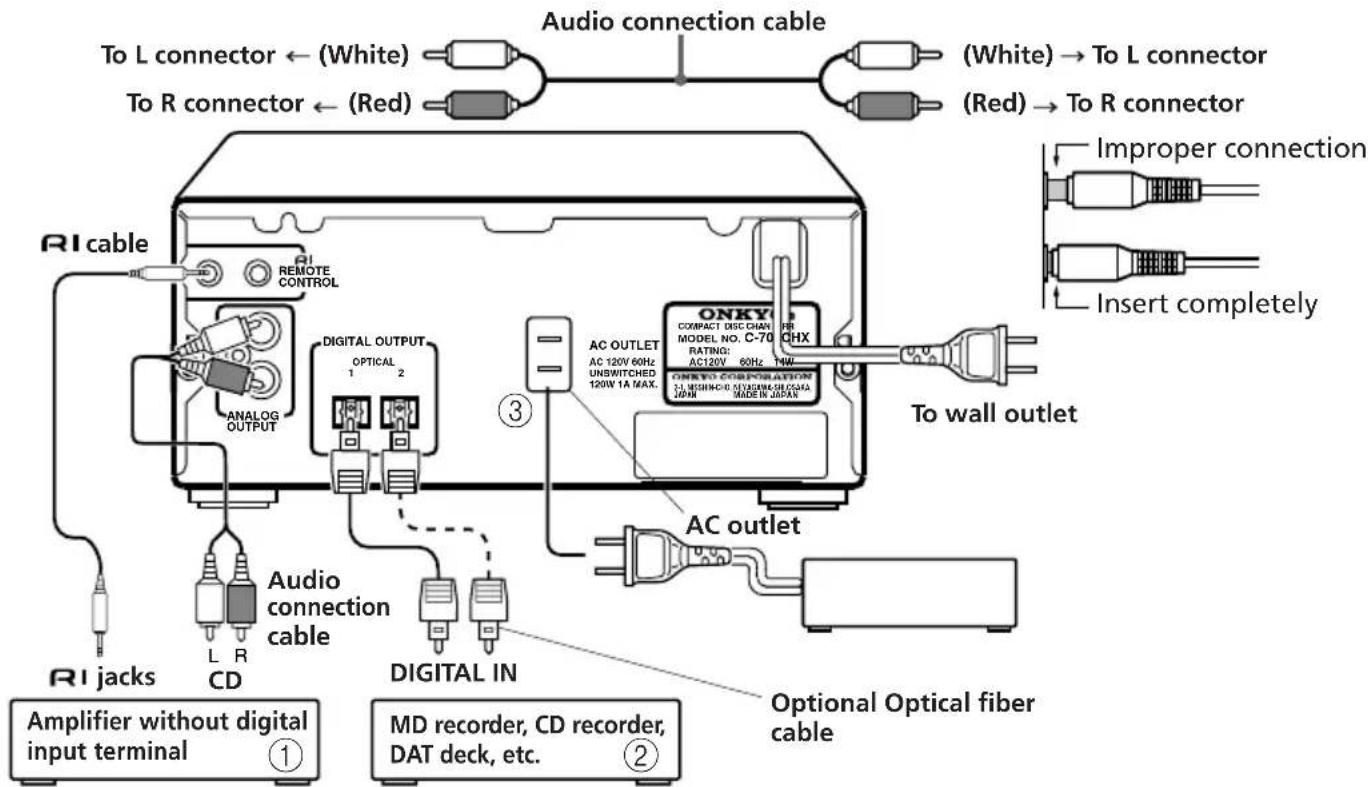
①Connecting to an amplifier
Connect the CD's OUTPUT jacks and the amplifier's CD input jacks using the audio connection cable. Refer to the amplifier's instruction manual for connections.
② Connection to digital equipment, such as an MD,CD Recorder or DAT
Using the DIGITAL OUTPUT connector, you can record on digital audio equipment, such as an MD, CD recorder, DAT, etc. For digital recording, connect the equipment to either DIGITAL OUTPUT OPTICAL 1 or 2 connector using the optical cable (option). These connectors can also be used for connecting an
amplifier which is equipped with a digital input connector.
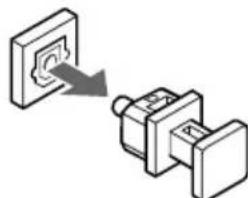
A connector protection cap is attached to the digital output connector. Remove this cap to connect the unit to other digital equipment. When you are not using the digital output connector, replace this cap.
natural_image
Diagram showing a switch or connector being inserted into a larger terminal block (no text or symbols present)③To AC OUTLET (UNSWITCHED)
The AC power cord of another component can be connected to this AC OUTLET connector. This means that if the C-707CHX is plugged into an AC outlet, AC power is available to this AC OUTLET even if the C-707CHX is off.
Note
The shape, number, and total capacity of the AC outlets may differ depending on the area where the unit is purchased.
120 V, 60 Hz model: Capacity is 120 W in total.
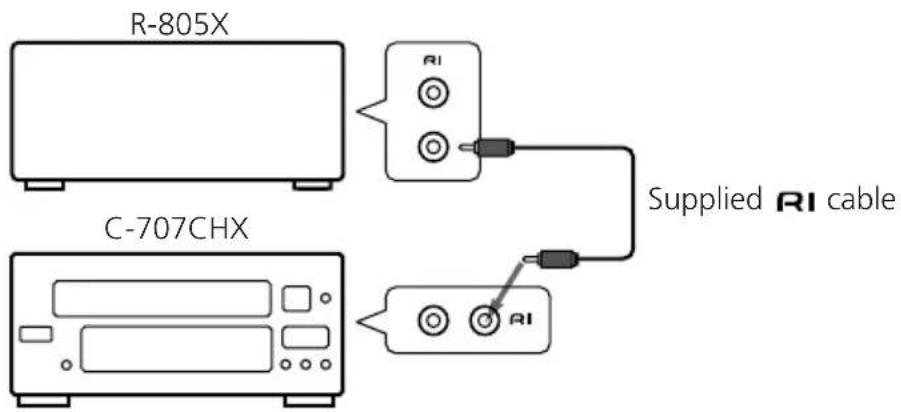
Connecting for remote control (R1)
If your other components are made by ONKYO and those components are equipped with the connectors, you can control this unit with the amplifier's remote controller.
Before connecting
- The amplifier must be connected in the system hookups for control operations.
• Each component has two RI connectors. There is no difference between those connectors. - The components may be connected in any order.
- Remote control operation is not possible if only the RI remote control cable is connected to the RI connectors. Connect the audio connection cables correctly.
Note
An Remote control cable equipped with a 1/8 in.(3.5mm) diameter miniature two-conductor phone plug is included with this unit and with every tuner and cassette deck that bears the RI mark.
Connecting the power cord (mains lead)
Insert the AC power cord (mains lead) into a wall outlet. The STANDBY indicator lights.
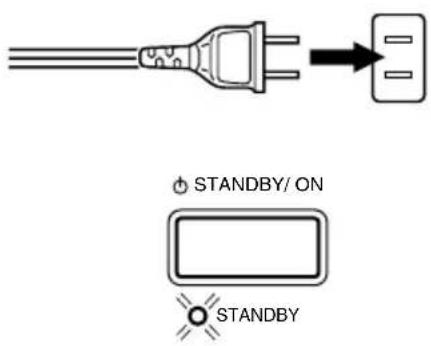
- If you press the ☑PEN/CLOSE button while the unit is in the standby mode, the power will turn on and the display will light up automatically.
- To use the unit with the other Onkyo Separate Collection series components, follow the connection diagram in the R-805X instruction manual to connect the unit to the system.
Using the remote controller
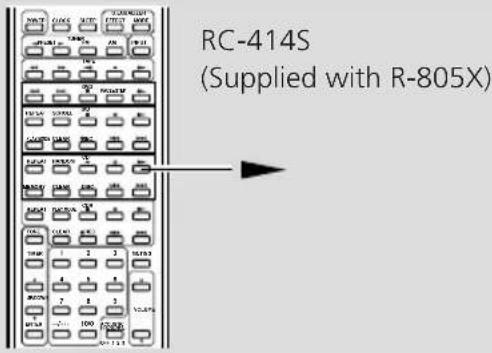
The unit is not shipped with a remote controller. However, you can use a remote controller (RC-414S/RC-456S) that is shipped with the R-805X amplifier.
Remote controller RC-414S/RC-456S
When the remote controller RC-414S/RC-456S supplied with the amplifier R-805X is used, operate the remote controller pointing towards the amplifier's remote sensor.
Be sure to make the RI connection securely. If the connection is incomplete, you cannot use the remote controller to operate the unit.
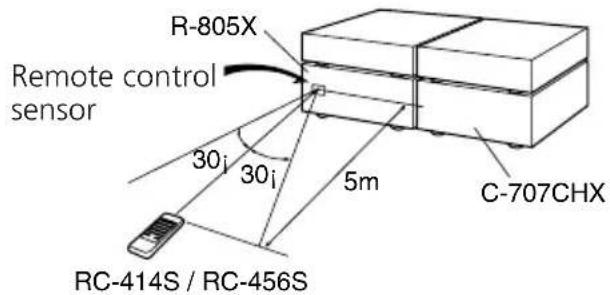
The RC-414S remote controller is shown in the following illustrations.
Notes
- Place the unit away from strong light such as direct sunlight or inverted fluorescent light which can prevent proper operation of the remote controller.
- Using another remote controller of the same type in the same room or using the unit near equipment which uses infrared rays may cause operational interference.
- Do not put any object such as a book on the remote controller. The buttons of the remote controller may be pressed by mistake and drain the batteries.
- Make sure the audio rack doors do not have colored glass. Placing the unit behind such doors may prevent proper remote controller operation.
- If there is any obstacle between the remote controller and the remote control sensor, the remote controller will not operate.
Normal play
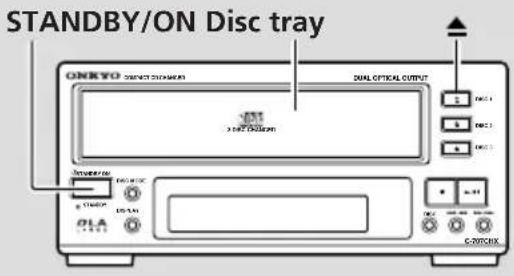
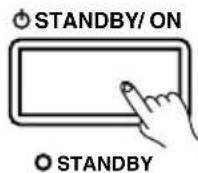
1 Press the STANDBY/ON button to turn on the unit.
The STANDBY indicator goes out.
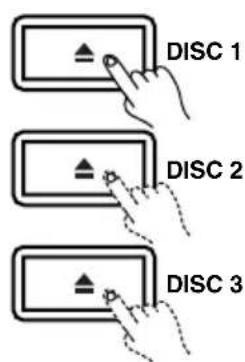
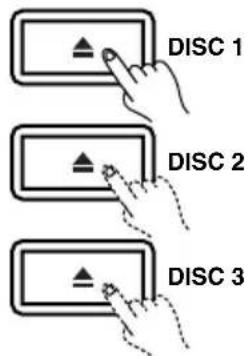
2 Press the desired ▲OPEN/CLOSE button (DISC 1 - DISC 3).
The disc tray corresponding to the ▲OPEN/CLOSE button opens and the disc indicator for the open disc tray flashes (see page 15).
Note:
If one of the ▲OPEN/CLOSE buttons (DISC 1 - DISC 3) is pressed in STANDBY mode, the unit turns on automatically and then the corresponding disc tray opens.
3 Place the disc in the disc tray, with its label face up.
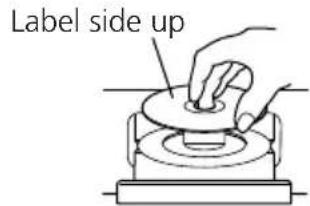
Place only one disc on each tray.
4 Press the ▲OPEN/CLOSE button (DISC 1 - DISC 3) to close the open disc tray.
Alternatively, you may lightly press the front face of the open disc tray.
Note:
You can continuously load second and third discs in the disc trays by pressing the ▲ buttons (DISC 1 - DISC 3).
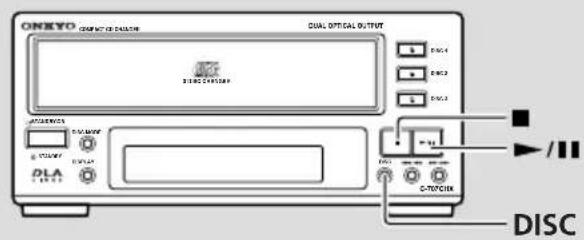
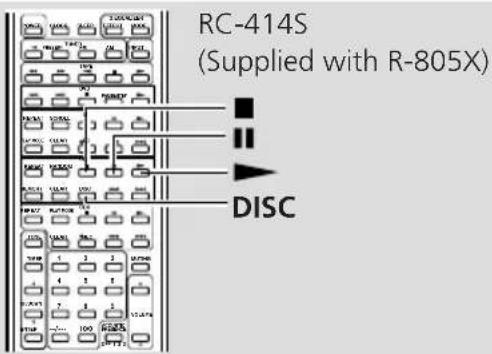
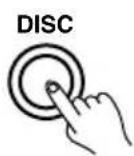
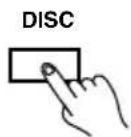
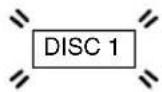
5 Press the DISC button once or more to select the disc you wish to play.
Remote controller
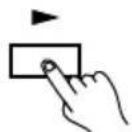
6 Press the ▶button.
The CD changer starts playing the first track of the selected disc.
Remote controller

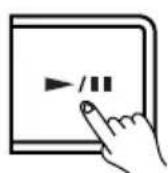
To pause playing
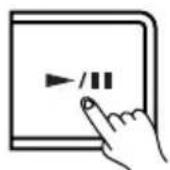
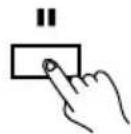
Press the ▶/■ button, or the ■ button on the remote controller.
To resume playback, press the ▶/■ button on the unit, or the ■ button on the remote controller.
Remote controller
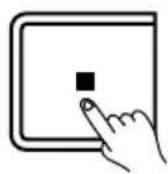
To stop playing
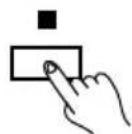
Press the ■ button during play.
Remote controller
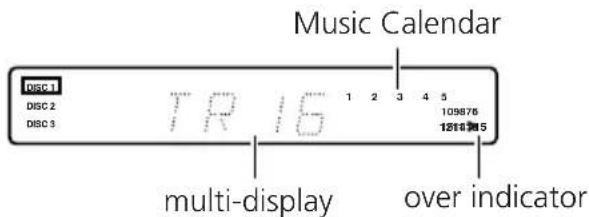
Music Calendar
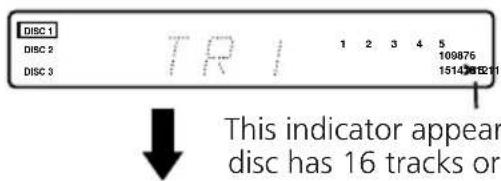
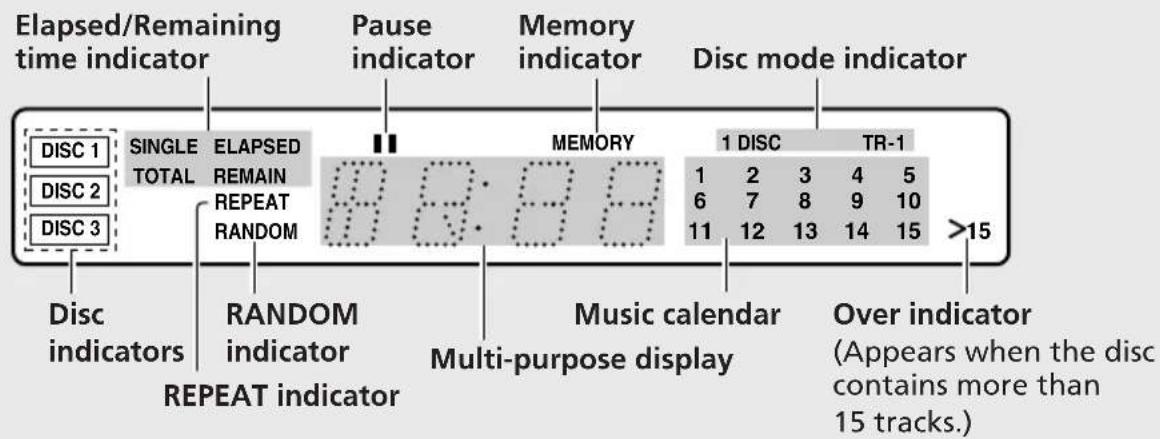
The Music Calendar shows the numbers of the tracks to be played. When the playback of a track is completed, the corresponding track number indicator turns off. If the disc contains 16 or more tracks, the "over indicator (>15)" lights up. (The total number of the tracks on a disc is shown on the multi-display.)
Skip play
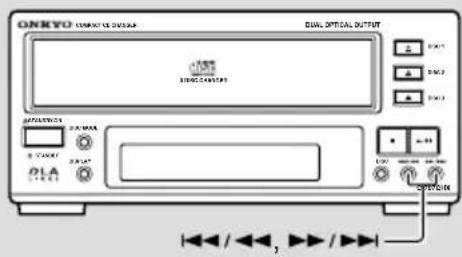
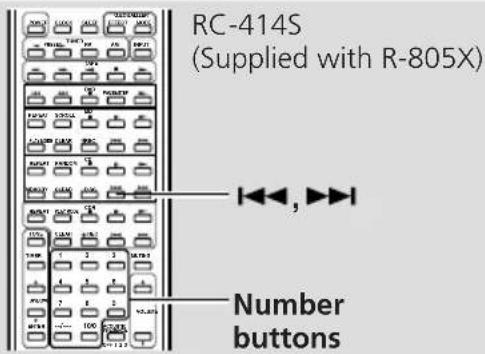
Use the 📄/button to jump to the beginning of the previous or next track, respectively. Pressing the button during playback causes the CD Changer to play from the beginning of that track
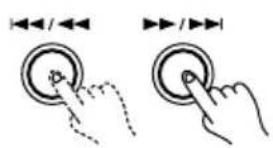
Remote controller
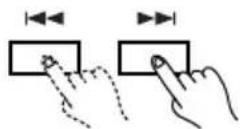
◀◀/◀◀ : Press this button during playback to jump to the beginning of the current track. Press it again to jump to the beginning of the previous track. ▶▶/▶▶▶ : Press this button to jump to the beginning of the next track.
Search play
Hold down the ▶/Button▶/▶▶ during playback. The CD Changer will start playback from where you release your finger.
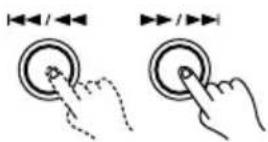
fast-rewind fast-forward
Note:
During Memory play, searching is performed only for those tracks stored in the memory. (See pages 18 to 20 for Memory play.)
Starting playback from a given track (remote controller only)
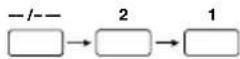
With the RC-414S remote controller (included with the R-805X), you can select the track to play using the number buttons. In this case, selecting a track automatically starts playback from that track.
How to enter track numbers
Remote controller
To enter track #5

To enter track #10

To enter track #21
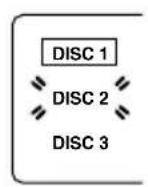
Understanding the meaning of disc indicators
DISC 1
DISC 2
DISC 3
Boxed: The disc is playing or ready for playback.
On: A disc is loaded in the disc tray.
Flashing: The disc tray is open.
Off: No disc is loaded in the disc tray.
Note:
The disc indicator stays lit until the presence/absence detection is completed, even if the disc tray holds no discs.
Changing the discs during playback
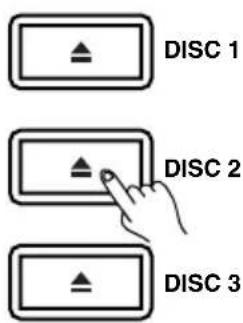
The C-707CHX allows you to change the other two discs while one disc is playing.
When one disc is playing, press the ▲ button (DISC 1 - DISC 3) for another disc tray.
The disc indicator for the open disc tray flashes. Replace the disc in the disc tray and press the ▲ button to close the disc tray.
If the ▲button for the playing disc is pressed...
Playback stops and the tray holding that disc opens.
IMPORTANT!
During recording, pressing the ▲ button for the tray holding the playing disc stops the recording.
Notes:
- This CD Changer has three disc trays that slide forward and backward internally. Note that pressing any of the ▲ buttons will cause the all the trays to change position, either in or out, or forward or backward.
- Be sure that the internal disc trays have stopped moving before changing the disc.
- When removing a disc, be careful not to scratch the disc that may exist in the disc tray below. This is especially important when removing a CD-single.
DISC MODE
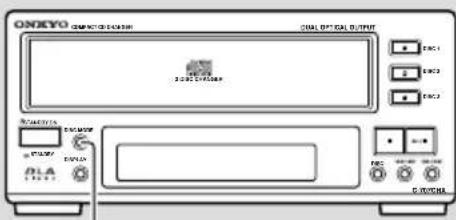
Selecting the disc mode
DISC MODE
TR-1

1 DISC

Off

TR-1
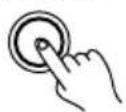
Each time you press the DISC MODE button, the disc mode will change in the following sequence:

flowchart
graph LR
    A["TR-1 +DISC"] --> B["Normal play\n(No indication made)"]
(The current disc mode is shown by the disc mode indicators.)
TR-1 mode (hit-parade function): When loaded with CD-singles, the CD Changer plays only the first tracks of discs. The unit automatically stops when the first tracks of all discs have been played back. This mode is useful when you play only the first tracks of one CD-single after another.
1DISC mode: The CD Changer plays only the currently selected disc. When finished, the unit stops without playing the next CD.
Normal play (No indication made): When finished playing the disc's final track, the CD Changer immediately starts playing the next disc's first track. The unit automatically stops when all discs have been played back.
Note:
In the TR-1 mode, the CD Changer determines whether it is a CD-single by the total playing time, not the size of the disc. Therefore, even if a 12-cm disc is loaded, the unit will recognize it as a CD-single if it includes 4 tracks or less and its total playing time is less than 27 minutes, and play back only the disc's first track.
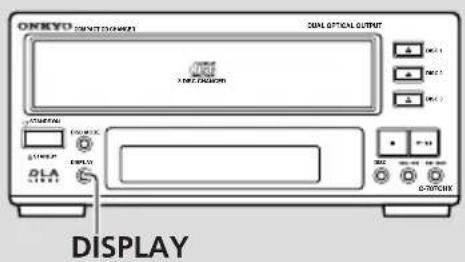
Changing the display
The display changes each time you press the DISPLAY button during play.
DISPLAY
While the unit is playing or in pause mode:
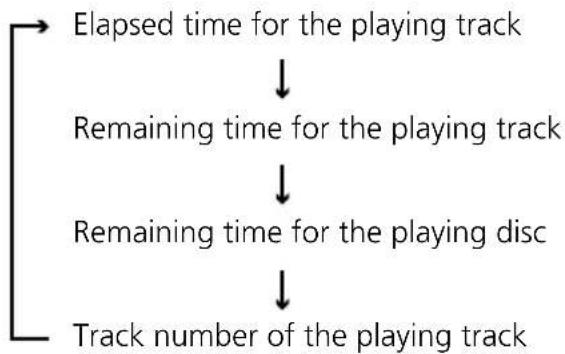
flowchart
graph TD
    A["Elapsed time for the playing track"] --> B["Remaining time for the playing track"]
    B --> C["Remaining time for the playing disc"]
    C --> D["Track number of the playing track"]
While the unit is stopped:
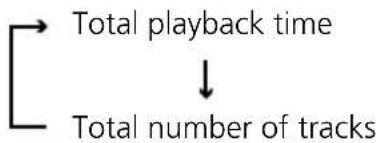
flowchart
graph TD
    A["Total playback time"] --> B["Total number of tracks"]
Note:
In the following cases, the display will show "--::--":
- An attempt to display the remaining time is made when Track 21 or a later track is playing.
- An attempt to display the remaining time for the playing track or disc is made when Track 21 or a later track is stored in memory.
- An attempt to display the remaining time for the playing disc is made during Memory play when the total time of the stored tracks in memory exceeds "99:59".
- An attempt to display the remaining time for the playing track or disc is made when tracks of other discs are stored in memory.
- An attempt to display the remaining time for the playing disc is made during Random play.
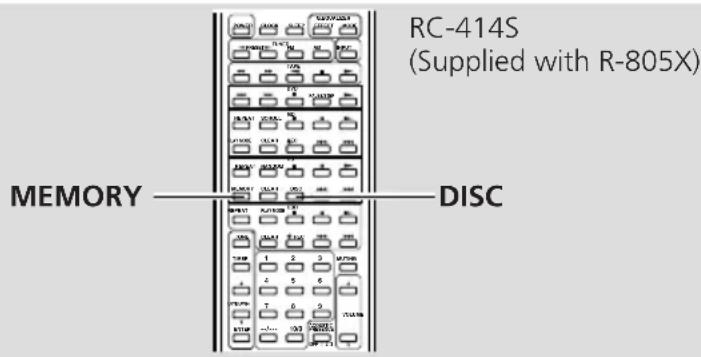
You can perform Memory playback, Random playback, and Repeat playback using the remote controller (RC-414S) that comes with Onkyo R-805X. (You can also control the unit using the system remote controller that came with the Onkyo Separate Collection series.)
Memory play
You can store your favorite selections from up to 3 discs in the CD Changer's internal memory. Up to 40 selections can be stored.
- A selection here means to select either a single track or all tracks of a disc.
- The memory contents will not be lost even if you turn off the unit with Memory play stopped.
The following is an example of storing 3 selections in memory:
Selection 1: Track 3 of Disc 1
Selection 2: All tracks of Disc 2
Selection 3: Track 12 of Disc 3
1 Press the MEMORY button when the CD Changer is stopped.
The MEMORY indicator appears.
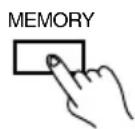

Note:
Pressing the MEMORY button during play causes the playing track to be stored as "P-1".
2 Press the DISC button once or more to select "DISC 1".
You may use the remote controller's DISC button.
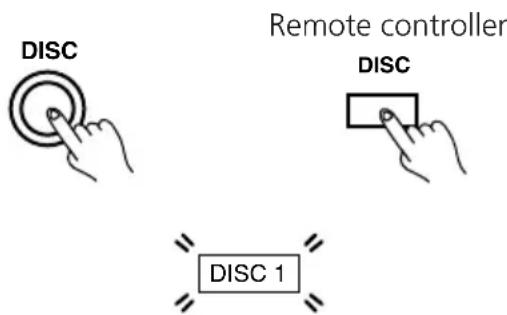
- If you skip this step, the current disc remains selected.
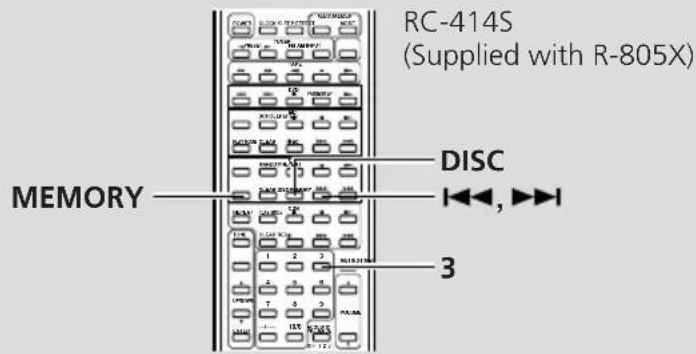
3 Press the ◀◀/◀◀ button once or more to select Track 3 on the display. Then, press the MEMORY button on the remote controller to store the track.
The track in memory are played in the order you specified.
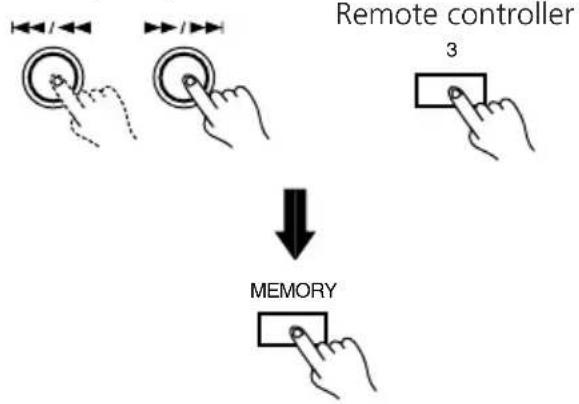
flowchart
graph TD
    A["Remote controller"] --> B["↓ Memory"]
    B --> C["3"]
Storing tracks using the remote controller Simply press the number button "3". Each time you press a number button, the corresponding track number is stored in memory.
4 Press the DISC button once or more to select "DISC 2".
You may use the remote controller's DISC button.
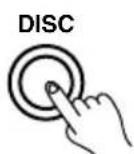
Remote controller
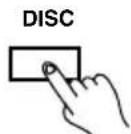
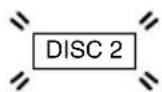
5 Press the ◀◀/◀◀ ▶▶/▶▶◀ button on the unit or the ◀◀ or ▶▶◀ button on the remote controller repeatedly to select "AL" on the display. Then, press the MEMORY button on the remote controller to store all tracks of the disc.
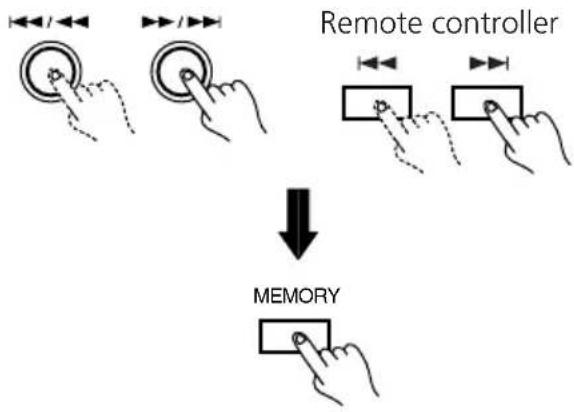
flowchart
graph TD
    A["Hand with left-angle indicators"] --> B["Arrow pointing inward"]
    C["Hand with right-angle indicators"] --> D["Arrow pointing inward"]
    E["Hand with left-angle indicators"] --> F["Arrow pointing inward"]
    G["Hand with right-angle indicators"] --> H["Arrow pointing inward"]
    I["Remote controller"] --> J["Arrow pointing inward"]
    K["Memory"] --> L["Arrow pointing inward"]
6 Press the DISC button once or more to select "DISC 3".
You may use the remote controller's DISC button.
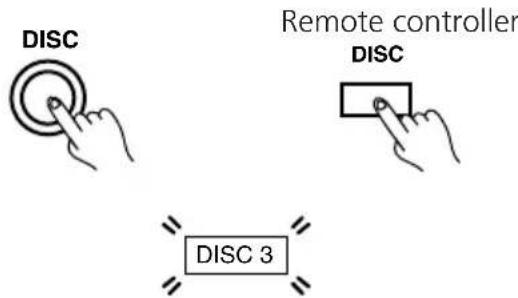
Memory play (continued)
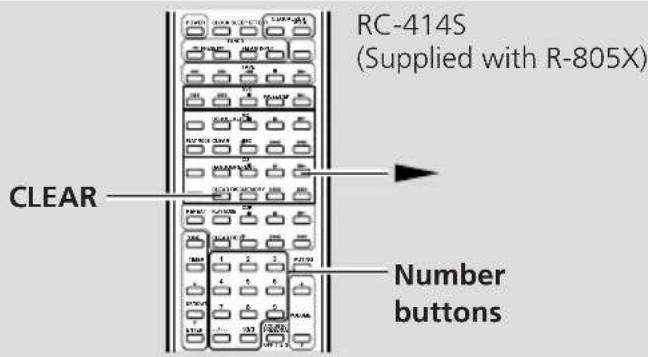
7
Press the ◀/◄◄ ▶►/►► button once or more to select Track 12 on the display. Then, press the MEMORY button on the remote controller to store the track.
You may press the number button "12" on the remote controller to store Track 12.
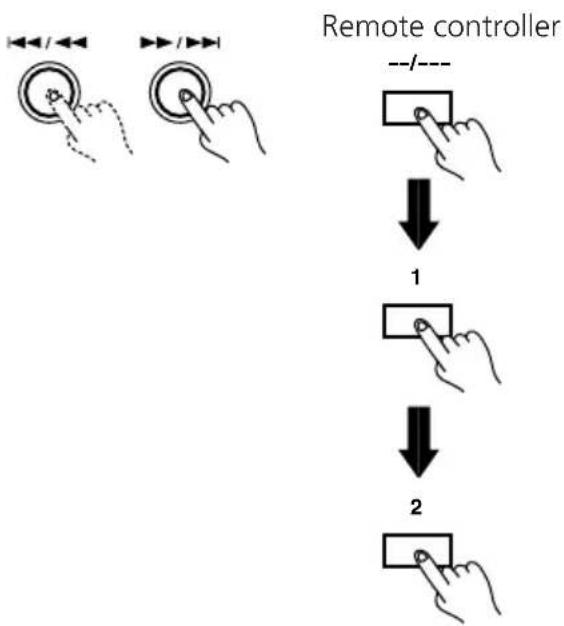
flowchart
graph TD
    A["Left Hand: Click/Arrow"] --> B["Right Hand: Click/Arrow"]
    B --> C["Step 1: Down arrow to right, labeled 'Remote controller --/---'"]
    C --> D["Step 2: Down arrow to left, labeled 'Remote controller --/---'"]
    D --> E["Step 3: Down arrow to right, labeled 'Remote controller --/---'"]
Note:
- If the number of selections stored in the memory reaches 40, "FULL" will appear on the display. In this case, you cannot store tracks any more.
8
Press the ▶ button.
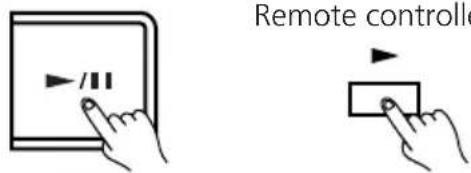
- The CD changer plays the stored tracks in the stored order.
- To stop Memory play, press the ■ button.
To return to Normal play:
- Press the MEMORY button to turn off the MEMORY indicator. If you press the MEMORY button during Memory play, you will return to Normal play from the currently playing track.
- To return to Memory play again, first stop playback and then press the MEMORY button. Note that pressing the MEMORY button without stopping playback erases all tracks in the memory and stores the playing track as "P-1".
Checking the tracks stored in the memory
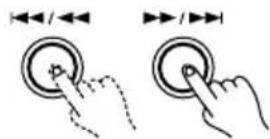
While the CD Changer is stopped, press the
or button for at least 1 second.
This displays the disc number, the track number and the program number of the first track in the memory. To view the second track, press the button again for at least 1 second.
Clearing the stored tracks
When Memory play is stopped (when the MEMORY indicator is lit), press the CLEAR button.
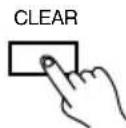
Pressing this button repeatedly clears the tracks you stored one by one in the reverse order (from the last track to the first).
Other play modes
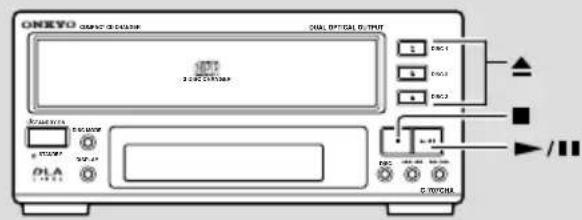
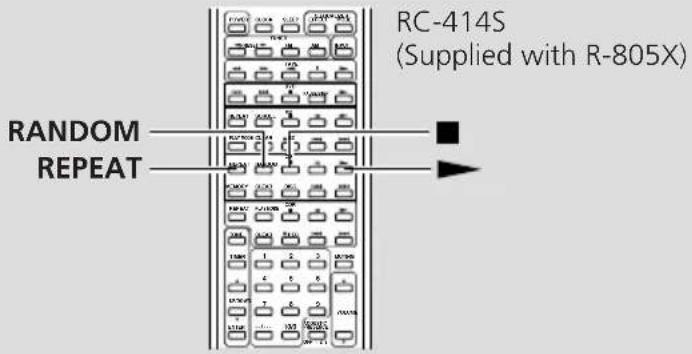
Random play
You can play all tracks of the disc(s) in random order.
1 Press the RANDOM button.
The RANDOM indicator appears and the CD Changer starts Random play. You can enjoy Random play of tracks on different discs.
RANDOM
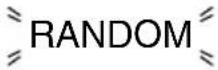
Notes:
- During Memory play, pressing the RANDOM button starts Random play of only the stored tracks.
- During Random play, pressing the REPEAT button will start another Random play, with a new track order, when the current Random play of the entire disc is completed.
To return to Normal play:
Press the RANDOM button again.
RANDOM
- To cancel the Random playback, press the stop button (■). You can also cancel Random playback by pressing the Open/Close button of the corresponding disc tray and open the tray.
Repeat play
You can repeat playing the tracks of the disc(s).
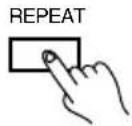
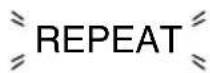
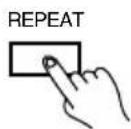
1 Press the REPEAT button.
The REPEAT indicator appears.
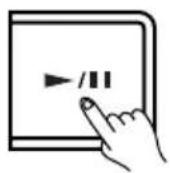
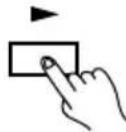
2 Press the▶/11 button.
Remote controller
Tracks to be repeated vary depending on playback mode as shown in the table below.
| Play mode | Repeated tracks |
| Normal All tracks on disc | |
| Memory Tracks in memory (in stored order) | |
| Random Repeats Random play of all tracks on disc | |
| TR-1 | First tracks of CD-singles (see page16) |
| 1 DISC Tracks on selected disc | |
To return to Normal play:
- Press the REPEAT button again. The REPEAT indicator disappears.
Playing the first tracks only (TR-1 play)
In this mode, you can play the first tracks of several CD-singles one after another. You can replace non-playing discs while one disc is playing. The TR-1 play mode is useful for making your own MD, CD-R or tape from your favorite CD-singles.
1 Place discs in all the disc trays.
Label side up
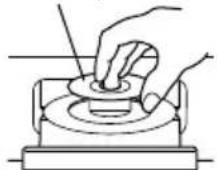
Place only one disc on each tray.
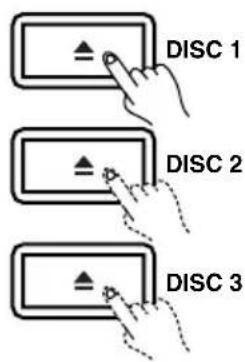
- To do so, first press the DISC 1 ▲ button and load the first CD-single.
- Similarly, load the second and the third CD-singles using the DISC 2 and DISC 3 ▲ buttons.
2 Press the ▲button (DISC 1 - DISC 3) for the disc tray in which you place the third disc.
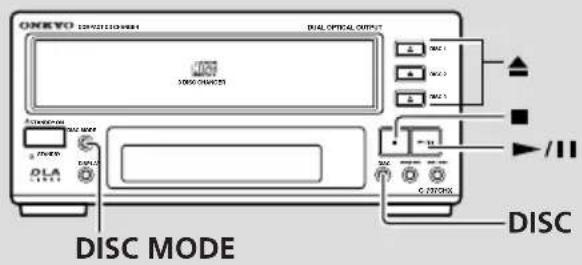
3 Press the DISC MODE button once or more to display "TR-1" on the display.
DISC MODE
Each time you press the DISC MODE button, the disc mode changes in the following sequence:

flowchart
graph LR
    A["TR-1 1DISC"] --> B["Normal play\n(No indication made)"]
4 Press the DISC button once or more to select DISC 1.
The CD Changer will immediately start playing the first track of the first disc.
5 Press the ▶ button.
The CD changer starts playing the first track of the first disc.
Remote controller
Note:
You can enjoy TR-1 play of four or more discs. First press the REPEAT button on the remote controller to display the REPEAT indicator and start TR-1 play. Then, replace the discs for which playback has been finished one after another.
Handling CDs
playable discs
This unit can play back the following discs.
| Disc mark | Contents | Disc size | Maximum playback time | |
| Audio CDs |  | Audio | 12 cm | Approx. 74minutes |
| 8 cm (CD single) | Approx. 20 minutes |
You cannot play back discs other than those listed above.
Do not use discs that are not audio discs (eg.CD-ROMs for use with personal computers), as these could damage the speakers and amplifier.

Avoid using heart-shaped or octagonal discs. Playing irregularly shaped discs may damage the internal mechanism of the unit.
Do not use discs on which adhesive from adhesive tape or a disc label (if it is a rental disc) remains. Otherwise, you may not be able to eject the discs or the unit may become inoperative.
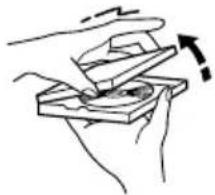
Taking the CD out of the disc case
1 Hold the disc case in the palm of one hand and pull the cover upward with the other hand to open the disc case.
natural_image
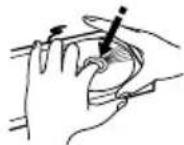
Illustration of hands using a mechanical device to interact with a circular component (no text or symbols visible)2 While pushing on the center grip of the disc case with your finger, take out the disc by holding its edges.
Important notes on handling CDs
- Carefully lift the disc from the disc case, making sure to only hold the disc by its edges or the hole in the middle.
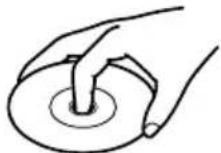
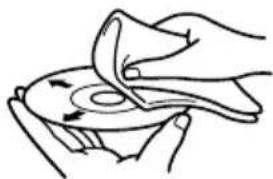
- A dry, soft cloth may be used to wipe dust and fingerprints off the surface of CDs.
natural_image
Illustration of hands performing a circular motion on a curved surface (no text or symbols)- Do not use volatile agents on discs, such as thinner or benzine. Also, do not use conventional record cleaner or antistatic agents.
- Do not place a CD in direct sunlight or locations subject to high humidity or low temperature.
- Do not store a CD in the CD changer tray for long periods of time.
Troubleshooting
If you have any problems with the unit, please check the troubleshooting table below first.
For any problems not described in the table, please consult your nearest Onkyo authorized service center.
| Symptom | Cause | Remedy |
| STANDBY button is pressed, but power does not come on. | Power cord plug is not properly connected to AC outlet. | Insert the plug firmly.(See pages 11.) |
| Disc is loaded in the disc tray, but playback will not begin. | Disc is in the disc tray upside down.Disc is dirty.Moisture has accumulated inside the CD Changer.Disc in the disc tray is loaded off-center. | Load the disc with the label facing upward.Clean the disc. (See page 23.)Remove the disc from the disc tray, place the CD Changer in a warm place and leave the power on for about one hour. (See page 4).Load the disc properly in the disc tray. |
| No sound | Incomplete or incorrect connections. | Insert all plugs firmly into jacks.(See pages 8-9.) |
| Disc skipping | Disc is dirty.Disc is scratched.CD Changer has been bumped. | Clean the disc. (See page 23)Replace the disc.Place the CD Changer in a more stable location. |
| Search time (when moving to a specific track) is extremely long. | Disc is dirty.Disc is scratched. | Clean the disc. (See page 23)Replace the disc. |
| Track numbers cannot be stored in memory. | No disc in the tray.A track number not on the disc is being input. | Load a disc into the tray.Use only the track numbers on the disc. (See pages 18-20.) |
| Noise during play | Interference from TV | Turn off the TV, or move the unit farther from the TV. |
| Remote control does not function. | Battery level is low.Your position is too far from the unit's remote control sensor or out of the sensor's detection angle.An obstacle exists between you and the unit's remote control sensor. | Replace the batteries.Remote control is possible within a distance of approximately 5 meters from the unit's sensor and a detection range of 30^ .(See pages 11.)Operate from a different position or remove the obstacle. |
| The unit does not operate. | A failure occurred in the unit's microprocessor. | Remove the power plug, wait for approx. 5 seconds, and then re-insert the power plug. |
Specifications
Signal readout system
Optical non-contact
D/A converter
1 bit D/A converter
Frequency response
5 Hz - 20 kHz
Total harmonic distortion
0.005% (at 1 kHz)
Channel separation
85 dB(at 1 kHz)
Dynamic range
96 dB
Signal to noise ratio
90 dB
Wow and Flutter
Below threshold of measurability
Output level
2 volts r.m.s.
Power supply rating
AC 120V, 60 Hz
Power consumption
14 watts
Dimensions (W x H x D)
205 × 91 × 334 mm
8-1/16" × 3-9/16" × 13-3/16"
Weight
3.0 kg, 6.6 lbs.
Specifications and external appearance are subject to change without notice because of product improvements.
Index to parts and controls
For operational instructions, refer to the page indicated in parentheses.
Front panel
STANDBY/ON button [11, 12]
![Disc tray [12] Open/Close button (▲) [12, 14, 22] ONKYO COMPACT DISC CHANGER DUAL OPTICAL OUTPUT 3 DISC CHANGER DISC 1 DISC 2 DISC 3 STANDBY/ON DISC MODE Stop button (■) [13] Play/Pause button ( ▶ / ■ ) [13, 20, 22] STANDBY DISPLAY DISC button [13, 18, 19] STANDBY indicator [11, 12] DISPLAY button [17] DISC MODE button [16, 22] Track UP and DOWN buttons ( ◀◀/◀◀, ▶▶/▶▶) [14, 19, 20]](/content/2026/05/1052984/images/02bfaf5e8b38bdf0f452f4c29628978d61022443856cfa59fa393bacd0addbb7.jpg)
Display
flowchart
graph LR
    A["Elapsed/Remaining time indicator"] --> B["SINGLE TOTAL"]
    A --> C["ELAPSED REMAIN"]
    A --> D["REPEAT RANDOM"]
    E["Pause indicator"] --> F["8:8:8:8"]
    G["Memory indicator"] --> H["MEMORY"]
    I["Disc mode indicator"] --> J["1 DISC TR-1"]
    K["Disc indicators"] --> L["DISC 1"]
    K --> M["DISC 2"]
    K --> N["DISC 3"]
    O["Multi-purpose display"] --> P["1 2 3 4 5"]
    O --> Q["6 7 8 9 10"]
    O --> R["11 12 13 14 15"]
    S["Music calendar"] --> T["Over indicator (Appears when the disc contains more than 15 tracks.)"]
    U[">15"] --> V[">15"]
Remote controller
Remote controller included with the R-805X (RC-414S).
To operate the included remote controller, make the appropriate connection to the RI remote connection.
You can also control the unit using the system remote controller that came with the Onkyo Separate Collection series.
RC-414S (supplied with R-805X)
![CD operation buttons REPEAT : Repeat mode button RANDOM : Random play button ■ : Stop button ■ : Pause button ► : Play button MEMORY : Memory button CLEAR : Clear button DISC : Disc button ◀◀ : Track down button ►◀ : Track up button POWER CLOCK SLEEP EFFECT G.EQUALIZER MODE TUNER FM AM INPUT TAPE DVD PAUSE/STEP MD SCROLL/REPEAT PLAY MODE CLEAR REC CD RANDOM/REPEAT CLEAR DISCMEMORY REPEAT PLAY MODE CDR TONE CLEAR REC 1 2 3 MUTING/TIMER 4 5 6 UP/DOWN 7 8 9 VOLUME ENTER -/---- 10/0 ACoustic PRESENCE OFF 1 2 3 REMOTE CONTROLLER RC-414S by ONIKYO Number buttons [14, 19, 20] Used to select tracks when the R-805X amplifier's input selector is in "CD" position.](/content/2026/05/1052984/images/3d9754f0e8e2b5d6462c8fbdca8227727dda945794e49d792d7e1d714b016f6a.jpg)
ONKYO CORPORATION
Sales & Product Planning Div.: 2-1, Nisshin-cho, Neyagawa-shi, OSAKA 572-8540, JAPAN
Tel: 072-831-8111 Fax: 072-833-5222 http://www.onkyo-intl.com
18 Park Way, Upper Saddle River, N.J. 07458, U.S.A.
Tel: 201-785-2600 Fax: 201-785-2650 http://www.onkyousa.com
ONKYO EUROPE ELECTRONICS GmbH
Liegnitzerstrasse 6, 82194 Groebenzell, GERMANY
Tel: +49-8142-4401-0 Fax: +49-8142-4401-555 http://www.onkyo.net
ONKYO CHINA LIMITED
Units 2102-2107, Metroplaza Tower I, 223 Hing Fong Road, Kwai Chung,
N.T., HONG KONG Tel: 852-2429-3118 Fax: 852-2428-9039
- Compact Disc Changer C-707CHX
- Thank you for purchasing ...
- Main Features
- WARNING:
- CAUTION:
- Important Safeguards
- Precautions
- Warranty Claim
- Power
- WARNING
- Do not touch this unit with wet hands
- Location of this unit
- Care
- Points to remember
- DANGER:
- For U.S. model
- FCC INFORMATION FOR USER
- NOTE:
- For Canadian model
- For British model
- IMPORTANT
- Declaration of Conformity
- Table of contents
- Before Using
- Connections
- Operations
- Other Information
- Supplied accessories
- Connecting to Onkyo Separate Collection series components
- - Auto Power On
- - Direct Change
- - Remote Control Operation
- - Program Timer
- - Sleep Timer
- • CD Synchro Recording
- - CD Dubbing
- - DLA LINK
- Connecting to the other components
- Before connecting
- ①Connecting to an amplifier
- ② Connection to digital equipment, such as an MD,CD Recorder or DAT
- ③To AC OUTLET (UNSWITCHED)
- Note
- Connecting for remote control (R1)
- Connecting the power cord (mains lead)
- Using the remote controller
- Remote controller RC-414S/RC-456S
- Notes
- Normal play
- Press the STANDBY/ON button to turn on the unit.
- Press the desired ▲OPEN/CLOSE button (DISC 1 - DISC 3).
- Place the disc in the disc tray, with its label face up.
- Press the ▲OPEN/CLOSE button (DISC 1 - DISC 3) to close the open disc tray.
- Press the DISC button once or more to select the disc you wish to play.
- Press the ▶button.
- To pause playing
- To stop playing
- Music Calendar
- Skip play
- Search play
- Starting playback from a given track (remote controller only)
- How to enter track numbers
- Remote controller
- Understanding the meaning of disc indicators
- Changing the discs during playback
- If the ▲button for the playing disc is pressed...
- IMPORTANT!
- Notes:
- Selecting the disc mode
- Changing the display
- Memory play
- Press the MEMORY button when the CD Changer is stopped.
- Press the DISC button once or more to select "DISC 1".
- Memory play (continued)
- 7
- 8
- To return to Normal play:
- Checking the tracks stored in the memory
- Clearing the stored tracks
- Other play modes
- Random play
- Press the RANDOM button.
- Repeat play
- Press the REPEAT button.
- Press the▶/11 button.
- Playing the first tracks only (TR-1 play)
- Place discs in all the disc trays.
- Press the ▲button (DISC 1 - DISC 3) for the disc tray in which you place the third disc.
- Press the DISC MODE button once or more to display "TR-1" on the display.
- Press the DISC button once or more to select DISC 1.
- Press the ▶ button.
- Handling CDs
- playable discs
- Taking the CD out of the disc case
- Important notes on handling CDs
- Troubleshooting
- Specifications
- Signal readout system
- D/A converter
- Frequency response
- Total harmonic distortion
- Channel separation
- Dynamic range
- Signal to noise ratio
- Wow and Flutter
- Output level
- Power supply rating
- Power consumption
- Dimensions (W x H x D)
- Weight
- Index to parts and controls
- Front panel
- ONKYO CORPORATION
- ONKYO EUROPE ELECTRONICS GmbH
- ONKYO CHINA LIMITED
Brand : ONKYO
Model : C-707CHX
Category : CD Player