Yeticaster Studio - Microphone Blue - Free user manual and instructions
Find the device manual for free Yeticaster Studio Blue in PDF.


| Product Type | USB Condenser Microphone |
| Brand | Blue |
| Model | Yeticaster Studio |
| Dimensions (with stand) | 12.2 x 12.2 x 27.5 cm (4.8 x 4.8 x 10.8 in) |
| Weight | 1.36 kg (3 lbs) |
| Power Source | USB (5V, 500mA) |
| Frequency Response | 20 Hz – 20 kHz |
| Polar Pattern | Cardioid |
| Sample Rate | 48 kHz |
| Bit Depth | 16-bit |
| Capsule Type | Condenser |
| Built-in Shock Mount | Yes |
| Built-in Pop Filter | Yes |
| Headphone Output | 3.5mm stereo jack |
| Controls | Mute button, headphone volume knob, pattern selection |
| Connectivity | USB-C to USB-A cable included |
| Compatible Operating Systems | Windows, macOS, Chrome OS, Linux, PS5, PS4 |
| Included Accessories | USB cable, desk stand, user manual |
| Maintenance | Wipe with a dry, lint-free cloth; avoid moisture and dust |
| Safety | Do not disassemble; keep away from liquids; use only with USB ports |
| Spare Parts Availability | Contact Blue support for replacement parts |
| Environmental Info | RoHS compliant; recycling instructions in manual |
Frequently Asked Questions - Yeticaster Studio Blue
User questions about Yeticaster Studio Blue
0 question about this device. Answer the ones you know or ask your own.
Ask a new question about this device
Download the instructions for your Microphone in PDF format for free! Find your manual Yeticaster Studio - Blue and take your electronic device back in hand. On this page are published all the documents necessary for the use of your device. Yeticaster Studio by Blue.
USER MANUAL Yeticaster Studio Blue
PROFESSIONAL MULTI-PATTERN USB MIC FOR RECORDING AND STREAMING
QUICK START GUIDE
Congratulations on your purchase of the Yeti, the world's #1 USB microphone! Featuring Blue's innovative tri-capsule array, the Yeti lets you record with four unique patterns—stereo, cardioid, omnidirectional, and bidirectional—offering you recording possibilities that usually require multiple microphones. Informed by Blue's illustrious studio legacy, Yeti delivers dramatic, professional sound for podcasting, voiceover, Skype/VolP, game streaming, vocals and instruments. There are no drivers to install—simply plug the Yeti into your PC or Mac, load up your favorite recording software, and record something amazing.
natural_image
Line drawing of a blue studio microphone with mesh head and front-mounted buttons (no text or symbols)GETTING STARTED WITH YETI SOFTWARE SETUP
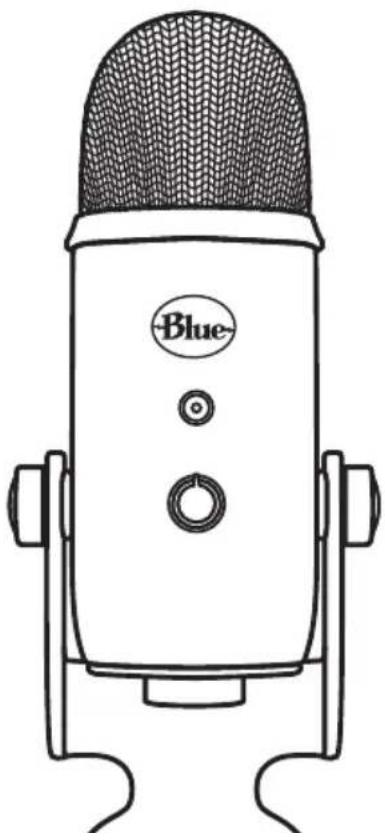
After unpacking your Yeti, rotate the microphone 180 degrees so that the Blue logo and headphone volume control are facing you. Tighten the set-screws on the left and right of the base after adjusting the microphone to your desired angle. Connect Yeti to your computer with the supplied USB cable—the LED just above the Blue logo will grow red, indicating power has reached the mic
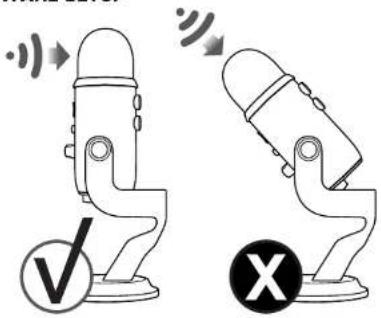
Yeti is a side-address microphone, which means you should speak, sing, and play into the side of the microphone with the Blue logo facing the sound source, not the top of the microphone. Now you can start recording and streaming in stunning audio quality.
text_image
Diagram showing two devices with sound waves and a checkmark and an X symbol indicating cancellation or error.Whatever your favorite software is—Audacity. Garagebend, Movie, Adleton, Skype, you name it—Yet will produce amazing results. Simply plug the micro into your Mac or PC, select You as your recording input within your selected software and start recording—no drivers required. It's that easy.
For game streamers, Yet is compatible with most popular live-streaming software programs including Discord, Open Broadcaster Software (OBS), XSpilt, Gamesnow and more.
USING YETI WITH PC
(WINDOWS 7, 8.1, OR 10)
-
Connect to your PC using the provided USB cable.
-
From the Start menu, select the Control Panel
- From the Control Panel, select the Sound icon
- Click the Recording tab and select Yet.
- Click the Playback tab and select Yet
USING YETI WITH MAC
(macOS 10.10 OR HIGHER)
- Connect to your Mac using the provided USB cable.
- Open System Preferences and select the Sound Icon.
- Click the input tab and select Blue Yesi
- Click Output lab and select Yell
- From this screen set the Output volume to 100%.
natural_image
Line drawing of a blue portable device with labeled buttons (no text or symbols beyond branding)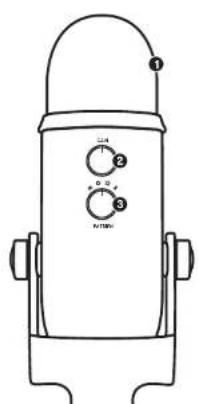
text_image
Technical diagram of a cylindrical device with labeled ports and control knobsGETTING TO KNOW YOUR YETI
● TRIPLE CAPSULE ARRAY
recordings in most any situation.
Three condenser capsules in an innovative configuration to enable great
MICROPHONE GAIN
and left to reduce the level
Control Yet's gain Isensitivity. Turn the knob right, to increase the level,
● MULTIPLE PATTERN SELECTION Quickly select from Yes's four pattern settings (stereo, cardiod, omnidirectional, bidirectional), by rotating the pattern selector knob.
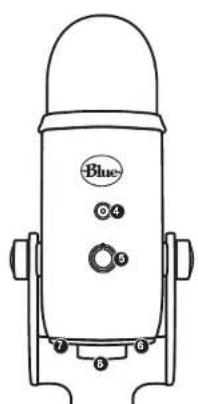
● MUTE BUTTON/STATUS LIGHT Press the mute button to mute/unmute. When muted, the LED status light will flash.
● HEADPHONE VOLUME CONTROL Easily adjusts. Yet's headphone output, by turning the volume knob.
- HEADPHONE OUTPUT Yet includes a standard 1/8" (3.5mm) headphone jack for monitoring and playback. Use Yet's headphone output to monitor your microphone recording in real time without latency delays.
USB CONNECTION Yeti connects to your computer with one simple USB cable.
STANDARD THREAD MOUNT If you would like to mount your Yet to a standard microphone studio mount, remove Yet from the included desk stand and thread in a standard threaded mount. For broadcast applications, we recommend the Compass desktop boom arm. To subtle Yet from noise, shock, and ambient vibration, and the Radius II shockmount
SWITCHABLE POLAR PATTERNS

STEREO
Uses both the left and right channels to capture a body, realistic sound image—ideal for recording acoustic guitar or choir

● OMNIDIRECTIONAL
Picks up sound equally from all around the mic. It's best used in situations when you want to capture the ambience of "being here" like recording a band's live performance, a multi-person podcast or a conference call

CARDIOID
Perfect for podcasts, game streaming, vocal performances, voiceovers and instruments. Cardioid mode records sound sources that are directly in front of the microphone, delivering rich full bodied sound.

BIDIRECTIONAL
Records from both the front, and rear of the microphone—good for recording a duct or a two-person interview.
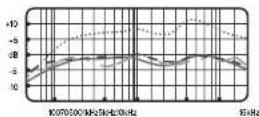
FREQUENCY RESPONSE POLAR PATTERN
These charts are a starting point for the sound provided. How the microphone reacts in a particular application will differ depending on sound source, orientation and distance from sound source, room acoustics and other factors. For more tips on mixing and recording techniques, check out bluedesigns.com

TECHNICAL SPECIFICATIONS SYSTEM REQUIREMENTS
• Power Required/Consumption: 5V 150mA
Sample Rate: 48kV
- Bit Rate: 10bit
- Capsules: 3 Blue-proprietary
14mm condenser capsules
- Polar Patterns: Cardoid, Bidirectional,
Omnidirectional, Sterec
• Frequency Response: 20 Hz - 23 kHz
• Sensitivity: 45mW/Pa (1kV)
• Max SPL: 120:45 ITHD: 0.5% kHz
- Dimensions - mic with stand
- L: 472" (12cm) W: 492" (25cm) H: 1157 (29.5cm)
- Weight: 3.4lbs (55kg)
Headphone Amplifier
- Impedance: >15 points
• Power Output (RMS): 130mW - THD: 0.009%
■ Frequency Response: 15Hz, 22kHz
• Signal to Noise: 100dB
PC
Windows 7, 81.10
(3451)20730
MAC
macOS [10.10 or higher]
0:51 10/15/20
For best performance.
plug Yeti directly into
your computer's US\$ p
Please see bluedesign.com for more details
WARRANTY
Blue Microphones warrants its hardware product and defects in materials and workshop or operated TiWO(2)YEATS from subsidiary original purchase, provided the purchase was made from an authorized Blue Microphones dealer. This warranty is well if the equipment is allocated, measured, referenced, characterized, reimbursed buffers excessive wear, or is serviced by any parties not authorized by Blue Microphones. The warranty does not include transportation costs incurred because of the need for service unless arranged for in advance. Blue Microphones reserves the right to make changes in design and improve user its products without obligation to install these improvements in any of its products previously manufactured. For warranty certificate, or for a copy of briefs Warranty Policy, including a complete list of exclusions and limitations, contact Blue at 016-879-5200 in viewing with our policy of continued product improvement; Datic Latvian Universal Electronics (BLUE) reserves the right to alter specifications without prior notice. www.bluedesigns.com

Designed in USA. Made in China.
REV C
PRODUCT REGISTRATION
Please take a moment and register Yeti with us. It'll only take a minute and we guarantee you'll sleep better at night. As our way of saying thanks we'll provide you with:
FREE PRODUCT SUPPORT
OFFERS FOR DISCOUNTS ON OUR WEBSTORE*
MORE COOL STUFF
PLEASE REGISTER AT: BLUEDESIGNS.COM
*Not available in all regions—check web site for details.

BLUEDESIGNS.COM
©2018 Blue Microphones. All rights reserved. Blue Logo Oval are registered trademarks of Blue Microphones, LLC. Mac, Macintosh, GarageBand and iMovie are trademarks of Apple Inc., registered in the U.S. and other countries. Windows 7, Windows 8.1, Windows 10 and Skype are registered trademarks of Microsoft, Inc. YouTube is a trademark of Google LLC. Audacity is a trademark of Dominic Mazzoni. Ableton is a trademark of Ableton AG. Discord is a trademark of Discord, Inc. XSplit Broadcaster is a trademark of Splitmedialabs Limited. Gameshow is a trademark of Telesream, LLC.