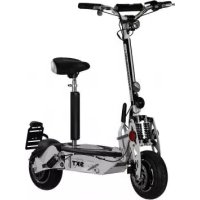
Light Plus V - Scooter SXT - Free user manual and instructions
Find the device manual for free Light Plus V SXT in PDF.


| Product Type | Electric Scooter |
| Brand | SXT |
| Model | Light Plus V |
| Dimensions (L x W x H) | 1200 x 600 x 1000 mm |
| Weight | 50 kg |
| Max Load Capacity | 120 kg |
| Motor Type | Brushless DC Motor |
| Motor Power | 500 W |
| Battery Type | Lithium-ion |
| Battery Voltage | 48 V |
| Battery Capacity | 20 Ah |
| Charging Time | 6 hours |
| Maximum Speed | 25 km/h |
| Range per Charge | 40 km |
| Tire Size | 10 inches (pneumatic) |
| Brake System | Disc brakes (front and rear) |
| Lighting | LED headlight and taillight |
| Cleaning Instructions | Wipe with damp cloth; avoid high-pressure water |
| Safety Features | Anti-lock braking (ABS), horn, rear reflector |
| Spare Parts Availability | Batteries, tires, brake pads, lights available |
Frequently Asked Questions - Light Plus V SXT
User questions about Light Plus V SXT
0 question about this device. Answer the ones you know or ask your own.
Ask a new question about this device
Download the instructions for your Scooter in PDF format for free! Find your manual Light Plus V - SXT and take your electronic device back in hand. On this page are published all the documents necessary for the use of your device. Light Plus V by SXT.
USER MANUAL Light Plus V SXT
natural_image
Black electric scooter with two wheels and a handle, isolated on white background (no text or symbols visible)INHALTSVERZEICHNIS
1. ÜBER SXT LIGHT PLUS V eKFV MODELLE
text_image
Yellow triangular warning sign with black exclamation mark symbol1.2 WARNHINWEISE
text_image
E-TWOW LI SETtext_image
PI E-TWOWFehler Code
text_image
E-TWOW KM/h 90% 27°C ODO 12.9KMnatural_image
Black electric scooter with extended wheels and a red accent, isolated on white background (no text or symbols visible)natural_image
Side view of a black electric scooter with wheels and a handle, showing motion arrows (no text or symbols)natural_image
Black electric scooter with red and black body, showing front wheel, rear wheels, and charging mechanism (no visible text or symbols)natural_image
Close-up of hands adjusting a mechanical component with a black arrow pointing to the component (no visible text or symbols)(b)
natural_image
Person riding a scooter with one hand extended, showing motion direction (no text or symbols)(c)
natural_image
Close-up of a mechanical clamp or lever mechanism with a black arrow pointing to a component (no visible text or symbols)(d)
natural_image
Close-up of hands adjusting a camera lens on a tripod, with arrows indicating motion direction (no text or symbols)(e)
3.3 ZUSAMMENKLAPPVORGANG
natural_image
Close-up of a hand holding a mechanical component, with an arrow pointing to it (no text or symbols visible)(a)
natural_image
Close-up of a hand holding a black mechanical device with an arrow indicating motion (no text or symbols visible)(b)
text_image
1(c)
natural_image
Close-up of hands performing a massage or grip technique on a device (no text or symbols visible)(d)
natural_image
Close-up of hands adjusting a camera module with directional arrows indicating motion (no text or symbols)(e)
natural_image
Person in gloves holding a handheld device (no visible text or symbols)(f)
natural_image
Close-up of a person's foot wearing a scooter with visible mechanical components and motion arrows (no text or symbols)(g)
natural_image
Close-up of a hand holding a scooter with a mechanical component, showing a close-up of the wheel and handle (no text or symbols visible)(h)
natural_image
Side view of a black electric scooter with red accents and wheels, no visible text or symbols(i)
1.1 Introduction of the Light Plus V eKFV
1.2 Warnings
1.3 Safety instructions
1.4 Serial no.
1.5 License plate / Insurance license plate
2. SCOOTER MAIN PARTS
2.1 Explanation of the parts on the handlebar and frame
2.2 Instructions for use
2.3 Menu for SPEED LIMIT
3. THE SCOOTER
3.1 Folding steps
3.2 Unfolded
3.3 Folded
3.4 Riding Operation
4. BATTERY AND CHARGING
4.1 Maintenance and Care
4.2 Troubleshooting
5. WARRANTY

Downloads Current manual
SXT Light Plus V eKFV
1. ABOUT SXT LIGHT PLUS V eKFV MODEL
1.1 INTRODUCTION OF SXT LIGHT PLUS V EKFV
We are delighted that you have chosen a SXT Scooter.
The SXT Light Plus V eKFV Model is ideal for leisure and short distances, such as school or city transport.
It looks classy, it is easy to fold and it is very good to take away. We are sure you will enjoy driving our Scooter.
READ THIS INSTRUCTIONS AND WARRANTIES BEFORE USE SCOOTER.
WARNING

text_image
Yellow triangular warning sign with black exclamation mark symbol1.2 WARNINGS
The use of the electric scooter entails dangers. Different causes can lead to the failure of individual components through no fault of the manufacturer. Like other electric vehicles, the electric scooter is designed to move - this automatically carries the risk of losing control, falling or getting into dangerous situations while driving, which cannot be avoided by training, practice or education. In such cases, despite the use of protective equipment or other precautions, you may injure yourself or, in the worst case, die. USE AT YOUR OWN RISK. DRIVE WITH COMMON SENSE.
This instruction manual contains various warnings and safety instructions regarding the consequences of improper maintenance, care or use. Any accident may result in serious injury or, in the worst case, death - we do not repeat this warning regarding possible injury or, in the worst case, death at every location where such a warning is listed.
Do not drive the scooter under the influence of alcohol!
Minimum age is 14 years!
The E-scooter never be driven with 2 persons at the same time!
DISREGARDING THE ABOVE INSTRUCTIONS AND DISREGARDING NORMAL COMMON SENSE WILL RESULT IN SERIOUS INJURY. THEREFORE USE THE CHARGER WITH CARE.
1.3 SAFETY INSTRUCTIONS
-
Minimum age is 14 years and older. It is limited for one Person - do not carry two People at the same time. Is not suitable for minors.
-
Always inspect the scooter prior to use. Properly inspecting and maintaining your product can reduce the risk of injury.
-
Please wear your safety helmet and other protective equipment when riding. Use an approved bicycle or skateboard helmet that fits properly with the chin strap in place and protects the back of your head. Local legislations may require riders of two wheels products to wear a helmet and other protective gear. Never ride the scooter barefoot or in open-toed shoes or high-heels.
-
Do not ride in traffic lane or unsafe roads and do not break local regulations.
-
Please exercise in wide areas, and ride after skilled manipulation, do not ride in traffic lane.
-
Do not make any dangerous actions when riding or riding with one hand. Keep your feet on the scooter.
-
Do not attempt to ride the scooter on stairs that are above 3 cm, it may overturn causing injuries and/or damages to the rider and/or scooter.
-
Highest speed is 20 Km/h.
-
Do not use the scooter when the outside temperature is lower than 0°C.
-
Please slow down or get off from the scooter when riding in bad road conditions.
-
Do not ride the scooter in oily or icy surface terrain.
-
Please adjust the handlebar according to your height to ensure a safe riding.
-
To avoid damages of the electrical parts of the vehicle please do not immerse the scooter in the water with the depth of more than 4 cm and do not wash it with water under pressure.
-
For protection please do not ride the scooter in bad weather such as heavy rain and high winds.
-
Do not drive the E-scooter under influence of alkohol.
1.4 SERIAL NO.
Note Vehicle Identification Number (FIN):
Make a note of the vehicle identification number of your E-scooter. Keep it in a safe place. Each SXT Light Plus V eKFV model has an individual number. This number can be used to uniquely identify your vehicle in the event of theft, for example.
How to you find the vehicle identification number (FIN):
The number is located below the food board.
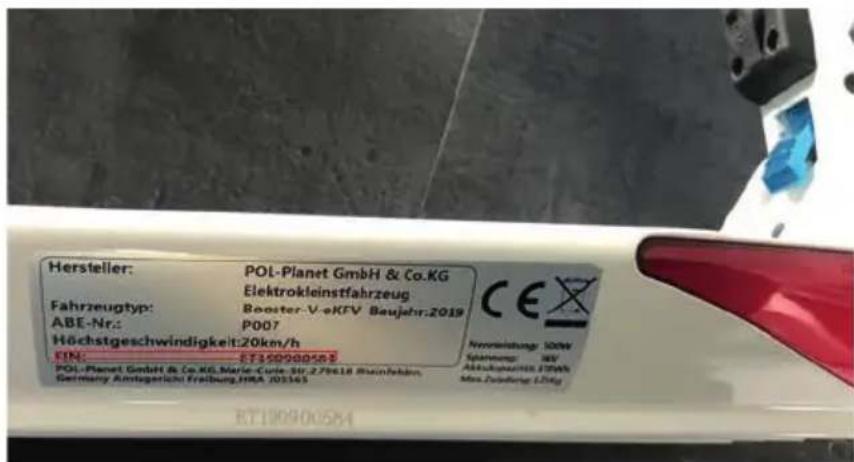
Before first ride in traffic, you should take the scooter with an insurance company report. You will receive an insurance number plate, which you can install on the number plate holder on the back of scooter.

text_image
123 SXT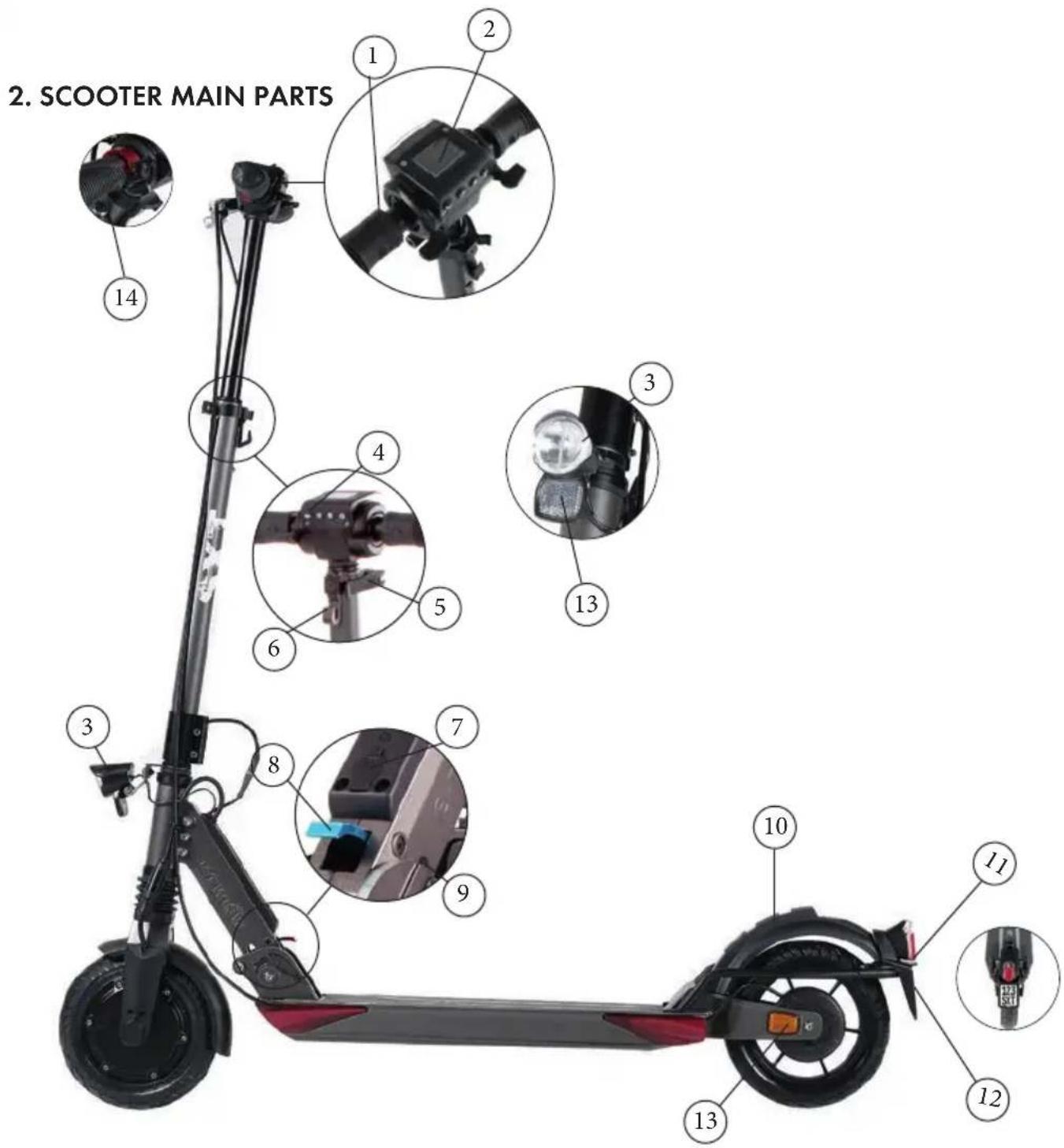
text_image
2. SCOOTER MAIN PARTS 1 2 3 4 5 6 7 8 9 10 11 12 13 14- handle bar 6. folding safety hook 11. rear light
- UBHI (display, etc) 7. Battery charging socket 12. Number plate holder
- LED front light 8. folding lever 13. reflectors
- horn (deactivated) 9. safety bolt 14. bell
- clamping lever 10. rear brake
All technical Specifications about scooters can be found on our homepage:
www.sxt-scooters.de
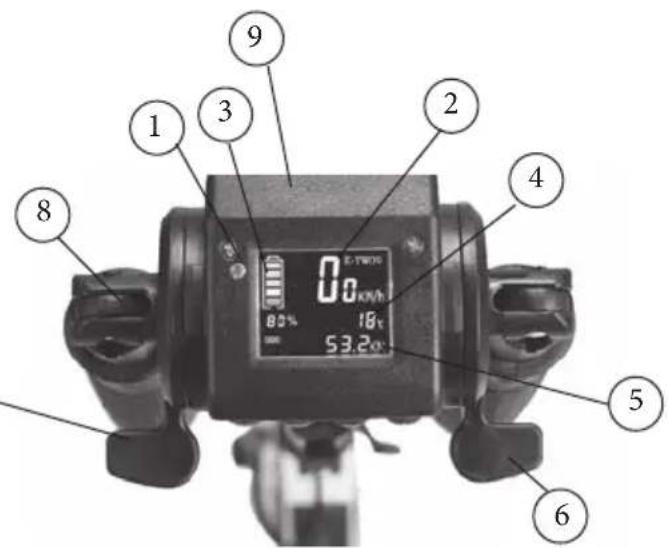
2.1 EXPLANATION OF THE PARTS ON HANDLEBAR AND FRAME
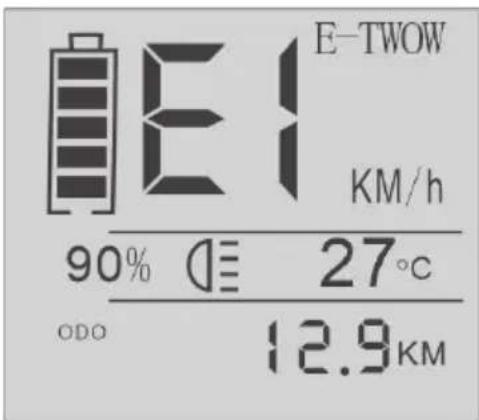
- light sensor
- Speed
- battery state of charge
- temperature
- shows the total and day trip distance (From left to right: total, trip)
- thumb gas
- brake/thumb brake
- light sensor
- Speed
- battery state of charge
- temperature
- shows the total and day trip distance (From left to right: total, trip)
- thumb gas
- brake/thumb brake
text_image
0.0 kWh 80% 18kΩ 53.2Ω 9 1 3 2 4 5 6-
handlebar flap
-
protective cover Display
-
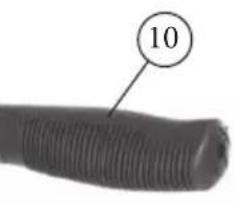
handlebar
-
horn (deactivated)
-
on/off light button
-
adjustment button
-
on/off button
15 bell 14
- square tube
- folding rod
- protective cover
- front of the battery
- splash guard
natural_image
Close-up of a black threaded object with a circled number 10 pointing to it (no text or symbols on the object itself)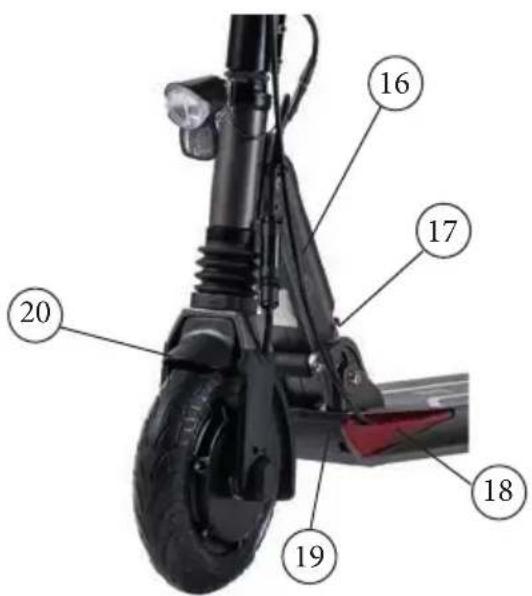
text_image
16 17 20 19 182.2 OPERATING INSTRUCTIONS
1. ON/OFF
Press the switch for 3 seconds, and the display will light up, indicating the power is on. Press for 3 seconds if you want to turn it off. It will turn off automatically if you don't use it for 3 minutes.
2. Speed control
Press the right thumb accelerator to control the speed (1-20km/h).
3. Breaking control
Press the left thumb brake lever to activate the electromagnetic brake. The more the lever is pressed the stronger the braking effect. Or pull the right brake lever to the handle to brake, or apply the foot brake on the rear tire with the foot. (see vehicle parts and explanation of individual parts on handlebar and frame)
4. Bell
Press the bell with the thumb pull. (The horn button is deactivated on the eKFV models, because a bell is required).
5. Led headlight
In manual mode: Press the On/Off Light button when needed and there will be a sign in display, indicating the light turns on. Press the button again when you do not need the light. The scooter Keep pressed for a few seconds. Is equipped with a sensor light that detects the need of light. The light will turn on automatically (auto light mode) if the sensor detects poor ambient light until the sign "Auto" disappears from the screen. For example: when it is cloudy weather and the auto light mode is on, the light turns on. If the daylight is proper, the auto light mode detects the light and the Headlights will go off after 5 seconds. On auto light mode, the display is also lighted depending on the ambient light. If the scooter is on auto light mode, you can go to manual mode by pushing the On/Off Light Button.
6.Rear light
The rear light is permanently on. Please note that the rear light does not light up during braking.
7. Mileage show
When the display is powered on, It shows two modes: ODO and trip. You can change it by pressing the settings button. In "Trip" mode, press the setting button (S) for 3 seconds and it will clear the trip.
8. Emergency
In an emergency, it's recommended to use all brakes controlled at the same time.
2.3 MENU FOR SPEED LIMIT
MENU for SPEED LIMIT
-
To set up speed limit
-
Turn off display
- Press and hold thumb brake
-
Power the display
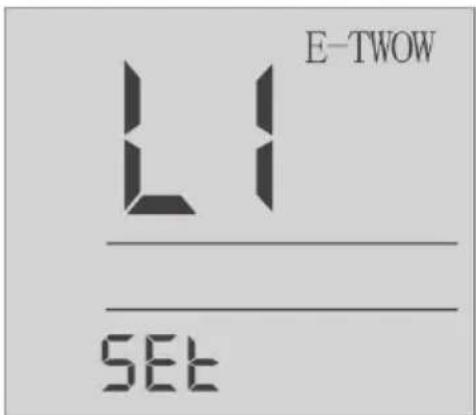
• The display will show "L1" -
Move to menu with button [LIGHT] L1-L2-L3
- To set up a new speed limit, press button[SET]
text_image
E-TWOW L1 SETL1 = Limit the speed to 6km/h
L2= Limit the speed to 12km/h
L3= Limit the speed to 20km/h
KICK START
For statutory reasons, the kickstart cannot be switched off!
text_image
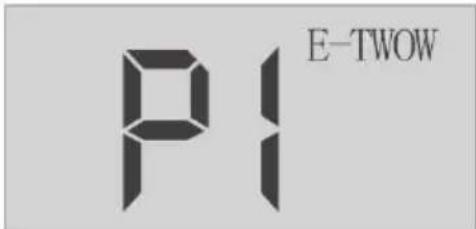
PI E-TWOWERROR CODE
E1: Overcurrent protection (Motor does not move more than 4 seconds)- this error clears after release the acceleration throttle. If not clear, send to service.
E2/E4: Communication error (No communication for more than 400ms) - this error clear when starting the communication. If not clear, send to service.
E3: Overvoltage error (Battery voltage higher). Put back original battery, other hardware problem.
- Black-Screen. Exposure under the sun for too long. Place it in shadow and it will return to normal after a period of time. If not clear, send to service.
text_image
E-TWOW KM/h 90% 27°C ODO 12.9KM- THE SCOOTER
3.1 FOLDING STEPS
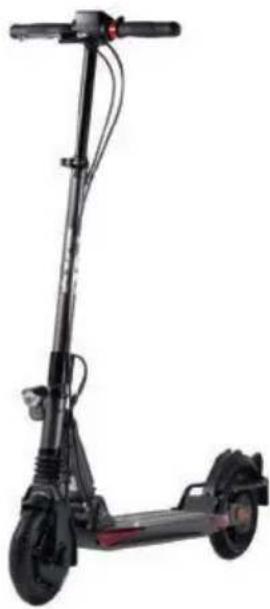
natural_image
Black electric scooter with extended wheels and a vertical suspension (no visible text or symbols)Figure A - Unfolded -
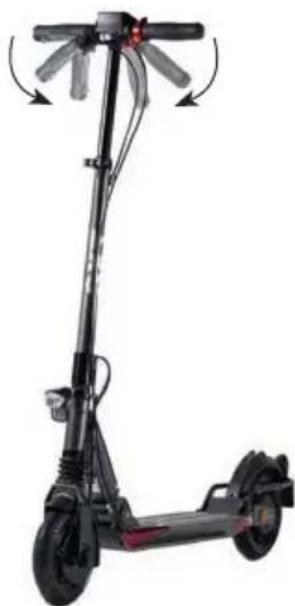
natural_image
Black electric scooter with extended wheels and a handle, shown in motion (no text or symbols visible)Figure B - Folded handlebars -
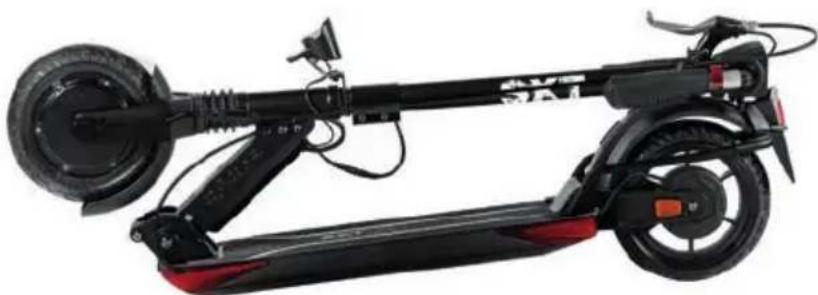
natural_image
Black electric scooter with red and black body, showing front wheel, rear wheels, and suspension components (no visible text or symbols)Figure C - Fully folded -
3.2 UNFOLDED
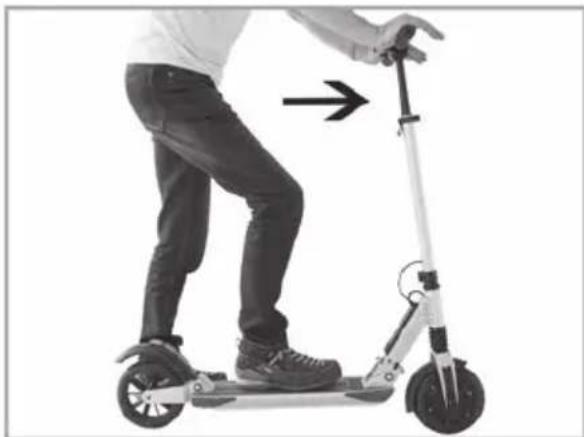
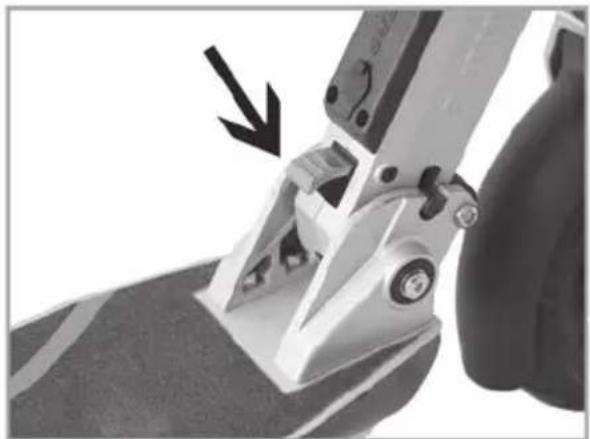
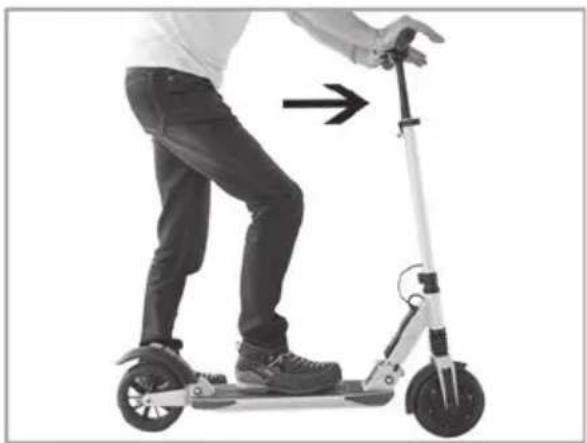
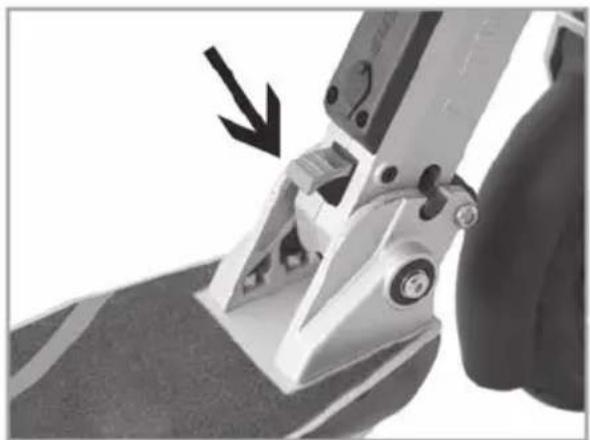
- Press the rear brake fender in the direction of the arrow in the figure (b) until the folding hook is released from the opening located on the rear brake fender. Then, lift the handlebar until it reaches the normal position and the locking bolt comes into place, like in figure (c). Make sure that the locking bolt is Locked, like in figure (d).
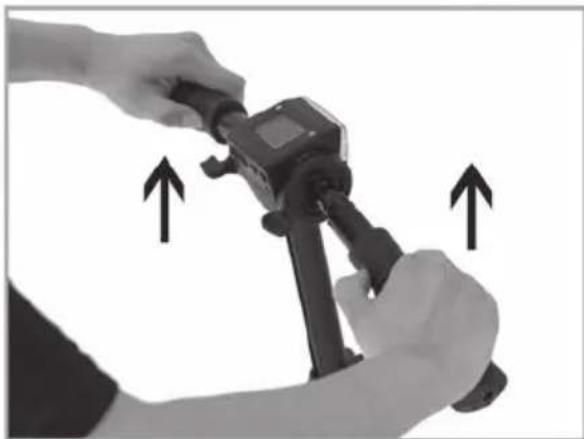
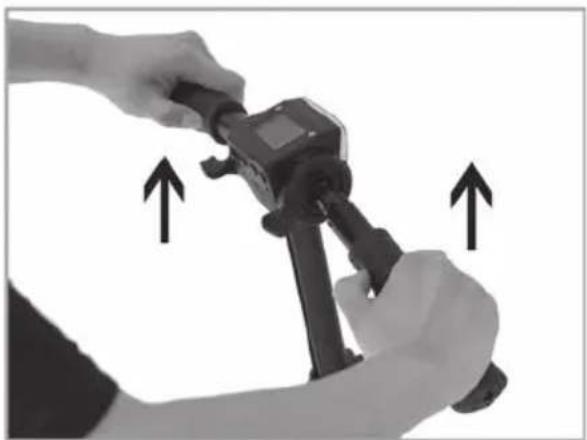
- Raise the two handles of the handlebar until they automatically return to the work position, figure (e).
- Open the quick release. Press button shown in Figure (f) and secure it in one of the two holes, as desired. Close the quick release in the direction of the arrow in figure (g). Make sure that you always keep the quick release secured and tightly closed.
- Show the fully unfolded scooter, figure (a).
(SXT Scooter in the picture may look different)
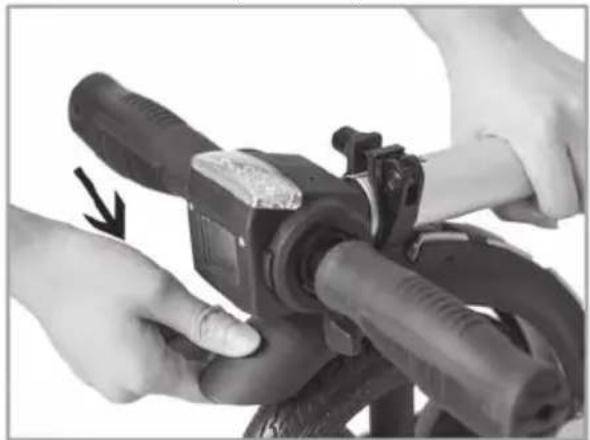
natural_image
Close-up of hands operating a mechanical device with hoses and a clip, no visible text or symbols(b)
natural_image
Person riding a scooter with a hand adjusting the seat (no text or symbols visible)(c)
natural_image
Close-up of a mechanical clamp or grip mechanism with a black arrow pointing to a component (no visible text or symbols)(d)
natural_image
Close-up of hands using a handheld device to adjust or install a component, with two arrows indicating upward motion (no text or symbols visible)(e)
3.3 FOLDED
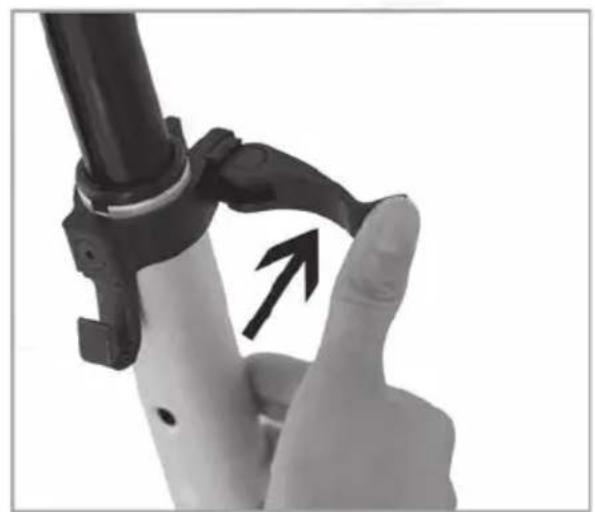
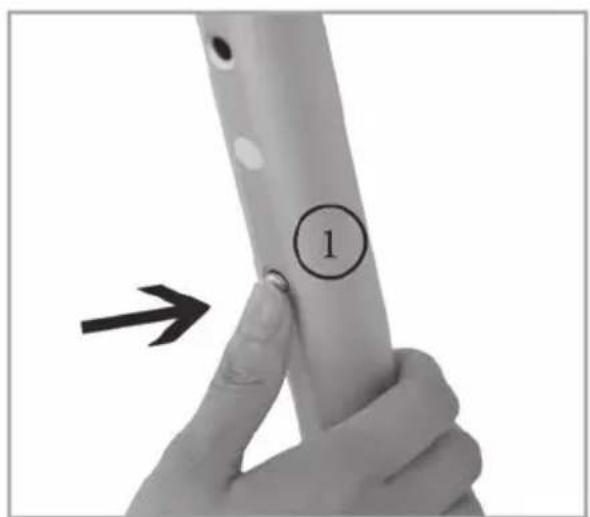
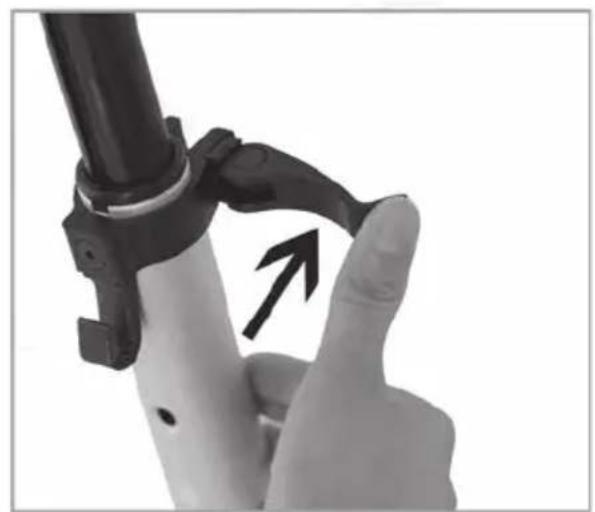
- Open the quick release as shown in figure (a & b).
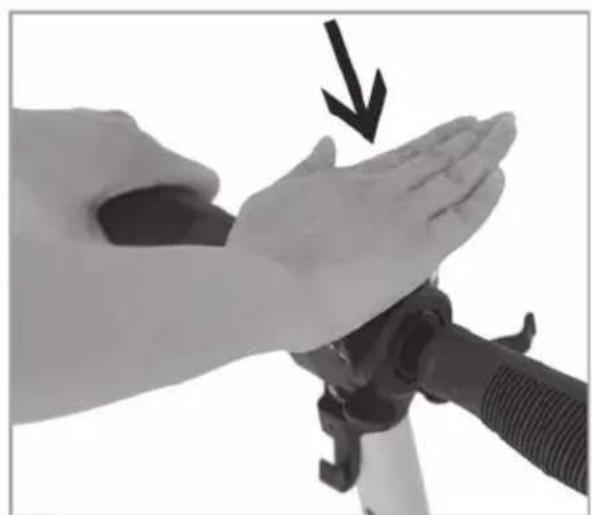
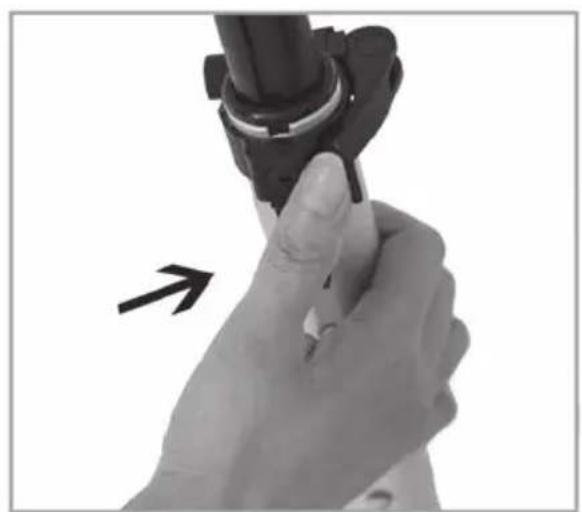
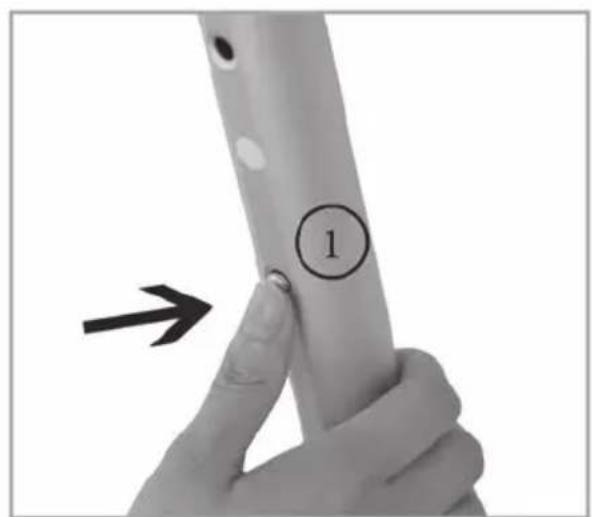
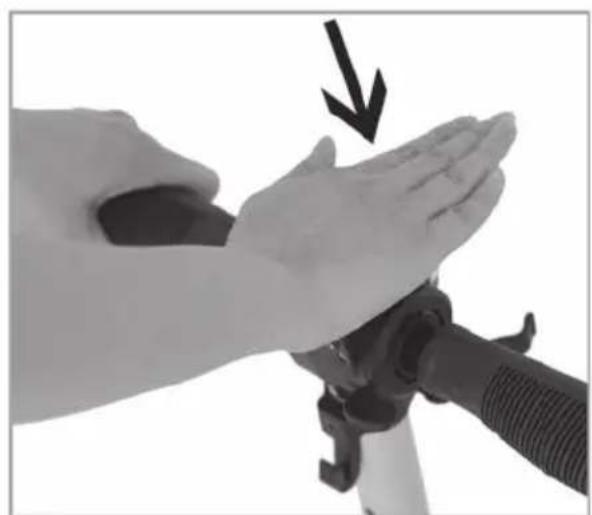
- Press button 1 shown in Figure (c) and puch down the handlebars like shown in figure (d). Close the quick release.
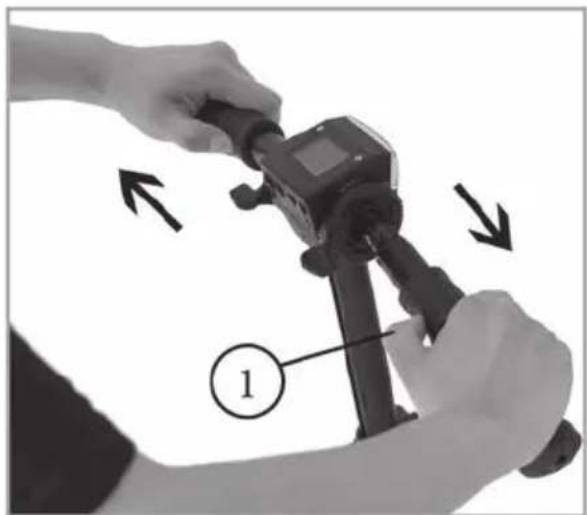
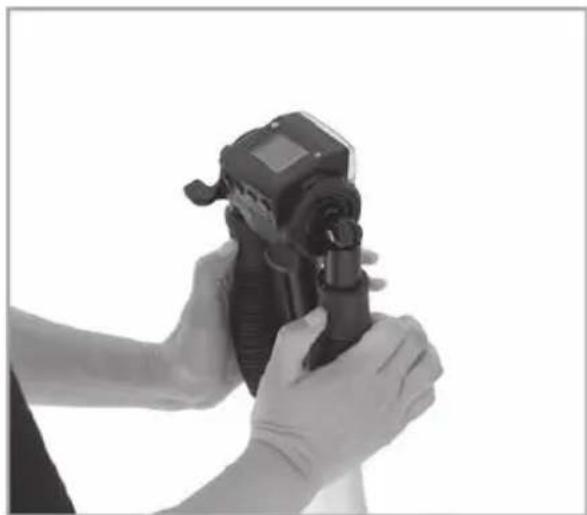
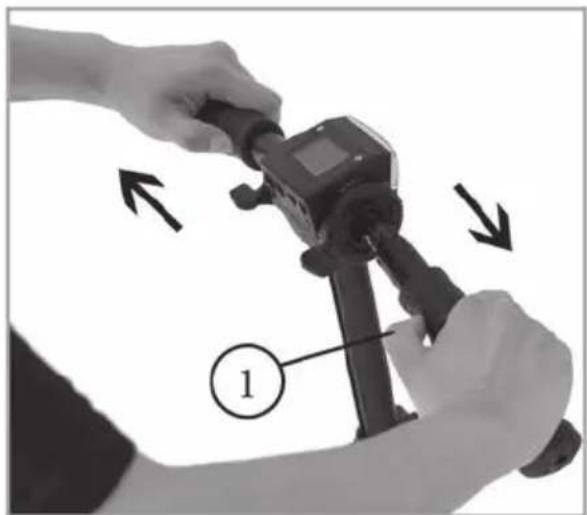
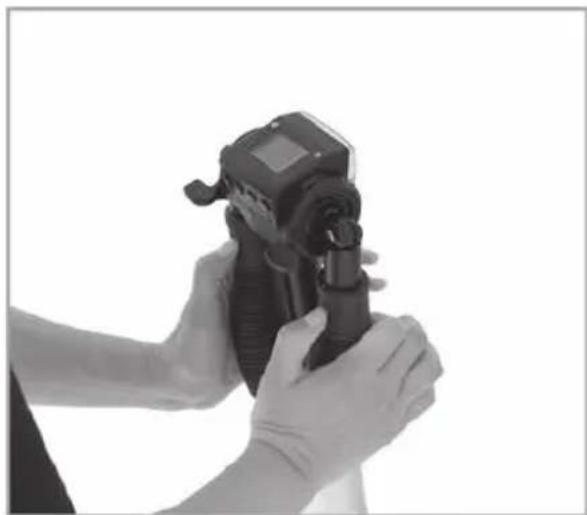
- Hold the handlebar with both hands, press buttons (1) shown in figure (e). Pull out the handlebar grips up to the maximum and fold downwards like in figure (f).
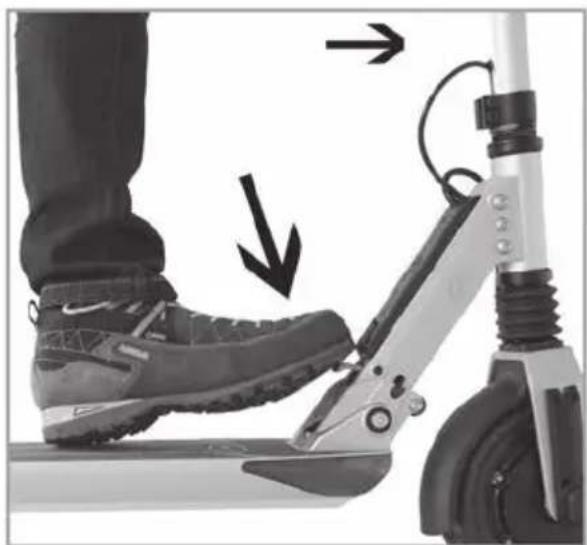
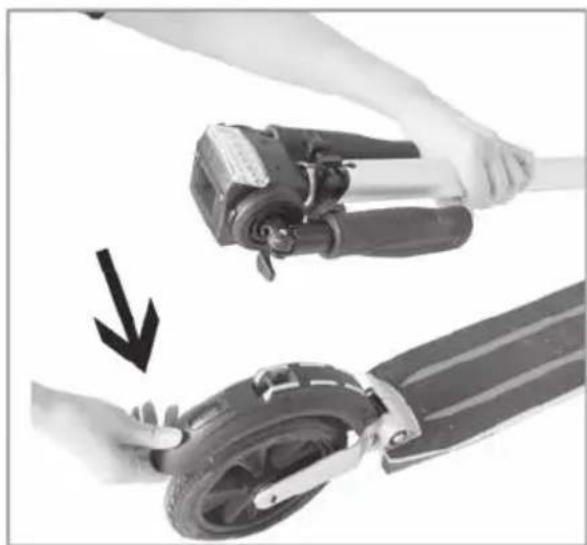
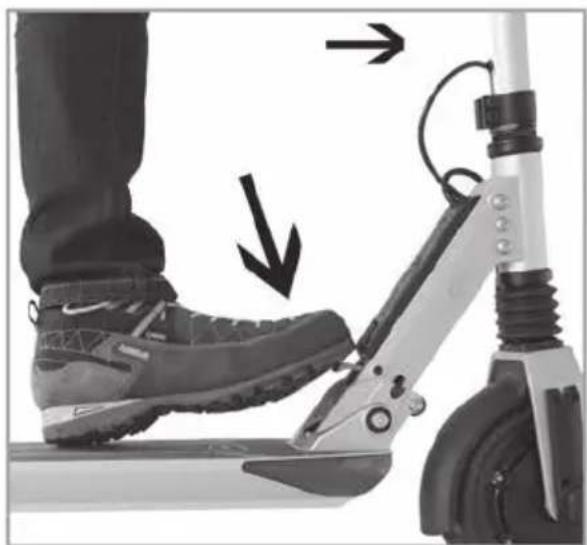
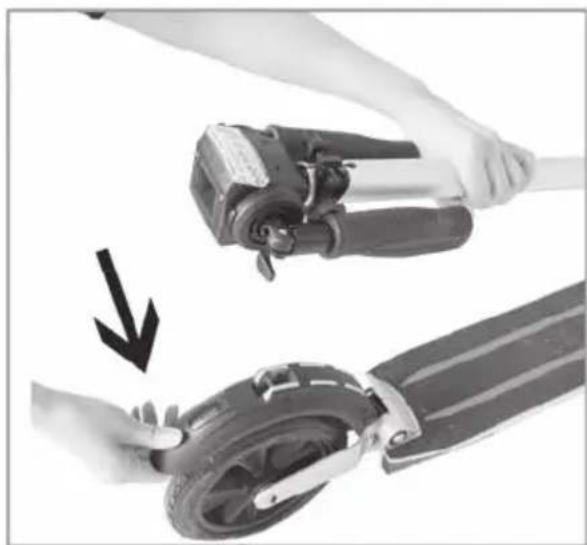
- Press the metal pin button, shown in figure (g), and continue folding the scooter until the folding hook reaches the opening located on the rear brake fender as detailed in figure (h).
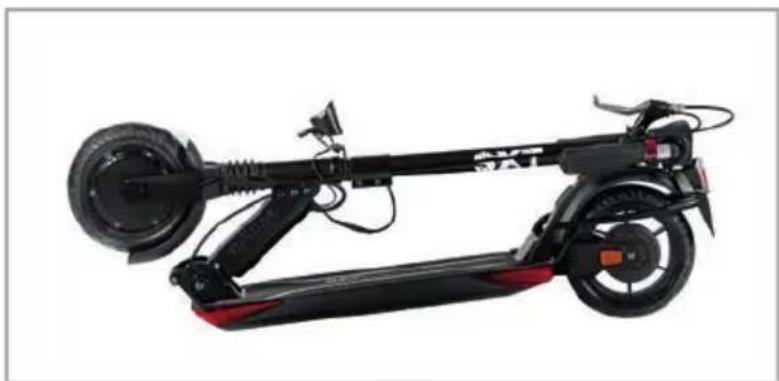
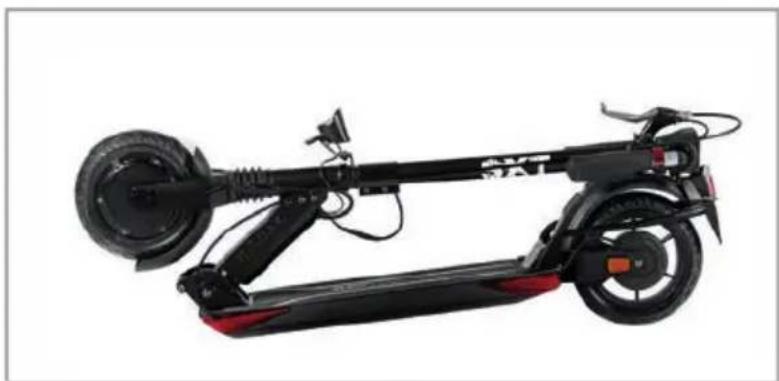
- Show the fully folded scooter, figure (i).
(SXT Scooter in the picture may look different)
natural_image
Close-up of a hand holding a mechanical component, with an arrow pointing to it (no text or symbols visible)(a)
natural_image
Close-up of a hand holding a black mechanical device with an arrow indicating motion (no text or symbols visible)(b)
text_image
1(c)
natural_image
Close-up of hands performing a massage or grip technique on a wrist, with a black arrow indicating the motion direction (no text or symbols present)(d)
natural_image
Close-up of hands adjusting a camera module with directional arrows indicating motion (no text or symbols)(e)
natural_image
Person in gloves holding a handheld device (no visible text or symbols)(f)
natural_image
Close-up of a person's foot wearing a scooter with a foot highlighted by arrows (no text or symbols visible)(g)
natural_image
Close-up of a hand holding a scooter with a device being adjusted, showing the wheel and handle mechanism (no text or symbols visible)(h)
natural_image
Side view of a black electric scooter with red wheels and charging module (no visible text or symbols)(i)
- Choose a suitable venue for riding.
- Unfold the scooter in accordance with the instructions and make sure the safety pin is engaged.
- Adjust the T-pipe to the suitable height according to your height.
Start
- Press the power button to turn on the power.
- Stand one foot on the scooter and leave another foot on the ground.
- Gently press down on the right thumb accelerator, the scooter will immediately move forward slowly. Place the previous foot on the scooter. Press the right thumb accelerator with your right thumb. The greater pressure you put, the faster it will go.
Brakes
- Under normal conditions, the right thumb brake lever is pushed down and the electromagnetic brake is activated and the scooter immediately slows down and the flow of energy to the engine is interrupted. The more the brake lever is pushed down, the more the scooter brakes. The electromagnetic brake additionally activates the kinetic energy recovery system (KERS), which feeds the braking energy back into the battery in the same way as with Fomel 1 cars.
- The Scooter also have a conventional mechanical foot brake at the rear. The mechanical brake slows down the scooter on the rear axle. No matter what situation you are in - if the first system fails, you still have the mechanical foot brake on the rear axle at your disposal.
- The "SXT Light Plus V eKFV models" have a brake lever on the right handle that can be pulled.
Kick starter
This function is designed for safety reasons. The option allows the acceleration to be activated only the scooter is first pushed with the foot and the wheel is in motion, ensuring that the acceleration lever is not actioned by mistake. The zero start function is not activated by default, you need to activated it after the purchase of the scooters.
This function can be activated or deactivated from the central control unit, according to the user's needs.
Maximum speed limitation
Once a maximum speed is set, the scooter won't exceed that speed. The maximum speed limit options are 6km/h, 12km/h, 20km. This function can be activated or deactivated from the central control unit, according to the user's needs.
4. BATTERY AND CHARGER
Each electric scooter is equipped with a special lithium polymer battery and special smart charger. These accessories that come with each scooter have a dedicated number, please do not use the chargers from other brands. If the battery or charger will be damaged owing to these, our company will not be responsible.
Battery
When you get the electric scooter for the first time, please charge the battery fully before using. The battery can be charged at any time, in order to ensure that the battery has power, during which the battery will not charge for any damage.
Warning: do not use batteries from other brands, it will not work with scooter.
Please charge the battery once every three months if stop using the scooter.
Water immersion, collisions, and other abnormal factors will lead to battery damage, which is not covered under warranty.
Charger
The company provides dedicated charger which has a charging protection function, when the battery is 100% charged, the charger will automatically stop charging. Charging time is no more than 3 hours.
Charge Description
- Connect the charger plug into the power socket. The LED turns green.
- Open the charging hole rubber protective cover, put the charger connector into the charging hole.
4.1 MAINTENANCE
Lubricating
Please add a small amount of grease or lubricants to handle folded position every six months.
Please check scooter every three months if the screws are loose it up.
Battery
The lithium polymer batteries provided by our company can be recharged at least 500 times, the normal use can reach more than 1,000 times.
Placement and daily care
Do not expose the scooter under the sun or wet places for too long time. Please keep the scooter clean and dry.
For cleaning use a damp cloth and a mild detergent.
4.2 General Troubleshooting
Checklist
When the products have any problems, please refer to the following methods.
- LED display black screen
Reason: Exposure under the sun for too long.
Solution: Place it in shadow and it will return to normal after a period.
- No information on digital display
Reason: Bad battery contacts or the battery is dead.
Solution: Turn off the power then restart again, if the problem still occurs, please contact your local reseller.
In case that the product still does not operate normally, please contact your local vendor or reseller.
5. WARRANTY
Thank you for your purchase of the product from us.
Please observe the following regulations carefully to enjoy your benefit:
Please note that no quality assurance will be provided in case of one of the followings:
- The quality assurance period has expired.
- The scooter fails because of misuse, lack of maintenance and adjustment in breach of the use instructions.
- The scooter is damaged due to improper use and storage or incident.
- The scooter is damaged because the user tampers with it, or its fault can not be technically identified and analyzed because the user disassembles it to change its original fault state.
- The scooter fails because the user does not use the original charger.
- The data on the item without effective invoice do not comply with the information.
- The scooter is damaged because of its contact with smoke, drug, chemical, water, etc.
- The electronic system of the entire scooter is damaged by moisture, rain, snow, etc.
- The scooter is damaged by act of God, including, but not only limited to flood, fire, lightning, earthquake, social event, etc.
- Consumables are not covered. Examples listed but not limited to lamp, display, brake disc, tyre, rubber part, plastic part, etc.
- The user is not satisfied with the scooter color, dimension, etc.
In addition, wearing parts such as Tires and brake pads are not covered by the warranty.

text_image
SXT® Scooterstext_image
QR code image containing encoded data, no visible human-readable textDownloads Aktuelles Handbuch | Current manuel SXT Light Plus V eKFV