
TWIN 30.3048 - Weather Station TFA - Free user manual and instructions
Find the device manual for free TWIN 30.3048 TFA in PDF.


| Product type | Indoor/outdoor weather station |
| Brand | TFA |
| Model | TWIN 30.3048 |
| Display dimensions | 150 x 100 x 20 mm |
| Outdoor sensor dimensions | 100 x 50 x 30 mm |
| Total weight | Approximately 220 g |
| Display power supply | 2 AA (LR6) 1.5V batteries |
| Outdoor sensor power supply | 2 AA (LR6) 1.5V batteries |
| Transmission range | Up to 100 meters (open field) |
| Indoor temperature | 0°C to +50°C |
| Outdoor temperature | -40°C to +60°C |
| Indoor humidity | 20% to 95% RH |
| Outdoor humidity | 20% to 95% RH |
| Clock function | Radio-controlled DCF-77 |
| Main functions | Indoor/outdoor temperature and humidity, weather trend, time/date display, alarm, backlight |
| Care and cleaning | Wipe with a soft, dry cloth. Do not use abrasive products. |
| Safety | Do not immerse in water. Keep out of reach of children. Do not expose to direct heat sources. |
| Spare parts and repairability | The outdoor sensor can be replaced. Contact TFA customer service. |
| General information | Wireless weather station, LCD display, backup battery for clock included |
Frequently Asked Questions - TWIN 30.3048 TFA
User questions about TWIN 30.3048 TFA
0 question about this device. Answer the ones you know or ask your own.
Ask a new question about this device
Download the instructions for your Weather Station in PDF format for free! Find your manual TWIN 30.3048 - TFA and take your electronic device back in hand. On this page are published all the documents necessary for the use of your device. TWIN 30.3048 by TFA.
USER MANUAL TWIN 30.3048 TFA
TWIN - Funkthermometer

TWIN – Wireless thermometer

Thank you for choosing this instrument from TFA.
1. Before you use this product
- Please make sure you read the instruction manual carefully. This information will help you to familiarise yourself with your new device, learn all of its functions and parts, find out important details about its first use and how to operate it, and get advice in the event of faults.
- Following and respecting the instructions in your manual will prevent damage to your instrument and loss of your statutory rights arising from defects due to incorrect use.
- We shall not be liable for any damage occurring as a result of non-following of these instructions. Likewise, we take no responsibility for any incorrect readings or for any consequences resulting from them.
- Please take particular note of the safety advice!
- Please keep this instruction manual safe for future reference.
2. Delivery contents
• Wireless thermometer (base station)
• Transmitter (Cat.-Nr. 30.3193)
- Instruction manual
3. Field of operation and all of the benefits of your new instrument at a glance
• Outdoor temperature wireless (up to 30 m)
- Indication of indoor temperature
• Temperature alarm
- Frost symbol
• Max.-min.-function with storage of the last 24 hours
4. For your safety
- This product is exclusively intended for the field of application described above. It should only be used as described within this instruction.
- Unauthorised repairs, modifications or changes to the product are prohibited.
TWIN – Wireless thermometer


Caution! Risk of injury:
- Keep these devices and the batteries out of reach of children.
- Batteries contain harmful acids and may be hazardous if swallowed. If a battery is swallowed, this can lead to serious internal burns and death within two hours. If you suspect a battery could have been swallowed or otherwise caught in the body, seek medical help immediately.
- Batteries must not be thrown into a fire, short-circuited, taken apart or recharged. Risk of explosion!
- Low batteries should be changed as soon as possible to prevent damage caused by leaking. Never use a combination of old and new batteries together, nor batteries of different types.
- Wear chemical-resistant protective gloves and safety glasses when handling leaking batteries.

Important information on product safety!
- Do not expose your device to extreme temperatures, vibrations or shocks.
- Protect it from moisture.
- The outdoor transmitter is protected against splash water, but is not watertight. Choose a shady and dry position for the transmitter.
5. Elements
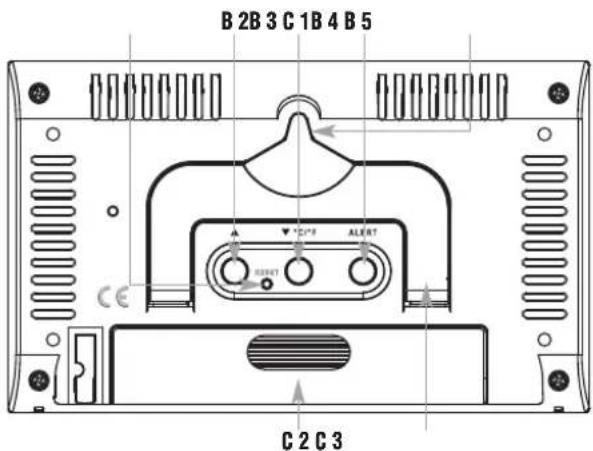
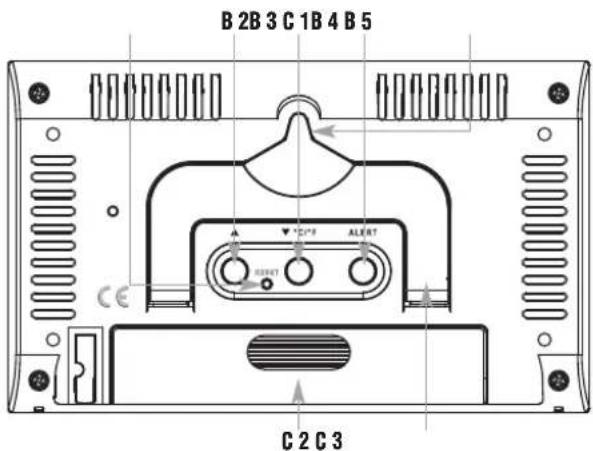
5.1 Base station (Fig. 1):
A: Display for indoor and outdoor
A 1: Indoor and outdoor temperature
A 2: MAX/MIN values
B: Buttons:
Button front:
B 1: SEARCH button
TWIN – Wireless thermometer

Buttons backside:
B 2: ▲ button
B 3: RESET button
B 4: ▼ /°C/°F button
B 5: ALERT button
C: Housing:
C 1: Wall mount hole
C 2: Battery compartment
C 3: Stand (fold out)
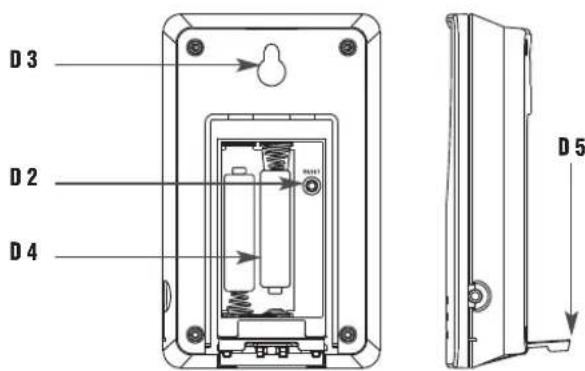
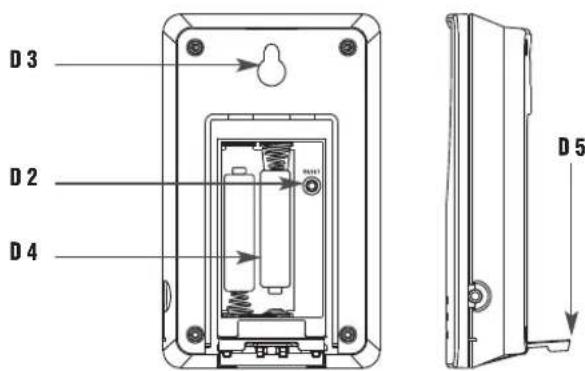
5.2 Outdoor transmitter (Fig. 2):
D 1: Transmission signal lamp
Button inside the battery compartment
D 2: RESET button
Housing:
D 3: Wall mount hole
D 4: Battery compartment
D 5: Stand (fold out)
6. Getting started
Insert batteries:
- Place both instruments on a desk with a distance of approximately 1.5 meter. Check that no other electronic devices are close.
- Open the battery compartment of the transmitter by pulling the battery compartment cover downwards (see marking) and lift up the cover.
- Insert two new batteries 1,5 V AAA, ensure battery polarities are correct.
- Close the battery compartment again.
- Open the battery compartment of the base station and insert two new batteries 1,5 V AAA, ensure battery polarities are correct.
- A brief beep tone will sound and all LCD segments will light up for a short moment.
- Close the battery compartment again.
TWIN – Wireless thermometer

Reception of the outdoor temperature
• After the batteries are inserted the outdoor temperature will automatically be transmitted to the base station.
- The reception signal - symbol flashes. The base station will scan for 3 minutes the outdoor temperature.
- If the reception of outdoor temperature fails, “--.-” appears on the display. Check the batteries and try it again. Check if there is any source of interference.
- Manual initialization can be helpful. Press and hold SEARCH button of the base station for 3 seconds.
- A brief beep tone will sound, “- -.-” and the reception symbol flash on the display. The base station will scan the outdoor temperature.
7. Operation
- The instrument will automatically quit the setting mode if no button is pressed within 15 seconds.
- Every press of a button is confirmed with a short beep.
7.1 Store and reset of the maximum and minimum values
- As soon as the base station and the outdoor transmitter are active the maximum and minimum values for indoor and outdoor will be stored and reset automatically after 24 hours.
- Press and hold SEARCH button for 3 seconds to clear the maximum and minimum outdoor values manually. At the same time the reception for the outdoor transmitter will be activated.
- Press the RESET button with a pointed pin or remove the batteries to clear all recorded values.
7.2 Temperature indication
- Press the ▼/°C/°F button to change between °C (Celsius) or °F (Fahrenheit) as temperature unit.
7.3 Temperature alarm
- Press the ALERT button for 3 seconds.
- and 70 °C (default) or the last adjusted upper temperature limit appear on the display.
- Press the ▼/°C/°F or ▲ button to adjust the desired upper temperature limit.
TWIN – Wireless thermometer

- Confirm with the ALERT button.
- and -50 °C (default) or the last adjusted lower temperature limit appear on the display.
- Press ▼/°C/°F or ▲ button to adjust the desired lower temperature limit.
- Confirm with the ALERT button.
- Press the ALERT button again, to activate the upper temperature alarm.
• appears on the right display. - Press the ALERT button again to activate only the lower temperature alarm.
• appears on the right display. - Press the ALERT button again to activate both alarms.
• appears on the display. - Press the ALERT button again to deactivate the alarm function.
• disappears.
7.4 Case of alarm
- In the case of an alarm the corresponding symbol flashes and an alarm sound is acitated. You can stop the alarm by pressing any button. If the alarm will not be turned off, the instrument will automatically turn off after approximately 2 minutes.
7.5 Indication of frost
- If the outside temperature is between -2 °C and +3 °C the snow-flake symbol appears on the display.
7.6 Positioning and fixing of the basic station and the transmitter
- With the foldable leg at the back of the base station it can be placed onto any flat surface or wall mounted at the respective location by the hanging hole at the back of the unit. Avoid the vicinity of any interfering field like computer monitors or TV sets and solid metal objects. - With the foldable leg at the back of the transmitter it can be placed onto any flat surface or wall mounted at the respective location by the hanging hole at the back of the unit. Choose a shady and dry position for the transmitter. (Direct sunshine falsifies the measurement and continuous humidity strains the electronic components needlessly).
TWIN – Wireless thermometer

- Check the transmission of 433 MHz signal from the transmitter to the display unit (transmission range 30 m free field). Within ferro-concrete rooms (basements, superstructures), the received signal is naturally weakened.
- If necessary choose another position for transmitter and/or basic station.
8. Care and maintenance
- Clean the instrument with a soft damp cloth. Do not use solvents or scouring agents.
- Remove the batteries if you do not use the product for a long period of time.
- Keep the instrument in a dry place.
8.1 Battery replacement
- When the battery symbol on the display of the outdoor temperature appears, replace the batteries in the transmitter.
- Please note:
When the batteries are changed, the contact between transmitter and receiver must be restored – so always insert new batteries into both units or start a manual transmitter search.
9. Troubleshooting
Problems Solution
No indication → Ensure batteries polarities at the base station are correct
→ Change batteries
No transmitter reception → Check batteries of external trans-Display “---” mitter (do not use rechargeable batteries!)
→ Restart the transmitter and the basic station according to the manual
TWIN – Wireless thermometer

→ Start manual search for the transmitter: Press the RESET button in the battery compartment of the transmitter by using a pointed object and press and hold the SEARCH button on the base station
→ Choose another place for the transmitter and/or the base station
→ Reduce the distance between the transmitter and the base station
→ Check if there is any source of interference
Incorrect indication → Change batteries
→ Press the RESET button on the base station by using a pointed object
10. Waste disposal
This product has been manufactured using high-grade materials and components which can be recycled and reused.

Never dispose of empty batteries and rechargeable batteries in household waste. As a consumer, you are legally required to take them to your retail store or to an appropriate collection site depending on national or local regulations in order to protect the environment.
The symbols for the heavy metals contained are: Cd=cadmium, Hg=mercury, Pb=lead
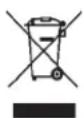
This instrument is labelled in accordance with the EU Waste Electrical and Electronic Equipment Directive (WEEE).
TWIN – Wireless thermometer

Please do not dispose of this instrument in household waste. The user is obligated to take end-of-life devices to a designated collection point for the disposal of electrical and electronic equipment, in order to ensure environmentally-compatible disposal.
11. Specifications
Basic station:
Measuring range
Indoor temperature: -10 °C... +50 °C
(+14 °F...+122 °F)
Indication LL.L /HH.H Temperature is outside
measuring range
Power consumption: 2 × 1,5 V AAA
(batteries not included)
Use alkaline batteries
Dimensions: 137 x 17 (38) x 83 mm
Weight: 105 g (only instrument)
Outdoor transmitter:
Measuring range
Outdoor temperature: -20 °C... +50 °C
(-4 °F ...+122 °F)
Range: max. 30 m (free field)
Transmission frequency: 433 MHz
Maximum radio-frequency power: < 10mW
Transmission time: 30 seconds
Power consumption: 2 x 1,5 V AAA
(batteries not included)
Use alkaline batteries
TWIN – Wireless thermometer

Dimensions: 62 x 24 (35) x101 mm
Weight: 62 g (instrument only)
No part of this manual may be reproduced without written consent of TFA Dostmann. The technical data are correct at the time of going to print and may change without prior notice.
The latest technical data and information about this product can be found in our homepage by simply entering the product number in the search box.
EU declaration of conformity
Hereby, TFA Dostmann declares that the radio equipment type 30.3048 is in compliance with Directive 2014/53/EU. The full text of the EU declaration of conformity is available at the following Internet address:
www.tfa-dostmann.de/service/downloads/ce
www.tfa-dostmann.de


- TWIN - Funkthermometer
- TWIN – Wireless thermometer
- Before you use this product
- Delivery contents
- Field of operation and all of the benefits of your new instrument at a glance
- For your safety
- Caution! Risk of injury:
- Important information on product safety!
- Elements
- Base station (Fig. 1):
- Buttons backside:
- C: Housing:
- Outdoor transmitter (Fig. 2):
- Button inside the battery compartment
- Housing:
- Getting started
- Insert batteries:
- Reception of the outdoor temperature
- Operation
- Store and reset of the maximum and minimum values
- Temperature indication
- Temperature alarm
- Case of alarm
- Indication of frost
- Positioning and fixing of the basic station and the transmitter
- Care and maintenance
- Battery replacement
- Troubleshooting
- Problems Solution
- Waste disposal
- Specifications
- Basic station:
- Outdoor transmitter:
- EU declaration of conformity
- www.tfa-dostmann.de
Brand : TFA
Model : TWIN 30.3048
Category : Weather Station