
GDDE-EVDRI16E - Dehumidifier DIMPLEX - Free user manual and instructions
Find the device manual for free GDDE-EVDRI16E DIMPLEX in PDF.


| Type de produit | Dehumidifier |
| Modèle | GDDE-EVDRI16E |
| Marque | Dimplex |
| Alimentation électrique | 220-240V~, 50Hz |
| Capacité de déshumidification | 16 L/jour (à 30°C, 80% HR) |
| Débit d'air maximal | 150 m³/h |
| Compresseur | Reciprocating (R-134a, 100% HFC) |
| Réfrigérant | R-134a (GWP 1430) |
| Plage de fonctionnement | 5 ~ 32°C |
| Capacité du réservoir d'eau | 3 L |
| Dimensions (L x P x H) | 300 x 204 x 429 mm |
| Poids net | 12.5 kg |
| Fonctions principales | Déshumidification continue, réglage d'humidité (40%-70%), minuterie (1-24h), mode séchage, mode purification d'air (sur certains modèles), affichage de la température |
| Filtres | Filtre à poussière lavable + filtre à charbon actif (non lavable, à remplacer) |
| Nettoyage du filtre | Filtre à poussière : nettoyage toutes les 2 semaines, lavable à l'eau tiède |
| Entretien du réservoir | Vider et nettoyer le réservoir tous les 3 jours avec de l'eau fraîche ou un détergent doux |
| Vidange continue | Possible avec un tuyau de vidange (non fourni, diamètre intérieur 11 mm) |
| Mobilité | Roulettes pour un déplacement facile |
| Sécurité | Arrêt automatique si réservoir plein, protection contre le basculement (attendre 24h après basculement), ne pas utiliser dans une salle de bain ou à proximité d'eau, ne pas couvrir les entrées/sorties d'air |
| Garantie | 2 ans (pièces et main-d'œuvre, sur présentation de la preuve d'achat) |
| Réparabilité | Non destiné à une réparation par l'utilisateur ; faire appel à un professionnel agréé |
| Accessoires inclus | Filtre à charbon actif (pré-installé) |
Frequently Asked Questions - GDDE-EVDRI16E DIMPLEX
User questions about GDDE-EVDRI16E DIMPLEX
0 question about this device. Answer the ones you know or ask your own.
Ask a new question about this device
Download the instructions for your Dehumidifier in PDF format for free! Find your manual GDDE-EVDRI16E - DIMPLEX and take your electronic device back in hand. On this page are published all the documents necessary for the use of your device. GDDE-EVDRI16E by DIMPLEX.
USER MANUAL GDDE-EVDRI16E DIMPLEX
natural_image
Line drawing of a portable air conditioner unit with wheels and doors, no text or symbols presentDimplex GDDE-EVDRI16E
Models: 16L
For domestic household use only.
CAUTION: FAILURE TO FOLLOW THESE INSTRUCTIONS MAY CAUSE INJURY AND/OR DAMAGE AND MAY INVALIDATE YOUR GUARANTEE
Please read the operating instructions carefully before using your dehumidifier for the first time and keep them in a safe place.
WARNING - This appliance must not be used in a bathroom.
WARNING - Do not use this appliance in the immediate surroundings of a bath, a shower or a swimming pool.
- Never immerse the appliance in water or other liquids.
- Operate this unit only on a firm, flat surface to avoid the risk of water leakage. Ensure that the unit is kept upright at all times (including during transport and storage). If it is overturned at any stage it should be left standing upright for 24 hours before use.
- Do not place on soft, unstable or non-horizontal/angled surfaces.
- Never operate the appliance if a cable or connector has been damaged, after appliance malfunction or if the appliance was dropped or is otherwise damaged.
- If the mains lead is damaged it must only be replaced by the manufacturers service agent or a similarly qualified person in order to avoid a hazard.
- Please ask a professional service agent to repair the product. Improper repair may cause danger to users.
- Disconnect the appliance from mains power whenever it is not in use, before relocating it, and before cleaning.
- Operate the appliance only at the voltage specified on the rating label.
- Only connect the unit to a properly installed and easily accessible socket so that you can quickly disconnect the plug if necessary.
- Do not connect this product to the mains using an extension lead.
- Do not connect the dehumidifier to a multiple socket outlet, which is also being used for other electrical appliances
- This dehumidifier is only intended for INDOOR RESIDENTIAL applications. This dehumidifier should not be used for commercial or industrial or leisure applications or in small enclosed spaces.
- Never use the mains lead as a carrying strap or pulling lead.
- To avoid a fire or electrocution hazard, NEVER put the cord near heat registers, radiator, stoves or heaters.
- DO NOT cover cord with carpeting, throw rugs, runners, or similar coverings.
- DO NOT route cord under furniture or appliances. Take care to position the cord away from traffic areas and where it will not be a tripping hazard.
- DO NOT COVER. Never cover or obstruct in any way the outlet at the top of the dehumidifier or the air inlet slots at the rear of the dehumidifier.
-
Only operate this appliance with a minimum of 50cm clearance all around i.e. away from walls, furniture and overhanging objects such as curtains or a shelf.
-
Children aged from 3 years and less than 8 years shall only switch on/off the appliance provided that it has been placed or installed in its intended normal operating position and they have been given supervision or instruction concerning use of the appliance in a safe way and understand the hazards involved. Children aged from 3 years and less than 8 years shall not plug in, regulate and clean the appliance or perform user maintenance.
• Children of less than 3 years should be kept away unless continuously supervised.
• To prevent spillage, empty the water tank before lifting or relocating the appliance. - Do not tip the appliance to any side as escaping water could damage the appliance.
- WARNING: Never leave water in the reservoir when the appliance is not in use, microorganisms can grow in stagnant water, the water tank should be emptied and cleaned regularly and properly. Empty the tank, clean and dry it when not in use and before putting into storage.
- CAUTION: Clean and empty the water tank at least every third day. Empty the water tank and clean it with fresh tap water or mild detergent. Remove any scale, deposits, or film that has formed on the sides of the water tank or on interior surfaces using soft non-abrasive cleaning agents (such as washing up liquid), wipe all surfaces dry on completion.
- WARNING – The water collected in the tank is must never be used for drinking, it is not suitable for human, bird or animal consumption.
- Be aware that high humidity levels may encourage the growth of biological organisms in the environment.
- Monitor the area around the dehumidifier to ensure there is no damp or wet. Do not allow absorbent materials, such as carpeting, drapes, or tablecloths to become damp.
- When the unit stops, you have to wait for 3 minutes before you can restart the unit to protect the compressor from damage
- Air inlet filter must be cleaned regularly to ensure correct operation and to avoid damage to the appliance.
- Never operate the product without the filter
- WARNING: To avoid danger of suffocation please remove all packaging materials particularly plastic and EPS and keep these away from vulnerable people, children and babies.
- WARNING: To avoid the risk of accidental strangulation from the supply cord all children and vulnerable people must be supervised when in the vicinity of the product whether it is working or not.
- IMPORTANT: Do not use this unit where the ambient temperature is lower than 5^ , otherwise the evaporating coil will ice up heavily and this will affect the performance of the product and potentially cause a malfunction.
- NEVER drop or insert any object into any openings.
- Do not use the appliance in locations where paint, petrol or other flammable liquids are used or stored.
- Do not use bug sprays or other flammable cleansers/vapour sprays on or around the unit.
• Always switch off the unit and take the plug out of the socket
• If you are not using the unit - Before you clean or carry out maintenance on the unit
- If a fault occurs
• In the event of an electrical storm.
Do not use in the following conditions

Exposed to the weather outdoors
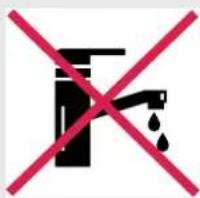
Near water If the power cable wires are frayed or cut

wires are frayed or cut

natural_image
Black silhouette of a person crossed out by a red diagonal line (no text or symbols)Where small children may be left unattended
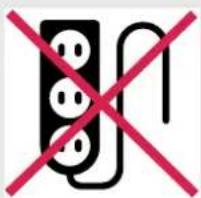
If an extension lead may become overload

Where the power cable may be damaged

natural_image
Symbol of a black box with red X marks, representing prohibition or restriction (no text present)On a slope or uneven surface

Where there is risk of fire or close to a naked flame

Where it may be damaged by chemicals

Where there is a risk of interference by foreign objects

This product is not made for DIY repair

If there is a risk of water falling on the unit
Specification
| Model no. GDDE-EVDRI16E | |
| Power supply | 220-240V~, 50Hz |
| Dehumidification capacity at 30°C, 80% | 16L/day |
| Air volume (max.) 150M3/h | |
| Compressor Reciprocating | |
| Refrigerant R-134a | |
| Working range 5 ~ 32°C | |
| Water tank 3L | |
| Size (WxDxH) 300 x 204 x 429 mm | |
| N.W. | 12.5kg |
Contains fluorinated greenhouse gases
Hermetically sealed system.
Contains Refrigerant HFC134a 100%
Global Warming Potential - 1430
Note. When the dehumidifier is in operation, the running compressor will produce heat, this is normal and may potentially raise the room temperature.
The operational temperature range for this unit is 5-32°C.
How It Works
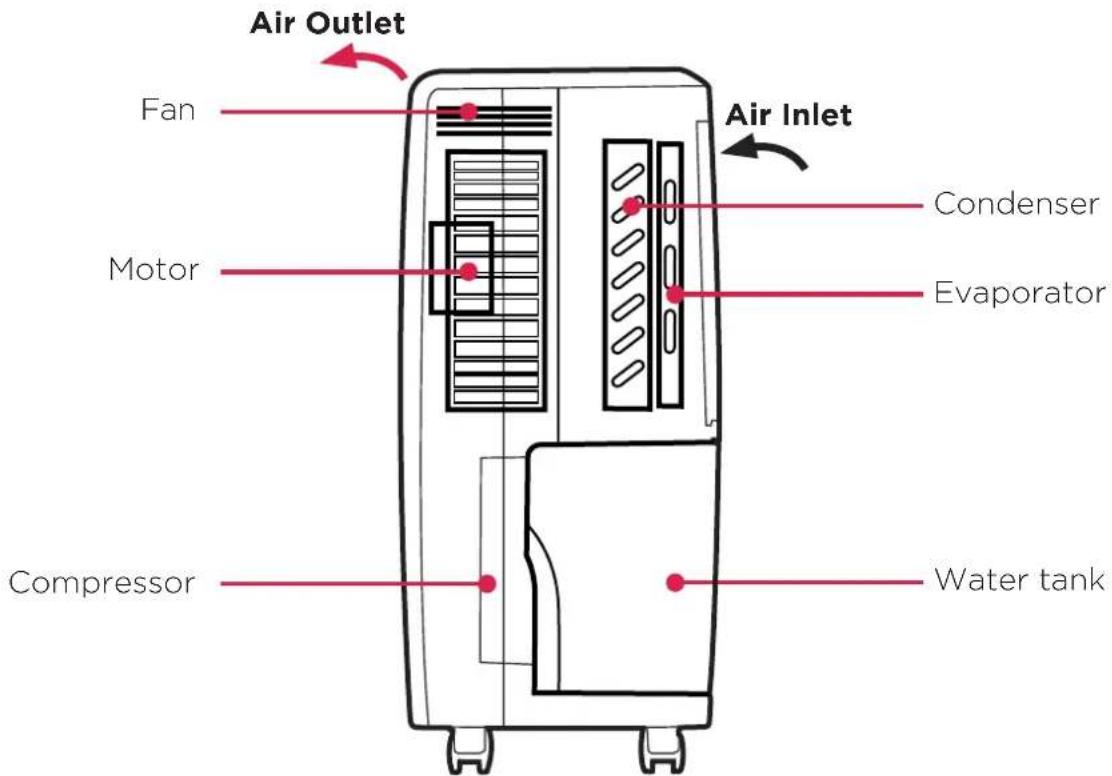
This product is a dehumidifier. It controls relative humidity by passing the air through the unit, forcing the excess moisture to condensate over the cooling elements. Contact with this cold surface causes the moisture in the air to condense. This condensed water then drains safely into the water tank. The dried air then passes through the condenser where it is slightly warmed and re-enters the room at a slightly elevated temperature.
Where To Position
Excess moisture will travel throughout your home, in the same way that cooking smells waft to every room in the house. For this reason, the dehumidifier should be positioned, so that it can draw this moist air towards it from all over the home.
Alternatively, if you have a serious problem in one area you can begin by positioning the dehumidifier close to this area and later moving it to a more central point. Alternatively, move the dehumidifier from room to room for more targeted dehumidifying.
When positioning the dehumidifier, ensure that it is placed on a level surface and that there is a minimum of 30 cm (12") of space on either side of the unit to allow for efficient airflow.
This dehumidifier is fitted with castors for extra mobility, if you move the unit, it should first be switched off and the water tank emptied. We do not recommend the use of an extension lead, so please try to ensure that the unit is sufficiently close to a fixed mains socket.
When the dehumidifier is in operation, outside doors and windows should be closed for most effective and efficient operation.
Parts
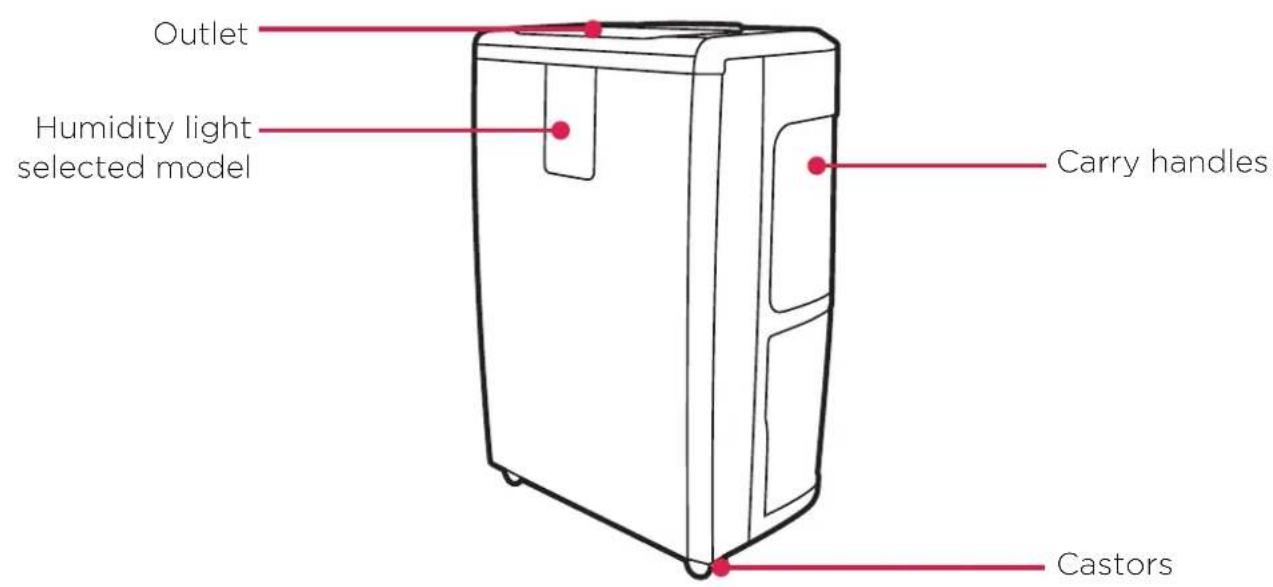
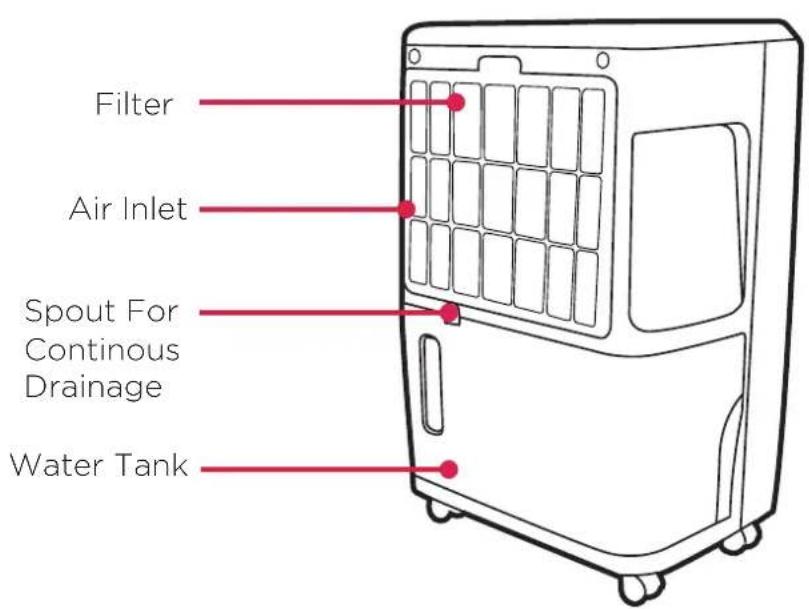
Accessories
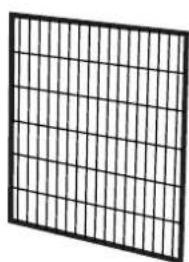
Active Carbon Filter
natural_image
Grid-patterned panel with uniform vertical lines, no text or symbols presentThe Active Carbon Filter is used for capturing the smaller particles of dust suspended in the air and for absorbing formaldehyde, benzene and other noxious gases. It has a limited life span and should be replaced when it becomes obviously dirty/discoloured. The useful life expectancy of the filter will depend on the conditions where it is used and the type of use/amount of use the product is subjected to.
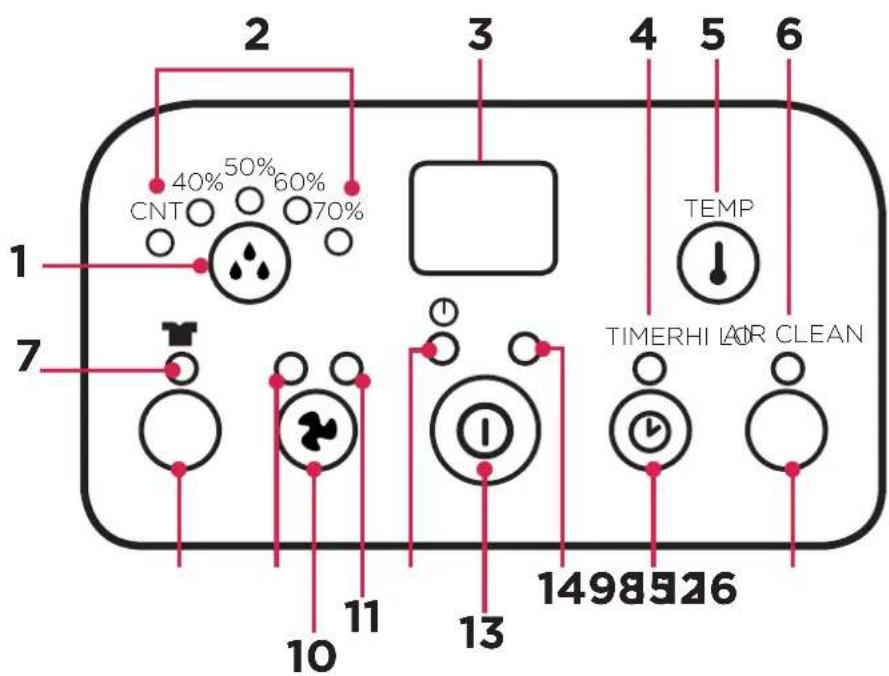
- Humidity setting button
- Working mode indicator (continuous working, humidity 40%, 50%, 60%, 70%)
- Humidity/Temperature display
- Timer operation indicator
- Temperature display button (selected models)
- AIR CLEAN indicator
-
DRYER indicator
-
DRYER High fan speed setting
- High ventilation indicator
- Speed/Ventilation selection button
- Low fan speed setting
- Power indicator
- ON/OFF (power) button
- "Full Water tank" indicator
- TIMER selection button
- AIR CLEAN selection button (selected models)
Operation
- Plug the unit into a correct mains socket. (Please refer to the rating label at the rear of the unit for correct voltage/frequency.)
- Press ON/OFF button to turn on the unit. The compressor will start to work.
-
Press ⚙️ humidity setting button to set the working mode you require: continuous working, humidity 40%, 50%, 60% or 70%.
-
Press speed/ventilation button to set the ventilation speed, high or low. The relative indicator light will be on to indicate the setting currently selected.
- Press the TIMER button to set the operating time you require (1-24 hours). The display window will show the time in hours you set as you press the TIMER button, the display window will return to show room humidity after around 8 seconds. When the set time has been reached, the compressor will stop working automatically.
- Pre-setting function: By pressing the TIMER button without turning on the other functions (including ON/OFF button), you can PRE-SET the time for the product to switch on later. For example, if you press the timer to '2', the unit will switch on automatically after 2 hours.
- By pressing the "TEMP" button, the display window will show the room temperature, after releasing the button the display window will return to show the room humidity after around 8 seconds.
- DRYER function uses turbo ventilation to dry the moisture in the air continuously, it can help to dry laundry by removing more moisture from the air.
- If you don't want to dry the air and just want to circulate the air or to help remove an odour from a room, please press AIR CLEAN button which will disengage the dehumidifier function and operate the product as an air circulating filter only. (Selected models only)
• To turn off the unit, press ON/OFF button again.
Drainage
While the water tank is full, the compressor will stop for self-protection and the water full indicator light will turn red.
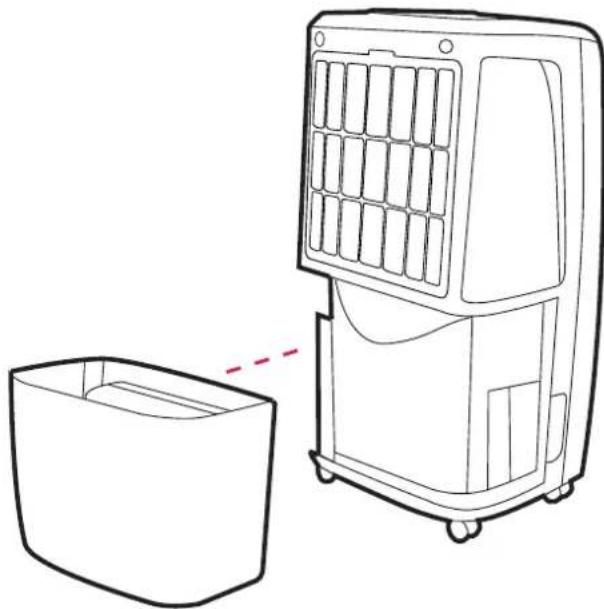
To remove the water tank, pull it out squarely from the unit.
After emptying the water tank, place the water tank carefully back into its space. The tank must be properly located in order for the 'water full' light to go out and for your dehumidifier to start operating again.
Please note, if the water tank has not been positioned/located correctly, the water full indicator will stay red and the product will not operate.
Continuous drainage
When the dehumidifier is operated at very high humidity levels, the water tank will require more frequent emptying. In this situation, it may be more convenient to set the unit up for continuous drainage, this can be done as follows;
- Pull out the water tank.
- Connect a water drain tube of inner diameter 11 mm to the drain spout connection outlet at the top of the tank location area.
* Please note, the water tube is not supplied with the unit. - Ensure the drain tube is fixed properly and that water will always drain away freely through the tube (the drain point/open end of the tube must be at a lower height than the drain outlet from the product).
Note! In very cold weather conditions, precautions should be taken to prevent the water tube from freezing. - Put the water tank back to its position.
natural_image
Line drawing of a portable air conditioner unit with a side panel and a separate empty container (no text or symbols)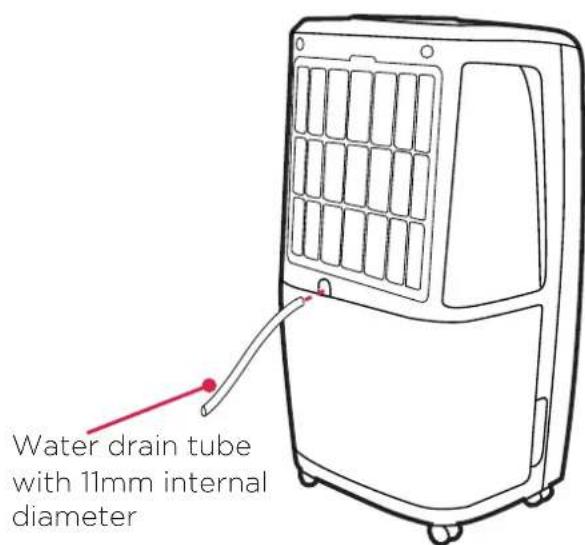
Maintenance
Always unplug the unit from the mains before carrying out any maintenance or cleaning of the unit.
CLEANING THE BODY
Use a soft damp cloth to wipe the unit clean.
Never use volatile chemicals, gasoline, detergents, chemically treated clothes, or other cleansing solutions. These all could possibly damage the enclosure.
CLEANING THE FILTER
This dehumidifier is equipped with 2 filters.
The plastic dust filter is washable and should be cleaned approximately every 2 weeks when in use (see instruction below).
The active carbon filter is not washable its life span is variable and depends on the ambient conditions where the unit is used. The filter should be checked periodically and replaced if necessary.
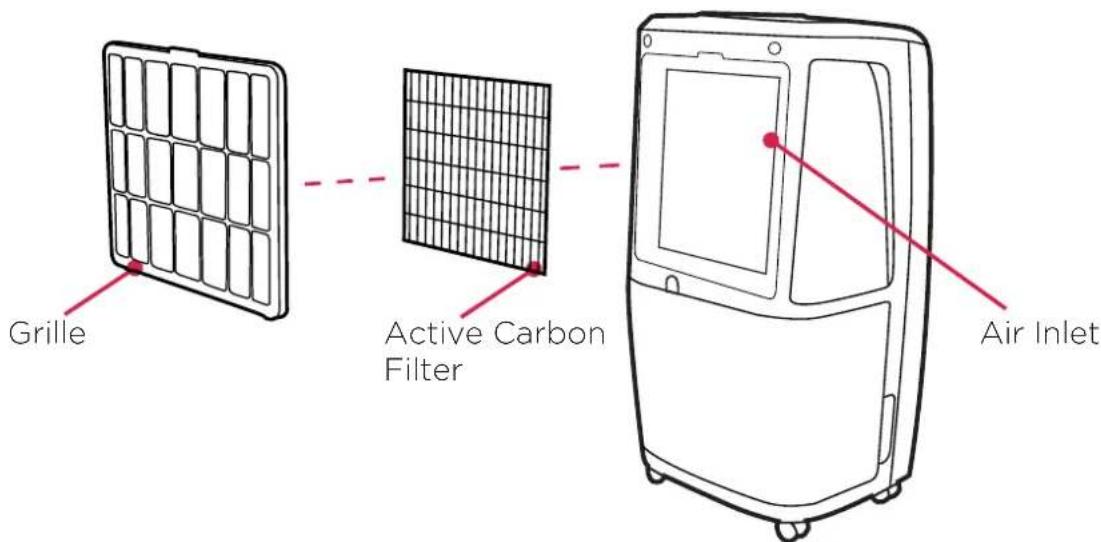
- Remove the anti-dust filter and separate the active carbon filter (not washable) and set it aside carefully.
- Use a vacuum cleaner or tap the plastic air filter lightly for easy cleaning. If the filter is particularly dirty, use warm water with a small amount of medium strength detergent to rinse the filter.
- Allow it to dry naturally and make sure the filter is completely dry before replacing.
- Do not expose the filter to sunlight.
STORAGE
If not using the unit for an extended period of time. Please:
• Turn the unit off, unplug and take care of the mains lead & plug.
• Completely empty the water tank and clean it thoroughly and wipe it dry.
- Cover the unit and store it upright in a location where it will not receive direct sunlight. NB- Prolonged exposure to direct sunlight will discolour the enclosure.
Troubleshooting
THE UNIT DOES NOT OPERATE:
• Is the unit plugged in?
• Is the house electricity on?
- Is the room temperature below 5^ C or above 32^ C? If so, then it is out of the working range of the unit.
- Ensure the ON/OFF switch is turned on.
- Check the water tank is located properly in the unit and it is not full.
- Make sure the air inlet and outlet are not obstructed.
THE UNIT SEEMS TO DO NOTHING:
• Is the filter dusty, contaminated?
• Is the air intake or outlet blocked?
• Is the room humidity already quite low?
THE UNIT SEEMS TO DO LITTLE:
- Are too many windows or doors open?
- Is there something in the room producing lots of humidity?
THE UNIT IS TOO NOISY:
- Check whether the unit is sitting on a level surface.
THE UNIT IS LEAKING:
- Make sure the unit is on a level surface and the water tank is fitted correctly
- Check that the water tank is not damaged.
natural_image
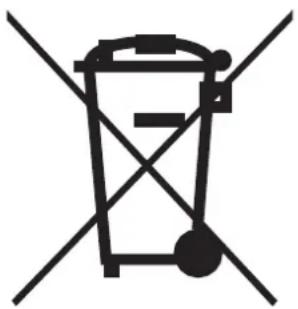
Symbol of a trash bin crossed with two diagonal lines, representing no waste or discharge (no text or numbers present)Recycling: Please recycle where facilities exist. Check with your Local Authority or retailer for recycling advice in your country.
Warranty
What does a Dimplex Warranty cover?
Dimplex products deliver reliable service for normal, household use in domestic settings. All Dimplex products are individually tested before leaving the factory.
If you are a consumer and you experience a problem with your Dimplex product, which is found to be defective due to faulty materials or workmanship within the Warranty Period, this Dimplex Warranty will cover repair or - at the discretion of Dimplex - replacement with a functionally equivalent Dimplex product.
Your product is under warranty for 2 years from the date of purchase or the date of delivery of the product, if later.
The Dimplex Warranty is conditional upon you providing the original purchase receipt as proof of purchase.
What is not covered by a Dimplex Warranty?
The Dimplex Warranty does not cover any of the following:
Any fault or damage to your Dimplex product due to faulty materials or workmanship occurring outside the Warranty Period.
Normal wear and tear including parts that might wear out over time or consumables, such as filters. Any fault or damage occurring to any pre-owned Dimplex product or to any other equipment or property. Accidental damage to your Dimplex product or damage to your Dimplex product from external sources (for example, transit, weather, electrical outages or power surges). Fault or damage to your Dimplex product which is: Not due to faulty materials or workmanship or which is due to circumstances outside Dimplex's control. Caused by use of your Dimplex product for anything other than normal domestic household purposes in the country where it was purchased.
Caused by any misuse, abuse or negligent use of the Dimplex product, including but not limited to any failure to use it in accordance with the Operating Instructions supplied with the product. Caused by any failure to assemble, install, clean and maintain your Dimplex product in accordance with the Operating Instructions supplied with the product unless this was carried out by Dimplex or its authorised dealer(s).
Caused by repairs or alterations to your Dimplex product not carried out by Dimplex service personnel or its authorised dealer(s). Caused by use of any consumables or spare parts for your Dimplex product which are not Dimplex -specified.
DCDimplex®
Customer Care: 09 274 8265
Sales@glendimplex.co.nz
www.dimplex.co.nz
© Glen Dimplex. All rights reserved. Material contained in this publication may not be reproduced in whole or in part, without prior permission in writing of Glen Dimplex
- Dimplex GDDE-EVDRI16E
- CAUTION: FAILURE TO FOLLOW THESE INSTRUCTIONS MAY CAUSE INJURY AND/OR DAMAGE AND MAY INVALIDATE YOUR GUARANTEE
- Do not use in the following conditions
- Specification
- How It Works
- Where To Position
- Parts
- Accessories
- Operation
- Drainage
- Continuous drainage
- Maintenance
- CLEANING THE BODY
- CLEANING THE FILTER
- STORAGE
- Troubleshooting
- THE UNIT DOES NOT OPERATE:
- THE UNIT SEEMS TO DO NOTHING:
- THE UNIT SEEMS TO DO LITTLE:
- THE UNIT IS TOO NOISY:
- THE UNIT IS LEAKING:
- Warranty
- What does a Dimplex Warranty cover?
- What is not covered by a Dimplex Warranty?
Brand : DIMPLEX
Model : GDDE-EVDRI16E
Category : Dehumidifier