
GDDEU30 - Dehumidifier DIMPLEX - Free user manual and instructions
Find the device manual for free GDDEU30 DIMPLEX in PDF.


| Product Type | Dehumidifier |
| Brand | Dimplex |
| Model | GDDEU30 |
| Dimensions (W x D x H) | 360 x 246 x 506 mm |
| Net Weight | 13.4 kg |
| Power Supply | 220-240 V ~ 50 Hz |
| Power Input | 390 W |
| Running Current | 1.8 A |
| Moisture Removal (30 °C, 80% RH) | 30 L/day |
| Water Tank Capacity | 3.2 L |
| Operating Temperature Range | 5 °C to 32 °C |
| Refrigerant (GWP) | R410A (1975) |
| Fan Speeds | High / Low |
| Timer | 1 to 24 hours |
| Humidity Settings | 50%, 60%, 70%, 80%, Auto (AU), Continuous (CO) |
| Continuous Drainage | Yes, via PVC hose (not supplied) |
| Filter Cleaning Interval | Every 2 weeks (warm water below 40 °C) |
| Safety Features | Auto shut-off when tank full; defrost protection; 3-minute restart delay |
| Error Codes | E1 (temperature sensor error), E2 (coil sensor error) |
| Warranty / Support | Contact Glen Dimplex Australia or New Zealand |
Frequently Asked Questions - GDDEU30 DIMPLEX
User questions about GDDEU30 DIMPLEX
0 question about this device. Answer the ones you know or ask your own.
Ask a new question about this device
Download the instructions for your Dehumidifier in PDF format for free! Find your manual GDDEU30 - DIMPLEX and take your electronic device back in hand. On this page are published all the documents necessary for the use of your device. GDDEU30 by DIMPLEX.
USER MANUAL GDDEU30 DIMPLEX
natural_image
Line drawing of a SCDimplex air purifier with control panel and wheels (no text or symbols on device body)SAFETY INFORMATION
- Please read the operating instructions carefully before using your dehumidifier for the first time and keep it for future reference.
- Never immerse the appliance in water or other liquids.
- Never operate the appliance if a cable or connector has been damaged or if the appliance malfunctions or if the appliance was dropped or otherwise damaged.
- Electrical appliances may only be repaired by qualified personnel; improper repair work can be a source of considerable danger to users.
- Children are not aware of the hazards of electric appliances. Therefore, never allow children to operate electric appliances unless properly supervised.
- Disconnect the appliance from the mains power whenever it is not in use and before relocating it.
- Operate the appliance only at the voltage specified on the rating label.
- Use the appliance only within household environments and only for the purpose it was designed for.
- Do not place heavy objects on the appliance.
- To prevent spillage, empty the water tank before relocating the appliance.
- Do not tilt the appliance to any side as escaping water could damage the appliance.
- This appliance is not intended for use by persons (including children) with reduced physical, sensory or mental capabilities, or lack of experience and knowledge, unless they have been given supervision or instruction concerning use of the appliance by a person responsible for their safety. Children should be supervised to ensure that they do not play with the appliance.
- When the power supply cord is damaged, it must be replaced by the manufacturer, its service agent or a similarly qualified person in order to avoid a hazard.
- The devices should be installed at minimum distant of 50cm from the wall or other obstacles.
- Unplug the appliance before cleaning.
OPERATING INSTRUCTIONS
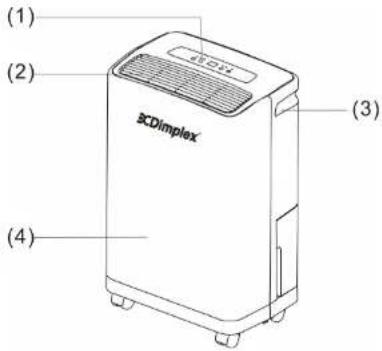
- Control panel
- Air outlet
- Handle
- Front panel
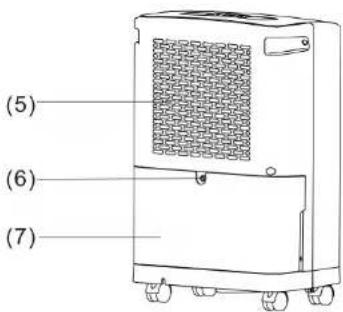
- Back panel
- Water outlet hole
- Water tank
2
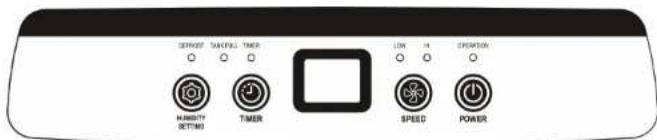
CONTROL PANEL DESCRIPTION
OPERATING INSTRUCTIONS
1. POWER KEY
Press to turn unit "ON" or "OFF".
2. FAN SPEED
Press this key to regulate fan speed, "HI" or "LOW".
3. TIMER
a. Press the key to set time you need. (1 to 24 hours)
b. When setting timer in stand-by mode, the unit will be turned on automatically; when setting timer in operating mode, the unit will be turned off automatically.
c. If the power button pressed before the timer has elapsed, the setting timer will be canceled.
d. While the timer is in use, the indicating light illuminates; when not in use, the indicating light is turned off.
e. 5 seconds after the timer has been set, the display 88 will switch back to show the ambient humidity. Press this button again to show the progress of the timer.
4. HUMIDITY SETTING
Press this button to set the desired humidity (RH50%, 60%, 70%, 80%, AU, CO.)
When the room humidity is less than 3% of the set humidity, the compressor will turn off automatically. If the room humidity rises to above 3%, the compressor will re-start automatically.
3
The fan will continue to run until the unit is switched off.
Comfort Mode (Indicated by: AU)
a. When ambient temperature is below 5^ , the compressor will switch off.
b. When ambient temperature is between 5^ C and 20^ C, it will automatically set the humidity level at 60%
c. When ambient temperature is between 20^ C and 27^ C, it will automatically set the humidity level at 55%
d. When ambient temperature is above 27^ C, it will automatically set the humidity level at 50%
Continuous Mode (Indicated by: CO)
The continuous mode allows the dehumidifier to run continuously at a set humidity level. The unit will only stop once the water tank is full.
TANK FULL INDICATOR
If this indicator illuminates, it shows that the water tank is full. The compressor and fan will stop automatically until the water tank is emptied.
PRECAUTIONS
- The dehumidifier will not operate if the humidity setting is higher than the ambient humidity.
- Drain the water in the water storage tank when the water tank is full and the water level indicator light illuminates. Reinstall the empty water tank back to its position, so the unit can continue its operation.
- When the unit stops, it is required that you wait for 3 minutes before you restart the unit to protect the compressor from damage.
- The operating temperature range for this unit is 5-32 °C
- If the dehumidifier does not start (i.e. the operation light does not illuminate) or the dehumidifier makes intermittent stops for unknown
reasons, please check the plug and power supply for a poor power connection. If the plug and power supply is in normal condition, wait for 10 minutes and restart the unit (it takes about 10 minutes to reset). If the unit still does not start in 10 minutes, please contact your local retailer/service agent for repair.
- When the dehumidifier is in operation, the running compressor can sometimes produce heat and make the room temperature higher. This is normal.
- If the defrost light illuminates – it indicates that the unit is in defrost mode. During this operation mode the compressor is switched off, however the fan motor will still be running. The unit should resume normal operation after several minutes.
DRAINAGE INSTRUCTIONS
The extracted water can be collected in the water tank, or drained continuously with a PVC hose (not supplied):
WATER TANK:
When the Tank Full indicator illuminates, the tank is full, the compressor and the fan will stop operation, please empty the water tank:
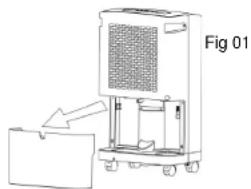
- Remove the water tank as Fig 01. and empty it.
- Insert the water tank gently back into the unit to its original position.
CONTINUOUS DRAINAGE
When you want to use this function please pull out the water tank and plug a PVC water discharge pipe
natural_image
Diagram of a portable air purifier unit with labeled component 'Fig 01' and directional arrow (no text or symbols on the device itself)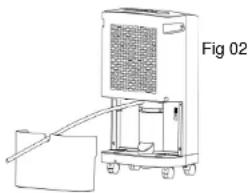
natural_image
Line drawing of a portable air purifier unit with a handle and wheels, labeled Fig 02 (no text or symbols on the device itself)into the "Water outlet hole" (See Fig.02). Then insert the water tank back into the unit, so the unit can resume operation.
The continuous drainage hose will need to be directed towards an outdoor area for unrestricted flow of water.
FILTER REMOVAL
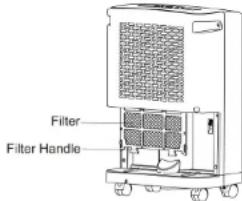
• The filter can be removed from its slot by pulling on the filter handle and sliding it out from the back of the appliance.
- It is recommended that the filter is removed and cleaned with warm water, below 40^ every 2 weeks. Allow for it to dry naturally and then reinstall.
MAINTENANCE INSTRUCTIONS
- Do not position the unit on an uneven surface when in operation to avoid vibration and noise and potential damage to the unit.
- Never insert any objects into the unit's body to avoid hazards or unit failure.
- During power off or when not in use for a long time, please remove the power cord from the outlet.
- For better dehumidifying, the areas in front and rear of the unit should be clear and free from obstacles.
- Clean the air filter once every two weeks (never use alcohol, gasoline, or hot water with a temperature of over 40^ C).
TROUBLE SHOOTING
| Problems | Cause of problem | Solution |
| E1 | Temperature sensor error indicating E1, control system is off | please contact service agent or similarly qualified persons for repair |
| E2 | Coil sensor error indicating E2, control system is off |
SPECIFICATIONS
| MODELSPECIFICATIONS | GDDEU30 |
| POWER SUPPLY 220-240V~50Hz | |
| POWER INPUT(EN60335) 390W | |
| RUNNING CURRENT 1.8A | |
| NET WEIGHT 13.4Kg | |
| MOISTURE REMOVAL(30°C RH80%) | 30 litres/day |
| CABINETDIMEMSION 360Wx246D x506H | |
| TEMP. RANGE FOR USE | 5°C~32°C |
| WATER TANK CAPACITY 3.2L | |
(CE) N 842/2006:
R410A is a type of fluorinated greenhouse gases covered by the Kyoto Protocol.
Its total global warming potential (GWP) is 1975
SUPPLIER INFORMATION
Glen Dimplex Australia Pty Ltd
Unit 1, 21 Lionel Road,
Mount Waverley VIC 3149
Australia
Ph: 1300 556 816
Fax: 1800 058 900
Web: www.dimplex.com.au
Glen Dimplex New Zealand Ltd
38 Harris Road, East Tamaki,
Manukau, Auckland 2013
New Zealand
Ph: (09) 274 8265
Fax: (09) 274 8472
Web: www.dimplex.co.nz
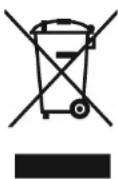
This marking indicates that this product should not be disposed with other household wastes throughout NZ/AUS. To prevent possible harm to the environment or human health from uncontrolled waste disposal, recycle it responsibly to promote the sustainable re-use of material resources. To return your used device, please use the return and collection systems or contact the retailer where the product was purchased. They can direct you on how to dispose it in an environmentally friendly manner.
- SAFETY INFORMATION
- OPERATING INSTRUCTIONS
- CONTROL PANEL DESCRIPTION
- POWER KEY
- FAN SPEED
- TIMER
- HUMIDITY SETTING
- Comfort Mode (Indicated by: AU)
- Continuous Mode (Indicated by: CO)
- TANK FULL INDICATOR
- PRECAUTIONS
- DRAINAGE INSTRUCTIONS
- WATER TANK:
- CONTINUOUS DRAINAGE
- FILTER REMOVAL
- MAINTENANCE INSTRUCTIONS
- SUPPLIER INFORMATION
Brand : DIMPLEX
Model : GDDEU30
Category : Dehumidifier