 ManualGo.com
CS-RE15PKE3 - Air-conditioner PANASONIC - Free user manual and instructions
Find the device manual for free CS-RE15PKE3 PANASONIC in PDF.



Download the instructions for your Air-conditioner in PDF format for free! Find your manual CS-RE15PKE3 - PANASONIC and take your electronic device back in hand. On this page are published all the documents necessary for the use of your device. CS-RE15PKE3 by PANASONIC.
USER MANUAL CS-RE15PKE3 PANASONIC
Operating Instructions Air Conditioner CU-RE9PKE-3 CS-RE12PKE-3 CU-RE12PKE-3 CS-RE15PKE-3 CU-RE15PKE-3 10-17 Thank you for purchasing Panasonic Air Conditioner. Before operating the unit, read these operating instructions thoroughly and keep them for future reference. Installation Instructions attached for authorized dealer or specialist.
Operating Instructions F568946 01 F568946-en.indd 1 2012-11-9 9:42:04 Quick guide Inserting the batteries
1 Remove the battery cover 2 Insert AAA or R03 batteries (can be used ~ 1 year)
SET/CANCEL 2 Set the time 3 Confirm Basic operation 1 Select the desired mode AUTO
2 Start/stop the operation POWER
- Please note that the OFF indication is as follows: To start: To stop:
3 Select the desired temperature
- Selection range : 16°C ~ 30°C.
- Operating the unit within the recommended temperature may save energy. HEAT: 20°C ~ 24°C . COOL: 26°C ~ 28°C. DRY : 1°C ~ 2°C lower than room temperature.
- Use remote control within 8m from the remote control receiver of the indoor unit. The illustrations in this manual are for explanation purposes only and may differ from the actual unit. They are subject to change without notice for future improvement.
01 F568946-en.indd 2 2012-11-9 9:42:06 Table of contents
- AAA or R03 batteries × 2
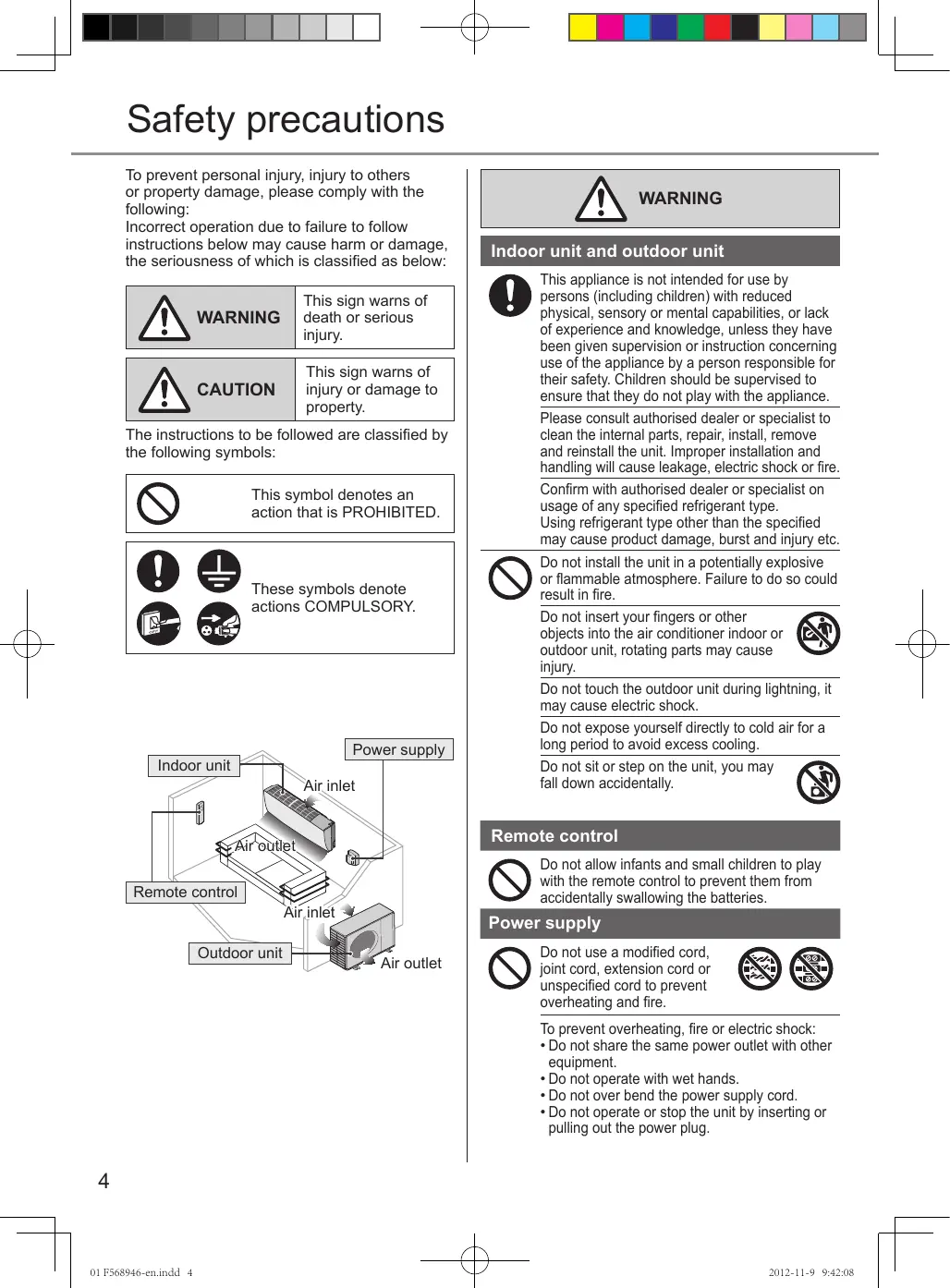
01 F568946-en.indd 3 2012-11-9 9:42:06 Safety precautions To prevent personal injury, injury to others or property damage, please comply with the following: Incorrect operation due to failure to follow instructions below may cause harm or damage, the seriousness of which is classified as below: WARNING This sign warns of death or serious injury. CAUTION This sign warns of injury or damage to property. The instructions to be followed are classified by the following symbols: This symbol denotes an action that is PROHIBITED. These symbols denote actions COMPULSORY. Power supply Indoor unit Air inlet Outdoor unit Indoor unit and outdoor unit This appliance is not intended for use by persons (including children) with reduced physical, sensory or mental capabilities, or lack of experience and knowledge, unless they have been given supervision or instruction concerning use of the appliance by a person responsible for their safety. Children should be supervised to ensure that they do not play with the appliance. Please consult authorised dealer or specialist to clean the internal parts, repair, install, remove and reinstall the unit. Improper installation and handling will cause leakage, electric shock or fire. Confirm with authorised dealer or specialist on usage of any specified refrigerant type. Using refrigerant type other than the specified may cause product damage, burst and injury etc. Do not install the unit in a potentially explosive or flammable atmosphere. Failure to do so could result in fire. Do not insert your fingers or other objects into the air conditioner indoor or outdoor unit, rotating parts may cause injury. Do not touch the outdoor unit during lightning, it may cause electric shock. Do not expose yourself directly to cold air for a long period to avoid excess cooling. Do not sit or step on the unit, you may fall down accidentally. Remote control Air outlet Remote control WARNING Do not allow infants and small children to play with the remote control to prevent them from accidentally swallowing the batteries. Air inlet Power supply Air outlet Do not use a modified cord, joint cord, extension cord or unspecified cord to prevent overheating and fire. To prevent overheating, fire or electric shock:
- Do not share the same power outlet with other equipment.
- Do not operate with wet hands.
- Do not over bend the power supply cord.
- Do not operate or stop the unit by inserting or pulling out the power plug.
01 F568946-en.indd 4 2012-11-9 9:42:08 Indoor unit and outdoor unit If the supply cord is damaged, it must be replaced by the manufacturer, service agent or similarly qualified persons in order to avoid a hazard. It is strongly recommended to be installed with Earth Leakage Circuit Breaker (ELCB) or Residual Current Device (RCD) to prevent electric shock or fire. To prevent overheating, fire or electric shock:
- Insert the power plug properly.
- Dust on the power plug should be periodically wiped with a dry cloth. Stop using the product if any abnormality/ failure occurs and disconnect the power plug or turn off the power switch and breaker. (Risk of smoke/fire/electric shock) Examples of abnormality/failure
- The ELCB trips frequently.
- Burning smell is observed.
- Abnormal noise or vibration of the unit is observed.
- Water leaks from the indoor unit.
- Power cord or plug becomes abnormally hot.
- Fan speed cannot be controlled.
- The unit stops running immediately even if it is switched on for operation.
- The fan does not stop even if the operation is stopped. Contact your local dealer immediately for maintenance/repair. Replacement or installation of power plugs shall be performed by authorized/qualified personnel only. The wires in this mains lead are coloured in accordance with the following code: Terminals Red Black Green/Yellow colours (IEC Standard) brown blue green-yellow Wiring colour may vary depending on a country wiring code’s standard. This equipment must be earthed to prevent electrical shock or fire. Prevent electric shock by switching off the power supply and unplug: - Before cleaning or servicing, - When extended non-use, or - During abnormally strong lightning activity. Do not wash the indoor unit with water, benzine, thinner or scouring powder to avoid damage or corrosion at the unit. Do not use for preservation of precise equipment, food, animals, plants, artwork or other objects. This may cause quality deterioration, etc. Do not use any combustible equipment in front of the airflow outlet to avoid fire propagation. Do not expose plants or pet directly to airflow to avoid injury, etc. Safety precautions Power supply CAUTION English WARNING Do not touch the sharp aluminium fin, sharp parts may cause injury. Do not switch ON the indoor unit when waxing the floor. After waxing, aerate the room properly before operating the unit. Do not install the unit in oily and smoky areas to prevent damage to the unit. Do not dismantle the unit for cleaning purpose to avoid injury. Do not step onto an unstable bench when cleaning the unit to avoid injury. Do not place a vase or water container on the unit. Water may enter the unit and degrade the insulation. This may cause an electric shock. Do not open window or door for long time during COOL/DRY mode operation. Prevent water leakage by ensuring drainage pipe is: - Connected properly, - Kept clear of gutters and containers, or - Not immersed in water After a long period of use or use with any combustible equipment, aerate the room regularly. After a long period of use, make sure the installation rack does not deteriorate to prevent the unit from falling down. Remote control Do not use rechargeable (Ni-Cd) batteries. It may damage the remote control. To prevent malfunction or damage of the remote control:
- Remove the batteries if the unit is not going to be used for a long period of time.
- New batteries of the same type must be inserted following the polarity stated. Power supply Do not disconnect the plug by pulling the cord to prevent electric shock. 01 F568946-en.indd 5
2012-11-9 9:42:09 How to use To turn on or off the unit To set temperature To select fan speed (5 options) (Remote control display) Remote control receiver and indicator POWER TIMER QUIET POWERFUL (GREEN) (ORANGE) (GREEN) (RED)
- For AUTO, the indoor fan speed is automatically adjusted according to the operation mode. To enjoy quiet environment
- This setting provides a quiet environment by reducing the airflow noise. Press to restore the remote control to default setting. Not used in normal operations. To adjust horizontal airflow direction
- Manually adjustable.
01 F568946-en.indd 6 Auto OFF/ON button Use when remote control is misplaced or a malfunction occurs. Raise the front panel:
- To use in AUTO mode, press the button once.
- To use in COOL mode, press and hold the button until 1 beep is heard, then release.
- To use in HEAT mode, press and hold the button until 1 beep is heard, then release. And press again until 2 beeps, then release.
- Press the button again to turn off. 2012-11-9 9:42:10
- During operation mode selection the power indicator blinks.
- Unit selects the operation mode according to the indoor intake temperature and remote control temperature. HEAT mode - To enjoy warm air
- In heat mode, it may take a while for the unit to warm up. COOL mode - To enjoy cool air
- To reduce power consumption during COOL mode, use curtains to screen off sunlight and outdoor heat. DRY mode - To dehumidify the environment
- Unit operates at low fan speed to give a gentle cooling operation. To adjust vertical airflow direction (5 options)
- To turn ON the unit at a preset time. Set the timer while the unit is OFF.
- To turn OFF the unit at a preset time. Set the timer while the unit is ON. 1 Press once to select timer. English AUTO mode - For your convenience How to use To set the timer To select operation mode repeatedly to set your desired 2 Press time. 3 Press once to confirm.
- To turn ON and then turn OFF the unit at preset time. Set the timers while unit is OFF.
- To turn OFF and then turn ON the unit at preset time. Set the timers while unit is ON. 1 Press twice to select timers. 2 Press desired time. (Remote control display) repeatedly to set your 3 Press once to confirm.
- Keeps the room ventilated.
- In COOL mode, if AUTO is set, the louver swings up/down automatically.
- In HEAT mode, if AUTO is set, the horizontal louver fix at predetermined position.
- Do not adjust the louver by hand. To achieve temperature quickly
- This setting enables the desired set temperature to be reached quickly. NOTE: POWERFUL and QUIET operations can not be activated at the same time.
- Press the button again to cancel timer operation.
- The timer will also be cancelled when you press button.
- The timer indicator of indoor unit will light up during timer operation.
- When ON Timer is set, the unit may start earlier before the actual set time in order to achieve the desired temperature on time.
- If timer is cancelled manually or due to power failure, you can restore the timer again by repeating steps above (once power is resumed). Operation conditions Use this air conditioner under the following temperature range. Temperature(°C) COOLING HEATING Maximum Minimum Maximum Minimum Indoor *DBT *WBT
DBT: Dry bulb temperature WBT: Wet bulb temperature NOTICE: • This model is not suitable for 24 hours non-stopping operation in heating mode below -15°C. When the outdoor temperature is below -15°C and you use this model out of above conditions, the outdoor unit might be frozen up and stop operation for protection control. 01 F568946-en.indd 7
2012-11-9 9:42:10 Cleaning instructions To ensure optimal performance of the unit, cleaning has to be carried out at regular intervals. Indoor unit Front panel Aluminium fin
- Switch off the power supply and unplug before cleaning.
- Do not touch the aluminium fin, sharp parts may cause injury.
- Do not use benzine, thinner or scouring powder.
- Use only soap ( pH 7) or neutral household detergent.
- Do not use water hotter than 40°C. Air filters Indoor unit Air filters Wipe the unit gently with a soft, dry cloth. Wash gently and dry. Clean the filter regularly
- Wash/rinse the filters gently with water to avoid damage to the filter surface.
- Dry the filters thoroughly under shade, away from fire or direct sunlight.
- Replace any damaged filters. Remove the front panel Remove air filter Front panel Attach air filter 2 Pull out Insert into the unit 1 Raise Close it securely 3 Press both ends of the front panel 1 Insert at both sides For seasonal inspection after extended non-use
- Checking of remote control batteries.
- No obstruction at air inlet and air outlet vents.
- Use Auto OFF/ON button to select Cooling/ Heating operation. After 15minutes of operation, it is normal to have the following temperature difference between air inlet and air outlet vents: Cooling: ≥ 8°C Heating: ≥ 14°C For extended non-use
- Turn off the power supply and unplug.
- Remove the remote control batteries. 2 Close down
01 F568946-en.indd 8 2012-11-9 9:42:12 Symptom Cause Mist emerges from indoor unit. Water flowing sound during operation. The room has a peculiar odour.
- Condensation effect due to cooling process.
- Refrigerant flow inside the unit.
- This may due to damp smell emitted by the wall, carpet, furniture or clothing. Indoor fan stops occasionally during automatic • This helps to remove the surrounding odours. fan speed setting. Operation is delayed a few minutes after
- The delay is a protection to the unit’s compressor. restarting. Outdoor unit emits water/steam.
- Condensation or evaporation occurs on pipes. The unit operates automatically when power
- It is the Auto Restart function of the unit. Operation will is resumed after a power failure. be restarted automatically under the previous operation mode and air flow direction when power is resumed as the operation is not stopped by remote control.
- To avoid unintended cooling effect. Indoor fan stops occasionally during heating operation. Power indicator blinks before the unit is
- This is a preliminary step in preparation for the switched on. operation when the ON timer has been set.
- Changes of temperature cause the expansion/ Cracking sound during operation. contraction of the unit. Cleaning instructions / Troubleshooting The following symptoms do not indicate malfunction. English Troubleshooting Check the following before calling for servicing. Symptom Check Operation in COOL/HEAT mode is not working • Set the temperature correctly. efficiently.
- Close all doors and windows.
- Clean or replace the filters.
- Clear any obstruction at the air inlet and air outlet vents.
- Check if the unit has been installed at an incline. Noisy during operation.
- Close the front panel properly.
- Insert the batteries correctly. Remote control does not work. (Display is dim or transmission signal is weak.) • Replace weak batteries.
- Check if the circuit breaker is tripped. The unit does not work.
- Check if timers have been set.
- Make sure the receiver is not obstructed. The unit does not receive the signal from the
- Certain fluorescent lights may interfere with signal remote control. transmitter. Please consult authorised dealer.
TURN OFF POWER SUPPLY AND UNPLUG
then please consult authorised dealer under the following conditions:
- Abnormal noise during operation.
- Water/foreign particles have entered the remote control.
- Water leaks from Indoor unit.
- Circuit breaker switches off frequently.
- Power cord becomes unnaturally warm.
- Switches or buttons are not functioning properly.
- The timer indicator blinks and the unit can not be operated The unit stops and the TIMER indicator blinks. Use remote control to retrieve error code.
Press for 5 seconds.
Press for 5 seconds to quit checking. QUIET POWERFUL
CHECK ERROR RESET RESET
Press until you hear beep sound, then jot down the error code.
Turn the unit off and reveal the error code to authorized dealer.
01 F568946-en.indd 9 2012-11-9 9:42:12 (VERT) (ORANGE) (VERT) (ROUGE) Maximum Minimum Maximum Minimum
CHECK ERROR RESET RESET
05 F568946-FR.indd 17 2012-11-9 8:55:48
02 F568946-ES.indd 19 2012-11-9 9:02:17
CHECK ERROR RESET RESET
CHECK ERROR RESET RESET
Guιa rápido Colocar as baterias
Retire o painel frontal
CHECK ERROR RESET RESET
04 F568946-PT.indd 41
CHECK ERROR RESET RESET
06 F568946-BU.indd 49
2012-11-9 9:25:50 JIS C 9612 [<70 dB(A)] Noise Level Conditions 1m Distance Max. cooling/ heating operation Sound power level Air Circulation
[dB(A)] Dimensions (H x W x D) [mm]
290×848×213 290×848×213 290×848×213 540×780×289 540×780×289 540×780×289
- Standby power consumption ≤ 7.5W (when switched OFF by remote control, except under selfprotection control).
- Standard piping length: 5m.
- Air filters are attached.
01 F568946-en.indd 50 2012-11-13 11:01:39
01 F568946-en.indd 51 2012-11-13 17:16:20
- Standby power consumption ≤ 7.5W (when switched OFF by remote control, except under self-protection control). Engilsh Español Deutsch
01 F568946-en.indd 52 2012-11-9 9:42:30 MEMO
01 F568946-en.indd 53 2012-11-9 9:42:30 Information for Users on Collection and Disposal of Old Equipment and Used Batteries These symbols on the products, packaging, and/or accompanying documents mean that used electrical and electronic products and batteries should not be mixed with general household waste. For proper treatment, recovery and recycling of old products and used batteries, please take them to applicable collection points, in accordance with your national legislation and the Directives 2002/96/EC and 2006/66/EC. By disposing of these products and batteries correctly, you will help to save valuable resources and prevent any potential negative effects on human health and the environment which could otherwise arise from inappropriate waste handling. For more information about collection and recycling of old products and batteries, please contact your local municipality, your waste disposal service or the point of sale where you purchased the items. Penalties may be applicable for incorrect disposal of this waste, in accordance with national legislation.
For business users in the European Union If you wish to discard electrical and electronic equipment, please contact your dealer or supplier for further information. [Information on Disposal in other Countries outside the European Union] These symbols are only valid in the European Union. If you wish to discard these items, please contact your local authorities or dealer and ask for the correct method of disposal. Note for the battery symbol (bottom two symbol examples): This symbol might be used in combination with a chemical symbol. In this case it complies with the requirement set by the Directive for the chemical involved. Français © Panasonic Corporation 2012. Printed in China 01 F568946-en.indd 56
Authorized representative in EU Panasonic Testing Centre Panasonic Marketing Europe GmbH Winsbergring 15, 22525 Hamburg, Germany F568946 F1209-00 2012-11-9 9:42:31