VMS61 - Action Camera Valore - Free user manual and instructions
Find the device manual for free VMS61 Valore in PDF.


| Product Type | Action Camera |
| Brand | Valore |
| Model | VMS61 |
| Dimensions | 60 x 40 x 20 mm |
| Weight | 60 g (without accessories) |
| Power Supply | Built-in rechargeable Li-ion battery 900 mAh |
| Battery Life | Up to 90 minutes of recording at 1080p |
| Waterproof Rating | IPX8 (30m with included waterproof case) |
| Video Resolution | 1080p Full HD (1920x1080) at 30 fps |
| Photo Resolution | 12 MP (4000x3000) |
| Lens | Wide-angle 170° fish-eye lens |
| Display | 2.0 inch TFT LCD touchscreen |
| Storage | MicroSD card up to 64 GB (not included) |
| Connectivity | Micro USB 2.0, Wi-Fi (802.11 b/g/n) |
| Mounting | Standard tripod socket (1/4 inch), adhesive mounts included |
| Main Functions | Video recording, photo capture, time-lapse, loop recording, motion detection |
| Maintenance | Keep lens clean with microfiber cloth; charge regularly to preserve battery |
| Cleaning | Wipe exterior with dry cloth; do not use solvents |
| Safety | Do not disassemble; avoid exposure to extreme temperatures; use only included accessories |
| Spare Parts | Battery, USB cable, waterproof case, mounts available from Valore |
| Repairability | Limited user repair; contact Valore support for service |
| General Information | Manufacturer: Valore; Country of origin: China; Warranty: 1 year |
Frequently Asked Questions - VMS61 Valore
User questions about VMS61 Valore
0 question about this device. Answer the ones you know or ask your own.
Ask a new question about this device
Download the instructions for your Action Camera in PDF format for free! Find your manual VMS61 - Valore and take your electronic device back in hand. On this page are published all the documents necessary for the use of your device. VMS61 by Valore.
USER MANUAL VMS61 Valore
Thank you for purchasing Valore Wide-Angle Car DVR (VMS61).
• Records high-quality 1080P video
• HDMI output allows playback on TV
• Supports G-sensor and motion detection
*Built-in battery is for emergency backup only, for normal use, please plug into power source.
Important: Please read the user manual thoroughly before using your car DVR.
Specifications:
• Image sensor: MSC8328 + GC2023
- LCD: 3 inch IPS
- Lens: 170^ ultra wide-angle
• Resolution: 2304 x 1296P @30fps
1920 x 1080P @30fps
1280 x 720P @30fps
• Still image resolution: 2M
• Supports: G-sensor / Motion detection
- Input: 5V/1A
• Frequency: 50Hz/60Hz
- Battery type: Built-in 150mAh lithium battery
• Video format: MOV
- Storage expansion: Min 4GB, Max 32GB Class 10 microSD™ card
- Photo format: JPEG
- Dimension (L x W x H): 87 x 50 x 14mm
- Wide-angle car DVR
- USB cable (800mm)
- Mount
- Car charger
Packag
UNDERSTANDING THE PRODUCT
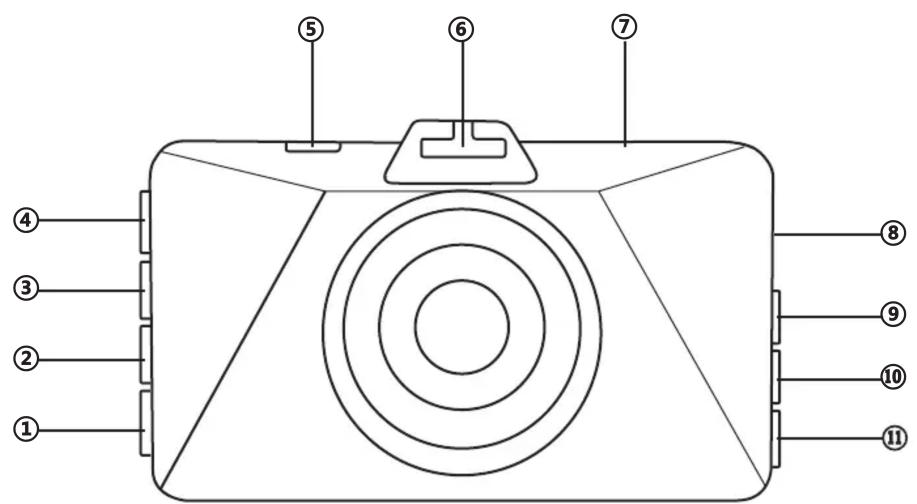
① Power
② SOS
③ Playback/Mode
④ OK
⑤ USB
⑥ Mount bracket
⑦ HDMI
⑧ TF card slot
⑨ UP
⑩ Menu
⑪ Down
START USING THE 1080P CAR DVR
1) Functions of Keys
Power: Short press - Screensaver Long press - Turn On/Off camera
Menu: Enter general settings Up: Selecting function when setting camera
OK: To start or stop video recording In setting mode, to confirm setting
Down: In video mode, short press to take a photo
2) Auto-recording
Switch on car engine, camera will automatically switch on and start recording. When engine is switched off, camera will save video automatically and shut down. When SD card is full, camera will overwrite the earlier files.
3) Manual recording / Taking photo
Short press OK key to start recording. Short press Down key to take a photo.
4) Motion detection
In standby mode, long press Menu key or enter settings to turn on motion detection mode. When an object moves in front of the camera, it will start recording automatically and will stop recording in one minute when nothing is moving. In standby mode, long press Menu key again to exit motion detection mode.
5) G-sensor (Protect level)
If high impact, the camera will lock the file recorded. Locked files are saved to a special file that cannot be overwritten.
Note: G-sensor supports sensitivity adjustment in settings.
6) Date and time setting
In standby mode, short press Menu key to enter settings. Short press Up or Down key to go to Date/Time. Short press OK, Up and Down key to set. Press OK to confirm.
7) File playback
In standby mode, short press Playback key. Press Up or Down ket to choose file. Press OK to play. Short press Playback key to exit.
8) Parking monitoring
If the car has a slight vibration, camera will automatically start recording.
Trouble shooting:
Problem: Cannot take photo or record.
Solution: Check if Micro SD card has enough space or is locked.
Problem: Automatically stop when recording.
Solution: Use a compatible high speed Micro SD card. (Class 10 and above)
Problem: Appear "file error" when replaying video and photo.
Solution: Micro SD card storage error, please format your Micro SD card.
Problem: Unclear video
Solution: Check if there are any dirt or fingerprint and use lens cloth to clear the camera lens.
Problem: Black image when recording sky or water scenes.
Solution: Scenes with high contrast will influence the automatic exposure function of camera, you can adjust 'EV' in setting mode to correct exposure.
Problem: Cross stripe interference in image.
Solution: Reset ‘light frequency’ to 50Hz or 60Hz according to the local power supply frequency.
TECHNICAL SUPPORT & WARRANTY
- For Technical Support, email us at v.info@valore.sg.
- For Warranty Registration, visit www.valore.sg.
Cautions:
Read all the instructions and warnings carefully prior to using this product.
- Do not store the car DVR in a high temperature environment.
- Do not place the car DVR near a fire or other excessively hot environments.
- Do not expose this car DVR to moisture or submerge it in liquid. Keep car DVR dry at all times.
- Do not attempt to charge the car DVR using any other method or connection other than the car DVR's provided charging cable.
- Do not disassemble this car DVR or attempt to repair or modify it in any manner.
- Be cautious of excessive drops, bumps, abrasions or other impacts to this car DVR. If there is any damage to the car DVR such as dents, punctures, tears, deformities or corrosion, stop using the car DVR and contact us immediately via email at v.info@valore.sg, or return this product to the store where you have purchased it from.
- If the product produces an abnormal smell, high temperature (low temperature during normal use), discolours or changes shape abnormally, stop using the product and contact us immediately via email at v.info@valore.sg.
DISCLAIMER & TRADEMARKS
All information, trademarks, logos, graphics, and images (“Materials”) provided on this user manual are copyrighted or trademarked and are the property of Challenger Technologies Limited. Any unauthorized use of any material contained on the instruction manual may violate copyright laws, trademark laws, laws of privacy and communications statutes.
The trademarks, service marks and logos used and displayed in the Materials are registered and unregistered trademarks and service marks of Valore and others. All other registered and unregistered company names, product names and marks mentioned herein the (“Materials”) are the property of their respective owners and may be trademarks or registered trademarks.
- Specifications:
- START USING THE 1080P CAR DVR
- 1) Functions of Keys
- 2) Auto-recording
- 3) Manual recording / Taking photo
- 4) Motion detection
- 5) G-sensor (Protect level)
- 6) Date and time setting
- 7) File playback
- 8) Parking monitoring
- Trouble shooting:
- TECHNICAL SUPPORT & WARRANTY
- Cautions:
- DISCLAIMER & TRADEMARKS
Brand : Valore
Model : VMS61
Category : Action Camera