ST-VC7274 - Vacuum Cleaner Saturn - Free user manual and instructions
Find the device manual for free ST-VC7274 Saturn in PDF.


| Type | Vacuum Cleaner |
| Brand | Saturn |
| Model | ST-VC7274 |
| Voltage | 220-230 V |
| Frequency | 50 Hz |
| Power Consumption | 1600 W |
| Rated Current | 7.3 A |
| Power Control | Electronic speed control (MIN to MAX) |
| Cord Rewind | Automatic with button (do not exceed red mark) |
| Floor Brush | Bristle extension/retraction for hard floor and carpet |
| Dust Bag | Replaceable with dust full indicator |
| Filter | Washable (do not machine wash, air dry) |
| Hose | Flexible hose with airflow controller on handle |
| Accessories Included | Tube, handle, hose, floor brush |
| Body Material | Plastic |
| Color | Red and black |
| Usage | Dry vacuum only (do not pick up water or liquids) |
| Safety Features | Thermal protection (not specified), do not vacuum burning objects or sharp items |
| Maintenance | Clean outer shell with soft soap and water; replace dust bag when full; wash filter regularly |
| Warranty | 2 years or more per local law |
| Package Contents | Vacuum cleaner, instruction manual, warranty book |
Frequently Asked Questions - ST-VC7274 Saturn
User questions about ST-VC7274 Saturn
0 question about this device. Answer the ones you know or ask your own.
Ask a new question about this device
Download the instructions for your Vacuum Cleaner in PDF format for free! Find your manual ST-VC7274 - Saturn and take your electronic device back in hand. On this page are published all the documents necessary for the use of your device. ST-VC7274 by Saturn.
USER MANUAL ST-VC7274 Saturn
natural_image
Red vacuum cleaner with black handle and black body, no visible text or symbols2
GB
VACUUM CLEANER
Dear Buyer!
We congratulate you on having bought the device under trade name "Saturn". We are sure that our devices will become faithful and reliable assistance in your house-keeping.
Avoid extreme temperature changes. Rapid temperature change (e.g. when the unit is moved from freezing temperature to a warm room) may cause condensation inside the unit and a malfunction when it is switched on. In this case leave the unit at room temperature for at least 1.5 hours before switching it on. If the unit has been in transit, leave it indoors for at least 1.5 hours before starting operation.
Parts of the vacuum cleaner
A. Tube
B. Airflow Controller
C. Handle
D. Hose
E. Hose Guider
F. Front Cover
G. Cord-rewinder Button
H. Dust Full Indicator
I. ON/OFF Switch
1. Power Plug
K. Floor Brush

I. Brief introduction:
This vacuum cleaner features exquisite appearance, graceful in color, reasonable in internal structure. There are foot push switch and automatic wire rolling button on it, and also have many absorbing attachments. Its absorb power is controlled by electronics and it features low noise and high efficiency, suitable for any different place. It makes your life comfortable if you choose this machine.
II. For the sake of safety, please comply with following instruction:

- After using, don't pull the power cable when you want to stop the power.

- Don't run the appliance over the power cable when operating.

- Don't absorb the burning cigarette.
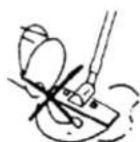
- Don't absorb water and other liquid.
3

5. Don't absorb sharp things or too heavy things.
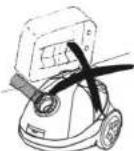
6. Don't place it near the heat source.
III How to use 1. Preparation
(1) Let the end of the hose insert into the air intake socket until clicking position.

(2) After using, press the button and drag the end of the hose out.

(3) Fit the extension tube to the handle, tube and tube to floor brush as showing in the picture.


2. Using the machine
Before connecting the device to the mains, check whether the supply voltage indicated on the device corresponds to the mains voltage. The device must be plugged into a grounded outlet.
Pull the wire to suitable length, insert the plug into power socket. Then make the speed control button on MIN, press the switch to run the machine. The vacuum cleaner begins to work. The part, which can adjust wind volume, is on the handle. The speed control button can adjust the power.
*Attention: Don't extend the cable beyond the RED mark.

- Using accessories
(1) Bristles extended for hard floor.

(2) Bristles retracted for carpet.

- After using
(1) Press the switch to stop the machine, and press the cord-rewinder button to roll back the wire steadily.
*Attention: If the power cable can't re-wind completely, please pull out the power cable a little bit and press the cord-rewinder button again. You can repeat the rewinding step until the cable is re-winded completely.
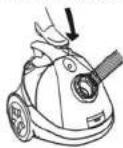
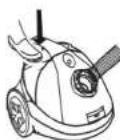
(2) After using, you can put them as showing in the picture.


V. Replacing the Dust-bag
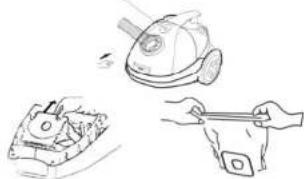
When the dust-bag is full, the color of the sign turns into red at that moment, please open the front cover as showing in the picture, then take out the bag and empty the dust or replace the bag.
DUST FILL INDICATOR
natural_image
Line drawings of three different household appliances: a vacuum cleaner, a small box with a handle, and a hand holding a tool (no text or symbols present)IV. Maintenance
1. The dust-bag should be often replaced in order to avoid barrier.
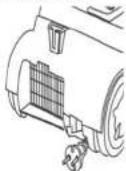
2. When the filter is full of dust, it should be washed or replaced.
*Attention:
Don't wash the filter in the washing machine or dry it with electrical heater, please refix it after drying the filter in the air.
3. Don't clean the outer-shell of vacuum cleaner in petrol oil-like liquid. Please rub it with water and soft soap liquid.

*Attention: Don't clean the machine with the cloth full of water. Don't let the water flow into the vacuum cleaner. If the supply cord of vacuum cleaner is damaged, it must be replaced by the manufacturer or its service agent in order to avoid a hazard.
This appliance is not intended for use by persons (including children) with reduced physical, sensory or mental capabilities or lack of experience and knowledge, unless they have been given supervision or instruction concerning Use of the appliance by a person responsible for their safety.
Specifications
Voltage: 220-230 V
Frequency: 50 Hz
Power consumption: 1600 W
Rated Current: 7.3 A
Set
Vacuum cleaner 1
Instruction manual
with warranty book 1
Package 1
Environment friendly disposal:
You can help protect the environ-

Please remember to respect the local regulations: hand in the non-working electrical equipments to an appropriate waste disposal centre.
The manufacturer reserves the right to change the specification of goods.
RU
Пылесос
natural_image
Illustration of three different cleaning or repair tasks: a vacuum cleaner, a mechanical component, and a hand holding a tool (no text or symbols present)natural_image
Illustration of three hand-drawn scenarios: a car being cleaned, a hand holding a tool, and a bag with a handle (no text or symbols)natural_image
Technical line drawing of a vehicle and its internal components (no text or symbols)The Warranty is provided for the period of 2 years or more if the Law on User Right of the country where the appliance was bought provides for a greater minimum warranty period.
All terms of warranty comply with to the Law on Protection of the Consumer Rights and are governed by the legislation of the country where the product was bought.
The warranty and free of charge repair are provided in any country where the product is delivered to by Saturn Home Appliances or authorized representative thereof, and where no restriction of import or other legal provisions interfere with rendering of warranty services and free of charge repair.
Cases uncovered by the warranty and free of charge repair:
- Guarantee coupon is filled in improperly.
- The product has become inoperable because of the Buyer's non-observance of the service regulations indicated in the instruction.
- The product was used for professional, commercial or industrial purposes (except for the models, specially intended for this purpose that is indicated in the instruction).
- The product has external mechanical damage or damage caused by penetration of the liquid inside, dust, insects and other foreign objects.
- The product has damages caused by non-observance of the rules of power supply from batteries, mains or accumulators.
- The product was exposed to opening, repair or modification of design by the persons, unauthorized to repair; independent cleaning of internal mechanisms etc. was made.
- The product has natural wear of parts with limited service life, expendables etc.
- The product has deposits of scale Inside or outside of fire-bar elements, irrespective of used water quality.
- The product has damages caused by effect of high (low) temperatures or fire on non-heat resistant parts of the product.
- The product has damages of accessories and nozzles which are included into the complete set of product shipment (filters, grids, bags, flasks, cups, covers, knives, sealing rings, graters, disks, plates, tubes, hoses, brushes, and also power cords, headphone cords etc.).
On the warranty service and repair, please contact the authorized
service centers of Saturn Home Appliances.
CZ
MEZINÁRODNÍ ZÁRUKA
When purchasing the product,
please require its checking before you;
BE SURE
that the goods sold to you, are functional and complete and that the warranty coupon is filled in correctly.
This warranty coupon confirms the absence of any defects in the product you purchased and provides for free of charge repair of the product failed through the fault of the manufacturer throughout the period of warranty service and free of charge repair.
Falling the presentation of this coupon, in case of its Improper filling in, infringement of factory seals (if any), and also in cases indicated in the warranty obligations, the claims are not accepted, and no warranty service and free of charge repair is made! The warranty coupon is valid only in the original copy with the stamp of trading organization, signature of the seller, date of sale and signature of the buyer.
CZ
ZÁRUČNÍ LIST
Při koupi výrobku
Buyer's Signature confirming the acquaintance and consent with conditions of free of charge maintenance service of the product, and absence of the complaints on appearance and color of the product.



Brand : Saturn
Model : ST-VC7274
Category : Vacuum Cleaner