CHV-TSTATEX - Thermostat Crestron - Free user manual and instructions
Find the device manual for free CHV-TSTATEX Crestron in PDF.


User questions about CHV-TSTATEX Crestron
0 question about this device. Answer the ones you know or ask your own.
Ask a new question about this device
Download the instructions for your Thermostat in PDF format for free! Find your manual CHV-TSTATEX - Crestron and take your electronic device back in hand. On this page are published all the documents necessary for the use of your device. CHV-TSTATEX by Crestron.
USER MANUAL CHV-TSTATEX Crestron
Crestron CHV-TSTATEX
infiNET EX ^® Thermostat
Operations & Installation Guide
Regulatory Compliance
As of the date of manufacture, the CHV-TSTATEX has been tested and found to comply with specifications for CE marking and standards per EMC and Radiocommunications Compliance Labelling.

Federal Communications Commission (FCC) Compliance Statement
CAUTION: Changes or modifications not expressly approved by the manufacturer responsible for compliance could void the user's authority to operate the equipment.
NOTE: This equipment has been tested and found to comply with the limits for a Class B digital device, pursuant to part 15 of the FCC Rules. These limits are designed to provide reasonable protection against harmful interference in a residential installation. This equipment generates, uses and can radiate radio frequency energy and, if not installed and used in accordance with the instructions, may cause harmful interference to radio communications. However, there is no guarantee that interference will not occur in a particular installation. If this equipment does cause harmful interference to radio or television reception, which can be determined by turning the equipment off and on, the user is encouraged to try to correct the interference by one or more of the following measures:
• Reorient or relocate the receiving antenna
- Increase the separation between the equipment and receiver
- Connect the equipment into an outlet on a circuit different from that to which the receiver is connected
- Consult the dealer or an experienced radio/TV technician for help
Industry Canada (IC) Compliance Statement
Operation is subject to the following two conditions:
- This device may not cause interference, and
- This device must accept any interference, including interference that may cause undesired operation of the device.
To satisfy RF exposure requirements, this device and its antenna must operate with a separation distance of at least 20 centimeters from all persons and must not be colocated or operating in conjunction with any other antenna or transmitter.
The specific patents that cover Crestron products are listed at patents.crestron.com.
Crestron, the Crestron logo, 3-Series Control System, Cresnet, Crestron Studio, Crestron Toolbox, D3 Pro, infiNET EX and SystemBuilder are either trademarks or registered trademarks of Crestron Electronics, Inc. in the United States and/or other countries. Other trademarks, registered trademarks, and trade names may be used in this document to refer to either the entities claiming the marks and names or their products. Crestron disclaims any proprietary interest in the marks and names of others. Crestron is not responsible for errors in typography or photography.
This document was written by the Technical Publications department at Crestron.
©2013 Crestron Electronics, Inc.
Contents
infiNET EX Thermostat: CHV-TSTATEX 1
Introduction .... 1
Features and Functions .... 1
Specifications 3
Physical Description 5
Setup 9
Identity Code 9
Supplied Hardware 9
Installation 9
DIP Switch Setup 11
Wiring the CHV-TSTATEX to the HVAC System....12
Basic Setup 21
Basic Thermostat Setup....21
Joining an infiNET EX Network 21
Leaving an infiNET EX Network....22
Advanced Setup....23
Setup Mode....23
Setup Mode Parameters/Functions 24
Verifying Communication Status 27
Self-Test Results....28
Operation 29
System Mode 29
Fan....30
Setpoints 31
Hold....31
Remote Operation....32
LCD Display....32
Uploading and Upgrading....34
Establishing Communication....34
Programs and Firmware 34
Program Checks 35
Problem Solving 36
Troubleshooting....36
Reference Documents....38
Further Inquiries 38
Future Updates 38
Appendix: About Heat Pumps 39
Glossary 40
Return and Warranty Policies....42
Merchandise Returns / Repair Service 42
Crestron Limited Warranty....42
infiNET EX Thermostat: CHV-TSTATEX
Introduction
The CHV-TSTATEX is a wireless thermostat featuring infINET EX ^® technology. The CHV-TSTATEX installs just like a conventional thermostat because no extra wires are needed to connect to the control system. Although functional as a standalone thermostat, the CHV-TSTATEX delivers enhanced functionality as part of a complete Crestron ^® automation system. Integrating HVAC with a Crestron system can help lower energy bills and increase user friendliness.
The CHV-TSTATEX is designed for one- or two-stage heating and one- or two-stage cooling control of baseboard, forced air, heat pump*, and dual-fuel heat pump* HVAC systems. The large backlit LCD display provides a clear view of temperature, set point, system mode, fan mode, system status, and setup functions. Climate control features include separate heating and cooling set points, and adjustable anticipators to prevent overshooting the desired temperature. Continuous fan operation can be selected when needed for increased circulation.
Features and Functions
- Wall mount heat/cool thermostat for baseboard, forced air, and heat pump* HVAC systems
- Crestron system integration via infiNET EX wireless network
• Saves on energy costs with advanced programming abilities
• Supports two remote temperature sensors
• Fail-safe mode allows operation in event of control system failure - Backlit LCD display
• Available in white, black, or almond
infiNET EX Communications
Built on steadfast infiNET technology, infiNET EX is the new standard in 2-way wireless connectivity that can handle installations in even the most urban settings. The redundant nature of its mesh networking technology means that a command is never missed, resulting in faultless operation - something that is of the utmost importance when it comes to HVAC control and home automation. The CHV-TSTATEX harnesses this cutting edge wireless connectivity which affords it a level of robustness and dependability above other solutions.
Automation System Integration
The wireless connection to the control system allows the functions of the CHV-TSTATEX to be controlled from touch screens, keypads, wireless remotes, computers, or even a mobile device. It supports unlimited flexibility for remote control, scheduling, and integration with other devices and systems. However, in the event that communication with the control system is disrupted for any reason, the CHV-TSTATEX remains operable to control the HVAC system.
Easy Installation
System design and installation using infiNET EX thermostats could not be easier. Since no control wires are required, the CHV-TSTATEX can be installed just like any conventional thermostat.
To simplify installation, physical switches are provided for the most critical configuration options, including heat/cool type, heat pump behavior, power settings, number of heating/cooling stages, and fan options. These settings allow HVAC contractors to install and test the thermostats prior to the appearance of a Crestron system integrator.
An infiNET EX gateway such as the CEN-RFGW-EX or MC3 (both sold separately) is needed for communications. Setting up a complete network of infiNET EX devices is simple, utilizing dynamic discovery (self-install) to locate and acquire each RF device automatically. Setting the ID of each device employs the same convention as Crestron's familiar TSID method, and each device is programmable using Crestron Studio™, SIMPL Windows, SystemBuilder™ or D3 Pro™ software just like any wired Cresnet® device. Even firmware updates are performed over the wireless network.
No further action is required to configure the infiNET EX network. Each device assigned to a common gateway automatically behaves as a wireless expander* for any other devices within range (approximately 150 feet (46 meters) indoors), and additional expanders may be added if necessary. The infiNET EX gateway monitors each device on the network at all times, ignoring any other 2.4 GHz signals. It reconfigures the entire network automatically in response to new sources of interference and other changes in RF conditions.
Remote Sensors
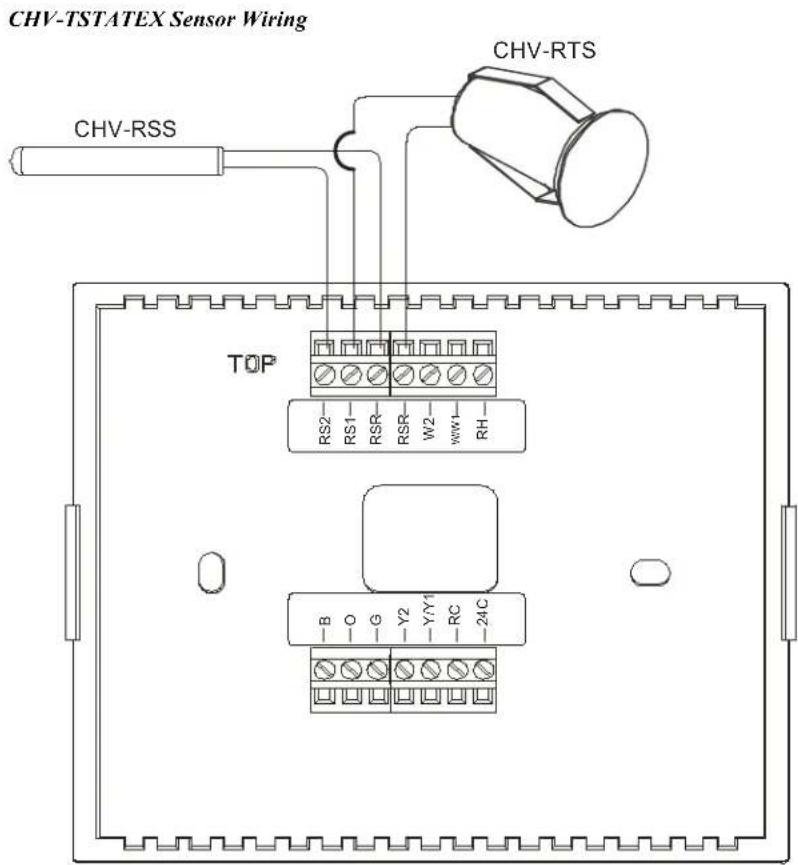
Optional remote temperature sensors can be connected to the CHV-TSTATEX for enhanced flexibility and optimized performance. Climate can be regulated according to an average of multiple sensors, or the built-in sensors can be disabled entirely to allow the CHV-TSTATEX to be installed out of view. For heat pump-type systems, outdoor temperature can be monitored to optimize system performance. Compatible sensors include the CHV-RTS and the CHV-RSS (both sold separately).
Specifications
Specifications for the CHV-TSTATEX are listed in the following table.
CHV-TSTATEX Specifications
| SPECIFICATION DETAILS | |
| WirelessRF TransceiverRange (typical)Gateway | 2-way RF, 2.4 GHz ISM Channels 11-26 (2400 to 2483.6 MHz), IEEE 802.15.4 compliant150 ft (46 m) indoor, 250 ft (76 m) outdoor;Subject to site-specific conditions; range is increased by adding additional devices or CLW-RFEXP-EX wireless expander (sold separately)Requires a CEN-RFGW-EX RF gateway or MC3 3-Series Control System®(both sold separately) |
| Display | Backlit LCD with two large 7-segment digits,two small 7-segment digits, 14 dedicated symbols;Displays ambient temperature, set point, system mode, fan setting, call activity, low battery, RF or control system communication errors, firmware download progress, setup parameter/function and value |
| Measurement RangeAmbient TemperatureDisplay Limits | -10° to 110° F (-23° to 43°C)-9° to 99° F (-9° to 43°C) |
| Temperature ToleranceOver Full RangeAt Room Temperatures | ±1° F (±0.5°C)±1° F (+0.4/-0.2°C) |
| Setpoint RangeHeat SetpointCool Setpoint | 38° to 89° F (3° to 32°C)59° to 99° F (15° to 37°C) or38° to 99° F (3° to 37°C) extended cool mode enabled |
| Relay Rating | 1 amp @ 40 volts dc or 24 volts ac (nominal) |
| EnvironmentalTemperatureHumidity | -10° to 110° F (-23° to 43°C)10% to 90% RH (non-condensing) |
| Power Requirements24VBattery | 0.24 watts (10 mA @ 24 volts ac) supplied by heating or cooling systemTwo AA batteries, estimated 1 year normal operation |
| Default RF ID 01 | |
| Housing | Injection molded plastic, surface mountable to the front of a horizontally oriented 1-gang electrical box |
| Dimensions | |
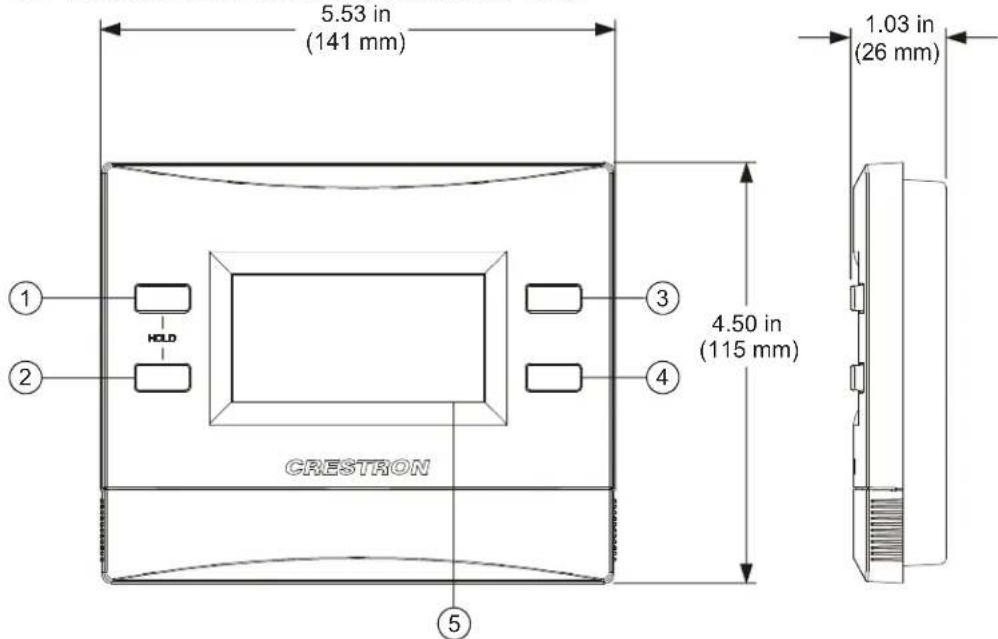
| Height 4.50 in (115 mm) | |
| Width 5.53 in (141 mm) | |
| Depth 1.03 in (26 mm) | |
| Weight 7 oz (190 g) | |
| Available Models | |
| CHV-TSTATEX-A-T | infiNET EX Thermostat, Textured Almond |
| CHV-TSTATEX-B-T | infiNET EX Thermostat, Textured Black |
| CHV-TSTATEX-W-T | infiNET EX Thermostat, Textured White |
| Available Accessories | |
| CEN-RFGW-EX | infiNET EX Wireless Gateway |
| CHV-RSS | Remote Slab Sensor and Outdoor Temperature Sensor |
| CHV-RTS | Remote Temperature Sensor |
| CLW-EXPEX-GD-W-T | infiNET EX Wireless Expander, Ground Pin Down, White Textured |
| MC3 | 3-Series Control System |
Physical Description
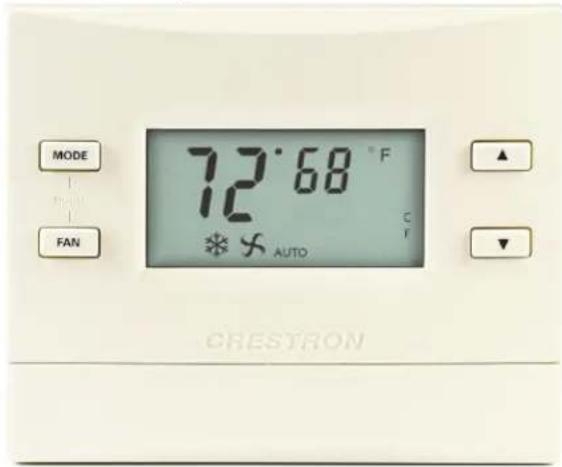
This section provides information on the connections, controls and indicators available on the CHV-TSTATEX.
CHV-TSTATEX Physical View
text_image
MODE FAN 72°68 °F C AUTO CRESTRONCHV-TSTATEX Overall Dimensions (Front and Side Views)
text_image
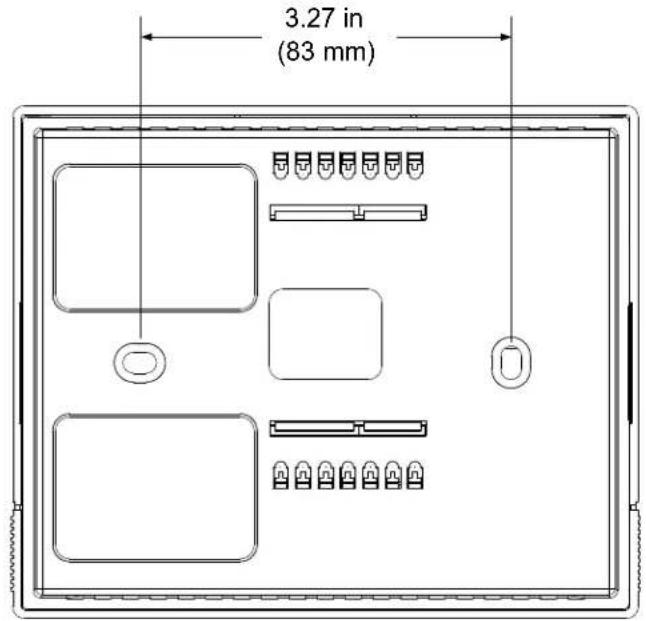
5.53 in (141 mm) 1.03 in (26 mm) ① ② HOLD ③ 4.50 in (115 mm) CRESTRON ④ ⑤CHV-TSTATEX Overall Dimensions (Rear View)
text_image
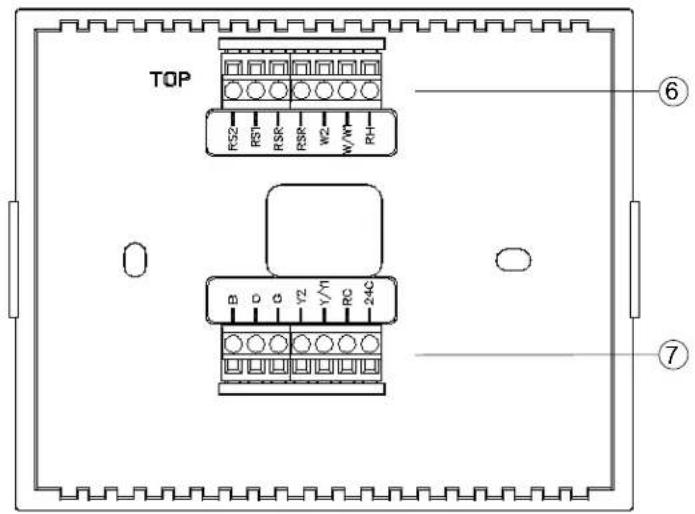
3.27 in (83 mm)CHV-TSTATEX (Connection View, front with cover removed)
text_image
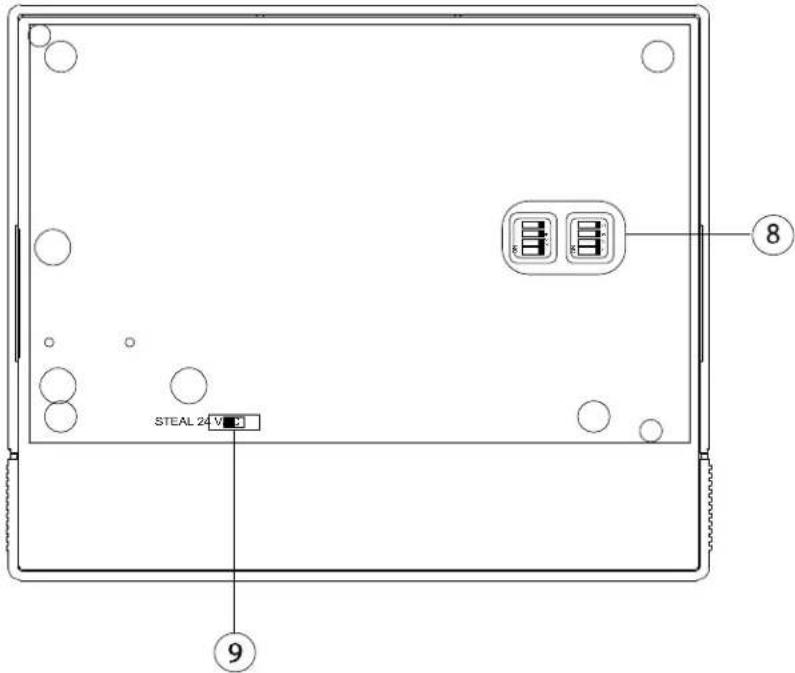
TOP RS2 RS1 RSR W2 W/M RH B D G V2 V1 RC 24C ⑥ ⑦CHV-TSTATEX (DIP Switch and Power Switch View)
text_image
STEAL 24V ⑨ ⑧Connectors, Controls & Indicators
| # CONNECTORS, CONTROLS & INDICATORS | DESCRIPTION | |
| 1 | MODE Button | Cycles through available system modes: OFF, HEAT, AUX HEAT ONLY (for heatpump or dual-fuel systems only), AUTO and COOL |
| 2 | FAN Button | Toggles fan setting between FAN AUTO and FAN ON |
| 3 | ▲ | Raises the setpoint |
| 4 | ▼ | Lowers the setpoint |
| 5 LCD DISPLAY Displays ambient temperature, setpoint, system mode, fan setting, call activity, low battery, RF or control system communication errors, firmware download progress, setup parameter/function and value | ||
| 6 HVAC (7) terminal blocks | RS2: Remote sensor (2) (outdoor)RS1: Remote sensor (1) (indoor)RSR: Remote sensor returnRSR: Remote sensor returnW2: 2nd stage heatW/W1: 1st stage heatRH: Return heat | |
| 7 HVAC (7) terminal blocks | B: Auto change over (inverted);switched to RC during heat calls.O: Auto change over; switched to RC during cool calls.G: FanY2: 2nd stage compressorY/Y1: 1st stage compressorRC: Return cool24C: 24 Vac common | |
| 8 | DIP Switches | (2) Four-bank two-position DIP switches used to configure device settings;Refer to “DIP Switch Setup” which starts on page 11 for details |
| 9 | Power Switch | (1) Two-position slide switch used to configure power settings;Refer to “DIP Switch Setup” which starts on page 11 for details |
Setup
Identity Code
Every CHV-TSTATEX communicating via RF with a Crestron control system through a CEN-RFGW-EX wireless gateway or with an MC3 3-Series Control System requires a unique RF ID. The RF ID is a two-digit hexadecimal number that can range from 03 to FF. The RF ID of the unit, set using Crestron Toolbox™, must match the RF ID specified in the Crestron Studio or SIMPL Windows program.
Supplied Hardware
The hardware supplied with the CHV-TSTATEX is listed in the following table.
Supplied Hardware for the CHV-TSTATEX
| DESCRIPTION PART | NUMBER | QUANTITY |
| Screws, Zinc, Phillips, Pan Head, #06-32 x 1” | 2007251 | 2 |
| Batteries, AA, Alkaline 2001050 2 |
Installation
NOTE: Installers should have a strong working knowledge of HVAC systems.
The location of the thermostat can affect its performance and efficiency. Install the thermostat away from direct sunlight, drafts, doorways, skylights and windows. Also make sure the thermostat is conveniently located for control access and setup.
Thermostats should be mounted 60 inches ( 1.6 meters) above the finished floor (HVAC industry standard). Do not mount on an exterior wall.
The following tools and hardware are required for installation:
• Standard 1-gang electrical box, mounted horizontally (not supplied)
• Phillips screwdriver (not supplied)
• Two 1-inch pan head Phillips screws (included)
• Two AA batteries (included)
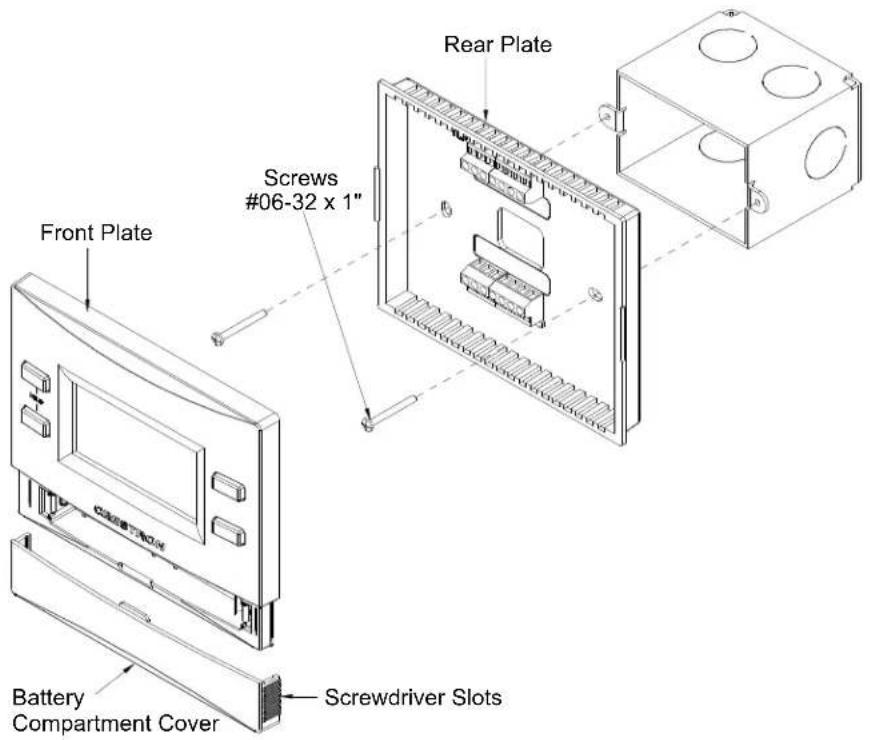
Use the following procedure to install the CHV-TSTATEX in a standard, 1-gang electrical box (refer to illustration on the following page):
- Turn HVAC system power OFF.
- Separate thermostat front plate from rear plate. (This may require exerting force when removing the front plate.)
- Feed HVAC wiring from the electrical box through the hole in the center of the rear plate so it can be connected to the proper terminals on the CHV-TSTATEX after the thermostat is mounted.
CAUTION: Excess wire pinched between the CHV-TSTATEX and electrical box could cause a short circuit. Make sure that all excess wire is completely inside the electrical box and not between the box and the CHV-TSTATEX.
NOTE: To ensure accurate temperature readings, avoid drafts in the back of the unit by plugging the wire hole with insulation.
-
Make sure unit is correctly oriented and place it in the electrical box.
-
Attach the CHV-TSTATEX rear plate to the electrical box using the two included #06-32 x 1" pan head screws.
CAUTION: Do not press on the LCD display during mounting, as this may cause the screen to crack.
-
Attach the front plate.
-
Carefully remove the warning label from the LCD display.
-
Insert batteries and attach the battery compartment cover.
CAUTION: Replace all batteries in the device at the same time. Mixing old and new batteries in the device may result in battery leakage and equipment damage.
NOTE: Crestron has provided small slots on either side of the battery cover, designed to allow a flathead screwdriver to be inserted to assist in removal.
- Turn HVAC system power ON.
Installation into Electrical Box
text_image
Rear Plate Screws #06-32 x 1" Front Plate Battery Compartment Cover Screwdriver SlotsDIP Switch Setup
The following describes the DIP switch settings.
- Install two AA batteries (included) in the battery compartment.
- Locate the DIP switches inside the unit and configure the parameters per the tables below.
DIP Switch Settings
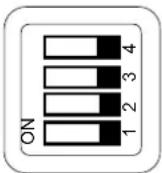
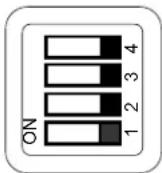
Left Switch
| # | DESCRIPTION ON OFF | ||
| 4 | System Type | Heat/Cool | Heat Pump |
| 3 | Heat Pump Mode | Aux Heat | Dual Fuel |
| 2 | Cool/HP Stages 1 2 | ||
| 1 | Heat Stages 1 2 |
Right Switch
| # | DESCRIPTION ON OFF | ||
| 4 | Fan In Heat | Disabled | Enabled |
| 3 | Change Over Outputs | Disabled | Enabled |
| 2 | Cool SP Range | Normal | Extended |
| 1 | N/A | N/A | N/A |
By default, the CHV-TSTATEX is configured to be powered by two AA alkaline batteries. To extend battery life, the device also receives power from the HVAC system by drawing a small amount of current through the heat or cool terminals. This is known as Steal Power mode.
To enable this feature, locate the power switch inside the unit and slide it to STEAL. (This is the default factory setting on the CHV-TSTATEX.)
Power Switch
STEAL
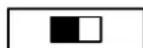
24VAC
NOTE: Steal Power mode does not draw enough current to cause the external heat or cool relays to close. More specifically, when the unit is not making a call for heat, it draws power through the RH and W terminals. When the unit is making a call for heat, it draws power through the RC and Y terminals. (This does not work if the thermostat has been wired for a cool only application.) The CHV-TSTATEX must be wired for heat control in order to take advantage of Steal Power mode.
NOTE: In Steal Power mode, even when an auxiliary power source is available, the unit continues to enter a communications sleep state, waking every 30 seconds or 1 minute (based on the infiNET EX Sleep Time setting) to exchange data with the control system. Refer to “Remote Operation” which starts on page 32 for details.
NOTE: Steal Power mode may cause problems with some types of HVAC systems, such as indicating a false heat or cool call. If this occurs, do not use Steal Power mode.
If the thermostat is going to be wired so that 24 volts ac are always present on the 24C terminal, slide the POWER DIP switch to 24VAC. No batteries are required in this mode.
NOTE: When the unit detects 24 Vac, it no longer “sleeps”, meaning it offers real time communication with the control system.
NOTE: When the unit is powered from a constant 24 Vac supply, there may be a slight discrepancy between the ambient temperature displayed on the thermostat and the actual room temperature. This discrepancy is also seen when switching from STEAL to 24VAC. This is normal and the discrepancy disappears within approximately 10 minutes.
Wiring the CHV-TSTATEX to the HVAC System
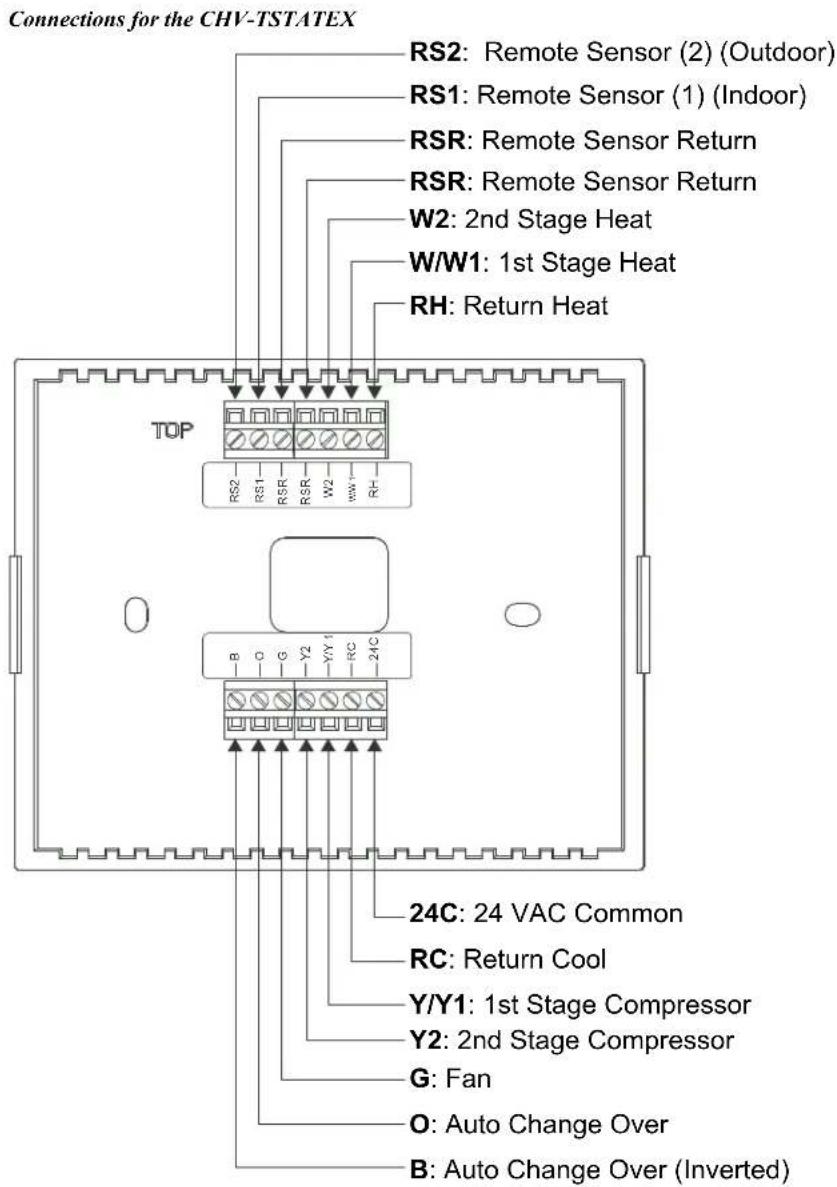
Make the necessary connections as called out in the illustrations that follow. A flat head screwdriver (not supplied) is required to attach the control wires from the HVAC system. Apply power after all connections have been made.
The illustrations on the following pages show examples for connection to various types of HVAC systems. If the system being connected does not match any of the systems described below, contact Crestron Technical Support for assistance.
text_image
Connections for the CHV-TSTATEX RS2: Remote Sensor (2) (Outdoor) RS1: Remote Sensor (1) (Indoor) RSR: Remote Sensor Return RSR: Remote Sensor Return W2: 2nd Stage Heat W/W1: 1st Stage Heat RH: Return Heat TOP RS2 RS1 RSR W2 w/w RH B O G Y2 Y/Y1 RC 24C 24C: 24 VAC Common RC: Return Cool Y/Y1: 1st Stage Compressor Y2: 2nd Stage Compressor G: Fan O: Auto Change Over B: Auto Change Over (Inverted)NOTE: 24 volt power is returned through the RH connector. Refer to wiring diagrams on the following pages.
NOTE: Most heat pump systems use O for changeover. B is provided for the systems that do not.
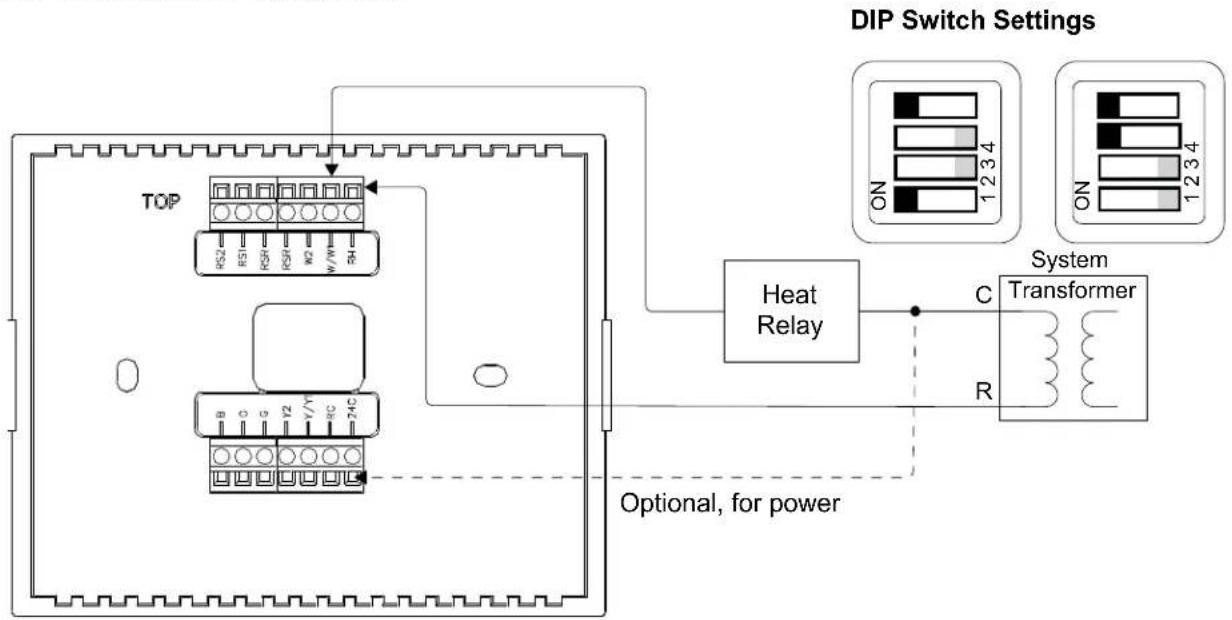
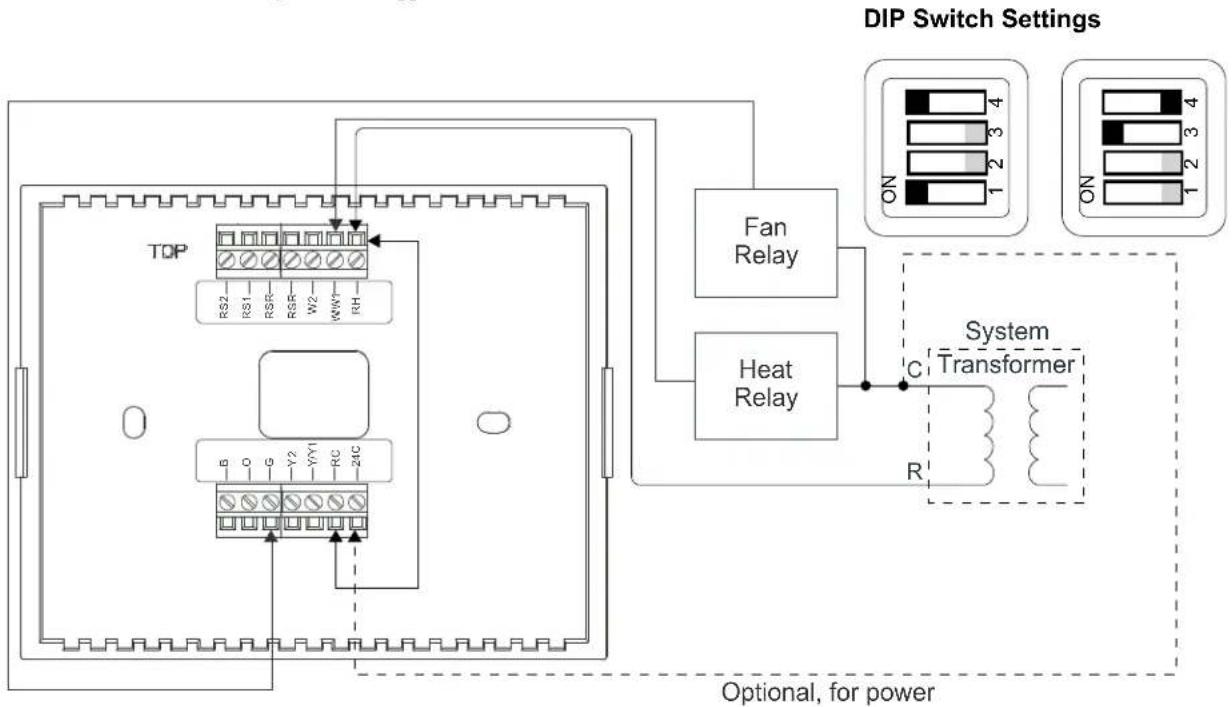
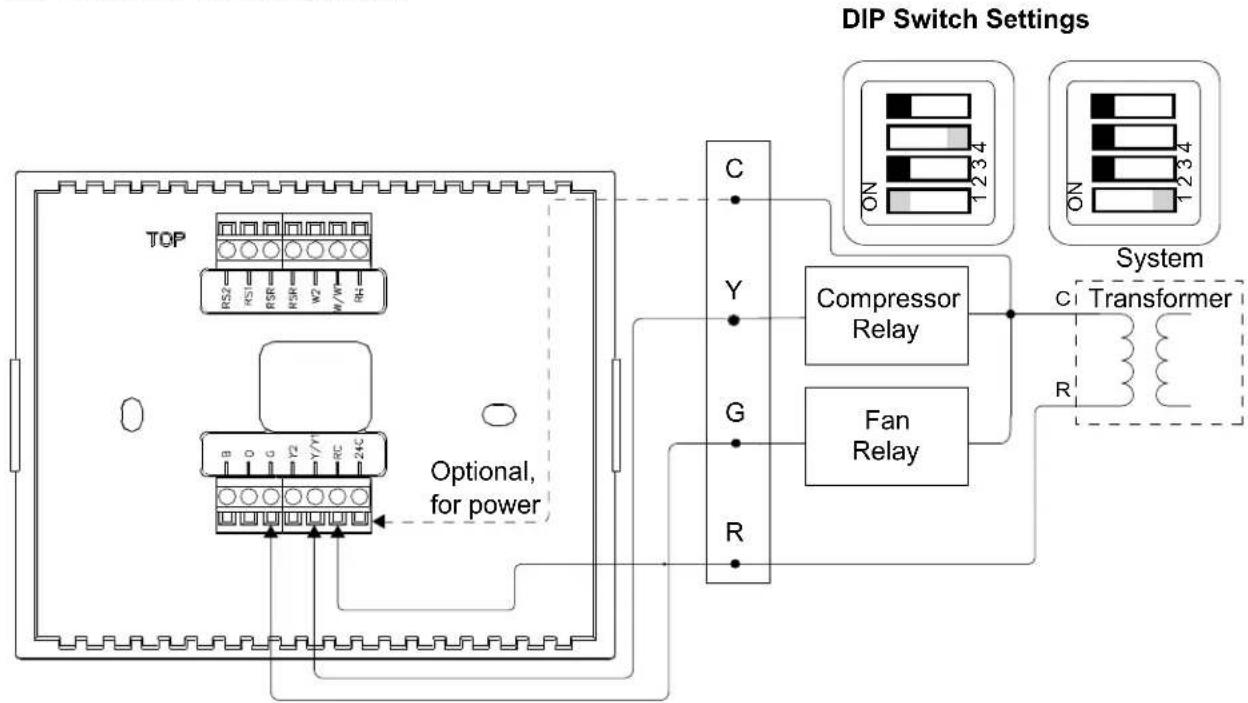
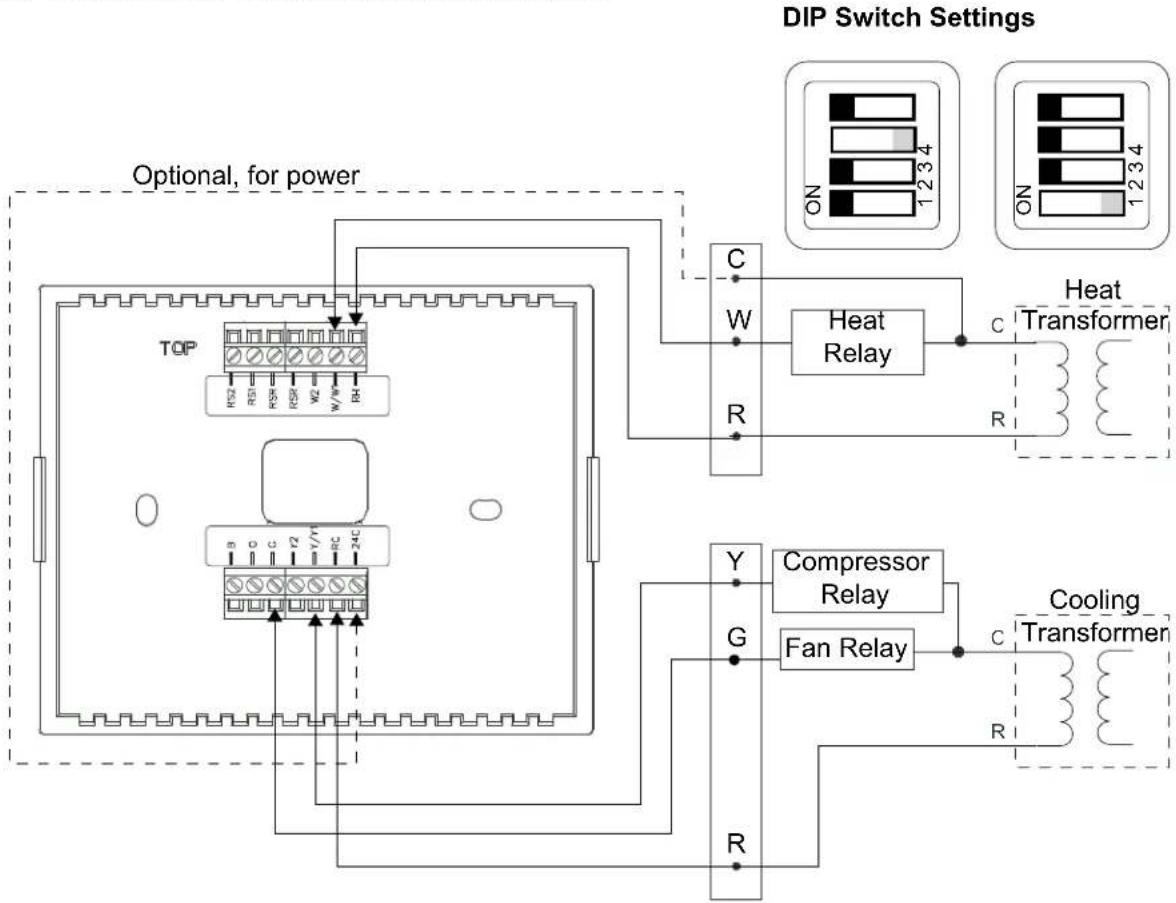
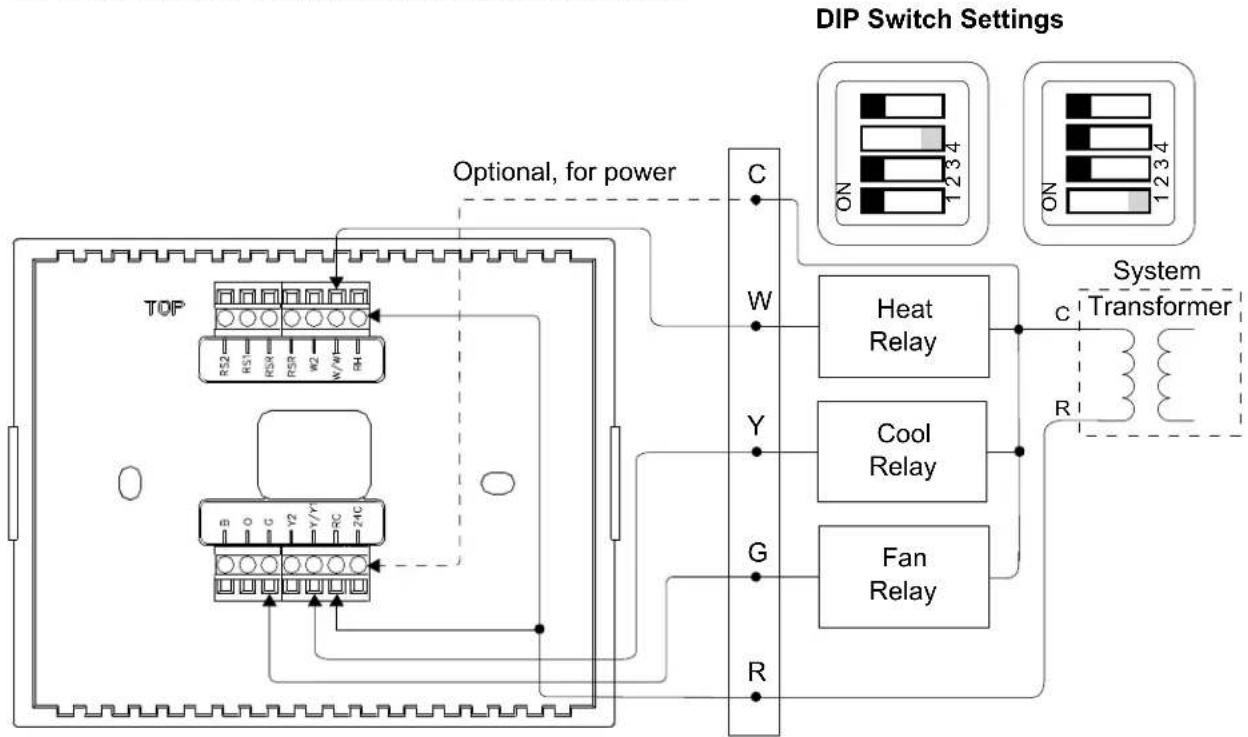
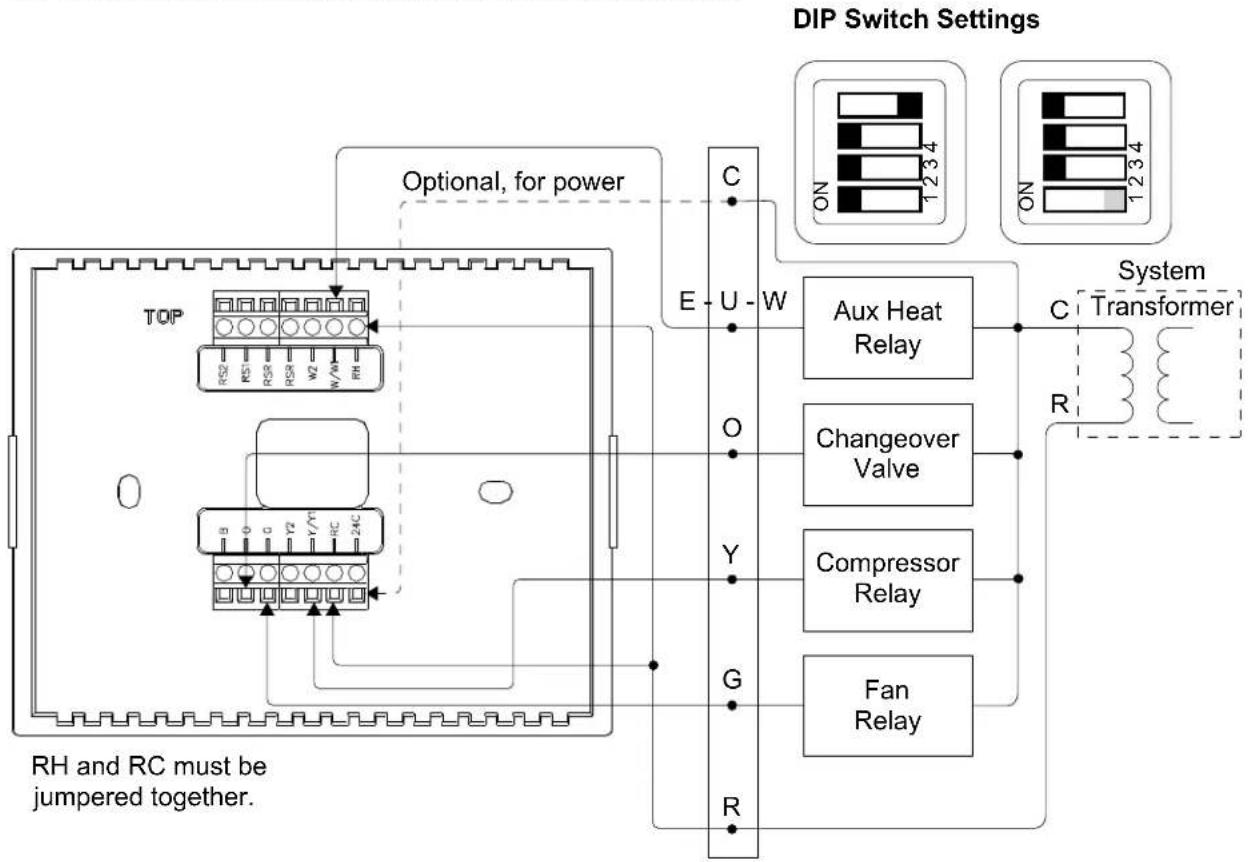
NOTE: Refer to "DIP Switch Setup" which starts on page 11 for DIP switch settings.
CHV-TSTATEX in Heat Only Application
flowchart
graph TD
    A["TOP"] --> B["RS2"]
    A --> C["RS1"]
    A --> D["RS8"]
    A --> E["RS9"]
    A --> F["RC"]
    A --> G["W/WH"]
    H["Heat Relay"] --> I["C"]
    I --> J["System Transformer"]
    K["Optional, for power"] --> L["R"]
    M["DIP Switch Settings"] --> N["ON 1 2 3 4"]
    M --> O["ON 1 2 3 4"]
CHV-TSTATEX in Heat Only with Fan Application
flowchart
graph TD
    A["TDP"] --> B["RS2"]
    A --> C["RS1"]
    A --> D["RSR"]
    A --> E["W2"]
    A --> F["KWY"]
    A --> G["RH"]
    H["Fan Relay"] --> I["ON 4"]
    H --> J["ON 3"]
    H --> K["ON 2"]
    L["Heat Relay"] --> M["ON 4"]
    L --> N["ON 3"]
    L --> O["ON 2"]
    P["System Transformer"] --> Q["C"]
    P --> R["R"]
    S["Optional, for power"] -.-> P
NOTE: To run fan during heat calls, be sure to enable the DIP switches. Refer to "DIP Switch Setup" which starts on page 11 for details.
NOTE: A jumper wire must be placed between RC and RH for heat only applications to be able to call the fan.
CHV-TSTATEX in Cool Only Application
flowchart
graph TD
    A["Power Input"] --> B["Optional, for power"]
    B --> C["Compressor Relay"]
    B --> D["Fan Relay"]
    C --> E["System Transformer"]
    D --> E
    E --> F["DIP Switch Settings"]
    style A fill:#f9f,stroke:#333
    style B fill:#ccf,stroke:#333
    style C fill:#cfc,stroke:#333
    style D fill:#fcc,stroke:#333
    style E fill:#ffc,stroke:#333
NOTE: A jumper wire must be placed between RC to RH for in order to provide power.
NOTE: Connect Y/Y1 and W/W1 to steal power in cool only mode. Make sure to disable heat calls on the Heat Enable (HE) screen in Setup mode. This setup can cause unintended system calls if Heat mode or Auto mode is entered.
CHV-TSTATEX in Heat-Cool Application with Separate Systems
flowchart
graph TD
    A["Power Input"] --> B["TOP"]
    B --> C["RS2 R10 R3R R5R W2 W/N RH"]
    B --> D["Resistor 24C"]
    E["Heat Relay"] --> F["C"]
    G["Compressor Relay"] --> H["Y"]
    I["Fan Relay"] --> J["G"]
    K["Heating Transformer"] --> L["R"]
    M["DIP Switch Settings"] --> N["Optional, for power"]
    N --> O["ON 1 2 3 4"]
    N --> P["ON 1 2 3 4"]
    style A fill:#f9f,stroke:#333
    style E fill:#ccf,stroke:#333
    style K fill:#cfc,stroke:#333
CHV-TSTATEX in Heat-Cool Application with Integrated Control Unit
flowchart
graph TD
    A["Power Input"] --> B["TOP"]
    B --> C["RS2 R52 H57 R53 R50 W2 W1 W4"]
    B --> D["RS1 24C"]
    E["DIP Switch Settings"] --> F["Heat Relay"]
    E --> G["Cool Relay"]
    E --> H["Fan Relay"]
    I["System Transformer"] --> J["ON 1 2 3 4"]
    I --> K["ON 1 2 3 4"]
    L["Optional, for power"] --> M["C"]
    L --> N["W"]
    L --> O["Y"]
    L --> P["G"]
    L --> Q["R"]
RH and RC must be jumpered together.
CHV-TSTATEX in Heat Pump System Application with Integrated Controller
flowchart
graph TD
    A["Power Input"] --> B["TOP"]
    B --> C["RS2 RCS1 RCS4 RCS8 W2 N/A6 RH"]
    B --> D["RS3 0 0 0 1/7 RC 24C"]
    E["DIP Switch Settings"] --> F["Aux Heat Relay"]
    F --> G["Changeover Valve"]
    F --> H["Compressor Relay"]
    F --> I["Fan Relay"]
    G --> J["System Transformer"]
    H --> J
    I --> J
    K["Optional, for power"] --> B
    L["RH and RC must be jumpered together."] --> M["Output"]
    style A fill:#f9f,stroke:#333
    style B fill:#ccf,stroke:#333
    style E fill:#cfc,stroke:#333
    style F fill:#fcc,stroke:#333
    style G fill:#ffc,stroke:#333
    style H fill:#fcc,stroke:#333
    style I fill:#fcc,stroke:#333
NOTE: Heat pump and dual-fuel heat pump systems require an outdoor temperature source (such as Crestron's CHV-RTS, sold separately) to function properly.
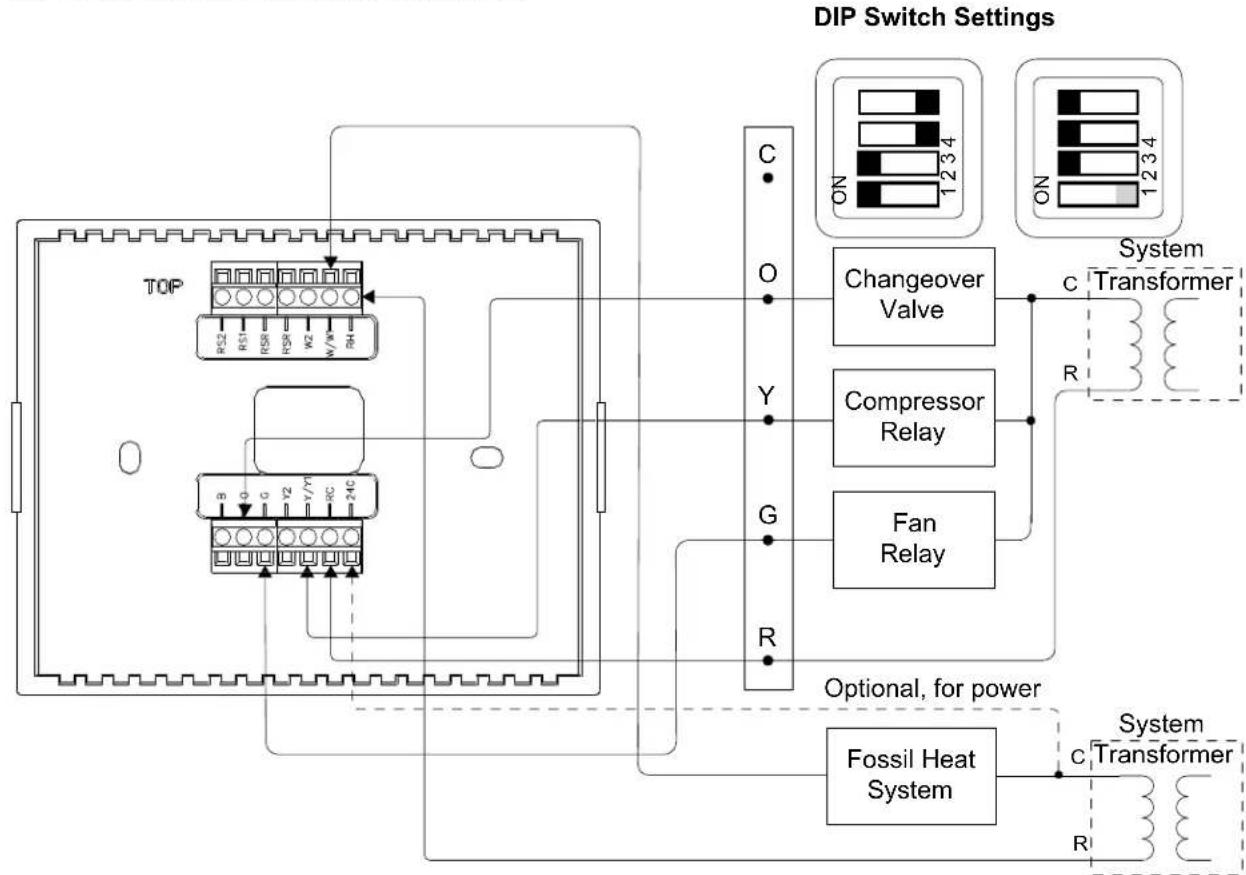
CHV-TSTATEX in Dual-Fuel Heat Pump Application
flowchart
graph TD
    A["TOP"] --> B["RS2 R51 R58 R59 V2 W/W RH"]
    B --> C["RS3 0 C V2 V/Y RC=24C"]
    C --> D["Changeover Valve"]
    C --> E["Compressor Relay"]
    C --> F["Fan Relay"]
    D --> G["ON 1234"]
    E --> H["ON 1234"]
    F --> I["ON 1234"]
    J["Optional, for power"] --> K["Fossil Heat System"]
    L["System Transformer"] --> M["ON 1234"]
    N["Other Components"] --> O["Chamber"]
    P["Power Supply"] --> Q["Power Supply"]
    style A fill:#f9f,stroke:#333
    style B fill:#ccf,stroke:#333
    style C fill:#cfc,stroke:#333
    style D fill:#fcc,stroke:#333
    style E fill:#fcc,stroke:#333
    style F fill:#fcc,stroke:#333
    style G fill:#fff,stroke:#333
    style H fill:#fff,stroke:#333
    style I fill:#fff,stroke:#333
    style J fill:#fff,stroke:#333
    style K fill:#fff,stroke:#333
    style L fill:#fff,stroke:#333
    style M fill:#fff,stroke:#333
    style N fill:#fff,stroke:#333
NOTE: The diagram above applies where furnace control is not integrated into the heat pump system.
NOTE: If the system requires a fan, set the top dip switch in the right bank to "on".
text_image
CHV-TSTATEX Sensor Wiring CHV-RSS CHV-RTS TOP RS2 RS1 RSR RSR W2 WW1 RH -B O G Y2 Y/Y1 RC -24CBasic Setup
Basic Thermostat Setup
The following describes the most common setup requirements. For full details on all setup options, refer to “Advanced Setup” which starts on page 23.
Place the CHV-TSTATEX in the Setup mode by doing the following:
- Press and hold the FAN button.
- While the FAN button is being held, press and hold the ▲ and ▼ buttons simultaneously.
- Hold all three buttons for 5 seconds, after which the unit enters Setup mode. The display shows the Temperature Scale function (FC).
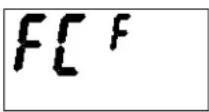
Use ▲ or ▼ to choose the temperature units: F (setpoint in whole degrees Fahrenheit), C1 (setpoint in whole degrees Celsius) or C2 (setpoint in half degrees Celsius).
When setting parameters (such as when choosing between Fahrenheit or Celsius display), pressing the ▲ or ▼ button increments or decrements the value. Value change occurs when button is released.
Joining an infiNET EX Network
Before a CHV-TSTATEX can be used on an infiNET EX network, it must first join an infiNET EX network by being acquired by an infiNET EX gateway (e.g., CEN-RFGW-EX).
NOTE: A CHV-TSTATEX can be acquired by only one gateway.
To acquire a CHV-TSTATEX, perform the following:
- Put the CEN-RFGW-EX into Acquire mode, from the unit itself or from Crestron Toolbox, as described in the latest revision of the CEN-RFGW-EX Operations & Installation Guide (Doc. 6706), which is available from the Crestron Web site (www.crestron.com/manuals).
NOTE: In an environment where multiple gateways are installed, only one gateway at a time should be in Acquire mode.

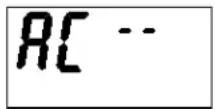
- Ensure the unit is in Setup mode (refer to "Basic Thermostat Setup" which starts on page 21 or "Setup Mode" which starts on page 23) and that Acquire mode (AC) is selected.
- Press MODE until the "infINET EX ID" function is displayed (id). Use ▲ and ▼o choose the infINET EX ID.
- Press MODE until the "Start infiNET EX Acquire" function is displayed (AC).
- Press ▲ or ▼ on the CHV-TSTATEX to start the acquire process: The display shows flashing “—” (in progress). When finished, the display shows 00 (finished, found gateway) or E# (finished, could not find gateway), where # represents an error code.
- Once all devices have been acquired, take the CEN-RFGW-EX out of Acquire mode by pressing its ACQUIRE button. Press FAN on the thermostat to exit Setup mode.
NOTE: The acquire process can take up to 15 seconds. The acquire process cannot be aborted.
NOTE: “E1” indicates that search time has expired and no gateway was found. To enable the channel, refer to “Start infiNET EX Acquire” in “Setup Mode Parameters/Functions” which starts on page 24.
Leaving an infiNET EX Network
To leave a network, press and hold the FAN, ▲ and ▼ buttons simultaneously for five seconds. Press MODE until the unacquire function is displayed (UA). Press ▲ or ▼ on the CHV-TSTATEX to start the unacquire process. Refer to “Verifying Communication Status” on page 27 for a list of codes displayed once the process is completed. Press FAN on the thermostat to exit Setup mode.
Advanced Setup
Setup Mode
After the CHV-TSTATEX is installed, it is necessary to set it up for a particular heating/cooling system. Please note that some of the setup parameters listed below are not always shown since they are dependent upon other thermostat settings. Refer to “Setup Mode Parameters/Functions” which starts on page 24 for details.
Place the CHV-TSTATEX in the Setup mode by doing the following:
- Press and hold the FAN button.
- While the FAN button is being held, press and hold the ▲ and ▼ buttons simultaneously.
- Hold all three buttons for 5 seconds, after which the unit enters Setup mode.
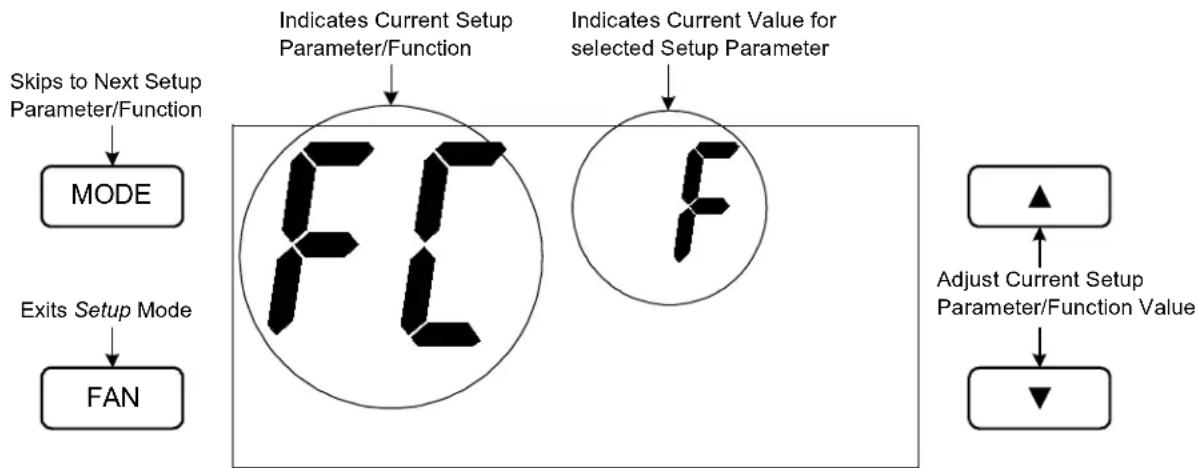
Once in Setup mode, the display indicates the currently selected setup parameter/function. Press and release the MODE button quickly (must be released within one second) to change to the next parameter/function in the list.
NOTE: Holding the MODE button for more than one second resets the currently selected parameter/function to its default value.
When setting parameters (such as when choosing between Fahrenheit or Celsius display), pressing the ▲ or ▼ button increments or decrements the value. Value change occurs when button is released.
When a function is selected (such as when starting an infiNET EX acquire), pressing either ▲ or ▼ executes the function.
To exit from Setup mode, press the FAN button on the CHV-TSTATEX.
CHV-TSTATEX LCD Display (Setup Mode)
flowchart
graph TD
    A["Skips to Next Setup Parameter/Function"] --> B["MODE"]
    C["Exits Setup Mode"] --> D["FAN"]
    E["Indicates Current Setup Parameter/Function"] --> F["FF"]
    G["Indicates Current Value for selected Setup Parameter"] --> H["F"]
    I["Adjust Current Setup Parameter/Function Value"] --> J["▼"]
NOTE: When the CHV-TSTATEX is in Setup mode the large 7-segment displays show the current setup parameter/function. The small 7-segment displays show the current value for the selected setup parameter, if applicable, or it displays “—” when a function is selected. All other display elements are hidden (refer to “LCD Display” which starts on page 32).
NOTE: While in Setup mode, a period of one minute with no button activity causes the CHV-TSTATEX to revert to standard operation, unless a function (such as an infiNET EX acquire) is executing.
Setup Mode Parameters/Functions
The following table shows the available setup parameters/functions.
Setup Mode Parameters/Functions
| PARAMETER/ FUNCTION | CODE VALID VALUES | DEFAULT VALUE | NOTES | |
| Temperature Scale | FC | F, C1 or C2 | F | Sets units to use for temperature display (Fahrenheit or Celsius);When using Celsius temperature scale, C2 allows the setpoint to be adjusted in 0.5°C steps |
| Backlight Timeout | bL | 1 – 4 seconds or disabled (--) | 4 seconds Sets the number of seconds the backlight remains lit after a button press | |
| Auto mode AU Disabled | (--), | Dual setpoint (d) or Single setpoint (S) | -- | Used to enable Auto mode with single or dual setpoint operation |
| Auto Dead Band(only appears when Auto mode is enabled) | db | 2 – 6 (for Fahrenheit) or 1 – 3 (for Celsius) | 2 Used to set minimum separation between heat and cool setpoints (with dual setpoints) or maximum drift before system latches alternate mode (with single setpoint). | |
| Heat system mode enable | HE | Y, N | Y | Used to protect cool-only H/C applications that use wire jumper from Y1 to W1 to enable power stealing;Allowing heat mode in this situation would result in cooling during a heat call |
| Temperature Offset | to | -9 to +9 (for Fahrenheit) or -5 to +5 (for Celsius) | 0 Permits recalibration of room temperature sensor. This is the number of degrees added to or subtracted from the actual temperature;This adjustment changes the actual regulation temperature, not just the display | |
| Heat Anticipator | HA | 1 – 6 | 3 | Lower setting results in more frequent cycles and faster response (tighter regulation);Higher setting results in less frequent cycles and slower response (looser regulation);The default value should suffice in nearly all installations |
| PARAMETER/FUNCTION | CODE | VALID VALUES | DEFAULT VALUE | NOTES |
| Cool Anticipator | CA | 1 – 6 | 3 | Lower setting results in more frequent cycles and faster response (tighter regulation);Higher setting results in less frequent cycles and slower response (looser regulation);The default value should suffice in nearly all installations |
| Heat pump Balance Point(only appears for Heat pump and Dual-Fuel Heat pump systems) | Hb 18 to | 90 (for Fahrenheit) or -8 to 32 (for Celsius) or Disabled (--) | -- Heat pump systems have performance restrictions based on outdoor temperature;This setting is the minimum outdoor temperature at which the heat pump (or dual-fuel heat pump) system runs;Full range of values is available when aB is disabled | |
| Aux-Heat Balance Point(only appears for Heat pump type systems) | aB 16 to | 88 (for Fahrenheit) or -9 to 31 (for Celsius) or Disabled (--) | -- | Aux heat operation is locked out when outdoor temperature exceeds the Aux Heat Balance Point;Dual-fuel systems do not allow both the heat pump and the aux to run at the same time;Full range of values is available when Hb is disabled |
| Interstage Differential(only appears for Heat pump systems) | dF 05 to | 80 (tenths of a degree Fahrenheit), adjustable in 5 tenths degree increments or 05 to 45 (tenths of a degree Celsius), adjustable in 5 tenths degree increments | 20 (F) or 10 (C) | This is the threshold to trigger higher stages in a 2-stage heat/cool system;Heat pump systems can allow both the heat pump and aux to run at the same time;This sets the ambient temperature threshold to trigger aux heat in addition to the heat pump |
| Heat pump/AUX or any 2-stage system configuration(only appears for Heat pump type systems) | AS 1 – 6 | 6 Accumulated staging threshold | index sets how aggressively staging is performed in response to extended system calls;Index 6 effectively disables accumulated staging effects | |
| Remote sensors Sn i, r, ir i | i – internal sensor only(When no remote sensor is detected, only this option is available);r – remote sensor only(Only available when a remote sensor has been detected);ir – average internal and remote sensors | |||
| Check Firmware Version | rE | Firmware version is displayed in xx.yy.zz format. “—” can also be displayed | -- When firmware version is not yet shown, display is “—”;Each press of the ▲ or ▼ button cycles to the next portion of the version number | |
| InfiNET EX ID (RF ID) | id | 01 and 03 – FE | 01 | Sets the infiNET EX ID. Crestron Studio (or SIMPL Windows) restricts infiNET EX devices to an ID range of 03 – 20 |
| infiNET EX Sleep Time | SL | Short (S) or Long (L) | L | Indicates thermostat update rate; Setting for fewer updates (L) conserves battery power |
| Start infiNET EX Acquire | AC Not started (--) In progress (flashing --) Finished, found GW (00) Finished, could not find GW (E#, where # represents an error code) | N/A Refer to “Verifying Communication Status” which starts on page 27 for details | ||
| Unacquire Gateway | UA | Not started (--) In progress (flashing --) Finished, success (00) Finished, failed (E#, where # represents an error code) | N/A Refer to “Verifying Communication Status” which starts on page 27 for details | |
| Communications check | CC Error (E# - where # is a number from 0 to 7) No problems (00) | N/A Refer to “Verifying Communication Status” which starts on page 27 for details | ||
| Check Battery Life | bA | Not started (--) Estimated remaining battery life (0 – 99) | N/A Gives estimated remaining battery life in percent | |
| Restore Factory Defaults | Fd | Not started (--) In progress (blank or flashing --) Finished (00) Button not held long enough (Er) | N/A Restores all setup parameters to their default settings; To prevent accidentally performing this action, press and hold either the ▲ or ▼ button for three seconds for this function to execute | |
| Perform Heat Call Test (Toggle) | H | Not started/Heat call off (--) Heat call on (on) (also, “H” icon turns on) | N/A | Tests the heat call output. Bypasses short-cycle timers; Useful for technician system testing; Note that calling the heat may activate other relays in the thermostat as required, such as the fan output for heat pump or dual-fuel types |
| Perform Cool Call Test (Toggle) | C | Not started/Cool call off (--) Cool call on (on) (also, “C” icon turns on) | N/A | Tests the cool call output; Bypasses short-cycle timers; Useful for technician system testing; Note that calling the cooling may activate other relays in the thermostat as required, such as the fan output |
| Perform Aux Heat Call Test (Toggle)(appears only on Heat pump and Dual-Fuel Heat pump systems) | A Not started/Aux call off (--)Aux call on (on)(also, “A” icon turns on) | N/A Same as above, for testing aux heat output | ||
| Perform Fan Call Test (Toggle) | F Not started/Fan call off (--)Fan call on (on)(also, “F” icon turns on) | N/A Same as above, for fan;Note that only the fan relay can be activated for a fan call test | ||
| Perform Self Test St Not started (--) | In progress (flashing --)Finished, self test ok (00)Finished, self test failed (E#, where # represents an error code) | N/A | Refer to “Self-Test Results” which starts on page 28 for details | |
Verifying Communication Status
To verify communication status, enter the Setup mode as described in "Basic Setup" on page 21. Press MODE until the AC, UA or CC function is displayed. Press ▲ or ▼ on the CHV-TSTATEX to verify the communication status.
Communication Error Codes
| STATUS/ERROR CODE | MEANING FOR ACQUIRE “AC” | MEANING FOR UNACQUIRE “UA” | MEANING FOR COMMUNICATION CHECK ”CC” |
| 00 | Success | Success | No problems found |
| E1 | No gateway found | Failed or no previous gateway information was present | No gateway information present |
| E2 GW found but rejected device | N/A | N/A | |
| E3 Radio operation not available | Radio operation not available | Radio operation not available | |
| E4 | N/A | N/A | N/A |
| E5 | N/A | N/A | N/A |
| E6 | N/A | N/A | Network communication not possible |
| E7 | N/A | N/A | Device not joined to a gateway |
Self-Test Results
These status/error codes are returned when performing a self-test operation, enter Setup mode as described in "Basic Setup" on page 21. Press MODE until the St function is displayed. Press ▲ or ▼ on the CHV-TSTATEX to verify the communication status.
Self-Test Error Codes
| STATUS/ERROR CODE | SUMMARY | CORRECTIVE ACTION | REMARKS |
| 00 | Success | None | No detectable problems found |
| E0 Low battery warning | Check and/or replace batteries | Error is only returned when current power configuration requires batteries | |
| E1 24 Vac usage warning | Check power configuration | Error is set when 24 Vac appears to be available but is not configured properly (slide switch position) | |
| E2 Display operation | Return unit | Device display may not be operating properly | |
| E3 NV memory usage | Replace unit if feasible | Retention of non-volatile setup and operation parameters may be compromised | |
| E4 Poor link quality | Perform general network debugging | Poor communication link to gateway may be consuming extra power and lowering battery life | |
| E5 Gateway acquire information | Acquire device or check network | Device cannot communicate with a gateway; Normal result for unacquired device | |
| E6 Network communication error | Additional network communication issues detected | Normal result for unacquired device | |
| E7 Poor network communication | Additional indicator of poor communications link | Often associated with excessive network hops; Consider moving device closer to gateway or splitting network with additional gateways for better coverage | |
Operation
System Mode
The MODE button on the CHV-TSTATEX cycles the unit through all available system modes in the following order: Off, Heat, Emergency Heat (for heat pump and dual-fuel systems), Cool and Auto (if enabled in Setup).
The system mode changes upon release of the MODE button and the selected mode becomes operational 5 seconds after the mode has been entered.
Off Mode
In Off mode, all HVAC systems are disabled.
Heat Mode
In Heat mode, the thermostat uses the heating system to maintain the setpoint temperature.
AUX Heat Mode
In Aux Heat mode, the thermostat uses only the auxiliary heat output on heat pump or dual-fuel systems to maintain the setpoint temperature.
NOTE: Aux Heat mode can only be accessed when heat/cool type has been set to Heat pump or Dual-Fuel Heat pump. This setting can be useful when the heat pump is being serviced or when there is an unexpected problem with it. The display flashes the “flame” icon when the system is in Aux Heat mode.
Cool Mode
In Cool mode, the thermostat uses the cooling system to maintain the setpoint temperature.
Auto Mode
In Auto mode, the thermostat allows the system to switch between Heat and Cool automatically as needed to maintain the setpoint temperature. By default, the CHV-TSTATEX has been configured with Auto mode disabled, meaning it is not available from the thermostat itself or via another interface such as a touch screen.
In order to enable Auto mode, enter Setup mode and change the AU setting from “--” to either d (dual setpoint) or S (single setpoint). Refer to “Setup Mode” which starts on page 23 for details.
Once Auto mode has been enabled, it can be accessed from the CHV-TSTATEX controls as follows:
-
Press the MODE button until both the flame and snowflake icons appear in the display. This indicates Auto mode is now active.
-
Use the ▲ and ▼ buttons to adjust the setpoint. Actual operation depends on whether single or dual setpoints are being used.
a. In dual setpoint Auto mode, the first press of the ▲ or ▼ buttons (or second press if the first press simply turned on the backlight) causes
either the flame 🎨 snowflake icon to flash rapidly. This indicates which setpoint is adjusted by subsequent presses of the ▲ or ▼ buttons. To adjust or view the alternate setpoint, press the MODE button while the icon is flashing. This causes the alternate icon to flash and now the ▲ and ▼ buttons adjust that setpoint. The flashing icon times out after 5 seconds of no button activity.
b. In single setpoint Auto mode, use the buttons to adjust the setpoint as usual.
Dual Setpoint Auto Mode ("AU" = "d" in Setup Mode)
In dual setpoint Auto mode, separate heat and cool setpoints are used. When the ambient temperature drops below the heat setpoint, the unit calls for heat to maintain the heat setpoint. When the ambient temperature rises above the heat setpoint, the unit does not call for cooling until the temperature exceeds the cool setpoint. When the ambient temperature drops below the cool setpoint, the unit does not call for heating until the temperature is below the heat setpoint.
When dual setpoint Auto mode has been enabled, the Auto Dead Band is used to maintain a minimum separation between the heat and cool setpoints. If this separation is violated by a setpoint adjustment, the other setpoint is automatically adjusted.
For example, if the heat setpoint is at 68 degrees, the cool setpoint is at 72 degrees and the Auto Dead Band is set to 4 degrees, if the cool setpoint is lowered to 71 degrees, the heat setpoint is automatically adjusted to 67 degrees to maintain the 4 degree Auto Dead Band separation.
In dual setpoint Auto mode, the CHV-TSTATEX display indicates whichever setpoint is closer to the ambient temperature. Both the heat and cool setpoints can be viewed simultaneously using a touch screen.
Single Setpoint Auto Mode ("AU" = "S" in Setup Mode)
In single setpoint Auto mode, a single setpoint is used for regulation at all times, regardless of whether the system is heating or cooling. The Auto Dead Band (“db”) setup parameter is used to determine when to switch between heating and cooling.
For example, if the setpoint is at 70 degrees and the Auto Dead Band is set to 2 degrees, if the system is cooling, it does not start heating until the ambient temperature drops below 68 degrees (setpoint – Auto Dead Band). Once the unit has switched to heating, it does not resume cooling until the ambient temperature rises above 72 degrees (setpoint + Auto Dead Band).
A larger value for the Auto Dead Band setting results in less cycling between heating and cooling but can result in large temperature swings during the course of the day. Smaller values for the Auto Dead Band setting result in tighter temperature regulation but more frequent cycling between heating and cooling.
NOTE: When using a single setpoint, the CHV-TSTATEX has a 20 minute change limiter to prevent system toggling. Changing the setpoint resets the 20 minute change limiter.
Fan
The FAN button toggles the fan setting between fan AUTO and fan ON. When set to AUTO, a fan call is made whenever the system makes a cool call or when the system
makes a heat call or auxiliary heat call (if the DIP switch is set to Enabled). When set to ON the fan always runs.
Setpoints
The setpoint is the user selectable temperature for the system to maintain.
The ▲ and ▼ buttons change the current setpoint by one degree F or C (if Temperature Scale is set to F or Cl) or by one half degree C (if Temperature Scale is set to C2).
NOTE: While the setpoint is being adjusted, if it is set to a half-degree increment, the integer portion of the number is displayed and alternates with _5 every quarter second for a period of 4 seconds after the last adjustment. After 4 seconds, only the integer portion of the number is displayed.
If the ▲ or ▼ button is held down for 2 seconds, the unit enters an auto-repeat state and the setpoint adjusts rapidly until the button is released or until the upper (or lower) limit is reached.
Some users want to have setpoints change automatically based on the day of the week and the time of day. For example, in the winter they may want to lower the heat setpoint while they sleep to lower heating costs. To accommodate this, the CHV-TSTATEX provides a “Scheduled Heat Setpoint” and a “Scheduled Cool Setpoint” which can be specified by the control system program. This is handled automatically by the “Crestron CHV-TSTATEX w/5-2 Scheduler” module provided with the Crestron Database. Refer to the Crestron Studio or SIMPL Windows help file for details.
For dual setpoint operation, refer to "Auto Mode" which starts on page 29.
Hold
Hold allows the user to adjust the setpoint and maintains that setpoint until the unit is taken out of Hold. This means that any change to the scheduled heat or cool setpoint that occurs while in Hold is ignored until the unit is taken out of Hold.
Pressing the MODE and FAN buttons simultaneously causes the unit to enter Hold if Hold is not yet active.
Pressing the MODE and FAN buttons simultaneously when Hold is active causes the unit to exit from Hold and recall either the scheduled heat setpoint or scheduled cool setpoint as appropriate to the system mode.
If the system is in single setpoint Auto mode, exiting from Hold recalls the scheduled auto setpoint. If the system is in dual setpoint Auto mode, upon exiting from Hold, the auto cool setpoint becomes the scheduled cool setpoint and the auto heat setpoint becomes the scheduled heat setpoint.
Pressing the MODE and FAN buttons simultaneously when the system mode is Off has no effect.
When Hold is active, the unit continues to adjust the current setpoint when the ▲ or ▼ buttons are pressed. The unit also continues to adjust the current setpoint when the setpoint signal from the control system changes.
When the system mode changes to Heat or Emergency Heat, the current setpoint is set to the scheduled heat setpoint.
When the system mode changes to Cool, the current setpoint is set to the scheduled cool setpoint.
Remote Operation
As an infiNET EX device, the CHV-TSTATEX can be controlled remotely via a Crestron control system. Most often, control of the thermostat is achieved via a touch screen or Web-based graphical interface. In order to extend battery life, the thermostat only communicates with the control system once every 30 seconds or 1 minute, based on the infiNET EX Sleep Time setting. Because of this, there is a noticeable delay between the time a button is pressed on a touch screen and when the thermostat reacts to the command. To account for this, the CHV-TSTATEX modules written by Crestron and provided in the Crestron Database mimic the feedback from the thermostat so that the user sees an immediate response on the touch screen.
Likewise, pressing a local button on the thermostat (for example, setpoint raise or lower) does not cause an immediate change to the corresponding display on a touch screen. Instead, the thermostat wakes up shortly after the last button press to send its updated status to the control system.
If the thermostat is wired to have the optional 24 Vac at the 24C terminal and the power switch is set for 24VAC, there is no delay in feedback.
LCD Display
CHV-TSTATEX LCD Display
text_image
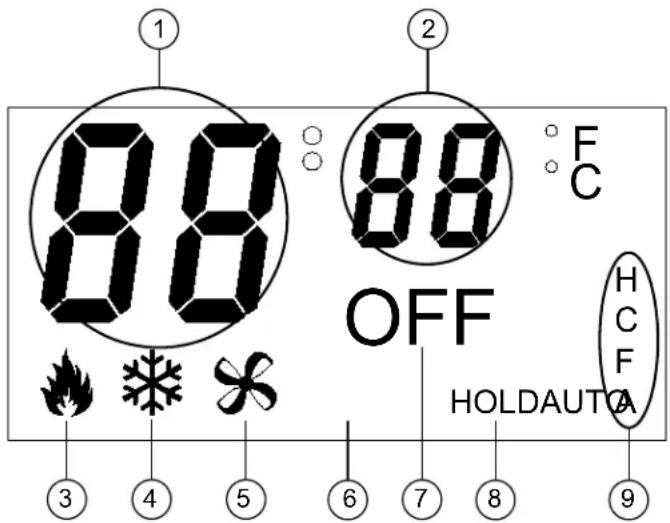
88 OFF HOLDAUTCA ① ② ③ ④ ⑤ ⑥ ⑦ ⑧ ⑨ ⑩ F CLCD Display Elements
| # LCD DISPLAY ELEMENT | DESCRIPTION | |
| 1 | Large 7-segment digits | Indicates current ambient temperature ^1,2 ;In Setup mode, indicates current setup parameter/function;Display range is limited to -9^ to 99^ F ( -9^ to 43^ C);If the ambient temperature is above 99^ , the display indicates 99^ ;If the ambient temperature is below -9^ , the display indicates -9^ |
| 2 | Small 7-segment digits | Indicates current setpoint (in F or C) in whole degrees;While the setpoint is being adjusted, if it is set to a half-degree increment, the integer portion of the number is displayed and alternates with _5 every quarter second for a period of 4 seconds after the last adjustment;After 4 seconds, only the integer portion of the number is displayed;In Setup mode, indicates current value for selected setup parameter |
| 3 | Flame icon | Displayed when the system mode is Heat;Flashes (on 2 seconds, off one half second) when the system mode is Aux Heat (Emergency Heat);Displayed with snowflake icon when system is in Auto mode |
| 4 | Snowflake icon | Displayed when the system mode is Cool;Displayed with flame icon when system is in Auto mode |
| 5 | Fan icon | Displayed at all times. |
| 6 | AUTO indicator | Displayed when FAN setting is AUTO;If this is not displayed, FAN is always ON |
| 7 | OFF indicator | Displayed when the system mode is Off |
| 8 | HOLD indicator | Displayed when the HOLD setting is active |
| 9 | H, C, F & A indicators | H – Displayed whenever a Heat Call is being made;C – Displayed whenever a Cool Call is being made;F – Displayed whenever a Fan Call is being made;A – Displayed whenever an Aux Heat Call is being made |
-
For heat pump and dual-fuel systems, when Emergency Heat mode is selected (by pressing and releasing the MODE button when system mode is Heat) the display shows EH in place of the ambient temperature for 2 seconds.
-
When the CHV-TSTATEX detects a low battery condition (approximately 1 month of battery life remaining), the display alternates L_0 in place of the ambient temperature once per second.
Uploading and Upgrading
Crestron recommends using the latest programming software and that each device contains the latest firmware to take advantage of the most recently released features. However, before attempting to upload or upgrade it is necessary to establish communication. Once communication has been established, files (for example, programs or firmware) can be transferred to the control system (or device). Finally, program checks can be performed (such as changing the device ID or creating an IP table) to ensure proper functioning.
NOTE: Crestron software and any files on the website are for authorized Crestron dealers and Crestron Service Providers (CSPs) only. New users must register to obtain access to certain areas of the site (including the FTP site).
Establishing Communication
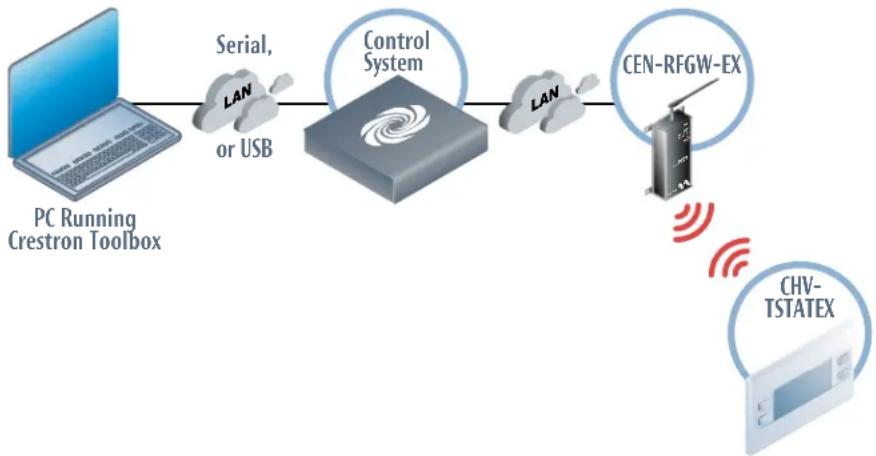
Use Crestron Toolbox for communicating with the CHV-TSTATEX; refer to the Crestron Toolbox help file for details. There is a single method of communication: indirect communication.
Indirect Communication
flowchart
graph LR
    A["PC Running Crestron Toolbox"] --> B["Serial, or USB"]
    B --> C["Control System"]
    C --> D["CEN-RFGW-EX"]
    D --> E["CHV-TSTATEX"]
The CHV-TSTATEX connects to the CEN-RFGW-EX (gateway), which connects to control system via Ethernet, or the CHV-TSTATEX connects directly to an MC3 Control System.
Establish communications between the PC and the control system as described in the latest version of the 2-Series Control Systems Reference Guide (Doc. 6256). If connecting to the MC3, refer to the latest version of the MC3 3-Series Control System Operations Guide (Doc. 7095).
Programs and Firmware
Program or firmware files may be distributed from programmers to installers or from Crestron to dealers. Firmware upgrades are available from the Crestron Web site as new features are developed after product releases. One has the option to upload programs via the programming software or to upload and upgrade via the Crestron Toolbox. For details on uploading and upgrading, refer to the Crestron Studio help file, the SIMPL Windows help file, or the Crestron Toolbox help file.
Crestron Studio / SIMPL Windows
Firmware
If a Crestron Studio (or SIMPL Windows) program is provided, it can be uploaded to the control system using Crestron Studio (or SIMPL Windows) or Crestron Toolbox.
Check the Crestron Web site to find the latest firmware. (New users must register to obtain access to certain areas of the site, including the FTP site.)
Upgrade CHV-TSTATEX firmware via Crestron Toolbox.
- Establish communications with the CHV-TSTATEX and display the "System Info" window.
- Select Functions | Firmware... to upgrade the CHV-TSTATEX firmware.
NOTE: Since the CHV-TSTATEX might be “asleep”, there may be a delay of one minute or less before the update starts.
Program Checks
Using Crestron Toolbox, display the network device tree (Tools | Network Device Tree View) to show all network devices connected to the control system and all infiNET devices that have been acquired by the gateway. Right-click on the CHV-TSTATEX to display actions that can be performed on the CHV-TSTATEX.
Problem Solving
Troubleshooting
The following table provides corrective action for possible trouble situations. If further assistance is required, please contact a Crestron customer service representative.
CHV-TSTATEX Troubleshooting
| TROUBLE POSSIBLE CAUSE(S) | CORRECTIVE ACTION | |
| No display. No power from system. | Check for +24 V on 24C connector.Check circuit breaker powering furnace or boiler.Check thermostat wiring.Check batteries (if running on battery power). | |
| Incorrect mounting to back plate. | ||
| Device does not follow control system commands. | Device is not communicating with the CEN-RFGW-EX. | Open Crestron Toolbox and select the Network Device Tree View. Expand the tree until the gateway to be managed is selected.Right-click the NET ID of the selected gateway to open the sub-menu and select Functions | infiNET EX Gateway... If device is not listed, it must be acquired by the infiNET EX network (refer to “Joining an infiNET EX Network” which starts on page 21). |
| RF ID of device (or the gateway ID) is not set to match the RF ID of the Crestron Studio (or SIMPL Windows) program. | Use the Network Device Tree infiNET EX network in Crestron Toolbox to poll the infiNET EX network. Verify that the RF ID for the infiNET EX device is set to match the RF ID specified in the Crestron Studio (or SIMPL Windows) program. | |
| Heating/Cooling system is not operating. | No power to thermostat. | Check circuit breaker.Check for +24 V on 24C connector.Check circuit breaker powering furnace or boiler.Recheck wiring connections.Check batteries, replace if necessary. |
| Cannot change setpoint setting. | The upper or lower temperature limits were reached. | Heat setpoint range is 38^ to 89^ F ( 3^ to 32^ C).Cool setpoint range is 59^ to 99^ F ( 15^ to 37^ C) or 38^ to 99^ F ( 3^ to 37^ C) if extended cool mode enabled.Refer to "Setup Mode Parameters/Functions" which starts on page 24. |
| System cycles too quickly. | Anticipator setting is too low. | Reprogram anticipator setting (refer to "Setup Mode Parameters/Functions" which starts on page 24). |
| Poor battery life. | Ensure that the power switch selection position is proper for the expected conditions. | Using the 24VAC position prevents power steal operation and causes a device to run on battery alone if no 24 V input is available. |
| Using the STEAL position prevents the 24 V input from being used even if it is available. | ||
| Cool-only applications with nothing connected to RH/W1 cannot power steal. | ||
| Ensure heat system is available if using power steal or follow the cool-only notes in that section. | ||
| Check for communication problems using standard RF troubleshooting. | Fringe communication and excessive gateway reconnect attempts cause extended runtime which consumes battery power more quickly. | |
| Unit is using remote sensors. | Avoid using remote sensors when running on battery alone. Setup system so that power-steal is available. | |
| A long backlight time is being used. | Avoid long backlight runtimes if the user interface is operated frequently. | |
| Room has high temperature variance. | Anticipator setting is too high. | Reprogram anticipator setting (refer to "Setup Mode Parameters/Functions" which starts on page 24). |
| Wide temperature variance in single setpoint Auto mode. | Auto dead band setting is too high. | Reprogram auto dead band (db) setting (refer to "Setup Mode Parameters/Functions" which starts on page 24). |
| Heating/Cooling not operating in single setpoint Auto mode. | 20 minute system toggling lockout. | Reprogram auto dead band (db) and anticipator settings for smoother operation (refer to "Setup Mode Parameters/Functions" which starts on page 24). |
| Wrong temperature is displayed. | Wrong temperature scale. | Select F or C as necessary. |
| A Temperature Offset has been applied. | Reset Temperature Offset (refer to "Setup Mode Parameters/Functions" which starts on page 24). | |
| Bad location. Ensure the thermostat is located away from direct sunlight, drafts, doorways, skylights and windows or exterior walls. | ||
| Heat or cool call occurs but device does not indicate a heat or cool call. | Steal power function may be causing problems with HVAC system. | Change Power DIP Switch to 24VAC and ensure two AA batteries are installed. |
| Improper wiring connections. | Recheck wiring connections. | |
| Can not enter Auto mode. | Auto mode is disabled in setup. | Reprogram Auto mode setting (AU) to S (for single setpoint operation) or d (for dual setpoint operation) (refer to “Setup Mode Parameters/Functions” which starts on page 24). |
Reference Documents
The latest version of all documents mentioned within the guide can be obtained from the Crestron Web site (http://www.crestron.com/manuals).
List of Related Reference Documents
| DOCUMENT TITLE |
| 2-Series Control Systems Reference Guide |
| CEN-RFGW-EX infiNET EX Wireless Gateway |
| MC3 3-Series Control System |
Further Inquiries
To locate specific information or to resolve questions after reviewing this guide, contact Crestron's True Blue Support at 1-888-CRESTRON [1-888-273-7876] or refer to the listing of Crestron worldwide offices on the Crestron Web site (www.crestron.com/offices) for assistance within a particular geographic region.
To post a question about Crestron products, log onto the Online Help section of the Crestron Web site (www.crestron.com/onlinehelp). First-time users must establish a user account to fully benefit from all available features.
Future Updates
As Crestron improves functions, adds new features and extends the capabilities of the CHV-TSTATEX, additional information may be made available as manual updates. These updates are solely electronic and serve as intermediary supplements prior to the release of a complete technical documentation revision.
Check the Crestron Web site periodically for manual update availability and its relevance. Updates are identified as an “Addendum” in the Download column.
Appendix: About Heat Pumps
A heat pump extracts available heat from one area and transfers it to another. Even cold air contains some heat and heat pumps can extract heat from the outside air on a cold day and transfer it indoors to maintain a comfortable temperature. A heat pump also works in reverse during the summer, extracting heat from indoors and transferring it outdoors.
In the heating mode, the efficiency of a heat pump decreases as the outdoor air temperature decreases.
Heat flows naturally from a warm area to a cooler area and the heat pump takes advantage of this principle. The heat pump essentially consists of a compressor, an inside coil and fan and an outside coil and fan. A refrigerant flows inside the coils, under pressure applied by the compressor.
The refrigerant boils at a very low temperature (as low as -15^ F) and becomes a vapor, just as water becomes a vapor (steam) when boiled. This vapor is sucked into the compressor where it becomes a high pressure, high temperature vapor.
When heating, the refrigerant is then forced through a coil within part of the heat pump located indoors. A fan blows cool air over the coil, the vapor cools, turns back to a liquid, releasing heat that is blown through a duct system to heat the house.
The cycle begins again as the cooled liquid refrigerant is pumped back outside after releasing its heat. On the way, it passes through an expansion valve, lowering the refrigerant's pressure and temperature again so it can boil more easily in the outdoor coil.
In its cooling mode, the heat pump system works in reverse, extracting available heat from indoors and transferring it outside.
Heat pumps are most economical when they can be used year-round for both winter heating and summer cooling.
The efficiency of a heat pump varies significantly with the outdoor temperature. While a heat pump may be twice as efficient as a conventional heating system at 50^ F. When the outdoor temperature drops to less than 30^ F, the heat pump must be supplemented with an auxiliary heating system such as electric resistance. At temperatures of 15^ F or less the heat pump may shut off and the backup heating system takes over. This is the heat pump balance point.
In a dual-fuel system, the heat pump is supplemented with a standard furnace, which takes over when it becomes more efficient than the heat pump at very low temperatures. The heat pump type setting (HP) of the Heat/Cool Type (HC) setup parameter allows aux heat to stage with the heat pump. A dual-fuel type setting (dF) does not allow both systems to run at the same time.
Glossary
Anticipators
Used to anticipate the drop or rise in temperature and energize the appropriate system before reaching the set point. Anticipators affect how tightly the setpoint temperature is maintained.
Auto Dead Band
Sets the minimum separation in auto mode between heat and cool setpoints (with dual setpoints) or maximum drift before system latches alternate mode (with single setpoint).
Balance Point
At low outdoor temperatures, the refrigeration cycle of a heat pump is not able to supply the heating requirements without the aid of a supplementary heat source. At higher outdoor temperatures, it is inefficient to use supplementary heat.
The heat pump balance point sets the minimum outdoor temperature required to allow operation of the heat pump. Additionally, for conventional heat pump system types (Heat/Cool Type setup parameter = HP), the Aux-Heat Balance Point sets the maximum outdoor temperature to allow operation of the auxiliary heat.
Since dual fuel system types only allow operation of one system at a time, only one balance point is available.
Blower (Fan)
An air-handling device for moving air in a distribution system.
Call
A call is the action taken by the thermostat when it sends a signal to turn on the heating or cooling system.
Dual Fuel
A heat pump used in conjunction with an existing fossil fueled furnace.
Emergency Heat (Supplementary Electric Heat)
The auxiliary (AUX) or emergency heat provided at temperatures below a heat pump's balance point. It is usually electrical resistance heat.
Extended Cool
Extends the cool setpoint range to the full auto range of 38 to 99° F.
Forced Air
A type of heating system that uses a blower motor to move air through the furnace and into the ductwork.
Furnace
Equipment used to convert heating energy, such as fuel, oil, gas or electricity, to usable heat. It usually contains a heat exchanger, a blower and the controls to operate the system.
Heat Pump
A unit that both cools and heats. A heat pump system can be either a split system or a packaged system. A heat pump can be used in conjunction with a gas/oil/LP furnace (using the furnace instead of electric resistance heat when temperatures fall below about 35^ F).
Humidity
The total amount of moisture in air. Relative humidity (RH) is the amount of moisture in air, relative to its total capability based upon its temperature (dew point). Moisture condenses on surfaces that are below this dew point.
HVAC
Heating, ventilation and air conditioning.
Interstage Differential
The proportional temperature error (0.5 to 3.0°) to trigger the second stage (2-stage only), such as the aux heat for a heat pump type system.
Run Fan in Heat Calls
A device setting that activates the fan output during heat (W) calls. (For heat pump or dual fuel system types, this setting activates the fan during calls for auxiliary heat.
Setpoint
The user selectable temperature for the system to maintain.
Time Delay (Timer Guards)
Refers to a safety device or circuit that does not allow restart for 3 minutes.
Return and Warranty Policies
Merchandise Returns / Repair Service
- No merchandise may be returned for credit, exchange or service without prior authorization from Crestron. To obtain warranty service for Crestron products, contact an authorized Crestron dealer. Only authorized Crestron dealers may contact the factory and request an RMA (Return Merchandise Authorization) number. Enclose a note specifying the nature of the problem, name and phone number of contact person, RMA number and return address.
- Products may be returned for credit, exchange or service with a Crestron Return Merchandise Authorization (RMA) number. Authorized returns must be shipped freight prepaid to Crestron, 6 Volvo Drive, Rockleigh, N.J. or its authorized subsidiaries, with RMA number clearly marked on the outside of all cartons. Shipments arriving freight collect or without an RMA number shall be subject to refusal. Crestron reserves the right in its sole and absolute discretion to charge a 15% restocking fee plus shipping costs on any products returned with an RMA.
- Return freight charges following repair of items under warranty shall be paid by Crestron, shipping by standard ground carrier. In the event repairs are found to be non-warranty, return freight costs shall be paid by the purchaser.
Crestron Limited Warranty
Crestron Electronics, Inc. warrants its products to be free from manufacturing defects in materials and workmanship under normal use for a period of three (3) years from the date of purchase from Crestron, with the following exceptions: disk drives and any other moving or rotating mechanical parts, pan/tilt heads and power supplies are covered for a period of one (1) year; touch screen display and overlay components are covered for 90 days; batteries and incandescent lamps are not covered.
This warranty extends to products purchased directly from Crestron or an authorized Crestron dealer. Purchasers should inquire of the dealer regarding the nature and extent of the dealer's warranty, if any.
Crestron shall not be liable to honor the terms of this warranty if the product has been used in any application other than that for which it was intended or if it has been subjected to misuse, accidental damage, modification or improper installation procedures. Furthermore, this warranty does not cover any product that has had the serial number altered, defaced or removed.
This warranty shall be the sole and exclusive remedy to the original purchaser. In no event shall Crestron be liable for incidental or consequential damages of any kind (property or economic damages inclusive) arising from the sale or use of this equipment. Crestron is not liable for any claim made by a third party or made by the purchaser for a third party.
Crestron shall, at its option, repair or replace any product found defective, without charge for parts or labor. Repaired or replaced equipment and parts supplied under this warranty shall be covered only by the unexpired portion of the warranty.
Except as expressly set forth in this warranty, Crestron makes no other warranties, expressed or implied, nor authorizes any other party to offer any warranty, including any implied warranties of merchantability or fitness for a particular purpose. Any implied warranties that may be imposed by law are limited to the terms of this limited warranty. This warranty statement supersedes all previous warranties.
This page is intentionally left blank.

CRESTRON®

Crestron Electronics, Inc.
15 Volvo Drive Rockleigh, NJ 07647
Tel: 888.CRESTRON 01.13
Fax: 201.767.7576
www.crestron.com
Operations & Installation Guide - DOC. 6989C
(2027560)
Specifications subject to
change without notice.