
HZA-CONV-THSTAT-2WIRE - Thermostat Crestron - Free user manual and instructions
Find the device manual for free HZA-CONV-THSTAT-2WIRE Crestron in PDF.


| Product Type | Thermostat |
| Brand | Crestron |
| Model | HZA-CONV-THSTAT-2WIRE |
| Dimensions (approx.) | 4.5 x 4.5 x 1.2 inches (114 x 114 x 30 mm) |
| Weight (approx.) | 0.5 lb (227 g) |
| Power Supply | 24 VAC, 2-wire system |
| Compatibility | Most 24V HVAC systems (gas, electric, heat pump) |
| Temperature Range | 50°F to 90°F (10°C to 32°C) |
| Programmable Schedules | 7-day, 4 periods per day |
| Display Type | Backlit LCD |
| Control Interface | Touch screen or push buttons |
| System Modes | Heat, Cool, Auto, Off |
| Fan Modes | On, Auto |
| Maintenance | Clean with a soft, dry cloth. Avoid liquids. |
| Safety | Low voltage (24V) for safe operation |
| Spare Parts & Repairability | Contact Crestron customer service for replacement parts or service |
| Warranty | Limited, refer to Crestron policy |
Frequently Asked Questions - HZA-CONV-THSTAT-2WIRE Crestron
User questions about HZA-CONV-THSTAT-2WIRE Crestron
0 question about this device. Answer the ones you know or ask your own.
Ask a new question about this device
Download the instructions for your Thermostat in PDF format for free! Find your manual HZA-CONV-THSTAT-2WIRE - Crestron and take your electronic device back in hand. On this page are published all the documents necessary for the use of your device. HZA-CONV-THSTAT-2WIRE by Crestron.
USER MANUAL HZA-CONV-THSTAT-2WIRE Crestron
HZA-CONV-THSTAT-2WIRE
Common WireAdapter forHZ-THSTAT
Quick Start
The Crestron® HZA-CONV-THSTAT-2WIRE is an adapter for the Horizon® HZ-THSTAT Wireless Thermostat (sold separately) that eliminates the need to add a common wire in retrofit applications. The adapter allows the HZ-THSTAT to power itself and perform an HVAC call, with as few as two wires, without stealing power from the HVAC call relay connections. The adapter can also be used to add an additional wire for a system upgrade if a common wire is already present. The HZA-CONV-THSTAT-2WIRE is installed near the HVAC equipment and can be mounted with either mounting screws (included) or double-sided tape (included).
HZA-CONV-THSTAT-2WIRE


In the Box
1 HZA-CONV-THSTAT-2WIRE, Common Wire Adapter for HZ-THSTAT
Additional Items
2 Screw, 6-20 BSD, #2 PT, Self Drill, 1/2 in. Hex, Steel (2056229)
2 Tape, 1.5 in. x 0.75 in., Double Sided (2048130)
HZA-CONV-THSTAT-2WIRE
Common WireAdapter forHZ-THSTAT
Quick Start

Install the Device
Install the HZA-CONV-THSTAT-2WIRE near the HVAC equipment. It can be mounted to most flat surfaces with self-drill mounting screws (included) or double-sided tape (included).
Mounting with Double-Sided Tape
Two pieces of double-sided tape are provided. The illustration below, depicts the recommended placement for the double-sided tape on the HZA-CONV-THSTAT-2WIRE. Make sure the HZA-CONV-THSTAT-2WIRE and the mounting surface are both clean before attaching the tape.

Mounting with Included Screws
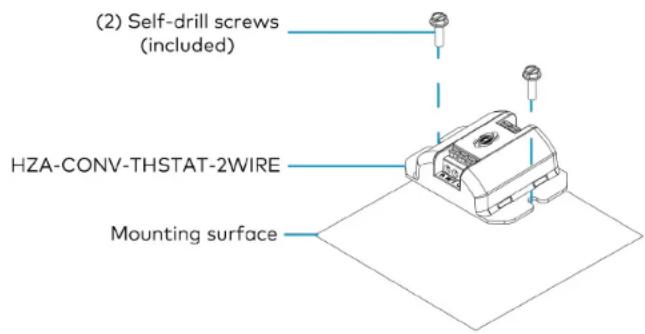
Before mounting the HZA-CONV-THSTAT-2WIRE, prepare the mounting surface. A power drill is required for the installation.
- Place the HZA-CONV-THSTAT-2WIRE on the mounting surface.
- Make a center mark through both of the HZA-CONV-THSTAT-2WIRE mounting holes.
- Partially screw one of the included screws to the mounting surface.
- Align the HZA-CONV-THSTAT-2WIRE with the screw, and continue tightening the screw.
HZA-CONV-THSTAT-2WIRE
Common WireAdapter forHZ-THSTAT
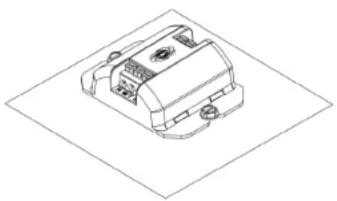
- With one side fastened, use the second included screw to secure the other side of the HZA-CONV-THSTAT-2WIRE to the mounting surface.
natural_image
Isometric line drawing of a mechanical component with no visible text or symbols
Wire the Device
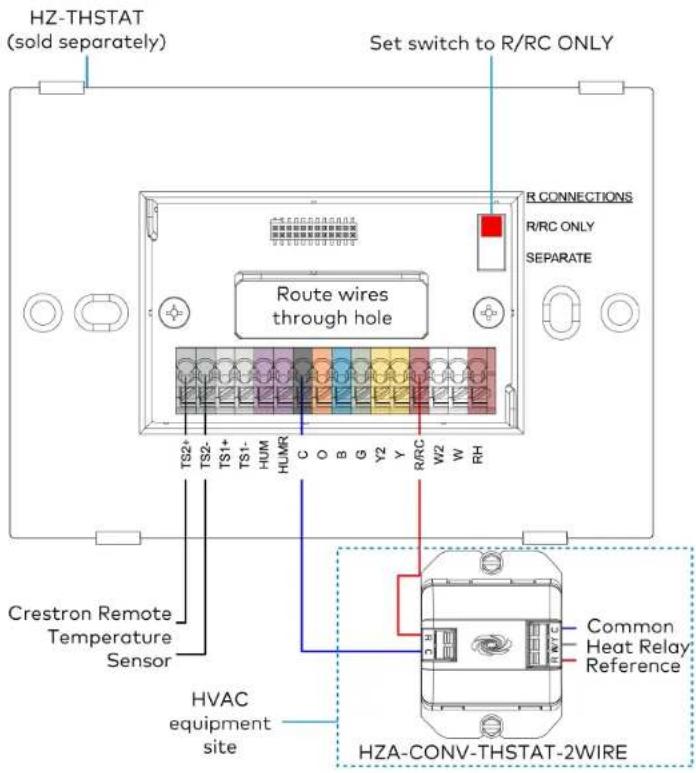
Turn the HVAC system power off, and make the necessary connections as called out in the illustrations that follow. Apply power after all connections have been made.
NOTES:
• Always wire the HZA-CONV-THSTAT-2WIRE to the R/RC and C connections on the HZ-THSTAT.
Keep the R CONNECTIONS switch set to R/RC ONLY.
- The W/Y connection on the HZA-CONV-THSTAT-2WIRE, always replaces the Y connection when there is a Y connection for the system type selected.
For Heat only systems, the W/Y connection will replace the W connection.
For Radiant.Floor only systems, the W/Y connection will replace the W2 connection.
HZA-CONV-THSTAT-2WIRE
Quick Start
Common WireAdapter forHZ-THSTAT
Single Stage Heat-Only System without Common Wire Single Stage Heat/Cool System without Common Wire

HZA-CONV-THSTAT-2WIRE
Common WireAdapter forHZ-THSTAT
For detailed setup information, refer to the HZ-THSTAT Product Manual (Doc. 8622).

Visit the Product Page
Scan the QR code to visit the product page.
HZA-CONV-THSTAT-2WIRE

www.crestron.com/model/6511526
Quick Start
Additional Information
Original Instructions
The U.S. English version of this document is the original instructions. All other languages are a translation of the original instructions.
Regulatory Model: M202016001
Crestron product development software is licensed to Crestron dealers and Crestron Service Providers (CSPS) under a limited nonexclusive, nontransferable Software Development Tools License Agreement. Crestron product operating system software is licensed to Crestron dealers, CSPs, and end-users under a separate End-User License Agreement. Both of these Agreements can be found on the Crestron website at www.crestron.com/legal/software_license_agreement.
The product warranty can be found at www.crestron.com/warranty.
The specific patents that cover Crestron products are listed at www.crestron.com/legal/patents.
Certain Crestron products contain open source software. For specific information, visit www.crestron.com/opensource.
Crestron, the Crestron logo and Horizon are either trademarks or registered trademarks of Crestron Electronics, Inc. in the United States and/or other countries. Other trademarks, registered trademarks, and trade names may be used in this document to refer to either the entities claiming the marks and names or their products. Crestron disclaims any proprietary interest in the marks and names of others. Crestron is not responsible for errors in typography or photography.
©2021 Crestron Electronics, Inc.
Doc ID 8958A
05/26/21


Brand : Crestron
Model : HZA-CONV-THSTAT-2WIRE
Category : Thermostat