
KX-TGA860FX - Telephone PANASONIC - Free user manual and instructions
Find the device manual for free KX-TGA860FX PANASONIC in PDF.


| Product Type | Additional Digital Cordless Handset |
| Model Number | KX-TGA860FX |
| Brand | Panasonic |
| Compatible Base Units | KX-TG8611, KX-TG6611, KX-TG6621, KX-TG8051, KX-TG8061 series |
| Supplied Accessories | Charger, AC Adaptor (PNLV226CE), 2x Rechargeable Batteries (AAA Ni-MH), Belt Clip, Handset Cover |
| Battery Type | Rechargeable Ni-MH AAA (R03) size |
| Battery Charging Time | Approximately 7 hours for initial charge |
| Display Language Options | 16 languages available |
| AC Adaptor | Panasonic PNLV226CE only |
| Weight | Approx. 130 g (handset with batteries) |
| Dimensions (Handset) | Approx. 168 x 48 x 29 mm (height x width x depth) |
| Operating Frequency | 1.88 GHz to 1.90 GHz (DECT) |
| Range | Up to 50 m indoors, up to 300 m outdoors |
| Answering System | Not built-in; requires compatible base unit with answering system |
| Power Connection | AC adaptor must remain connected at all times |
| Safety Precautions | Use only specified Ni-MH batteries; do not mix old/new batteries; avoid short circuits |
| Routine Care | Wipe with soft moist cloth; do not use benzine, thinner, or abrasive powder |
| Registration Required | Yes, must be registered to base unit before use |
| Country of Origin | China |
Frequently Asked Questions - KX-TGA860FX PANASONIC
User questions about KX-TGA860FX PANASONIC
0 question about this device. Answer the ones you know or ask your own.
Ask a new question about this device
Download the instructions for your Telephone in PDF format for free! Find your manual KX-TGA860FX - PANASONIC and take your electronic device back in hand. On this page are published all the documents necessary for the use of your device. KX-TGA860FX by PANASONIC.
USER MANUAL KX-TGA860FX PANASONIC
natural_image
Line drawing of a mobile phone with keypad and base (no text or symbols)KX-TGA661

Additional Digital Cordless Handset
TGA806FX(13langs)_0113_ver501.book Page 2 Friday, January 13, 2017 12:20 PM
This unit is an additional handset compatible with the following series of Panasonic Digital Cordless Phone:
- KX-TG6611/KX-TG6621 (KX-TGA661)
- KX-TG8051/KX-TG8061 (KX-TGA806)
- KX-TG8611 (KX-TGA860)
You must register this handset with your base unit before it can be used. This installation manual describes only the steps needed to register and begin using the handset. Please read the base unit's operating instructions for further details.
Supplied accessories
| Charger...... 1AC adaptor/PNLV226CE ...... 1 | Rechargeable batteries*1...... 2 |
| Belt clip (KX-TGA806/KX-TGA860)...... 1 | Handset cover*2...... 1 |
*1 Please read the base unit's operating instructions for replacement battery information.
*2 The handset cover comes attached to the handset.
Note:
- Please read the base unit's operating instructions for additional/replacement accessories.
Connection/Wall mounting (page 2: 1)
- Use only the supplied Panasonic AC adaptor PNLV226CE.
- The AC adaptor must remain connected at all times. (It is normal for the adaptor to feel warm during use.)
- Make sure that the wall and the fixing method are strong enough to support the weight of the unit. (KX-TGA661/KX-TGA806)





Battery installation/Battery charging (page 2: 2)
When the language selection is displayed after installing the batteries for the first time, you can select your desired language.
[▲]: Select your desired language. → OK → [✗]
Important:
- Use the supplied rechargeable batteries. For replacement, we recommend using the Panasonic rechargeable batteries noted in the base unit's operating instructions.
- Wipe the battery ends (, ) with a dry cloth.
- Avoid touching the battery ends (, ) or the unit contacts.
- Confirm correct polarities (⊕, ⊖).
- USE ONLY Ni-MH batteries AAA (R03) size.
- Do NOT use Alkaline/Manganese/Ni-Cd batteries.
Place the handset on the charger for about 7 hours before initial use.
Note:
- The handset display may show "Please wait for 1 minute." when the handset is placed on the charger if it is not registered to the base unit.
- If the batteries are fully charged, but the operating time seems to be shorter, clean the battery ends (, ) and the charge contacts with a dry cloth and charge again.

Display language
16 display languages are available.
2 [▲]: Select your desired language. → OK → [✗]




Registering the handset to the base unit
Ensure that the handset is switched on. If it is not on, press and hold [✗] for few seconds to turn the handset on.
1 Handset:
Lift the handset and press [✗️].
2 Base unit:
Proceed with the operation for your model.
■ KX-TG6611/KX-TG8051/KX-TG8611
Press and hold [•••] for about 5 seconds. (No registration tone)
■ KX-TG6621/KX-TG8061
Press and hold [•••] for about 5 seconds, until the registration tone sounds.
- If all registered handsets start ringing, press [●●●] again to stop, then repeat this step.
3 Handset:
Place the handset on the base unit or charger.
- Continue the operation even when the handset display shows
"Please wait for 1 minute."
4 With the handset still on the base unit or charger, wait until a confirmation tone sounds and Y is displayed.
Note:
- If an error tone sounds, or if is displayed, register the handset according to the base unit's operating instructions.
- The KX-TG6611/KX-TG8051/KX-TG8611 does not feature an answering system.
- Answering system features are available only when this handset is registered to the KX-TG6621/KX-TG8061.
For your safety
To prevent severe injury and loss of life/property, read this section carefully before using the product to ensure proper and safe operation of your product.
WARNING
Power connection
- Completely insert the AC adaptor/power plug into the power outlet. Failure to do so may cause electric shock and/or excessive heat resulting in a fire.
- Regularly remove any dust, etc. from the AC adaptor/power plug by pulling it from the power outlet, then wiping with a dry cloth. Accumulated dust may cause an insulation defect from moisture, etc. resulting in a fire.




- Unplug the product from power outlets if it emits smoke, an abnormal smell, or makes an unusual noise. These conditions can cause fire or electric shock. Confirm that smoke has stopped emitting and contact an authorised service centre.
Installation
• To prevent the risk of fire or electrical shock, do not expose the product to rain or any type of moisture.
- Do not place or use this product near automatically controlled devices such as automatic doors and fire alarms. Radio waves emitted from this product may cause such devices to malfunction resulting in an accident.
Operating safeguards
- The use of excessive sound volume through earphones, headphones, or headsets may cause hearing loss. (KX-TGA806/KX-TGA860)
CAUTION
Installation and location
- The AC adaptor is used as the main disconnect device. Ensure that the AC outlet is installed near the product and is easily accessible.
Battery
- We recommend using the supplied batteries or additional/replacement batteries noted in the base unit's operating instructions for replacement battery information. USE ONLY rechargeable Ni-MH batteries AAA (R03) size.
- Do not mix old and new batteries.
- Do not open or mutilate the batteries. Released electrolyte from the batteries is corrosive and may cause burns or injury to the eyes or skin. The electrolyte is toxic and may be harmful if swallowed.
- Exercise care when handling the batteries. Do not allow conductive materials such as rings, bracelets, or keys to touch the batteries, otherwise a short circuit may cause the batteries and/or the conductive material to overheat and cause burns.
- Charge the batteries provided with or identified for use with this product only, in accordance with the instructions and limitations specified in this manual.
- Only use a compatible base unit (or charger) to charge the batteries. Do not tamper with the base unit (or charger). Failure to follow these instructions may cause the batteries to swell or explode.
Important safety instructions
When using your product, basic safety precautions should always be followed to reduce the risk of fire, electric shock, and injury to persons, including the following:
- Do not use this product near water for example, near a bathtub, washbowl, kitchen sink, or laundry tub, in a wet basement or near a swimming pool.
- Do not use the telephone to report a gas leak in the vicinity of the leak.
- Use only the power cord and batteries indicated in this manual. Do not dispose of batteries in a fire. They may explode. Check with local codes for possible special disposal instructions.
SAVE THESE INSTRUCTIONS
7




Other information
- Operating the product near electrical appliances may cause interference. Move away from the electrical appliances.
CAUTION: Risk of explosion if battery is replaced by an incorrect type. Dispose of used batteries according to the instructions.
Routine care
- Wipe the outer surface of the product with a soft moist cloth.
- Do not use benzine, thinner, or any abrasive powder.
Notice for product disposal, transfer, or return
- This product can store your private/confidential information. To protect your privacy/confidentiality, we recommend that you erase information such as phonebook or caller list entries from the memory before you dispose of, transfer, or return the product.
Information for Users on Collection and Disposal of Old Equipment and used Batteries

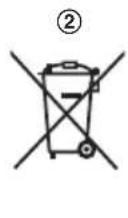

These symbols (①, ②, ③) on the products, packaging, and/or accompanying documents mean that used electrical and electronic products and batteries should not be mixed with general household waste. For proper treatment, recovery and recycling of old products and used batteries, please take them to applicable collection points, in accordance with your national
legislation and the Directives 2002/96/EC and 2006/66/EC.
By disposing of these products and batteries correctly, you will help to save valuable resources and prevent any potential negative effects on human health and the environment which could otherwise arise from inappropriate waste handling.
For more information about collection and recycling of old products and batteries, please contact your local municipality, your waste disposal service or the point of sale where you purchased the items.
Penalties may be applicable for incorrect disposal of this waste, in accordance with national legislation.
For business users in the European Union
If you wish to discard electrical and electronic equipment, please contact your dealer or supplier for further information.
Information on Disposal in other Countries outside the European Union
These symbols (①, ②, ③) are only valid in the European Union. If you wish to discard these items, please contact your local authorities or dealer and ask for the correct method of disposal.
Note for the battery symbol
This symbol (②) might be used in combination with a chemical symbol (③). In this case it complies with the requirement set by the Directive for the chemical involved.




Magyar
KÉRJÜK, HASZNÁLAT ELŐTT OLVASSA EL, ÉS ÖRIZZE MEG
- KX-TG8051/KX-TG8061 (KX-TGA806)
- KX-TG8611 (KX-TGA860)
■ KX-TG6621/KX-TG8061
TGA806FX(13langs)_0113_ver501.book Page 14 Friday, January 13, 2017 12:20 PM


- KX-TG8051/KX-TG8061 (KX-TGA806)
- KX-TG8611 (KX-TGA860)
natural_image
Pure geometric diagram with concentric circles and radial lines, no text or symbols present
Ważne:
■ KX-TG6621/KX-TG8061
- KX-TG8051/KX-TG8061 (KX-TGA806)
- KX-TG8611 (KX-TGA860)
natural_image
Simple crosshair target symbol with concentric circles and intersecting lines (no text or labels)


■ KX-TG6621/KX-TG8061
- KX-TG8051/KX-TG8061 (KX-TGA806)
- KX-TG8611 (KX-TGA860)
■ KX-TG6621/KX-TG8061
TYTO POKYNY SI USCHOVEJTE

28


Další informace
- KX-TG8051/KX-TG8061 (KX-TGA806)
- KX-TG8611 (KX-TGA860)
■ KX-TG6621/KX-TG8061
Pritisnite i zadržite [•••] otprilike 5 sekundi sve dok se ne začuje registracijski ton.
- Ako zazvone sve registrirane slušalice, ponovno pritisnite [•••] da zaustavite zvonjenje, potom ponovite ovaj korak.
3 Slušalica:
Postavite slušalicu na baznu stanicu ili punjač.
- Nastavite s ovim postupkom čak i kad se na slušalici prikaže "Pričekajte 1 minutu."
4 Dok je slušalica na baznoj stanici ili punjaču, pričekajte da se pojavi ton za potvrdu i prikaže se Y.
Napomena:
- Ako se pojavi ton pogreške ili ako se prikaže , registrirajte slušalicu prema uputama za rukovanje baznom stanicom.
- Na modelu KX-TG6611/KX-TG8051/KX-TG8611 ne postoji telefonska tajnica.
- Značajke telefonske tajnice dostupne su samo kad je ova slušalica registrirana na KX-TG6621/KX-TG8061.
Za Vašu sigurnost
■ KX-TG6621/KX-TG8061
TGA806FX(13langs)_0113_ver501.book Page 45 Friday, January 13, 2017 12:20 PM


natural_image
Simple crosshair target symbol with concentric circles and intersecting lines (no text or labels)

■ KX-TG6621/KX-TG8061
TGA806FX(13langs)_0113_ver501.book Page 51 Friday, January 13, 2017 12:20 PM

- KX-TG8051/KX-TG8061 (KX-TGA806)
- KX-TG8611 (KX-TGA860)
Pre upotrebe, slušalicu morate registrovati u baznoj jedinici. U ovom priručniku za instalaciju opisani su samo koraci neophodni za registrovanje i početak upotrebe slušalice. Molimo vas da detaljnije informacije potražite u uputstvu za upotrebu bazne jedinice.
Isporučena dodatna oprema
| Punjač | 1 |
| Adapter za naizmeničnu struju/PNLV226CE | 1 |
Punjive baterije ^*1 2
Kopča na pojasu (KX-TGA806/KX-TGA860).... 1
Poklopac slušalice ^*2 ..... 1
*1 Molimo vas da informacije o načinu zamene baterija potražite u uputstvu za upotrebu bazne jedinice.
*2 Poklopac slušalice je prilikom isporuke već postavljen na slušalicu.
Napomena:
- Molimo vas da informacije o dodatnoj/rezervnoj opremi potražite u uputstvu za upotrebu bazne jedinice.
Povezivanje/Montiranje na zid (strana 2: 1)
- Koristite isključivo adapter za naizmeničnu struju marke Panasonic PNLV226CE.
- Adapter za naizmeničnu struju mora sve vreme ostati priključen na uređaj. (Normalna je pojava da se adapter tokom upotrebe zagreva.)
- Proverite da li su zid i način pričvršćivanja dovoljno jaki da nose težinu uređaja. (KX-TGA661/KX-TGA806)


52



natural_image
Simple crosshair target symbol with concentric circles and intersecting lines (no text or labels)


Instalacija baterija/punjenje baterija (strana 2: 2)
■ KX-TG6621/KX-TG8061
Pritisnite i držite [•••] oko 5 sekundi, dok se iz slušalice ne začuje zvučni signal registracije.
- Ako sve registrovane slušalice počnu da zvone, pritisnite [•••] ponovo kako bi prestale a zatim ponovite ovaj korak.
3 Slušalica:
TGA806FX(13langs)_0113_ver501.book Page 57 Friday, January 13, 2017 12:20 PM


- KX-TG8051/KX-TG8061 (KX-TGA806)
- KX-TG8611 (KX-TGA860)
■ KX-TG6621/KX-TG8061
TGA806FX(13langs)_0113_ver501.book Page 63 Friday, January 13, 2017 12:20 PM

- KX-TG8051/KX-TG8061 (KX-TGA806)
- KX-TG8611 (KX-TGA860)
■ KX-TG6621/KX-TG8061
TGA806FX(13langs)_0113_ver501.book Page 69 Friday, January 13, 2017 12:20 PM


■ KX-TG6621/KX-TG8061
Declaration of Conformity:
- Panasonic Corporation declares that the radio equipment type (KX-TGA806) is in compliance with Directive 2014/53/EU. The full text of the EU declaration of conformity is available at the following internet address: http://www.ptc.panasonic.eu/doc
1-62, 4-chome, Minoshima, Hakata-ku, Fukuoka 812-8531 Japan
Declaration of Conformity
Document No. PCTP-100095-05
023119
(Issuer's name & address.)
Panasonic System Networks Co., Ltd.
Hakata-ku, Fukuoka, Japan
(Object of the declaration)
(Product) : Digital Enhanced Cordless Telephone
(Trade Name): Panasonic
del Nr.) : Base unit -KX-TG6611E.KX-TG6612E.KX-TG6613E.KX-TG6621E.
KX-TO8622E.KX-TO8623E.KX-TO8624E.KX-TO8611G.KX-TO8612G.KX-TO8621G
KX-TG0023G.KX-TG0023G.KX-TG0024G.KX-TG0011SP.KX-TG0012SP.KX-TG0021SP.
KX-TG8611JT,KX-TG8612JT,KX-TG8621JT,KX-TG8611NE,KX-TG8612NE,KX-TG8613NE,
KX-TG022NL,KX-TG011FX,KX-TG012FX,KX-TG021FX,KX-TG011FR,KX-TG012FR
KX-TG8621FR.KX-TG8622FR.KX-TG8623FR.KX-TG8611TR.KX-TG8612TR.KX-TG8621TR.
KA-102611PDUKX-102612PUKX-102621PD.KX-102611NL.KX-102612NL.KX-102613NL.
KX-TG0021NL KX-TG0022NL KX-TG0023NL KX-TG0032NL KX-TG0011AR LKX-TG0022AR
KJ-1G681U4KX-TG6812U4KX-TG6821U4KX-TG6811BLXX-TG6812BLXX-TG6813BL
RX-1G8621BL RX-1G8611SL RX-1G8612SL RX-1G8621SL RX-1G8621TO RX-1G8611TO
RX-TG8622JT
Handset - RX-TGA061E, RX-TGA060E, RX-TGA061EX, RX-TGA060EX, RX-TGA061FX,
AC Aerospace - PNLY226E, PNLY226CE
Chamfer Unit - PNLC1018/PNLC1019
(Country of origin): China
< A >
The object of the declaration described above is in conformity with the requirements of the following EU legislations and harmonized standards. For the RoHS Directive, this declaration of conformity is issued under the sole responsibility of the manufacturer.:
(Council Directive) : 1999/5EC
(Council recommendation): 1999/519EC
(Harmonized Standards) : EN 60950-1:2006 +A11:2009 +A1:2010 +A12:2011. < C >
EN 301 406 V2.1.1. EN 301 459-1 V1.9.2. EN 301 459-6 V1.3.1
EN 50385:2002. EN 50360:2001+A1:2012
(Council directive) : 2009/125/EC
(Implementing Measure for ErP Directive): Commission Regulation (EC) No.278/2009
(Harmonized Standards) : EN 50563:2011
(Implementing Measure for ErP Directive): Commission Regulation (EC) No.1275/2008
Amended by (EU) No.801/2013
(Harmonized Standards) : EN 60564:2011
(Council directive) : 2011/05/EU
(Harmonized Standards) : EN 50581:2012
The last two digits of the year in which the CE marking was affixed the first time: 10
Signed for and on behalf of
St. Klimt
Printed Name : Makoto Kaburnoto
Title : Senior Technical Regulation Manager
Date of issue : 28th November, 2014
Authorised Representative in EU
Panasonic Testing Centre
Panasonic Marketing Europe GmbH
Winsbergring 15, 22525 Hamburg, G
- 16
(Signature)
(Printed name)
(3) Name
(Date)
Wolfram Kühl
28 Nov 2014
2 a. NOV. 2014
Ovaj proizvod više nije dostupan.
Declaration of Conformity
Document Number: PCTP-110098-06
Manufacturer
| Name | Panasonic System networks Co., Ltd. |
| Address | 1-62, 4-chome, Minoshima,Hakata-ku, Fukuoka, 812-8331Japan |
Object of Declaration
(A)
| Product Name | Digital Enhanced Cordless Telephone |
| Trade Name | Panasonic |
| Model Number | KX-TG805xyy; KX-TG805xyy; KX-TGA805yy; (Base Unit); KX-TG8051yy; KX-TG8061yy; (Portable Unit); KX-TGA805yy; KX-TGA808yy; (Charger Cradle) PNLC101B; PNLC101B; (AC adaptor); PNLV220yy |
GE Requirements
| This declaration of conformity is issued under the sole responsibility of manufacturer. The object of the declaration described above is in conformity with the requirements of the following ITU legislation and harmonized standards: |
| Council | : 2014/53/EU | RED | < B > |
| Directive(s) | 2008/125/EO | ErP | |
| 2011/65/EU | RaHS |
| Commission Regulation(s) | (EC) No.278/2009 (EC) No.1275/2008 (EU) No.901/2013 | Implementing measures for ErP Directive Implementing measures for ErP Directive Implementing measures for ErP Directive |
| Council | : 1998/519/EC | EMF |
| Recommendation(a) |
| Harmonized Standards):EN 60850-1:2006 +A11:2009 +A1:2010 +A12:2011 +A2:2013; EN 301 408 V2.1.1:2009EN 301 408-1 V1.9.2:2011; EN 301 408-0 V1.4.1:2015; EN 50300 :2001 +A1:2012EN 50305 :2002; EN 50583 :2011 +A1:2013; EN 50584 :2011; EN 50581 :2012 | < O > |
Additional Information
< D >
| Suffix "x" represents packing configuration with the number of handset can be any digits "0 to 9". |
| Suffix "yy" represents country code, can be any combination of characters "A to 2". |

Nobuhiro Senno / Senior Tech. Reg. Manager Printed Name / Title
- Juni 2016

Wolfram Köhl
Authorised Representative Panasonic Testing Centre Panasonic Marketing Europe GmbH Minaberging 15, 22525 Hamburg, Germany
Predmet gore navedene izjave je sukladan sa zahtjevima pravnih propisa EU u nastavku i harmoniziranih normi
TGA806FX(13langs)_0113_ver501.book Page 80 Friday, January 13, 2017 12:20 PM
© Panasonic Corporation 2011
PNQX3286UA TC0311YK5027 (E)
FX-2/2
- Note:
- Connection/Wall mounting (page 2: 1)
- Battery installation/Battery charging (page 2: 2)
- Important:
- Display language
- Registering the handset to the base unit
- Handset:
- Base unit:
- Handset:
- For your safety
- WARNING
- Power connection
- Installation
- Operating safeguards
- CAUTION
- Installation and location
- Battery
- Important safety instructions
- SAVE THESE INSTRUCTIONS
- Other information
- Routine care
- For business users in the European Union
- Information on Disposal in other Countries outside the European Union
- Note for the battery symbol
- Magyar
- KÉRJÜK, HASZNÁLAT ELŐTT OLVASSA EL, ÉS ÖRIZZE MEG
- Ważne:
- Další informace
- Slušalica:
- Napomena:
- Za Vašu sigurnost
- Povezivanje/Montiranje na zid (strana 2: 1)
- Instalacija baterija/punjenje baterija (strana 2: 2)
- Declaration of Conformity:
- Declaration of Conformity
Brand : PANASONIC
Model : KX-TGA860FX
Category : Telephone