CDJ-907 - CD Player Akiyama - Free user manual and instructions
Find the device manual for free CDJ-907 Akiyama in PDF.


| Product Type | CD Player |
| Brand | Akiyama |
| Model | CDJ-907 |
| Dimensions (W x H x D) | 430 mm x 105 mm x 280 mm |
| Weight | 3.5 kg |
| Power Supply | AC 230 V, 50 Hz |
| Power Consumption | 15 W |
| Playback Formats | CD, CD-R, CD-RW, MP3 |
| Playback Modes | Program, Repeat, Random, Intro Scan |
| Audio Outputs | Analog RCA (stereo), Digital Optical (Toslink) |
| Headphone Jack | 3.5 mm stereo, with volume control |
| Display | Backlit LCD with track, time, and playback info |
| Disc Loading | Top-loading with manual tray |
| Remote Control | Included (infrared) |
| Maintenance | Clean lens with CD lens cleaner; wipe exterior with dry soft cloth |
| Safety | Do not expose to moisture or heat; use only specified power source |
| Spare Parts & Repairability | Spare parts available through Akiyama service; seek professional repair |
| Accessories Included | Power cable, remote control (with batteries), RCA cable, user manual |
Frequently Asked Questions - CDJ-907 Akiyama
User questions about CDJ-907 Akiyama
0 question about this device. Answer the ones you know or ask your own.
Ask a new question about this device
Download the instructions for your CD Player in PDF format for free! Find your manual CDJ-907 - Akiyama and take your electronic device back in hand. On this page are published all the documents necessary for the use of your device. CDJ-907 by Akiyama.
USER MANUAL CDJ-907 Akiyama
pie
Circular chart displaying binary code segments. The chart displays 25 segments labeled with binary codes: '0' (black), '1' (white), '2' (light gray), '3' (medium gray), '4' (dark gray), '5' (light gray), '6' (white), '7' (gray), '8' (light gray), '9' (white), '10' (gray), '11' (white), '12' (gray), '13' (white), '14' (gray), '15' (white), '16' (gray), '17' (white), '18' (gray), '19' (white), '20' (gray), '21' (white), '22' (gray), '23' (white), '24' (gray), '25' (white). All segments are colored in black, representing the full scale from 0 to 25. No trend or correlation is present — this is a static categorical representation.PROFESSIONAL CD PLAYER
CDJ-907
INSTRUCTIONS MANUAL MANUAL DE INSTRUCCIONES
CAUTION
RISK OF ELECTRIC SHOCK DO NOT OPEN

CAUTION: To reduce the risk of electric shock, do not remove any cover. No user-serviceable parts inside. Refer servicing to qualified service personnel only.
The lightning flash with arrowhead symbol within the equilateral triangle is intended to alert the use to the presence of un-insulated “dangerous voltage” within the product’s enclosure that may be of sufficient magnitude to constitute a risk of electric shock.

The exclamation point within the equilateral triangle is intended to alert the user to the presence of important operation and maintenance (servicing) instructions in the literature accompanying this appliance.
To prevent electric shock, do not use this polarized plug with an extension cord, receptacle or other outlet unless the blades can be fully inserted to prevent blade exposure.
- Read Instructions. All the safety and operating instructions should be read before this product is operated, not fall and liquids
- Retain Instructions. The safety and operating instructions should be retained for future reference.
- Heed Warnings. All warnings on the appliance and in the operating instructions should be adhered to.
- Follow Instructions. All operating and use instructions should be followed.
- Water and Moisture. The appliance should not be used near water - for example, near a bathtub, washbowl, kitchen sink, laundry tub, in a wet basement, or near a swimming pool, and the like.
- Carts and Stands. The appliance should be used only with a cart or stand that is recommended by the manufacturer.
An appliance and cart combination should be moved with care. Quick stops, excessive force, and uneven surfaces may cause the appliance and cart combination to overturn.
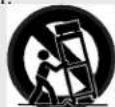
- Wall or Ceiling Mounting. The product should be mounted to A wall or ceiling only as recommended by the manufacturer.
- Heat. The appliance should be situated away from heat sources such as radiators, heat registers, stoves, or other appliances (including amplifiers) that produce heat.
- Power Sources. This product should be operated only from the type of power source indicated on the rating label. If you are not sure of the type of power supply to your home, consult your product dealer or local power company. For products intended to operate from battery power, or other sources, refer the operating instructions.
- Grounding or Polarization. This product may be equipped with a polarized alternation-current line plug (a plug having one blade wider than the other). This plug will fit into the power outlet only one way. This is a safety feature. If you are unable to insert the plug fully into the outlet, try reversing the plug. If the plug should still fail to fit, contact your electrician to replace your obsolete outlet. Do not defeat the safety purpose of the polarized plug.
- Power-Cord Protection. Power-supply cords should be routed so that they are not likely to be walked on or pinched by items placed upon or against them, paying particular attention to the cord in correspondence of plugs, convenience receptacles, and the point where they exit from the appliance.
- Cleaning. The appliance should be cleaned only as recommended by the manufacturer. Clean by wiping with a cloth slightly damp with water. Avoid getting water inside the appliance.
- For AC line powered units. Before returning repaired unit to user, use an ohm-meter to measure from both AC plug blades to all exposed metallic parts. The resistance should be more than 100,000 ohms.
-
Non-use Periods. The power cord of the appliance should be unplugged from the outlet when left unused for a long period of time.
-
Object and Liquid Entry. Care should be taken so that objects do spilled into the enclosure through openings.
-
Damage Requiring Service. The appliance should be serviced by qualified service personnel when:
-
The power-supply cord or the plug has been damaged.
- Objects have fallen, or liquid has been spilled into the appliance.
• The appliance has been exposed to rain. -
The appliance does not appear to operate normally or exhibits a marked change in performance.
• The appliance has been dropped, or the enclosure damaged. -
Servicing. The user should not attempt any service to the appliance beyond that described in the operating instructions. All other servicing should be referred to qualified service personnel.
-
Ventilation. Slots and openings in the cabinet are provided for ventilation and to ensure reliable operation of the product and to protect it from overheating, and these openings must not be blocked or covered. The openings should never be blocked by placing the product on a bed, sofa, rug, or other similar surface. This product should not be placed in a built-in installation such as a bookcase or rack unless proper ventilation is the manufacturer's instructions have been adhered to.
- Attachments. Do not use attachments not recommended by the product manufacturer as they may cause hazards.
- Accessories. Do not place this product on an unstable cart, stand, tripod, bracket, or table. The product may fall, causing serious injury to a child or adult, and serious damage to the product. Use only with a cart, stand, tripod, bracket, or table recommended by the manufacturer, or sold with the product. Any mounting of the product should follow the manufacturer's instructions, and should use a mounting accessory recommended by the manufacturer.
- Lightning. For added protection for this product during a lightning storm, or when it is left unattended and unused for long periods of time, unplug it from the wall outlet and disconnect the antenna or cable system. This will prevent damage to the product due to lightning and power-line surges.
- Replacement Parts. When replacement parts are required, be sure the service technician has used replacement parts specified by the manufacturer or have the same characteristics as the original part. Unauthorized substitutions may result in fire, electric shock, or other hazards.
- Safety Check. Upon completion of any service or repairs to this product, ask the service technician to perform safety checks to determine that the product is in proper operating condition.
NOTE ON USAGE
Allow for sufficient heat dispersion when installed on a rack.
Handle the power cord carefully. holes)
Do not obstruct the ventilation holes. (For units with ventilation
Hold the plug when unplugging the cord. Do not drop foreign objects into the unit.
Keep the appliance free from moisture, water, and dust.
Do not let insecticides, benzene, and thinner come in contact with the set.
Unplug the power cord when not using the appliance for long periods of time. Never disassemble or modify the set in any way.
FEATURES
8 times over sampling 1 bit D/A converter
Instant start within 10 msec (sound is produced immediately when the PLAY button is pressed)
Seamless Loop (uninterrupted loop playback)
Auto cue
Realtime cue
Frame search
4 different speed scan
The BPM adjustment range with the pitch slider can be set to +/-8%, +/-12%, +/-16%
Pitch display
10 number buttons for direct track access
30 programable tracks
10 cue points can be memorized
Digital output RCA coaxial
Relay playback (using the control jack)
Beat Counter
Large bright LCD Screen can be viewed from wide angles
60 seconds transport protection
Auto protection (after 15 minutes with no operating in pause mode, the laser diode will be turned off)
PREPARATIONS
1. Checking the Contents
Check that the carton contains the following items:
CAUTION: The player will work normally when the main unit is
1) Main unit mounted with the front panel at within 15 degrees of the vertical
2) Control unit plane. If the unit is tilted excessively, discs may not be loaded or
3) Operating instruction (this booklet) unloaded properly.
4) Pair of RCA pin cord.
5) Control cords The control panel's LCD's are designed to be clearly visible within the
angles shown in Figure 2. Mount the control unit so that the visual angle is within this range.
2. Installing the Unit
Mount the unit into your console or rack with 19" EIA rack rails.
Insert draw
Figure 2
Insert draw
Connections
1) Turn off the POWER switch.
2) Connect the RCA pin cord to the input on your mixer.
3) Connect the control cords to the REMOTE connector on the main unit.
CAUTION:
Be sure to use the supplied control cords. Using another type of cable may result in damage.
Be sure the power is off when connecting the control cords.
Otherwise the units may not work properly.
CONTROL UNIT
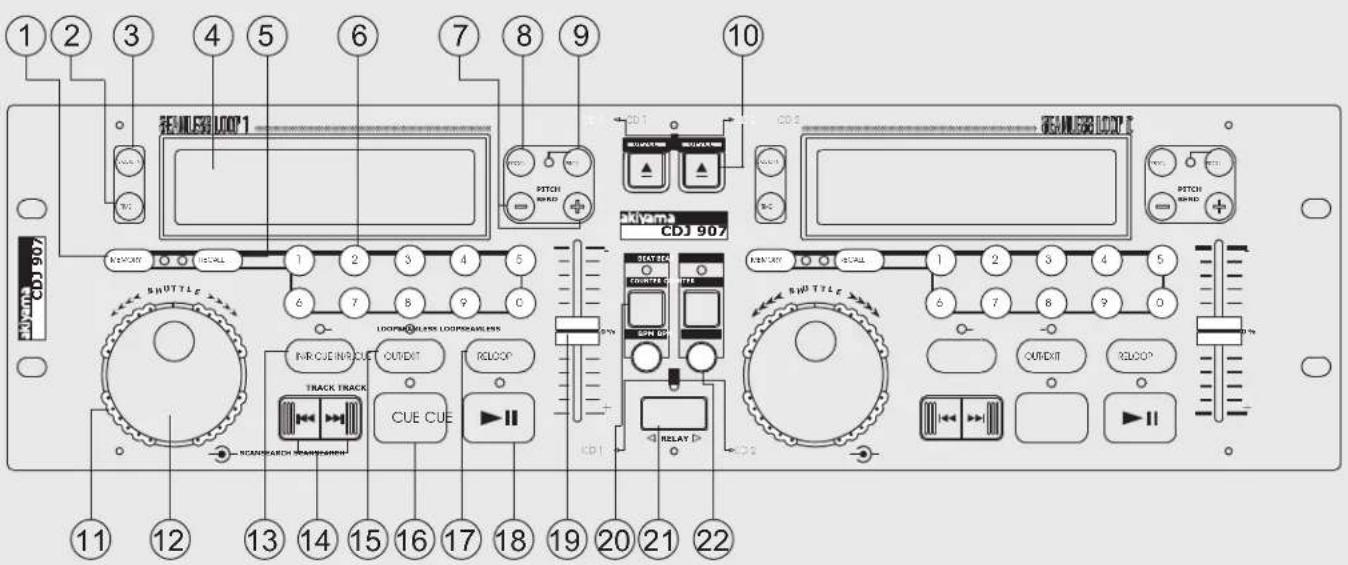
- Memory Button: This button is used to save the CD current position to the cue memory. You can memorize up to 10 cue points. To erase all the cue memory hold the MEMORY button down for more than 2 seconds till the cue memory indicators on the LCD display arc off.
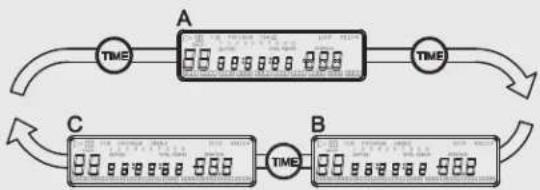
2.Time Button: The TIME button switches among Elapsed playing time, Remaining time in a selection, Total remaining time of the disc.
3.SGL/CTN: You can choose between a single track to play or all tracks in order by pressing once or twice.
-
LCD Display: Indicates all the functions, as they are occurring with the CD.
-
Recall Button: This button allows you to cue up any of the 10 memory CUE points that have been memorized. The player will cue up the selected point when RECALL button is pressed.
-
Track Numerical Butons: These buttons serve 2 functions depending on the MEMORY and RECALL LEDs you are working in.
a. The numerical buttons are for quickly advancing to the track on a CD while both MEMORY and RECALL LEDs are off.
b. The numerical buttons are also for memorizing and recalling the Cue points
7.Pitch Bend +/-16%: The pitch will automatically rise while the + button is pressed and return to the original pitch when the button is released. The pitch will automatically drop when the button is pressed and return to the original pitch when the button is released.
- Program: Depress this button to stop the CD and enter the program mode. Note the word "PROGRAM" is indicated on the display. Select each track to be programmed and press the PROGRAM button between selections. You can program up to 30 tracks. Press PLAY to start the program. To exit and erase program hold the PROGRAM button down for mode than 2 seconds while the unit is stopped
9.Pitch Button: This button activates de Pitch slider(19).
-
Open/Close Disc Tray: Press to load or eject the disc. Each press will open or close the disc tray on the transport. NOTE: Tray will not open when the disc is playing
-
Search wheel (Outer ring): This wheel has 4 forward and 4 backward speed positions for searching through songs. The more you turn the wheel in either direction the faster you search through the music.
-
Jog wheel (Inner ring): This jog wheel serve 2 functions depending on the mode you are working in.
a. The jog wheel will act as a slow frame search control when the CD is not
playing but either paused or set to a cue point. To set a new frame cue point, spin the wheel then press PLAY when you have determined the proper position. Press CUE to return to the "CUE POINT".
b. The jog wheel temporarily bend the pitch of the music up to +/-16% if the song is already playing by rotating the wheel clockwise to speed up or counterclockwise to slow down. The amount of pitch change is determined by the speed of rotation
13.In/R.Cue: This allows you to set the cue point without stopping the play back. This button also sets the beginning of a seamless loop.
-
Track: These buttons are used to select the track to be played. Forward skip & Back skip
-
Out/Exit: Used to set the ending when looping music. The player will start to loop continuous until you press this button again to exit.
-
Cue: Pressing the CUE button during play provides a return to the position at which play was started. If pause is used before CUE or CUE point was set, that will become the cue point. With the unit in the pause mode (Play/Pause LED blinks) the search and/or jog wheel is used to set a different start point. By pressing "PLAY/PAUSE" button then "CUE", you can confirm this new cue point is desirable. The CUE LED will light up since the cue button is pressed until the CD has returned to the position at which play was started.
-
Reloop Button: If a loop has been made and you have hit the exit button, press this button to enter the loop again. To exit loop pressing OUT/EXIT button.
18.Play/Pause: Each press of the PLAY/PAUSE button causes the operation to change from play to pause or from pause to play.
19.Pitch Slider: The pitch can be changed up to +/-12% by pressing the PITCH button so the PITCH LED is lit, then moving the sliding fader.
The pitch will not be changed if the PITCH LED is off. If you want to change the BPM adjustment range (+/-8%, +/-12%, +/-16%), press and hold PITCH button then press the PITCH BEND+ to select
-
Counter Button: Tap this button with the beat of the music to determine the current Beats Per Minute (BPM).
-
Relay: By pressing the Relay button, the playback automatically switches to the other player affect every track.
22.BPM Button: Switches the mode of the display between showing the BPM and the percentage change in pitch.
PART NAMES AND FUNCTIONS
REAR PANEL
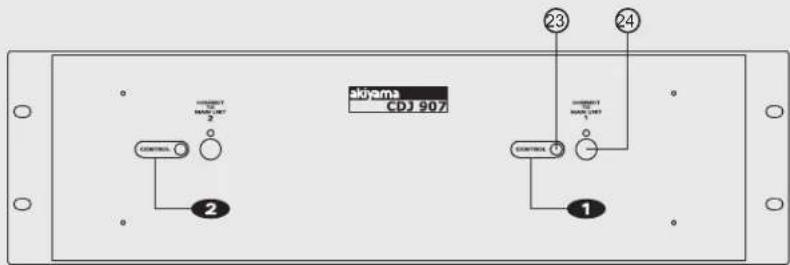
-
Remote Switch Input Jack: For external remote switch input, to control this unit play or pause. For CROSS FADER control, connect this connector to the control out from mixer control out
-
Control Conector: Connect this connector to the REMOTE connector on the main unit using the included control cords.
MAIN UNIT
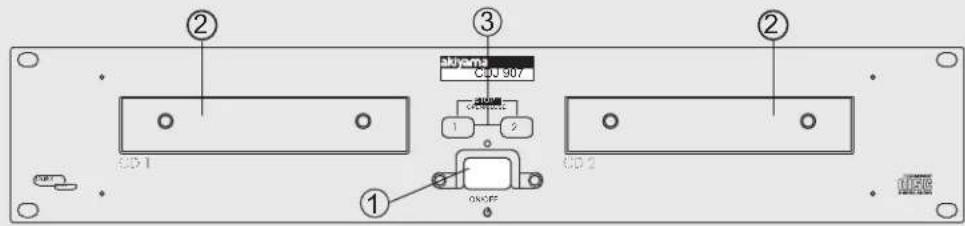
- Power Switch: Press this button to start operation.
2.Disc Holder: Place the disc on the holder. Press the OPEN/CLOSE button to open and close the Disc Holder.. button.
3.Open CLOSE/BUTTON: Press it to open and close the disc holder. The control unit also includes OPEN/CLOSE button. The disc holder can not be opened during playback, so stop playback before pressing the
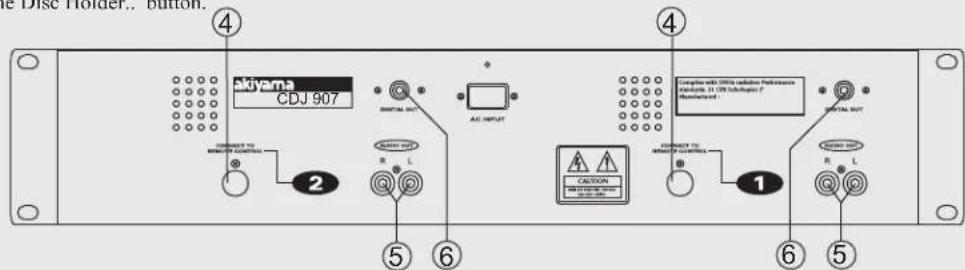
- Remote Control Conector: Connect this connector to the control unit these jacks, using the included control cords.
5.Line OUT 1 and 2: The audio signals from each player are output from
- Digital Out socket: The music-signals of this socket is digital. Connect the output to the respective input of a digital amplifier for example
LCD DISPLAY
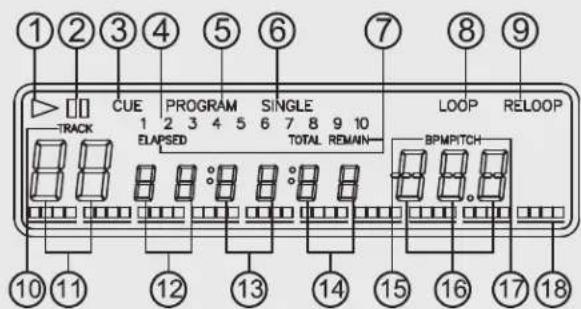
- Play: lit while the unit is playing a CD
- Pause: The PAUSE indicators light during pause or cue mode
3.Cue: Lit when the unit is at a cue point -
Cue Memory Calendar: The numeral on the cue memory calendar shows to indicate which cue memory is set previously. Flashing while the cue memory is setting or recalling
-
Program: This lights when program mode is set or played.
6.Single: Shows when the unit is set to play just one track at a time. When this is not lit the CD will play continuously through all tracks. The function is controlled by the SGL/CTN BUTTON (3)
-
Elapsed, Total Remain: These indicate that the time shown on the display is the ELAPSED, TOTAL REMAINING or single song remaining time
-
Loop: Shows when the CD is repeating a particular area with the music on the CD
-
Reloop: Shows when the CD has had a loop set previously and can go back to loop again TRACKshows the track that unit is playing with.
-
Track: shows the track that unit is playing with
11-14. Track, Minute, Second, Frame: These displays indicate information on the current track and time
15.BPM: indicator lights up when when BPM button is engaged
16.Pitch/BPM: Shows either the percentage change in pitch or the BPM of the song depending on the mode selected with the BPM BUTTON (22)
17. Pitch: Indicator light to show percent of pitch is displayed
18.Time Bar: Shows either time remaining or elapsed depending on the setting of the TIME BUTTON (2)
-.Switch de CD Player on via the Power Switch.
When the devices is on and the tray has no disc, "No Disc" appears on the display. You will scan or reverse at 4 different speeds depend
-.Disc Tray. This operation only works when the power is on. Press the OPEN/CLOSE button(10) to open or close the disc tray.
Press PLAY button tray automatically closes. If tray is not closed after 60 seconds it will close automatically and pause.
The disc trays cannot be opened during playback to prevent playback from being interrupted if the OPEN/CLOSE button is pressed accidentally. Stop playback, then press the OPEN/CLOSE button(10).
CAUTION: Do not play foreign objects in the disc tray, and do not place more than one disc in the disc tray at a time. Doing so may result in malfunction.
Do not push the disc tray in manually when the power is off, as this may result in malfunction and damage the player.
-Selecting Tracks: Select desired track using NUMBER Button(6) or press the TRACK Buttons once to move to one higher or lower track or Hold the TRACK buttons(14) in to change tracks continuously at a higher speed.
When a new track is selected during playback, playback begins as soon as the search operation is completed.
-.Starting Playback: Press the PLAY/PAUSE button(18) during the pause or cue to start playback. The PLAY indicator lights when playback starts
-.Stoping Playback: There are two ways to stop playback.
a. Press the PLAY/PAUSE button(18) during playback to pause at that point.
b. Press the CUE button(16) during playback to return to the position at which playback started(Back Cue).
-.Pausing: Press the PLAY/PAUSE button(18) to switch between play and pause.
The PAUSE indicator lights when the pause mode is set.
-.Cue: "Cueing" is the action of preparing for playback; when the Cue button(16) is pressed, playback return to the cue point and enters pause mode. When the PLAY/PAUSE button(18) is pressed during the cue mode, playback starts.
-.Scanning: To do this rotate Shuttle wheel(11) forward or reverse.
much you rotate the wheel.
-Loop Play: You can create a seamless loop between two points continuously.
Press PLAY/PAUSE BUTTON (18) so a CD is playing. The PLAY/PAUSE BUTTON'S LED lights.
Press IN REAL TIME CUE BUTTON (13). This sets the starting point of the SEAMLESS LOOP. The IN REAL TIME CUE'S BUTTON LED will light
Press OUT/EXIT BUTTON (15) to set desired ending point of the SEAMLESS LOOP. You will know you are in SEAMLESS LOOP mode because IN REAL TIME and OUT/EXIT LEDs will light and flash. LOOP INDICATOR (8) in LCD DISPLAY will also flash.
Sound will continue with no interruption (SEAMLESS LOOP). To exit SEAMLESS LOOP, press OUT/EXIT BUTTON (15). LEDs will stay on but not flash. Music will resume normal play.
To replay loop, press the RELOOP BUTTON (17). IN REAL TIME and OUT/EXIT LEDs and LOOP INDICATOR (8) in LCD DISPLAY will all begin flashing again
-.Samless Loop: (Must be in SEAMLESS LOOP mode). If a SEAMLESS LOOP has not been created, follow instructions on this page for creating a SEAMLESS LOOP. If a SEAMLESS LOOP has already been created, press RELOOP BUTTON (17) to reenter the SEMALESS LOOP mode.
Next, press OUT/EXIT BUTTON (15) to return to normal play (figure 6). This disengages the SEAMLESS LOOP mode.
Press OUT/EXIT BUTTON (15) again for new desired ending point of the loop.
FOR SHORTER LOOP: press OUT/EXIT BUTTON (15) quickly. FOR LONGER LOOP: Wait until the song plays several frames, then press OUT/EXIT BUTTON (15).
NOTE: YOU CAN ONLY EDIT THE ENDING PART OF THE LOOP
-Sleep Mode. The CD player automatically shuts off the transport and laser after 15 minutes (when in pause or cue mode). This will lengthen the life of your motor drive and laser. To restart player, just (16) or play(18) buttons
-Time Display: During normal play, each time you press TIME
Cue point setting: button(2), the display changes as following information.
Playback starts from pause ( using the jog wheel to set the starting a. Elapsed playing time point ) or skip to a new track during play or pause. b.Remaining
a. The beginning play point will be set to the cue point, or
b. Press the IN REALTIME CUE button(13) during playback to set the new cue point, or
c.Memorize any of 10 CUE points by pressing MEMORY(1) to set desired Cue then press any of 10 number buttons(6).
To return to Cue point press Cue Button(16). This will return to point A or B above. The player has completed the cue or pause operation and is waiting for the play start command. When the PLAY/PAUSE button(18) is pressed, playback starts.
d. To recall cues, if the recall LED is lit you can press the last number button cue stored and create a STUTTER EFFECT (see also p8). The last cue that was stored or recalled will flash in the LED screen to let you know it was last cued up
-.Auto Cue: When disk is loaded, the cue point is set to the first source of music.
If track is changed before pressing play, the cue point is changed to the new starting point.
If you pause during playback this also sets the new cue point.
-Frame search: This is done by first pausing then using the jog wheel(12) to set the starting point.(When you use the jog wheel the monitor function allows you to hear what is playing. Once you have set starting point press PLAY(18) then CUE(16) to again mute output.)
playing time
b.Remaining time in a selection
c. Total remaining time of the disc
flowchart
graph LR
    A["Block A"] -->|TIME| B["Block B"]
    B -->|TIME| A
    style A fill:#f9f,stroke:#333
    style B fill:#bbf,stroke:#333
-.Pitch Bending: The speed increases or decreases respectively while the PITCH BEND+(7) or PITCH BEND-(7) button is pressed. The extent to which the speed changes is proportionated to the amount of time the button is pressed. For example, if the PITCH BEND+ button is held in continuously, the speed increases usually.
The pitch changes within a range of +/- 16% . The jog wheel will temporarily bend the pitch of the music if the song is already playing by rotating the wheel clockwise to speed up or counterclockwise to slow down. The speed that you rotate the JOG Wheel determines the
-.Program Play: Press PROG Button(8) to make the unit enter the program mode and stop condition. The PROGRAM indicator lights. Select Track using NUMBER button(6) or TRACK SEARCH button(14) press PROG. again. Repeat this up to 30 times. Press PLAY button(18) to begin playing programmed tracks. To cancel Program press and hold PROG. Button(8) more than 2 sec
-.Memory Cuening: Press the MEMORY button(1) to make the unit enter cue memory mode, then press the desired numerical button(6) at the desired cue point to memorize. The numeral(4) on the display will flash twice then lit steadily to indicate the cue memory has been set. Press the RECALL button(5) to make the unit enter cue recall mode, then press the desired numerical button(6) to recall the desired cue memory point. A new cue point will be set. To clear all the cue memory, just press and hold the MEMORY button(1) for more than 2 seconds. All the cue memory will be clear
-.Fader Start Playback: Both player's CONTROL jack are connected to Mixer's CROSS FADER signal output CH1 or CH2; when the jack are connected, the operation for both player as following: Left player will return to standby mode at CUE point automatically when move CROSS FADER from left to right to start playback on right player. Right player will return to standby mode at CUE point automatically when move CROSS FADER from right to left to start playback on left player
-.Relay Play using two Players: How to set the Relay function
- By either the both player's CONTROL jack are connected to each other without pressing the RELAY button; when the both player's CONTROL jack are connected to each other, the relay-play effects can be produced. The relay play is explained as below
*Set both players to single play mode (the SINGLE indicators(6) will lit in the displays).
*Begin playback on the first player
*When the currently playing track ends, playback will begin automatically on the standby player
*The first player will enter standby mode at the beginning of the next track on its disc
*By repeating this operation, the two players can be used to perform continuous relay play
*By loading new discs on the standby player, you can construct a
continuous program of whatever tracks you wish
*By setting a cue point on the standby player, you can perform relay to any desired cue point on the selected track
NOTE: Relay play may not work properly if the audio out jacks on the two players are not connected to the same audio amplifier
- or press the RELAY button(21) on the front panel of Controller
*The default has no Relay function when power on
*Pressing the RELAY button to enable Relay function
*While the Relay is enabled, the LED will light on
*In the single mode, the CD player will be paused at the next track when finish playing current track
*And only the other side of CD player that is standby in pause mode will start playing automatically
*There is no Fader start function when in the Relay mode
-. Stutter Effect: It can create a sound similar to a CD skipping. The STUTTER Effect can be created in 2 ways.
- By rapidly pressing the CUE BUTTON (16)
a. Press PLAY/PAUSE BUTTON (18) so that music is playing. PLAY/PAUSE LED will light
b. Next, rapidly press the CUE BUTTON (16) in sync with the music
- By Hitting The DIRECT TRACK ACCESS BUTTONS (6)
a. Press PLAY/PAUSE BUTTON (18) so that music is playing. PLAY/PAUSE LED will light
b. Press MEMORY BUTTON (2) to set a CUE POINT in memory. MEMORY LED will light
c. Press desired DIRECT TRACK ACCESS BUTTON d. Press RECALL BUTTON(5)
e.Once RECALL LED lights, rapidly press the DIRECT TRACK ACCESS BUTTON (6) previously selected
-End of Operation: Before you switch off the CDPlayer, please make sure that the CDTray is completely closed before you switch off. If this is not the case, switch the CDPlayer on again and close the CDTray with the Open/Close button.
BEFORE SWITCHING OFF THE POWER
When you have finished using the CD player, before switching off the CAUTION:
power, be sure that the disc holder had been closed with the OPEN/CLOSE button.
Do not forcibly close the disc holder when the power is off.
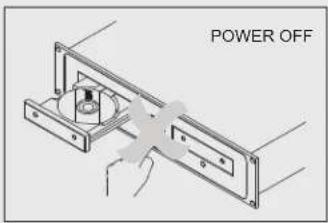
Do not switch off the power when the disc holder is open.
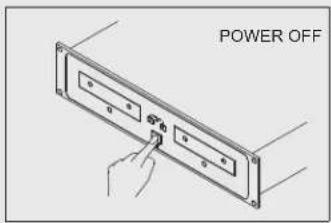
Switch off the power after the disc holder has been closed with the OPEN/CLOSE button.
HANDLING COMPACT DISCS
-
Precautions on handling compact discs. implement such as a pencil or ball point pen.
-
Do not allow fingerprints, oil or dust to get on the surface of the - Condensation will form if a disc is brought into a warm area from
disc. a colder one, such as outdoors in winter. Do not attempt to dry the - If the disc is dirty, wipe it off with a soft dry cloth. disc with a hair dryer, etc..
- Do not use benzene, thinner, water, record spray, electrostatic- 2. Precaution on storage
proof chemicals, or silicone-treated cloths to clean discs. - Always handle discs carefully to prevent damaging the surface; in particular when removing a disc from its case or returning it.
- Do not bend the disc.
- Do not apply heat.
- Do not enlarge the hole in the center of the disc.
- Do not write on the label (printed side) with a hard-tipped
- Condensation will form if a disc is brought into a warm area from
- After playing a disc, always unload it from the player.
- Always store the disc in the jewel case to protect from dirt or damage.
- Do not place discs in the following areas:
- Areas exposed to directs sunlight for a considerable time.
- Areas subject to accumulation of dust or high humidity.
- Areas are affected by heat from indoor heaters, etc..

CAUTION
RISK OF ELECTRIC SHOCK
DO NOT OPEN

ATENCION: PARA REDUCIR EL RIESGO DE ELECTROCUCION, NO MANIPULE EL INTERIOR DEL EQUIPO.
Seamless Loop (Loop continuo) Salida digital RCA coaxial
Auto cue Contador de Beats
Realtime cue Pantalla LCD
español
Weight: Player unit: 5 kgs
Control unit: 1.9 kgs
Power supply: 115/230V AC, 50/60Hz
Power consumption: 25W