Urban CC-VT240W - Bike computer Cateye - Free user manual and instructions
Find the device manual for free Urban CC-VT240W Cateye in PDF.


| Product Type | Bike computer |
| Brand | Cateye |
| Model | Urban CC-VT240W |
| Functions | Current speed, average speed, maximum speed, trip distance, odometer, elapsed time, clock |
| Display | LCD, two-line display |
| Power Supply | CR2032 coin cell battery |
| Battery Life | Approx. 1 year (1 hour use per day) |
| Dimensions | 45 x 38 x 18 mm (L x W x H) |
| Weight | Approx. 30 g |
| Sensor Type | Wired (magnet and reed switch) |
| Wheel Size Setting | Manual input in mm |
| Water Resistance | Splash proof (IPX4 equivalent) |
| Mount Type | Handlebar or stem bracket |
| Color | Black |
| Included Accessories | Computer unit, speed sensor, magnet, wire, mounting bracket, user manual |
Frequently Asked Questions - Urban CC-VT240W Cateye
User questions about Urban CC-VT240W Cateye
0 question about this device. Answer the ones you know or ask your own.
Ask a new question about this device
Download the instructions for your Bike computer in PDF format for free! Find your manual Urban CC-VT240W - Cateye and take your electronic device back in hand. On this page are published all the documents necessary for the use of your device. Urban CC-VT240W by Cateye.
USER MANUAL Urban CC-VT240W Cateye
CATEYE URBAN WIRELESS
CYCLOCOMPUTER CC-VT240W
text_image
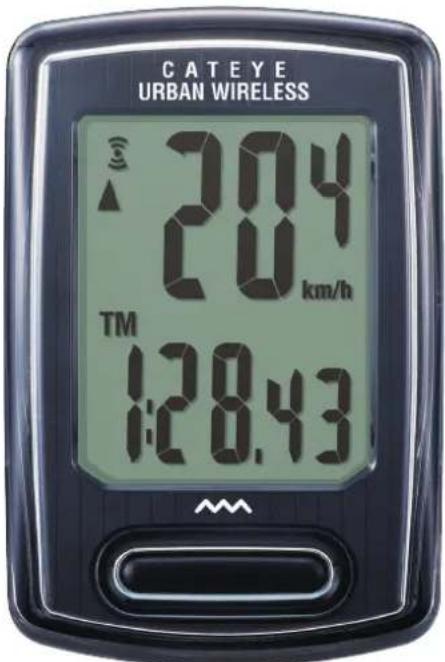
C A T E Y E URBAN WIRELESS 204 km/h TM 1:28.43- This instruction manual is subject to change without notice. See our website for the latest instruction manual (PDF).
- Please visit our website, where a detailed Quick Start manual containing videos can be downloaded.
http://www.cateye.com/products/detail/CC-VT240W/manual/
Mounting the computer
Setting up the computer
Starting measurement
Changing settings
Warning/Caution Product Warranty, etc.
Mounting the computer
Bracket band
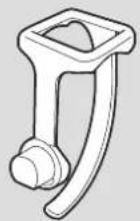
Bracket rubber pad Speed sensor


Magnet

Bracket Dial


Sensor rubber pad
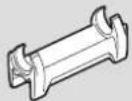
Nylon tie

1 Mount the bracket
- When mounting on stem

natural_image
Illustration of a bicycle's front wheel and handle assembly (no text or symbols)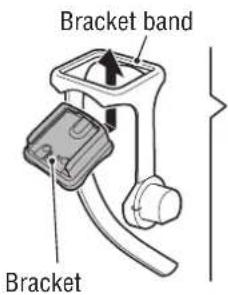
text_image
Bracket band Bracket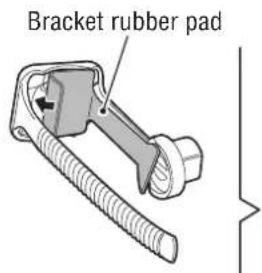
text_image
Bracket rubber pad
text_image
Stem- When mounting on handlebar

natural_image
Line drawing of a bicycle's front wheel and side arm (no text or symbols)
text_image
Bracket band Bracket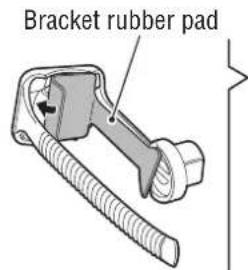
text_image
Bracket rubber pad
text_image
Handlebar
When mounting the bracket on a handlebar, adjust the angle of the bracket so that the back of the computer faces the speed sensor when the computer is attached.


Cutting band after mounting
CAUTION:
Cut the bracket band so that cut end will not cause injury.
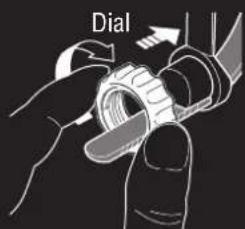
text_image
Dial

text_image
CutMounting the computer
2 Mount the speed sensor
- Mounting on right front fork
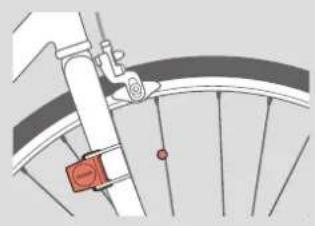
natural_image
Diagram of a bicycle wheel with a red belt and lever mechanism (no text or symbols)- Mounting on left front fork
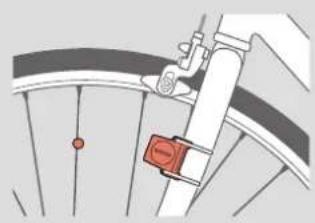
natural_image
Diagram of a bicycle wheel with a red sensor attached, showing mechanical components (no text or symbols)Mount the speed sensor in a position where the distance from the computer to the speed sensor is within the signal range.
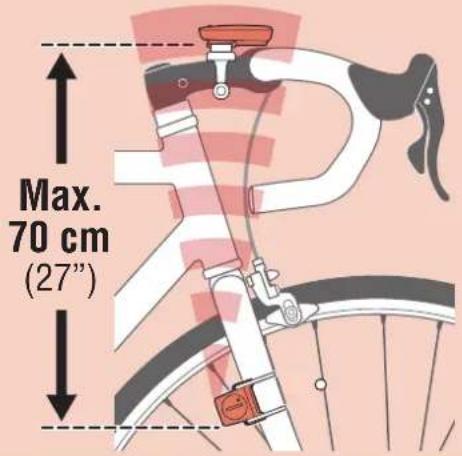
text_image
Max. 70 cm (27")
text_image
Sensor Speed sensor SENSOR ZONE
text_image
Nylon tie Pull tight SENSOR ZONE Cut rubber pad3 Mount the magnet
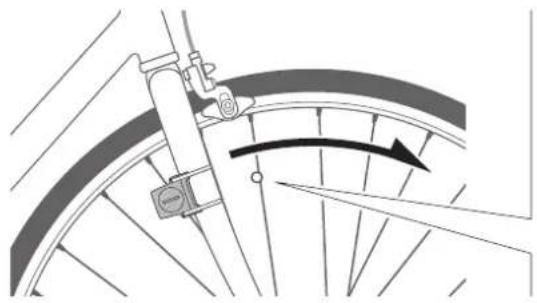
natural_image
Diagram of a bicycle wheel with a directional arrow indicating rotation or motion (no text or symbols present)
text_image
Magnet Spoke To sensor zoneMounting the computer
4 Adjust the speed sensor and the magnet

The magnet passes through the speed sensor zone.
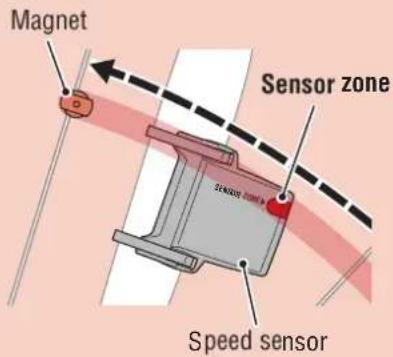
text_image
Magnet Sensor zone Speed sensor
The clearance between the speed sensor and the magnet is within 5 mm (3/16").

text_image
Magnet Speed sensor 5 mm (3/16")* The magnet may be mounted at any position on spoke as long as attachment conditions are satisfied.
5 Attach/detach computer
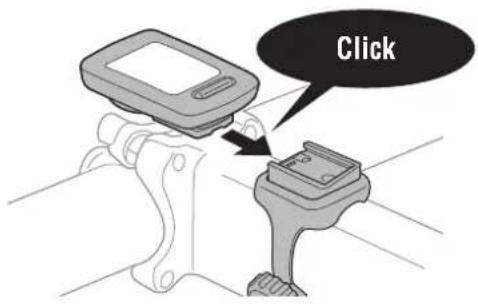
text_image
ClickHold computer.
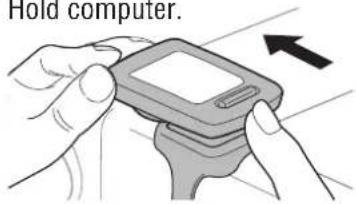
text_image
Hold computer.Push out so that front lifts up.
6 Test operation
After attaching the computer, rotate the front wheel gently to check that current speed is displayed on the computer.
If the speed is not displayed, refer to the attachment conditions in steps 1, 2, and 4 again.
Setting up the computer

When using the computer for the first time or resetting it to its factory default settings, clear all computer data following the procedure below.
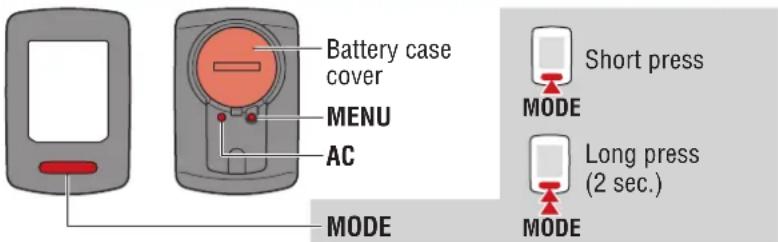
text_image
Battery case cover MENU AC MODE Short press MODE Long press (2 sec.) MODE1 Clear all data.
Press the AC button on the back of the computer.
* All data is deleted and the computer is reset to its factory default settings.

text_image
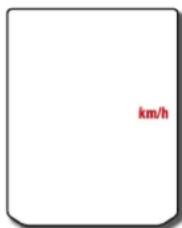
AC2 Select the measurement unit.
Select "km/h" or "mph".
text_image
km/h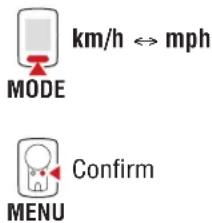
text_image
km/h ⇌ mph MODE Confirm MENU3 Select the tire size.
Simple setting:
When MODE is pressed, 26"→700C→
$$ 2 7 ^ {\prime \prime} \rightarrow 2 7. 5 ^ {\prime \prime} \rightarrow 2 9 ^ {\prime \prime} \rightarrow 2 0 5 [ ] \rightarrow 1 6 ^ {\prime \prime} \rightarrow 1 8 ^ {\prime \prime} \rightarrow $$
20"→22"→24" and 26" will appear, in this order.
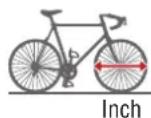
Select the tire size (inch) of your bicycle.

text_image
26"

Advanced settings
(For more accurate measurement):
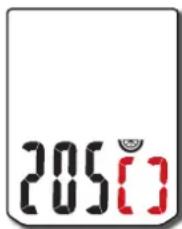
Display 205[] on the screen, and press and hold MODE to enter the tire size of your bicycle in cm. Pressing MODE changes the value, and pressing and holding MODE moves to the next digit.
* For details on the tire circumference, see "Tire circumference" (page 7).
text_image
205[ ]



Setting up the computer
4 Set the clock.
Each time the MODE button is pressed and held, settings switch from time display mode, to hours, to minutes.
* When 12h is selected, A (AM) or P (PM) is displayed at the top of the screen.
Time display mode (24h or 12h)

text_image
24h 1:00ours

MODE
Switch item or increase numbers

MODE
Switch screen or move to next digit (Press and hold)
5 Press MENU to complete setup.
Setup is completed and the computer switches to the measurement screen. For instructions on how to start measurement, refer to “Starting measurement” (page 8).

MENU
Setup complete
Setting up the computer
Tire circumference
Tire circumference can be determined by either of the following two methods:
• Measure the actual tire circumference (L)
After ensuring that the tire pressure is appropriate, sit on your bike, roll it forward so that the tire makes one full revolution (use the valve or other marking as a reference), and measure the distance traveled on the road.

L cm
- Tire size chart
* The tire size or ETRTO code is indicated on the side of the tire.
| ETRTO Tire size | L (cm) | ||
| 40-25414 | x1.50 | 102 | |
| 47-254 | 14x1.75 | 106 | |
| 40-30516 | x1.50 | 119 | |
| 47-305 | 16x1.75 | 120 | |
| 54-30516 | x2.00 | 125 | |
| 28-349 | 16x1-1/8 | 129 | |
| 37-349 | 16x1-3/8 | 130 | |
| 32-369 | 17x1-1/4 (369) | 134 | |
| 40-35518 | x1.50 | 134 | |
| 47-355 | 18x1.75 | 135 | |
| 32-406 | 20x1.25 | 145 | |
| 35-406 | 20x1.35 | 146 | |
| 40-406 | 20x1.50 | 149 | |
| 47-406 | 20x1.75 | 152 | |
| 50-406 | 20x1.95 | 157 | |
| 28-451 | 20x1-1/8 | 155 | |
| 37-451 | 20x1-3/8 | 162 | |
| 37-501 | 22x1-3/8 | 177 | |
| 40-50122 | x1-1/2 | 179 | |
| 47-507 | 24x1.75 | 189 | |
| 50-507 | 24x2.00 | 193 | |
| 54-507 | 24x2.125 | 197 | |
| 25-52024 | x1(520) | 175 | |
| 24x3/4 Tubular 179 | |||
| 28-540 | 24x1-1/8 | 180 | |
| 32-54024 | x1-1/4 | 191 | |
| 25-55926 | x1(559) | 191 | |
| 32-55926 | x1.25 | 195 | |
| 37-559 | 26x1.40 | 201 | |
| 40-55926 | x1.50 | 201 | |
| 47-559 | 26x1.75 | 202 | |
| 50-559 | 26x1.95 | 205 | |
| 54-55926 | x2.10 | 207 | |
| 57-559 | 26x2.125 | 207 | |
| 58-559 | 26x2.35 | 208 | |
| 75-559 | 26x3.00 | 217 | |
| ETRTO Tire size | L (cm) | ||
| 28-590 | 26x1-1/8 | 197 | |
| 37-590 | 26x1-3/8 | 207 | |
| 37-584 | 26x1-1/2 | 210 | |
| 650C Tubular 26x7/8 | 192 | ||
| 20-571 | 650x20C | 194 | |
| 23-571 | 650x23C | 194 | |
| 25-571 | 650x25C | 26x1(571) 195 | |
| 40-59065 | 0x38A | 213 | |
| 40-584 | 650x38B | 211 | |
| 25-630 | 27x1(630) | 215 | |
| 28-630 | 27x1-1/8 | 216 | |
| 32-630 | 27x1-1/4 | 216 | |
| 37-630 | 27x1-3/8 | 217 | |
| 40-584 | 27.5x1.50 | 208 | |
| 50-584 | 27.5x1.95 | 209 | |
| 54-584 | 27.5x2.1 | 215 | |
| 57-584 | 27.5x2.25 | 218 | |
| 18-622 | 700x18C | 207 | |
| 19-622 | 700x19C | 208 | |
| 20-622 | 700x20C | 209 | |
| 23-622 | 700x23C | 210 | |
| 25-622 | 700x25C | 211 | |
| 28-622 | 700x28C | 214 | |
| 30-622 | 700x30C | 215 | |
| 32-622 | 700x32C | 216 | |
| 700C Tubular 213 | |||
| 35-622 | 700x35C | 217 | |
| 38-622 | 700x38C | 218 | |
| 40-622 | 700x40C | 220 | |
| 42-622 | 700x42C | 222 | |
| 44-622 | 700x44C | 224 | |
| 45-622 | 700x45C | 224 | |
| 47-622 | 700x47C | 227 | |
| 54-622 | 29x2.1 | 229 | |
| 56-622 | 29x2.2 | 230 | |
| 60-622 | 29x2.3 | 233 | |
Starting measurement [Measurement screen]
Sensor signal icon
Flashes in sync with a sensor signal.
Pace arrow
Indicates whether the current speed is faster (▲) or slower (▼) than the average speed.
![Cateye Urban CC-VT240W - Starting measurement [Measurement screen] - 1](/content/2026/05/1048007/images/bbd93adfd0eeced66399754c3321a5e758c5f712d22cd52e707f7373e9a54e70.jpg)
text_image
20.4 20 km/h TM 0:12.57Current speed
0.0 (4.0) - 105.9 km/h [0.0 (3.0) - 65.9 mph]
Measurement unit
Current function
Switching current function
Pressing MODE switches the current function displayed at the bottom of the screen.
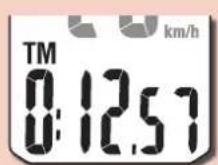
Elapsed Time
0:00'00" - 9:59'59"


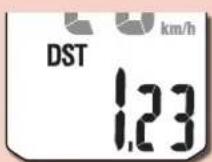



Trip Distance
0.00 - 999.99 km [mile]
Average Speed (*1)
0.0 – 105.9 km/h [0.0 – 65.9 mph]

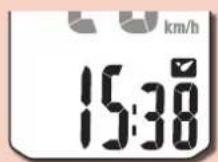
Clock
On the measurement screen, press MENU to go to the menu screen. Various settings can be changed on the menu screen.

MODE

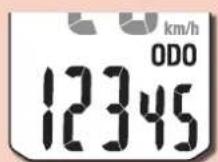
Total distance
0 - 99999 km [mile]






Calorie Consumption (*2)
0 - 99999 kcal
Maximum Speed
0.0 (4.0) - 105.9 km/h [0.0 (3.0) - 65.9 mph]
*1: Av (Average Speed) displays .E instead of the measurement value when Tm (Elapsed Time) exceeds approximately 27 hours or Dst (Trip Distance) exceeds 999.99 km. Reset the measurement data.
*2: Calorie consumption is a cumulative value based on speed calculated at one second intervals. Values for calorie consumption per hour are shown below.
Use the values in this chart as a reference.
| Speed 10 km/h [mph] 20 km/h [mph] 30 km/h [mph] | |
| Kcal per hour 67.3 kcal [155.2 kcal] 244.5 kcal [768.2 kcal] 641.6 kcal [2297.2 kcal] |
Starting measurement [Measurement screen]
Starting/stopping measurement
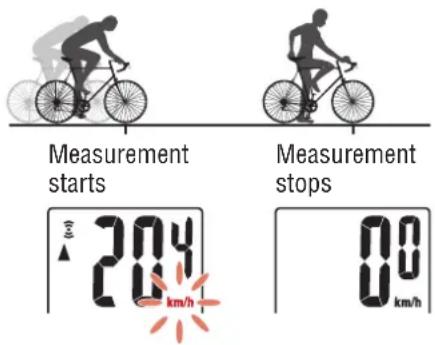
Measurement starts automatically when the bicycle moves.
During measurement the measurement unit (km/h or mph) flashes.
text_image
Measurement starts Measurement stops 20.4 km/h 0.0 km/hResetting data
Pressing and holding the MODE button when on the measurement screen resets all measurement data to 0 (excluding Odo).
Power-saving function
If the computer does not receive any signal for 10 minutes, the power-saving screen is activated and only the clock is displayed. If MODE is pressed or a sensor signal is received while the powersaving screen is activated, the computer returns to the measurement screen.
* If the computer is left on the power-saving screen for 1 hour, SLEEP is displayed. When the computer is in this state, you can return to the measurement screen by pressing the MODE button.

flowchart
graph TD
    A["Measurement screen"] --> B["10 minutes"]
    B --> C["Power-saving screen"]
    C --> D["1 hour"]
    D --> E["Sleep"]
    E --> F["MODE"]
    F --> G["Time scale: 0.00 km/h"]
    G --> H["Motor icon with bicycle"]
    H --> I["Speedometer display: 0:12.57"]
Changing settings [Menu screen]
On the measurement screen, press MENU to go to the menu screen.
Various settings can be changed on the menu screen.
* After changing settings, always press MENU to confirm changes.
* When the menu screen is left on for 1 minute, the computer returns to the measurement screen.
![Cateye Urban CC-VT240W - Changing settings [Menu screen] - 1](/content/2026/05/1048007/images/12de4faf742928ebd10a3464796a2ad5d8f7028c25b55338371a99f41cbf0348.jpg)
flowchart
graph TD
    A["Measurement screen"] --> B["0.1257 km/h MENU"]
    B --> C["26""]
    C --> D["Change setting"]
    D --> E["26" (Press and hold)"]
    E --> F["24""]
    F --> G["700c"]
    G --> H["27""]
    H --> I["27.5""]
    I --> J["29""]
    J --> K["Advanced settings"]
    K --> L["205 c"]
    L --> M["MODE (Press and hold)"]
    M --> N["205 c"]
    N --> O["Increase numbers"]
    O --> P["Move to next digit (Press and hold)"]
    P --> Q["205 c"]
    Q --> R["Mode (Press and hold)"]
    R --> S["205 c"]
    S --> T["Increase numbers"]
    T --> U["205 c"]
    U --> V["Increase numbers"]
    V --> W["205 c"]
    W --> X["Increase numbers"]
    X --> Y["205 c"]
Changing settings [Menu screen]
![Cateye Urban CC-VT240W - Changing settings [Menu screen] - 1](/content/2026/05/1048007/images/68de19986f0cbd45323b020ca3be93d31ea6103859394da8191a65c46443d724.jpg)
flowchart
graph TD
    A["Measurement screen"] --> B["Menu screen"]
    B --> C{Clock}
    C --> D["Change setting"]
    D --> E["Select display"]
    E --> F["12h ↔ 24h"]
    F --> G{Set "hours"}
    G --> H["Increase numbers"]
    H --> I{Set "minutes"}
    I --> J["Increase numbers"]
    J --> K["Manual distance input"]
    K --> L{Change setting}
    L --> M{Move to next digit}
    M --> N["Increase numbers"]
    N --> O["Move to next digit"]
    O --> P["Increase numbers"]
    P --> Q["Move to next digit"]
    Q --> R["Increase numbers"]
    R --> S["Increase numbers"]
    S --> T["Increase numbers"]
    T --> U["Increase numbers"]
    U --> V["Increase numbers"]
    V --> W["Increase numbers"]
    W --> X["Increase numbers"]
    X --> Y["Increase numbers"]
    Y --> Z["Increase numbers"]
    Z --> AA["Increase numbers"]
    AA --> AB["Increase numbers"]
    AB --> AC["Increase numbers"]
    AC --> AD["Increase numbers"]
    AD --> AE["Increase numbers"]
    AE --> AF["Increase numbers"]
    AF --> AG["Increase numbers"]
    AG --> AH["Increase numbers"]
    AH --> AI["Increase numbers"]
    AI --> AJ["Increase numbers"]
    AJ --> AK["Increase numbers"]
    AK --> AL["Increase numbers"]
    AL --> AM["Increase numbers"]
    AM --> AN["Increase numbers"]
    AN --> AO["Increase numbers"]
    AO --> AP["Increase numbers"]
    AP --> AQ["Increase numbers"]
    AQ --> AR["Increase numbers"]
    AR --> AS["Increase numbers"]
    AS --> AT["Increase numbers"]
    AT --> AU["Increase numbers"]
    AU --> AV["Increase numbers"]
    AV --> AW["Increase numbers"]
    AW --> AX["Increase numbers"]
    AX --> AY["Increase numbers"]
    AY --> AZ["Increase numbers"]
    AZ --> BA["Increase numbers"]
    BA --> BB["Increase numbers"]
    BB --> BC["Increase numbers"]
    BC --> BD["Increase numbers"]
    BD --> BE["Increase numbers"]
    BE --> BF["Increase numbers"]
    BF --> BG["Increase numbers"]
    BG --> BH["Increase numbers"]
    BH --> BI["Increase numbers"]
    BI --> BJ["Increase numbers"]
    BJ --> BK["Increase numbers"]
    BK --> BL["Increase numbers"]
    BL --> BM["Increase numbers"]
    BM --> BN["Increase numbers"]
    BN --> BO["Increase numbers"]
    BO --> BP["Increase numbers"]
    BP --> BQ["Increase numbers"]
    BQ --> BR["Increase numbers"]
    BR --> BS["Increase numbers"]
    BS --> BT["Increase numbers"]
    BT --> BU["Increase numbers"]
    BU --> BV["Increase numbers"]
    BV --> BW["Increase numbers"]
Changing settings [Menu screen]
![Cateye Urban CC-VT240W - Changing settings [Menu screen] - 2](/content/2026/05/1048007/images/ee7663356b4aa340685826f4d78113b1b46e4ade12cb3585d22d743136129a56.jpg)
flowchart
graph TD
    A["Measurement screen"] --> B["Menu screen"]
    B --> C["Description"]
    A --> D["0.0 km/h TM 0:12.57 MENU"]
    B --> E["26" MODE"]
    B --> F["24h 1:00 MODE"]
    B --> G["InPut km/h ODO"]
    B --> H["MODE"]
    B --> I["MODE"]
    B --> J["MODE"]
    B --> K["km/h Unit"]
    K --> L["Change setting"]
    L --> M["MODE (Press and hold)"]
    M --> N["km/h km/h↔mph"]
    N --> O["Confirm MENU"]
    O --> P["Select measurement unit"]
    style A fill:#f9f,stroke:#333
    style B fill:#ccf,stroke:#333
    style C fill:#cfc,stroke:#333
    style D fill:#fcc,stroke:#333
    style E fill:#cff,stroke:#333
    style F fill:#ffc,stroke:#333
    style G fill:#cfc,stroke:#333
    style H fill:#fcc,stroke:#333
    style I fill:#ffc,stroke:#333
    style J fill:#fcc,stroke:#333
    style K fill:#ffc,stroke:#333
    style L fill:#fcc,stroke:#333
    style M fill:#fcc,stroke:#333
    style N fill:#ffc,stroke:#333
Appendix
Warning / Caution
- Do not concentrate on the computer while riding. Always ride safely.
- Mount the magnet, sensor, and bracket securely, and check them periodically to ensure that they are not loose.
- If a battery is swallowed accidentally, consult a doctor immediately.
- Do not leave the computer in direct sunlight for a long period of time.
- Do not disassemble the computer.
- Do not drop the computer. Doing so may result in malfunction or damage.
- Always tighten the bracket band dial by hand. Using a tool or other object to tighten the dial may crush the screw thread.
- When cleaning the computer and accessories, do not use thinners, benzine, or alcohol.
- Risk of explosion if battery is replaced by an incorrect type.
Dispose of used batteries according to local regulations. - The LCD screen may be distorted when viewed through polarized sunglass lenses.

Wireless Sensor
The speed sensor is designed with a maximum signal range of 70 cm (27"), to reduce the chance of interference. (The signal range is intended to serve as a rough guide only.) When handling the wireless sensor, note the following:
- Signals cannot be received if the distance between the speed sensor and the computer is too large.
- Signal range may be shortened due to low temperature and flat batteries.
- Signals can be received only when the back of the computer is facing the speed sensor.
Interference may occur, resulting in malfunction, if the computer is:
- Near a TV, PC, radio, or motor, or in a car or train.
- Close to a railroad crossing, railway tracks, TV transmitter station, or radar station.
• Used with other wireless devices or certain battery-powered lights.
This device complies with Part 15 of the FCC Rules. Operation is subject to the following two conditions:(1) This device may not cause harmful interference, and (2) this device must accept any interference received, including interference that may cause undesired operation.
Modifications
The FCC requires the user to be notified that any changes or modifications made to this device that are not expressly approved by CatEye Co., Ltd. May void the user's authority to operate the equipment.
Hereby, CATEYE Co., Ltd., declares that this CC-VT240W is in compliance with the essential requirements and other relevant provisions of Directive 1999/5/EC.
Appendix
Maintenance
If the computer or accessories become dirty, clean with a soft cloth which is moistened with mild soap.
Replacing the battery
- Computer
When the display becomes dim, replace the battery. Insert a new lithium battery (CR2032) with the (+) side up.
* After replacing the battery, always follow the procedure described in “Setting up the computer” (page 5).
* If you make a note of the total distance value before replacing the battery, you will be able to continue from the same total distance by entering it after replacing the battery.
- Speed sensor
When the speed is not displayed even after adjusting correctly, it is time to replace the battery.
Insert a new lithium battery (CR2032) with the (+) side up and close the battery cover firmly.
* After replacing the battery, adjust the position of the magnet relative to the speed sensor as described in "Mounting the computer" (page 4) step 4.

text_image
Close COIN Open CR2032
text_image
CR2032 Close OpenTroubleshooting
The sensor signal reception icon does not flash. (Speed is not displayed.)
- Is there too much clearance between the speed sensor and the magnet? (Clearance should be within 5 mm (3/16").
- Does the magnet pass through the sensor zone correctly?
Adjust the position of the magnet and/or the speed sensor.
• Is the computer mounted at the correct angle?
Ensure that the back of the computer faces the speed sensor. - Are the computer and the speed sensor mounted at the correct distance apart? (Clearance should be from 20 to 70 cm (8" to 27").
Ensure that the speed sensor is within range.
• Is the computer or speed sensor battery flat?
* Battery performance diminishes in winter.
If the computer reacts only when it is close to the speed sensor, the problem may be due to weak batteries.
Replace the batteries with new ones as described in "Replacing the battery".
The display remains blank when the button is pressed.
Replace the computer battery as described in "Replacing the battery".
Incorrect data appear.
Clear all according to the procedure described in “Setting up the computer” (page 5).
Appendix
Main specifications
| Batteries usedBattery life | Computer | Lithium battery (CR2032) x1 / Approx. 1 year(If used for 1 hour a day; actual battery life will vary depending on usage conditions.) |
| Speed sensor | Lithium battery (CR2032) x1 /Total distance approx. 10000 km [6,250 miles] | |
| * Average value when used at temperature of 20 °C with computer and sensor mounted 65 cm apart.* Life of pre-installed battery may be shorter than indicated above. | ||
| Controller | 4 bit, 1-chip microcomputer(Crystal controlled oscillator) | |
| Display Liquid crystal | ||
| Sensor Non-contact magnetic sensor | ||
| Signal range 20 to 70 cm (8" to 27") | ||
| Tire size to be selected | 26", 700c, 27", 27.5", 29", 16", 18", 20", 22" and 24", ortire circumference of 100 cm - 299 cm (initial value: 26 inch) | |
| Operating temperature range | 32°F – 104°F (0°C – 40°C)(Guaranteed operating temperature range: Display visibility may deteriorate outside this range.) | |
| Dimensions/weight | Computer | 2-3/16" x 1-29/64" x 21/32" (55.5 x 37 x 16.5 mm) / 0.93 oz (26.4 g) |
| Speed sensor | 1-41/64" x 1-27/64" x 19/32" (41.5 x 36 x 15 mm) / 0.53 oz (15 g) | |
* Specifications and design are subject to change without notice.
LIMITED WARRANTY
2-Years Computer/Speed Sensor Only (Accessories and Battery Consumption Excluded)
CatEye cycle computers are warranted to be free of defects from materials and workmanship for a period of two years from original purchase. If the product fails to work due to normal use, CatEye will repair or replace the defect at no charge. Service must be performed by CatEye or an authorized retailer. To return the product, pack it carefully and enclose the warranty certificate (proof of purchase) with instruction for repair. Please write or type your name and address clearly on the warranty certificate. Insurance, handling and transportation charges to CatEye shall be borne by person desiring service.
For UK and REPUBLIC OF IRELAND consumers, please return to the place of purchase. This does not affect your statutory rights.
Please register your CatEye product on the website. http://www.cateye.com/en/support/regist/
CATEYE CO., LTD.
2-8-25, Kuwazu, Higashi Sumiyoshi-ku, Osaka 546-0041 Japan Attn: CATEYE Customer Service
Phone : (06)6719-6863 Fax : (06)6719-6033
E-mail : support@cateye.co.jp URL : http://www.cateye.com
[For US Customers]
CATEYE AMERICA, INC.
2825 Wilderness Place Suite 1200, Boulder CO 80301-5494 USA
Phone : 303.443.4595 Toll Free : 800.5.CATEYE
Fax : 303.473.0006 E-mail : service@cateye.com
Standard accessories
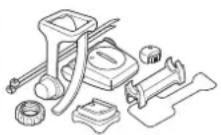
1602190N
Parts kit

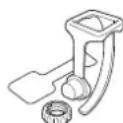

1602194
Bracket kit
1600280N
Bracket band
Bracket

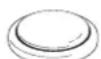
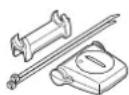
1699691N
Wheel magnet
1665150
Lithium battery
1602196
Speed sensor (SPD-01)
Optional accessories
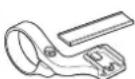
1604100
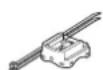
Out-front bracket
1602980
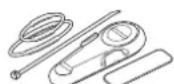
Nylon tie bracket
1603891
Speed sensor (SPD-02)