Urban CC-VT220W - Bike computer Cateye - Free user manual and instructions
Find the device manual for free Urban CC-VT220W Cateye in PDF.


User questions about Urban CC-VT220W Cateye
0 question about this device. Answer the ones you know or ask your own.
Ask a new question about this device
Download the instructions for your Bike computer in PDF format for free! Find your manual Urban CC-VT220W - Cateye and take your electronic device back in hand. On this page are published all the documents necessary for the use of your device. Urban CC-VT220W by Cateye.
USER MANUAL Urban CC-VT220W Cateye
text_image
CATEYE URBAN WIRELESS CYCLOCOMPUTER CC-VT220W Owner's Manual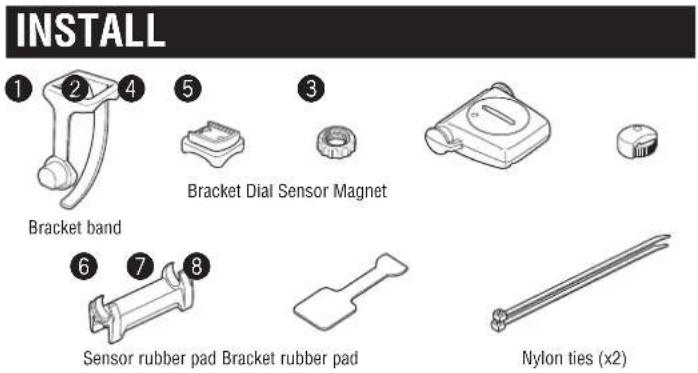
text_image
INSTALL 1 2 4 5 3 Bracket band Bracket Dial Sensor Magnet 6 7 8 Sensor rubber pad Bracket rubber pad Nylon ties (x2)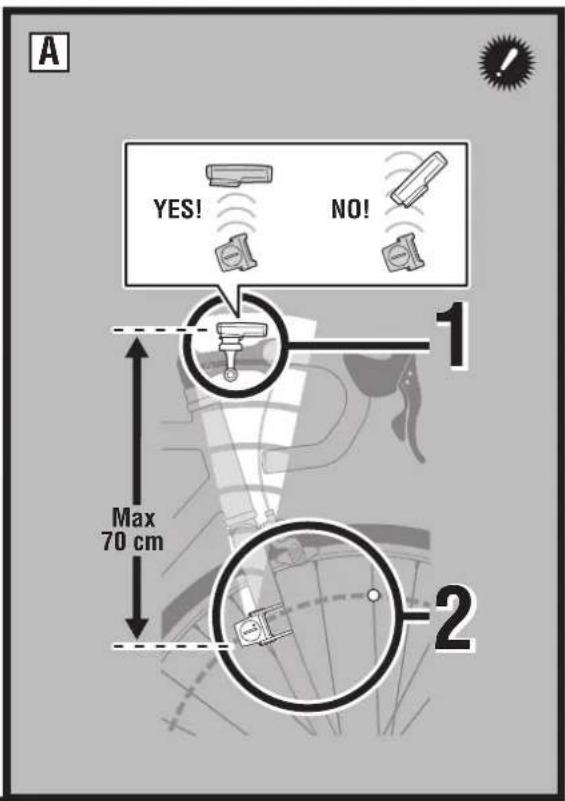
text_image
A YES! NO! 1 Max 70 cm 2
flowchart
graph TD
    A["Bracket: [Stem"] ①] --> B["Component: ⑦"]
    B --> C["Component: ③"]
    C --> D["Computer Click"]
    E["Handlebar: ①"] --> F["Component: ⑦"]
    F --> G["Component: ③"]
    G --> H["Computer Click"]
text_image
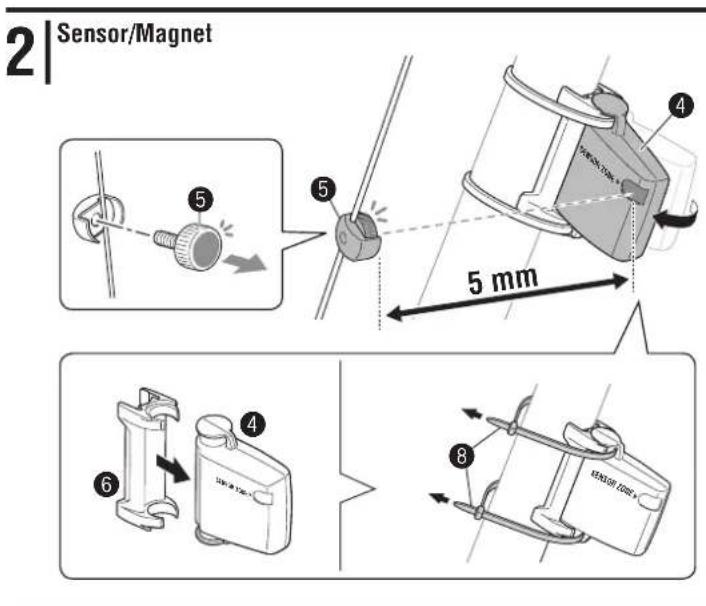
2 | Sensor/Magnet 5 mm 6 4 8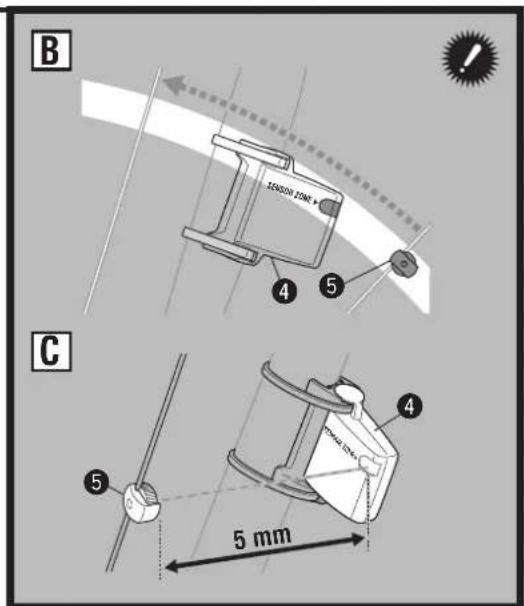
text_image
B 155000 1000 x 4 5 C 5 mm 4 5SETTING

3
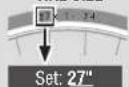
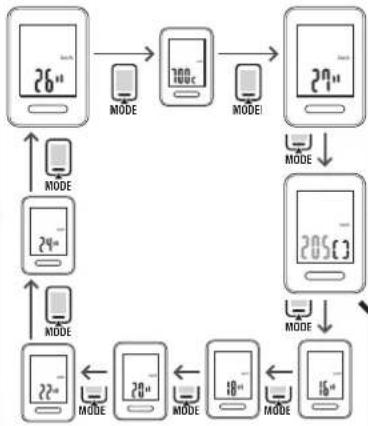
Tire Size
[Quick setting size]

TIRE SIZE
flowchart
graph TD
    A["26" MODE"] --> B["700C MODE"]
    B --> C["2n" MODE"]
    C --> D["205C MODE"]
    D --> E["16" MODE"]
    E --> F["18" MODE"]
    F --> G["24" MODE"]
    G --> H["22" MODE"]
    H --> I["MODE"]
    I --> J["MODE"]
    J --> K["MODE"]
    K --> L["MODE"]
    L --> M["MODE"]
    M --> N["MODE"]
    N --> O["MODE"]
    O --> P["MODE"]
    P --> Q["MODE"]
    Q --> R["MODE"]
    R --> S["MODE"]
    S --> T["MODE"]
    T --> U["MODE"]
    U --> V["MODE"]
    V --> W["MODE"]
    W --> X["MODE"]
    X --> Y["MODE"]
    Y --> Z["MODE"]


Register
the setting


Register
the setting
4
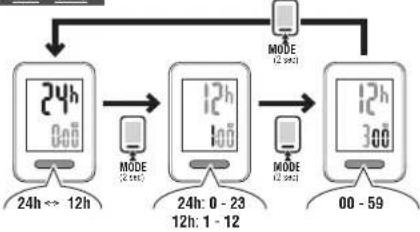
Clock Setting
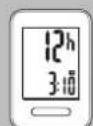
Set: 12h - 3:10
flowchart
graph TD
    A["MODE (24h)"] --> B["24h: 0 - 23 12h"]
    B --> C["MODE (24h) → 12h"]
    C --> D["MODE (24h) → 12h"]
    D --> E["MODE (24h) → 12h"]
    E --> F["MODE (24h) → 12h"]
    F --> G["MODE (24h) → 12h"]
    G --> H["MODE (24h) → 12h"]
    H --> I["MODE (24h) → 12h"]
    I --> J["MODE (24h) → 12h"]
    J --> K["MODE (24h) → 12h"]
    K --> L["MODE (24h) → 12h"]
    L --> M["MODE (24h) → 12h"]
    M --> N["MODE (24h) → 12h"]
    N --> O["MODE (24h) → 12h"]
    O --> P["MODE (24h) → 12h"]
    P --> Q["MODE (24h) → 12h"]
    Q --> R["MODE (24h) → 12h"]
    R --> S["MODE (24h) → 12h"]
    S --> T["MODE (24h) → 12h"]
    T --> U["MODE (24h) → 12h"]
    U --> V["MODE (24h) → 12h"]
    V --> W["MODE (24h) → 12h"]
    W --> X["MODE (24h) → 12h"]
    X --> Y["MODE (24h) → 12h"]
    Y --> Z["MODE (24h) → 12h"]
    Z --> AA["MODE (24h) → 12h"]
    AA --> AB["MODE (24h) → 12h"]
    AB --> AC["MODE (24h) → 12h"]
    AC --> AD["MODE (24h) → 12h"]
    AD --> AE["MODE (24h) → 12h"]
    AE --> AF["MODE (24h) → 12h"]
    AF --> AG["MODE (24h) → 12h"]
    AG --> AH["MODE (24h) → 12h"]
    AH --> AI["MODE (24h) → 12h"]
    AI --> AJ["MODE (24h) → 12h"]
    AJ --> AK["MODE (24h) → 12h"]
    AK --> AL["MODE (24h) → 12h"]
    AL --> AM["MODE (24h) → 12h"]
    AM --> AN["MODE (24h) → 12h"]
    AN --> AO["MODE (24h) → 12h"]
    AO --> AP["MODE (24h) → 12h"]
    AP --> AQ["MODE (24h) → 12h"]
    AQ --> AR["MODE (24h) → 12h"]
    AR --> AS["MODE (24h) → 12h"]
    AS --> AT["MODE (24h) → 12h"]
    AT --> AU["MODE (24h) → 12h"]
    AU --> AV["MODE (24h) → 12h"]
    AV --> AW["MODE (24h) → 12h"]
    AW --> AX["MODE (24h) → 12h"]
    AX --> AY["MODE (24h) → 12h"]
    AY --> AZ["MODE (24h) → 12h"]
    AZ --> BA["MODE (24h) → 12h"]
    BA --> BB["MODE (24h) → 12h"]
    BB --> BC["MODE (24h) → 12h"]
    BC --> BD["MODE (24h) → 12h"]
    BD --> BE["MODE (24h) → 12h"]
    BE --> BF["MODE (24h) → 12h"]
    BF --> BG["MODE (24h) → 12h"]
    BG --> BH["MODE (24h) → 12h"]
    BH --> BI["MODE (24h) → 12h"]
    BI --> BJ["MODE (24h) → 12h"]
    BJ --> BK["MODE (24h) → 12h"]
    BK --> BL["MODE (24h) → 12h"]
    BL --> BM["MODE (24h) → 12h"]
    BM --> BN["MODE (24h) → 12h"]
    BN --> BO["MODE (24h) → 12h"]
    BO --> BP["MODE (24h) → 12h"]
    BP --> BQ["MODE (24h) → 12h"]
    BQ --> BR["MODE (24h) → 12h"]
    BR --> BS["MODE (24h) → 12h"]
    BS --> BT["MODE (24h) → 12h"]
    BT --> BU["MODE (24h) → 12h"]
    BU --> BV["MODE (24h) → 12h"]
    BV --> BW["MODE (24h) → 12h"]
    BW --> BX["MODE (24h) → 12h"]
    BX --> BY["MODE (24h) → 12h"]
    BY --> BZ["MODE (24h) → 12h"]
    BZ --> CA["MODE (24h) → 12h"]
    CA --> CB["MODE (24h) → 12h"]
    CB --> CC["MODE (24h) → 12h"]
    CC --> CD["MODE (24h) → 12h"]
    CD --> CE["MODE (24h) → 12h"]
    CE --> CF["MODE (24h) → 12h"]
    CF --> CG["MODE (24h) → 12h"]
    CG --> CH["MODE (24h) → 12h"]
    CH --> CI["MODE (24h) → 12h"]
    CI --> CJ["MODE (24h) → 12h"]
    CJ --> CK["MODE (24h) → 12h"]

Register
the setting (Finish)
OPERATION FLOW
Current Speed
0.0(4.0) - 105.9 km/h
[0.0(3.0) - 65.9 mph]


TM
0:00.00 - 9:59.59

DST
0.00 - 999.99 km [mile]
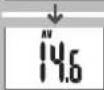
AV *1
0.0 - 105.9 km/h
[0.0 - 65.9 mph]
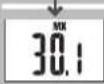
MX
0.0(4.0) - 105.9 km/h
[0.0(3.0) - 65.9 mph]
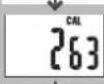
CAL *2
0 - 99999 kcal

CO2 *3
0.00 - 999.99 kg

ODO
0 - 99999 km [mile]


0:00-23:59
[1:00-12:59]
Data Reset

MODE (2 sec)
TM = 0
DST = 0
AV = 0
MX = 0
CAL = 0
CO2 = 0
Battery
Computer

SETTING
1.All clear
Sensor


This device complies with Part 15 of the FCC Rules. Operation is subject to the following two conditions: (1) This device may not cause harmful interference, and (2) this device must accept any interference received, including interference that may cause undesired operation. Modifications The FCC requires the user to be notified that any changes or modifications made to this device that are not expressly approved by CatEye Co., Ltd. May void the user's authority to operate the equipment.
For the Quick start manual to install the unit on the bicycle or set up the wristwatch, please visit our website at http://www.cateye.com.
Before using the computer, please thoroughly read this manual and keep it for future reference.
WARNING / CAUTION
- Do not concentrate on the computer while riding. Ride safely!
- Install the magnet, sensor, and bracket securely. Check these periodically.
- If a child swallows a battery, consult a doctor immediately.
- Do not leave the computer in direct sunlight for a long period of time.
- Do not disassemble the computer.
- Do not drop the computer to avoid malfunction or damage.
- Tighten the dial on the FlexTight bracket by hand only. Over-tightening can damage the bracket threads.
- When cleaning the computer, bracket and sensor, do not use thinners, benzene, or alcohol.
- Dispose of used batteries according to local regulations.
- LCD screen may be distorted when viewed through polarized sunglass lenses.
Wireless Sensor
The sensor was designed to receive signals within a maximum range of 70 cm, to reduce chance of interference. When adjusting the wireless sensor, note the following:
- Signals cannot be received if the distance between the sensor and the computer is too large.
• The receiving distance may be shortened due to low temperature and exhausted batteries.
- Signals can be received only when the back of the computer is facing the sensor.
Interference may occur, resulting in incorrect data, if the computer is:
- Near a TV, PC, radio, motor, or in a car or train.
- Close to a railroad crossing, railway tracks, TV stations and/or radar base.
• Using with other wireless devices in close proximity.
Install the sensor and magnet
A The distance between the computer and the sensor must not exceed the transmission range of 70 cm. The back of the computer must face the sensor.
B The magnet passes through the sensor zone.
C The clearance between the sensor and magnet is 5 mm or less.
* The magnet may be installed anywhere on the spoke if the above installation conditions are satisfied.
Element names
A Current speed
B Sensor signal icon
Flashes in synch with a sensor signal.
© Speed unit km/h mph
D Pace arrow ▲
Indicates whether the current speed is faster (▲or slower (▼) than the average speed.
E Selected mode
Indicates the data currently selected.
TM.....Elapsed Time DST.....Trip Distance
AV ^1 .....Average Speed MX..... Maximum Speed
CAL.....Calorie Consumption CO2.....Carbon offset
ODO.....Total Distance 📋.....Clock
*1 When TM exceeds about 27 hours, or DST exceeds 999.99 km, .E will appear. Reset the data.
F Battery case cover
Starting/Stopping measurement
Measurements start automatically when the bicycle is in motion. During measurement, km/h or mph flashes.
Switching computer function
Pressing MODE switches the measurement data at the bottom in the order of OPERATION FLOW.
Resetting data
Pressing and holding MODE on the measuring screen returns the measurement data to 0.
The odometer is not reset.
Power-saving mode
If the computer has not received a signal for 10 minutes, power-saving mode will activate and only the clock will be displayed. When the computer receives a sensor signal, the measuring screen reappears. If another 2 weeks' inactivity elapsed, SLEEP will be displayed on the screen. Pressing the MODE in SLEEP mode brings up the measuring screen.
Calorie Consumption \*2
The calorie consumption data is only the accumulated value that is calculated from the speed data of every second. It differs from the actual consumed calorie.
| Speed | 10 km/h [mph] | 20 km/h [mph] | 30 km/h [mph] |
| Kcal per hour | 67.3 kcal[155.2 kcal] | 244.5 kcal[768.2 kcal] | 641.6 kcal[2297.2 kcal] |
How to calculate the Carbon offset \*3
The Carbon offset are calculated a
Trip distance (km) x 0.15 = Carbon offset (kg)
* This factor of 0.15 is determined by applying the average value of the overall gasoline-powered passenger cars in 2008 to the equation of the "Carbon offset from 1km drive of a gasoline-powered car" described on the website of the Ministry of Land, Infrastructure and Transport and Tourism.
Maintenance
To clean the computer or accessories, use diluted neutral detergent on a soft cloth, and wipe it off with a dry cloth.
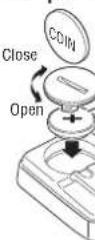
Replacing the battery
- Computer
When the display appears dim, or the computer hardly receives a sensor signal, replace the battery. Install a new lithium battery (CR2032) with the (+) side facing upward. * After replacing the computer battery, follow the procedure described in SETTING
- Sensor
When the speed is not displayed even after adjusting correctly, replace the battery. After replacement, check the positions of the sensor and magnet.
Troubleshooting
The sensor signal icon does not flash (the speed is not displayed). (Move the computer near the sensor, and turn the front wheel. If the sensor signal icon flashes, this trouble may be a matter of transmission
distance due to battery drain, but not any malfunction.)
Check that the clearance between the sensor and magnet is not too large. (Clearance: within 5 mm) Check that the magnet passes through the sensor zone correctly. Adjust the positions of the magnet and sensor.
Is the computer installed at the correct angle?
Back of computer must face toward the sensor
Check that the distance between the computer and sensor is
correct. (Distance: within 20 to 70 cm)
Install the sensor within the specified range.
is the computer or sensor battery weak?
to winter, battery performance diminishes.
Replace with new batteries. After replacement, follow the
procedure "Replacing the battery"
No display.
Is battery in the computer run down?
Replace it with a new battery. After replacement, follow the
procedure described in SETTING
Incorrect data appear
Follow the procedure described in SETTING
Specification
Battery
Computer: Lithium battery (CR2032) x 1
Sensor : Lithium battery (CR2032) x 1
Battery life
Computer: Approx. 1 year (If the computer is used for 1 hour/day; the battery life will vary depending on the conditions of use.) Sensor: Unit Total Distance reaches about 10000 km (6250 miles)
* This is the average figure of being used under 20 °C temperature and the distance between the computer and the sensor is 65 cm.
Controller..... 4 bit, 1-chip microcomputer (Crystal controlled oscillator)
Display .... Liquid crystal display
Sensor......No contact magnetic sensor
Transmission distance...Between 20 and 70 cm
Tire size to be selected
26", 700c, 27", 16", 18", 20", 22" and 24", or tire circumference of 100 cm - 299 cm (initial value: 26 inch)
Working temperature
32°F - 104°F (0°C - 40°C) (This product will not display appropriately when exceeding the Working Temperature range. Slow response or black LCD at lower or higher temperature may happen respectively.)
Dimensions/weight
Computer : 2-3/16" x 1-15/32" x 5/32" (55.5 x 37.5 x 18.5 mm) / 0.99 oz (26 g) Sensor : 1-41/64" x 1-3/8" x 19/32" (41.5 x 35 x 15 mm) / 0.53 oz (15 g)
* The factory-loaded battery life might be shorter than the above-mentioned specification.
* The specifications and design are subject to change without notice.
LIMITED WARRANTY
2-Year Computer/Sensor only (Accessories/Bracket sensor and Battery Consumption excluded)
CatEye cycle computers are warranted to be free of defects from materials and workmanship for a period of two years from original purchase. If the product fails to work due to normal use, CatEye will repair or replace the defect at no charge. Service must be performed by CatEye or an authorized retailer. To return the product, pack it carefully and enclose the warranty certificate (proof or purchase) within instruction for repair. Please write or type your name and address clearly on the warranty certificate. Insurance, handling and transportation charges to CatEye shall be borne by person desiring service.
For UK and REPUBLIC OF IRELAND consumers, please return to the place of purchase. This does not affect your statutory rights.
CATEYE CO.LTD.
2-8-25, Kuwazu, Higashi Sumiyoshi-ku,
Osaka 546-0041 Japan
Attn: CATEYE Customer Service
Phone : (06)6719-6863
Fax : (06)6719-6033
E-mail : support@cateye.co.jp
URL:http://www.cateye.com
[For US Customers]
CATEYE AMERICA, INC
2825 Wilderness Place Suite 1200, Boulder
CO80301-5494 USA
Phone:303.443.4595
Toll Free : 800.5CATEYE
Fax:303.473.0006
E-mail: service@cateye.com
| ETRTO Tire size | L (cm) | |
| 40-254 | 1x1.50 102 | |
| 47-254 | 1x1.75 110 | |
| 40-305 | 1x1.50 119 | |
| 47-305 | 1x1.75 120 | |
| 54-305 | 1x2.00 125 | |
| 28-349 | 1x1-1/8 129 | |
| 37-349 | 1x1-3/8 130 | |
| 32-369 | 1x1-1/4 [569] | 134 |
| 40-355 | 1x1.50 134 | |
| 47-355 | 1x1.75 135 | |
| 32-406 | 2x1.25 145 | |
| 35-406 | 2x1.35 146 | |
| 40-406 | 2x1.50 149 | |
| 47-406 | 2x1.75 152 | |
| 50-406 | 2x1.95 157 | |
| 28-451 | 2x1-1/8 156 | |
| 37-451 | 2x1-3/8 162 | |
| 37-501 | 2x1-3/8 177 | |
| 40-501 | 2x1-1/2 179 | |
| 47-507 | 2x1.75 189 | |
| 50-507 | 2x2.00 193 | |
| 54-507 | 2x2.125 197 | |
| 25-520 | 2x1 (520) | 175 |
| 24x3/4 Tubuler 179 | ||
| 28-540 | 2x1-1/8 180 | |
| 32-540 | 2x1-1/4 191 | |
| 25-559 | 2x1 (559) | 191 |
| 32-559 | 2x1.25 195 | |
| 37-559 | 2x1.40 201 | |
| 40-559 | 2x1.50 201 | |
| 47-559 | 2x1.75 202 | |
| 50-559 | 2x1.95 205 | |
| 54-559 | 2x2.10 207 | |
| 57-559 | 2x2.125 207 | |
| 58-559 | 2x2.35 208 | |
| 75-559 | 2x3.00 217 | |
| 28-590 | 2x1-1/8 197 | |
| 37-590 | 2x1-3/8 207 | |
| 37-584 | 2x1-1/2 210 | |
| 650C Tubuler 26x7/8 192 | ||
| 20-571 | 60x20C 194 | |
| 23-571 | 60x23C 194 | |
| 25-571 | 60x25C 26x1 (571) | 195 |
| 40-590 | 60x38A 213 | |
| 40-584 | 60x38B 211 | |
| 25-630 | 2x1 (630) | 215 |
| 28-630 | 2x1-1/8 216 | |
| 32-630 | 2x1-1/4 216 | |
| 37-630 | 2x1-3/8 217 | |
| 18-622 | 700x18C 207 | |
| 19-622 | 700x19C 208 | |
| 20-622 | 700x20C 209 | |
| 23-622 | 700x23C 210 | |
| 25-622 | 700x25C 211 | |
| 28-622 | 700x28C 214 | |
| 30-622 | 700x30C 215 | |
| 32-622 | 700x32C 216 | |
| 700C Tubuler | 213 | |
| 35-622 | 700x35C 217 | |
| 38-622 | 700x38C 218 | |
| 40-622 | 700x40C 220 | |
| 42-622 | 700x42C 222 | |
| 44-622 | 700x44C 224 | |
| 45-622 | 700x45C 224 | |
| 47-622 | 700x47C 227 | |
| 54-622 | 29x2.1 | 229 |
| 60-622 | 29x2.3 | 233 |
STANDARD PARTS
160-2190N: Parts kit

160-2196 : Speed sensor
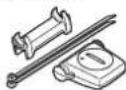
160-0280N: Bracket band

160-2193 : Bracket
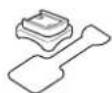
166-5150 : Lithium battery (CR2032)
