
AG820CRL - Microwave Clas Ohlson - Free user manual and instructions
Find the device manual for free AG820CRL Clas Ohlson in PDF.


| Product Type | Countertop Microwave Oven |
| Brand | Clas Ohlson |
| Model | AG820CRL |
| Capacity | 20 L |
| Microwave Power | 800 W |
| Grill Power | 1000 W |
| Input Power | 1200 W |
| Power Supply | 230 V ~ 50 Hz |
| Dimensions (W x D x H) | 45.2 x 34.5 x 26.2 cm |
| Interior Dimensions (W x D x H) | 28.5 x 28.5 x 18.5 cm |
| Weight | 10.2 kg |
| Turntable Diameter | 27 cm |
| Functions | Microwave, Grill, Combination, Defrost by weight/time, Auto-cook menus |
| Power Levels | 5 levels |
| Child Lock | Yes |
| Display | LED digital display with clock and timer |
| Interior Light | Yes |
| Door Opening | Front handle, side open |
| Cleaning | Wipe with damp cloth; use mild detergent; avoid abrasives |
| Safety | Overheat protection, door interlock switches |
| Accessories Included | Glass turntable, rotating ring, grill rack |
| Warranty | 1 year |
Frequently Asked Questions - AG820CRL Clas Ohlson
User questions about AG820CRL Clas Ohlson
0 question about this device. Answer the ones you know or ask your own.
Ask a new question about this device
Download the instructions for your Microwave in PDF format for free! Find your manual AG820CRL - Clas Ohlson and take your electronic device back in hand. On this page are published all the documents necessary for the use of your device. AG820CRL by Clas Ohlson.
USER MANUAL AG820CRL Clas Ohlson
Microwave Grill Oven
Mikrovågsugn
Mikrobølgeovn
Mikroaaltouuni
Art.no. Model
34-4059 AG820CRL
Ver. 200903
Microwave Grill Oven
Art.no 34-4059 Model AG820CRL
Please read the entire instruction manual before using the product and save it for future reference.
We reserve the right for any errors in text or images and any necessary changes made to technical data.
If you have any questions regarding technical problems please contact Customer Services (see address on reverse).
Safety
Caution:
To avoid the risk of exposure to harmful microwaves:
- The microwave oven should not be used if the door or casing is damaged.
- The microwave may only be disassembled and repaired by qualified service personnel.
- Never open the casing. Certain components inside the casing carry dangerous currents. Contact with these may cause electric shock.
- The microwave oven should not be taken apart or modified.
- The product should not be used by unsupervised children if they do not have the required knowledge of how to use it.
- Never heat drinks or other food items in closed containers since it might cause them to explode.
- Only use microwave-safe containers.
- Never leave the microwave unattended while heating food items in plastic or paper containers since there may be a risk of fire.
- If smoke is detected, immediately shut off or unplug the microwave oven. Keep the door shut to suffocate possible flames.
- The contents of feeding bottles or similar baby food containers should always be well stirred or shaken before serving. Always check the temperature before serving to avoid burns.
- Do not heat or cook eggs in the microwave. They may explode during or after heating.
- Clean the microwave regularly. Make sure to wipe up any food spills.
- Place the microwave oven on a dry and even surface.
- Do not place the microwave oven where it could fall into water or any other type of liquid.
- Check that your power supply is 230 V and that the microwave oven is connected to an earthed socket.
- Always unplug the microwave oven from the wall socket before cleaning it.
- Do not expose the microwave to knocks or blows.
- Make sure that the lead does not come in contact with warm surfaces, e.g. a warm hob.
- Do not us the microwave oven if the cable or plug is damaged.
- The microwave should only be used and kept indoors.
- Be aware that food containers heated in the microwave become very hot so take care when removing them. Use an oven cloth or oven glove to avoid burning yourself.
- Do not use the microwave oven when it is empty. Sparks may be produced and the microwave may become damaged.
Product description Suitable containers for microwave use
We recommend that microwave-safe tableware is used. Suitable materials are glass, porcelain and certain plastic materials. Never use metal containers or containers with gold or silver trim. Even containers of wood or with wooden parts are unsuitable since the wood will dry in the microwave and may even crack.
Buttons and functions

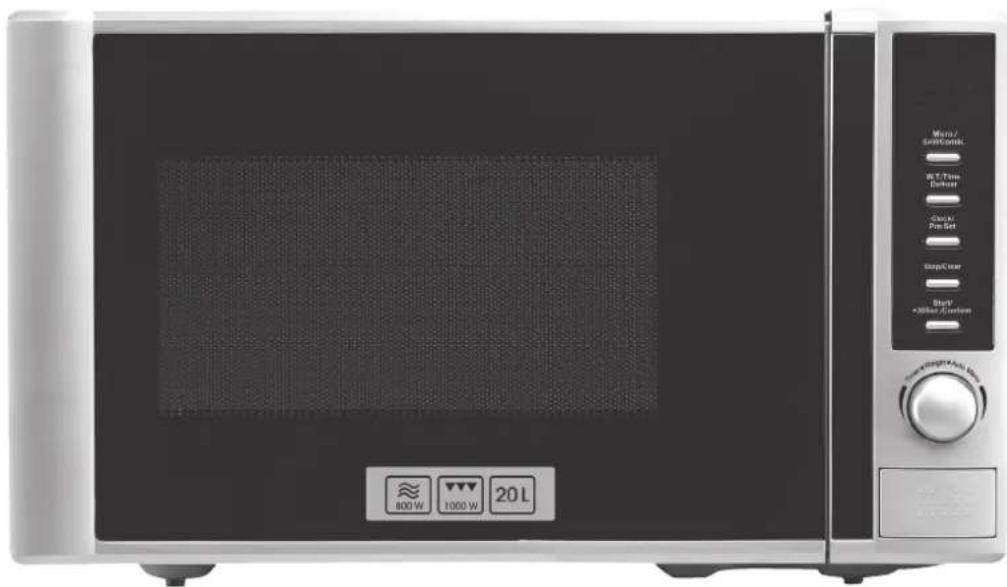
- Micro/Grill/Combi – Selector
- W.T./Time Defrost – Automatic defrost programme
- Clock/Pre-Set – Sets the clock/Preset start time
- Stop/Clear – Turns the microwave off /Clears settings/Button lock
- Start/+30Sec./Confi rm - Turns the microwave on/Confi rms settings
- Setting dial
- Turntable drive
- Turntable support ring
- Turntable
- Metal grill rack
Installation & preparations
Unpack all parts and check that they are intact. Package contents:
- Microwave oven
- Turntable
- Turntable support ring
- Grill rack
- Instruction manual
Installing the rotating turntable
- Never place the turntable (9) upside down (the 3 middle "feet" should be facing downwards).
- Both the turntable (9) and the support ring (8) must be in place every time the microwave oven is used.
- All food items and containers should be placed on the turntable when defrosting or heating.
- If the turntable or support ring is damaged, contact Customer Services.

Selecting a good location
- Place the microwave on a flat and dry surface.
- Make sure that the microwave oven has plenty of space so that no air inlet/outlet ports are blocked. The minimum free area around the oven should be about 7.5 cm and 30 cm above.
- Do not remove the microwave oven's feet. These are needed to provide enough ventilation underneath the microwave.
- Place the appliance as far away from TVs and radios as possible. Microwaves can cause interference to TV reception and radio broadcasts.

Setting the clock
Once the microwave is connected to the mains a signal will be emitted and "0:00" will show in the display.
- Push Clock/Pre-Set once or twice. The time display will begin fl ashing.
- Turn Ⓞ to set the hours.
- Push once again on Clock/Pre-Set to come to the minutes setting.
- Turn Ⓞ to set the minutes.
- Push Clock/Pre-Set to confirm and save your settings.
Operation
Using the microwave
- Place the item to be heated into the microwave.
- Press Micro/Grill/Combi repeatedly or turn to select the desired power level. The display will show, in order, "P 100", "P 80", "P 50", "P 30" and "P 10". Examples of suitable power settings:
Defrosting P 30
Cooking/reheating P 80
Boiling water P 100
Confir rm power settings by pressing Start/+30Sec/Confir rm.
- Then set the desired time by turning (up to 95 minutes).
- Close the oven door and push Start/+30Sec/Confirm to start the microwave oven.
N.B. The preset time setting intervals are as follows:
| 0 -1 min 5 seconds |
| 1-5 min 10 seconds |
| 5-10 min 30 seconds |
| 10-30 min 1 minute |
| 30-95 min 5 minutes |
Power levels:
| Display Power | |
| P100 100 % | |
| P80 80 % | |
| P50 50 % | |
| P30 30 % | |
| P10 10 % |
Using the grill
- Place the item to be heated into the microwave.
- Push Micro/Grill/Combi once. The display will begin fl ashing "100".
- Turn (O) to select the grill. The icon "G" in the display means the grill is active.
- When the "G" icon shows, press Start/+30Sec/Confirm to confirm your choice.
- Turn (○) to set the desired cooking time (up to 95 minutes).
- Close the oven door and press Start/+30Sec/Confirm to start the oven.
N.B.
When half the grilling time has elapsed the microwave oven will emit two beeps. This is completely normal and is merely signalling that only half the cooking time remains.
To grill the food evenly it should be turned at this time. Close the oven door and push Start/+30Sec/Confirm to continue grilling.
Combined use
Choose from two combinations C-1 and C-2.
Combinations:
| Selection Microwave Grill | ||
| C-1 55 % 45 % | ||
| C-2 36 % 64 % | ||
- Place the item to be heated into the microwave.
- Push Micro/Grill/Combi once. The display will begin fl ashing "100".
- Turn ☐ to select either C-1 or C-2.
- Push Start/+30Sec/Confir rm once to confi rm the chosen setting.
- Turn (○) to set the desired cooking time (up to 95 minutes).
- Close the oven door and press Start/+30Sec/Confirm to start the oven.
Defrosting
Defrosting by weight
- Put the item to be defrosted into the microwave.
- Press W.T./Time Defrost once. The display will show "def1".
- Turn ☐ to set the weight of the item to be defrosted. Select the appropriate weight from 100 to 2000 grams.
- Close the oven door and push Start/+30Sec/Confirm to begin defrosting.
Defrosting by time
- Put the item to be defrosted into the microwave.
- Push DEFROST BY W.T/TIME twice. The display will show "def2".
- Turn to set the defrost time (5 seconds to 95 minutes).
- Close the oven door and push Start/+30Sec/Confirm to begin defrosting.
Additional features
Multi-function
The multi-function feature can be used when you want to use the various automatic functions of the microwave oven in a sequence. The cooking method can be set for two functions at the most.
Example: You wish to defrost your food for 5 minutes and continue cooking it at 80% power for 7 minutes.
- Place the item to be heated into the microwave.
- Press W.T./TIME DEFROST once. The display will show "def1" (100 %).
- Turn ☐ to set the defrost time to 5 minutes.
-
Push Micro/Grill/Combi once.
-
Turn to set the power setting to 80%. The display will show "P80".
- Push Start/+30Sec/Confir rm once to confi rm the chosen setting.
- Turn (O) to set the cooking time to 7 minutes.
- Close the oven door and press Start/+30Sec/Confirm to start the oven.
Preset start times
The microwave oven can be programmed to start at a preset time.
- Make sure that the microwave oven clock is set correctly (see the Setting the clock section).
- Set the desired method of cooking according to the instruction manual (do not use this for defrosting). Cooking methods can be set for two functions at the most.
Example: You wish to prepare food at 80% power for 7 minutes.
- Push Micro/Grill/Combi once.
- Turn (○) to set the power setting to 80%. The display will show "P80".
- Push Start/+30Sec/Confir rm once to confi rm the chosen setting.
- Turn ☐ to set the cooking time to 7 minutes.
-
Push Clock/Pre-Set once. The hour display will start to flash.
-
Turn ☐ to set the hours.
-
Push Clock/Pre-Set again. The current time will be shown and the minute display will begin flashing. Turn 🔍 to set the minutes.
-
Close the oven door and push Start/+30Sec/Confirm to confirm and save settings.
-
At the preset time a signal will be emitted and the oven will start according to the preset programme.
N.B.
- The oven door has to be closed when the preset time occurs or the oven will not start.
- The clock has to be set for this function to be used.
Quick start
- Put what you want to cook/heat into the oven and close the door.
- Push Start/+30Sec/Confirm to run the oven for 30 seconds at full power (100%).
- To increase the time, push Start/+30Sec/Confirm once or repeatedly. Each press increases the time by 30 seconds.
N.B.
- When defrosting, using the preset start time or multi-function feature, the time cannot be increased by pushingStart/+30Sec/Confirm.
- It is even possible to quick-start the oven in normal mode by turning clockwise to set the time directly. Start the oven by pressing Start/+30Sec/Confirm. Power level at 100%.
Automatic cooking programmes
- Place the item that you wish to cook/reheat into the microwave.
- Turn clockwise to select a cooking programme (A-1 to A-8). Refer to the table for various food items.
- Push Start/+30Sec/Confir rm once to confi rm your selection.
- Turn Ⓞ to set the variables for the food item and its weight/portion.
- Close the oven door and press Start/+30Sec/Confirm to start cooking.
- When the time has elapsed the oven will emit a signal.
| Menu Weight Display Power | |||
| A-1Reheat | 200 g 200 100 % | ||
| 400 g 400 100 % | |||
| 600 g 600 100 % | |||
| A-2Vegetables | 200 g 200 100 % | ||
| 300 g 300 100 % | |||
| 400 g 400 100 % | |||
| A-3Fish | 250 g 250 80 % | ||
| 350 g 350 80 % | |||
| 450 g 450 80 % | |||
| A-4Meat | 250 g 250 100 % | ||
| 350 g 350 100 % | |||
| 450 g 450 100 % | |||
| A-5Pasta | 50 g (with water 450 g) 50 80 % | ||
| 100 g (with water 800 g) 100 | 80 % | ||
| A-6Potatoes | 200 g 200 | 100 % | |
| 400 g 400 | 100 % | ||
| 600 g 600 | 100 % | ||
| A-7Pizza | 200 g 500 100 % | ||
| 750 g 750 | 100 % | ||
| A-8Soup | 200 g 200 80 % | ||
| 400 g 400 | 80 % | ||
Checking your settings
You may always check your settings during use.
- During cooking press Micro/Grill/Combi to check the current active feature.
- For preset start times press Clock/Pre-Set to check the preset start time.
- When cooking press Clock/Pre-Set to display the time.
Button lock
The button lock is ideal for preventing children from accidentally starting the oven.
Locking the buttons
- Depress STOP/CLEAR for about 3 seconds while the oven is in standby mode. A signal will be emitted and the key icon ⚫️ will be displayed.
Unlocking the buttons
- Depress STOP/CLEAR for about 3 seconds. A signal will be emitted and the key icon should disappear.
N.B.
- The microwave will beep five times when the cooking time has elapsed.
- If the door should open during use Start/+30Sec/Confirm must be pressed again to continue cooking.
- If Start/+30Sec/Confirm is not pushed within a minute after setting a programme/feature, the microwave will return to standby mode. You then have to reset the feature.
Care and maintenance
Always unplug the product from the wall socket before cleaning. Never immerse the microwave in water to clean it. Wipe both the inside and outside of the oven with a soft, damp cloth using a mild cleaning solution. Avoid using solvents and abrasive cleaning agents. Wash the glass turntable, support ring and grill rack in warm water with washing up liquid.
Troubleshooting guide
| Problem Possible cause Possible solution | ||
| Oven does not start. | Power cable not connected. Connect the plug to the wall socket. | |
| Door is open. Close the door. | ||
| Arcing or small sparks occur. | Unsuitable materials, e.g. metal is used in the microwave oven. | Use only microwave-safe materials such as glass or porcelain. |
| The microwave oven is being used while empty. | Do not use the microwave oven while it is empty. | |
| Food is heated unevenly. | Unsuitable materials, e.g. metal is used in the microwave oven. | Use only microwave-safe materials such as glass or porcelain. |
| The food has not been turned over or mixed. | Turn over or mix the food. | |
Disposal
Follow local ordinances when disposing of this product. If you are unsure of how to dispose of this product, please contact your municipality.
Specifications
Model AG820CRL
Power supply 230 V AC, 50 Hz
Microwave power consumption 1270 W
Microwave power output 800 W
Grill power consumption 1000 W
Capacity 20 litres
Glass turntable diameter 24.5 cm
External dimensions 43.3 x 25.8 x 33.5 cm
Weight (ca) 10.5 kg
Mikrovågsugn
Art.nr 34-4059 Modell AG820CRL
- Micro./Grill/Combi – Funksjonsvelger
- W.T./Time Defrost – Automatisk opptiningsprogram
- Clock/Pre-Set – Still inn klokken/Tidsinnstilt start
- Stop/Clear – Stopper ovnen/Sletter innstillinger/Tastelås
- Start/+30Sec./Confi rm – Starter ovnen/Bekrefter innstillinger
- Innstillingsbryter
- Drev for glasstallerken
- Støtte til glasstallerken
- Glasstallerken
- Metallgitter/grillgitter
For consumer contact, please visit www.clasohlson.co.uk and click on customer service.
INTERNET www.clasohlson.co.uk

- MICROWAVE GRILL OVEN
- SAFETY
- CAUTION
- PRODUCT DESCRIPTION SUITABLE CONTAINERS FOR MICROWAVE USE
- BUTTONS AND FUNCTIONS
- INSTALLATION & PREPARATIONS
- INSTALLING THE ROTATING TURNTABLE
- SELECTING A GOOD LOCATION
- SETTING THE CLOCK
- OPERATION
- USING THE MICROWAVE
- USING THE GRILL
- N.B
- COMBINED USE
- DEFROSTING
- DEFROSTING BY WEIGHT
- DEFROSTING BY TIME
- ADDITIONAL FEATURES
- MULTI-FUNCTION
- PRESET START TIMES
- QUICK START
- AUTOMATIC COOKING PROGRAMMES
- CHECKING YOUR SETTINGS
- BUTTON LOCK
- LOCKING THE BUTTONS
- UNLOCKING THE BUTTONS
- CARE AND MAINTENANCE
- DISPOSAL
- SPECIFICATIONS
- MIKROVÅGSUGN
Brand : Clas Ohlson
Model : AG820CRL
Category : Microwave