
E300 - Organ KAWAI - Free user manual and instructions
Find the device manual for free E300 KAWAI in PDF.


| Product Type | Digital Organ |
| Brand | Kawai |
| Model | E300 |
| Category | Organ |
| Dimensions (W x D x H) | 1300 x 680 x 950 mm |
| Weight | 62 kg |
| Power Supply | AC 100-240V, 50/60Hz, 30W |
| Sound Source | Harmonic Imaging™ with 96 voices |
| Polyphony | 128 notes |
| Manual Keys | 61 keys (waterfall action, velocity sensitive) |
| Pedalboard | 13 pedals (radiating concave) |
| Number of Voices | 100 (including organ stops, piano, strings, etc.) |
| Effects | Reverb, chorus, rotary speaker, tremolo |
| Connectivity | MIDI IN/OUT, USB to Host, Audio In/Out, Headphone jack |
| Display | LCD with adjustable contrast |
| Speakers | Two 20 cm woofers, two 5 cm tweeters |
| Amplifier Power | 2 x 30W |
| Maintenance & Cleaning | Wipe with a soft, dry cloth; avoid solvents |
| Safety | Auto power-off after 30 minutes of inactivity |
| Accessories Included | Music stand, owner's manual, power cord |
Frequently Asked Questions - E300 KAWAI
User questions about E300 KAWAI
0 question about this device. Answer the ones you know or ask your own.
Ask a new question about this device
Download the instructions for your Organ in PDF format for free! Find your manual E300 - KAWAI and take your electronic device back in hand. On this page are published all the documents necessary for the use of your device. E300 by KAWAI.
USER MANUAL E300 KAWAI
Organ Playing the Kawai Way
Kawai Electronic Organ
OWNER'S MANUAL
MODEE300
natural_image
Silhouette illustration of a person playing a stringed instrument with two others (no text or symbols)KAWAI ORGANS

Published exclusively for Kawai Organs
Haldeonard Publishing Corporation
on the purchase of your new KAWAI ORGAN. This magnificent instrument will furnish you and your family with years of musical pleasure and trouble-free service. Your new KAWAI ORGAN not only offers you quality construction and organ tone of unsurpassed beauty, but it features completely up-to-date electronic techniques to provide you with one of the most dependable instruments in the world.
Table of Contents
Learn To Play The Kawai Way 2
A Brief Look At The Past and Present. 2
How To Care For Your Kawai Organ.... 2
Model E300.... 3
The Keyboards and Pedals 4
Expression Pedal 4
Stop Tabs. 4
The Four Families of Tone 4
Footage 4
Mechanical Controls. 5
Upper Percussion Voices....6
Independent Speaking Voices 6
The Kawai Autorhythm.... 7
The Kawai Electro-Chord.... 8
Additional Kawai Features 9
Registrations 10
Beautiful Brown Eyes....11
Oh Marie 12
Liebestraum 13
After The Ball....14
Holy, Holy, Holy....14
Bach Theme 15
Oh! Susanna....15
Carnival Of Venice 16
Theme from Borodin's Polovetzian Dance....17
Brahm's Lullaby 18
When The Saints Go Marching In 19
Chopin's Nocturne....19
The Cassette Recorder....20
© Copyright 1974 by HAL LEONARD PUBLISHING CORPORATION
Made in U.S.A./International Copyright Secured/All Rights Reserved
Learn to Play The Kawai Way
Your KAWAI owner's manual will acquaint you with all the fascinating features of your new organ. How to use them is colorfully and clearly explained in KAWAI'S exclusive and extraordinary new organ approach ... THE KAWAI WAY. This remarkable three-part course is included with your organ purchase.
Part 1, designed as your introduction to organ playing, will get you involved immediately in the basics, while you enjoy the thrill of playing your favorite songs. Each new element of musical information is presented with a new song arrangement, a collection of twenty songs from ever-popular favorites and recent hits.
Part 2 of the KAWAI WAY presents more advanced materials that will help you add many more professional touches to your KAWAI ORGAN playing. All Part 2 instructions are carefully coordinated to a fabulous collection of 60 popular song arrangements, in standard sheet music form.
Part 3 consists of twenty more great songs which are coordinated to the special effects and rhythm guide, a section that shows you how to create and easily perform the incredible range of organ effects and special rhythms that are possible on your new KAWAI. You'll thrill your family and friends as you treat them to danceable selections with a Latin, Go-go, or Rock beat.
It's so much fun, it's hard to treat the KAWAI WAY as an organ course. But enjoy all the benefits while you gain a truly sound musical education. The KAWAI WAY will get every member of the family involved in organ playing, whether they try it on their own or with the support of a private or classroom organ teacher. The techniques, fresh graphics, and exciting popular music truly represent a unique breakthrough in learning.
Learn to play...the KAWAI WAY.
A Brief Look at the Past and Present
The first pipe organs were invented over two thousand years ago. Most organs of today have two keyboards but until around 400 years ago all organs had only one manual. As the organ grew in versatility, it also grew in size, weight and cost. As a matter of fact, by the end of the 19th century some organs had as many as six or seven keyboards. For a long period of time only the extremely wealthy could afford the cost and provide the necessary space for a fine organ.
Thanks to modern science, the problems of cost, weight, and space have been eliminated. Your new KAWAI is a completely transistorized and integrated solid-state instrument that makes use of the most advanced technological features of space age circuitry.
How to Care for your Kawai Organ
Here are some general rules to follow:
1) Always plug your KAWAI into a standard Volt AC line. Plugging into a DC outlet could cause damage.
2) To remove any greasiness from the cabinetry, keys, or pedals, use a damp cloth and a little mild soap. Be sure to wipe dry with a soft cloth.
3) When using wax from spray-on containers, be sure to spray the dust cloth. Wax which is sprayed directly on the keys or tabs could eventually cause sluggish action.
4) Do not expose your KAWAI to direct sunlight, cold drafts or radiator heat.

MODEL E 300
The Keyboards and Pedals
Your KAWAI ORGAN has two keyboards (which are also called manuals) each consisting of 49 keys. Generally, you'll play the melody of a song with your right hand on upper manual, and the accompaniment or background part with your left hand on the lower manual. In addition, your left foot is used to play the 13 pedals (pedalboard) which are located at the base of your organ. These pedals add the beautiful deep tones that will give your playing a lush professional fullness. The pedal's role in organ music is similar to that of a bass violin in an orchestra.
Expression Pedal
On your KAWAI the volume is controlled by the Expression Pedal. This pedal is found next to the pedalboard and is controlled with the right foot. Pressing the Expression Pedal forward with your toe will increase the volume. Pressing the Expression Pedal back with your heel will decrease the volume.
Stop Tabs
The "stops" or "stop tabs" on your KAWAI can be divided into two general groups: the "voice" or "speaking" tabs that produce the actual organ voices; and the "mechanical" or "non-speaking" tabs that produce no sound of their own but directly affect the sound of the speaking stops.
Hundreds of different effects are possible by a careful selection of voice and mechanical tabs. The art of utilizing these stops to obtain certain sounds and effects is called registration.
The Four Families of Tone
All traditional organ voices can be grouped into four basic families of tone. These are Diapason, Flute, String and Reed. The tabs on your KAWAI have been color coded to help you to find these families of tone easily. For example, the white tabs represent the Diapason and Flute tones, the red tabs indicate the Reeds, and the yellow tabs identify the Strings.
The Flute voices have a very mellow tone which is smooth and easy to listen to. The Reed family has great variety of sound. Some reeds have a very biting sharp sound while others are extremely mellow and rich. The Reeds are generally very good as solo voices.
The Strings add all the beautiful, lush vibrant, qualities to your KAWAI that a string section adds to an orchestra. The tonal range is extremely large encompassing the range of the string bass, cello, viola, and violin.
The Diapason is the family of tone which is most commonly associated with the traditional cathedral pipe organ sound. Not imitative of any orchestral sound, the Diapason serves as a foundation on which to build a multitude of great organ voices.
Footage
By now you've probably noticed that there's a number after the name of each tab. Don't be confused by the markings 16, 8, 4 and 2% . These merely indicate the length of the pipe necessary to create that sound on a pipe organ. For example, a tab marked Flute 8 simply means that a pipe 8 feet long would be necessary to produce that particular sound on a pipe organ.
To demonstrate the tonal range and richness of sound available on your KAWAI, let's try the following experiment. First, play middle C using only the Flute 8. Listen carefully to the sound, and then turn off the Flute 8 and substitute the Flute 16. Notice that the sound becomes an entire octave lower. Try the same procedure using the Flute 4 and the pitch will become an octave higher.
After playing each of the Flutes alone, press them all at once. Each time you press a single key on the keyboard, you'll be producing three tones each an octave apart. Play four notes together and you'll actually be hearing twelve tones.
Many solo voices, particularly those in the Reed and String families, have just one footage because the range of pitch plays a most important role. These tabs are principally used to create special effects and to augment the total sound of your KAWAI.
Mechanical Controls
(NON-SPEAKING CONTROLS)
The following is a list of mechanical or non-speaking controls which are found on your KAWAI ORGAN. These controls produce no sound of their own but affect the tone of the speaking voice tabs. The purpose, or effect of each stop is listed along with suggestions for its use.
PEDAL VOLUME
When using dainty and light solo registrations, it is often necessary to cut down the volume of the heavy pedal tones. Conversely, ensemble registrations require the use of a deep and full pedal sound. This feature allows you to select the proper amount of pedal volume for each type of set-up.
PEDAL SUSTAIN
This tab causes the sound of the pedals to linger and then gradually fade away. Useful in practically all types of music, it sustains each pedal tone about one second and makes your playing sound smoother.
REVERB
Reverberation, often called "echo", is the sound that reaches your ear after bouncing off the floor, ceiling and walls. If you've ever walked in a large empty room, you've heard the reverberation of your footsteps. However, in most furnished rooms most of the natural reverberation is soaked up. Because a certain amount of reverb is desirable in music, your KAWAI has an electronic unit which replaces the reverb lost in a furnished room. The degree of its use is a matter of individual preference.
KNEE LEVER (Sustainer)
The Knee Lever is located under the middle of the lower keyboard and folds horizontally. This lever controls the sustain effect of the Upper Manual Keyboard. To use this lever, pull down and merely swing your knee to the right. This will turn on the sustain effect even if the sustain Tab is off.
VIBRATO
The Vibrato adds a wavering or pulsating effect to music which closely resembles the sound of the human voice and the orchestral string section. Your KAWAI features three different Vibrato effects.
With the tab marked VIBRATO in the ON position, the pulsating effect will be slow. The slow Vibrato is generally used with solo voices. With the tab marked VIBRATO FAST in the ON position, the pulsating effect will be fast. The fast Vibrato is generally used with ensemble registrations or to create the Theatre Organ effect. When the tab marked DELAY VIBRATO is in the ON position, the Vibrato will begin about one second after a key has been struck. This unique feature makes it possible to create the exact playing techniques of various orchestral instruments and is particularly effective when used to simulate string sounds (violin, cello etc).
TREMOLO
The Tremolo is a vibrato-like effect. It is produced by a rotating baffle which whirls the sound waves of a fixed speaker. The tremolo on your KAWAI operates in three different ways. When you press the tab marked TREMOLO, it will operate at a fast speed. This type of Tremolo is generally used for ensemble registrations. When you press the tab marked CHORUS, the tremolo will operate at a slow speed. This type of tremolo is most frequently used for church music. When you press the tab marked ENSEMBLE, the String voice, Reed voice, and lower manual voice become activated through the Leslie speaker.
LOWER MANUAL DIAL
The LOWER MANUAL VOLUME dial controls the volume of the lower keyboard. Turn the dial to the RIGHT for more volume, to the LEFT for less volume. Under normal playing conditions, the upper keyboard should be a little louder than the lower keyboard.
The TOTAL VOLUME dial controls the maximum volume for the entire organ (both keyboards and pedals).
UPPER SUSTAIN
Your KAWAI is equipped with a SUSTAIN tab for the upper manual. When it is activated, it causes the sound of the selected voices to linger and then gradually fade away.
SUSTAIN TIME
The dial marked SUSTAIN TIME makes it possible for you to control the amount of upper manual Sustain. Turn the dial to the RIGHT, and you'll get a longer Sustain; turn the dial to the LEFT, and you'll get a shorter Sustain. The longer sustain should be used with songs that are played at a relatively slow tempo, or for special effects. The shorter sustain is very effective for practically all other types of music. Using sustain adds a smoothness and continuity to your playing that would generally require years of intensive practice.
Upper Percussion Voices
The Upper Percussion voices are the green and yellow tabs located immediately under the REPEAT RATE dial. These pre-set voice tabs, which are used to produce many of the popular effects used by most organists, can be used alone or to augment other organ voices on the upper manual.
NOTE: When the black tab marked ORGAN SILENT is pressed down, the upper manual speaking voices are automatically cancelled, and you'll hear just the percussion voices.
PIANO
The pre-set Piano tab has an extremely authentic sound. Short sustain has been automatically included to simulate the "decay" sound of the piano. When playing a song using this setting, the best results are obtained by using a short, crisp "staccato" touch.
HARPSICHORD
The harpsichord stop is another example of a beautifully engineered sound. With exactly the right amount of sustain, this voice is a faithful reproduction of the popular 18th century musical instrument.
MANDOLIN
The Mandolin is an upper solo percussion voice. When you push this tab, the notes you play on the upper manual will repeat. The Repeat Rate dial (located above the Mandolin tab) controls the rate of speed at which these notes repeat. This voicing has a moderately rapid "decay" which perfectly imitates the delicate picking sound of the Mandolin.
BANJO
A mere touch of this tab will give you a strummin' Banjo effect on the upper manual. To assure the best sound possible, set the Repeat Rate dial (located above the Banjo tab) at a tempo which best fits the mood of the song you're playing.
MARIMBA
The Marimba is an upper manual solo percussion voice. When you push this tab, the notes you play on the upper manual will repeat, giving you a perfect imitation of the Marimba. The Repeat Rate dial (located above the Marimba tab) controls the rate of speed at which these notes repeat.
Independent Speaking Voices
TIBIA 16
The tone color is the same as the Tibia 8. However, this stop is one entire octave lower than the 8 pitch.
STRING 16
This is a mellow orchestral accompaniment voice which may also be used as a counter-melody accent for reinforcing ensemble combinations.
MAJOR FLUTE 8
Major Flute 8 is a very lush and mellow bass tone which adds a solid foundation to your playing.
BOURDON 16
A bass flute voice, the Bourdon 16 produces a tone one octave lower than the Major Flute 8.
STRING BASS
String Bass is an exact imitation of the sound of the electric guitar bass. This bass sound is extremely popular in the contemporary music of today.
DIAPASON 8
Diapason 8 is one of the most important stops on your organ for it serves as a foundation on which to build many great ensemble combinations.
TIBIA 8
The Tibia 8 is a popular, clear toned solo voice which is relatively free of harmonics.
OBOE 8
This is an excellent solo voice, closely resembling the plaintive voice of the orchestral oboe.
HORN 8
The Horn 8 has a beautifully breathy quality which is most effective when used in the formation of good orchestral blends.
WOW TRUMPET
The Wow Trumpet authentically reproduces the muted trumpet sound made famous by Clyde McCoy and Henry Busse. The Wow Trumpet works well by itself but is equally effective when used with other speaking voices on your KAWAI. The Wow speed dial (located above the Wow Trumpet tab) controls the rate of speed which best fits the mood of the song you're playing.
STRING 8
The String 8 is basically a solo voice, but it may be used in combinations to
create beautiful ensemble sounds. It is particularly effective when used to contrast various flute combinations.
CLARINET 8
The Clarinet 8 is a very mellow tone which has a quiet, pleasing quality.
STRING 4
The String 4 is one octave higher in pitch than the String 8.
TIBIA 4
The Tibia 4 is one octave higher in pitch than the Tibia 8.
TIBIA 2-2/3
This fractional voice creates a tonal pitch other than the tone or note you are playing. Therefore, it should always be used with other voices to add tonal color.
The Kawai
Autorhythm

TONE

VOLUME

TEMPO

FLASHING RED LIGHT
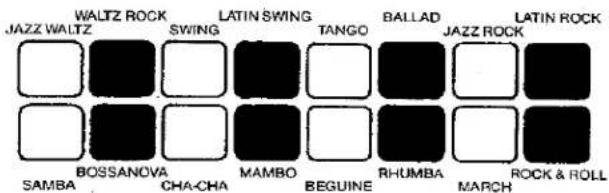
The KAWAI AUTORHYTHM is an exciting rhythm device which will provide authentic percussion instrument background to your playing. All you do is push the tab marked RHYTHMER. This tab is located to the left of the lower manual. Then push one of the many rhythm buttons (marked SAMBA, MAMBO etc.), and you'll have a complete percussion section for any song you select.
There are 5 controls which play an integral part in the operation of Autorhythm.
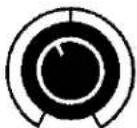
TONE — This knob controls the timbre (treble and bass sounds) of the percussion section. Turn it to the right, and the emphasis will be on the treble percussion sounds (like brushes and cymbals); turn it to the left, and the emphasis will be on the bass percussion sounds (like bass drum).
RHYTHMER VOLUME — This knob controls the volume of the rhythm section.
TEMPO — This knob is used to control the speed of the rhythm section. Find a tempo which is appropriate for the song and is comfortable for you.
FLASHING RED LIGHT — The flashing red light shows the downbeat or first beat of each rhythm pattern. To play a song, simply watch the light and start to play when it flashes.
BREAK — When the tab marked BREAK is in the ON position, the rhythm will start only when you touch a key on the lower manual or when you play a bass pedal.
TO STOP THE AUTORHYTHM UNIT:
- Push the tab marked RHYTHMER to the OFF position ... or
- Use the switch located on the left side of the expression pedal. To use this foot switch, merely swing your foot to the left. This will automatically disengage the AUTORHYTHM unit.
The Kawai Electro-Chord®
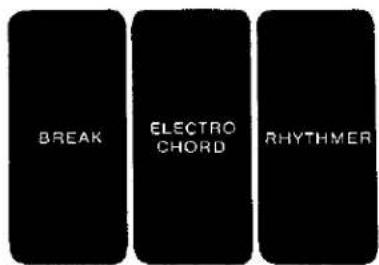
With the fantastic KAWAI ELECTRO-CHORD, you don't even have to lift your hand off the keyboard to create fantastic rhythm patterns. That's right! To play a fully automatic rhythm pattern, just push the tab marked ELECTRO-CHORD (located to the left of the lower manual). Then, when you push a rhythm button and play a chord on the lower manual, the organ does the rest. As an example, let's try the Beguine rhythm.
You Play

You Hear

The following diagram shows the range of the ELECTRO-CHORD feature on your instrument.
Whichever way you choose to use the KAWAI ELECTRO-CHORD, you'll find this exclusive feature will add unlimited pleasure to your organ playing.
Lower Keyboard

© - 1973 - KAWAI PIANO (AMERICA) CORPORATION
Additional Kawai Features

GUITAR

MIC

TONE
VOLUME

EAR PHONE
HEADPHONE JACK
The HEADPHONE JACK is located under the right side of the lower keyboard. While other members of your family are watching television, reading, engaging in conversation, or sleeping, you'll be able to plug in a headphone set and play in complete privacy. The only one who'll hear you is you.
AC CONVENIENCE OUTLET
An AC CONVENIENCE OUTLET (maximum wattage 300) has been provided on the back of the KAWAI ORGAN. If you're using a cassette tape recorder or a music rack lamp, you may plug it into this outlet. The convenience outlet can be used even though the organ is turned off.
EXTERNAL SPEAKER OUTPUT
The EXTERNAL SPEAKER OUTPUT is located next to the AC convenience outlet. If you're planning to use any external speaker (including a Leslie speaker) with your KAWAI, please check with your KAWAI dealer before connecting your speaker to the organ.
Registrations
Organ REGISTRATION is the art of selecting the tabs which best produce a desired effect. The following Registration Chart shows 16 of the most common settings used by organists. After you're familiar with these settings, experiment on your own. You'll find an endless combination of registrations that can add a fantastic amount of variety to any song you play.
| Registration | Upper: | Lower: | Pedal: | Misc: |
| 1. FLUTE ENSEMBLE | Tibia 16, 8, 4, 2% | Tibia 8, 4 | Bourdon 16 Major Flute 8 Sustain On | Reverb |
| 2. THEATRE ORGAN | Tibia 16, 4, 2% | Tibia 8 | Bourdon 16 Major Flute 8 Sustain On | Vibrato Fast |
| 3. FULL ORGAN | Tibia 16, 8, 4 String 16, 8 Oboe 8 | Diapason 8 Tibia 8, 4 String 8 | Bourdon 16 Major Flute 8 String Bass | |
| 4. FULL ORGAN | Tibia 16, 8, 4, 2% String 16, 8 Diapason 8 | Diapason 8 Tibia 8 String 8 Horn 8 | Bourdon 16 Major Flute 8 String Bass | Vibrato On |
| 5. FULL ORGAN | Tibia 16, 8, 4, 2% String 16, 8, 4 Oboe 8 Clarinet 8 | Tibia 8, 4 Horn 8 String 4 | Major Flute 8 Sustain On | Ensemble |
| 6. CHURCH ORGAN | Tibia 16, 4 String 16, 8 Diapason 8 Oboe 8 | Diapason 8 String 8 Tibia 8 | Bourdon 16 Major Flute 8 | Chorus |
| 7. CLASSICAL ORGAN | Tibia 16, 8, 4 String 16, 8, 4 | Diapason 8 Tibia 8 | Bourdon 16 Major Flute 8 | Chorus |
| 8. PIANO | Piano | Tibia 8, 4 | Major Flute 8 String Bass | |
| 9. HARPSICHORD | Harpsichord | Tibia 8, 4 | Major Flute 8 String Bass | |
| 10. MANDOLIN | Mandolin | Tibia 8, 4 | Bourdon 16 Major Flute 8 | |
| 11. BANJO | Banjo | Diapason 8 Tibia 8 | Major Flute 8 String Bass Sustain On | |
| 12. MARIMBA | Marimba | Tibia 8 String 8 | Bourdon 16 Major Flute 8 | |
| 13. OBOE SOLO | Oboe 8 | Diapason 8 Tibia 8, 4 | Major Flute 8 Sustain On | |
| 14. WOW TRUMPET | Wow Trumpet | Diapason 8 Horn 8 | Major Flute 8 Sustain On | |
| 15. ACCORDION | String 16, 8 Oboe 8 | Tibia 8 Diapason 8 | Major Flute 8 Sustain On | |
| 16. POP ORGAN | Tibia 16, 8 | Horn 8 | Major Flute 8 String Bass | Tremolo |
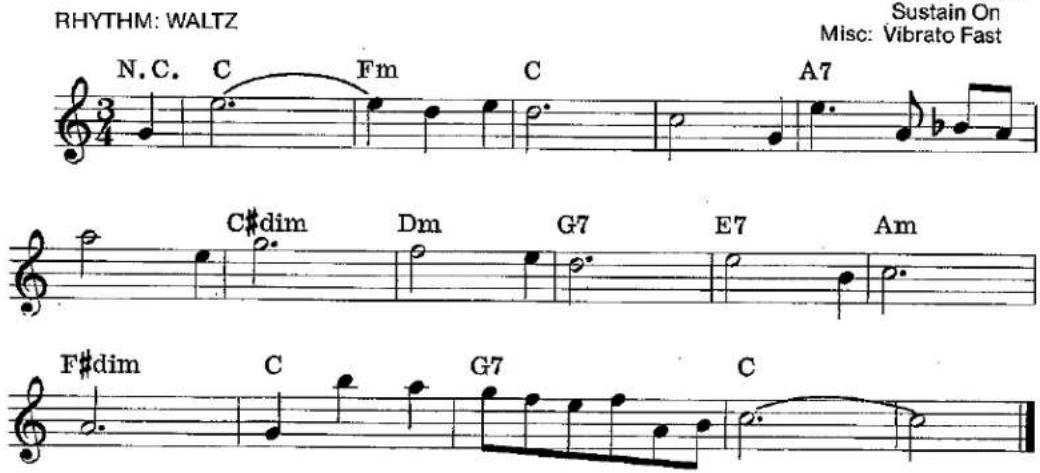
The following songs demonstrate some of the registrations that you can create on your KAWAI ORGAN. Before you play each song, set up the tabs that are indicated at the beginning of each song.
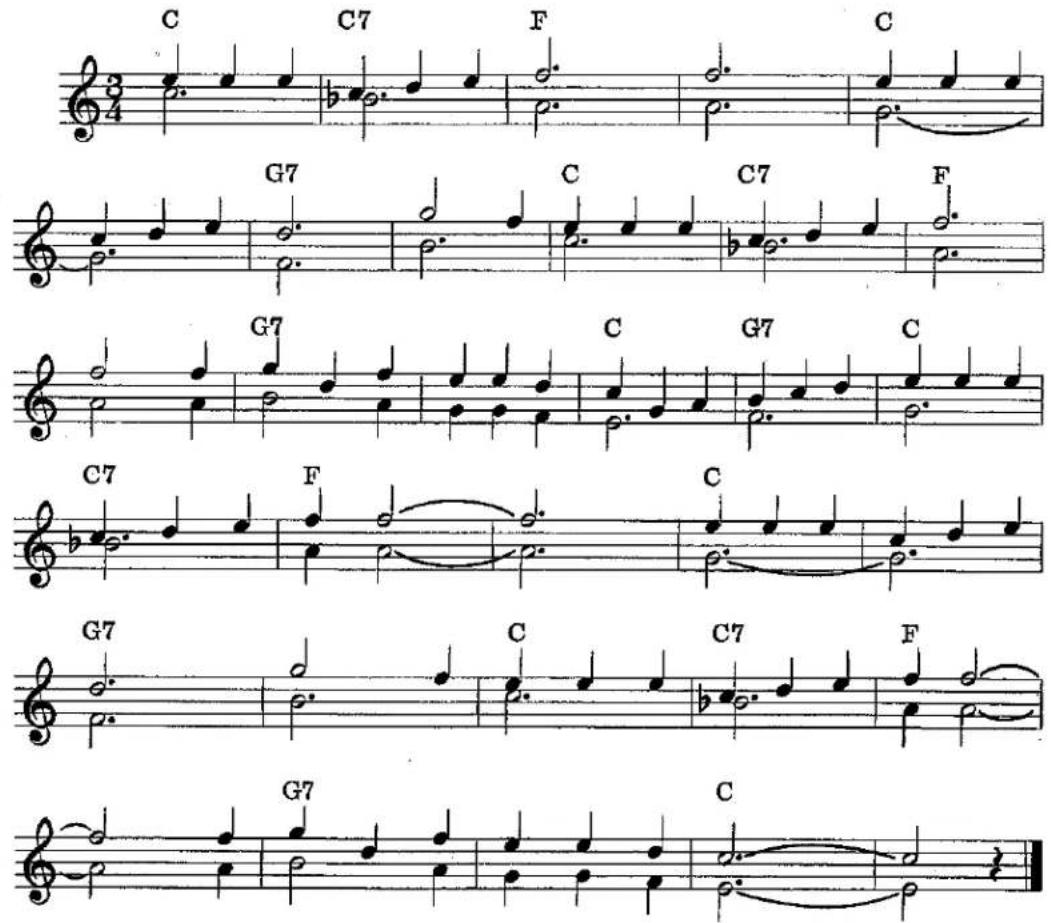
Beautiful Brown Eyes
MARIMBA
Upper: Marimba
Lower: Tibia 8
String 8
Pedal: Bourdon 16
Major Flute 8
RHYTHM: WALTZ
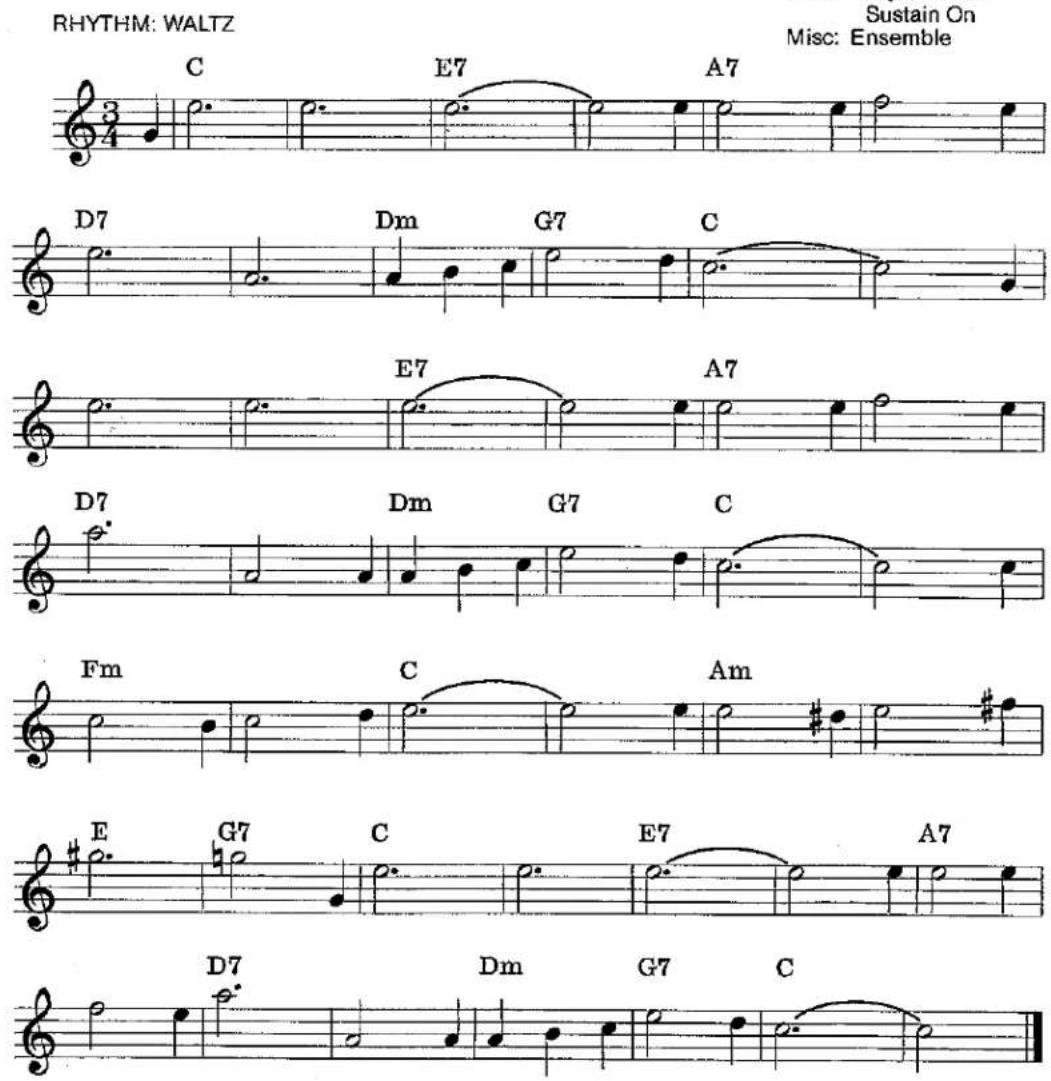
Oh Marie
RHYTHM: WALTZ
MANDOLIN
Upper: Mandolin
Lower: Tibia 8, 4
Pedal: Bourdon 16
Major Flute 8

Liebestraum
FULL ORGAN
Upper: Tibia 16, 8, 4, 2 ^3 / _3
String 16, 8, 4
Oboe 8
Clarinet 8
Lower: Tibia 8, 4
Horn 8
String 4
Pedal: Major Flute 8
Sustain On
Misc: Ensemble
After the Ball

Holy. Holy. Holy
CHURCH ORGAN
Upper: Tibia 16, 4
String 16, 8
Diapason 8
Oboe 8
Lower: Diapason 8
String 8
Tibia 8
Pedal: Bourdon 16
Major Flute 8
Misc: Chorus

Bach Theme
RHYTHM: WALTZ
PIANO SOLO
Upper: Piano
Lower: Tibia 8,4
Pedal: Major Flute 8
String Bass



Oh! Susanna
BANJO SOLO
Upper: Banjo
Lower: Diapason 8
Tibia 8
Pedal: Major Flute 8
String Bass
Sustain On
RHYTHM: SWING




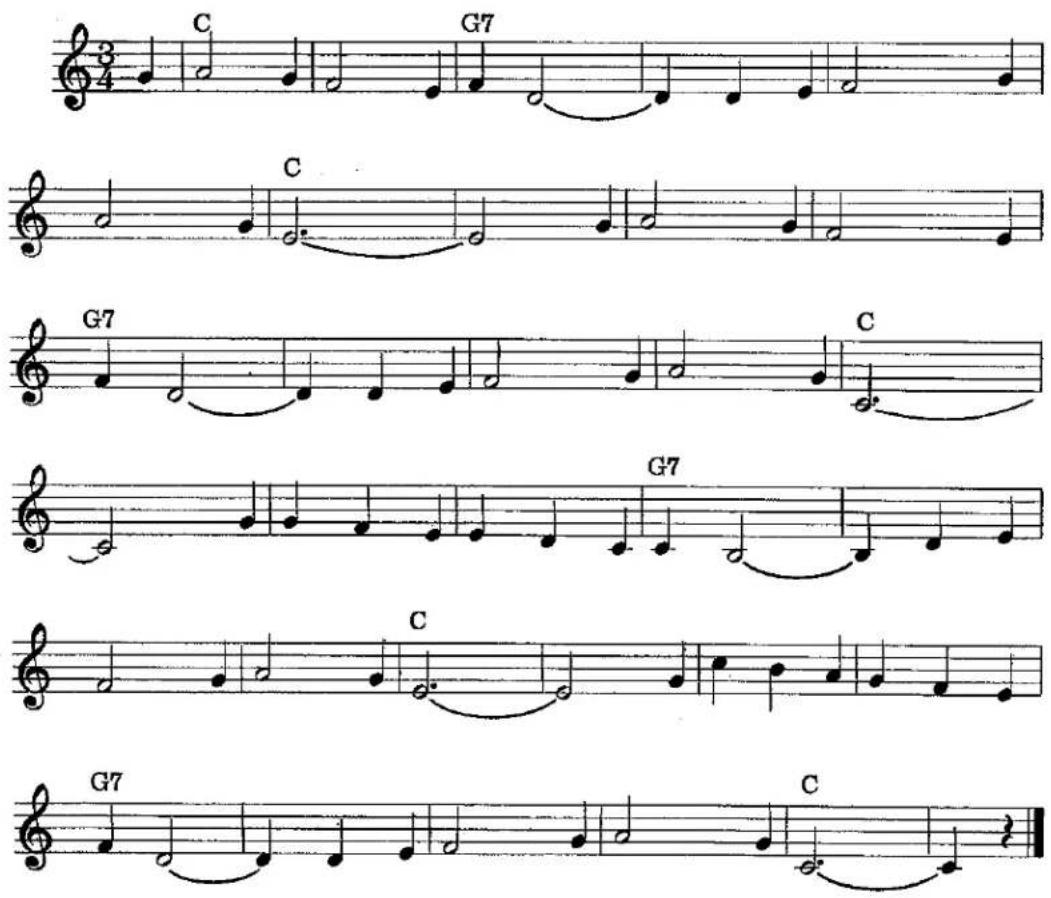
Carnival of Venice
RHYTHM: WALTZ
FULL ORGAN
Upper: Tibia 16, 8, 4
String 16, 8
Oboe 8
Lower: Diapason 8
Tibia 8,4
String 8
Pedal: Bourdon 16
Major Flute 8
String Bass
Theme from Borodin's Polovetzian Dance
CLASSICAL ORGAN
Upper: Tibia 16, 8, 4
String 16, 8, 4
Lower: Diapason 8
Tibia 8
Pedal: Bourdon 16
Major Flute 8
Misc: Chorus
RHYTHM: BEGUINE

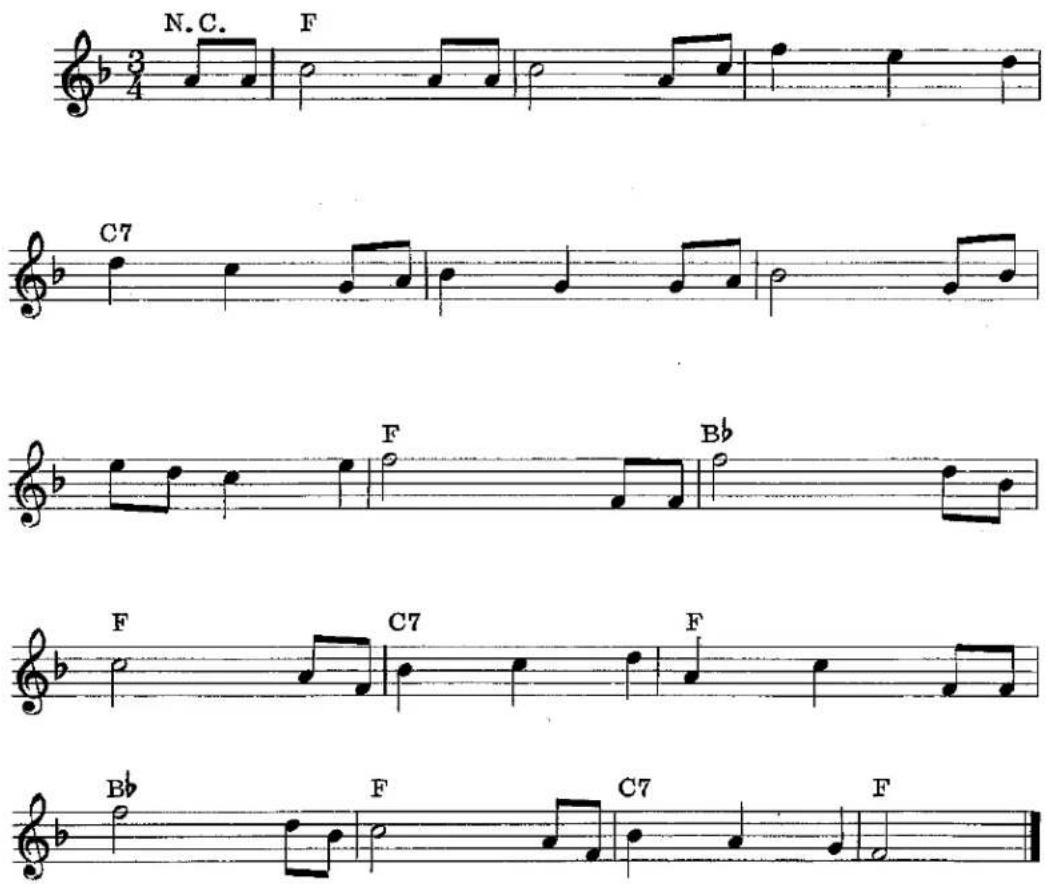
Brahm's Lullaby
RHYTHM: WALTZ
HARPSICHORD
Upper: Harpsichord
Lower: Tibia 8, 4
Pedal: Major Flute 8
String Bass
When the Saints Go Marching In

Chopin's Nocturne
The Cassette Recorder
If your KAWAI is equipped with a CASSETTE RECORDER, it will soon become an integral part of your musical enjoyment. The following instructions will help acquaint you with its operation.
TO PLAY
To play a tape, simply snap the cassette tape into the machine and push the button marked PLAY.
TO RECORD
To record, push and hold the button (marked RECORD) and at the same time push the Play button (marked ▶). With these two buttons pushed in, you are now ready to record your playing. No microphone is necessary.
TO STOP
Whether you're in the process of recording, playing or rewinding a tape, whenever you want the tape stopped, push the button marked STOP. Your cassette has a special clutch which prevents the tape from unwinding when you've reached the end of a cassette. However, it is still advisable to push the STOP button at that point to prevent excessive stress on the recorder that could cause trouble after an extended period of time.
TO REWIND
To rewind the cassette, press the button marked REW/REVIEW. When it's been rewound to the place where the recording was started or to where you'd like the tape stopped, push the STOP button.
MEMORY
Your KAWAI Cassette machine is equipped with a special feature called MEMORY. Here's an example of how it works. Let's say that you'd like to practice a song along with an orchestra on tape. At the beginning of the song, push the MEMORY ON/OFF switch to the ON position. After you're finished playing the song and you'd like to try it again, push the REWIND (REW/REVIEW) button. The tape will now automatically return to the beginning of the song, and stop.
With the MEMORY feature, you may mark any place on the tape in the same way.
FAST FORWARD
When you press the Fast Forward button (marked F-FWD/CUE) the cassette machine will speed up and the tape will quickly advance forward.
NOTE: THIS BUTTON DOES NOT LOCK INTO PLACE BUT MUST BE HELD. WHEN THE BUTTON IS RELEASED, THE TAPE WILL STOP.
VOLUME CONTROL
The VOLUME CONTROL dial allows you to adjust the volume of the cassette at whatever sound level you choose. As you turn this dial to the right, the sound becomes louder.
PITCH CONTROL
The Pitch Control dial is located to the left of the Memory ON/OFF switch. When you move this dial to the right, you can raise the tone (sharp—#) of the cassette tape; when you move this dial to the left, you can lower the tone (flat—b) of the cassette tape. This control enables you to tune the cassette to your KAWAI organ. It virtually eliminates the possibility of the cassette and organ being out of tune with one another.
LEVEL CONTROL
The LEVEL CONTROL (marked LEVEL) is an aid which visually shows you whether your playing volume for recording is too loud or too soft. To guarantee a good recording, always make sure that the needle stays in the silver portion of the control. Recording with the needle in the red section means the volume is too loud and the recording will have some distortion.
KAWAI
Kawai Musical Instrument Manufacturing Co., Ltd./200 Terajima-cho/Hamamatsu/Japan
Kawai Piano (America) Corporation/24200 South Vermont Avenue/Harbor City/California 90710/U.S.A.
- Organ Playing the Kawai Way
- Kawai Electronic Organ
- OWNER'S MANUAL
- Table of Contents
- Learn to Play The Kawai Way
- A Brief Look at the Past and Present
- How to Care for your Kawai Organ
- The Keyboards and Pedals
- Expression Pedal
- Stop Tabs
- The Four Families of Tone
- Footage
- Mechanical Controls
- PEDAL VOLUME
- PEDAL SUSTAIN
- REVERB
- KNEE LEVER (Sustainer)
- VIBRATO
- TREMOLO
- LOWER MANUAL DIAL
- UPPER SUSTAIN
- SUSTAIN TIME
- Upper Percussion Voices
- PIANO
- HARPSICHORD
- MANDOLIN
- BANJO
- MARIMBA
- Independent Speaking Voices
- TIBIA 16
- STRING 16
- MAJOR FLUTE 8
- BOURDON 16
- STRING BASS
- DIAPASON 8
- TIBIA 8
- OBOE 8
- HORN 8
- WOW TRUMPET
- STRING 8
- CLARINET 8
- STRING 4
- TIBIA 4
- TIBIA 2-2/3
- TO STOP THE AUTORHYTHM UNIT:
- The Kawai Electro-Chord®
- Additional Kawai Features
- HEADPHONE JACK
- AC CONVENIENCE OUTLET
- EXTERNAL SPEAKER OUTPUT
- Registrations
- Beautiful Brown Eyes
- Oh Marie
- FULL ORGAN
- CHURCH ORGAN
- Carnival of Venice
- Theme from Borodin's Polovetzian Dance
- Brahm's Lullaby
- The Cassette Recorder
- TO PLAY
- TO RECORD
- TO STOP
- TO REWIND
- MEMORY
- FAST FORWARD
- VOLUME CONTROL
- PITCH CONTROL
- LEVEL CONTROL
- KAWAI
Brand : KAWAI
Model : E300
Category : Organ