
H-CDM8095 - Car stereo HYUNDAI - Free user manual and instructions
Find the device manual for free H-CDM8095 HYUNDAI in PDF.


| Product Type | Single-Din Car Stereo Receiver |
| Brand | Hyundai |
| Model | H-CDM8095 |
| Dimensions (W x H x D) | 178 x 50 x 160 mm |
| Weight | 0.8 kg |
| Power Supply | 12V DC (negative ground) |
| Max Power Output | 4 x 50 Watts |
| RMS Power Output | 4 x 25 Watts |
| Supported Discs | CD, CD-R, CD-RW, MP3, WMA |
| USB Playback | Yes (front USB port, MP3/WMA) |
| AUX Input | Yes (3.5 mm front jack) |
| Radio Bands | FM (87.5-108 MHz) / AM (530-1710 kHz) with RDS |
| Preset Stations | 30 (18 FM, 12 AM) |
| Bluetooth | Not supported |
| Display | LCD with white illumination |
| Remote Control | Included (IR) |
| Equalizer | Preset EQ (Rock, Pop, Classic, Flat) + Custom |
| Loudness | Yes |
| Clock | Yes (RDS time sync supported) |
| Detachable Faceplate | Yes (anti-theft) |
| Security Code | Yes (programmable) |
| Steering Wheel Control | Compatible (requires adapter, not included) |
| Installation Standard | ISO/DIN single-Din |
| Fuse | 10A (blade type) |
| Accessories Included | Wiring harness, mounting screws, trim ring, remote control |
| Maintenance | Clean with soft dry cloth; avoid liquids |
Frequently Asked Questions - H-CDM8095 HYUNDAI
User questions about H-CDM8095 HYUNDAI
0 question about this device. Answer the ones you know or ask your own.
Ask a new question about this device
Download the instructions for your Car stereo in PDF format for free! Find your manual H-CDM8095 - HYUNDAI and take your electronic device back in hand. On this page are published all the documents necessary for the use of your device. H-CDM8095 by HYUNDAI.
USER MANUAL H-CDM8095 HYUNDAI
natural_image
Exterior view of a Hyundai audio recording device with two speakers and a digital display (no visible text or symbols)
natural_image
Two glossy spheres with reflections, no text or symbols presentSet for car installation: CD/MP3
RECEIVER + 13 cm 2-WAY
Thank you for purchasing our product. For safety, it is strongly recommended to read this manual carefully before connecting, operating and/or adjusting the product and keep the manual for reference in the future.
Table of contents 2
Before you start 3
Utilization of the product 3
Important safeguards 3
Installation/Connection 4
Installation 4
General notes 4
Din Front/Rear-Mount 4
- DIN front-mount (Method A) 4
Dismantling the unit 4
Trim frame installation 5
- DIN rear-mount (Method B) 5
Detachable control panel 5
Anti-theft system 5
Connection 6
Connection diagram 6
Using the ISO Connector 6
Operation 7
Control elements 7
Front panel 7
Inner panel 7
LCD layout 8
General operations 9
Turning on/off 9
Mode selection 9
Volume control 9
Mute function 9
Audio parameter setting 9
Beep 9
EQ modes 9
Loudness 9
Clock setting 9
AUX in jack 9
Radio operations 9
Band select 9
Auto/Manual tuning 10
Programming tuner stations 10
Auto store/preset scan 10
Mono/Stereo control 10
Local station search 10
RDS function 10
AF (Alternative Frequencies) function ... 10
TA (Traffic Alarm) function 10
PTY (Program Type).... 10
Other parameter setting.... 11
Disc operations.... 11
Insert/Eject disc 11
MP3 track search.... 11
Fast forward/rewind.... 12
Play/pause 12
Scanning tracks.... 12
Repeat 12
Random playback 12
Multi-session disc reading 12
ID3-tags 12
USB/SD/MMC operation 12
USB/SD/MMC notes 12
Inserting SD/MMC card/USB device .... 12
General information 13
Handling compact discs 13
Cleaning discs 13
Cleaning the unit body 13
Accessories 13
Troubleshooting guide 14
Specification 15
13 cm 2-way coaxial acoustic system ..... 16
Dimensions 16
Accessories 16
Important safeguards 16
Installation of the speaker 17
Securing the speaker 18
Troubleshooting guide 19
Specification 19
Utilization of the product
If you want to dispose this product, do not mix it with general household waste. There is a separate collection system for used electronic products in accordance with legislation that requires proper treatment, recovery and recycling.
Please contact your local authorities for the correct method of disposal. By doing so, you will ensure that your disposed product undergoes the necessary treatment, recovery and recycling and thus prevent potential negative effects on the environment and human health.
Important safeguards
- Read carefully through the manual to familiarize yourself with this unit.
- Keep this manual handy as a reference for operating procedures and precautions. Do not allow persons who have not read through this manual to use this unit.
- "CLASS 1 LASER PRODUCT"
This product contains a laser diode of higher class than 1. Laser beams from the optical pickup are dangerous to the eyes. To ensure continued safety, do not remove any covers or attempt to gain access to the inside of the product. Refer all servicing to qualified personnel.
- Do not allow this unit to come into contact with liquids. Electrical shock could result. Also, damage to this unit, smoke, and overheating could result from contact with liquids or dust. Protect this unit from moisture.
- Make sure that foreign objects do not get inside the unit; they may cause malfunctions, or create safety hazards such as electrical shock or laser beam exposure.
- The beginning of operation is the moment of the unit installation. Before use the device in winter it is recommended to heat up the passenger compartment during 20 seconds or to the operation temperature.
- Using the unit with the temperature that goes beyond the operation temperature greatly decreases the operation resource of the screen and other components of the unit and can
result in an outage.
- Disconnect the vehicle's negative battery terminal while mounting and connecting the unit.
- The unit is designed for negative terminal of the battery, which is connected to the vehicle metal. Please ensure it before installation.
- When replacing the fuse, be sure to use one with an identical amperage rating. Using a fuse with a higher amperage rating may cause serious damage to the unit.
- Do not allow the speaker wires to be shorted together when the unit is switched on. Otherwise it may overload or burn out the power amplifier.
- Make sure you disconnect the power supply and aerial if you will not be using the system for a long period or during a thunderstorm.
- Make sure you disconnect the power supply if the system appears to be working incorrectly, is making an unusual sound, has a strange smell, has smoke emitting from it or liquids have got inside it. Let a qualified technician check the system.
• Always keep the volume low enough so that you can hear sounds from outside the vehicle.
- Should this product fail to operate properly, contact your dealer or nearest service center.
Installation
General notes
- Choose the mounting location where the unit will not interfere with the normal driving function of the driver.
- Before finally installing the unit, connect the wiring and make sure that the unit works properly.
- Consult with your nearest dealer if installation requires the drilling of holes or other modifications of the vehicle.
- Install the unit where it does not get in the driver's way and cannot injure the passenger if there is a sudden stop, like an emergency stop.
- If installation angle exceeds 30^ from horizontal, the unit may not perform properly.
- Avoid installing the unit where it would be subject to high temperature, such as from direct sunlight, or from hot air, from the heater, or where it would be subject to dust, dirt or excessive vibration.
Din Front/Rear-Mount
This unit can be properly installed either from 'Front' (conventional DIN Front-mount) or 'Rear' (DIN Rear-mount installation, utilizing threaded screw Holes at the sides of the unit chassis). For details, refer to the following illustrated installation methods.
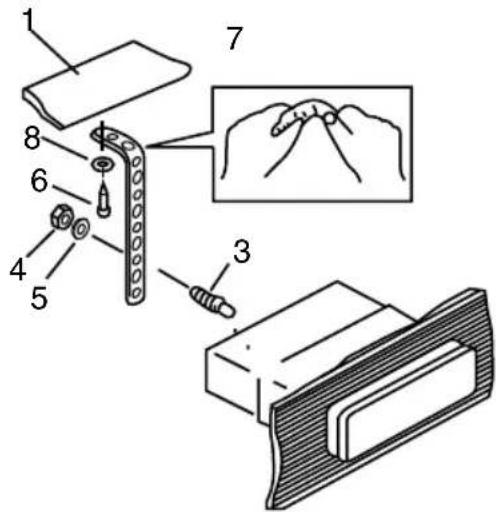
1. DIN front-mount (Method A)
- Car dashboard
- Sleeve
- Screw
- Nut (5 mm)
- Spring washer
- Screw (5 x 25 mm)
- Metal strap
- Flat washer
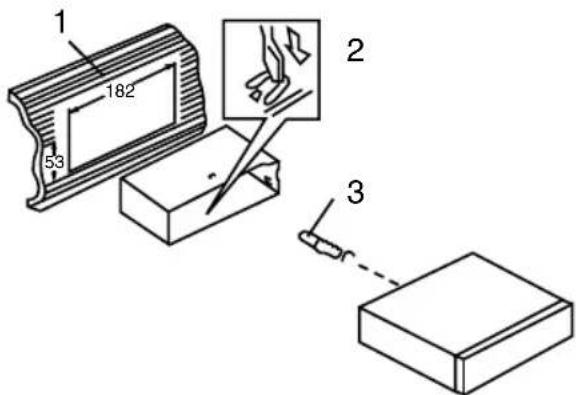
- Install the sleeve into the dashboard; ensure it is installed with the correct side and there are no obstacles (wires, dashboard elements, etc) for the unit installation.
- After installing the sleeve into the dashboard, bend tabs fitting to the size of the dashboard to fix the sleeve in place.
- Use the metal strap to fix the rear side of the unit. Determine a place for fixing and install the strap as shown in the picture. You can bend the strap to the needed angle with your hands.
- Make the necessary wire connections. Ensure the connections are correct.
- Install the unit into the sleeve until the side locks are fixed.
Dismantling the unit
a - Trim frame
b – Frame uninstall direction
c - Release key insertion
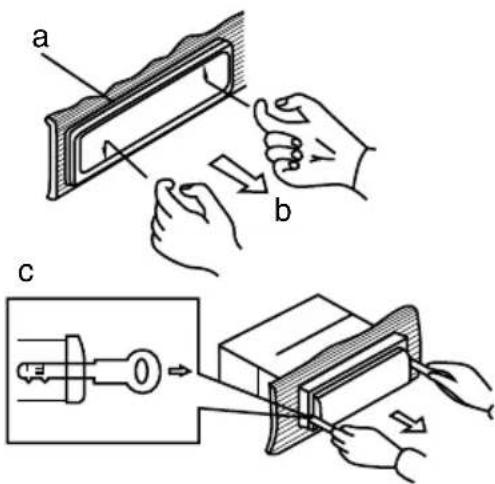
- Switch off the unit and detach the front panel.
- Insert your fingers into the groove in the front side of the trim frame (apply some effort to detach the frame). Pull the frame to detach it.
- Insert the supplied release keys into the both sides of the unit body to click, as shown in the picture. To extract the unit from the dashboard, pull the release keys or the unit body to pull it out. Before detaching the unit, ensure it is not fixed with the metal strap.
Trim frame installation
To install the trim frame, press it to the unit body and push it to fix it in place. This should be done before installing the front panel; otherwise you are not able to install the trim frame. When the trim frame being installed, the side with the groove should face down and fixed first.
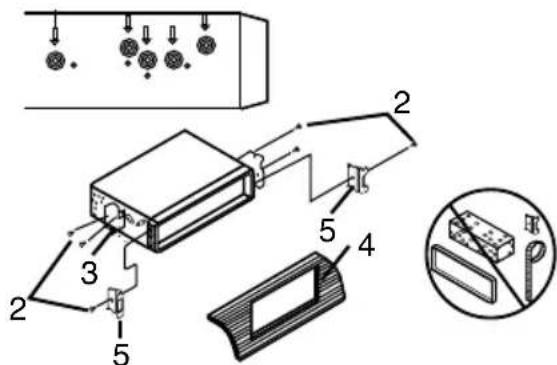
2. DIN rear-mount (Method B)
For this method, use the screw holes in the lateral sides of the unit. Fix the unit with the help of the factory radio mounting brackets.
- Select a position in which the screw holes of the brackets (3) are aligned with the screw holes in the unit body, and screw in two screws (2) in each side.
- Screw.
- Factory radio mounting brackets.
-
Vehicle dashboard.
-
Lock (remove this part).
The outer trim frame and mounting sleeve are not used for method of installation.
Detachable control panel
Install the fastening hole on the right side of the front panel on the right fastening of the unit. After that, press on the left part of the panel until a click. Ensure that the panel is properly fixed, otherwise error symbols may be displayed and some buttons may not function.
To detach the front panel, press OPEN button, then distract the right side of the panel from the fastening of the unit.
The control panel can easily be damaged by shocks. After removing it, place it in a protective case and be careful not to drop it or subject it to strong shocks. The rear connector that connects the main unit and the control panel is an extremely important part. Be careful not to damage it by pressing on it with fingernails, pens, screwdrivers, etc.
If the control panel is dirty, wipe off the dirt with soft, dry cloth only. And use a cotton swab soaked in isopropyl alcohol to clean the socket on the back of the control panel.
Anti-theft system
The front panel of this unit can be stored in the included protective case when not in used and carried away when you leave the vehicle to deter theft.
Switch off the power of the unit. Detach the front panel, then put it to the protective case and take it with you.
Connection
Connection diagram
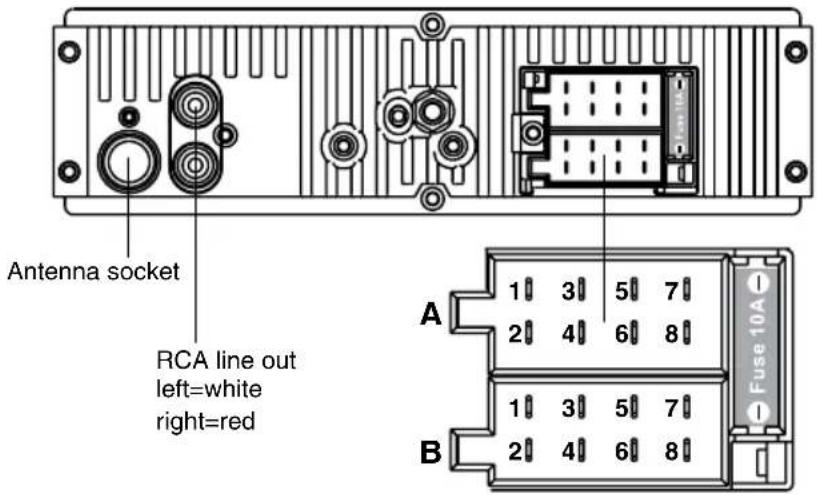
Using the ISO Connector
| Location Function | ||
| Connector A Connector B | ||
| 1 Rear Right(+)---Blue - | ||
| 2 Rear Right(-)---Blue/White Stripe - | ||
| 3 Front Right(+)---Grey - | ||
| 4 Front Right(-)---Grey/White Stripe Battery 12V (+)/yellow | ||
| 5 Front Left(+)---Green Power Antenna/Orange | ||
| 6 Front Left((-)---Green/White Stripe Panel light/White | ||
| 7 Rear Left(+)---Brown ACC+/red | ||
| 8 Rear Left(-)---Brown/White Stripe Ground/black | ||
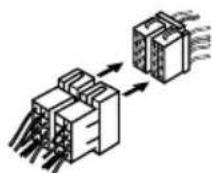
- If your car is equipped with the ISO connector, then connect the ISO connectors as illustrated.
- For connections without the ISO connectors, check the wiring in the vehicle carefully before connecting, incorrect connection may cause serious damage to this unit.
Cut the connector, connect the colored leads of the power cord to the car battery as shown in the colour code table above for speaker and power cable connections.
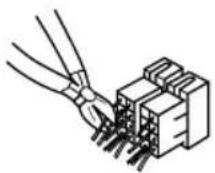
Panel light wire should be connected to “+” of the side parking lights wire. Power antenna wire is intended for power supply of the antenna and for remote control of an additional amplifier.
Control elements
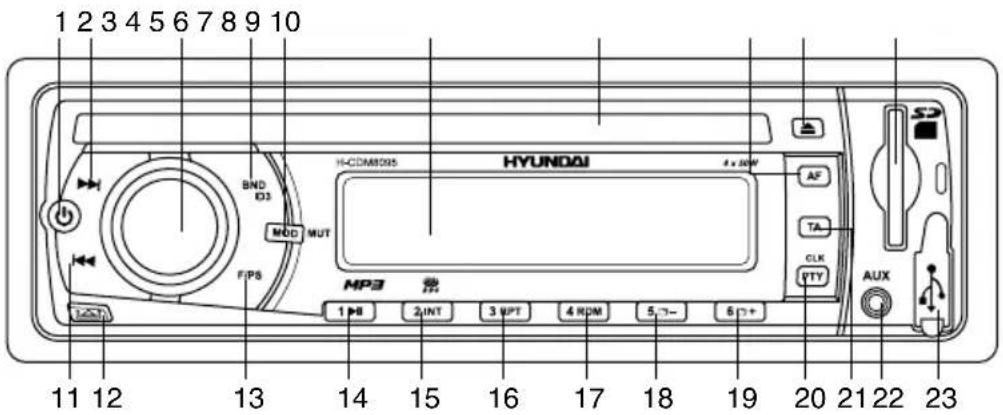
Front panel
- POWER button
- ▶ button
- VOLUME knob/SEL button
- BND/ID3 button
- MOD/MUT button
- Display
- Disc slot
- AF button
- EJECT button
- SD/MMC memory card slot
- Button
- OPEN button
- F/PS button
- 1▶|| button
- 2/INT button
- 3/RPT button
- 4/RDM button
- 5/☐ - button
- 6/☐ + button
- CLK/PTY button
- TA button
- AUX in jack
- USB slot
Inner panel
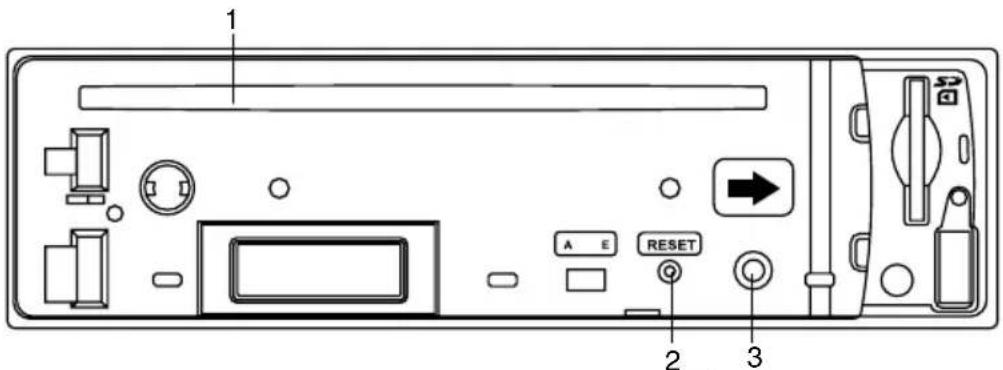
- Disc slot
- RESET button (hole)
- Panel status indicator

Pressing RESET hole will erase the
clock setting and stored stations.
Panel status indicator lights up when you slide the panel down, flashes when you remove the panel.
LCD layout
![29 28 LOUD VIDEO MUSIC ALBUM FOLDER ARTIST RPT INT RDM EON AF TA TP PTY [SYSTEM E2] Sub-W ESP WMA MP3 MUTE 1 2 3 4 5 6 7 8 9 10 11 12 13 14 15 16 17 18 19 20 21 22](/content/2026/05/1046304/images/8b231bb710631686055864363257d38b6d62328f73fe851f93c29fa396c4feb8.jpg)
- Video playback indicator
- Music playback indicator
- Album name on
- File name on
- Folder name on
- Repeat mode indicator
- Artist name on
- Intro mode on
- Random playback on
- ROCK equalizer mode
- POP equalizer mode
- EON function indicator
- CLASS equalizer mode
- AF function indicator
-
FLAT equalizer mode
-
TA function indicator
- Equalizer indicator
- TP function indicator
- PTY function indicator
- Mute mode indicator
- Stereo reception indicator
- Signal indicator
- MP3 playback
- WMA playback
- ESP function indicator
- Subwoofer indicator
- Digit display (radio frequency, track number/name, etc.)
- Disc loading indicator
- Loudness function indicator
General operations
Turning on/off
Press any button (except OPEN and EJECT button) to turn the unit on. The display will show a message WELCOME to indicate it is ready to use. Press and hold POWER button to turn the unit off.
Mode selecting
Press MOD/MUT button to select between AUX, TUNER, S-CDP (disc), USB and SD/MMC modes.
Disc, USB and memory card modes can be selected only if corresponding device is loaded into the unit.
Volume control
The volume level can be adjusted at any time by rotating VOLUME knob.
Mute function
Press and hold MOD/MUT button to cancel the sound. Press it again or change the volume level to resume the sound.
Audio parameter setting
Press SEL button to select bass, treble, balance or fader mode. The corresponding word appears on the display. Rotate VOLUME knob to adjust the selected parameter. Balance is to adjust the balance between the left and right speakers. Fader is to adjust the balance between the rear and front speakers. After you have reached your desired effect, leave the unit idle in order for the new setting to take effect.
Beep
Press SEL button repeatedly until the display show BEEP ON; rotate VOLUME knob to toggle between BEEP ON (beep sound will be heard when buttons are pressed) and BEEP OFF, then leave the unit idle for the new setting to take effect.
EQ modes
Press SEL button repeatedly until the display show EQ OFF. Rotate VOLUME knob to choose an equalizer effect: POP => ROCK => CLASS => FLAT => EQ OFF. After you have reached your desired effect, leave the unit idle in order for the new setting to take effect.
Loudness
Press SEL button repeatedly until the display shows LOUD ON (LOUD OFF). Rotate VOLUME knob to select between LOUD ON/LOUD OFF. LOUD function is to emphasize the bass output; the word LOUD ON indicates that the LOUD mode is on.
Clock setting
The clock can be set anytime when the power is on. Press CLK/PTY button (in radio mode - press and hold the button) and then press and hold the button for 2 seconds, the time indication will blink on the display. Rotate VOLUME knob to adjust hours. Press SEL button to go to minute setting. Rotate VOLUME knob to adjust minutes. Press CLK/PTY button again or leave the unit idle for the new setting to take effect.
Press CLK/PTY button (in radio mode press and hold the button) to view the time display.
AUX in jack
AUX-in jack is intended for connecting an external audio or video equipment to amplify the sound. If connection is made correctly, the audio signal from the external source will be translated through the acoustics of the head unit. This enables to adjust the volume and quality of the sounding. For example, you can connect an MP3-player to listen to tracks using the car acoustic system.
Radio operations
Band select
Press BND/ID3 button repeatedly to select
your desired radio band during Radio mode: FM1, FM2, FM3, AM1 (MW1), AM2 (MW2). In each set of the bands you can store up to 6 preset stations, making total 30 preset memory stations.
Auto/Manual tuning
Press and hold in buttons to display MANU TUNE. Now you can press these buttons repeatedly to adjust the needed frequency manually.
To adjust the needed frequency automatically, press instructions. The radio will seek to the next down or up strong and clear frequency station. Repeat this action to seek for other desired stations.
Programming tuner stations
There are six numbered preset buttons, under which you can store and recall stations for each band. Select the needed station, then press and hold a preset button. The station will be saved in the memory under the corresponding number. To recall a stored station, press the corresponding preset button.
Automatic store/preset scan
Automatic store
Press and hold F/PS button. The radio will automatically store the 6 strongest available stations to the 6 preset memories of the 3 FM or 2 MW bands (depending on which is current). To stop auto store, press this button again.
Preset scan
Press F/PS button, the receiver will scan the saved stations in the current band.
Mono/Stereo control (in FM radio mode)
Press SEL button until the display shows STEREO (MONO). Turn VOLUME knob to switch between stereo reception or mono reception.
Improvement of reception of distant stations can be done by selecting mono mode, which may cut down some reception noise.
Local radio station search
Press SEL button to choose LOCAL (DX). When the LOCAL function is on, the local stations (stations with weak radio signal) can be played. When the DX function is on both local and distant stations (stations with strong radio signal) can be played.
RDS function
RDS (Radio Data System) service availability varies with areas. Please understand if RDS service is not available in you area, the following service is not available, either.
AF (Alternative Frequencies) function
Press AF button on the panel to turn the AF function on or off.
When the radio signal strength is poor, enabling the AF function will allow the unit to automatically search another station with the same PI (Program Identification) as the current station but with a stronger signal, so that you do not have to retune the stations when driving between different transmitter coverage areas. When AF symbol is on, it means RDS information is received; when AF symbol is flashing, it means RDS information is not yet received.
PS (Program Service name): the name of station will be display instead of frequency.
If RDS service is not available in your area, turn off the AF mode. Default setting is ON.
TA (Traffic Alarm) function
Press TA button to turn TA function on or off.
In TA mode traffic program will be automatically searched, until the program is received. When traffic announcement is received the unit will temporarily switch to the tuner mode (regardless of the current mode) and begin broadcasting the announcement. After the traffic announcement is over, it will return to the previous mode and volume level. To interrupt traffic announcement press TAbutton shortly; it will not switch off the TA mode.
PTY (Program Type)
This radio will allow you to select the type of program required, and will search for a station broadcasting that type of program.
Press CLK/PTY button to show the music type. Then press 1 - 6 number buttons to choose different music programs available.
Press CLK/PTY button twice to show the speech type program. Then press 1 - 6 number buttons to choose different speech programs. Each number button will show 3 different speech programs for you to choose (see table below).
| Button | Music group | Speech group |
| 1 Pop | Rock News, Affairs, Info | |
| 2 Easy | Light Sport, Educate, Drama | |
| 3 Classics | Culture, Science, Varied | |
| 4 Jazz | Country Weather, Finance, Children | |
| 5 Nation | Oldies Social, Religion, Phone IN | |
| 6 Folk | Travel, Leisure, Document |
When PTY is selected, the radio starts to search corresponding PTY information, and stops if the corresponding PTY information is detected. If no buttons are pressed within several seconds, previously selected PTY is searched. During 1 loop, if desired PTY is not found, the unit will return to previous mode. Press CLK/PTY button for the 3rd time to switch the PTY function off.
Other parameter setting
To choose the corresponding parameter, press and hold SEL button for 2 seconds, then press it repeatedly until the display shows the needed parameter. Turn VOLUME knob to choose the needed value. After choosing,
please leave the unit idle to activate.
TA SEEK/TA ALARM
In TA SEEK mode, the unit will seek for traffic announcement program when TA button is pressed; in TA ALARM the unit does not retune to TA information.
MASK DPI/MASK ALL
During MASK DPI mode, the unit will mask only the AF which has different PI, this is the default mode; during MASK ALL mode, the unit will mask the AF which has different PI and no RDS signal with high field strength.
RETUNE S/L - SHORT/LONG
"RETUNE" refers to the time period the unit allows for radio scan when reception is interrupted. "S" represents a long time period, and "L" represents a short time period.
Disc operations
Insert/Eject discs
Insert a disc into the disc slot with label side up. The disc will be automatically loaded into the unit, even when it is off or in radio mode. For MP3 discs, MP3 symbol will be displayed as the disc is loaded. The first file in the root folder will be played.
Press EJECT button to eject the disc from the slot. If the disc is not removed from the slot within several seconds, it will be automatically loaded into the slot again. When the disc is ejected and removed, the unit will automatically switch to radio mode.
MP3 track search
You can make use of the following search modes to play your favorite MP3 tracks.
Ordinary search
Press 1/buttons to go to the previous or next track. Press 5/☐ and 6/ + buttons to go to previous or next folder.
Track number search
Press F/PS button. TRK-SCH will be displayed. Rotate VOLUME knob to input the digit. As you input the number of the track,
press and hold SEL button. The input track will be searched and played.
Folder search
Press F/PS button twice, NAVIGATE will show on the display. Rotate VOLUME knob to choose the desired folder name and press SEL button to confirm and ply the folder.
Character search
Press F/PS button for thrice. At this moment, press SEL button, the current folder name and D will be displayed. Rotate VOLUME knob to select the desired folder name, then press SEL button to confirm. The files in the selected folder will be searched and played.
It is recommended to record files in the root folder and do not use the complicated folder system to allow this type of search to function properly.
Fast Forward/rewind
Press and hold ▶ button to fast forward. Press and hold ▶ button to fast reverse. When the needed point of the track is found, press 1/▶ button to resume normal playback of the track.
Play/pause
Press 1▶ button to pause the disc playback. Press this button again to resume playback.
Scanning tracks
Press 2/INT button to play the first 15 seconds of each track. Press this button again to resume playback.
Repeat
Press 3/RPT button to repeat the same track continuously. Press this button again to stop repeating.
Random playback
Press 4/RDM button to play all the tracks in random order. Press the button again to stop random play.
Multi-session disc reading
This unit can read multi-session CDs. The multi-session reading will be activated automatically if the player detects a file that is written in multi-session format.
ID3 tags
If an MP3 file contains ID3 information in English or in Russian, such information will be displayed during the file playback. For display of various ID3-tag categories (folder/file/title/artist/album name) press BND/ID3 button repeatedly.
This unit may not support some version of ID3-tag information.
USB/SD/MMC operation
USB/SD/MMC notes
USB format supports 2.0 and 1.1. Capacity: up to 2 Gb.
For correct and satisfactory operation, licensed SD/MMC memory cards of famous brands should be used with this unit. Avoid using memory cards of unknown brands. Capacity: up to 2 Gb.
Inserting SD/MMC card/USB device
Insert an MMC/SD card or a USB device into MMC/SD slot or USB slot. Then the playing mode will be changed into Card or USB mode automatically. The first card/USB device track playback will start. If the unit was afterwards switched to another mode, press MOD button to select USB or memory card mode.
When MMC/SD card and USB device are both inserted into their compartment or socket, the playing mode will be changed into the mode of the later one.
All the operations with files stored in a memory card or USB are the same as described in Disc Operations.
Handling compact discs
Handling discs
- Do not insert anything other than a CD into the CD loading slot.
- Do not use cracked, chipped, warped, or otherwise damaged discs as they may cause skipping or noise damage the player.
- Handle the disc only by the edges (as shown in the picture). To keep discs clean do not touch its surface.
• Store discs in their cases when not in use. - Do not expose discs to direct sunlight, high humidity, high temperature or dust.
- Prolonged exposure to extreme temperature (such as leaving the discs in your car during summertime) can wrap a disc.
- Do not attach labels, write on or apply chemicals to the surface of the discs.
- Do not touch the recorded surface of the discs.
- Use 12-cm CDs. Use only conventional, fully circular discs. Do not use shaped discs.
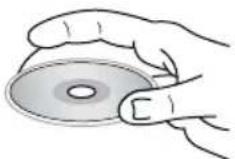
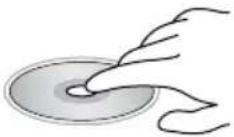
Cleaning discs
Fingerprints should be carefully wiped from the surface of disc with a soft cloth. Unlike conventional records, compact discs have no grooves to collect dust and macroscopic dirt, so gently wiping them with a soft cloth should remove must panicles. Wipe in a straight motion from the center to the edge.
Never use thinner benzine, record cleaner or anti static spray on a compact disc. Such chemicals can damage its plastic surface.
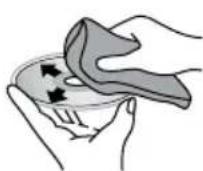
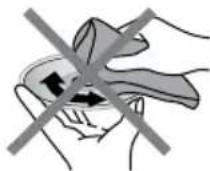
Cleaning the unit body
Wipe with a soft cloth. If the cabinet is very dampen (not dropping wet) the cloth with a weak solution of soapy water, and then wipe clean.
Accessories
- Receiver ....1 pc ....
- Front panel ....1.pc....
- Protective case....1 pc....
- ISO connector ....1 pc ....
- Mounting parts: Nut 5 mm....1 pc....
Spring washer ....2 pcs....
Plain washer ....2 pcs ....
Screw M5x25 mm ...1 pc ....
Screw ....1 pc ....
Metal strap ....1.pc....
Release key ....2 pcs....
Mounting collar ....1.pc....
Trim frame ....1.pc....
- Instruction manual .....1 pc ....
- Warranty card .....1.pc.....
- Consumer information .....1.pc ....
Troubleshooting
Below is a table describing simple measures that can help you eliminate most problems likely to emerge when this unit is in use. If below measures do not help, turn to a service center.
| Symptom Cause Solution | ||
| No power The car | ignition is not on. If the power supply is properly connected to the car accessory switch the ignition key to “ACC”. | |
| The fuse is blown. Replace the fuse. | ||
| No sound Volume | is in minimum. Adjust volume to a desired level. | |
| Wiring is not properly connected. Check wiring connection. | ||
| Bad sound quality | The installation angle is more than 30 degrees. | Adjust the installation angle to less than 30 degrees. |
| The disc is extremely dirty or defective. | Clean the compact disc/try to play a new one. | |
| Disc cannot be loaded or ejected | The unit already contains a disc. | Remove the disc in the player then put a new one. |
| Moisture condensation. Leave the unit idle for an hour, then retry. | ||
| Disc cannot be read | The disc is inserted upside down. | Insert the compact disc with the label side facing upward. |
| Compact disc is extremely dirty or defective. | Clean the disc or try to play a new one. | |
| Temperature inside the car is too high. | Cool off until the ambient temperature returns to normal. | |
| Buttons do not work | The built-in microcomputer is not operating properly. | Reset the unit with the help of RESET button. |
| Front panel is not properly fix into its place. | Install the front panel properly. | |
| The radio does not work | The antenna cable is not connected. | Insert the antenna cable properly. |
| The radio station automatic tuning does not work | The signals are too weak. Select stations manually. | |
| The display shows an error message (ERROR 1 – 11) one time. | Possible disc error. | Reset the unit by pressing RESET hole.Ensure the disc is inserted correctly into the slot.Clean or change the disc. |
| The display shows an error message (ERROR 1 – 11) repeatedly. | Unit operation error. | Turn to a service center. |
Specifications
General
Power supply 12 V DC
Current consumption max. 10 A
Maximum power output 4 x 50 W
Fuse 1A & 10A
Dimensions (L x W x H)/Weight 178 x 51 x 178 mm/1.5 kg
Temperature range -20 ^ C - +60 ^ C
ESP 40 sec. for CD, 120 sec. for MP3
Mounting angle 0 - +/-30
FM stereo radio
Frequency range 87.5 - 108.0 MHz
Presettable stations 18
Stereo separation 35 dB (1 kHz)
MW Section
Frequency range 522 kHz-1620 kHz
Presettable stations 12
Usable sensitivity 30 dB
Disc player
Disc support CD/CD-R/CD-RW/USB/SD/MMC
Fromat support CDDA/MP3
Frequency characteristics 20-100 Hz ≤ 5 dB
10-20 kHz ≤ 5 dB
Signal to noise CD 50 dB (1kHz)
Line output 2-channel RCA line-out (2 V)
Specifications are subject to change without notice. Dimensions are approximate.
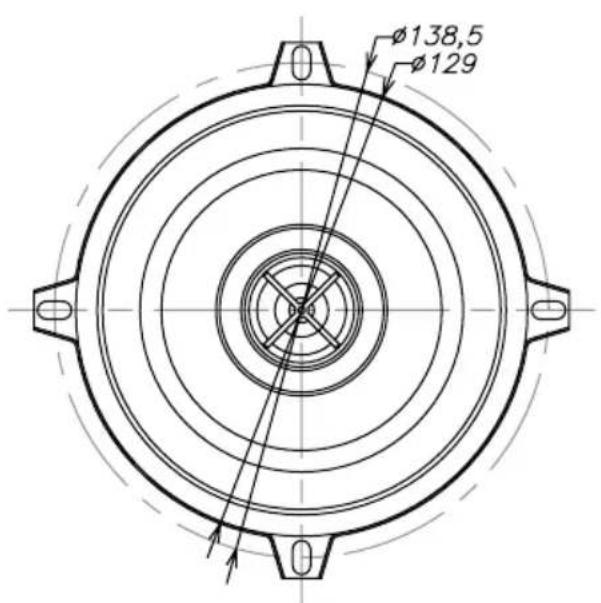
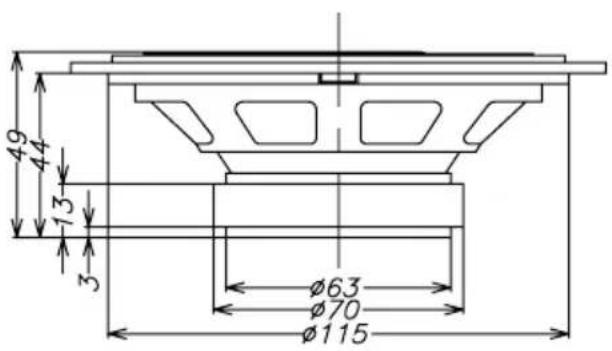
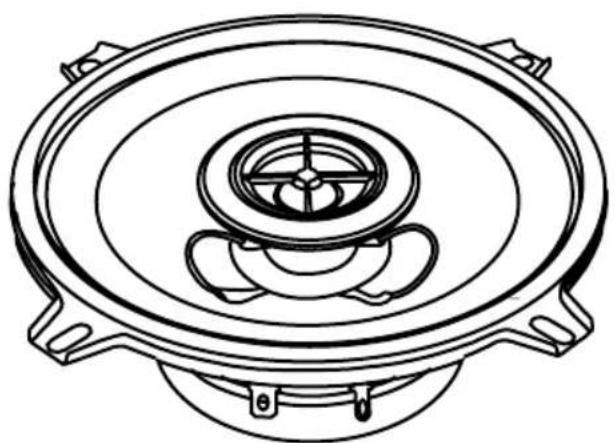
13 cm 2-way coaxial acoustic system
Dimensions Accessories
natural_image
Line drawing of a speaker bowl with concentric rings and mounting feet (no text or symbols)Speaker (2 pcs), Metal grill (2 pcs)
natural_image
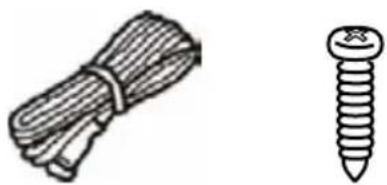
Illustration of a bundle of cord and a single screw (no text or symbols)Speaker wire (2 m x 2 pcs) Screw (8 pcs)
natural_image
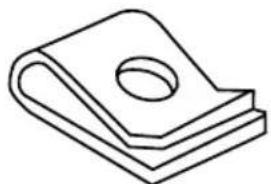
Simple line drawing of a folded or layered object with a central hole (no text or symbols)Clip (8 pcs)
Important safeguards
- The instruction manual contains important operating and maintenance instructions for your safety. It is necessary to refer the manual.
- Do not install the speakers where they may be subjected to excessive heat moisture,
dust or where they will be kicked repeatedly, brushed or bumped.
- Before mounting and connecting the wires be sure that wire of the negative pole terminal is disconnected from accumulator. Non-observance of this demand may cause a short circuit or fire.
• To prevent short circuit never put or leave
13 cm 2-way coaxial acoustic system
any metal objects (e.g. coins or metal tools) inside the acoustic system.
• Make absolutely sure that the terminals for the speakers are connected to the proper outputs from the music source.
- Never run the wiring on the outside of the vehicle or under it where it can be damaged by road hazards or the moving parts of the vehicle. Use existing wire channels, sills, panels and molding strips inside the vehicle to hide the wiring for safety and a neat appliance.
• Make sure the wire of the negative pole terminal is disconnected from accumulator while connecting the speaker terminals.
Turn on the various components and slowly advance the volume. Remember to check and re-check all connections to insure proper installation and use.
- Do not continuously use the speaker system beyond the nominal power handling capacity.
- Keep recorded tapes, watches, and personal credit cards using magnetic coding away from the speaker system to protect them from damage caused by the magnets in the speakers.
- If you cannot find the appropriate mounting location, consult your car dealer or your nearest dealer before mounting.
Take extreme caution when working near the gas tank, gas lines, brake or hydraulic lines and electrical wiring.
Installation of the speaker
Installation kits are available from your dealer or local stereo shop to help make your installation easy. These kits also give your installation a clean, custom appearance. Questions about installations methods please consult a professional auto sound dealer/installer for assistance.
- Choose the place of installation for acoustic system. For most acoustic system stipulated regular places in the automobile
approach. In this case you need to know only assembly depth. Before installation acoustic system check up their assembly depth.
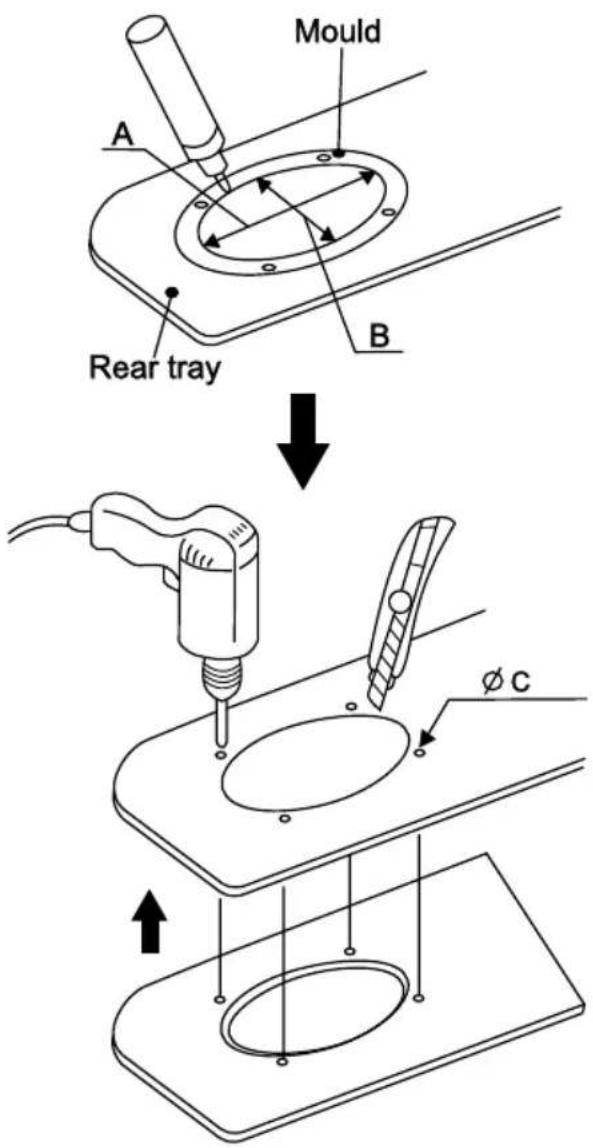
- At a choice of a non-standard arrangement of speakers at which it is necessary to cut them in panels of the automobile, use a mould (not included). For achievement of ideal arrangement of acoustic system keep up geometry of a mould, as it is very important for correct installation of your system (A=B=115 mm, ∅C=5 mm).
13 cm 2-way coaxial acoustic system
- If it is necessary to cut steel, reinstall the cosmetic panel in place and use the hole you have previously cut as a template. This will help to insure proper cutting and a good fit. Now, mark the locations for the speakers mounting screws, remove the panel and drill the screw holes. When finished you may replace the panel.
- After cutting and drilling all holes, inspect the mounting areas for any metal burrs or rough edges. File any area that may interfere with the mounting of the speaker.
- Clean any metal shavings from the mounting area and check for areas in which water may enter the speaker cavity. Treat the area for water protection when necessary.
Securing the speaker
- Position the speaker into the mounting hole and reconfirm the correct mounting location and hole placement.
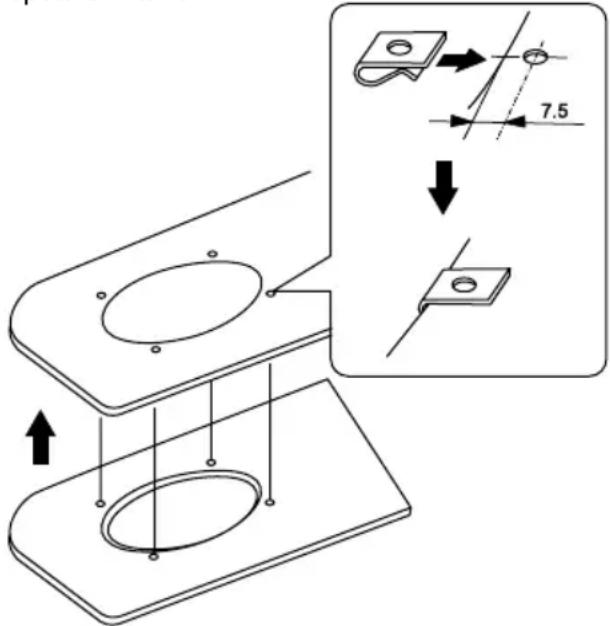
- Screw clips are provided to ensure a snug fit. These should be placed over the metal surface and line up the hole you have previously drilled with the screw clip. Place the speaker into the hole, align the holes and proceed to insert the screws. Be sure to tighten the screws evenly so that it will not warp the speaker frame.
- Turn your system back on and confirm the speakers operation first at a low volume and then you may increase the volume as you desire.
-
After installation acoustic system and having tested it the speaker grill will have to be inserted. Turn on you system and follow these steps carefully:
-
locate the speaker grill;
- now carefully inspect the place where the speaker grill will be mounted – there should be no blowholes;
- fix the speaker grill by screws.
Troubleshooting guide
Carefully read the instruction to make sure the unit is being operated properly. Check the following before you take your unit to the local dealer for repair.
| Symptom | Possible cause Solution | |
| No sound | The volume control regulator set in the minimal position | Adjust sound level |
| Bad power connections Check to see that | all the power and speaker leads are securely connected | |
| The audio cassette receiver is damaged | Take your unit to the local dealer for repair | |
| Unnatural sound | Acoustic system cables are connected without observance of polarity (+ or -) | Check to see that all the power and speaker leads are securely connected |
| Damaged speaker wire or speaker Replace the speaker or speaker wires | ||
| The audio cassette receiver is damaged | Take your unit to the local dealer for repair | |
Good ground connections eliminate most electrical noise problems and require tight contact with the metal vehicle chassis.
Specification
| Loudspeaker cone woofer: polypropylene cone tweeter: 20 mm mylar | |
| Magnet 5.3 Oz | |
| Peak output power 120 W | |
| Rated output power 60 W | |
| Impedance 4 Ohm | |
| Sensitivity 90 dB | |
| Frequency response 80 – 20000 Hz | |
| Dimensions 138.5 x 49 mm | |
| Net/Gross weight 0.38 kg/0.8 kg | |
| Gift box dimension (L x H x W) 275 mm x 135 mm |
Снятие устройства
natural_image
Diagram showing two stages of connector assembly: one with internal pins and arrows, the other with hands holding a cable (no text or symbols)| Button | Music group | Speech group |
| 1 Pop | Rock News, Affairs, Info | |
| 2 Easy | Light Sport, Educate, Drama | |
| 3 Classics Culture, Science, Varied | ||
| 4 Jazz, Country Weather, Finance, Children | ||
| 5 Nation, Oldies Social, Religion, Phone IN | ||
| 6 Folk Travel, Leisure, Document |
natural_image
Illustration of hands holding a bowl with a cloth, showing a circular motion arrow (no text or symbols)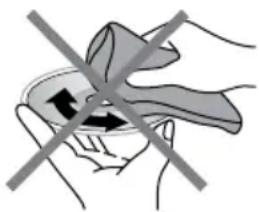
natural_image
Illustration of a hand holding a small object with two arrows indicating direction, crossed by a diagonal line (no text or symbols)natural_image
Line drawing of a speaker bowl with concentric rings and mounting feet (no text or symbols)natural_image
Illustration of a bundle of cable and a single screw (no text or symbols)natural_image
Simple line drawing of a folded or layered object with a circular hole (no text or symbols)Хомут (8 шт)
Меры безопасности
- Table of contents 2
- Before you start 3
- Installation/Connection 4
- Operation 7
- General information 13
- cm 2-way coaxial acoustic system ..... 16
- Utilization of the product
- Important safeguards
- Installation
- General notes
- Din Front/Rear-Mount
- DIN front-mount (Method A)
- Dismantling the unit
- Trim frame installation
- DIN rear-mount (Method B)
- Detachable control panel
- Anti-theft system
- Connection
- Control elements
- Front panel
- General operations
- Turning on/off
- Mode selecting
- Volume control
- Mute function
- Audio parameter setting
- Beep
- EQ modes
- Loudness
- Clock setting
- AUX in jack
- Radio operations
- Band select
- Auto/Manual tuning
- Programming tuner stations
- Automatic store/preset scan
- Automatic store
- Preset scan
- Mono/Stereo control (in FM radio mode)
- Local radio station search
- RDS function
- AF (Alternative Frequencies) function
- TA (Traffic Alarm) function
- PTY (Program Type)
- Other parameter setting
- TA SEEK/TA ALARM
- MASK DPI/MASK ALL
- RETUNE S/L - SHORT/LONG
- Disc operations
- Insert/Eject discs
- MP3 track search
- Ordinary search
- Track number search
- Folder search
- Character search
- Fast Forward/rewind
- Play/pause
- Scanning tracks
- Repeat
- Random playback
- Multi-session disc reading
- ID3 tags
- USB/SD/MMC operation
- USB/SD/MMC notes
- Inserting SD/MMC card/USB device
- Handling compact discs
- Handling discs
- Cleaning discs
- Cleaning the unit body
- Accessories
- Troubleshooting
- Specifications
- General
- FM stereo radio
- MW Section
- Disc player
- cm 2-way coaxial acoustic system
- Dimensions Accessories
- Installation of the speaker
- Securing the speaker
- Troubleshooting guide
- Меры безопасности
Brand : HYUNDAI
Model : H-CDM8095
Category : Car stereo