
VW-BN1 - Batteries PANASONIC - Free user manual and instructions
Find the device manual for free VW-BN1 PANASONIC in PDF.


User questions about VW-BN1 PANASONIC
0 question about this device. Answer the ones you know or ask your own.
Ask a new question about this device
Download the instructions for your Batteries in PDF format for free! Find your manual VW-BN1 - PANASONIC and take your electronic device back in hand. On this page are published all the documents necessary for the use of your device. VW-BN1 by PANASONIC.
USER MANUAL VW-BN1 PANASONIC
Panasonic®
Operating Instructions
Bedienungsanleitung
Mode d'emploi
Istruzioni d'uso
Before use, please read these instructions completely.
We would like to take this opportunity to thank you for purchasing this Panasonic DVD Burner. Please read these Operating Instructions carefully and keep them handy for future reference.
Please note that the actual controls and components, etc. of your DVD Burner may look somewhat different from those shown in the illustrations in these Operating Instructions.
◇ Information for your safety
■ Caution for AC Mains Lead (For United Kingdom)
For your safety, please read the following text carefully.
This appliance is supplied with a moulded three pin mains plug for your safety and convenience.
A 5-ampere fuse is fitted in this plug.
Should the fuse need to be replaced please ensure that the replacement fuse has a rating of 5-ampere and that it is approved by ASTA or BSI to BS1362.
Check for the ASTA mark 📋 or the BSI mark ♥ on the body of the fuse.
If the plug contains a removable fuse cover you must ensure that it is refitted when the fuse is replaced.
If you lose the fuse cover the plug must not be used until a replacement cover is obtained.
A replacement fuse cover can be purchased from your local dealer.
CAUTION!
IF THE FITTED MOULDED PLUG IS UNSUITABLE FOR THE SOCKET OUTLET IN YOUR HOME THEN THE FUSE SHOULD BE REMOVED AND THE PLUG CUT OFF AND DISPOSED OF SAFELY.
THERE IS A DANGER OF SEVERE ELECTRICAL SHOCK IF THE CUT OFF PLUG IS INSERTED INTO ANY 13-AMPERE SOCKET.
If a new plug is to be fitted please observe the wiring code as stated below.
If in any doubt please consult a qualified electrician.
IMPORTANT
The wires in this mains lead are coloured in accordance with the following code:
Blue: Neutral, Brown: Live.
As these colours may not correspond with the coloured markings identifying the terminals in your plug, proceed as follows: The wire which is coloured Blue must be connected to the terminal which is marked with the letter N or coloured Black or Blue. The wire which is coloured Brown must be connected to the terminal which is marked with the letter L or coloured Brown or Red.
WARNING: DO NOT CONNECT EITHER WIRE TO THE EARTH TERMINAL WHICH IS MARKED WITH THE LETTER E, BY THE EARTH SYMBOL ⊥ OR COLOURED GREEN OR GREEN/YELLOW.
THIS PLUG IS NOT WATERPROOF—KEEP DRY.
Before use
Remove the connector cover.
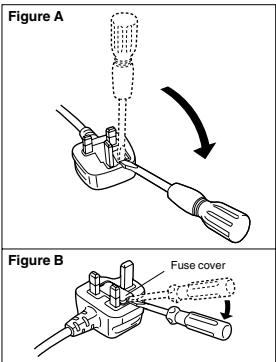
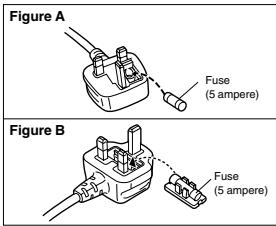
How to replace the fuse
The location of the fuse differ according to the type of AC mains plug (figures A and B).
Confirm the AC mains plug fitted and follow the instructions below.
Illustrations may differ from actual AC mains plug.
- Open the fuse cover with a screwdriver.
- Replace the fuse and close or attach the fuse cover.
WARNING:
TO REDUCE THE RISK OF FIRE, ELECTRIC SHOCK OR PRODUCT DAMAGE,
- DO NOT EXPOSE THIS APPARATUS TO RAIN, MOISTURE, DRIPPING OR SPLASHING AND THAT NO OBJECTS FILLED WITH LIQUIDS, SUCH AS VASES, SHALL BE PLACED ON THE APPARATUS.
- USE ONLY THE RECOMMENDED ACCESSORIES.
- DO NOT REMOVE THE COVER (OR BACK); THERE ARE NO USER SERVICEABLE PARTS INSIDE. REFER SERVICING TO QUALIFIED SERVICE PERSONNEL.
CAUTION!
- DO NOT INSTALL OR PLACE THIS UNIT IN A BOOKCASE, BUILT-IN CABINET OR IN ANOTHER CONFINED SPACE. ENSURE THE UNIT IS WELL VENTILATED. TO PREVENT RISK OF ELECTRIC SHOCK OR FIRE HAZARD DUE TO OVERHEATING, ENSURE THAT CURTAINS AND ANY OTHER MATERIALS DO NOT OBSTRUCT THE VENTILATION VENTS.
- DO NOT OBSTRUCT THE UNIT'S VENTILATION OPENINGS WITH NEWSPAPERS, TABLECLOTHS, CURTAINS, AND SIMILAR ITEMS.
- DO NOT PLACE SOURCES OF NAKED FLAMES, SUCH AS LIGHTED CANDLES, ON THE UNIT.
THE SOCKET OUTLET SHALL BE INSTALLED NEAR THE EQUIPMENT AND SHALL BE EASILY ACCESSIBLE.
This product may receive radio interference caused by mobile telephones during use. If such interference is apparent, please increase separation between the product and the mobile telephone.
CAUTION!
THIS PRODUCT UTILIZES A LASER.
USE OF CONTROLS OR ADJUSTMENTS OR PERFORMANCE OF PROCEDURES OTHER THAN THOSE SPECIFIED HEREIN MAY RESULT IN HAZARDOUS RADIATION EXPOSURE.
DO NOT OPEN COVERS AND DO NOT REPAIR YOURSELF. REFER SERVICING TO QUALIFIED PERSONNEL.
Product Identification Marking is located on the bottom of units.
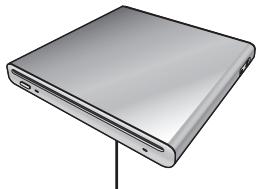
CLASS 1
LASER PRODUCT
LUOKAN 1 LASERLAITE KLASS 1 LASER APPARAT
(Bottom of product)
CLASS 1 LASER PRODUCT
KLASS 1 LASER APPARAT
LASER KLASSE 1
LUOKAN 1 LASERLAITE
EN60825-1
APPAREIL À LASER DE CLASSE 1
1类激光产品
CAUTION -CLASS 2M LASER RADIATION WHEN OPEN. DO NOT STARE INTO THE BEAM OR VIEW DIRECTLY WITH OPTICAL INSTRUMENTS.
ATTENTION - RAYONNEMENT LASER, CLASSE 2M, EN CAS D'OUVERTURE. NE PAS REGARDER DANS LE FAISCEAU NI DIRECTEMENT À L'AIDE D'INSTRUMENTS D'OPTIQUE.
CAUTION - Laser radiation when open. DO NOT STARE INTO BEAM.
FDA 21 CFR / Class II
DANGER - Invisible Laser radiation when open. AVOID DIRECT EXPOSURE TO BEAM.
FDA 21 CFR / Class IIIb
(Inside of product)
(Produktets innside)
(Tuotteen sisällä)
VAROITUS:
VÄHENNÄ TULIPALON, SÄHKÖISKUN TAI LAITTEISTON VAHINGOITTUMISEN VAARAA
- TÄTÄ LAITETTA EI SAA ALTISTAA SATEELLE, KOSTEUDELLE, ROISKEILLE TAI TIPPUVILLE NESTEILLE. LAITTEEN PÄÄLLE EI SAA MYÖSKÄÄN ASETTAA MITÄÄN NESTEELLÄ TÄYTETTYÄ ESINETTÄ, KUTEN MALJAKKOA.
- KÄYTÄ VAIN SUOSITELTUJA LISÄVARUSTEITA.
- ÄLÄ IRROTA KANTTA (TAI TAUSTAA). SISÄLLÄ EI OLE KÄYTTÄJÄN HUOLLETTAVISSA OLEVIA OSIA. HUOLLON SAA SUORITTAA VAIN AMMATTITAITOINEN HENKILÖKUNTA.
VAROITUS!
- ÄLÄ ASENNA TAI LAITA TÄTÄ LAITETTA KABINETTITYYPPISEEN KIRJAKAAPPIIN TAI MUUHUN SULJETTUUN TILAAN, JOTTA TUULETUS ONNISTUISI. VARMISTA, ETTÄ VERHO TAI MIKÄÄN MUU MATERIAALI EI HUONONNA TUULETUSTA, JOTTA VÄLTETTÄISIIN YLIKUUMENEMISESTA JOHTUVA SÄHKÖISKU-TAI TULIPALOVAARA.
- ÄLÄ PEITÄ LAITTEEN TUULETUSAUKKOJA SANOMALEHDELLÄ, PÖYTÄLIINALLA, VERHOLLA TAI MUULLA VASTAAVALLA ESINEELLÄ.
- ÄLÄ ASETA PALAVAA KYNTTILÄÄ TAI MUUTA AVOTULEN LÄHDETTÄ LAITTEEN PÄÄLLE.
PISTORASIA TULEE ASENTAA LAITTEEN LÄHELLE HELPOSTI SAAVUTETTAVAAN PAIKKAAN.
VAROITUS!
LAITTEEN KÄYTTÄMINEN MUULLA KUIN TÄSSÄ KÄYTTÖOHJEESSA MAINITULLA TAVALLA SAATTAA ALTISTAA KÄYTTÄJÄN TURVALLISUUSLUOKAN 1 YLITTÄVÄLLE NÄKYMÄTTÖMÄLLE LASERSÄTEILYLLE.
ADVARSEL:
F∅LG NEDENSTÅENDE INSTRUKSER FOR Å REDUSERE RISIKOEN FOR BRANN, ELEKTRISK ST∅T OG SKADE PÅ PRODUKTET:
- DETTE APPARATET MÅ IKKE UTSETTES FOR REGN, FUKTIGHET, DRYPP ELLER SPRUT, OG INGEN VÆSKEFYLTE GJENSTANDER, SOM F.EKS. VASER, MÅ PLASSERES PÅ APPARATET.
• BRUK KUN ANBEFALT TILBEH∅R. - IKKE FJERN DEKSELET (ELLER BAKSIDEN); APPARATET INNEHOLDER INGEN DELER SOM KAN SKIFTES ELLER REPARERES AV BRUKEREN. OVERLAT TIL KVALIFISERTE SERVICETEKNIKERE Å UTF∅RE SERVICE.
ADVARSEL!
- APPARATET MÅ IKKE PLASSERES I EN BOKHYLLE, ET INNEBYGGET KABINETT ELLER ET ANNET LUKKET STED HVOR VENTILASJONSFORHOLDENE ER UTILSTREKKELIGE. S∅RG FOR AT GARDINER ELLER LIGNENDE IKKE FORVERRER VENTILASJONSFORHOLDENE, SÅ RISIKO FOR ELEKTRISK SJOKK ELLER BRANN FORÅRSAKET AV OVERHETING UNNGÅS.
- APPARATETS VENTILASJONSÄPNINGER MÅ IKKE DEKKES TIL MED AVISER, BORDDUKER, GARDINER OG LIGNENDE.
- PLASSER IKKE ÅPEN ILD, SLIK SOM LEVENDE LYS, OPPÅ APPARATET.
KONTAKTUTTAKET MÅ INSTALLERES I NÆRHETEN AV UTSTYRET OG MÅ VÆRE LETT TILGJENGELIG.
ADVARSEL!
DETTE PRODUKTET ANVENDER EN LASER.
BETJENING AV KONTROLLER, JUSTERINGER ELLER ANDRE INNGREP ENN DE SOM ER BESKREVET I DENNE BRUKSANVISNING, KAN F∅RE TIL FARLIG BESTRÅLING.
DEKSLER MÅ IKKE ÅPNES, OG FORS∅K ALDRI Å REPARERE APPARATET PÅ EGENHÅND. ALT SERVICE OG REPARASJONSARBEID MÅ UTF∅RES AV KVALIFISERT PERSONELL.
Information on Disposal for Users of Waste Electrical & Electronic Equipment (private households)

This symbol on the products and/or accompanying documents means that used electrical and electronic products should not be mixed with general household waste.
For proper treatment, recovery and recycling, please take these products to designated collection points, where they will be accepted on a free of charge basis. Alternatively, in some countries you may be able to return your products to your local retailer upon the purchase of an equivalent new product.
Disposing of this product correctly will help to save valuable resources and prevent any potential negative effects on human health and the environment which could otherwise arise from inappropriate waste handling. Please contact your local authority for further details of your nearest designated collection point.
Penalties may be applicable for incorrect disposal of this waste, in accordance with national legislation.
For business users in the European Union
If you wish to discard electrical and electronic equipment, please contact your dealer or supplier for further information.
Information on Disposal in other Countries outside the European Union
This symbol is only valid in the European Union.
If you wish to discard this product, please contact your local authorities or dealer and ask for the correct method of disposal.
Contents
Information for your safety ...... 2
Features 7
Before use....8
About the disc 8
Accessories 11
Parts identification and handling ..... 11
Power supply....11
Inserting/removing a disc.... 12
Copying from a video camera to a DVD disc 12
Playing back a copied DVD disc on a video camera 13
Connecting to a PC for use 13
Cautions for Use 14
Trouble shooting....16
Specifications.... 18
Features
- This is a portable device with a thin, lightweight and compact design. If you connect this unit and a compatible Panasonic video camera, then the pictures recorded on the connected video camera can be easily copied to a DVD disc even at your travel destination.
- You can also play back DVD discs created on this unit if you connect this unit and a compatible Panasonic video camera.
- If you connect this unit and a PC using the USB cable supplied with a compatible Panasonic video camera, you can copy pictures edited on a PC etc. to a DVD disc.
- Operation is not guaranteed for any kind of uses other than these mentioned above.

Before use
■ Handling this unit
This unit is a high-precision device that is not built to withstand vibration, shock or dust. Depending on the environment and handling of the unit, some content may become damaged and in the worst case reading the disc may no longer be possible. In particular, do not subject this unit to vibration and shock or disconnect the AC mains lead during use.
- Panasonic will in no way be liable for any damages sustained directly or indirectly from the use or failure of this product. Panasonic will also in no way be liable for any losses of data caused by this product.
- Injury or material damage resulting from any kind of use that is not in accordance with the operating Instructions are the sole responsibility of the user.
■ When placing this unit
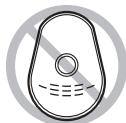
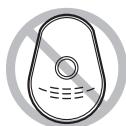
Place this unit on a flat, level surface while using it.
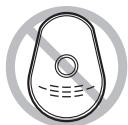
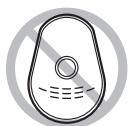
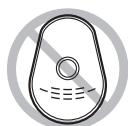
- You cannot use this unit if it is placed vertically.
■ Carefully observe copyright laws
The materials that you record and create can be used for your personal entertainment only. Under copyright laws, other materials cannot be used without obtaining permission from the holders of the copyrights.
■ Pages for reference
Pages that you should refer to are shown as (P00).
- Microsoft ® , Windows ® , Windows Vista TM and DirectX ® are either registered trademarks or trademarks of Microsoft Corporation in the United States and/or other countries.
- IBM and PC/AT are registered trademarks of International Business Machines Corporation of the U.S.
- Intel ® , Pentium ® and Celeron ® are registered trademarks or trademarks of Intel Corporation in the United States and other countries.
- Microsoft product screen shot(s) reprinted with permission from Microsoft Corporation.
- Other names of systems and products mentioned in these instructions are usually the registered trademarks or trademarks of the manufacturers who developed the system or product concerned.

About the disc
■ Discs that can be used on this unit
Discs that can be used for copying when you connect this unit and a compatible Panasonic video camera are 12 cm non-cartridge type DVD-RAM, DVD-RW, DVD-R, DVD-R DL (dual layer on single side), CD-RW and CD-R.
- The discs that can be used with this unit will differ depending on the video camera that is connected. Read the operating instructions of the video camera for details.
Important Notice
If you copy pictures recorded in AVCHD format to a disc, do not insert this disc in devices which do not support the AVCHD format. In some cases the disc may get stuck in the device. The disc will not play back on devices that do not support the AVCHD format.
- You cannot record or play continuously from one side of the disc to the other when using a double sided disc. You will need to eject the disc and turn it over.
- Discs inserted in a holder, cartridge, or caddy case cannot be used. Always remove bare discs from these containers prior to use.
- It is recommended that you use Panasonic discs. Usually discs compatible with the DVD standard can be used for recording and playback with no problems. However, some commercially available discs do not meet the DVD standard for quality and performance. If you use one of these discs, you may not be able to record or playback normally. Refer to the following support site for information about discs that have been confirmed as compatible by Panasonic. http://panasonic.jp/support/global/cs/e_cam
(This website is in English only.)
- Discs recorded on this unit may not be playable on other products. In such cases, play back the disc on this unit instead.
-
When using DVD-RW, DVD-R or DVD-R DL do not perform the following as it may make the disc unusable.
-
Record on a disc with other products after recording on it with this unit.
- Record on a disc with this unit after recording on it with other products.
– Insert an un-finalized disc in any other products.
■ About DVD-R DL (dual layer on single side)
DVD-R DL (dual layer on single side) discs have two layers of recording and playback surface on one side. If a scene does not fit on the first layer (L0), recording continues on the second layer (L1) so one scene is recorded across two layers. This unit automatically switches layers during disc playback so you can play the whole of the disc continuously like a normal disc. However, the image or the sound may momentarily stop at the point where the layers switch.
■ Examples of discs that cannot be used on this unit
- Discs other than those with a 12 cm diameter (You cannot use 8 cm discs even if you insert them in a commercially available adaptor.)
- 6X–12X high speed recording compatible DVD-RAM
- +RW - +R - +R DL
- BD-RE - BD-R - BD-ROM
- HD DVD-RAM - HD DVD-RW - HD DVD-R
- LD - MO - MD
- iD - Floppy disk
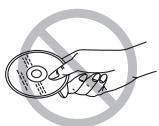
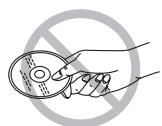
■ How to hold a disc
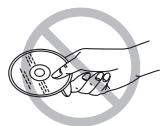
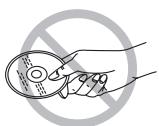
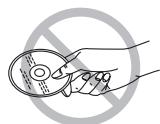
Do not touch the recorded surface.
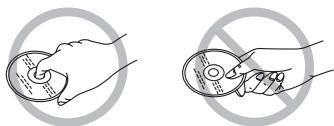
■ When inserting/removing a disc
Do not allow fingerprints or dirt to get on the recording/playback side of the disc.
- If there are scratches or dirt (e.g. dust or fingerprints) on the recording/playback side of the disc, normal recording/playback may not be possible and the following kind of phenomena may occur.
– Recording/playback is not possible.
– The image or the sound is interrupted or stops momentarily.
- Noise appears on the image or the sound.
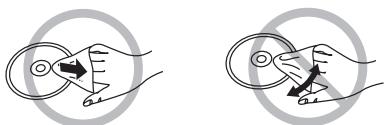
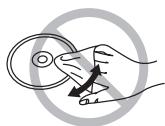
■ If there is dirt on the disc
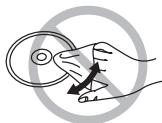
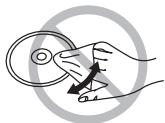
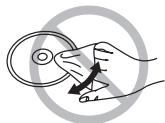
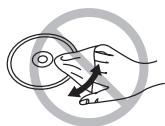
- Clean it with the commercially available disc cleaning cloth. Wipe the disc from the centre to the outer edge to remove the dirt. Do not use force when wiping the disc as it may scratch it. Also, do not use solvents (thinner, water, antistatic agent, detergent etc.).
■ Handling precautions
- Be careful about scratches and dirt.
- Do not attach labels or stickers to discs. (This may cause disc warping and un-balanced rotation, rendering it unusable.)
- Write on the label side of the disc only with a soft, oil-based felt pen. Do not use ballpoint pens or other hard writing implements.
- Do not use record cleaning sprays, benzine, thinner, static electricity prevention liquids or any other solvent.
- Do not use scratch-proof protectors or covers.
- Do not drop, stack, or impact discs. Do not place objects on them.
- Do not use the following discs:
– Discs with exposed adhesive from removed stickers or labels.
– Discs that are badly warped or cracked.
–Irregularly shaped discs, such as heart shapes.

- Do not place in the following areas:
– In direct sunlight.
– In very dusty or humid areas. - Near a heater.
– Locations susceptible to significant difference in temperature (condensation can occur). - Where static electricity or electromagnetic waves occur.
- To protect discs, return them to their cases when you are not using them.
For the United Kingdom and Republic of Ireland
■ Sales and Support Information
Customer Care Centre
- For customers within the UK: 0844 844 3852
- For customers within the Republic of Ireland: 01 289 8333
- Visit our website for product information
• E-mail: customer.care@panasonic.co.uk
Technical Support for AV Software
- For customers within the UK: 0844 844 3869
- For customers within the Republic of Ireland: 01 289 8333
Direct Sales at Panasonic UK
- Order accessory and consumable items for your product with ease and confidence by phoning our Customer Care Centre Monday – Thursday 9.00 a.m.–5.30 p.m., Friday 9.30 a.m.–5.30 p.m. (Excluding public holidays)
- Or go on line through our Internet Accessory ordering application at www.panasonic.co.uk.
- Most major credit and debit cards accepted.
- All enquiries transactions and distribution facilities are provided directly by Panasonic UK Ltd.
- It couldn't be simpler!
- Also available through our Internet is direct shopping for a wide range of finished products, take a browse on our website for further details.
Interested in purchasing an extended guarantee?
Please call 0870 240 6284 or visit our website www.panasonic.co.uk/guarantee.

Accessories
Check the accessories before using this unit.
AC adaptor
VSK0692
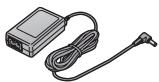
AC mains lead
Ⓐ K2CT3CA00004
United Kingdom,
Hong Kong Special
Administrative Region of
China and Saudi Arabia
⑧ K2CJ2DA00011 Australia and New Zealand
© K2CR2DA00004
Areas Other than United Kingdom,
Hong Kong Special Administrative
Region of China, Australia,
New Zealand and Saudi Arabia
Mini AB USB
Connection Cable
K2KZ59B00002
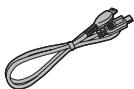

Parts identification and handling
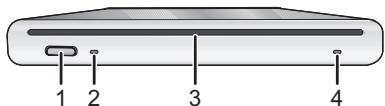
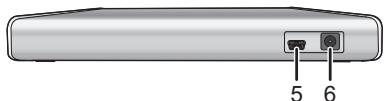
1 Eject button [▲]
2 Access lamp [ACCESS] (P12)
3 Disc insertion slot
4 Power lamp [POWER]
- This indicator lights when the unit is connected to the AC mains supply.
5 USB terminal [←]
6 DC input terminal [DC/C.C.IN 5.0 V]
- Do not use any other AC adaptors except the supplied one.

Power supply
The unit is in the standby condition when the AC adaptor is connected. The primary circuit is always “live” as long as the AC adaptor is connected to an electrical outlet.
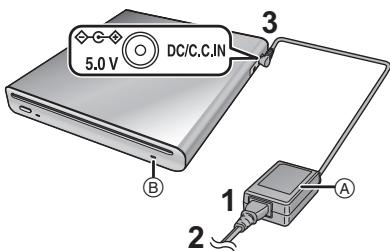
1 Connect the AC mains lead to the AC adaptor Ⓐ.
2 Connect the AC mains lead to the AC outlet.
3 Connect the AC adaptor to this unit's DC input terminal [DC/C.C.IN 5.0 V].
- The power lamp Ⓑ lights up.
- The AC mains lead is for use with this unit only. Do not use it with other devices or use the AC mains lead for other devices with this unit.
- The unit and the disc heat up during use. This is not a malfunction.
◇ Inserting/removing a disc
- When inserting or removing the disc, connect the AC adaptor to the unit. You cannot insert or remove a disc unless the unit is powered.
1 Connect this unit to the AC adaptor.
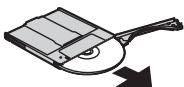
2 Inserting disc Insert the disc in the disc insertion slot.
The disc is automatically loaded.
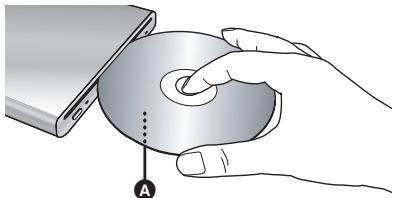
A Recording/playback side
Removing disc Press the [▲] button.
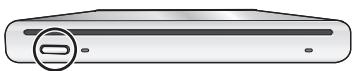
- Be careful not to touch the recording/ playback side of the disc when inserting/ removing it.
■ About the access lamp
When the unit accesses a disc, the access lamp lights up.

- Do not do the following operations when the access lamp is lit. The disc or the recorded data on the disc may be damaged and this unit may malfunction.
- Disconnect the AC adaptor.
- Disconnect the USB cable.
- Subject this unit to a strong shock or vibration.
◇ Copying from a video camera to a DVD disc
If you connect this unit and a compatible Panasonic video camera, you can copy pictures recorded on the video camera to a DVD disc.
- Use the Mini AB USB Connection Cable to connect this unit and the compatible Panasonic video camera.
- This function does not work if the video camera is not compatible with this unit.
- Refer to the operating instructions of the video camera about the available data for copying.
- Connect this unit to the AC adaptor.
1 Connect this unit to the video camera.
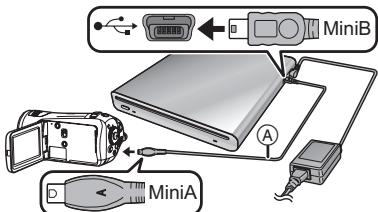
ⒶMini AB USB Connection Cable (supplied)
- Connect the miniA terminal to the video camera and the miniB terminal to this unit.
- Insert the plugs as far as they will go. The unit and the video camera will not operate properly if they are not inserted fully.
- Do not use any other USB connection cables except the supplied one.
2 Start copying on the video camera.
- Read the operating instructions of the video camera for information about how to copy.
- If the compatible Panasonic video camera supports copying to a CD-R and a CD-RW, you can copy the still picture data to a CD-R or a CD-RW. Read the operating instructions of the video camera for details.
◇ Playing back a copied DVD disc on a video camera
If you connect this unit and a compatible Panasonic video camera, you can play back the DVD disc that you copied pictures to.
- To play back the disc, connect the same video camera that you connected when copying to it.
- Use the Mini AB USB Connection Cable to connect this unit and the compatible Panasonic video camera.
- Connect this unit to the AC adaptor.
1 Connect this unit and the video camera using the Mini AB USB Connection Cable.
- Connect the miniA terminal to the video camera and the miniB terminal to this unit.
- Insert the plugs as far as they will go. The unit and the video camera will not operate properly if they are not inserted fully.
- Do not use any other USB connection cables except the supplied one.
2 Start playback of the disc on the video camera.
- Read the operating instructions of the video camera for information about how to play back.
◇ Connecting to a PC for use
You can copy pictures recorded on a Panasonic video camera and edited on a PC to a DVD disc.
Use the software supplied with the Panasonic video camera to copy the pictures. You can also play back the DVD disc that you copied the pictures to using the same software.
- Use the USB cable supplied with a Panasonic video camera compatible with this unit to connect this unit and a PC.
- Depending on the software, the available data for copying may vary.
If using Windows
■ Operating environment
Personal computer
IBM PC/AT compatible personal computer OS
The compatible OS will differ depending on the software supplied with the video camera. Please see the operating environment of the software.
Interface
USB port
Other requirements
Mouse or equivalent pointing device
- Even if the system requirements mentioned in these operating instructions are fulfilled, some personal computers cannot be used.
- Operation is not guaranteed on an upgraded OS.
- Operation on an OS other than the one pre-installed is not guaranteed.
- When 2 or more USB devices are connected to a PC, or when devices are connected through USB hubs or by using extension cables, proper operation is not guaranteed.
■ Connection and recognition procedures
- Connect this unit to the AC adaptor.
1 Connect this unit to the PC.
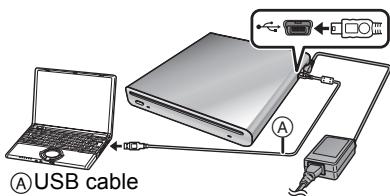
ⒶUSB cable
(supplied with the video camera)
- This unit is recognised as a [DVD-RAM Drive] on [My Computer].
- Insert the plugs as far as they will go. The unit and PC will not operate properly if they are not inserted fully.
- Be sure to use the USB cable supplied with the video camera. (We cannot guarantee operation if you use a USB cable other than the one supplied with the Panasonic video camera.)
2 Start copying/playback.
- Use the software supplied with a Panasonic video camera to copy/play back the pictures.
- Read the operating instructions of the software for information about how to copy/play back.
■ To disconnect the USB cable safely
If the USB cable is disconnected while the access lamp is lit, this unit may malfunction and the data may be lost.
1 Check that the access lamp is not lit.
2 Double click the ( ) icon in task tray.
- Hardware disconnect dialogue appears.
- Depending on your PC's settings, this icon may not be displayed.
3 Select [USB Mass Storage Device] and click [Stop].
4 Click [OK].
- Click [OK], and you can safely disconnect the cable.
◇ Cautions for Use
■ About this unit
The unit and disc become warm after long operation, but this is not a malfunction.
Keep the unit as far away as possible from electromagnetic equipment (such as microwave ovens, TVs, video games etc.).
- If you use the unit on top of or near a TV, the pictures and sound on the unit may be disrupted by electromagnetic wave radiation.
- Do not use the unit near cell phones because doing so may result in noise adversely affecting the pictures and sound.
- Recorded data may be damaged, or pictures may be distorted, by strong magnetic fields created by speakers or large motors.
- Electromagnetic wave radiation generated by microprocessors may adversely affect the unit, disturbing the pictures and sound.
- If this unit is adversely affected by electromagnetic equipment and stops functioning properly, disconnect the AC adaptor and then connect it again.
Do not use the unit near radio transmitters or high-voltage lines.
- If you record near radio transmitters or high-voltage lines, the recorded pictures and sound may be adversely affected.
Make sure to use the supplied cords and cables.
Do not extend the cords and the cables.
Do not spray insecticides or volatile chemicals onto the unit.
- If the unit is sprayed with such chemicals, its body may be marred and the surface finish may peel off.
- Do not leave rubber or plastic products in contact with the unit for a long time.
Do not subject this unit to vibrations or impacts, shake, drop or bump it, place objects on top of it or drop objects on it.
- A strong impact can break the unit's casing, causing it to malfunction.
In particular, do not place a video camera etc. on top of this unit during use. If this unit is subjected to vibration during disc reading or writing, the operation of the video camera may be affected or the video camera may fall.
Do not use benzine, paint thinner or alcohol for cleaning the unit.
- Before cleaning, pull out the AC mains lead from the AC mains socket.
- If you use a solvent, the casing may be discoloured and the surface finish may peel off.
- Wipe the unit with a soft dry cloth to remove dust and fingerprints. To remove stubborn stains, thoroughly wring a cloth that has been soaked in a neutral detergent diluted with water and wipe the unit with it. Afterwards, wipe it with a dry cloth.
- Do not use a chemical dust cloth.
When you are not going to use the unit for an extended time
- When storing the unit in a cupboard or cabinet, it is recommended that you put a desiccant (silica gel) in with it.
■ About the AC adaptor
- Be sure to use the supplied AC adaptor.
- If you use the AC adaptor near a radio, radio reception may be disturbed. Keep the AC adaptor 1 m or more away from the radio.
- When using the AC adaptor, it may generate whirring sounds. However, this is normal.
- After use, be sure to disconnect the AC adaptor. (If it is left connected, about 0.3 W of current is consumed at most.)
- Always keep the electrodes of the AC adaptor clean.
Put this unit near the outlet to make it easy to reach for the interrupting device (plug).
■ About the disc
- If there is dust, a scratch, or dirt on disc or if it is warped, the following phenomena may occur:
– Block noise in playback image
– Momentary stop of playback image
– Sound interrupted during playback, or abnormal sound
– Disc cannot correctly be recognised
– Delay between video and audio
When the ACCESS lamp is illuminated (while accessing a disc), do not disconnect the AC adaptor or the USB cable or subject this unit to vibration and shock.
DVD-R/DVD-R DL
- For optimum recording on DVD-R or DVD-R DL discs, this unit writes control data to a DVD-R or DVD-R DL used for recording when it is being inserted and ejected. If the disc has no area for control data to be written, recording may not be possible. To prevent this, do not insert a DVD-R or DVD-R DL which has been recorded on more than 50 times.
- Do not insert a DVD-R or DVD-R DL recorded on this unit that has not been finalized into a recordable device, such as a DVD recorder. The recorded data may be damaged.
■ About condensation
Shortly after removing a chilled bottle from the refrigerator in summer, you will see that it is covered with tiny droplets of water. This phenomenon is called condensation. Using this unit when condensation has occurred may cause it to malfunction. Make every effort to ensure that condensation does not form. If it does form, take the actions described below.
Causes of condensation
Condensation takes place when the ambient temperature or humidity is changed as follows.
- When this unit is brought inside from the cold to a warm room.
- When this unit is moved from an air-conditioned car to outside.
- When a cold room has been warmed up quickly.
- When cool wind from an air conditioner is directly blown onto this unit.
● After summer afternoon showers of rain. - When this unit is in a very humid place where the air is thick with steam.
When this unit is taken to a location with a significant temperature difference such as from a cold place to a hot place. Place the unit inside a plastic bag, remove as much of the air from inside the bag as possible, then seal the bag. Leave the unit for about an hour in the room so the temperature of the unit is close to the ambient temperature of the room, then use it.
What to do when condensation forms
Disconnect the AC adaptor and leave the unit for about 1 hour. Check that the condensation disappeared naturally when the unit became close to the ambient temperature and then use the unit.
| Problem | Check points |
| This unit cannot be turned on. | Is the AC adaptor connected?→ Connect the AC adaptor and the AC mains lead correctly.(P11) |
| This unit cannot be operated even when powered up.This unit does not operate normally. | Disconnect the AC adaptor and then about 1 minute later connect it again. (Conducting the above operation when the access lamp is on may destroy the data on the disc.) If normal conditions are not restored, detach from the connected power source and consult the dealer who you purchased this unit from. |
| The [▲] button does not work. | The disc will not eject unless this unit is powered.→ Connect the AC adaptor.The [▲] button may not work when copying from a connected video camera to a disc is in progress.→ Wait until the copying is finished.In cases other than the above, detach from the connected power source and consult the dealer who you purchased this unit from. |
| The disc cannot be read.Copying stops.The playback picture breaks up for a moment. | Is the disc scratched or dirty?→ Wipe off the dirt on the disc. (P9) If the disc is scratched, insert a new one.The internal temperature of this unit is high. Disconnect the AC adaptor, wait a short while and then you will be able to use this unit again.Discs recorded on other devices may not be correctly read or played back on this device. |
| Cannot copy although power is supplied to this unit and the disc is correctly inserted. | Has the DVD-RW, DVD-R or DVD-R DL been finalized?→ After finalizing, the discs become play-only and cannot record. If you un-finalize a DVD-RW, it can be used for recording. (If you un-finalize a DVD-RW and then use it again when copying from a compatible Panasonic video camera, the recorded scenes may be deleted.)Is the memory of the disc full?→ If there is no more available memory, delete unnecessary scenes with the PC or use a new disc. |
| Even if connected by the USB cable, this unit is not recognised by the PC. | Select another USB terminal on the PC.Check the operating environment. (P13)Disconnect the AC adaptor and the USB cable and then connect them again. |
| When the USB cable is disconnected, an error message will appear on PC. | To disconnect the USB cable safely, double-click the ( [IMAGE] ) icon in the task tray and follow the instructions on the screen. |
| The PC will not start up. | Dld you connect this unit to the PC with the USB cable before turning on the power to the PC?→ Start up the PC and then connect this unit to it. |
| A region code setting screen appears when trying to play a DVD video. | The region code is not set when this unit is purchased. Check the setting contents and then click [OK]. Playback of the DVD video will start after the setting is changed to the new region code. You can change the setting 5 times. Be aware that you cannot change the setting after the fifth time and the region code is fixed to the last setting. |
DVD Burner: Information for your safety
| Power source: | DC 5.0 V |
| Power consumption: | 7.5 W (When writing to a disc) |
| Compatible media | 12 cm DVD-RAM Ver.2.112 cm DVD-RW Ver.1.1/2X-SPEED (2X/1X)12 cm DVD-R for General Ver.2.012 cm DVD-R for DL Ver.3.012 cm CD-R12 cm CD-RW | ||
| Interface | Hi-Speed USB compliant (USB 2.0), USB terminal Type miniB | ||
| Buffer capacity | 2 MB | ||
| Dimensions | 139 mm (W)×16.8 mm (H)×138.1 mm (D)(excluding the projecting parts) | ||
| Mass | Approx. 390 g (DVD burner only) | ||
| Operating temperature | 5 °C to 35 °C | ||
| Operating humidity | 10% to 80% | ||
| Data writing rate | DVD-RAM: Maximum 3X-SPEEDDVD-RW: Maximum 4X-SPEEDDVD-R: Maximum 8X-SPEED | DVD-R DL: Maximum 4X-SPEEDCD-R: Maximum 24X-SPEEDCD-RW: Maximum 16X-SPEED | |
| Data reading rate | DVD-RAM: Maximum 3X-SPEEDDVD-RW: Maximum 6X-SPEEDDVD-R: Maximum 8X-SPEED | DVD-R DL: Maximum 6X-SPEEDCD-R: Maximum 24X-SPEEDCD-RW: Maximum 24X-SPEED | |
| LASER specification | Class 1 LASER Product (Pickup)Wave length: DVD 662 nmCD 785 nmLaser power:No hazardous radiation is emitted with the safety protection | ||
| NORSK | Bølgelengde: DVD 662 nmCD 785 nmLaserstyrke:Ingen farlig stråling sendes ut | ||
AC adaptor VSK0692: Information for your safety
| Power source: | AC 110 V to 240 V, 50/60 Hz |
| Input capacitance: | 0.22 A |
| DC output: | DC 5.0 V 1.6 A |
CLASS 1
LASER PRODUCT
CLASS 1 LASER PRODUCT
KLASS 1 LASER APPARAT
LASER KLASSE 1
LUOKAN 1 LASERLAITE
EN60825-1
APPAREIL À LASER DE CLASSE 1
1类激光产品
CAUTION -CLASS 2M LASER RADIATION WHEN OPEN. DO NOT STARE INTO THE BEAM OR VIEW DIRECTLY WITH OPTICAL INSTRUMENTS.
ATTENTION - RAYONNEMENT LASER, CLASSE 2M, EN CAS D'OUVERTURE. NE PAS REGARDER DANS LE FAISCEAU NI DIRECTEMENT À L'AIDE D'INSTRUMENTS D'OPTIQUE.
CAUTION - Laser radiation when open. DO NOT STARE INTO BEAM.
FDA 21 CFR / Class II
DANGER - Invisible Laser radiation when open. AVOID DIRECT EXPOSURE TO BEAM.
FDA 21 CFR / Class IIIb
POUR RÉDUIRE LES RISQUES D'INCENDIE, D'ÉLECTROCUTION OU DE DOMMAGES AU PRODUIT,
- N'EXPOSEZ PAS CET APPAREIL À LA PLUIE, À L'HUMIDITÉ, À UNE CHUTE DE GOUTTES OU À DES ÉCLABOUSSURES ET NE PLACEZ AUCUN RÉCIPIENT CONTENANT UN LIQUIDE TEL QU'UN VASE AU-DESSUS.
- N'UTILISEZ QUE LES ACCESSOIRES RECOMMANDÉS.
- NE RETIREZ PAS LE COUVERCLE (OU L'ARRIÈRE); IL N'Y A AUCUNE PIÈCE RÉPARABLE PAR L'UTILISATEUR À L'INTÉRIEUR. CONFIEZ TOUTE INTERVENTION À UN PERSONNEL DE DÉPANNAGE QUALIFIÉ.
ATTENTION!
- NE PAS INSTALLER OU PLACER CETTE UNITÉ DANS UNE BIBLIOTHÈQUE, PLACARD OU DANS UN AUTRE ESPACE CONFINÉ. S'ASSURER QUE CETTE UNITÉ EST BIEN AÉRÉE. AFIN D'ÉVITER TOUS RISQUES DE CHOCS ÉLECTRIQUES OU DE FEU CAUSÉS PAR UNE SURCHAUFFE, S'ASSURER QU'AUCUNS RIDEAUX OU AUTRES MATÉRIAUX N'OBSTRUENT LES BOUCHES DE VENTILATION.
- NE PAS OBSTRUER LES OUVERTURES DE VENTILATION DE L'UNITÉ AVEC DU JOURNAL, DES COUVERTURES, DES RIDEAUX ET ÉLÉMENTS SIMILAIRES.
- NE PAS PLACER D'OBJET ÉTANT SOURCE DE FEU, COMME DES BOUGIES ALLUMÉES, SUR L'UNITÉ.
LA PRISE ÉLECTRIQUE DOIT ÊTRE INSTALLÉE À PROXIMITÉ DE L'APPAREIL ET ÊTRE FACILEMENT ACCESSIBLE.
CLASS 1
LASER PRODUCT
CLASS 1 LASER PRODUCT KLASS 1 LASER APPARAT
LASER KLASSE 1 LUOKAN 1 LASERLAITE EN60825-1 APPAREIL À LASER DE CLASSE 1 1 类激光产品
| CAUTION | - CLASS 2M LASER RADIATION WHEN OPEN. DO NOT STARE INTO THE BEAM OR VIEW DIRECTLY WITH OPTICAL INSTRUMENTS. |
| ATTENTION | - RAYONNEMENT, LASER, CLASSE 2M, EN CAS D'OUVERTURE. NE PAS REGARDER DANS LE FAISCEAU NI DIRECTEMENT À L'AIDE D'INSTRUMENTS D'OPTIQUE. |
| VORSICHT | - LASERSTRAHLUNG KLASSE 2M, WENN ABDECKING GEÖFFNET. NICHT IN DEN STRAHL BLICKEN ODER DIRECT MIT OPTISCHEN INSTRUMENTEN BETRACHEN. |
| ADVARSEL | - KLASSE 2M LASERSTRALING VED ÅBNING. SE IKKE INDI STRALEN -HELLER IKKE MED OPTISKA INSTRUMENTER. |
| ADVARSEL | - KLASSE 2M LASERSTRALING N&R DEKSEL ÅPNES. STIRR IKKE INNI STRALEN ELLER SE DIREKTE LED OPTISKE INSTRUMENTER. |
| VARNING | - LASERSTRALNING KLASSE 2M VID ÖPPEN LUCKA. STIRRA INNI IN STRALEN VARKEN EDRKET ELLER GENOM OPTIK. |
| VARO | - AVATTAESSA OLET ALTTINA LUKAN 2M LASERSÄTEILYLLE. ÄLÄ TUJOTA SÄTEEESEN TAI KATSO OPTISELLA LAITTEELLA SUORAAN SÄTEEESEN. |
CAUTION - Laser radiation when open. DO NOT STARE INTO BEAM.
FDA 21 CFR / Class II
DANGER - Invisible Laser radiation when open. AVOID DIRECT EXPOSURE TO BEAM.
FDA 21 CFR / Class IIIb
■ Précautions de manipulation
CLASS 1 LASER PRODUCT
CAUTION -CLASS 2M LASER RADIATION WHEN OPEN. DO NOT STARE INTO THE BEAM OR VIEW DIRECTLY WITH OPTICAL INSTRUMENTS.
ATTENTION -RAYONNEMENT LASER, CLASSE 2M, EN CAS D'OUVERTURE. NE PAS REGARDER DANS LE FAISCEAU NI DIRECTEMENT À L'AIDE D'INSTRUMENTS D'OPTIQUE.
CAUTION - Laser radiation when open. DO NOT STARE INTO BEAM.
DANGER - Invisible Laser radiation when open. AVOID DIRECT EXPOSURE TO BEAM.
FDA 21 CFR / Class II
FDA 21 CFR / Class IIIb
Personal computer IBM PC/AT compatibile SO
CLASS 1
LASER PRODUCT
■ Precauciones
CLASS 1 LASER PRODUCT
(Ürünün alt kısmı)
| CLASS 1 LASER PRODUCTKLASS 1 LASER APPARAT | LASER KLASSE 1 LUXOKAN 1 LASERLAITE EN60825-1APPAREIL À LASER DE CLASSE 1 1类激光产品 | |
| CAUTION | - CLASS 2M LASER RADIATION WHEN OPEN. DO NOT STARE INTO THE BEAM OR VIEW DIRECTLY WITH OPTICAL INSTRUMENTS. | |
| ATTENTION | - RAYONNEMENT, LASER, CLASSE 2M, EN CAS D'OUVERTURE. NE PAS REGARDER DANS LE FAISCEAU NIDIRECTEMENT À L'AIDE INSTRUMENTS D'OPTIQUE. | |
| VORSICHT | - LASERSTRAHLUNG KLASSE 2M, WENN ABDECKING GEÖFFNET. NICHT IN DEN STRAHL BLICKEN ODER DIREKTMIT OPTISCHEN INSTRUMENTEN BETRACHENT. | |
| ADVARSEL | - KLASSE 2M LASERSTRALING VED ABNING. SE IKKE IND I STRALEN.-HELLER IKKE MED OPTISKA INSTRUMENTER. | |
| ADVARSEL | - KLASSE 2M LASERSTRALING NAR DEKSEL APNES. STIRR IKKE INNI STRALEN ELLER SE DIREKTE MEDOPTISEK STRUMENTER. | |
| VARNINGVARO | - LASERSTRALING KLASSE 2M VID OPPENLUCKA. STIRRA INTE INI STRÅLEN VARKEN DIREKT ELLER GENOM OPTIK.AVATTAESSA OLET ALT TIINA LUOKAN 2M LASERSÄTEILYLLE. ALÄ TUJOTA SÄTEESESEN TAI KATSOPTISELLA LAITTELLA SUORAAN SÄTEESEEN. | |
| 注意 | - 打开时有激光辐射。避免光束照射。 | |
| CAUTION | - CLASS 3B INVISIBLE LASER RADIATION WHEN OPEN. AVOID EXPOSURE TO THE BEAM. | |
| ATTENTION | - RAYONNEMENT, LASER INVISIBLE, CLASSE 3B, EN CAS D'OUVERTURE. EVITER UNE EXPOSITION AU FAISCEAU.- | |
| VORSICHT | - UNSICHTBARE LASERSTRAHLUNG KLASSE 3B, WENN ABDECKING GEÖFFNET. NICHT DEM STRAHL AUSSETZEN. | |
| ADVARSEL | - KLASSE 3B USYNLIG LASERSTRALING VED ABNING. UNDGA UDSSETTELE FOR STRALING. | |
| ADVARSEL | - KLASSE 3B USYNLIG LASERSTRALING NAR DEKSEL APNES. UNNGA EKSPONERING FOR STRALEN. | |
| VARNINGVARO | - OSYNLIG LASERSTRALING KLASSE 3B VID OPPENLUCKA. UNDIVIK EXPONERING FÖR LASERSTRAHLNINGEN.AVATTAESSA OLET ALT TIINA LUOKAN 3B NAKYMATÖNTÄ LASERSÄTEILYÄ. VARO ALISTUMISTA SÄTEELLE. | |
| 注意 | - 打开时有不可见激光辐射。避免光束照射。 | |
| CAUTION - Laser radiation when open. DO NOT STARE INTO BEAM. FDA 21 CFR / Class II | ||
| DANGER - Invisible Laser radiation when open. AVOID DIRECT EXPOSURE TO BEAM. FDA 21 CFR / Class IIIb | ||
(Ürünün iç kısmı)

- PANASONIC®
- OPERATING INSTRUCTIONS
- BEDIENUNGSANLEITUNG
- MODE D'EMPLOI
- ISTRUZIONI D'USO
- ◇ INFORMATION FOR YOUR SAFETY
- CAUTION FOR AC MAINS LEAD (FOR UNITED KINGDOM)
- CAUTION
- IMPORTANT
- BEFORE USE
- HOW TO REPLACE THE FUSE
- WARNING
- THE SOCKET OUTLET SHALL BE INSTALLED NEAR THE EQUIPMENT AND SHALL BE EASILY ACCESSIBLE
- LUOKAN 1 LASERLAITE KLASS 1 LASER APPARAT
- VAROITUS
- ADVARSEL
- INFORMATION ON DISPOSAL FOR USERS OF WASTE ELECTRICAL & ELECTRONIC EQUIPMENT (PRIVATE HOUSEHOLDS)
- FOR BUSINESS USERS IN THE EUROPEAN UNION
- INFORMATION ON DISPOSAL IN OTHER COUNTRIES OUTSIDE THE EUROPEAN UNION
- CONTENTS
- FEATURES
- HANDLING THIS UNIT
- WHEN PLACING THIS UNIT
- CAREFULLY OBSERVE COPYRIGHT LAWS
- PAGES FOR REFERENCE
- ABOUT THE DISC
- DISCS THAT CAN BE USED ON THIS UNIT
- IMPORTANT NOTICE
- ABOUT DVD-R DL (DUAL LAYER ON SINGLE SIDE)
- EXAMPLES OF DISCS THAT CANNOT BE USED ON THIS UNIT
- HOW TO HOLD A DISC
- WHEN INSERTING/REMOVING A DISC
- IF THERE IS DIRT ON THE DISC
- HANDLING PRECAUTIONS
- FOR THE UNITED KINGDOM AND REPUBLIC OF IRELAND
- SALES AND SUPPORT INFORMATION
- CUSTOMER CARE CENTRE
- TECHNICAL SUPPORT FOR AV SOFTWARE
- DIRECT SALES AT PANASONIC UK
- ACCESSORIES
- AC ADAPTOR
- AC MAINS LEAD
- MINI AB USB
- CONNECTION CABLE
- PARTS IDENTIFICATION AND HANDLING
- POWER SUPPLY
- ◇ INSERTING/REMOVING A DISC
- CONNECT THIS UNIT TO THE AC ADAPTOR
- INSERTING DISC INSERT THE DISC IN THE DISC INSERTION SLOT
- ABOUT THE ACCESS LAMP
- ◇ COPYING FROM A VIDEO CAMERA TO A DVD DISC
- CONNECT THIS UNIT TO THE VIDEO CAMERA
- START COPYING ON THE VIDEO CAMERA
- ◇ PLAYING BACK A COPIED DVD DISC ON A VIDEO CAMERA
- CONNECT THIS UNIT AND THE VIDEO CAMERA USING THE MINI AB USB CONNECTION CABLE
- START PLAYBACK OF THE DISC ON THE VIDEO CAMERA
- ◇ CONNECTING TO A PC FOR USE
- IF USING WINDOWS
- OPERATING ENVIRONMENT
- PERSONAL COMPUTER
- INTERFACE
- OTHER REQUIREMENTS
- CONNECTION AND RECOGNITION PROCEDURES
- CONNECT THIS UNIT TO THE PC
- START COPYING/PLAYBACK
- TO DISCONNECT THE USB CABLE SAFELY
- CHECK THAT THE ACCESS LAMP IS NOT LIT
- DOUBLE CLICK THE ( ) ICON IN TASK TRAY
- SELECT [USB MASS STORAGE DEVICE] AND CLICK [STOP]
- CLICK [OK]
- ◇ CAUTIONS FOR USE
- ABOUT THIS UNIT
- KEEP THE UNIT AS FAR AWAY AS POSSIBLE FROM ELECTROMAGNETIC EQUIPMENT (SUCH AS MICROWAVE OVENS, TVS, VIDEO GAMES ETC.)
- DO NOT USE THE UNIT NEAR RADIO TRANSMITTERS OR HIGH-VOLTAGE LINES
- MAKE SURE TO USE THE SUPPLIED CORDS AND CABLES
- DO NOT SPRAY INSECTICIDES OR VOLATILE CHEMICALS ONTO THE UNIT
- DO NOT SUBJECT THIS UNIT TO VIBRATIONS OR IMPACTS, SHAKE, DROP OR BUMP IT, PLACE OBJECTS ON TOP OF IT OR DROP OBJECTS ON IT
- DO NOT USE BENZINE, PAINT THINNER OR ALCOHOL FOR CLEANING THE UNIT
- WHEN YOU ARE NOT GOING TO USE THE UNIT FOR AN EXTENDED TIME
- ABOUT THE AC ADAPTOR
- PUT THIS UNIT NEAR THE OUTLET TO MAKE IT EASY TO REACH FOR THE INTERRUPTING DEVICE (PLUG)
- WHEN THE ACCESS LAMP IS ILLUMINATED (WHILE ACCESSING A DISC), DO NOT DISCONNECT THE AC ADAPTOR OR THE USB CABLE OR SUBJECT THIS UNIT TO VIBRATION AND SHOCK
- DVD-R/DVD-R DL
- ABOUT CONDENSATION
- CAUSES OF CONDENSATION
- CONDENSATION TAKES PLACE WHEN THE AMBIENT TEMPERATURE OR HUMIDITY IS CHANGED AS FOLLOWS
- WHEN THIS UNIT IS TAKEN TO A LOCATION WITH A SIGNIFICANT TEMPERATURE DIFFERENCE SUCH AS FROM A COLD PLACE TO A HOT PLACE. PLACE THE UNIT INSIDE A PLASTIC BAG, REMOVE AS MUCH OF THE AIR FROM INSIDE THE BAG AS POSSIBLE, THEN SEAL THE BAG. LEAVE THE UNIT FOR ABOUT AN HOUR IN THE ROOM SO THE TEMPERATURE OF THE UNIT IS CLOSE TO THE AMBIENT TEMPERATURE OF THE ROOM, THEN USE IT
- WHAT TO DO WHEN CONDENSATION FORMS
- CLASS
- LASER PRODUCT
- ATTENTION
- PRÉCAUTIONS DE MANIPULATION
- CLASS 1 LASER PRODUCT
- PRECAUCIONES
- (ÜRÜNÜN ALT KISMI)
Brand : PANASONIC
Model : VW-BN1
Category : Batteries