Harrier Lite - Air-conditioner DOMETIC - Free user manual and instructions
Find the device manual for free Harrier Lite DOMETIC in PDF.


| Product Type | Portable Air Conditioner |
| Brand | Dometic |
| Model | Harrier Lite |
| Cooling Capacity | 9000 BTU/h (estimated) |
| Energy Efficiency Ratio (EER) | 2.6 (estimated) |
| Power Supply | 220–240 V, 50 Hz |
| Power Consumption (Cooling) | Approx. 1000 W |
| Refrigerant | R32 |
| Airflow (Max) | 300 m³/h (estimated) |
| Noise Level (Low/High) | 45 / 55 dB(A) (estimated) |
| Dimensions (W×H×D) | 350×700×350 mm (estimated) |
| Weight | 22 kg (estimated) |
| Operation Modes | Cool, Fan, Dehumidify, Auto |
| Fan Speeds | 3 speeds (Low, Medium, High) |
| Timer | 1–24 hours |
| Remote Control | Included (battery operated) |
| Filter Type | Washable mesh filter |
| Maintenance | Clean filter every 2 weeks; drain condensate in humid conditions |
| Safety Features | Overheat protection, child lock (via remote), auto-restart |
| Spare Parts Available | Filter, remote control, exhaust hose, window kit |
| Warranty | 2 years (subject to terms) |
Frequently Asked Questions - Harrier Lite DOMETIC
User questions about Harrier Lite DOMETIC
0 question about this device. Answer the ones you know or ask your own.
Ask a new question about this device
Download the instructions for your Air-conditioner in PDF format for free! Find your manual Harrier Lite - DOMETIC and take your electronic device back in hand. On this page are published all the documents necessary for the use of your device. Harrier Lite by DOMETIC.
USER MANUAL Harrier Lite DOMETIC
natural_image
White and black DOMETIC device with ventilation grilles (no visible text or symbols on body)Harrier Inverter CK36H401RI, CK36H401RIY

Air conditioning roof unit
Operating manual
Please read this instruction manual carefully before installation and start-up, and store it in a safe place. If you pass on the device to another person, hand over this instruction manual along with it.
Table of contents
1 Explanation of symbols....4
2 Safety instructions....4
3 Target group for this manual. 6
4 Scope of delivery 7
5 Intended use ....7
6 Technical description....7
7 Before initial use 13
8 Operating the roof air conditioner....13
9 Cleaning the roof air conditioner 21
10 Maintenance of the roof air conditioner. 22
11 Troubleshooting 23
12 Warranty 25
13 Disposal.... 25
14 Technical data 27
1 Explanation of symbols
WARNING!
Safety instruction: Indicates a hazardous situation that, if not avoided, could result in death or serious injury.
CAUTION!
Safety instruction: Indicates a hazardous situation that, if not avoided, could result in minor or moderate injury.

NOTICE!
Indicates a situation that, if not avoided, can result in property damage.

NOTE
Supplementary information for operating the product.
2 Safety instructions
The manufacturer accepts no liability for damage in the following cases:
- Damage to the product resulting from mechanical influences and incorrect connection voltage
• Alterations to the product without express permission from the manufacturer - Use for purposes other than those described in the operating manual
In particular, the manufacturer will not be liable for any consequential damage, especially consequential damage caused by failure of the roof air conditioner.
Note the following basic safety information when using electrical devices to protect against:
- Electric shock
- Fire hazards
- Injury
2.1 General safety
WARNING!
• Electrical devices are not toys.
The device is not to be used by persons (including children) with reduced physical, sensory or mental capabilities, or lack of experience and knowledge, unless they are under supervision or have been given instruction.
- Children should be supervised to ensure that they do not play with the device.
- This device can be used by children aged from 8 years and above and persons with reduced physical, sensory or mental capabilities or lack of experience and knowledge if they are under supervision or have been given instruction concerning use of the device in a safe way and understand the hazards involved.
• Children shall not play with the device. - Cleaning and user maintenance shall not be performed by children without supervision.
- Only use the device as intended.
- Do not make any alterations or conversions to the device.
- Installation, maintenance and repairs of the roof air conditioner may only be carried out by qualified personnel who are familiar with the risks involved when handling refrigerant and air conditioning systems as well as the relevant regulations. Inadequate repairs may cause serious hazards. For repair service, please contact the service centre in your country (addresses on the back page).
- Do not use the device near flammable fluids or in closed rooms.
-
Make sure no combustible objects are stored or installed near the air outlet. A distance of at least 50 cm must be kept.
-
Do not reach into air outlets or insert any foreign objects in the roof air conditioner.
- Do not undo the upper cover of the roof air conditioner in the event of a fire. Use approved extinguishing agents instead. Do not use water to extinguish fires.
- If the supply cord is damaged, it must be replaced by the manufacturer, its service agent or similarly qualified persons in order to avoid a hazard.

NOTICE!
- Never drive through automatic car washes when the roof air conditioner is mounted.
- If faults occur in the roof air conditioner's refrigerant circuit, the roof air conditioner must be checked by a specialist company and properly repaired. The refrigerant must never be released into the air.

NOTE
- Please ask your vehicle manufacturer if a technical inspection is required after fitting an air conditioner and whether the height entered in your vehicle documents needs to be altered: - Harrier Inverter: increased height 255 mm
2.2 Operating the device safely
WARNING!
• Always disconnect the power supply when working on the device.

NOTICE!
- The roof air conditioner is not suitable for use in agricultural or construction vehicles.
- Operate the device only if you are certain that the housing and the cables are undamaged.
3 Target group for this manual
This operating manual is for the user of the roof air conditioner.
4 S c o p e o f d
Rooftop unit
Designation Quantity Ref. number
Dometic Harrier Inverter roof air conditioner 1 CK36H401RI2
CK36H401RIY2
ADB with oscillation vents 1 CA02HR112
Installation manual 1
Operating manual 1
5 Intended use
The Dometic Harrier Inverter roof air conditioner can condition the interior of campers and caravans with cool or warm dehumidified air.
The roof air conditioner is not suitable for installation in construction machines, agricultural machines or similar equipment. It will not work properly if exposed to strong vibrations.
Do not operate the roof air conditioner if the ambient temperature is above 52 °C (at extreme temperatures the performance will be affected).
6 Technical description
The roof air conditioner supplies the interior with cool or warm dehumidified air without dust and dirt.
LED lamps integrated in the air outlet unit provide pleasant lighting.
The roof air conditioner is operated with the remote control.

NOTE
- The roof air conditioner can lower the temperature within the vehicle to a certain level. The temperature depends on the type of vehicle, the ambient temperature and the cooling capacity of your roof air conditioner.
- Below an outside temperature of 16^ the roof air conditioner doesn't cool anymore.
6.1 Components
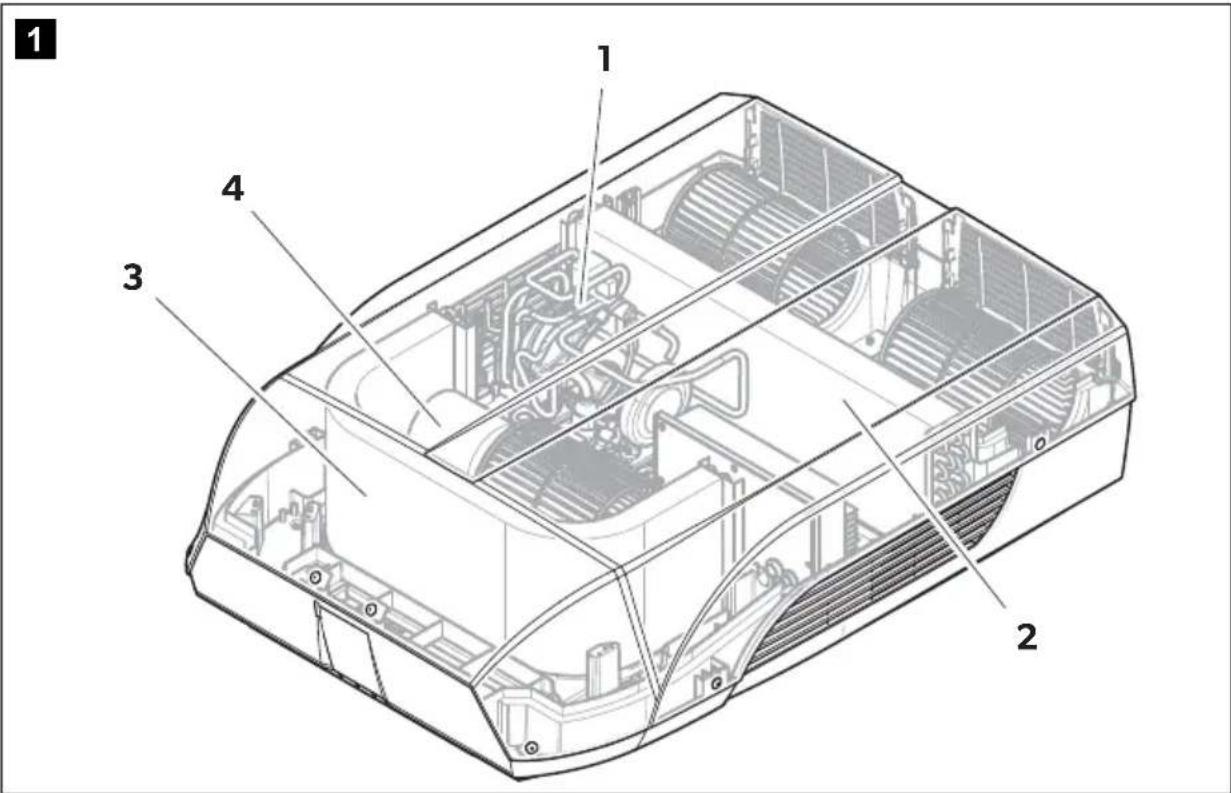
text_image
1 1 2 3 4The refrigerant circuit of the roof air conditioner consists of the following main components:
- Compressor (1)
The compressor draws in the refrigerant used and compresses it. This raises the pressure and therefore the temperature of the refrigerant.
- Condenser (2)
The built-in liquefier works like a cooler or heat exchanger. The air flowing past absorbs the heat and the hot refrigerant gas cools down and becomes liquid.
- Evaporator (3)
The evaporators cool down and dehumidify the air flowing past them. The refrigerant absorbs the heat and vaporises.
- Blower (4)
A blower distributes the cooled air within the vehicle through an air outlet unit.
6.2 Control panel
The control panel is at the air outlet unit of the roof air conditioner.
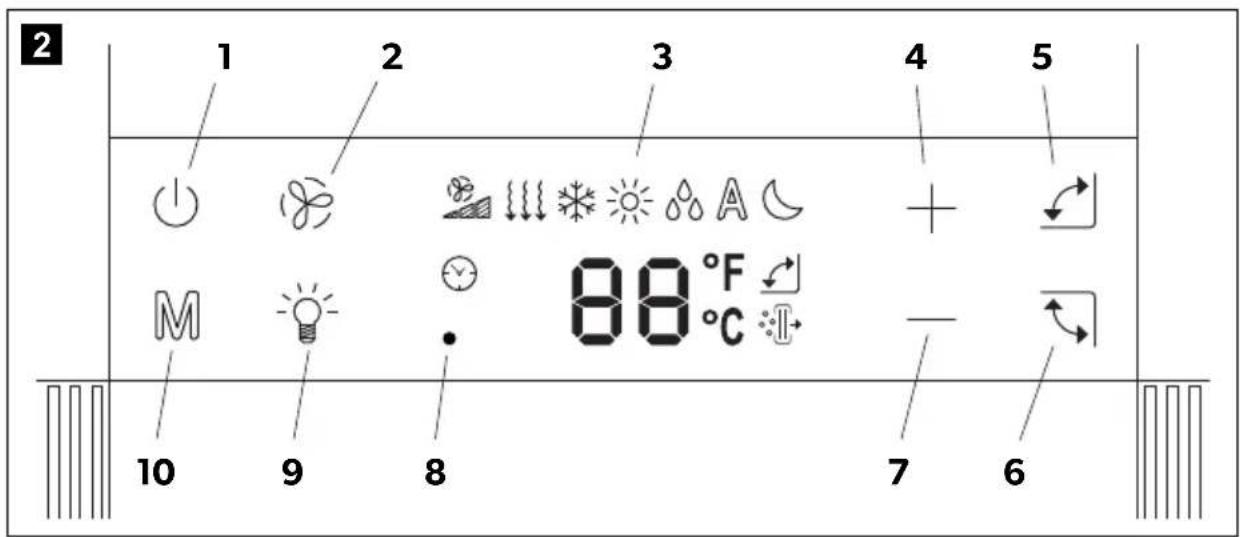
text_image
2 1 2 3 4 5 M 9 8 88 °F 7 6It contains the following control and display elements:
No. Explanation
| 1 | Button | Switches the roof air conditioner on, off or to stand-by mode |
| With status indicator: | ||
| Off: The roof air conditioning is switched off (no mains power). | ||
| Red light: The roof air conditioner is in stand-by mode. | ||
| White light: The roof air conditioning is switched on. | ||
| 2 | Button | Switches the fan level to: LOW, MED, HIGH, AUTO |
| 3 | Display Fan, Mode, Timer, Oscillation, Temperature setting, °C or °F | |
| 4 | Button + | Increases the temperature setting |
| 5 | Button | Switches the front oscillation vent On/Off. |
| 6 | Button | Switches the rear oscillation vent On/Off. |
| 7 | Button - | Reduces the temperature setting |
| 8 | Infrared receiver for the remote control | |
| 9 | Button | Switches the light on or off. |
| 10 | Button M | Switches the mode to: COOL, HEAT, DEHUMIDIFICATION, VENTILLATION, AUTO |
6.3 Remote control
All settings of the device (e. g. temperature settings, timer programming) are transmitted to the roof air conditioner by remote control.
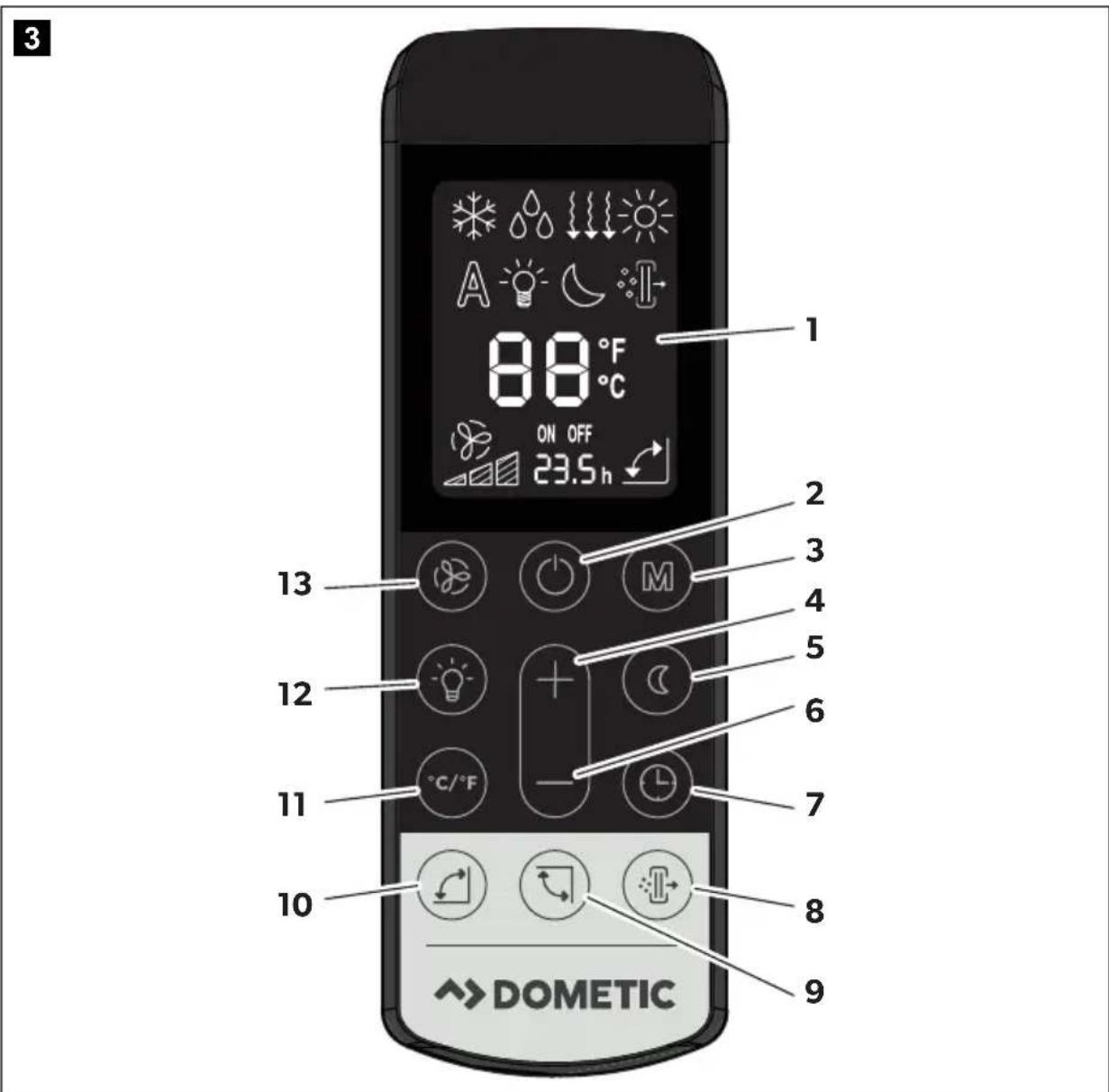
text_image
3 1 88 °F ON OFF 23.5 h 2 2 3 4 5 6 7 8 9 10 DOMETICThe following control and display elements are available on the remote control:
No. Explanation
| 1 Display Displays the following: | ||
| TimerSet temperature (target value) in °C or °FModeFan levelSymbols for active additional functions | ||
| 2 | Button | Switches the roof air conditioner and remote control on or to stand-by mode |
| 3 | Button | M Switches the mode to:COOL, HEAT, DEHUMIDIFICATION, VENTILLATION, AUTO |
| 4 | Button | + Increases the value being set |
| 5 | Button | Activates the sleep function. The sleep function automatically modifies the fan speed to reduce noise. |
| 6 | Button | - Reduces the value being set |
| 7 | Button | Sets the timer function |
| 8 | Button | Turns the air purifier function On/Off. |
| 9 | Button | Switches the rear oscillation vent On/Off. |
| 10 | Button | Switches the front oscillation vent On/Off. |
| 11 | Button °F/°C | If temperature is displayed: switches between temperature units Celsius (°C) and Fahrenheit (°F) |
| 12 | Button | Switches the light of the roof air conditioner on or off. |
| 13 | Button | Switches the fan level to:LOW, MED, HIGH, AUTO |
6.4 Air conditioning modes
The roof air conditioner has the following air conditioning modes:
| Mode | Display message | Explanation |
| Automatic The air conditioner automatically maintains the temperature between 20 °C and 25 °C by heating or cooling as needed. | ||
| Cooling You specify the temperature and blower settings, and the roof air conditioner cools the interior to this temperature. | ||
| Heating You specify the temperature and blower settings, and the roof air conditioner heats the interior to this temperature. | ||
| Ventillation The fan operates to circulate air without heating or cooling. | ||
| Dehumidification Dehumidification removes moisture from the air without heating or cooling the inside. The fan speed is Low. | ||
6.5 Additional functions
The roof air conditioner has the following additional functions:
| Function | Display message | Explanation |
| Timer The roof air conditioner is switched on at the specified time between 0.5 to 24 hours in the future. | ||
| OFF 23.5 H | The roof air conditioner is switched off at the specified time between 0.5 to 24 hours in the future. | |
| Sleep The sleep function reduces the fan speed and the compressor speed to reduce the noise levels for easier sleeping. | ||
7 Before initial use
Inspection before starting up
Before you switch on the roof air conditioner, observe the following:
▶ Check whether the supply voltage and frequency correspond to the values specified in the technical data (page 27).
▶ Ensure both the air intake opening and the air nozzles are free. All ventilation grilles must always be kept free to ensure that the roof air conditioner is able to operate at maximum capacity.
CAUTION! Beware of injury
Do not insert your fingers or objects into the air nozzles or the intake grille.
Check remote control and insert batteries
▶ Insert the provided batteries in the remote control battery compartment (chapter "Replacing the remote control batteries" on page 20).
8 Operating the roof air conditioner
8.1 Basic notes on operation
The roof air conditioner has three operating modes:
Operating mode Features
Off The roof air conditioner is switched off. The remote control is inactive.
Stand-by The roof air conditioner is ready for operation and can be switched on with the remote control. The lights are available.
On The roof air conditioner is conditioning the air in the interior.
You can use the control panel to
- switch the roof air conditioner on or to stand-by mode
- switch the light on and off
• make adjustments to the settings
You can use the remote control to
- switch the roof air conditioner on or to stand-by mode
- switch the light on and off
• make adjustments to the settings - select additional functions
8.2 Using the remote control
The values are directly transmitted to the roof air conditioner when you set them.
The remote control must be pointed at the IR receiver on the control panel during operation.
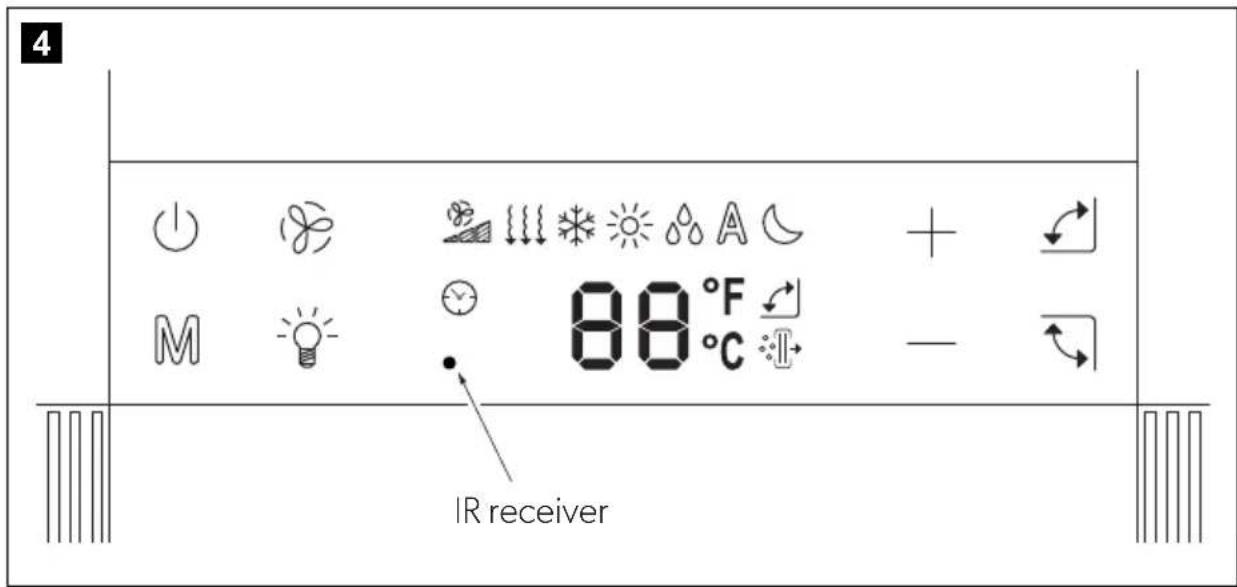
text_image
4 M IR receiver 88 °F C + -When a button is pressed, the value is transmitted directly to the roof air conditioner. The roof air conditioner confirms the receipt of data with a beep.
8.3 Hint for improved use
The following hints will optimise the performance of your roof air conditioner:
- Improve the heat insulation of your vehicle by sealing gaps and hanging reflective blinds or curtains on your windows.
- If the vehicle has been subjected to direct sunlight for a long time and the outside temperature is lower than the inside temperature: Operate the roof air conditioner in the "Ventilation" ( ) mode with the windows open for a while before switching on the "Cooling" ( ) air conditioning mode.
- Avoid opening doors and windows as far as possible in the "Cooling" () * mode.
- Select an appropriate temperature and blower speed or use the Automatic blower fan setting.
- Make sure the air nozzles and intake grille are not covered by cloths, paper or other objects.
8.4 Selecting the air conditioning mode
▶ Select the air conditioning mode of your choice using the M key (chapter "Air conditioning modes" on page 12).
√ The roof air conditioner confirms the receipt of the values with a beep.
√ The roof air conditioner is switched to the selected air conditioning mode.
8.5 Selecting the blower setting manually
The blower controls the strength of the air supply.
| Display message Explanation | |
| [3DHS] | Low blower level |
 | Medium blower level |
 | High blower levelBoost to quickly bring the temperature in the RV to the setting |
 (ng) (ng) | AutomaticBlower level changes automatically based on temperature conditions |
▶ Use the button to select the desired blower level.
√ The roof air conditioner confirms the receipt of the values with a beep.
√The new blower level has been set.
8.6 Setting the temperature
Cooling Mode
In the "Cooling" (and "Dehumidifying" () modes you can specify a temperature between 16^ and 30^ via the remote control.
▶ Use the + or - button to select the desired temperature.
√ The roof air conditioner confirms the receipt of the values with a beep.
√The temperature is set on the roof air conditioner.
Heating Mode
In the "Heating" ()mode you can specify a temperature between 16 °C and 30 °C via the remote control.
▶ Use the + or - button to select the desired temperature.
√ The roof air conditioner confirms the receipt of the values with a beep.
√The temperature is set on the roof air conditioner.
8.7 Adjusting the air nozzles
The air supply within the vehicle can be regulated by setting the air nozzles.
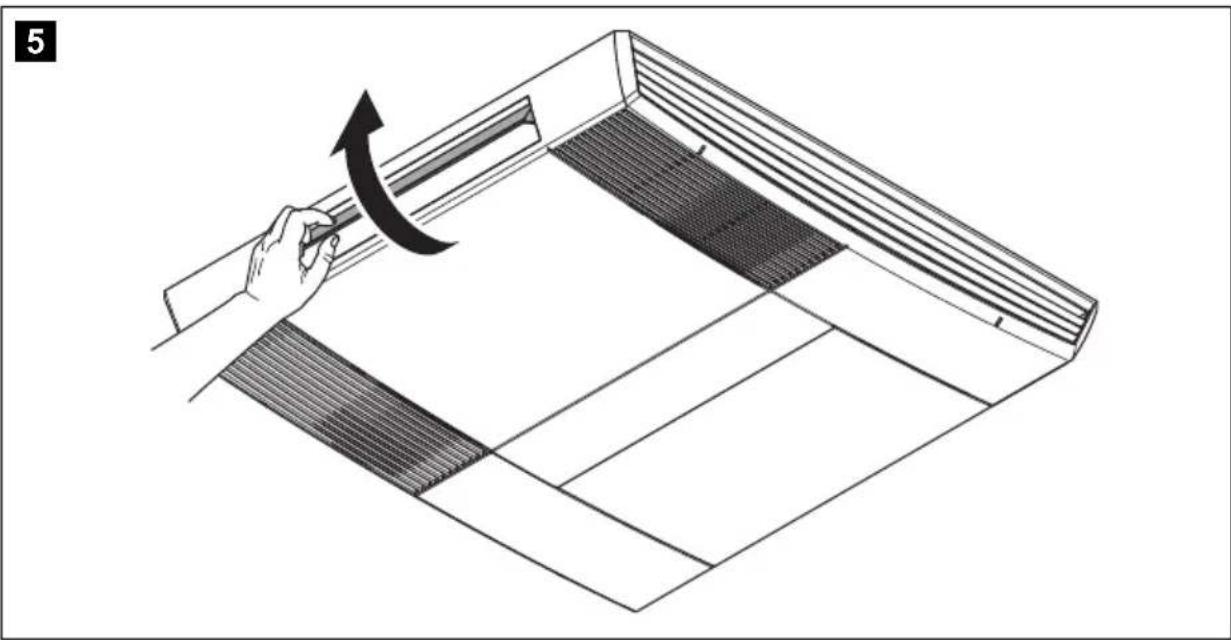
natural_image
Diagram of a hand using a tool to lift or rotate a component into a rectangular frame (no text or symbols)▶ Press the ∪ button and/or the ∪ button to start oscillation of each door.
Pressing again will fix the door at the current angle. When the roof air conditioner is turned off, the doors return to the closed position.
If the doors become misaligned they will return to the default position when the unit is turned off. Also, they can be rotated safely by hand without damaging the motors.
8.8 Setting the timer
The timer function allows you to set a specific time period for air conditioning. You can specify the switch-on time and the switch-off time. The time can be set in 0.5 hour increments.

NOTE
The remote control returns to its initial mode if no button is pressed on the remote control for 15 seconds while programming the timer.
Before programming the timer, select the air conditioning mode and all required values (e.g. temperature).

NOTE
The ON timer can only be set when the unit is turned OFF.
Cancelling the timer settings
If you have set the timer, you can cancel these settings as follows:
▶ Press the TIMER button once.
√The timer symbol disappears.
√The setting has been cancelled.
Setting the on and off times
▶ Press the TIMER button once.
√ The ON symbol (ON 01.5 H) flashes on the display of the remote control.
▶ Use the + or - button to set the time when the roof air conditioner is to switch on.
▶ Press the TIMER button to transmit the value to the roof air conditioner.
√ The OFF symbol (off 23.5 H) flashes on the display of the remote control.
▶ Use the + or - button to set the time when the roof air conditioner is to switch off.
▶ Press the TIMER button to transmit the value to the roof air conditioner.
√The on and off times are set on the roof air conditioner. The roof air conditioner runs in the selected air conditioning mode during the specified time.
8.9 Activating the sleep function

NOTE
The sleep function is only available in "Cooling" (For "Heating" () modes.

When the sleep function is activated, the inside and outside fan speeds are set to low to reduce noise.
▶ Set the required temperature (chapter "Setting the temperature" on page 16) and mode.
▶Press the SLEEP button.
√The symbol appears in the display. The sleep function is activated.
▶ To deactivate the sleep function press the SLEEP button again.

NOTE
The sleep function is deactivated if the M button is pressed.
8.10 Operating the lights
Switching the light on/off with the control panel
▶Briefly press the button to switch the lamps on or off.
Switching the light on/off with the remote control
▶Press the button to switch the lamps on or off.
8.11 Replacing the remote control batteries
Replace the batteries if you notice the range of the remote control reduced.

NOTE
The display of the remote control will still be bright even if the batteries are running low.
The battery compartment is on the back of the remote control.
▶Gently lift the lid of the battery compartment via the clip and remove it.
▶ Insert the new batteries (2 x type AAA) in the remote control as indicated in the battery compartment.
▶Close the cover of the battery compartment.
Protect the environment!
Do not dispose of any batteries with general household waste.
Return defective or used batteries to your retailer or dispose of them at collection points.
9 Cleaning the roof air conditioner
NOTICE! Beware of damage
- Do not clean the roof air conditioner with a high-pressure cleaner. Exposure to water can damage the air conditioner.
- Do not use sharp or hard objects or cleaning agents for cleaning as these may damage the roof air conditioner.
- To clean the roof air conditioner, use water with a gentle cleaning agent. Never use petrol, diesel or solvents.
▶Clean the housing of the roof air conditioner and the air outlet unit occasionally with a damp cloth.
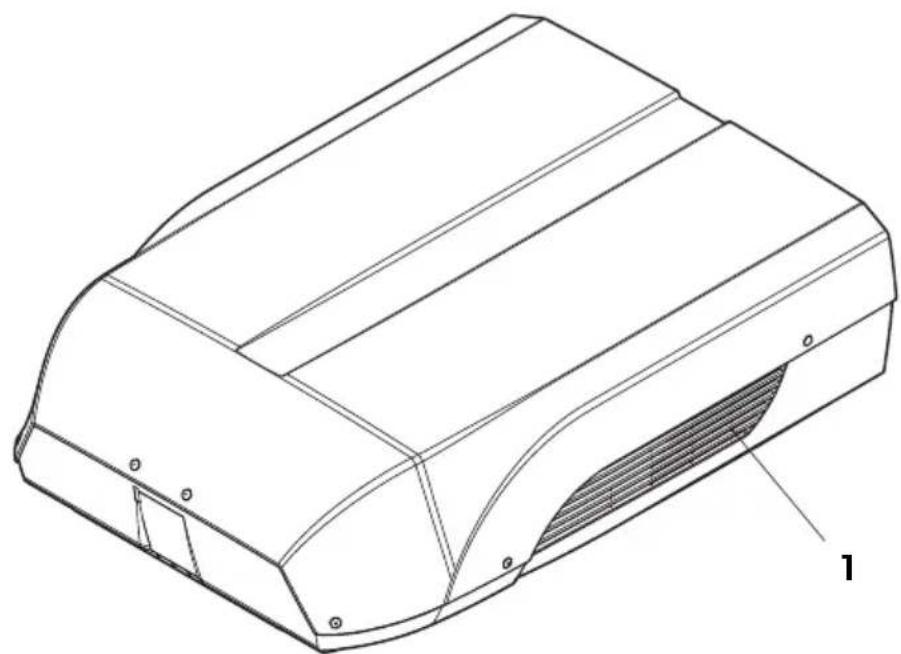
▶ Regularly remove leaves and other dirt from the ventilation grilles (1) of the roof air conditioner. Make sure you do not damage the grilles in the process.
6
natural_image
Technical line drawing of a mechanical component with a shaded internal area and mounting holes (no text or symbols)Clean the remote control with a slightly damp cloth from time to time. We recommend using a cleaning cloth for glasses to clean the display.
10 Maintenance of the roof air conditioner
WARNING!
Any other maintenance work to that which is described here may only be carried out by qualified personnel who are familiar with the risks involved when handling refrigerant and air conditioning systems as well as the relevant regulations.
Interval Inspection/maintenance
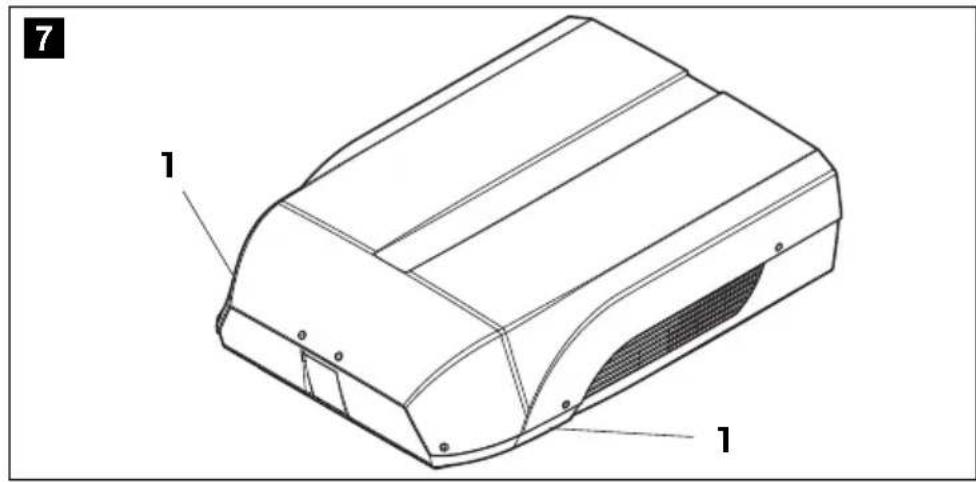
Regularly Check the condensation water drainage:
▶ Check whether the condensation water drainage channels (1) at the sides of the roof air conditioner are clear and the condensation water is able to escape.
text_image
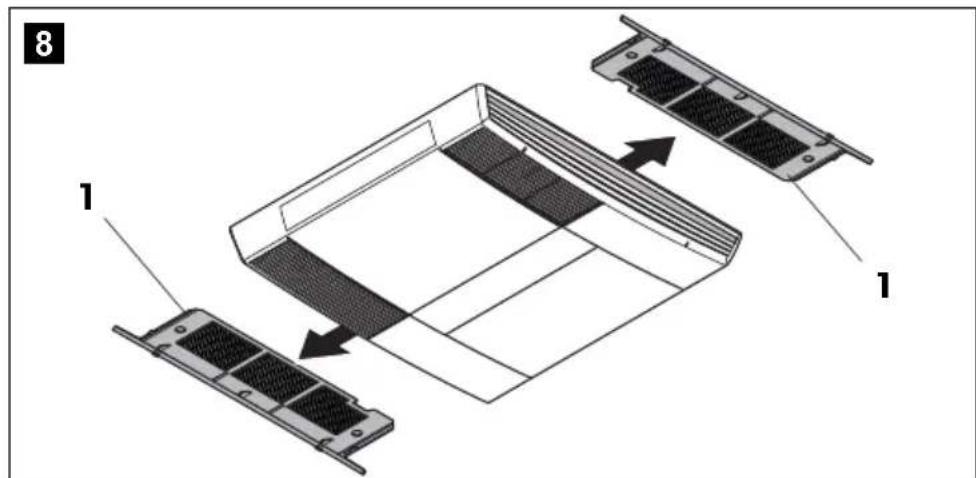
7 1 1Clean the filter of the air discharge unit:
text_image
8 1 1▶Remove the filter (1).
▶ Clean the filter (1) with a detergent solution and let it dry.
▶ Put the dry filter (1) back in.
Interval Inspection/maintenance
Once per year Check the profile seals:
▶ Check the seal between the roof air conditioner and the roof of the vehicle for cracks and other damage.
Have the heat exchanger serviced:
▶ Have the heat exchanger of the roof air conditioner serviced by specialist workshop.
Check the fastening bolt tightness:
▶ Check the fastening bolts are tightened to the correct torque and adjust if necessary.
11 Troubleshooting
Problem Cause Remedy
| Roof air conditioner constantly switches itself off. | Icing sensor has tripped. Outer temperature is too low or all air nozzles are closed. | |
| Not cooling well | The roof air conditioner is not set to cooling. | ▶Set the roof air conditioner to cooling. |
| The ambient temperature is above 52 °C. | The roof air conditioner is only designed for ambient temperatures of up to 52 °C. | |
| The temperature set is higher than the room temperature. | ▶Select a lower temperature. | |
| The ambient temperature is below 16 °C. | The roof air conditioner is only designed for ambient temperatures above 16 °C. | |
| One of the temperature sensors is defective. | ▶Contact an authorised service agent or Dometic. | |
| The evaporator fan is damaged. | ||
| The condenser fan is damaged. | ||
Problem Cause Remedy
| Not heating well The roof air conditioner is not set to heating. | ▶Set the roof air conditioner to heating. |
| The ambient temperature is above -2 °C. The roof air conditioner will only heat at ambient temperatures above -2 °C. | |
| The temperature set is lower than the room temperature. | ▶Select a higher temperature. |
| One of the temperature sensors is defective. | ▶Contact an authorised service agent or Dometic. |
| The evaporator fan is damaged. | |
| The condenser fan is damaged. | |
| Low air output The air intake grilles are blocked or obstructed. | ▶Remove any leaves and other dirt from the ventilation grilles of the roof air conditioner. |
| The blower is defective. ▶Contact an authorised service agent or Dometic. | |
| Water enters the vehicle | The condensation water drainage openings are clogged up. ▶Clean the drainage openings for condensation water. |
| The seals are damaged. ▶Contact an authorised service agent or Dometic. | |
| Roof air conditioner does not switch on. | No supply voltage (240 V~) connected. ▶Check the power supply. |
| The voltage is too low (under 200 V~). The voltage converter is defective. ▶Contact an authorised service agent or Dometic. | |
| One of the temperature sensors is defective. | |
| The electrical fuse of the power supply is too low. ▶Check the electrical fuse of the power supply. | |
| Roof air conditioner does not switch off. | One of the temperature sensors is defective. ▶Contact an authorised service agent or Dometic. |
| The electrical fuse of the power supply is too low. ▶Check the electrical fuse of the power supply. | |
| Remote control does not register | The remote control is not pointing towards the ADB display. ▶Point the remote control towards the ADB display. |
| The batteries in the remote control need replacing. ▶Replace the batteries in the remote control. | |
| Note: The display of the remote control will still be bright even if the batteries are low. | |
12 Warranty
The statutory warranty period applies. If the product is defective, please contact the service partner in your country (addresses on the back on the instruction manual).
Our experts will be happy to help you and will discuss the warranty process with you in more detail.
13 Disposal
Regulations for environmental safety and correct disposal
All organisations must apply a set of procedures to identify, evaluate and control the influence that their activities (manufacturing, products, services, etc.) have on the environment.
The procedures to be followed to identify significant environmental impact must take the following factors into account:
- use of raw materials and natural resources
• atmospheric emissions - discharge of liquids
- waste management and recycling
• contamination of the soil
In order to minimise environmental impact, the manufacturer provides a series of indications here below that should be taken into account by all those who, for whatever reason, interact with the appliance during its working life.
- All packing components must be disposed of (preferably recycled) in compliance with statutory legislation in the country in which disposal takes place.
- All product components must be disposed of (preferably recycled) in compliance with statutory legislation in the country in which disposal takes place.
- For correct disposal, the appliance must be consigned to an authorised waste disposal company to ensure that all recyclable components are reused and the remaining materials are processed properly.
- During installation ensure the room has adequate ventilation to prevent the build-up of stale air that might be harmful to the health of the operators.
- During operation and maintenance ensure that any waste pollutant products (oil, grease, etc.) are disposed of correctly.
- Keep noise levels down to reduce noise pollution.
For more information on correct dismantling of our products please refer to the recycling handbooks at www.dometic.com.
▶ Place the packaging material in the appropriate recycling waste bins wherever possible.
When in operation or undergoing repairs and maintenance work, make sure that the refrigerant circuit is not damaged and refrigerant cannot escape. It acts as a greenhouse gas and should not be allowed into the environment.
Any person who handles or works on equipment containing refrigerant in Australia must have an appropriate refrigerant handling license.
This includes:
- decanting the refrigerant
- manufacturing, installing, commissioning, servicing or maintaining equipment regardless of whether it is charged with refrigerant or not
- decommissioning or disposing of equipment where refrigerant is present
Discharge of refrigerant into the atmosphere is against the law. Severe penalties apply.
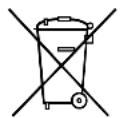
If you wish to finally dispose of the product, ask your local recycling centre or specialist dealer for details about how to do this in accordance with the applicable disposal regulations.
▶ Dispose of the product at an official waste disposal facility in accordance with the applicable recycling or disposal guidelines.
Protect the environment!
Do not dispose of any batteries with general household waste.
Return defective or used batteries to your retailer or dispose of them at collection points.
14 Technical data
| Dometic Harrier Inverter | |
| Model: CK36H401RI2, CK36H401RIY2 | |
| Compressor rated capacity: 3675 W | |
| Cooling capacity based on ISO 5151: 3124 W | |
| Heating capacity based on ISO 5151: 2827 W | |
| Rated input voltage: | 220 - 240 V~ / 50 Hz |
| Power consumption in cooling mode: 6.5 A | |
| Power consumption in heating mode: 6.3 A | |
| Operating temperature range: -2 °C to +52 °C | |
| Refrigerant: R-410A | |
| Refrigerant quantity: 0.780 kg | |
| CO2 equivalent: | 1.629 t |
| Global warming potential (GWP): | 2088 |
| Protection class (outdoor unit): | IPX4 |
| Blower: 3 blower levels | 1 Automatic mode |
| Suggested max. vehicle length (with insulated walls): | ≥7.5 m |
| Dimensions L x W x H (mm): | 1070 x 750 x 280 mm (height above vehicle roof) |
| Weight: | 45 kg |
| Inspection/certification: |    |
dometic.com
YOUR LOCAL DEALER
dometic.com/dealer
YOUR LOCAL SUPPORT
dometic.com/contact
dometic.com/sales-offices
