A61 - Thermometer Uni-T - Free user manual and instructions
Find the device manual for free A61 Uni-T in PDF.


| Product Type | Digital Thermometer |
| Brand | Uni-T |
| Model | A61 |
| Measurement Range | -50 to 300 °C (-58 to 572 °F) |
| Accuracy | ±1% of reading ±1 °C (±2 °F) |
| Resolution | 0.1 °C / 0.1 °F |
| Power Source | 1 x 3V CR2032 battery |
| Dimensions | 148 x 29 x 16 mm |
| Weight | 45 g (with battery) |
| Display | LCD, 3.5 digits |
| Functions | Temperature measurement, °C/°F switch, data hold, auto power off |
| Probe Type | Stainless steel, 3 cm length |
| Cleaning | Wipe with a soft, dry cloth. Do not use solvents. |
| Storage Temperature | -20 to 60 °C |
| Warranty | 1 year |
Frequently Asked Questions - A61 Uni-T
User questions about A61 Uni-T
0 question about this device. Answer the ones you know or ask your own.
Ask a new question about this device
Download the instructions for your Thermometer in PDF format for free! Find your manual A61 - Uni-T and take your electronic device back in hand. On this page are published all the documents necessary for the use of your device. A61 by Uni-T.
USER MANUAL A61 Uni-T
English Manual of A61 Digital Thermometer
1. Introduction
A61 is an IP65 rated thermometer with FDA certified stainless steel probe. It is equipped with a protective shell to prevent accidental skin puncture and burning. With its portable pen-like design, clear backlight display, and auto power off functions, A61 is a great temperature measurement tool for cooking, refrigeration, heating, food processing and other applications.
2. Safety Instructions
Electrical Hazards Alert
- Never measure near live electrical components!
Announcements
- Please use this unit according to proper technical requirements and applications.
- When battery is low, the backlight will turn down or off for energy saving, please replace battery in time to ensure the accuracy.
- Please dispose used batteries into designated spots.
- Avoid exposing to flammable, explosive liquid, gas or dust environment that fire or explosion can catch.
- Do not place together with poisonous and harmful solvent (such as acetone).
- Cover the protective shell on the probe after use.
- Keep probe out of the reach of children.
- Avoid touching the probe tip to prevent injury.
- This unit is not designed for medical diagnosis, do not put the probe into any organs such as mouth, ear or nostril.
3. Description
1) Structural Description
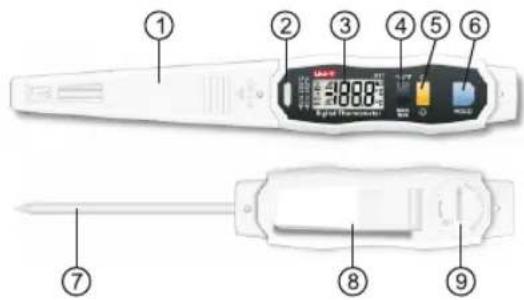
text_image
Diagram of a medical device with numbered parts for identification and assembly reference.| 1 | Probe shell | 6 | HOLD button |
| 2 | LED alarm light | 7 | Temperature probe |
| 3 | LCD screen | 8 | Back clip |
| 4 | °C/°F_MAX/MIN button | 9 | Cell cover |
| 5 | Power_backlight button |
2) Display Description

text_image
1 2 3 4 5 MAX MIN 6 HI -18.0 7 8 9 °C 10 °F 11| 1 | Auto power-off icon | 7 | Low temperature alarm |
| 2 | Temperature hold icon | 8 | Temperature data |
| 3 | Temperature alarm icon | 9 | Low battery icon |
| 4 | Maximum temperature | 10 | Centigrade unit °C |
| 5 | Minimum temperature | 11 | Fahrenheit unit °F |
| 6 | High temperature alarm |
4. Product Features
- Backlit LCD screen offers an easy viewing experience in dark conditions
• Maximum/minimum/real-time data measurement - Data hold function allows to lock the temp reading Portable pen-like design with easy operation
• LED alarm function for quick notice
• Equipped with food grade SUS304 stainless steel probe which has FDA and GRAS certifications -
IP65 rated water and dust proof allows direct water cleaning available
• Durable with 1m drop proof -
Specifications
| Functions | Specifications |
| Measurement range | -40°C~250°C(-40°F~482°F) |
| Accuracy | ±2°C(-40°C≤T<-20°C) |
| ±1°C(-20°C≤T≤100°C) | |
| ±2°C(100°C< T≤250°C) | |
| ±4°F(-40°F≤T<-4°F) | |
| ±2°F(-4°F≤T≤212°F) | |
| ±4°F(212°F | |
| Minimum measuring depth | 12mm |
| Sensor | NTC |
| Stabilization time | 20S |
| Display resolution | 0.1°C(0.1°F) |
| Battery type | 1*3V button cell (CR1632) |
| Battery duration | 12 hours |
| Product size | 190*29.5*15.5mm |
| Net weight | 50.8g |
| Operating temperature | 0°C~40°C(32°F~104°F) |
| Storage temperature | -20°C~60°C(-4°F~140°F) |
| Operating humidity | < Rh80% (No condensable) |
| Protective level | Ip65 rated according to IEC60529 |
| Drop test | 1m |
| Certification | CE |
| Reference standard | JJG226-2001 |
6. Operation Guide
1) Battery Installation
As suggested direction, unscrew the cell cover by coin or other tools, put the cell inside the cover, place the cover back as arrow shows, then clockwise re-tighten it.
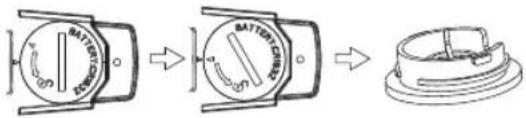
text_image
Diagram showing three stages of battery charging mechanism: initial, intermediate, and final state.How to take the cell cover out

text_image
Diagram showing a battery terminal with circuit breakers and labeled components, illustrating the process from initial state to final state.How to place the cell cover back
2) Measurement Procedures
① Press Power_backlight button to turn the unit on
② Insert probe into test object while inserting depth should be over 12mm
③ Take readings after it is stabilized
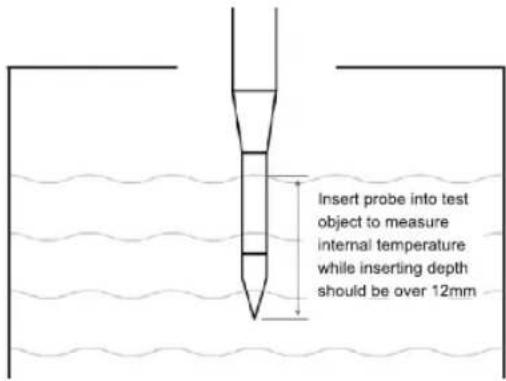
text_image
Insert probe into test object to measure internal temperature while inserting depth should be over 12mm3) Buttons Operations Guide
Power\_backlight button
Short press to turn on/off the backlight, long press to turn on/off unit;
°C/°F_MAX MIN button
Short press to switch MAX/MIN/normal measuring data, long press to switch ^ C/F units;
HOLD button
Short press to hold or release data, long press to adjust high/low temperature alarm settings;
4) Auto Power-off (APO) Setup Guide
The auto power off is default on. If this function is on, the instrument will power off automatically if there's no action within 10 minutes, otherwise, it will keep working till the battery ran out.
Setup Guide:
With the units off, hold the °C/°F_MAX MIN button, then long press Power_backlight button till full screen display is shown, release buttons to access auto power off function setup (will display —°C), short press °C/°F_MAX MIN button can turn this function on/off, APO icon will be displayed if it is on. Short press power_backlight button to return to normal test mode and the unit will save the selected setting.
5) High/low temperature Alarm Setup Guide
The high/low temperature alarm is default on.
Setup guide:
Long press HOLD button to switch between high/low temperature alarm limit setup and normal measurement. The high temperature alarm limit is 100°C by default (maximum 250°C) while the low temperature alarm limit is 0°C by default (minimum -40°C).
In temperature alarm limit setup interfaces:
① short press °C/°F_MAX MIN button to plus 1; short press power_backlight button to minus 1;
② long press°C/°F_MAX MIN button to rapid increase; long press power_backlight button to rapid reduce;
③ short press HOLD button to turn/off the alarm function, bell icon showing means the alarm function is on.
7. Maintenance
1) Cleaning
Use soft cloth to clean the surface of thermometer with soapy water. IP65 waterproof rated meaning it can be washed under running water, but do not submerse the unit in water.
2) Sterilization
Sterilizing the unit by wiping it with damp cloth of medical alcohol immersion, and the probe can be submersed into medical alcohol directly.
UNI-T.
UNI-TREND TECHNOLOGY (CHINA) CO., LTD.
No. 6, Gong Ye Bei 1st Road,
Songshan Lake National High-Tech Industrial
Development Zone, Dongguan City,
Guangdong Province, China
Tel: (86-769) 8572 3888
www.uni-trend.com