
UT308H - Thermometer Uni-T - Free user manual and instructions
Find the device manual for free UT308H Uni-T in PDF.


| Product Type | Non-contact Infrared Thermometer |
| Brand | Uni-T |
| Model | UT308H |
| Measurement Mode | Body and surface temperature |
| Temperature Range (Body) | 32.0°C ~ 45.0°C (89.6°F ~ 113.0°F) |
| Temperature Range (Surface) | 45.2°C ~ 47.3°C (113.4°F ~ 117.1°F) and up to 49.0°C (120.2°F) for objects |
| Display | LCD with backlight (Lamp indicator) |
| Memory Capacity | Up to 32 measurement groups |
| Power Source | 2 x AAA alkaline batteries (1.5V each, 3V DC total) |
| Auto Power Off | Yes, after about 15 seconds of inactivity |
| Buzzer | Yes, for fever alarm and button confirmation |
| Fever Alert | Red backlight and buzzer when temperature ≥ 37.2°C (99.0°F) |
| Measurement Units | °C or °F selectable |
| Data Review | Yes, using ▲ and ▼ buttons to scroll stored data |
| Mode Setting | Yes, via SET button to switch between body/object modes |
| Buzzer Setting | Can be turned on/off via SET and ▲/▼ buttons |
| History Data View | Review last 32 measurements by pressing ▲ or ▼ |
| Operating Environment | 15°C to 25°C (59°F to 77°F) |
| Warranty | 1 year limited warranty against material and workmanship defects |
| Maintenance | Clean lens with soft, dry cloth; avoid liquids |
| Safety Precautions | Read manual before use; keep battery away from children; do not use in explosive environments |
| Battery Replacement | User replaceable; remove if not used for extended period to avoid leakage |
Frequently Asked Questions - UT308H Uni-T
User questions about UT308H Uni-T
0 question about this device. Answer the ones you know or ask your own.
Ask a new question about this device
Download the instructions for your Thermometer in PDF format for free! Find your manual UT308H - Uni-T and take your electronic device back in hand. On this page are published all the documents necessary for the use of your device. UT308H by Uni-T.
USER MANUAL UT308H Uni-T
Thank you for purchasing the new internal thermometer. In order to use this product safety and correctly please read this manual thoroughly, especially the Safety/Instructions part. After reading this manual, it is recommended to keep the manual at an easily accessible place, preferably close to the device. In future reference.
LIMITED WARRANTY AND LIABILITY
One-Trend of guarantees that the product is free from any defect in material and ownership within one year from the purchase date. This warranty does not apply to damages caused by accident negligence, misuse, modification, contamination or improper handling. The dealer shall not be entitled to give any other warranty on behalf of Unit-T next. If you need warranty service within the warranty period, please contact your seller directly.
12/16-Trend with a set of recombinable factors are associated, indeed, incidental or multi-acquired damage or loss caused by using B-Is devices
OVERVIEW
U/T 009/UT300H Non-contact Infrared Thermometer (thermometer referred to as "thermometer"). This product measures temperature by collecting the infrared thermal radiation energy emitted by target surface.
U 1301@HJ/T 2081 has advantages of simple and secondary operations, quick and accurate measurement. The current pressure temperature (rises only at 50°C) is using the Diabster for transport costs of
It is not allowed to be used in the presence of a mixture of formable extractant gas, air oxygen or nitrate oxide. UT3001/UT30H in a carbon nanoperating device
The product is composed of either series circuit components, operating transformers and plastic shell.
SAFETY INSTRUCTION
Warning
To use the product property, please read the following instructions carefully before use:
- To ensure safety and accuracy of measurement, only qualified maintenance personnel can replace with original components.
- Resting the history of
- Prior to using the Boerwater, please often be the law. If any damage is the Boerwater were
Notes: please call mail to email, intercept for damage or any advantage of parts.
- This is recommended to identify the thermometer within the environment of 1.5°C–25°C and 0.91–60%.
- Please use the thermomolar probe and clinical sequence B to strong surveillance on these electromagnetics. Interference
Please ensure the temperature around the measuring object is stable, do not heat during strong
a
- Avoid heating in undersize temperature and temperature; - Wait - Wait to access the More cardiovascular for death. - Wait - 70-30 min to commute at E.The emergency absent, come from very high or very low temperature.
Please wait 10 min to measure fine objects after measuring very high or very low temperature
- It is recommended to measure twice for every object and the highest outstanding data should be used. - Please accurately aim the server window at the meeting a basket. Others are write on MUC
indicator sell across
- Please keep the battery out of the reach of children, children may easily equit. Contact with
- If the thermocenter will not return for long period, please take further battery to avoid leakage.
The laboratory in root milk and for the plume of you.
SYMBOLS
| Warning or Caulink | Direct current | Read the manual before use | |||
| Dispose the device and accessories properly according to local waste management policy. | |||||
SPECIFICATION
| Temperature range | 32.0°C~45.0°C(38.6°F~51.3°F) |
| 45.2°C~47.3°C~49.0°C(38.9-51.0°F) |
EXTERNAL STRUCTURE
| 1 | Inductor |
| 2 | UL/D display |
| 3 | Capture |
| 4 | Battery cover |
| 5 | Sitting hole |
| 6 | Lamp |
| 7 | Striker |
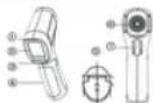
LCD FUNCTION DESCRIPTION
| Object of measurement mode | |
| ○ | Body mass measurement mode |
| ● | Buffer |
| ●● | Battery status |
| ●● | Unit of temperature |
| ●●● | Measured temperature value |
| ●●● | Storage serial number |
| ●●● | Auxiliary display of served data |

WORKING PRINCIPLE
Infrared thermometer can measure surface temperature of opaque crystals, its optical denoconveres the infrared energy concentrated on the detector, and the electronic components convert information into temperature reading which is displayed on the display screen.
OPERATING METHODS
Power On
With thermo motor off, short pressure the trigger hit power on, and the last measurement data before which well be displayed after next projection.
Power Off
The information will automatically about lines and ways the measured value and current total number of
Temperature Measurement
-
Avoid the thermometer at the measured target, press and hold the trigger the measured temperature area will be closed. This release the trigger, the measured data will be updated and the average serial number plus 1. A maximum of 32 data groups can be stored, and if it is overfed, the previously stored data will be overnight starting with group II S.
-
When the measure of temperature increases 37.2°C, the price indicator will be light runst.
- LO displays when the target temperature is lower than the range. 19 days when the target
Incorporations to monitoring free range, 0.036 indicator will include Kyltransfer surveillance study on LOPR in
Review Saved Temperature
In the main interface, short pulse on ▲ or ▼ to review the stored temperature data in auxiliary display area.
Mode Setting
In the main interface, short press the SET button to write mode setting and short press ▲ or ▼ to use daily before press (which is required) requirements.
Unit Rating
In the main interface, a left press the SET teacher twice to enter and asking, about pressure ▲ or ▼ to
and both three until have been "C or "
Buzzer Setting
In the main interface, short grass the 100 T cushion defines to enter cushion setting interfaces, and short protection ▲ or ▼ for web fast gateway set up off
History Data Viewing
(2)3081-will record measurement data automatically after each temperature measurement/Maximum
312 groups (517,800+1.20 groups) of data can be recorded, please follow the steps before to view from History data.
to the main interface, short press ▲ or ▼ to view all the history date from top to bottom starting from the last day on account
MAINTENANCE
The thermometer is a repeated you-set accurate device. Please pay attention to clean and
Brand : Uni-T
Model : UT308H
Category : Thermometer