
UT30H - Thermometer Uni-T - Free user manual and instructions
Find the device manual for free UT30H Uni-T in PDF.


| Product Type | Digital Thermometer |
| Brand | Uni-T |
| Model | UT30H |
| Display | LCD, 3 1/2 digits |
| Temperature Range | -50°C to 300°C (-58°F to 572°F) |
| Resolution | 0.1°C / 0.1°F |
| Accuracy | ±1°C (0°C to 100°C); ±2°C elsewhere |
| Sensor Type | K-type thermocouple |
| Power Supply | 9V battery (6F22) |
| Dimensions | 70 x 130 x 35 mm |
| Weight | 200 g (including battery) |
| Auto Power Off | Yes, after 15 minutes |
| Data Hold | Yes |
| Overload Protection | Yes |
| Low Battery Indication | Yes |
| Operating Temperature | 0°C to 40°C (32°F to 104°F) |
| Storage Temperature | -10°C to 50°C (14°F to 122°F) |
| Humidity | <80% RH |
| Safety Standards | EN 61010-1 |
| Accessories Included | K-type thermocouple probe, 9V battery, user manual |
| Maintenance | Clean with a soft dry cloth; do not use solvents |
| Repair | Contact authorized service center for repairs |
Frequently Asked Questions - UT30H Uni-T
User questions about UT30H Uni-T
0 question about this device. Answer the ones you know or ask your own.
Ask a new question about this device
Download the instructions for your Thermometer in PDF format for free! Find your manual UT30H - Uni-T and take your electronic device back in hand. On this page are published all the documents necessary for the use of your device. UT30H by Uni-T.
USER MANUAL UT30H Uni-T
Thank you for purchasing the new infrared thermometer. In order to use this product safely and correctly, please read this manual thoroughly, especially the Safety Instructions part. After reading this manual, it is recommended to keep the manual at an easily accessible place, preferably close to the device, for future reference.
LIMITED WARRANTY AND LIABILITY
Uni-Trend guarantees that the product is free from any defect in material and workmanship within one year from the purchase date. This warranty does not apply to damages caused by accident, negligence, misuse, modification, contamination or improper handling. The dealer shall not be entitled to give any other warranty on behalf of Uni-Trend. If you need warranty service within the warranty period, please contact your seller directly.
Uni-Trend will not be responsible for any special, indirect, incidental or subsequent damage or loss caused by using this device.
OVERVIEW
UT30H Non-contact Infrared Thermometer (hereinafter referred to as "thermometer"). This product measures temperature by collecting the infrared thermal radiation energy emitted by target surface. UT30H has advantages of simple and sanitary operation, quick and accurate measurement. It can measure temperature precisely within 1s by aiming the detector at target object. It is not allowed to be used in the presence of a mixture of flammable anesthetic gas, air, oxygen or nitrous oxide. UT30H is a continuous operating device.
This product is composed of infrared sensor, circuit components, operating buttons and plastic shell.
SAFETY INSTRUCTION
Warning:
To use the product properly, please read the following instructions carefully before use:
- To ensure safety and accuracy of measurement, only qualified maintenance personnel can repair it with original components.
- Replace the battery immediately once the battery indicator appears.
- Prior to using the thermometer, please check the box. If any damage to the thermometer were found, please do not use it. Inspect for damage or any shortage of parts.
- Do not place the thermometer near the objects with high temperature for long period.
- It is recommended to operate the thermometer within the environment of 15°C\~35°C and RH<85%.
- Please use the thermometer indoor and do not expose it to strong sunlight or intense electromagnetic interference.
- Please ensure the temperature around the measuring object is stable, do not test during strong airflow.
- Avoid testing in unstable temperature environment - wait 30min to allow the thermometer to stable.
- Wait 10\~30min to measure if the measuring object came from very high or very low temperature.
- Please wait 10min to measure new objects after measuring very high or very low temperature.
- It is recommended to measure thrice for every object and the highest occurring data should be used.
- Please accurately aim the sensor window at the measuring target. Otherwise error or HI/LO indicator will appear.
- Please keep the battery out of the reach of children, children may accidentally ingest. Contact with doctor immediately if that happens.
- If the thermometer will not in use for long period, please take out the battery to avoid leakage. The battery is not allowed to be placed in fire.
SYMBOLS
| Warning or Caution | Direct current | Read the manual before use | |||
| Dispose the device and accessories properly according to local waste management policy | |||||
SPECIFICATION
| Measurement Range(Object) | 0°C 100 32.0 212~°C (°F~°F) |
| Accuracy (Object) | 1.0°C (2.0°F) |
| Measurement Range(Body) | 32.0°C-45.0°C (89.6°F-113.0°F) |
| Accuracy (Body) | 35.0°C~42.0°C: 0.2°C (0.4°F)32.0°C~34.9°C, 42.1°C~45.0°C: 0.3°C (0.5°F) |
| Resolution | 0.1°C |
| Optimum measuring distance | 1-5cm |
| Unit conversion (°C/°F) | Support |
| Measurement alarm | Sound alarm for >37.2°C |
| Power-on Self-test | Support |
| Auto shutdown | Support |
| Backlight | Support |
| Battery type | 1.5V x 2 AAA |
| Operating environment | 15°C~35°C (59°F~95°F), <85%RH |
| Transport and storage environment | -20°C~60°C (-4°F~140°F), <93%RH |
| Operating atmosphere | 700hPa-1060hPa |
EXTERNAL STRUCTURE
| 1 | Infrared Sensor |
| 2 | Trigger |
| 3 | LCD |
| 4 | SET Button |
| 5 | MODE Button |
| 6 | SEL Button |
| 7 | Battery cover |
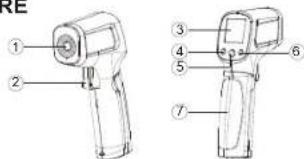
FEATURES
- White backlight
- Low voltage indication
• Option of Celsius/Fahrenheit - Display screen
- Dynamic monitoring of battery capacity
- Sound alarm for the upper and lower temperature limit
LCD FUNCTION DESCRIPTION
| Object measurement mode | ||
| Body measurement mode | ||
| Buzzer | ||
| Battery status | ||
| CF | Unit of temperature | |
| 1888 | Measured temperature value |
WORKING PRINCIPLE
Infrared thermometer can measure surface temperature of opaque objects. Its optical device can sense the infrared energy concentrated on the detector, and the electronic components convert information into temperature reading which is displayed on the display screen.
OPERATING METHODS
To measure temperature, allow the thermometer aim at the measured target, push the trigger to display the real time measured result; and loose the trigger to hold it. Thermometer will automatically shut down if no action were detected out within 15s.
SETTING OPERATION
Power On
With thermometer off, short press the trigger to power on, and the last measurement data before shut down will be displayed after self-inspection.
Power Off
Thermometer will automatically shut down and save the measured value and current serial number if no action was detected out within 15s.
Temperature Measurement
- Aim the thermometer at the measured target, press and hold the trigger, the measured temperature area will be cleared. Then release the trigger, the measured data will be updated.
- When the measured temperature exceeds 37.2°C, the buzzer will beep.
- LO displays when the target temperature is lower than the range; HI displays when the target temperature is exceeding the range. The buzzer will beep when the target temperature is out of the range
Mode Setting
In the main interface, short press the MODE button to switch between body/object temperature measurement mode.
Unit Setting
In the main interface, short press the SET button twice to enter unit setting, short press SEL button to switch the unit between °C or °F.
Buzzer Setting
In the main interface, short press the SET button thrice to enter buzzer setting interface, and short press SEL button to switch buzzer on or off.
MAINTENANCE
The thermometer is a repeatedly-used accurate device. Please pay attention to clean and maintenance. Especially keep the lens clean, or the accuracy may be affected.
Clean:
- Clean chassis: Clean the chassis with cotton sponge or soft cloth with medicinal alcohol or clean water.
- Clean lens: Blow away the slipped off grains with clean compressed air. Wipe the surface carefully with wet cotton swab. Cotton swab should be moistened with medicinal alcohol or clean water.
BATTERY REPLACEMENT
⚠️ If the thermometer will not in use for long period, please take out the batteries to avoid leakage. Please dispose the waste batteries properly.
Open the battery cover to take out the batteries. Load 2 newAAA batteries correctly and close the battery cover
FAULT DIAGNOSIS
| Symptom | Problem | Action |
| HI (on the screen) | Target temperature exceeding range | Select the target within range |
| LO (on the screen) | Target temperature lower than range | Select the target within range |
| Battery icon flashes | Battery low | Replace battery |
| Possible blank screen | Battery drained | Check and/or replace battery |
ACCESSORIES
Battery 2
Manual 1
Device 1
UNI-T.
UNI-TREND TECHNOLOGY (CHINA) CO., LTD.
No.6, Gong Ye Bei 1st Road,
Songshan Lake National High-Tech Industrial
Development Zone, Dongguan City,
Guangdong Province, China
Made in China


Brand : Uni-T
Model : UT30H
Category : Thermometer