KEW 5204 - Luxmètre Kyoritsu - Free user manual and instructions
Find the device manual for free KEW 5204 Kyoritsu in PDF.


| Product Type | Luxmeter |
| Brand | Kyoritsu |
| Model | KEW 5204 |
| Measurement Range | 0.01 to 200,000 lux |
| Accuracy | ±3% ±10 digits |
| Resolution | 0.01 lux (low range) |
| Display | Digital LCD, 4000 counts |
| Sensor | Silicon photodiode with spectral filter |
| Operating Temperature | -10°C to 50°C |
| Storage Temperature | -10°C to 60°C |
| Power Supply | 2 x AAA batteries (1.5V) |
| Battery Life | Approx. 200 hours |
| Dimensions | 150 x 70 x 30 mm |
| Weight | Approx. 200 g (with batteries) |
| Auto Power Off | After 10 minutes of inactivity |
| Functions | Data hold, peak hold, relative measurement, auto-range |
| Accessories | Carrying case, batteries, instruction manual |
| Maintenance | Clean sensor with soft cloth; store in dry place |
| Safety | Overrange indication with "OL" display |
| Spare Parts & Repairability | No user-serviceable parts; contact Kyoritsu service center |
| General Information | Compact, handheld design; ideal for indoor/outdoor light measurement |
Frequently Asked Questions - KEW 5204 Kyoritsu
User questions about KEW 5204 Kyoritsu
0 question about this device. Answer the ones you know or ask your own.
Ask a new question about this device
Download the instructions for your Luxmètre in PDF format for free! Find your manual KEW 5204 - Kyoritsu and take your electronic device back in hand. On this page are published all the documents necessary for the use of your device. KEW 5204 by Kyoritsu.
USER MANUAL KEW 5204 Kyoritsu
DIGITAL LIGHT METER
LIGHT METER SERIES
KEW 5204

Kyoritsu reserves the rights to change specifications or designs described in this manual without notice and without obligations.

Factory: Ehime, Japan
www.kew-ltd.co.jp
05-8
922349
1. SAFETY WARNINGS
This instruction manual contains warning and safety rules which must be observed by the user to ensure safe operation of the instrument and to retain it in safe condition.
WARNING
●Head through and understand instructions contained in the manual before starting using the inclustment.
● Sava and keep the manual hardy to enable quick reference whenever necessary.
The symbol indicated on the instrument means that the user must refer to related parts of the manual for safe operation of the instrument. Be sure to carefully read the instructions following each symbol in this manual.
△ DANGER : is reserved for conditions and actions that are likely to
△WARNING: is reserved for conditions and actions that can cause
serious or fatal injury. △ CAUTION : is reserved for conditions and actions that can cause
minor injury or instrument damage
WARNING
- Do not install substitute parts or make any modification to the instrument. Return the instrument to Kyorilso or your distributor for repair or re-calibration.
△ CAUTION
●Do not expose the instrument to the direct sun, extreme temperatures or dew fall
This instrument isn't dust. & water proved. Keep away from dust and water.
- Be sure to set the Function Selector Switch to the OFF position after use. When the instrument will not be used for a long period of time, once it is stored after removing the batteries.
- Use a damp cloth and detergent for cleaning the instrument. Do not use a bagasse or chelode.
●The instrument should be calibrated once a year or so far the accurate measurement
This symbol is marked where the user must re-instruction manual so as not to cause personal injury or instrument damage.
The instrument satisfies the marking requirement defined in the WEEE Directive. This symbol indicates separate electrical and electronic equipment.
5. Measurement
5-1 Zern adius
Please perform zero adjustment before measurement.
Press O ADJ button with the Lens Protecting Cover attached to the Light Sensing Probe.
"CAP- will auto-spare on the LCD display. After 'CAL-' appears, the motor enters the automatic zero adjustment. When automatic zero adjustment is completed, 'CAL-' disappears and '0.0' appears. After confirming the '0.0' display, remove the cap to start measuring.
If LRT appears, check the cap to make sure it is on property. After the measurement has been completed, press the power button again to turn off the power, and cover the light-detecting surface with the cap for protecting against stray light.
5-2 Measurement
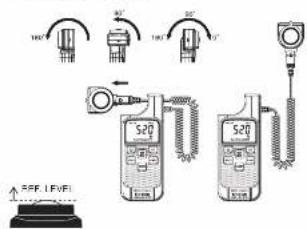
Place the light sensing probe parallel to the measuring object and measure it. At this time, please be careful that your own shadow does not hit the sensing probe.
The light sensing probe can be fixed on the motor parallel or perpendicular to the LCD Display. Or it may be detached from the unit to 1st the measuring requirement.
2. Features
●Wide Ranga 11.1—199900 Lr
●MAXMIN function
●Automatic Zero Adjust function
●Large LCD Display With Backlight
3. Name of Parts and Position/Operation
1Lans Protecting Cover
This is used to protect the
procell from scratching and
create complete dark environment for the motor is
peripm dark current
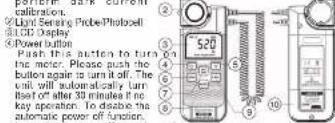
calibration
© Light Sensing Probe/Photography
LED Display
④Power button
Push this action to turn
the meter. Please push the ④
button again to turn it off. The
Unit will automatically turn
nset of after 30 minutes if he key equation. To close the
Key specimens. To disable the automatic power off junction
turn the metal oil push
keep holding button, then push ages
(5) Backlight buffer
Push this button to turn on and off the LCD backlight. The backlight will
be automatically off after 30 seconds to save battery power.
CHOLDBillar
The user may hold the present and keep it on the LCD display
preszing the button.
7 Max/Min button
First this bill is to set the smaller working plan MAX/IN block. By 8, pushing this button, the user may run the CD reading amore current.
planning this button, the later may swap the USB reading during current maximum and minimum reading. Bush and paid this key for 3 seconds
to exit MAXMIN mode.
0.0 Range selector button
The user may use this button to select the preferred measuring or
automatically selected by the meter. The available ranges are: AUTO
- 2000, 201001, 2010011 |x
© O ADJ button (Please refer to Measurement)
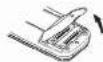
Battery cabinet cover
When batteries capacity segment is less
than one, the user should replace the
battery. The battery cabinet can be
opened with a screw driver and
type batteries should be installed.
- Specifications
| MODEL: KFW 6204 | |
| Light detector Silcois photo slice | |
| Measureing Range 0.0~195,980 k | |
| Range 195,971,989/19,990/193,900 lx | |
| Resolution 0.1 lx | |
| Accuracy | =4%kg±5mp (231°±21°) |
| 10° ±15% | |
| Angle deviation from cosine characteristics | 30° ±3% |
| 60° ±18% | |
| 80° ±30% | |
| Temperature characteristics | 15°C (20°C reference and a range of 5 to 40%) |
| Relative spectral sensitivity characteristics | Deviation from spectral luminous efficiency;9% or less |
| Respirer time | Auto range/5x or less Manual range 2% or less |
| Auto power off 30 min. | |
| Dimensions | 160Kx165Wx370D/mm |
| Weight | 210g approx.. |
| Power source R6(Au1.5V)x | |
| Operation Temperature/ Humidity | 0°C~40°C,80%RH or less (without compensation) |
| Storage Temperature/ Humidity | -10C~60C,70%RH or less (without compensation) |
| Continuous measuring time | Approx. 85 hours |
| Application Starcices | JIS C 180B 1200BIEC1326 |
| Accessories | Carrying case Inclusion Manual R6(MU1.5V)x2 |
ADEQUATE LIGHT LEVELS FOR YOUR WORKING OR AT YOUR WORK AREAS.
4.财务记录
| LUXES [H] | 3,000 | 2,000 | 1,500 | 1,000 | 750 | 500 | 300 | 200 | 150 | 100 | 75 | 50 | 30 | 20 | 15 | 10 | 7 |
| OFFICE | —— | SPOWAL (SALAD)POTATO ON | SPOWAL (SALAD)POTATO ON | —— | SPOWAL (SALAD)POTATO ON | ||||||||||||
| CAUDIANCECHINA (SALAD)POTATO ON | CUCUMBER (SALAD)POTATO ON | POTATO & POTATO | |||||||||||||||
| FACTORY | SALAD (SALAD) | SALAD (SALAD) | SALAD (SALAD) | —— | SALAD (SALAD) | ||||||||||||
| SCHOOL | SALAD (SALAD) | SALAD (SALAD) | —— | SALAD (SALAD) | |||||||||||||
| SALAD (SALAD) | SALAD (SALAD) | —— | —— | ||||||||||||||
| HOSPITAL | SALAD (SALAD)POTATO ON | SALAD (SALAD)POTATO ON | SALAD (SALAD)POTATO ON | —— | —— | ||||||||||||
| SALAD (SALAD)POTATO ON | SALAD (SALAD)POTATO ON | —— | —— | ||||||||||||||
| STORE | —— | —— | SALAD (SALAD)POTATO ON | SALAD (SALAD)POTATO ON | —— | —— | |||||||||||
| RESTAURANT | —— | SALAD (SALAD)POTATO ON | SALAD (SALAD)POTATO ON | —— | —— | ||||||||||||
| THEATIECONCERT WALL | —— | SALAD (SALAD)POTATO ON | SALAD (SALAD)POTATO ON | —— | —— | ||||||||||||
| INN. HOTEL | —— | SALAD (SALAD)POTATO ON | SALAD (SALAD)POTATO ON | —— | —— | ||||||||||||
| BEAUTY SALONBARBER SHOP | —— | SALAD (SALAD)POTATO ON | SALAD (SALAD)POTATO ON | —— | —— | ||||||||||||