EX1200L - Wi-Fi repeater Totolink - Free user manual and instructions
Find the device manual for free EX1200L Totolink in PDF.


| Product Type | Wi-Fi Range Extender / Repeater |
| Model | EX1200L |
| Brand | Totolink |
| Wireless Standards | IEEE 802.11ac/n/g/b/a |
| Frequency Bands | 2.4 GHz (300 Mbps) + 5 GHz (867 Mbps) |
| Maximum Speed | 1200 Mbps (combined) |
| Antenna Type | Internal dual-band antennas |
| Ports | 1 x 10/100/1000 Mbps Ethernet port |
| Buttons | WPS button, Reset button |
| Dimensions (W x D x H) | 85 x 55 x 35 mm |
| Weight | Approx. 120 g |
| Power Supply | AC 100-240V, 50/60Hz (via included adapter) |
| Power Consumption | < 5W |
| Operating Temperature | 0°C to 40°C |
| Main Functions | Wi-Fi range extension, Access Point mode, WPS one-touch setup, signal indicator |
| Security Features | WPA/WPA2-PSK, WPS Push Button, SSID broadcast control |
| Maintenance & Cleaning | Wipe with a dry, soft cloth. Do not use liquid cleaners. |
| Spare Parts & Repairability | Only power adapter is replaceable. Non-user-serviceable internal components. |
| Package Contents | EX1200L repeater, power adapter, Ethernet cable, quick installation guide |
| Certifications | CE, FCC |
Frequently Asked Questions - EX1200L Totolink
User questions about EX1200L Totolink
0 question about this device. Answer the ones you know or ask your own.
Ask a new question about this device
Download the instructions for your Wi-Fi repeater in PDF format for free! Find your manual EX1200L - Totolink and take your electronic device back in hand. On this page are published all the documents necessary for the use of your device. EX1200L by Totolink.
USER MANUAL EX1200L Totolink
natural_image
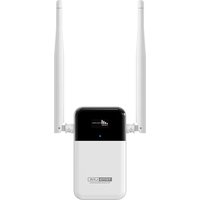
White TOTO LINK device with two white antennas against a blue background (no visible text or symbols on the device body)EX1200L
AC1200
Dual Band
Wi-Fi Smart Screen
Display Extender

Smart Visually Display Multiple Status

1200Mbps Dual Band Wi-Fi

Phone UI for Quick Setup

Dual Band WPS Extension

External Dual Band Antennas

Overview
AC1200
Dual Band Wi-Fi Smart Screen Display Extender
Model No. EX1200L
EX1200L eliminates dead zones with strong Wi-Fi expansion at combined speed of up to 1.2Gbps. Equipped with two high-gain external antennas, it can extend your wireless network to every corner of your house. What's more, it is convenient to find the best place to install the EX1200L with the intelligent screen, which means you can view the connection status of Wi-Fi and the strength of signal between host router and EX1200L intuitively. Besides, you can manage EX1200L both on phone UI and APP, which brings the users with more convenience and better Wi-Fi experience.

Features
- Eliminates dead zones with strong Wi-Fi expansion at combined speed of up to 1.2Gbps.
- Delivers over both the 2.4GHz band(300Mbps) and 5GHz band(867Mbps) for more stable and fast wireless experience.
- Intelligent screen helps to find the best spot to set up by showing the connection status and signal strength.
- Two high-gain external antennas increase the effective Wi-Fi coverage as well as enhance the reception and transmission stability.
- Ethernet port for Reliable Wired Connection.
- Supports WPS (Wi-Fi Protected Setup) Wi-Fi extension.
- Supports quick setup on Phone UI.
- Supports Access Point Mode.

natural_image
White TOTO LINK wireless router with two white antennas and a black LCD screen (no visible text or symbols on the device body)
natural_image
White TOTOLINK wireless router with two white antennas and a black internal component (no visible text or symbols on the device body)
1167Mbps Dual Band Wi-Fi
EX1200L eliminates dead zones with strong Wi-Fi expansion at combined speed of up to 1.2Gbps, which delivers wireless speed up to 300Mbps on 2.4GHz and 867Mbps on 5GHz. EX1200L lets you keep more devices connected at the same time with its dual 2.4GHz and 5GHz bands. Use the 2.4GHz band to send email and browse the web while gaming and streaming in 4K over its 5GHz band.

bar
| Category | Value | |---|---| | 802.11ac | 1167Mbps | | 802.11n | 300Mbps |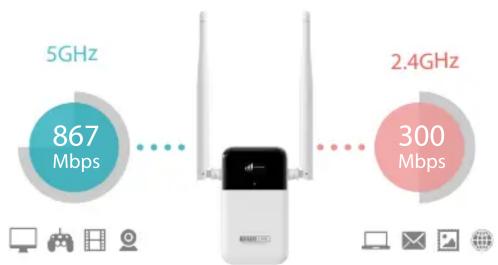
other
| Frequency | Bandwidth (Mbps) | | --------- | ---------------- | | 5GHz | 867 | | 2.4GHz | 300 |
Smart Screen Visually Display
The EX1200L's smart screen can display connection status of Wi-Fi and the strength of signal between host router and EX1200L. Besides, you can enable other functions by entering the menu, including display the IP address, open 2.4G/5G WPS function, turn off the screen.


Dual Band WPS Extension
Entering the menu and open 2.4G/5G WPS function, after starting the WPS function of a host router, then EX1200L can connect to it. The secured home Wi-Fi network can be established quickly to extend the wireless coverage of your existing WLAN network.

Specification
Hardware
| Interface | - 1*10/100BaseTX(Auto MDI/MDIX)LAN Port |
| Power Supply | - AC 100-240V 50/60Hz 0.1A (built-in power module) |
| Display | - 1*OLED (0.96" 128*64 Dots) |
| Antenna | - 2*5dBi External Antennas |
| Button | - 1*MENU/RST Button, 1*Menu Button(Up), 1*Menu Button(Down) |
| LED Indicators | - 1 *SYS (Blue) |
| Dimensions (W x L x H) | - CN/US Standard: 121*82*52.7MM |
| - UK Standard: 121*82*59.2MM | |
| - EUR Standard: 121*82*74.5MM |
Wireless
| Standards | - IEEE 802.11ac, IEEE 802.11n, IEEE 802.11g, IEEE 802.11b, IEEE 802.11a |
| RF Frequency | - 2.4GHz/5GHz |
| Data Rate | - 2.4GHz: Up to 300Mbps- 5GHz: Up to 867Mbps |
| EVM(Error Vector Magnitude) | - 11b:< -10dB, 11g/a:< -25dB, 11n:< -28dB, 11ac:< -32dB |
| Wireless Security | - 64/128-bit WEP, WPA/WPA2, WPA-PSK/WPA2-PSK |
| Tx power | - 2.4G: 11b: 11M 20±1.5dBm; 11g: 54M 16±1.5dBm;11n: MCS7 HT20 17±1.5dBm; MCS7 HT40 17±1.5dBm;- 5G: 11a: 54M 15±2dBm; 11n: MCS7 HT20 14±2dBm; MCS7 HT40 14±2dBm;11ac: MCS9 VHT80 13.5±2dBm. |
| Rx sensitivity | - 2.4G:11b:-81dBm, 11g:-68dBm, 11n:HT20 -65dBm, HT40 -62dBm- 5G:11ac:-51dBm, 11a:-68dBm, 11n:HT20 -65dBm, HT40 -62dBm |
Others
| Package Contents | - EX1200L AC1200 Dual Band Wi-Fi Smart Screen Display Extender *1- Quick Installation Guide *1 |
| Environment | - Operating Temperature: 0 °C~50 °C (32 °F ~122 °F)- Storage Temperature: -40 °C~70 °C (-40 °F ~158 °F)- Operating Humidity: 5%~95% non-condensing- Storage Humidity: 5%~95% non-condensing |
ZIONCOM ( HK ) TECHNOLOGY LIMITED
Copyright©ZIONCOM (HK) TECHNOLOGY CO., LTD. All Rights Reserved.
Headquarter & R&D Center
7/F, Unit D, 4 Building Shenzhen Software Industry Base, Xuefu Road, Nanshan District, Shenzhen, Guangdong, China
Tel : +86-755-6136-3288 (Ext.867) I FAX : +86-755-6136-3344
Factory
Building A1 & A2 Lantian Technology Park, Xinyu Road, Xinqiao Henggang Block, Shajing Street, Baoan District, Shenzhen, Guangdong, China
Direct Line : +86-755-3686-1188(Ext. 5810) I FAX : +86-755-3686-1133
Brand : Totolink
Model : EX1200L
Category : Wi-Fi repeater