
435 - Pregnant Sven - Free user manual and instructions
Find the device manual for free 435 Sven in PDF.


| Product Type | Wireless Bluetooth Speaker |
| Brand | Sven |
| Model | 435 |
| Dimensions (W x H x D) | 200 x 100 x 100 mm |
| Weight | 0.5 kg |
| Power Supply | Built-in rechargeable Li-ion battery 2000 mAh / USB DC 5V |
| Battery Life | Up to 6 hours at medium volume |
| Bluetooth Version | 5.0 |
| Supported Audio Sources | Bluetooth, AUX, TF Card, USB, FM Radio |
| Hands-Free Function | Yes, with built-in microphone |
| Output Power (RMS) | 5W (2.5W x 2) |
| Frequency Response | 100 Hz – 20 kHz |
| Signal-to-Noise Ratio | ≥ 80 dB |
| Control Buttons | Power, Volume +/-, Mode, Play/Pause, Previous/Next |
| Cleaning | Wipe with a soft, dry cloth |
| Safety Instructions | Keep away from moisture and heat; do not disassemble |
| Spare Parts Availability | Contact authorized service center |
| Warranty | 1 year from date of purchase |
Frequently Asked Questions - 435 Sven
User questions about 435 Sven
0 question about this device. Answer the ones you know or ask your own.
Ask a new question about this device
Download the instructions for your Pregnant in PDF format for free! Find your manual 435 - Sven and take your electronic device back in hand. On this page are published all the documents necessary for the use of your device. 435 by Sven.
USER MANUAL 435 Sven
USB 2.0 Gaming Speaker
System with Bluetooth
USER MANUAL
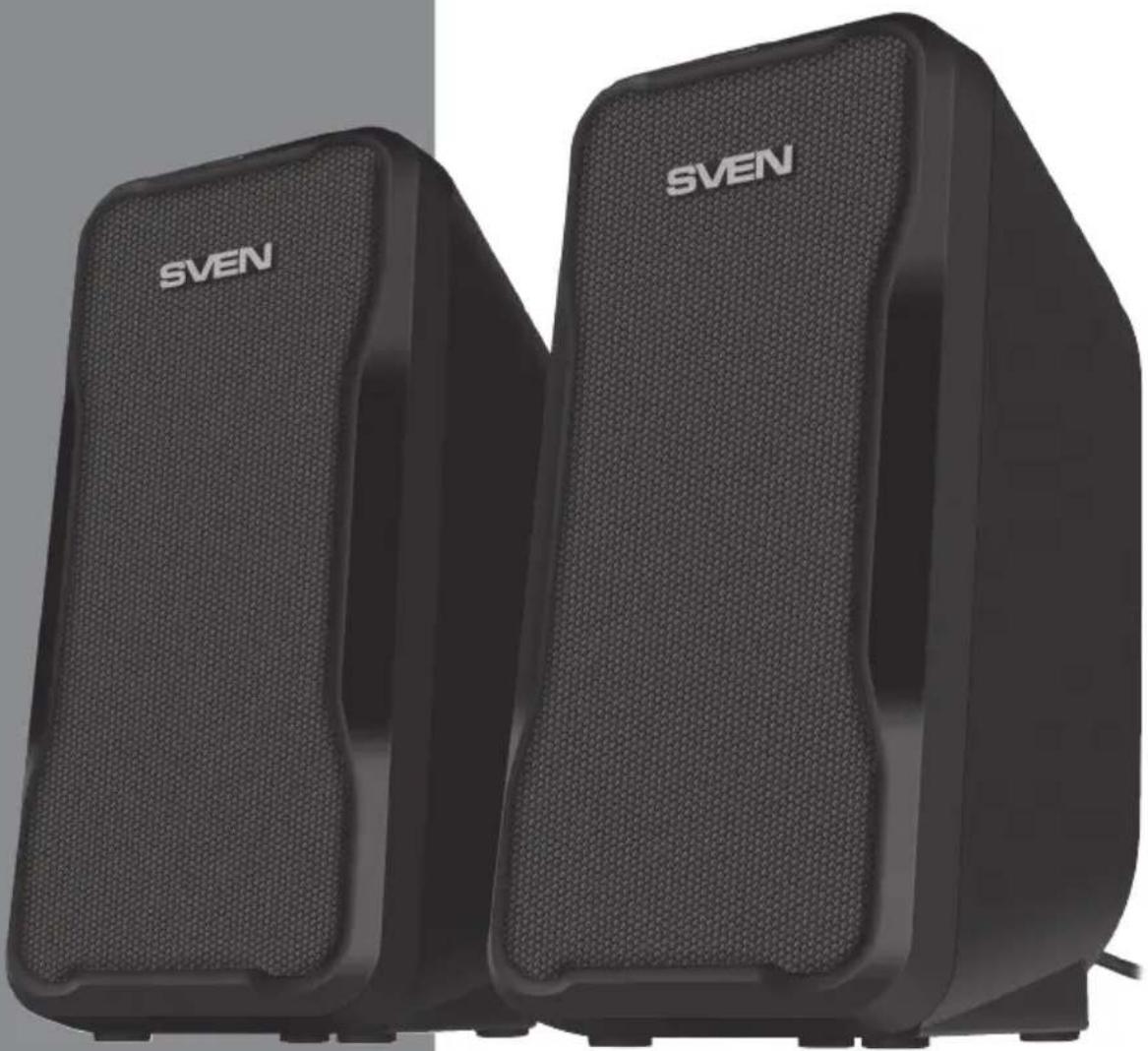
natural_image
Two black SVEN audio/video headsets with textured surfaces, no visible text or symbols on the device body.SVEN 435
www.sven.fi
SVEN®
USB 2.0 Gaming Speaker System with Bluetooth
Congratulations on your purchase of the SVEN speaker system!
COPYRIGHT
© SVEN PTE. LTD. Version 1.0 (23.09.2021).
This Manual and information contained in it are copyrighted. All rights reserved.
CONTENTS
ENG 2
RUS....6
UKR....12
BUYER RECOMMENDATIONS
- Unpack the device carefully. Make sure there are no accessories left in the box. Check up the device for damage; if the product was damaged during transportation, address the firm which carried out the delivery; if the product functions incorrectly, address the dealer at once.
- Shipping and transportation equipment is permitted only in the original container.
- Does not require special conditions for realization.
- Dispose of in accordance with regulations for the disposal of household and computer equipment.
- The date of manufacture of the product is indicated on the box.
PACKAGE CONTENTS
- Speakers — 2 pcs
- User Manual — 1 pc
- Warranty card — 1 pc
SAFETY PRECAUTIONS
- Do not open the MSS and do not perform repairs by yourself. Service and repairs should be performed only by qualified specialists at authorized service centers. The list of authorized service centers is on www.sven.fi.
- Do not allow the circuit of wires (including the grounded ones) between the speakers, on the power amplifier or the ground, for it causes damage to the power amplifier output stage.
- Make sure that foreign objects do not get inside the holes of the GSS.
- Protect the GSS from high humidity, water and dust.
- Protect the GSS from heating: do not place it closer than 1 m from a heat source. Do not expose it to direct sunlight.
- Do not use any chemical agents for cleaning. Clean it with dry soft cloth only.
- If the GSS does not operate, unplug it and address your dealer.
TECHNICAL DESCRIPTION
SVEN 435 2.0 Gaming Speaker System (MSS) is designed to play music and sound games, movies, etc. The MSS has a built-in audio and signal cable enabling to connect it to a PC, laptop, MP3 player and other audio devices. The MSS is powered via a PC or laptop USB port, or via a 5V DC power supply with the built-in USB power cable. The speaker with an audio input and a control panel is named the active one.
Technical support is on www.sven.
User Manual
SVEN 435
MSS special features
• Dynamic RGB backlight
• Volume control on cable
• ST-BY /modes changes button on cable
- USB-powered
Control panel
①: Switching backlight modes (short pressing); Backlight on/off (long pressing)
② POWER button (long pressing);
Switching modes button: Bluetooth/AUX (short pressing);
Disconnecting from the sound source (double clicked)
③ Volume control knob
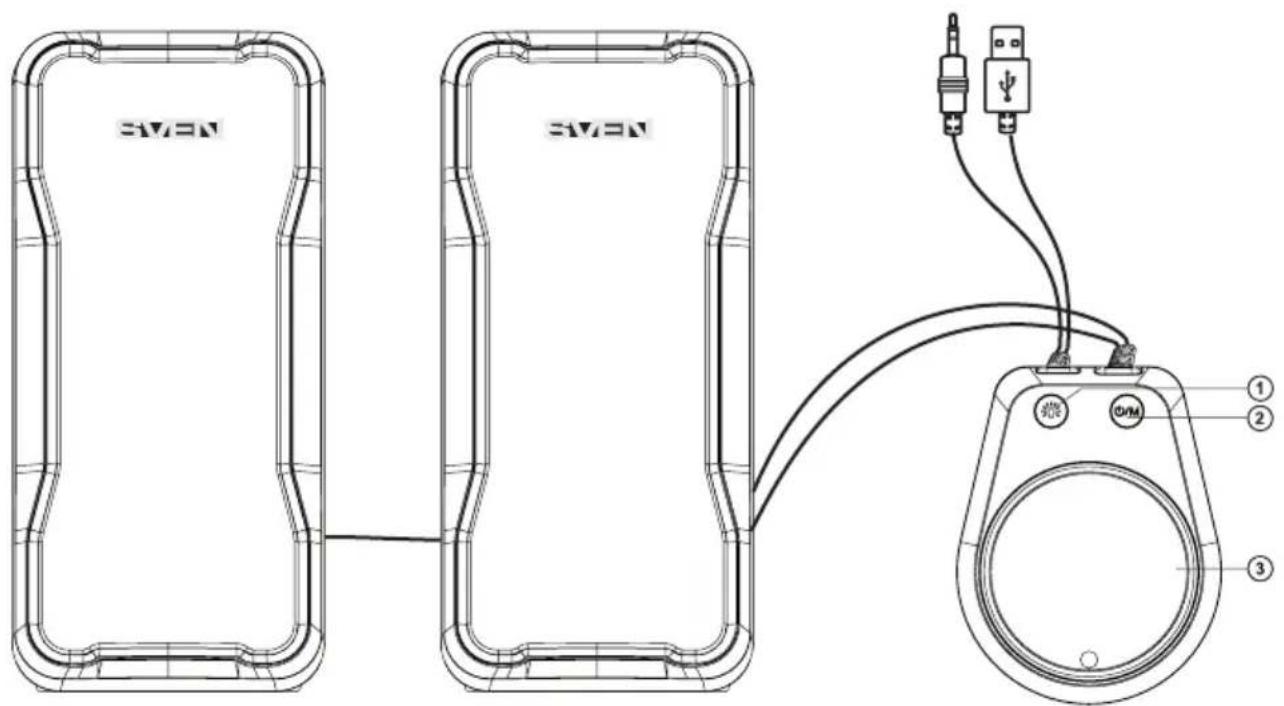
Fig.1.
- Place the speakers symmetrically to the listener at least one meter away.
- Place MSS far away from monitors and TV sets, as insignificant image distortion in these supersensitive devices is possible.
SVEN®
USB 2.0 Gaming Speaker System with Bluetooth
MSS Connecting
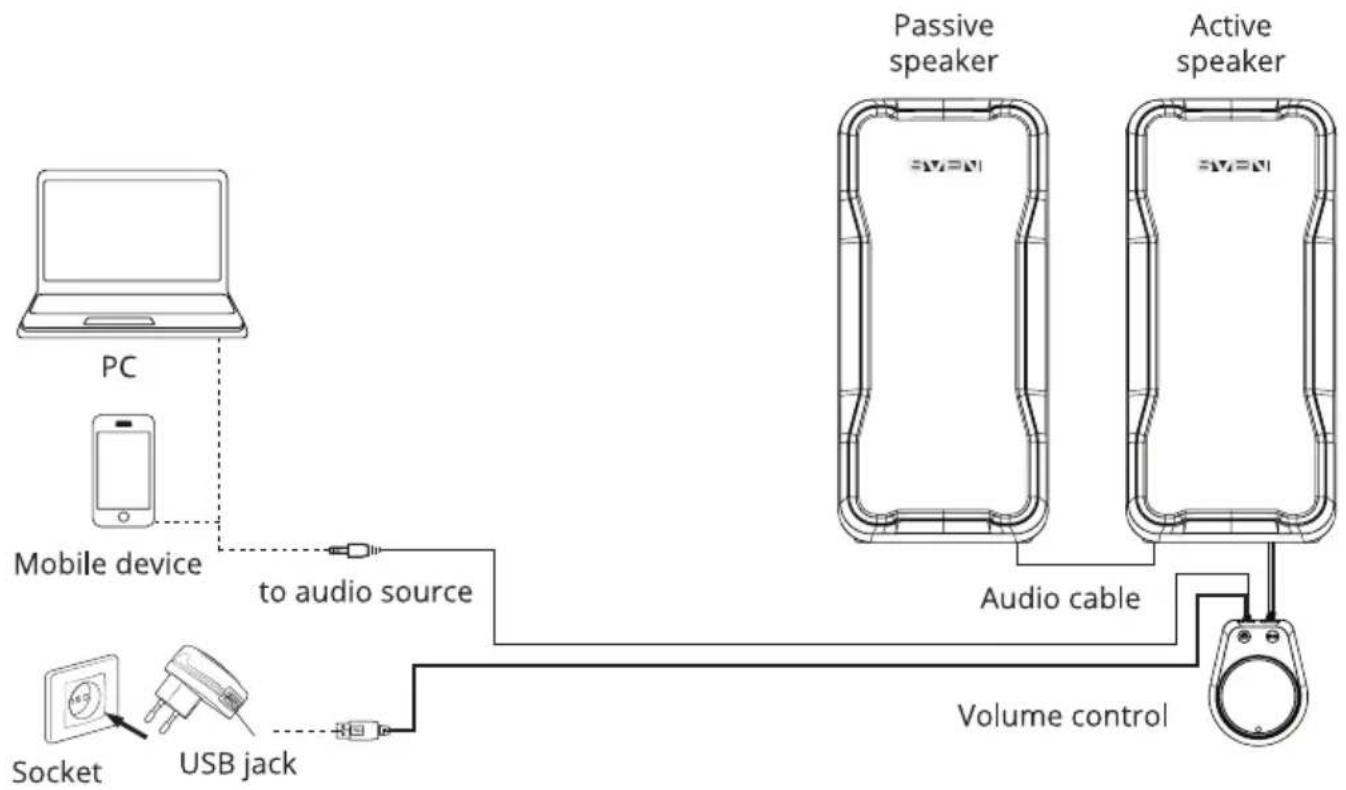
SVEN 435 2.0 USB Gamin Speaker System can be connected to virtually any audio source: MP3 player, PC sound card, etc. (see connection diagram, Fig. 2).
- Before making any connections, make sure that the MSS power supply is disconnected. Plug the built-in 3.5 mm mini-jack signal cable: connect the audio cable to the audio output jack of your sound source (see connection diagram, Fig. 2).
- Connect the built-in USB power cable to a USB port of your PC, laptop or to a 5V DC power supply (not included).
- Turn on your audio source.
- Adjust the master volume level by turning the VOLUME control knob ③. To increase the volume, turn the knob clockwise; to reduce it, turn the knob counterclockwise.
Note:
• After finishing using the MSS, mind to switch it off.
flowchart
graph LR
    PC["PC"] -->|to audio source| MobileDevice["Mobile device"]
    MobileDevice -->|to audio source| AudioCable["Audio cable"]
    AudioCable -->|Volume control| ActiveSpeaker["Active speaker"]
    ActiveSpeaker --> PassiveSpeaker["Passive speaker"]
    PassiveSpeaker --> AudioCable
    AudioCable --> VolumeControl["Volume control"]
    Packet["Packet"] --> Socket["Socket"]
    Packet --> USBJack["USB jack"]
Fig. 2. Connection diagram
TROUBLESHOOTING
| Problem Cause Solution | ||
| The MSS does not turn on. | The MSS isn't connected to a mains outlet. | Check the connection. |
| No sound. The volume level is set at minimum value. | Adjust the volume control knob. | |
| Improperly connected audio source. | ||
| There is too quiet sound of speakers. | The volume level is set at minimum value. | Adjust the volume control knob. |
| Distortion of sound. Large amplitude of the input signal. | Turn down the source volume and MSS volume. | |
If none of the above methods can not solve the problem, please seek professional advice at your nearest service center. Never attempt to repair the product yourself.
TECHNICAL SPECIFICATIONS
| Parameter, measurement unit Value | |
| Output power (RMS), W 10 (5 × 2) | |
| Frequency response, Hz 80 - 20 000 | |
| Speaker diameter, mm ∅ 47 | |
| Power supply, V USB/ | == 5 V |
| Rated current, A 0.3 | |
| Dimensions (one speaker) (W × H × D), mm 78 × 163 × 90 | |
| Weight, kg 0.75 |
Notes:
- Technical specifications given in this table are supplemental information and cannot give occasion to claims.
- Technical specifications and package contents are subject to change without notice due to the improvement of SVEN production.
natural_image
Two black SVEN audio/video headsets with textured surfaces, no visible text or symbols on the device body.SVEN 435
www.sven.fi
Puc.1.
natural_image
Two black SVEN audio/video equipment units with textured surfaces, no visible text or symbols on the device itself.SVEN 435
www.sven.fi
Мал.1.
USB 2.0 Gaming Speaker System with Bluetooth
SVEN®
Model: SVEN 435
Importer: Tiralana OY, Office 102, Kotolahden-tie 15, 48310 Kotka, Finland.
Модель: SVEN 435
Manufacturer: SVEN PTE. LTD, 176 Joo Chiat Road, № 02-02, Singapore, 427447.
Produced under the control of Oy Sven Scandinavia Ltd. 15, Kotolahdentie, Kotka, Finland, 48310. Made in China.
® Registered Trademark of Oy SVEN Scandinavia Ltd. Finland.

EACCE
SVEN 435
- USER MANUAL
- SVEN®
- USB 2.0 Gaming Speaker System with Bluetooth
- Congratulations on your purchase of the SVEN speaker system!
- COPYRIGHT
- CONTENTS
- BUYER RECOMMENDATIONS
- PACKAGE CONTENTS
- SAFETY PRECAUTIONS
- TECHNICAL DESCRIPTION
- SVEN 435
- MSS special features
- Control panel
- MSS Connecting
- Note:
- Notes:
- Model: SVEN 435
- Модель: SVEN 435
Brand : Sven
Model : 435
Category : Pregnant