
WIRELESS DIGITAL - Wireless audio system SENNHEISER - Free user manual and instructions
Find the device manual for free WIRELESS DIGITAL SENNHEISER in PDF.


| Product type | Digital wireless audio system |
| Brand | Sennheiser |
| Model | Wireless Digital (EM 1090 DIGITAL, SK 1093 DIGITAL, SKM 1091 DIGITAL) |
| Frequency band | UHF 905-925 MHz (4 switchable channels) |
| Transmission | Sennheiser patented digital, 16-bit A/D - D/A |
| Frequency response | 20 Hz - 15 kHz |
| Signal-to-noise ratio | >110 dB(A) |
| Distortion | <0.2% THD |
| Dynamic range | >120 dB |
| Range | 85 m in free field, 20-40 m in difficult conditions |
| RF power | 0.5 mW |
| Receiver power supply | 12 V DC via power adapter |
| Transmitter power supply | 9 V PP3 alkaline battery (IEC 6 LR61) |
| Handheld transmitter battery life | Approx. 4 hours with alkaline battery |
| Receiver dimensions (W x D x H) | 213 x 145 x 44 mm (1/2U 19") |
| Bodypack transmitter dimensions | 105 x 63 x 26 mm |
| Handheld transmitter dimensions | 245 x 38 mm (length x diameter) |
| Receiver audio outputs | Balanced XLR-3 (+18 dBu, 150 Ω) and unbalanced 1/4" jack (+12 dBu, 1.6 kΩ) |
| Bodypack transmitter audio input | Lockable 1/8" jack, unbalanced, with plug-in power for electret |
| Antennas | 4 internal antennas (Quadiversity), possibility to add up to 2 external A 1090 DIGITAL antennas via BNC connectors |
| Main features | Automatic channel scan, LED display of audio level and battery status, on/off switch, channel selection, gain adjustment |
| Maintenance and cleaning | Clean the handheld transmitter grille with hot water without detergent; use a soft cloth for the receiver; do not open the devices |
| Safety | Do not open electronic devices (risk of electric shock); disconnect before modification; do not expose to heat or moisture |
| Included accessories | Power adapter, 9V battery, mic clip (vocal set), instrument cable (instrumental set), lavalier mic (pocket set), instruction manual |
| Optional accessories | A 1090 DIGITAL antenna, BNC antenna cables (5m or 10m), GA 1031 CC cover module, GA 1031 AM antenna mount, US power adapter |
| Compliance | FCC Part 15; no license required |
Frequently Asked Questions - WIRELESS DIGITAL SENNHEISER
User questions about WIRELESS DIGITAL SENNHEISER
0 question about this device. Answer the ones you know or ask your own.
Ask a new question about this device
Download the instructions for your Wireless audio system in PDF format for free! Find your manual WIRELESS DIGITAL - SENNHEISER and take your electronic device back in hand. On this page are published all the documents necessary for the use of your device. WIRELESS DIGITAL by SENNHEISER.
USER MANUAL WIRELESS DIGITAL SENNHEISER
1 Contents 4
2 Features 5
3 Important notes 6
4 System variants 6
5 Preparing the devices for use 7
5.1 EM 1090 DIGITAL receiver 7
5.2 SK 1093 DIGITAL belt pack transmitter 10
5.3 SKM 1091 DIGITAL handheld transmitter 12
6 Troubleshooting 14
7 Installation in a 19" rack. 14
8 Care and maintenance 15
9 Connector assignment 15
10 Technical data. 16
11 Accessories 17
Congratulations
on your purchase of the Sennheiser Digital Wireless System. This is a state-of-the-art 900MHz (UHF) digital audio transmission system and is capable of outstanding audio and RF performance in combination with high-grade amplification, mixing and recording systems.
Sennheiser proudly presents this advanced new standard in audio transmission to musical and audio professionals as proof of Sennheiser's non-compromising pursuit of the ultimate in RF and audio performance.
Your digital wireless system is designed for superb audio quality and wireless performance as well as continued reliability. To familiarize you with your new digital wireless system, we suggest that you read through this entire operation manual.
2 Features
16-bit A/D-D/A conversion for CD quality sound.
- No compander ICs – for the transient response and “feel” of a wired connection.
- Frequency Clear™ UHF Digital: System transmits a proprietary digital signal on a 900 MHz UHF carrier for freedom from multi-pathing and interference, including HDTV.
- Quadiversity™ receiver - one UHF receiver, four internal antennas, all microprocessor-controlled for freedom from dropouts.
- Scanner-proof security: Proprietary digital transmission is scanner-proof for eavesdrop-free peace of mind.
- Operating range of 80 - 130 feet under adverse conditions, 280 feet line of sight.
- Nine-segment LED display shows important performance parameters including audio level and transmitter battery life.
This device complies with part 15 of the FCC rules. Operation is subject to the following two conditions:
1 This device may not cause harmful interference, and
2 this device must accept any interference that may cause undesired operation.
3 Important notes
Never open electronic devices! This must only be done by authorized personnel, especially for units connected to AC outlets. If devices are opened by customers in breach of this instruction, the warranty becomes null and void.
Always disconnect the devices from the mains by removing the plug when you wish to change connections or move the devices to a different place.
Never connect conventional RF antennas to the BNC sockets as these can damage the receiver!
Keep the devices away from central heating radiators and electric heaters. Never expose them to direct sunlight.
Use the devices in dry rooms only.
Use a damp cloth for cleaning the devices. Do not use any cleansing agents or solvents.
4 System variants
Vocal Set 1091 DIGITAL
This system is ideal for vocal applications.
Set 1091 DIGITAL consists of: EM 1090 DIGITAL receiver, SKM 1091 DIGITAL handheld transmitter with supercardioid dynamic microphone module, microphone clamp, plug-in mains unit, battery and operating manual.
Instrumental Set 1092 DIGITAL
This system is for connecting musical instruments (e.g. guitar) which have a 1/4 ” jack socket.
Set 1092 DIGITAL consists of: EM 1090 DIGITAL receiver, SK 1093 DIGITAL belt pack transmitter, instrument (guitar) cable, plug-in mains unit, battery and operating manual.
Bodypack Set 1093 DIGITAL
This system is ideal for presentation and PA applications in acoustically difficult rooms. The unobtrusive clip-on electret microphone (omnidirectional) can be directed towards the speaker's mouth.
Set 1093 DIGITAL consists of: EM 1090 DIGITAL receiver, SK 1093 DIGITAL belt pack transmitter, miniature clip-on electret microphone (omnidirectional), plug-in mains unit, battery and operating manual.
5 Preparing the devices for use
5.1 EM 1090 DIGITAL receiver
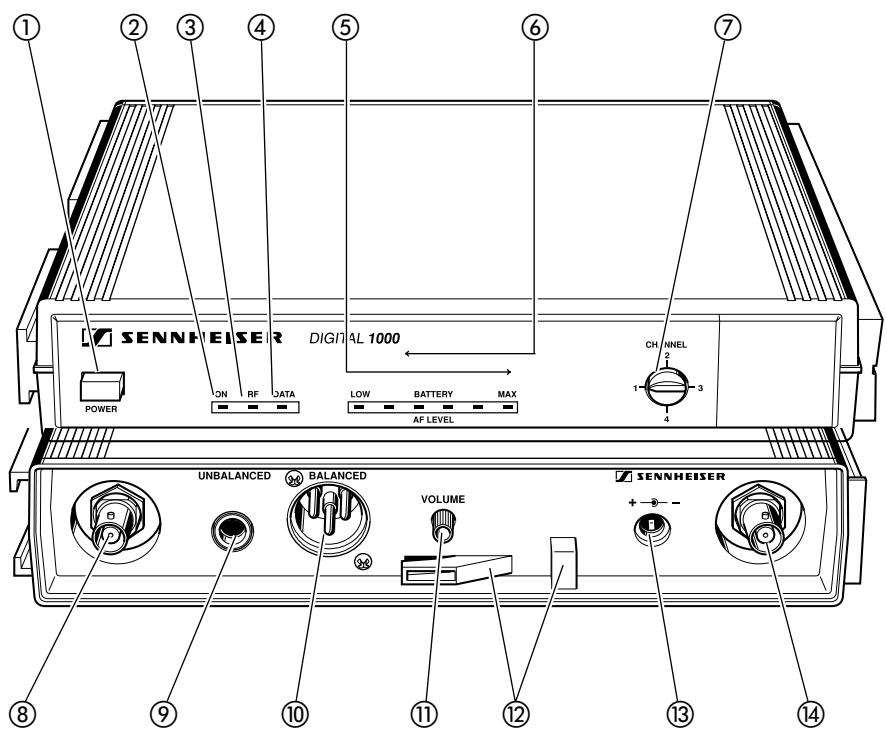
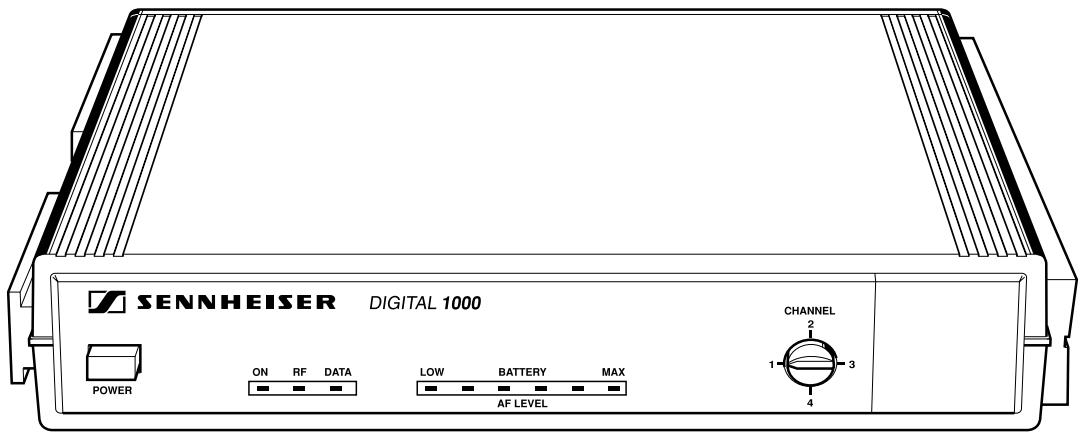
① POWER button
② "Power on/off" control LED
③ “RF” control LED
(4) “Data” control LED
6-segment level display for
(5) - incoming AF signal
- transmitter battery life
⑦ Channel selector switch
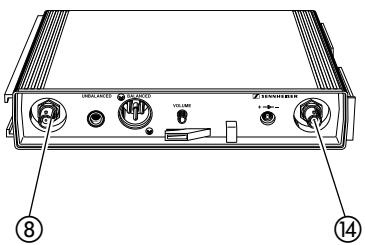
BNC socket 1 for connection of additional A 1090 DIGITAL antenna
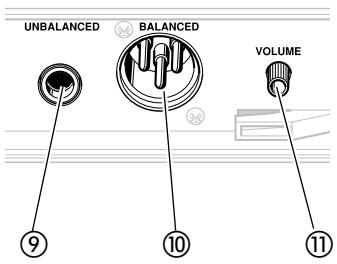
AF output, unbalanced, 1 / 4 jack (line level)
AF output, balanced, XLR-3M
AF output level control (for outputs 9 and 10)
⑫ Cable grip for power supply DC cable
⑬ DC socket for connection of mains unit
BNC socket 2 for connection of additional A 1090 DIGITAL antenna
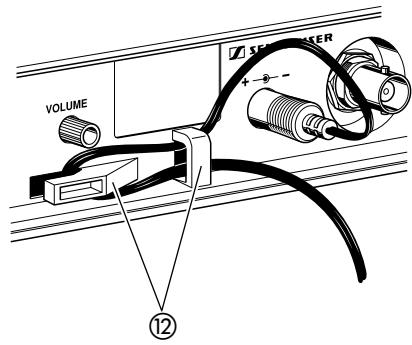
Connecting the mains unit
Insert the DC connector on the power supply output cable into socket (refer to page 7) at the rear of the receiver.
Pass the cable through the cable grip ⑫.
Connecting the amplifier/mixing console
Connect the amplifier/mixing console either
-
to the XLR-3M socket ⑩ or
-
to the 1/4 ” jack socket ⑨.
Adjusting the AF output level
Use the AF output level control (1) to adjust the AF signal level that appears at outputs (9) and (10).
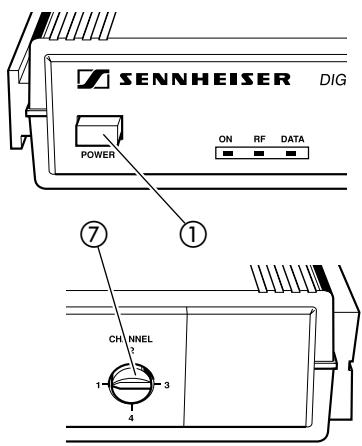
Switching the receiver on/off - Selecting a channel
Press the POWER button ① to switch the receiver on.
Use the channel selector switch ⑦ to select a channel.
Connecting additional A 1090 DIGITAL antennas
Additional digital antennas can be connected to the BNC sockets ⑧ and ④ if the range of the receiver's internal antennas is not sufficient. This may happen if receivers are mounted into a rack or are installed between metal constructions on a stage.
For connecting the antennas, use 50 coaxial cable with BNC connectors. Ready made up antenna cables from Sennheiser are available as accessories (see chapter 11).
Depending on the location you can connect one or two digital antennas.
Attention:
Never connect conventional RF antennas to the BNC sockets as these can damage the receiver!
Indicators on the EM 1090 DIGITAL receiver
The 3-segment LED display on the left of the front panel provides information on the operating state of the EM 1090 DIGITAL receiver:
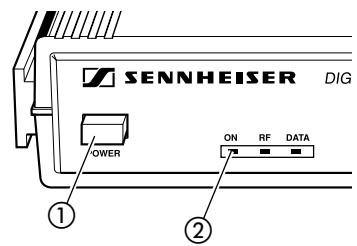
RedLED“ON”:
The LED ② lights up to show that the receiver is connected to the mains and has been switched on with the POWER button ①.
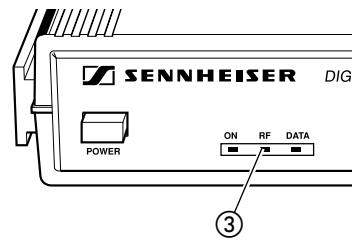
RedLED“RF”:
An RF signal from the suitable transmitter is being received by the receiver. In contrast to analog transmission, digital test signals are also received so that the transmitter can be identified.
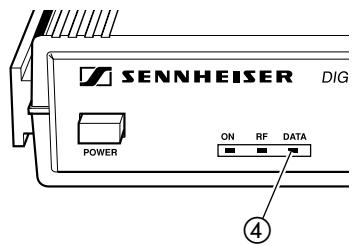
RedLED“DATA”:
After the receiver has checked the suitable transmitter and accepted the digital transmission, the LED ④ indicates that a data stream is being received.
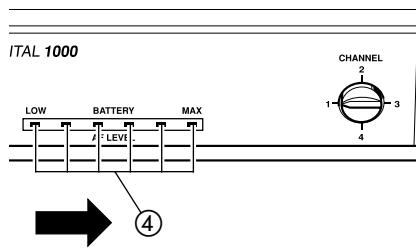
"AF LEVEL" indication
The 6-segment LED display on the right of the front panel indicates the AF level, i.e. the incoming audio signal. The segments of the LED display start lighting up from the left.
Adjust the sensitivity of the SK 1093 DIGITAL belt pack transmitter such that the last (right-hand) LED segment does not light up. The sensitivity of the SKM 1091 DIGITAL handheld transmitter is automatically adjusted.
"BATTERY" indication
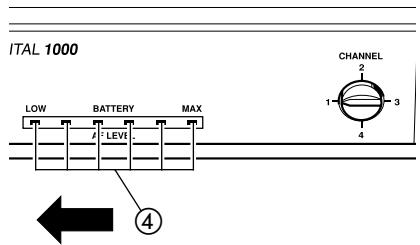
As long as the transmitter doesn't transmit any audio signal (e.g. during pauses in speaking), the 6-segment LED display indicates the remaining transmitter battery capacity. The segments of the LED display start lighting up from the right.
If the battery is going flat, the last (left-hand) LED segment will light up. You should replace the battery within the next 20 minutes (value depending on battery type).
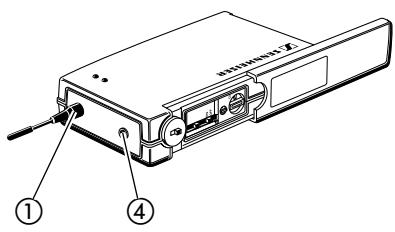
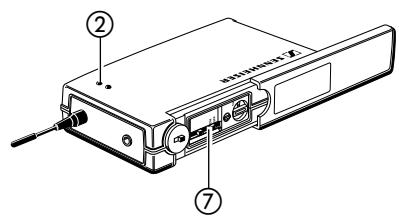
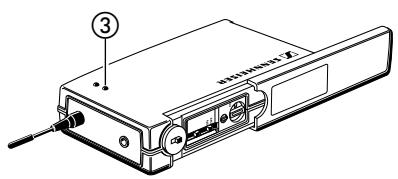
5.2 SK 1093 DIGITAL belt pack transmitter
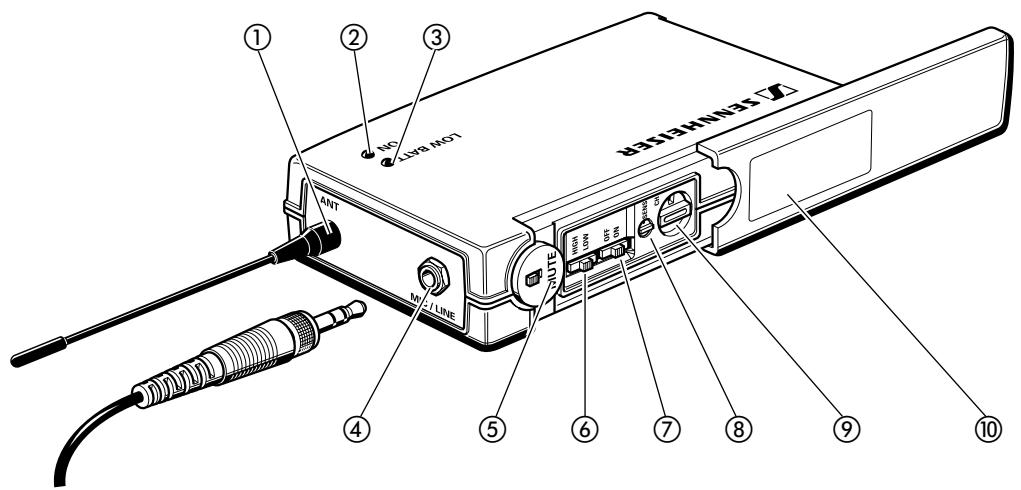
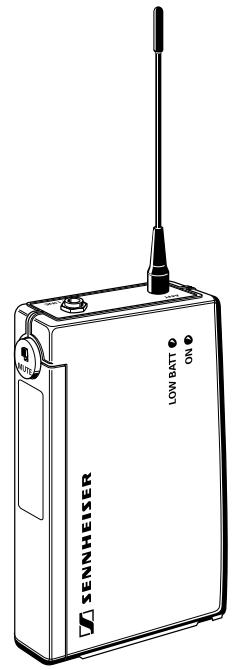
① Antenna
② Operationindicator(greenLED)
③ Battery life indicator (red LED)
④ AF input (MIC/LINE), 1/8" jack socket
(5) Mute switch
(6) HIGH/LOW dynamic window switch
(7) ON/OFF switch
⑧ Control for precise sensitivity adjustment
⑨ Channel selector switch
⑩ Cover plate
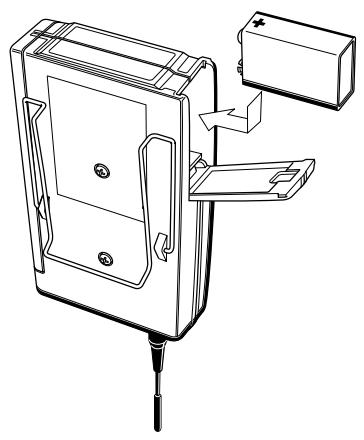
Inserting and changing the battery
▶ Slide the cover of the battery compartment in the direction of the embossed arrow until it clicks audibly.
Open the cover.
Insert the 9 V PP3 battery (IEC 6 LR 61). Please observe correct polarity when inserting the battery.
Close the battery compartment.
To remove the battery, push the small red lever in the battery compartment towards the bottom side of the transmitter.
Note:
We recommend powering the transmitter by a standard PP3 alkaline battery. If powered by a rechargeable 9V battery, the operating time will be drastically reduced.
Connecting the antenna
Screw the antenna onto the antenna socket ① (M3 connection).
Connecting the microphone/line cable
Electret powering ("plug-in" power) is available at the AF input for powering the microphone.
Connect the 1/8 jack plug from the microphone/line cable to the AF input ④.
Lock the jack plug by screwing down the locking ring.
Switching the transmitter on/off
▶ Slide back the cover plate.
Set the ON/OFF switch ⑦ to ON. The green LED ② lights up.
Battery life indication
The red LED ③ provides information on the battery life. LED ③ lit up: The battery is going flat! You should replace the battery within the next 20 minutes (value depending on battery type).
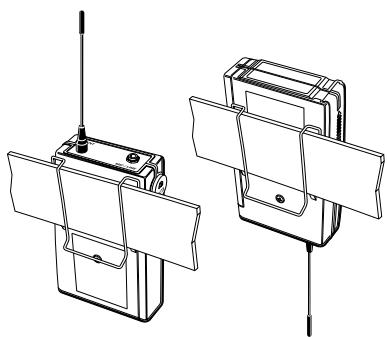
Attachment of the transmitter to clothing
The belt pack transmitter is best attached to e.g. the belt with the supplied clip.
The clip is detachable so that you can also attach the transmitter with the antenna pointing downwards. To do so, withdraw the clip from its fixing points and attach it the other way round.
5.3 SKM 1091 DIGITAL handheld transmitter
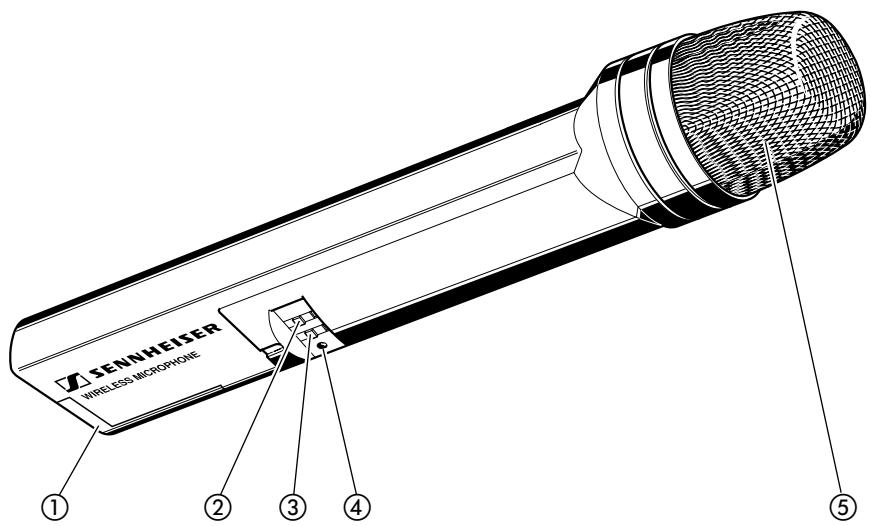
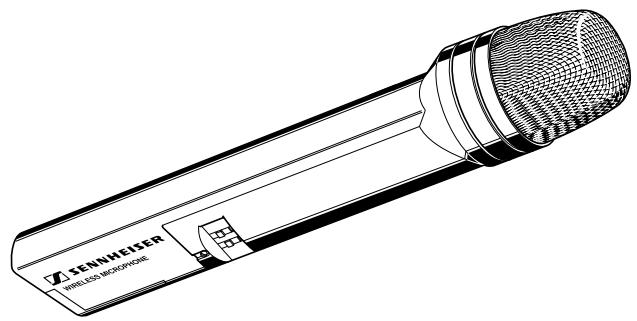
① Battery compartment
(2) HIGH/LOW dynamic window switch
③ ON/OFF switch
④ Power control LED
⑤ Removeable sound inlet basket
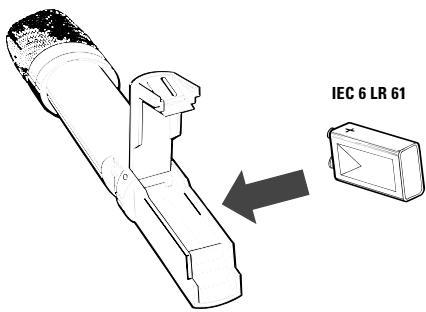
Inserting the battery
Open the battery compartment and insert the battery, taking care to observe the correct polarity.
Please use type 9 V PP3 (IEC 6 LR 61) alkaline batteries. They ensure an operating time of approx. 4 hours (value depending on battery type).
N.B.: Using NiCd rechargeable batteries is unadvisable as this would reduce operating time to under two hours (technical data are not affected).
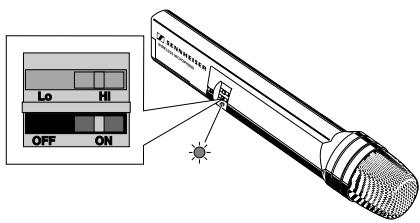
Switching on the handheld transmitter
Switch on the SKM 1091 DIGITAL handheld transmitter by setting the ON/OFF switch (3) to ON.
After a short time, the red LED ④ below the ON/OFF switch will light up, indicating that the handheld transmitter is now ready for operation.
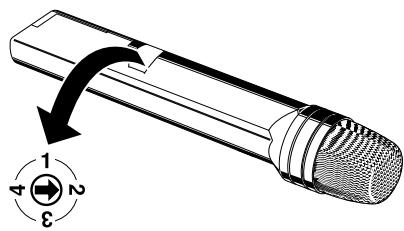
Selecting a transmission channel
Use the rotary switch at the side of the handheld transmitter to choose one of the 4 possible transmission channels. The corresponding transmission frequencies are listed on a sticker in the battery compartment.
Transmitter and receiver must operate on the same channel!
6 Troubleshooting
The transmission fails completely
Short-period switching off and back on again the EM 1090 DIGITAL receiver may lead to an interrupt in transmission.
After having switched off the receiver hang on for a couple of seconds before switching on again as with any processor-controlled device.
The transmission range is not sufficient
Use remote antennas. You can connect two additional A 1090 DIGITAL antennas to the EM 1090 DIGITAL receiver. The remote antennas can be installed at a distance of up to 30 meters from the receiver.
You can hear crackling noise and - occasionally - another transmitter is being received
A second DIGITAL transmitter is operating on the same transmission frequency. In contrast to analog audio transmission, both transmitters are received simultaneously. If the field strengths of both transmitters are almost similar, the receiver switches to and fro between the two transmitters - crackling noise occurs - and possibly, the "DATA"-LED goes off.
Choose a different transmission channel.
You can hear "crosstalk"
Observe a minimum distance of 3 meters between transmitter and receiver.
Crackling noise and dropouts occur during the operation with a clip-on microphone
The jack plug from the microphone cable is not screwed tightly to the SK 1093 DIGITAL. Lock the jack plug by screwing down the locking ring.
Before deciding on a transmission channel, test - with the receiver only - whether the chosen channel is free. Switch on the receiver and listen to the channel. When you are sure that no one else is occupying this channel, you can set the radiomicrophe to the same frequency.
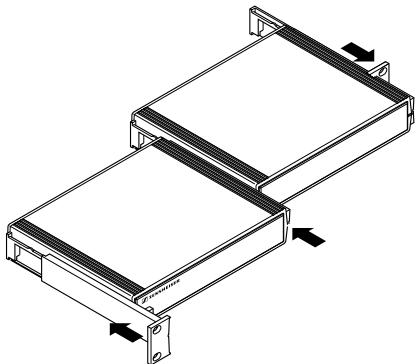
7 Installation in a 19" rack
Slide the supplied rack mount adapters and two receivers together as illustrated. The receivers can now be bolted into the rack.
Instead of a second EM 1090 DIGITAL receiver you can also use a GA 1031 CC blank module or a GA 1031 AM antenna mount.



8 Care and maintenance
SKM 1091 DIGITAL handheld transmitter
The SKM 1091 DIGITAL's sound inlet basket should be cleaned from time to time.
Unscrew the inlet basket (turn anti-clockwise) and remove it.
Rinse foam protection and sound inlet basket with warm water.
Dry both foam protection and sound inlet basket with a hairdryer.
Note:
Do not use any cleansing agents or solvents. Do not touch the microphone contacts.
Take off the sound inlet basket carefully in a straight line taking care of the microphone capsule!
Screw the sound inlet basket back tight on the SKM 1091 DIGITAL transmitter.
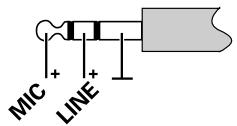
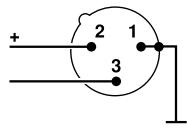
9 Connector assignment
1/8" stereo jack plug (lockable), SK 1093
XLR-3 connector, balanced, EM 1090
1/4" jack plug, unbalanced, EM 1090
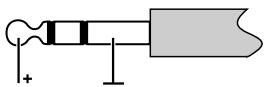
DC connector/Power supply

10 Technical data
Overall system
| Transmission format | Sennheiser proprietary digital audio transmission |
| Frequency response | 20 Hz to 15 kHz |
| Audio dynamic range | >120 dB |
| Distortion | <0.2 % THD |
| RF carrier frequency | 905 MHz to 925 MHz |
| Number of selectable frequencies | 4 |
| Channel 1 | 905 MHz |
| Channel 2 | 915 MHz |
| Channel 3 | 920 MHz |
| Channel 4 | 925 MHz |
| RF output power | 0.5 mW |
| Signal-to-noise ratio | >110 dB(A) |
| Transmission range | 280 feet line of sight 80 to 130 feet adverse conditions |
| FCC Approval | Part 15 approved, no user licence required |
SK 1093 DIGITAL & SKM 1091 DIGITAL Transmitter
| A/D conversion | 18-bit linear, 128 fold oversampling |
| Input impedance LINE | 1 MOhm |
| Input impedance MIC | 930 Ohm to 6,000 Ohm |
| Connectors (SK 1093 DIGITAL) | Lockable 1/8”, unbalanced |
| Controls | Mute, Power on/off, Channel Select, Sensitivity adjustment |
| Dimensions SK 1093 DIGITAL | 105 x 63 x 26 mm |
| Dimensions SKM 1091 DIGITAL | 245 x 38 mm |
EM 1090 DIGITAL Receiver
| D/A conversion | 16-bit linear |
| Output | Balanced +18 dBU (-2 dB), 150 Ohm Unbalanced +12 dBU (-2 dB), 1.6 kOhm |
| Connectors | Transformerless XLR, balanced 1/4” jack, unbalanced |
| Indicators | Power on/off, Transmitter Battery Life, Data Received, RF |
| Controls | Power on/off, Channel Select, AF Level |
| Dimensions | 213 x 145 x 44 mm - (1/2 RU) |
| Power supply | 12 V DC |
11 Accessories
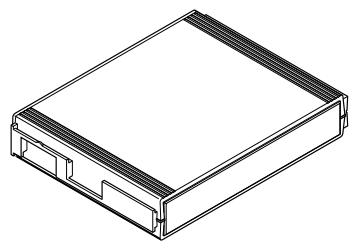
GA 1031 CC
(Cat.no.04253)
Blank module, can be used
instead of a receiver for installation
in a 19" rack
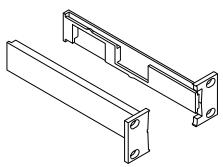
GA 1031 AM
(Cat.no.04254)
Antenna mount, permits the
connection of antennas to the front of the rack.
Attention:
Only connect A 1090 DIGITAL
antennas to the GA 1031 AM
antenna mount!

A 1090 DIGITAL
(Cat.no.04928)
Digital antenna, 4-diversity
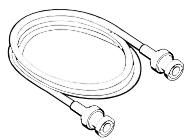
GZL 1019 A5
(Cat.no.02325)
BNC/BNC antenna cable, 5m
GZL 1019 A10
(Cat.no.02326)
BNC/BNC antenna cable, 10m
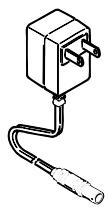
NG 1031-US
(Cat.no.03649)
Plug-in mains unit, US version
US
NOTICE D'EMPLOI
WIRELESS DIGITAL
1 Sommaire
Chap. Contenu
GA 1031 AM (Cat. No. 04254)
A 1090 DIGITAL (Cat. No. 04928)
Sennheiser Canada Inc.
221 Labrosse Ave.
Pointe Claire, Quebec
H9R 1A3
Phone +1 514 426 3013
Fax +1 5144263953
Sennheiser Electronic Corporation
One Enterprise Drive
Old Lyme, Connecut 06371
Phone +1 860 434 9190
Fax +1 860 434 9022
TTY +1 860 434 0509
http://www.sennheiser.usa.com
Subject to alterations, error excepted
Printed in Germany
Publ. 01/00
78364/A01
- Congratulations
- Features
- Important notes
- System variants
- Vocal Set 1091 DIGITAL
- Instrumental Set 1092 DIGITAL
- Bodypack Set 1093 DIGITAL
- Preparing the devices for use
- EM 1090 DIGITAL receiver
- Connecting the mains unit
- Connecting the amplifier/mixing console
- Adjusting the AF output level
- Switching the receiver on/off - Selecting a channel
- Connecting additional A 1090 DIGITAL antennas
- Attention:
- Indicators on the EM 1090 DIGITAL receiver
- SK 1093 DIGITAL belt pack transmitter
- Inserting and changing the battery
- Note:
- Connecting the antenna
- Connecting the microphone/line cable
- Switching the transmitter on/off
- Battery life indication
- Attachment of the transmitter to clothing
- SKM 1091 DIGITAL handheld transmitter
- Inserting the battery
- Switching on the handheld transmitter
- Selecting a transmission channel
- Troubleshooting
- Installation in a 19" rack
- Care and maintenance
- SKM 1091 DIGITAL handheld transmitter
- Connector assignment
- Technical data
- Overall system
- SK 1093 DIGITAL & SKM 1091 DIGITAL Transmitter
- EM 1090 DIGITAL Receiver
- Accessories
- WIRELESS DIGITAL
- Sommaire
- Chap. Contenu
Brand : SENNHEISER
Model : WIRELESS DIGITAL
Category : Wireless audio system