
X-Pad - Regulator Sven - Free user manual and instructions
Find the device manual for free X-Pad Sven in PDF.


| Product Type | Voltage Regulator |
| Brand | Sven |
| Model | X-Pad |
| Input Voltage | 12 V DC |
| Output Voltage | 5 V DC |
| Max Output Current | 2 A |
| Dimensions (L x W x H) | 80 x 50 x 25 mm |
| Weight | 120 g |
| Power Consumption | 10 W max |
| Protection Features | Overvoltage, overcurrent, short-circuit, thermal shutdown |
| Operating Temperature | -10°C to +60°C |
| Storage Temperature | -20°C to +70°C |
| Input Connector | DC barrel jack (5.5 x 2.1 mm) |
| Output Connector | USB-A female |
| LED Indicators | Power (green), Output (blue) |
| Mounting | Desktop or wall-mountable with included bracket |
| Certifications | CE, RoHS |
| Warranty | 2 years |
Frequently Asked Questions - X-Pad Sven
User questions about X-Pad Sven
0 question about this device. Answer the ones you know or ask your own.
Ask a new question about this device
Download the instructions for your Regulator in PDF format for free! Find your manual X-Pad - Sven and take your electronic device back in hand. On this page are published all the documents necessary for the use of your device. X-Pad by Sven.
USER MANUAL X-Pad Sven
natural_image
Black SVEN game controller with visible buttons and grip, shown from front and side (no text or symbols on main body)X-PAD
www.sven.fi
Рис. 2. Вид спереди

natural_image
Line drawing of a game controller with two main blades and a handle (no text or symbols)Рис. 3. Вид снизу
Рис. 4

Рис. 5
Рис. 6
natural_image
Black SVEN game controller with visible buttons and grip, shown from front and side (no text or symbols on main body)X-PAD
www.sven.fi
natural_image
Line drawing of a game controller with two main buttons and a handle (no text or symbols)Мал. 5
Мал. 6
natural_image
Black SVEN game controller with visible buttons and grip (no text or symbols on main body)X-PAD
www.sven.fi
Operation Manual
X-PAD
Congratulations on the purchase of Sven product!
Please read this Operation Manual before using the unit and retain this Operation Manual in safe place for future reference.
COPYRIGHT
© 2014. SVEN PTE. LTD. Version 1.0 (V 1.0).
This Manual and information contained in it are copyrighted. All rights reserved.
TRADEMARKS
All trademarks are the property of their legal holders.
NOTICE OF RESPONSIBILITY RESTRICTION
Despite the exerted efforts to make this Manual more exact, some discrepancies may occur. The information of this Manual is given on «as is» terms. The author and the publisher do not bear any liability to a person or an organization for loss or damages which have arisen from the information, contained in the given Manual.
UNPACKING
Unpack the device carefully. Make sure there are no accessories left in the box. Check up the device for damages; if the product was damaged during transportation, address the firm which carried out the delivery; if the product functions incorrectly, address the dealer at once.
CONTENTS
RUS 1
UKR....7
ENG 14
- DESCRIPTION 16
- SAFETY PRECAUTIONS 16
- PACKAGE CONTENTS 16
- SPECIAL FEATURES ...... 16
- SYSTEM REQUIREMENTS ...... 17
- DESCRIPTION OF THE CONSTRUCTION 16
- CONNECTION AND INSTALLATION 18
- TROUBLESHOOTING 20
1. DESCRIPTION
X-Pad PC Wired Gamepad can be used in different games such as simulators, arcades, shooter games etc. Vibration feedback imparts a feeling of realistic experience during games. Rubber coating and ergonomic construction of X-Pad enhance accuracy of its operation during games.
2. SAFETY PRECAUTIONS
- Do not disassemble or repair the device on your own. Maintenance and repairs should be carried out by qualified service centre staff only.
- Protect the device from direct impact of high humidity, dust, strong magnetic fields, vibrations, high temperatures, toxic liquids and gases.
- Instructions for device maintenance: for cleaning the case of the device please use clean soft cloth. Do not use such solvents as gasoline or spirit for cleaning, since these solvents can damage the surface of the device.
- Do not drop the device to avoid damaging it.
3. PACKAGE CONTENTS
- Gamepad — 1 pc
- Setup CD disk —1 pc
• Operation manual — 1 pc - Warranty card — 1 pc
4. SPECIAL FEATURES
- Ergonomic design of the gamepad
• Supports DirectX 7.0 and up, Windows XP/Vista/7/8 - USB Interface
• Vibration feedback function for higher realistic effect - Turbo function for continuous firing
- 4 axes, D-Pad, 2 joysticks and 12 buttons
- Rubber coating for comfortable use
• Digital and analog modes available
5. SYSTEM REQUIREMENTS
- USB port available
• Operational System Windows XP/Vista/7/8 - DirectX 7.0 Version and up
Operation Manual
X-PAD
6. DESCRIPTION OF THE CONSTRUCTION
① D-pad
② USB cable
③ TURBO: turbo mode ON button
④ MODE: mode switch button
⑤ CLEAR: TURBO mode
cancellation button
⑥ RUMBLE: illuminated button for switching on/off vibration mode
⑦ Buttons 1–6
⑧ Left joystick (button 11)
⑨ MODE indicator
⑩ Right joystick (button 12)
⑪ Button 8
⑫ Button 10
⑬ Button 7
⑭ Button 9
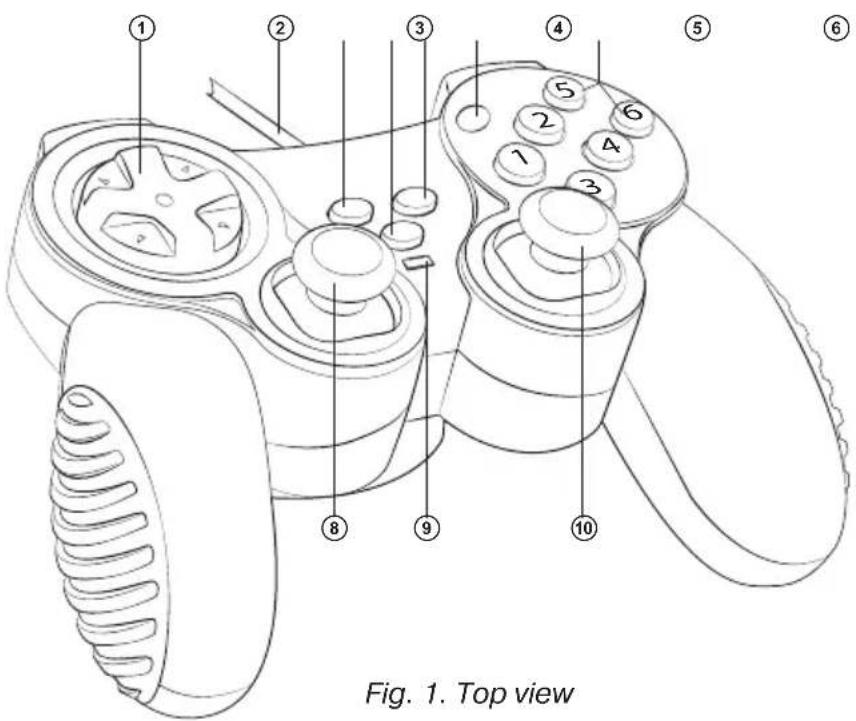

Fig. 2. Front view

natural_image
Line drawing of a game controller with two main blades and a screw head (no text or symbols)Fig. 3. Bottom view
7. CONNECTION AND INSTALLATION
- Connect the gamepad via USB cable ② to an available USB port of your PC. After connection to your PC, the device is automatically detected as a game controller and is fully ready for use. However, for Vibration Feedback function it is necessary to install drivers. Calibration of the second joystick is also impossible without the installation of drivers.
- Insert Software CD disk into your PC CD-Rom and start setup.exe for installation of drivers. For testing and setting the game controller choose Start → Control Panel → Game Controller. There will open up Properties: PC TWIN SHOCK (see Fig. 4) on your desktop.
- Click Function Test (Fig. 4) to test axes and buttons.
- Enter Calibration Function (Fig. 5) to calibrate all four axes.
- Enter Vibration test (see Fig. 6) to test and to set Vibration Feedback function:
a) increase or reduce Vibration strength by moving cursor. For example: vibration strength is 85 % in Fig. 6;
b) test Vibration Feedback function on the left or/and right motors by pressing Left force, Both force and Right force;
c) after setting and testing press OK (confirm) in the bottom of the window.
Note! Vibration Feedback function is always on when there is illumination of RUMBLE button ⑥. To turn off Vibration Feedback function, press RUMBLE button and its illumination will be off.

Fig. 4

Fig. 5
Operation Manual
X-PAD
- Switching Modes.
The device works in Digital Mode and Analog Mode that are switched by MODE button ④. LED color ⑨ changes from red to green according to the selected Mode. Digital Mode (green LED) has 2 axes and 10 buttons available, while Analog Mode (red LED) has all four axes and 12 buttons available.
- TURBO function.
Turbo function imitates multiple pressing and holding of any button, while it was pressed only once. To activate this function, press any button 1-12, hold it and press TURBO button ③. Now this button will have Turbo function set up. To cancel this function, press programmed button with Turbo, hold it and press CLEAR button ⑤.

Fig. 6
- TROUBLESHOOTING
| Problem | Solution |
| The gamepad does not work normally after installation of drivers on the PC. | A. Check whether the gamepad is connected properly to your PC.B. Make sure that all the settings in Game Controller are installed and confirmed.C. Check whether the settings of gamepad are in conflict with other peripherals.D. Restart your PC if the device still does not work normally. |
| Drivers can’t be installed on the PC. | Install DirectX 7.0 or higher. |
| Some analog axis goes into effect automatically. | The gamepad hasn’t been calibrated or the calibration hasn’t been confirmed. |
| After connecting the gamepad, its driving program can’t be found. | Enter My computer → Properties → Hardware → Device manager and delete corresponding equipment with «!» mark and reconnect the gamepad to the PC. Then your PC will find the driving system. |
| After entering the game, vibration feedback function operates automatically. | Enter Force Feedback and calibrate it. |
| During the game vibration feedback is insufficient. | Enter Force Feedback and set the force of feedback. |
If none of the above mentioned solutions removes the problem, please consult a nearest authorized service center. Never try to repair the device on your own.
natural_image
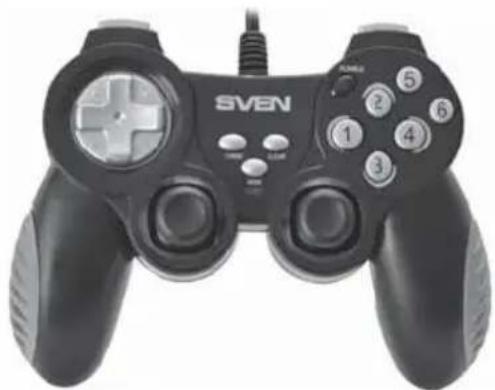
Black SVEN game controller with control buttons and a plus button (no visible text or symbols beyond branding)Модель: X-PAD
Manufacturer: SVEN PTE. LTD, 176 Joo Chiat Road, N° 02-02, Singapore, 427447. Produced under the control of Oy Sven Scandinavia Ltd. 15, Kotolahdentie, Kotka, Finland, 48310. Made in China.
® Registered Trademark of Oy SVEN Scandinavia Ltd. Finland.
- Operation Manual
- X-PAD
- Congratulations on the purchase of Sven product!
- COPYRIGHT
- TRADEMARKS
- NOTICE OF RESPONSIBILITY RESTRICTION
- UNPACKING
- CONTENTS
- DESCRIPTION
- SAFETY PRECAUTIONS
- PACKAGE CONTENTS
- SPECIAL FEATURES
- SYSTEM REQUIREMENTS
- DESCRIPTION OF THE CONSTRUCTION
- CONNECTION AND INSTALLATION
- - Switching Modes.
- - TURBO function.
- Модель: X-PAD
Brand : Sven
Model : X-Pad
Category : Regulator