VSC-SDI-HDMI - Audio/video converter Black Box - Free user manual and instructions
Find the device manual for free VSC-SDI-HDMI Black Box in PDF.


| Product Type | Audio/video converter |
| Brand | Black Box |
| Model | VSC-SDI-HDMI |
| Input Interface | 1x BNC (SDI) |
| Output Interface | 1x HDMI Type A |
| Supported SDI Standards | SD-SDI, HD-SDI, 3G-SDI |
| Supported HDMI Resolutions | Up to 1920x1080p @60Hz |
| Video Bandwidth | 2.97 Gbps per channel |
| Audio Support | Embedded audio pass-through (up to 8 channels) |
| Power Supply | 5V DC, 1A (via included adapter or USB power) |
| Power Consumption | <5W |
| Dimensions (W x D x H) | 3.94 x 2.36 x 0.79 in (10 x 6 x 2 cm) |
| Weight | Approx. 5.3 oz (150 g) |
| Housing Material | Metal |
| LED Indicators | Power (green), Signal (blue) |
| Operating Temperature | 32°F to 122°F (0°C to 50°C) |
| Storage Temperature | -4°F to 158°F (-20°C to 70°C) |
| Compliance | CE, FCC, RoHS |
| Included Accessories | Converter unit, power adapter, user manual |
| Maintenance | Wipe with a soft, dry cloth; do not use liquids |
| Safety Precautions | Use only supplied power adapter; avoid moisture and extreme temperatures |
| Repair and Spare Parts | Not user-serviceable; contact Black Box support for repairs |
| Warranty | 1 year limited warranty |
Frequently Asked Questions - VSC-SDI-HDMI Black Box
User questions about VSC-SDI-HDMI Black Box
0 question about this device. Answer the ones you know or ask your own.
Ask a new question about this device
Download the instructions for your Audio/video converter in PDF format for free! Find your manual VSC-SDI-HDMI - Black Box and take your electronic device back in hand. On this page are published all the documents necessary for the use of your device. VSC-SDI-HDMI by Black Box.
USER MANUAL VSC-SDI-HDMI Black Box
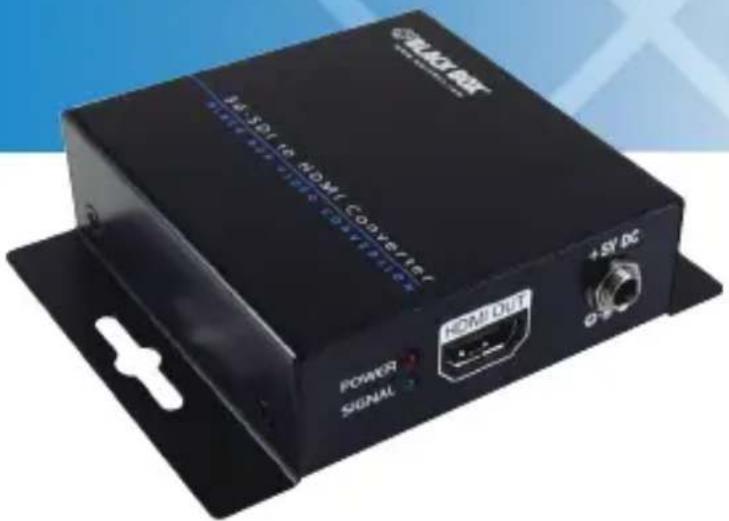
Converts SDI (Serial Digital Interface) video for output to an HDMI® display.
• Supports 3G-SDI (3 Gbps), HD-SDI, and SD-SDI input on coax BNC.
- Use to add an HDMI screen to a high-end broadcasting or AV application.
Customer Support Information
Order toll-free in the U.S.: Call 877-877-BBOX (outside U.S. call 724-746-5500) • FREE technical support 24 hours a day, 7 days a week: Call 724-746-5500 or fax 724-746-0746 • Mailing address: Black Box Corporation, 1000 Park Drive, Lawrence, PA 15055-1018 Web site: www.blackbox.com • E-mail: info@blackbox.com
Trademarks Used in this Manual
Black Box and the Double Diamond logo are registered trademarks of BB Technologies, Inc.
HDMI is a registered trademark of HDMI Licensing LLC.
Any other trademarks mentioned in this manual are acknowledged to be the property of the trademark owners.
FEDERAL COMMUNICATIONS COMMISSION AND INDUSTRY CANADA RADIO FREQUENCY INTERFERENCE STATEMENTS
This equipment generates, uses, and can radiate radio-frequency energy, and if not installed and used properly, that is, in strict accordance with the manufacturer's instructions, may cause interference to radio communication. It has been tested and found to comply with the limits for a Class A computing device in accordance with the specifications in Subpart B of Part 15 of FCC rules, which are designed to provide reasonable protection against such interference when the equipment is operated in a commercial environment. Operation of this equipment in a residential area is likely to cause interference, in which case the user at his own expense will be required to take whatever measures may be necessary to correct the interference.
Changes or modifications not expressly approved by the party responsible for compliance could void the user's authority to operate the equipment.
This digital apparatus does not exceed the Class A limits for radio noise emission from digital apparatus set out in the Radio Interference Regulation of Industry Canada.
Please read and follow the safety instructions to protect yourself from possible injury and to minimize the risk of damage to the unit.
- Follow all instructions and warnings marked on the unit.
- Do not attempt to service the unit yourself, except where explained in this manual.
- Provide proper ventilation and air circulation and do not use near water.
- Keep objects that might damage the device away from it, and place the unit on stable surfaces.
- Only use the power adapter, power cords, and connection cables designed for the unit.
- Do not use liquid or aerosol cleaners to clean this unit. Always unplug the power to the device before cleaning.
Table of Contents
- Specifications....7
- Overview 8
2.1 Introduction 8
2.2 Features....8
2.3 What's Included....8
2.4 Hardware Description 9
2.5 Typical Application....11
- Troubleshooting....12
3.1 Contacting Black Box....12
3.2 Shipping and Packaging....12
1. Specifications
SDI Signaling Resolutions Supported — SMTPE 424M: 3G-SDI 1080p at 50/59.94/60 Hz (4:2:2);
SMPTE 292M, 296M: HD-SDI 720p at 50/59.94/60 Hz, 1080i
at 50/59.94/60 Hz, 1080p at 23.98/24/25/29.97/30 Hz;
SMPTE 259M: SD-SDI NTSC 525 at 59.94 Hz, PAL 625 at 50 Hz
NOTE: SMPTE = Society of Motion Picture and Television Engineers.
SDI Speeds Supported — 270 Mbps, 1.4835 Gbps, 2.967 Gbps
SDI Standards Supported — Cable equalization: 3G-SDI: Up to 300 ft.
(90 m), HD-SDI: Up to 500 ft. (150 m), SD-SDI: Up to 1000 ft. (300 m)
RoHS — Yes
Connectors — SDI input: (1) BNC (75 ohm);
Local loopout: (1) BNC (75 ohm);
HDMI output: (1) HDMI F
Indicators — (2) LEDs: (1) Power, (1) Activity
Temperature Tolerance — Operating: +32 to +104°F (0 to +40°C);
Storage: -4 to +140° F (-20 to +60° C)
Power — AC input: 100–240 VAC, 50–60 Hz, 0.8 amps;
Output: 5 VDC, 4 amps;
Consumption: 3 watts (maximum)
Size — 1.2"H x 3.3"W x 3.1"D (2.7 x 8.4 x 7.9 cm)
Weight — 8.8 oz. (250 g)
2. Overview
2.1 Introduction
The 3G-SDI/HD-SDI to HDMI Converter with loopout converts 3G-SDI/HD-SDI to HDMI compliant format. The conversion between SDI and HDMI is pure digital and guarantees no loss of audio and video. With up to eight channels of audio support, 7.1 or 5.1 channel audio becomes available. The converter also has two low-jitter and re-clocked outputs for daisychain or multiple monitors.
2.2 Features
Converts serial digital interface video for output to an HDMI display.
• Supports 3G-SDI (3 Gbps), HD-SDI, and SD-SDI input on coax BNC.
- Use to add an HDMI screen to a high-end broadcasting or AV application.
- Also has SDI loopout for a local SDI monitor or daisychaining.
- Handles higher SDI bit rates of 2.97 Gbps (3G-SDI).
- Autodetects SDI video standard on its 75-ohm coax input.
- Supports 1080p HDMI video with Deep Color depth.
- Reclocks SDI data for low-jitter video output.
- Provides up to eight-channel audio support.
- No software or driver installation required.
• Wallmountable for space-saving installation.
2.3 What's Included
• 3G-SDI/HD-SDI to HDMI Converter
- Power supply
- This user's manual
2.4 Hardware Description
Figures 2-1 and 2-2 show the front and back panels of the converter. Table 2-1 describes the components.
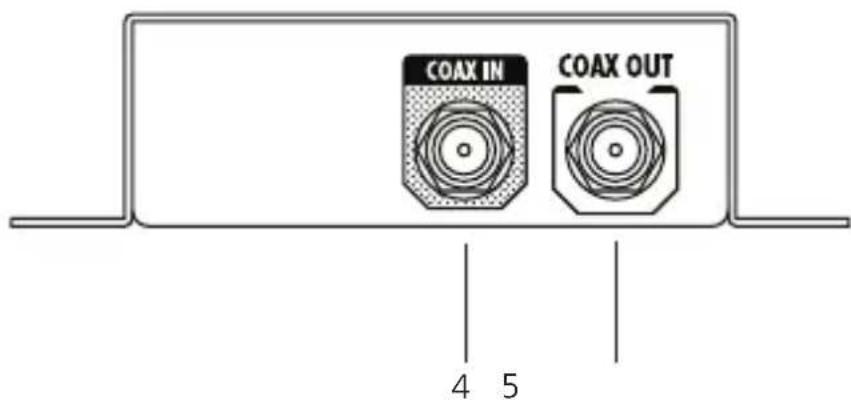
Figure 2-1. Front panel.
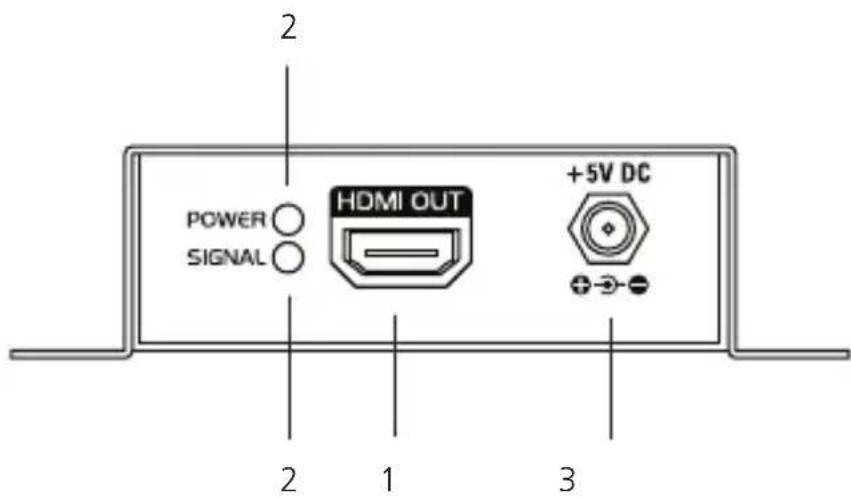
Figure 2-2. Back panel.
Table 2-1. Front and back panel components.
| Number Component Description | ||
| 1 | HDMI connector | HDMI output |
| 2 (2) LEDs | Green: both power and signal are activeOrange: only power is active | |
| 3 | Interlocked +5 V power jack | Links to power |
| 4 BNC connector 3G-HD/SD-SDI input | ||
| 5 BNC connector 3G-HD/SD-SDI output | ||
2.5 Typical Application
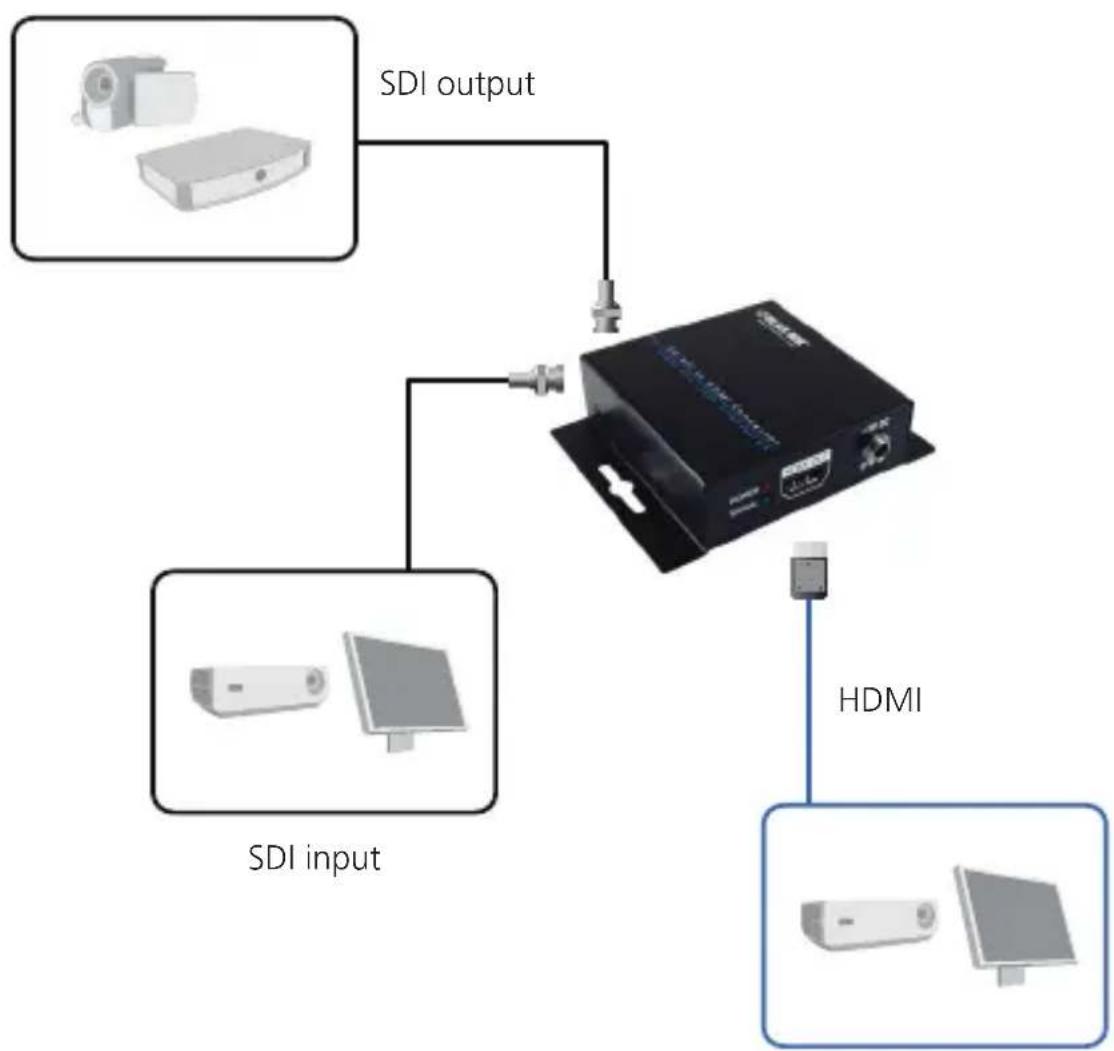
flowchart
graph TD
    A["SDI input"] --> B["Device"]
    C["SDI output"] --> B
    B --> D["HDMI"]
    style A fill:#f9f,stroke:#333
    style C fill:#f9f,stroke:#333
    style B fill:#ccf,stroke:#333
    style D fill:#cff,stroke:#333
Figure 2-3. Application diagram.
3. Troubleshooting
3.1 Contacting Black Box
If you determine that your 3G-SDI/HD-SDI to HDMI Converter is malfunctioning, do not attempt to alter or repair the unit. It contains no user-serviceable parts. Contact Black Box Technical Support at 724-746-5500 or info@blackbox.com.
Before you do, make a record of the history of the problem. We will be able to provide more efficient and accurate assistance if you have a complete description, including:
- the nature and duration of the problem.
- when the problem occurs.
- the components involved in the problem.
- any particular application that, when used, appears to create the problem or make it worse.
3.2 Shipping and Packaging
If you need to transport or ship your 3G-SDI/HD-SDI to HDMI Converter:
- Package it carefully. We recommend that you use the original container.
- If you are returning the unit, make sure you include everything you received with it. Before you ship for return or repair, contact Black Box to get a Return Authorization (RA) number.
Black Box Tech Support: FREE! Live. 24/7.
Tech support the way it should be.

natural_image
Close-up of a smiling woman wearing a headset, with no visible text or symbols.Great tech support is just 30 seconds away at 724-746-5500 or blackbox.com.

BLACK BOX®
NETWORK SERVICES
About Black Box
Black Box provides an extensive range of networking and infrastructure products. You'll find everything from cabinets and racks and power and surge protection products to media converters and Ethernet switches all supported by free, live 24/7 Tech support available in 30 seconds or less.
© Copyright 2012. Black Box Corporation. All rights reserved.
VSC-SDI-HDMI, version 1