AEMEX-HDMI-R2 - Audio/video converter Black Box - Free user manual and instructions
Find the device manual for free AEMEX-HDMI-R2 Black Box in PDF.


| Product Type | Audio/Video Converter |
| Brand | Black Box |
| Model | AEMEX-HDMI-R2 |
| Input Interface | HDMI (Type A) |
| Output Interface | HDMI (Type A) and Analog Audio (3.5mm) |
| Supported Video Resolutions | 480i, 480p, 576i, 576p, 720p, 1080i, 1080p (up to 60 Hz) |
| Supported Audio Formats | LPCM 2.0, Dolby Digital, DTS (pass-through) |
| HDCP Compliance | HDCP 1.4 |
| Dimensions (W x D x H) | 10.2 cm x 5.0 cm x 2.0 cm |
| Weight | 0.15 kg |
| Power Supply | 5V DC, 1A (via included USB cable) |
| Power Consumption | 2.5 W (max) |
| Operating Temperature | 0 °C to 40 °C |
| Storage Temperature | -20 °C to 60 °C |
| Humidity | 10% to 85% (non-condensing) |
| EDID Management | Built-in EDID emulation |
| Audio Extraction | Yes, via 3.5mm analog audio output |
| Maintenance | Wipe with a soft, dry cloth. Do not use liquids or cleaning agents. |
| Safety Precautions | Use only the provided power adapter. Do not expose to moisture or extreme temperatures. |
| Spare Parts and Repairability | No user-serviceable parts. Contact Black Box support for repairs. |
| Warranty | 1 year limited warranty |
| Package Contents | Converter unit, USB power cable, user manual |
Frequently Asked Questions - AEMEX-HDMI-R2 Black Box
User questions about AEMEX-HDMI-R2 Black Box
0 question about this device. Answer the ones you know or ask your own.
Ask a new question about this device
Download the instructions for your Audio/video converter in PDF format for free! Find your manual AEMEX-HDMI-R2 - Black Box and take your electronic device back in hand. On this page are published all the documents necessary for the use of your device. AEMEX-HDMI-R2 by Black Box.
USER MANUAL AEMEX-HDMI-R2 Black Box
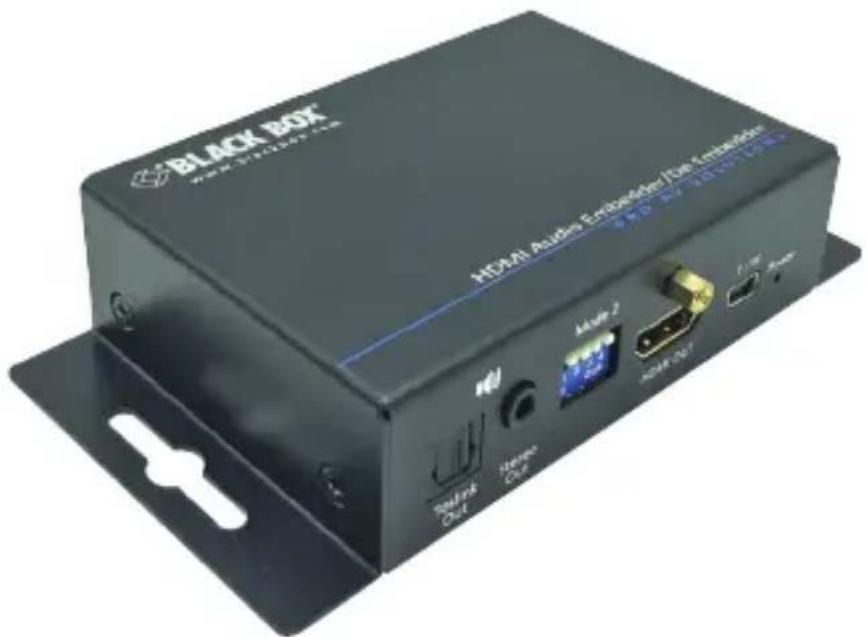
Audio Embedder/De-embedder - HDMI 2.0
Extract audio from an HDMI stream or embed a separate audio signal to an HDMI stream.
Contact Information
Order toll-free in the U.S. or for FREE 24/7 Technical Support:
Call 877-877-BBOX (outside U.S. call 724-746-5500)
www.blackbox.com • E-mail: info@blackbox.com
Trademarks Used in this Manual
Black Box and the Double Diamond logo are registered trademarks of BB Technologies, Inc.
HDMI is a registered trademark of HDMI Licensing LLC.
Any other trademarks mentioned in this manual are acknowledged to be the property of the trademark owners.
FEDERAL COMMUNICATIONS COMMISSION AND INDUSTRY CANADA RADIO FREQUENCY INTERFERENCE STATEMENTS
This equipment generates, uses, and can radiate radio-frequency energy, and if not installed and used properly, that is, in strict accordance with the manufacturer's instructions, may cause interference to radio communication. It has been tested and found to comply with the limits for a Class A computing device in accordance with the specifications in Subpart B of Part 15 of FCC rules, which are designed to provide reasonable protection against such interference when the equipment is operated in a commercial environment. Operation of this equipment in a residential area is likely to cause interference, in which case the user at his own expense will be required to take whatever measures may be necessary to correct the interference.
Changes or modifications not expressly approved by the party responsible for compliance could void the user's authority to operate the equipment.
This digital apparatus does not exceed the Class A limits for radio noise emission from digital apparatus set out in the Radio Interference Regulation of Industry Canada.
Please read and follow the safety instructions to protect yourself from possible injury and to minimize the risk of damage to the unit.
- Follow all instructions and warnings marked on the unit.
- Do not attempt to service the unit yourself, except where explained in this manual.
- Provide proper ventilation and air circulation and do not use near water.
- Keep objects that might damage the device away from it, and place the unit on stable surfaces.
- Only use the power adapter, power cords, and connection cables designed for the unit.
- Do not use liquid or aerosol cleaners to clean this unit. Always unplug the power to the device before cleaning.
Table of Contents
- Specifications....7
- Overview....9
2.1 Introduction....9
2.2 Features....9
2.3 What's Included....9
2.4 Hardware Description....10
DIP Switch Settings....12
- Connection Diagrams.....13
-
Contacting Black Box....15
-
Specifications
| Approvals HDMI 2.0, HDCP, CE, FCC, RoHS2, WEEE, UL | |
| Audio Support Supports HDMI, 3.5-mm analog audio, TOSLINK optical audio inputs and outputs;Embeds audio from either 3.5-mm or optical source to an HDMI or DVI-D signal | |
| Video Bandwidth Single-link 594 MHz (18 Gbps) | |
| Video Support Up to 4K @ 60 Hz 4:4:4 8 bits or 4K @ 60 4:2:010 bits (HDR) | |
| CEC Channel Bypass | |
| ESD Protection | Human body model: ±19 kV (air-gap discharge)and 12 kV (contact discharge);Core chipset: ±2 kV |
| Enclosure Metal | |
| Firmware Update via USB MIni B Port | |
| PCB Stackup | 4-layer board (impedance control—differential 100 ohms, single 50 ohms) |
| Connectors Input: | (1) HDMI (19-pin female),(1) 3.5-mm analog audio,(1) TOSLink digital optical audio;Output:(1) HDMI (19-pin female),(1) 3.5-mm analog audio,(1) TOSLink digital optical audio;For power and Firmware Updates:(1) USB Mini B |
| User Controls (1) 2-position DIP switch;(1) 4-position DIP switch | |
| Environment Temperature Tolerance:Operating: 32 to 104°F (0 to 40°C);Storage: -4 to +140°F (-20 to +60°C)Relative Humidity: 20–90%, noncondensing;Maximum Altitude: 10,000 feet (3125 m) | |
| Power Power supply (wallwart style):Input: 100 to 240 VAC, 50/60 Hz, 0.58 A;Output: 5-VDC, 4-A locking barrel plug | |
| Dimensions 1.03"H x 3.74"W x 2.61"D(2.61 x 9.49 x 6.62 cm) | |
| Weight 0.57 lb. (0.26 kg) | |
2. Overview
2.1 Introduction
The Audio Embedder/De-Embedder - HDMI 2.0 (AEMEX-HDMI-R2) is compatible with HDMI 2.0. It embeds audio from either an 3.5-mm or optical source to an HDMI or DVI-D source or camera. It also de-embeds (extracts) audio from an HDMI signal and outputs it to 3.5-mm analog and/or digital optical sound systems.
2.2 Features
- Supports HDMI, 3.5-mm analog audio, TOSLINK optical audio inputs and outputs.
- Using HDMI 2.0, the unit supports a maximum resolution of 4K @ 60 Hz 4:4:4 8 bits or 4K @ 60 4:2:0 10 bits (HDR).
- Embeds audio from either a 3.5-mm or an optical source to an HDMI or DVI-D signal.
- Creates an audio channel where one did not exist, such as in a DVI-D source or camera system.
- De-embeds (extracts) audio from HDMI signal and outputs it to 3.5-mm analog and/or digital optical sound systems. Audio is output to analog, optical, and HDMI at the same time.
- Requires no HDMI video output to extract audio.
- Supports embedding and de-embedding at the same time.
• Supports HDCP 2.2 for content protection. - Power through either a wallmount power supply or USB connector.
- Easy to configure via DIP switches.
2.3 What's Included
• Audio Embedder/De-Embedder - HDMI 2.0 (AEMEX-HDMI-R2)
- 5-VDC, 4-A power supply with adapter clips
To download this user manual from the Black Box web site:
- Go to www.blackbox.com
- Enter the part number (AEMEX-HDMI-R2) in the search box.
- Click on the product in the "Product Results" page.
- Click on the "Support" tab on the product page, and select the document you wish to download.

If you have any trouble accessing the Black Box site to download the manual, you can contact our Technical Support at 877-877-2269 or info@blackbox.com.
2.4 Hardware Description
Figures 2-1 and 2-2 show the front and back panels of the unit. Table 2-1 describes its components.
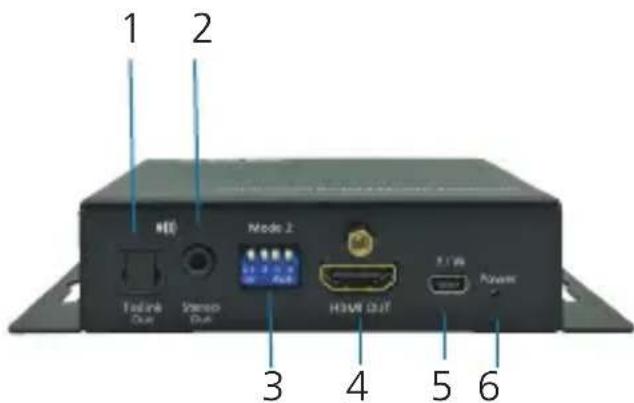
Figure 2-1. Front panel.
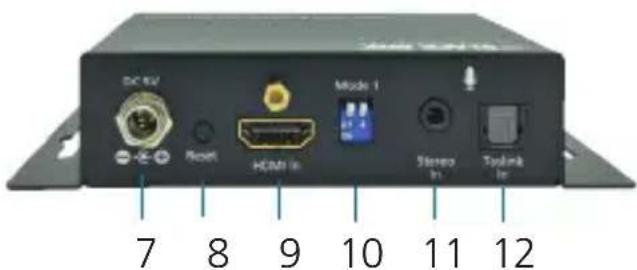
Figure 2-2. Back panel.
Table 2-1. AEMEX-HDMI-R2 components in Figures 2-1 and 2-2.
| Number | Component Description | |
| 1 | (1) TOSLINK Audio OUT connector | Connects to digital S/PDIF audio output. |
| 2 (1) 3.5-mm connector | Stereo OUT | |
| 3 | (1) 4-position DIP switch | See Table 2-3. |
| 4 | (1) HDMI female connector | HDMI OUT |
| 5 | (1) mini-USB connector | • Used for firmware update• Connects to 5 VDC power supply unit |
| 6 | (1) Power LED Lights when power is ON. | |
| 7 | (1) Barrel connector | +5 V power |
| 8 (1) Pushbutton For factory reset. | ||
| 9 | (1) HDMI female connector | HDMI IN |
| 10 (1) 2-position DIP switch | See Table 2-2. | |
| 11 | (1) 3.5-mm connector | Stereo IN |
| 12 | (1) TOSLINK Audio IN | Connects to audio source. |
DIP Switch Settings
Table 2-2. 2-Position DIP switch (shown in Figure 2-2).
| Switch Number | Position Description |
| 1 | ON (DOWN) Enable Audio Embedder function. |
| OFF (UP) Disable Audio Embedder function. | |
| 2 ON (DOWN) | S/PDIF connector selected on Audio Embedder. |
| OFF (UP) 3.5-mm connector selected on Audio Embedder. |
Table 2-3. 4-Position DIP switch (shown in Figure 2-1).
| Switch Number | Position Description | |
| 1 ON (DOWN) | Enable Audio | Extractor function via S/PDIF and 3.5-mm connectors. |
| OFF (UP) Disable | Audio Extractor function. | |
| 2 ON (DOWN) | Enable ARC function. | |
| OFF (UP) Disable | ARC function. | |
| 3 ON (DOWN) | Reserved for future use. | |
| OFF (UP) Reserved for future use. | ||
| 4 ON (DOWN) | Firmware update mode. | |
| OFF (UP) Normal mode. | ||
NOTES:
- ARC audio extraction is always via S/PDIF TOSLink output.
-
The audio will only extract via 3.5-mm stereo if you enable the ARC function.
-
Connection Diagrams
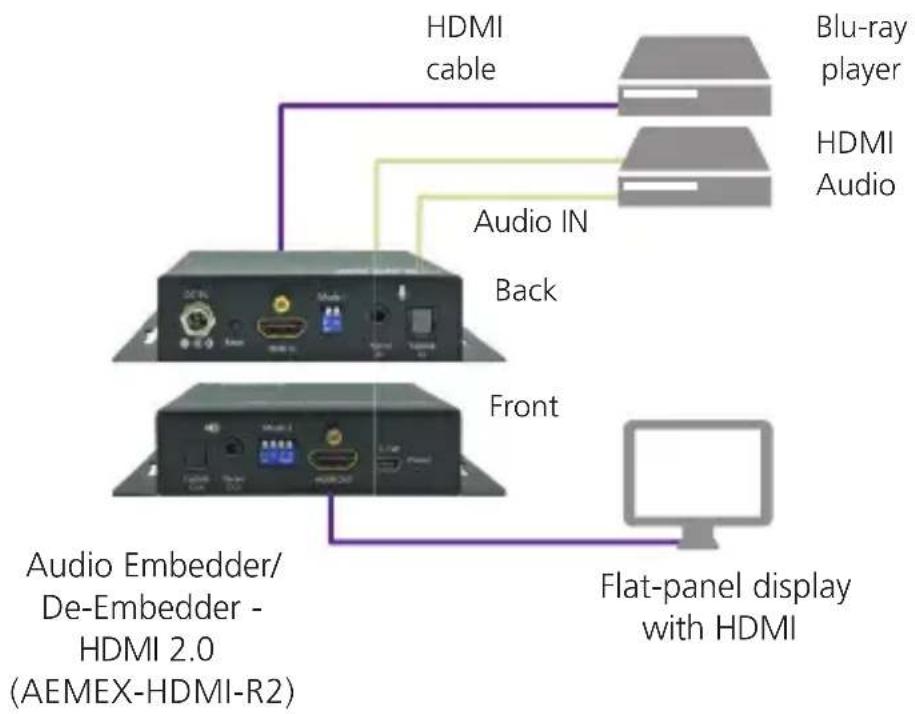
flowchart
graph TD
    A["Back"] --> B["HDMI cable"]
    A --> C["Audio IN"]
    A --> D["Front"]
    B --> E["Blu-ray player"]
    B --> F["HDMI Audio"]
    D --> G["Flat-panel display with HDMI"]
    H["Audio Embedder/De-Embedder - HDMI 2.0 (AEMEX-HDMI-R2)"] --> G
Figure 3-1.
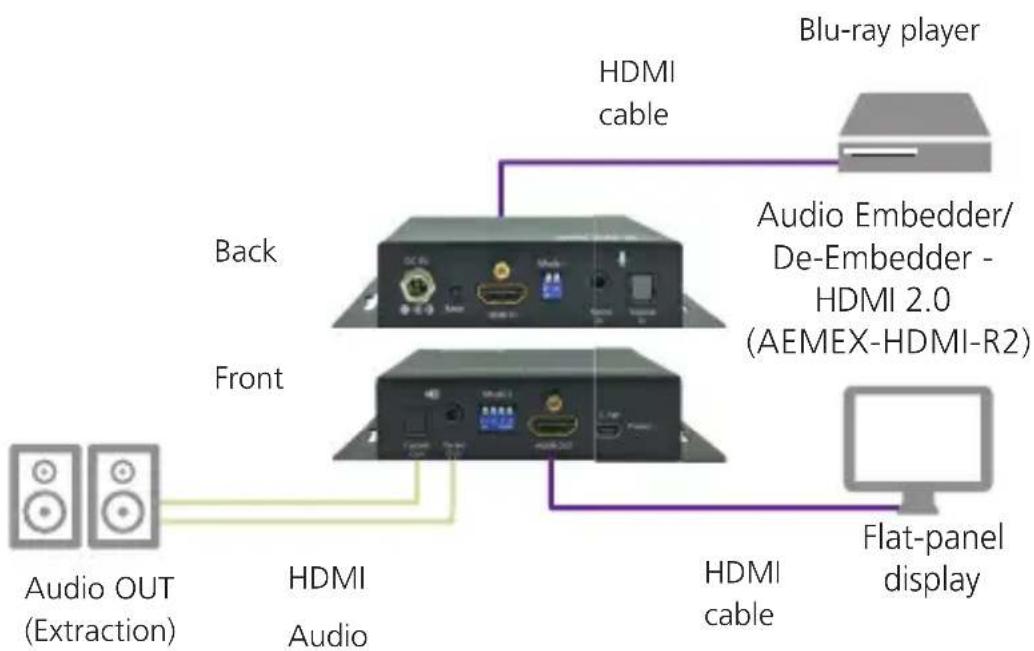
flowchart
graph TD
    A["Audio OUT (Extraction)"] --> B["Back"]
    C["Audio Cable"] --> D["Front"]
    D --> E["Blu-ray player"]
    D --> F["Audio Embedder/De-Embedder - HDMI 2.0 (AEMEX-HDMI-R2)"]
    B --> G["HDMI cable"]
    D --> H["HDMI Audio"]
    D --> I["Flat-panel display"]
Figure 3-2.
4. Contacting Black Box
If you determine that your Audio Embedder/De-Embedder - HDMI 2.0 (AEMEX-HDMI-R2) is malfunctioning, do not attempt to alter or repair the unit. It contains no user-serviceable parts. Contact Black Box Technical Support at 877-877-2269 or info@blackbox.com.
Before you do, make a record of the history of the problem. We will be able to provide more efficient and accurate assistance if you have a complete description, including:
- the nature and duration of the problem.
- when the problem occurs.
- the components involved in the problem.
- any particular application that, when used, appears to create the problem or make it worse.
Shipping and Packaging
If you need to transport or ship your Audio Embedder/De-Embedder - HDMI 2.0 (AEMEX-HDMI-R2):
- Package it carefully. We recommend that you use the original container.
- If you are returning the unit, make sure you include everything you received with it. Before you ship for return or repair, contact Black Box to get a Return Authorization (RA) number.
Black Box Tech Support: FREE! Live. 24/7.
Tech support the way it should be.

natural_image
Close-up of a smiling man wearing a headset against a blue background (no text or symbols visible)Great tech support is just 60 seconds away at 877-877-2269 or blackbox.com.

BLACK BOX®
About Black Box
Black Box provides an extensive range of networking and infrastructure products. You'll find everything from cabinets and racks and power and surge protection products to media converters and Ethernet switches all supported by free, live 24/7 Tech support available in 60 seconds or less.
© Copyright 2016. Black Box Corporation. All rights reserved.
aemex-hdmi-r2_user_rev3_a6.pdf
- Trademarks Used in this Manual
- FEDERAL COMMUNICATIONS COMMISSION AND INDUSTRY CANADA RADIO FREQUENCY INTERFERENCE STATEMENTS
- Table of Contents
- Overview
- Introduction
- Features
- What's Included
- Hardware Description
- DIP Switch Settings
- NOTES:
- Contacting Black Box
- Shipping and Packaging
- Black Box Tech Support: FREE! Live. 24/7.
- BLACK BOX®
- About Black Box
Brand : Black Box
Model : AEMEX-HDMI-R2
Category : Audio/video converter