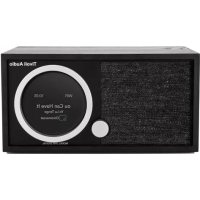
Speaker Model Ten 1509.21 - Radio TIVOLI AUDIO - Free user manual and instructions
Find the device manual for free Speaker Model Ten 1509.21 TIVOLI AUDIO in PDF.


Pick your language and provide your email: we'll send you a specifically translated version.
| Product Type | Table Radio with FM/AM Tuner |
| Brand | Tivoli Audio |
| Model | Speaker Model Ten 1509.21 |
| Color | Classic Wood (Walnut or Cherry) or Black |
| Dimensions (W x H x D) | 11.4 x 7.5 x 5.5 inches (29 x 19 x 14 cm) |
| Weight | Approximately 6 lbs (2.7 kg) |
| Power Supply | AC 120V/60Hz; detachable power cord |
| Radio Bands | FM (88-108 MHz) and AM (530-1710 kHz) |
| Tuning | Analog knob with high-precision vernier dial |
| Speaker Driver | 3-inch full-range driver with tuned port |
| Audio Output | Headphone jack (3.5mm) |
| Additional Inputs | Auxiliary input (3.5mm) for external devices |
| Controls | Volume/bass/treble knobs, tuning knob, band selector |
| Features | Auto frequency lock, sleep timer, battery backup for presets |
| Accessories Included | FM wire antenna, AM loop antenna, power cord, user manual |
| Maintenance | Wipe with a dry, soft cloth; avoid solvents and moisture |
| Safety | Do not expose to rain; unplug during cleaning or storms |
| Spare Parts & Repairability | Contact Tivoli Audio or authorized service centers; no user-serviceable parts inside |
| Warranty | Limited 2-year warranty (varies by region) |
Frequently Asked Questions - Speaker Model Ten 1509.21 TIVOLI AUDIO
How do I set the FM and AM antennas?
For FM, extend the included FM wire antenna fully and position it for best reception. For AM, the built-in antenna is directional; rotate the unit to optimize AM reception.
Can I connect my smartphone to the Model Ten?
Yes, use a 3.5mm audio cable to connect your smartphone to the Aux In jack on the back of the radio.
How do I set the sleep timer?
Press the Sleep button repeatedly to cycle through 15, 30, 45, or 60 minutes. The radio will turn off automatically after the selected time.
What is the battery backup for?
The battery backup (two AA batteries, not included) preserves your station presets during a power outage. Install them in the compartment on the bottom.
How do I improve FM reception?
Try repositioning the FM wire antenna to a higher location, away from metal objects. You can also connect an external FM antenna for better FM signal.
What should I do if the radio produces distorted sound?
Check the volume level and reduce it if too high. Ensure the bass/treble controls are set to the middle. Also, avoid placing the radio near strong magnetic fields.
How do I clean the radio?
Use a soft, dry cloth to wipe the exterior. Do not use any liquids or chemical cleaners, as they may damage the wood cabinet or electronics.
Is there a remote control included?
No, the Model Ten does not come with a remote control. All controls are on the front panel.
Can I use the radio with a 220V power supply?
The standard model is designed for 120V AC. For 220V use, you may need a voltage transformer or a regional specific model. Check the label on the back for voltage rating.
How do I store presets?
Tune to a station, then press and hold one of the five preset buttons until the display blinks or a beep sounds. Release the button to save. The presets are retained with the battery backup.
User questions about Speaker Model Ten 1509.21 TIVOLI AUDIO
0 question about this device. Answer the ones you know or ask your own.
Ask a new question about this device
No questions yet. Be the first to ask one.
Download the instructions for your Radio in PDF format for free! Find your manual Speaker Model Ten 1509.21 - TIVOLI AUDIO and take your electronic device back in hand. On this page are published all the documents necessary for the use of your device. Speaker Model Ten 1509.21 by TIVOLI AUDIO.