
SS-110 - Loudspeaker Acme United - Free user manual and instructions
Find the device manual for free SS-110 Acme United in PDF.


| Product Type | Portable Bluetooth Speaker |
| Brand | Acme United |
| Model | SS-110 |
| Dimensions (W x H x D) | 4.0 x 4.0 x 2.5 inches (10.2 x 10.2 x 6.4 cm) |
| Weight | 0.5 lbs (227 g) |
| Power Source | Built-in rechargeable lithium-ion battery (3.7V, 500mAh) |
| Battery Life | Up to 6 hours at moderate volume |
| Charging Port | Micro USB (5V, 1A) |
| Wireless Connectivity | Bluetooth 4.2 with range up to 33 ft (10 m) |
| Audio Input | 3.5mm AUX jack |
| Speaker Type | Full-range mono driver, passive radiator |
| Output Power | 3W RMS |
| Frequency Response | 100 Hz - 20 kHz |
| Controls | Power, Volume +/-, Play/Pause, Next/Previous track |
| Microphone | Built-in for hands-free calling |
| Compatibility | Smartphones, tablets, laptops, and other Bluetooth-enabled devices |
| Maintenance | Wipe with a soft, dry cloth. Do not use harsh chemicals or submerge in water. |
| Safety | Do not expose to extreme temperatures or moisture. Keep away from children. |
| Spare Parts & Repairability | Not user-serviceable. Contact Acme United customer service for repairs. |
| General Information | Portable speaker for music and calls. Available in black. |
Frequently Asked Questions - SS-110 Acme United
User questions about SS-110 Acme United
0 question about this device. Answer the ones you know or ask your own.
Ask a new question about this device
Download the instructions for your Loudspeaker in PDF format for free! Find your manual SS-110 - Acme United and take your electronic device back in hand. On this page are published all the documents necessary for the use of your device. SS-110 by Acme United.
USER MANUAL SS-110 Acme United
speakers
www.acme.eu
acme®

4 GB User's manual 40 Warranty card
7 LT Vartotojo gidas 41 Garantinis lapas
Thank you for purchasing ACME speakers. Please read this manual carefully FIRST, before using the device.
For your convenience, record the complete model number and the date you received the product together with your purchase receipt and attach it to the warranty and service information. Retain them in the event warranty service is required. If you found this product faulty or damaged due to quality problems, please return it to our repair department or the agency where you bought it.
GB
Important safety precautions
- For the best results, place your speakers on a solid, flat surface when in use.
- Do not place speakers on an unstable cart, stand, tripod, bracket or table.
- Do not touch the metallic portions of your connector cables.
- In order to avoid potential electric shock or other such accidents, do not dismantle or take apart the speakers or their components.
- Keep the volume tuned to the lowest setting before powering your speakers on. Once powered, proceed to raise the volume to a reasonable level.
- Do not expose your speakers to excessive amounts of heat or cold. Keep them in a well-ventilated area to prevent any possible overheating.
- Turn your speakers' power off when they are not in use.
- Do not spill liquids or fluids on your speakers. Make sure they stay dry at all times.
- When connecting an audio device to your speakers, make sure the volume on the audio device is not set too high in order to avoid an excessive signal input.
- This system should not be placed near a source of open flame, such as lighted candles.
- Objects filled with liquids (such as vases) should not be placed near the system.
- The circuit will be damaged if the audio input jack of speaker is connected to an external amplifier.
Cleaning
Unplug the USB cable before cleaning. Do not use liquid or aerosol cleaners. Use a damp cloth for cleaning.
GB
Operations
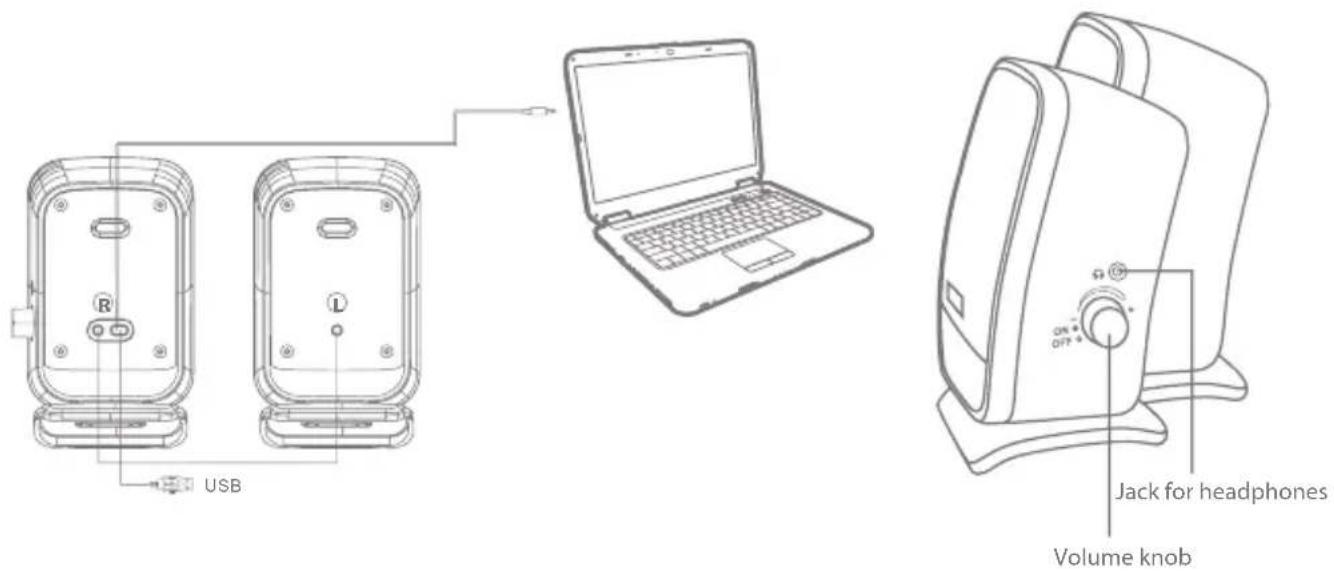
- Rotate the "Volume" knob to the end to the "-" side before inserting the USB plug into the USB port of the PC.
- Insert the USB plug into the USB port of the PC.
- Connect the ∅3.5 mm signal input cable to the audio frequency output jack of the PC or sound appliance.
- Turn the power ON by rotating the "Volume" knob, which is on the side of the speaker, clockwise and keep turning it in the same direction to increase volume.
- Adjust volume by using the "Volume" control knob (rotate to the "+" side to increase or rotate to the "-" side, to decrease volume).
- On the side of the speaker is a ∅3.5 mm headphone stereo jack. Volume in the headphones changes via the PC by software.
- When not in use, turn the "Volume" knob to the minimum level (completely to the "-" side). In this way power will be switched off.
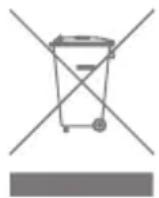
Waste Electrical and Electronic Equipment (WEEE) Symbol

The use of the WEEE symbol indicates that this product may not be treated as household waste. By ensuring this product is disposed of correctly, you will help protect the environment. For more detailed information about the recycling of this product, please contact your local authority, your household waste disposal service provider or the shop where you purchased the product.
lvadas
Olulised ohutusalased juhised
WEEE (Waste Electrical and Electronic Equipment)
Warranty card www.acme.eu/warranty
| Product Product model | |
| Product purchase date Seller name, address | |
| Failures (date, description, position of the person who accepts the product, first name, last name and signature) | |
1. Warranty period
Warranty enters into force starting with the day when the buyer acquires the product from the seller. Warranty period is indicated on the package of the product.
2. Warranty conditions
The warranty is valid only by providing an original document of the product acquisition and this warranty sheet, which includes name of the product model, product purchase date, name and address of the seller.
If it is noticed during the warranty period that the product has faults and these faults where not caused by any of the reasons when the warranty is not applied as indicated in the paragraphs below, manufacturer undertakes to replace the product.
The warranty is not applied to regular testing, maintenance and repair or replacement of the parts which are worn out naturally.
The warranty is not applied if damage or failures occurred due to the following reasons:
usage and/or operating the product without following the manual, technical requirements and safety standards as provided by the manufacturer, and additionally, inappropriate warehousing, falling from heights as well as hard strikes.
• Corrosion, mud, water and sand.
• Repair works, modifications or cleaning, which were performed by a service not authorised by the manufacturer.
• Usage of the spare parts, software or consump materials which do not apply to the product.
- Accidents or events or any other reasons which depend on the manufacturer, which includes lightning, water, fire, magnetic field and inappropriate ventilation.
- If the product does not meet standards and specifications of a particular country, in which it was not bought. Any attempt to adjust the product in order to meet technical and safety requirements such as those in the other countries withdraws all the rights to the warranty service.
- Inappropriate installation of the product, inappropriate if no failures are detected in the product, all the expenses in relation to the service are covered by the buyer.
Garantinis lapas www.acme.eu/warranty

Model: SS-110
speakers
acme®
www.acme.eu


- SPEAKERS
- IMPORTANT SAFETY PRECAUTIONS
- CLEANING
- GB
- OPERATIONS
- WASTE ELECTRICAL AND ELECTRONIC EQUIPMENT (WEEE) SYMBOL
- LVADAS
- OLULISED OHUTUSALASED JUHISED
- WEEE (WASTE ELECTRICAL AND ELECTRONIC EQUIPMENT)
- WARRANTY CARD WWW.ACME.EU/WARRANTY
- WARRANTY PERIOD
- WARRANTY CONDITIONS
- GARANTINIS LAPAS WWW.ACME.EU/WARRANTY
Brand : Acme United
Model : SS-110
Category : Loudspeaker