
8096 - Vacuum Cleaner IMETEC - Free user manual and instructions
Find the device manual for free 8096 IMETEC in PDF.


| Product Type | Canister Vacuum Cleaner |
| Brand | Imetec |
| Model | 8096 |
| Power Consumption | 1200 W |
| Suction Power | 250 AW |
| Dust Capacity | 1.5 L |
| Bag Type | Bagless (Cyclonic) |
| Filter Type | HEPA washable filter |
| Filtration Level | 99.9% of particles down to 0.3 microns |
| Noise Level | 75 dB(A) |
| Cable Length | 5 m |
| Weight | 4.5 kg |
| Dimensions (L x W x H) | 400 mm x 250 mm x 300 mm |
| Accessories Included | Crevice tool, brush tool, upholstery tool |
| Dust Indicator | Yes (visual max line) |
| Auto Shut-off | Yes (overheat protection) |
| Maintenance | Empty dust container after each use; wash filter monthly |
| Spare Parts Available | Yes (filter, accessories on Imetec website) |
| Power Cord Type | Retractable |
| Warranty | 2 years |
Frequently Asked Questions - 8096 IMETEC
User questions about 8096 IMETEC
0 question about this device. Answer the ones you know or ask your own.
Ask a new question about this device
Download the instructions for your Vacuum Cleaner in PDF format for free! Find your manual 8096 - IMETEC and take your electronic device back in hand. On this page are published all the documents necessary for the use of your device. 8096 by IMETEC.
USER MANUAL 8096 IMETEC
Operating instructions
Tel. +39.035.688.111 Fax +39.035.320.149
IMETEC
TYPE MI201
9
[A]
GUIDA ILLUSTRATIVA
ESPLOSO [FIG. A] ILLUSTRATIVE GUIDE
ILLUSTRATIVE GUIDE EXPLOPED VIEW (FIG. A)
GUÍA IL USTRATIVA
DESPICECE [FIG. A]
GUIA ILUSTRADO
PORMENOR [FIG. A]
SCHEDA PRODOTTO
PRODUCT DATA SHEET
FICHA DEL PRODUCTO
FICHA DO PRODUTO
ΚΑΡΤΑ ΠΡΟΪΟΝΤΟΣ
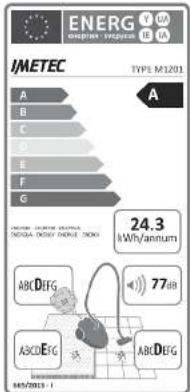
Electricity consumption test in accordance with EU Regulation 665/2013, carried out with the combined brush (4)
Dear customer, IMETEC thanks you for having purchased this product. We are certain you will appreciate the quality and reliability of this appliance, designed and manufactured with customer satisfaction in mind. This instruction manual has been drawn up in compliance with the European Standard EN 62079.

IMPORTANT!
uctions and warnings for safe use
Before using this appliance, carefully read the instructions and in particular the safety warnings, which must be complied with. Keep this manual and illustrative guide with the appliance for future consultation. Should you pass the appliance on to another user, make sure to also include this documentation.
NOTE: should certain parts of this booklet be difficult to understand or should doubts arise, contact the company before using the product, at the address indicated on the last page.
INDEX
SAFETY WARNINGS PAGE 9
SYMBOLS PAGE 11
DESCRIPTION OF THE APPLIANCE AND ACCESSORIES PAGE 11
ASSEMBLY PAGE 12
ACCESSORIES PAGE 12
USE PAGE 12
MAINTENANCE PAGE 13
STORING AND CARING FOR THE PRODUCT PAGE 15
TROUBLESHOOTING PAGE 15
DISPOSAL PAGE 16
ASSISTANCE AND WARRANTY
ILLUSTRATIVE GUIDE
TECHNICAL DATA
PAGE 16
I-II-III
III
SAFETY WARNINGS
- After having removed the appliance from its packaging, verify its integrity based on the drawing and any presence of damage caused by transport. If in doubt, do not use the appliance and contact an authorised service centre.
- Do not let children play with the packaging! Keep the plastic bag out of the reach of children - risk of suffocation!
EN
- Before connecting the appliance, check that the technical data (21) match the mains supply. The identification technical data (21) are found on the appliance and on the power supply/battery charger (if present).
- This appliance must be used only for the purpose for which it was designed, namely as a vacuum cleaner for home use. Any other use is considered not compliant and therefore dangerous.
- This appliance can be used by children aged 8 years and above and persons with reduced physical, sensory or mental capabilities or lack of experience and knowledge if they have been given supervision or instruction concerning the use of the appliance in a safe way and understand the risks involved. Children must not play with the appliance. The appliance cannot be cleaned or serviced by children without adult supervision.
-
DO NOT use the vacuum cleaner to vacuum:
-
burning ashes, cigarette butts, etc.;
- liquids, such as carpet cleaners;
- sharp or hard objects, such as nails or large glass shards;
- fine powder, such as cement;
-
toner powder (for laser printers, copy machines, etc.).
-
✉ NEVER use the vacuum cleaner without inserting the dust bag, dust container or filter.
- DO NOT use the appliance with wet hands, damp feet or barefoot.
- DO NOT pull the power cable or the appliance itself to remove the plug from the socket.
- DO NOT expose the appliance to humidity or weather conditions (rain, sun, etc.).
- Always disconnect the appliance from the mains supply before cleaning or performing maintenance and when the appliance is not in use.
- If the appliance is faulty or malfunctions, switch it off and do not tamper with it. Any repairs must only be carried out by an authorised technical service centre.
- If the power cable is damaged it must be replaced by an authorised technical service centre, so as to prevent all risks.
- NEVER pull or lift the appliance by its cable.
- NEVER submerge the appliance in water or other liquids.
EN
- ✉ NEVER direct the flexible hose, pipe or any other accessory towards eyes or ears and do not put them in your mouth when they are connected to the vacuum cleaner.
- Always use the appliance with a motor protection filter to prevent damaging the motor and the vacuum cleaner.
- The power cable must always be fully unwound to prevent hazardous overheating.
SYMBOLS
 | Protection class II ON/OFF switch1 | |
 | Automatic cable winding Prohit |  |
 | Carpets and rugs Hard floors |  |
DESCRIPTION OF THE APPLIANCE AND ACCESSORIES (Fig. A)
Refer to Figure [A] in the illustrative guide to verify your appliance equipment. All the figures are on the cover pages of these instructions for use.
- Handle
- Air flow manual adjustment device
- Suction pipe
3A. Adjustable telescopic pipe
3B. Telescopic pipe adjustment button
- Combination carpet/floor brush
4A. Brush position toggle switch - Flexible suction pipe
- Flexible suction pipe fastening button
- Discharge filter grid
- Electronic power control
- Automatic cable winding
- ON/OFF switch
- Dust container release button
- Handle
- Suction inlet
-
Power cable with plug
-
Dust collection system
15A. Dust container
15B. Upper cover opening key
15C. Upper cover
15D. Hepa filter
15E. Sponge filter
-
Outlet filter
-
Parking position
17A. Horizontal
17B. Vertical
- Accessories
18A. Crevice tool
18B. Dusting nozzle
18C. Upholstery nozzle
18D. Parquet brush
- Accessory-holder on the telescopic pipe
- Clogged filter LED
- Technical data

IMPORTANT! The vacuum cleaner has a motor protection thermostat, which intervenes in the case of overheating (caused by the inlet opening, filters, etc. being clogged). If it is triggered, press the ON/OFF button to switch the appliance off and let it cool down for a few hours. Verify whether dust has clogged the filters or the inlet opening before restarting the appliance.
ASSEMBLY
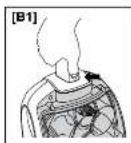
- Connect the flexible suction pipe (5) to the inlet connection (13) of the appliance. Pay attention to the correct position of the stop device; it is fastened securely when it clicks into place [Fig. B1].
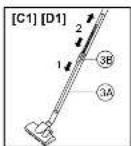
- Connect the handle (1) of the flexible pipe to the suction pipe (3). Adjust the length of the telescopic pipe by pressing the adjustment button (3B) in the direction of the arrow and removing or retracting the telescopic pipe [Fig. C1].
- Select the combination brush (4) or the accessory (18) suited to the surface to be cleaned and connect the part to the telescopic pipe (3).
ACCESSORIES
Combination carpet/floor brush (4)
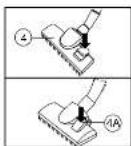
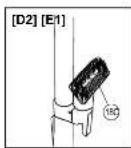
adjust the combination brush according to the type of flooring, using the toggle switch (4A) [Fig. D1]:
- Toggle switch (4A) with the symbol facing upwards: for hard flooring.
- Toggle switch (4A) with the symbol facing upwards: for rugs and carpets.
Your appliance is equipped with the following attachments:
Crevice tool (18A): To clean corners and crevices, such as radiators, skirting boards, blinds and awnings.
Dusting nozzle (18B): To clean small objects, audio and TV appliances, computers and furniture.
Upholstery nozzle (18C): To clean sofas, armchairs, upholstered chairs and curtains.
Parquet brush (18D): Special brush to clean parquet floors.
NOTE:
The accessories can be connected to the suction pipe (3) or directly to the handle (1).
One of the three accessories can be stored in the accessory-holder (19) on the telescopic pipe (3) if it is not used.
USE
Pull the power cable (14) completely up to the red mark, and insert the plug into the socket. The yellow mark on the cable is before the end part of the cable with the red mark.

Using the vacuum cleaner with the cable fully or partly wound involves an overheating hazard!
NOTE:
Bear in mind that a new appliance can develop odours the first few times it is used.
These odours are harmless and disappear shortly afterwards. Ventilate the room.
Press the ON/OFF button ⏻ (10) once to switch the vacuum cleaner on or off.
The electronic power control (8) allows you to adjust the suction force:
Minimum: for curtains, fine and delicate fabrics.
Average: ideal for cleaning sofas, armchairs, upholstered chairs, rugs and carpets.
Maximum: for smooth floors.
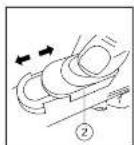
The suction power can also be changed by means of the manual adjusting device of the air flow (2) found on the handle (1) [Fig. E1].
Closed: Increases the suction power.
Open: Reduces the suction power.
Open the adjustment device of the air flow to reduce the suction power if an object, which has been drawn, blocks the opening.
Switch the appliance off after use, by pressing the ON/OFF button ⏻ (10) and disconnect the plug from the socket.
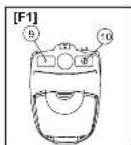
Press the automatic cord winding button (9) to wind the power cable [Fig. F1].
Hold the plug while winding the cable in order to prevent whiplash.
The flexible suction pipe (5) can be disconnected from the appliance before putting it away. To do so, press the flexible pipe fastening buttons (6) and disconnect the flexible pipe.
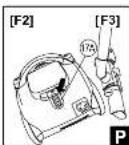
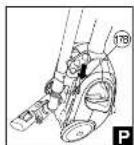
The suction pipe (3) or the combined brush (4) can be stored by hooking it to the appliance; the relative figures in the illustrative guide are marked with the parking symbol [Fig. F2, F3].
MAINTENANCE

ATTENTION!
Switch the appliance off and disconnect the plug from the socket before opening the appliance! Make sure all cleaned parts are completely dry before reusing the appliance.
CLEANING THE APPLIANCE
When necessary, clean the appliance with a damp cloth.

ATTENTION!
DO NOT USE SOLVENTS OR OTHER AGGRESSIVE OR ABRASIVE DETERGENTS. THIS CAN DAMAGE THE SURFACE.
EN
CLEANING THE COMBINATION BRUSH (4)
With the motor ON, rub the brush with your hand to remove the dust and fluff, which will be drawn.
CLEANING THE DUST COLLECTION SYSTEM (15)
When the suction power of the vacuum cleaner decreases or the clogged filter LED (20) turns red, remove the dust from the appliance.

ATTENTION! Empty the dust compartment (15) and clean the filters (15D-15E) after every use.
If the suction power of the vacuum cleaner does not improve after cleaning the dust collection system, the Hepa filter and the sponge filter of the vacuum cleaner could be very dirty. In this case, replace them.
If replacing the Hepa filter (15D), it is recommended to also replace the other filtering elements.
Clean the dust collection system following the instructions below and paying attention to the figures in the illustrative guide.
CLEANING THE DUST CONTAINER (15)
- Press the key (6) and disconnect the suction flexible pipe (5) from the appliance.
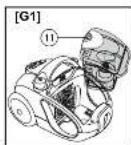
- Press the release button (11) to extract the dust container (15A) from the appliance [Fig. G1].
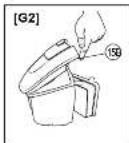
- Press the upper cover opening button (15B) to open the upper cover (15C) and empty the container [Fig. G2].
CLEANING THE HEPA FILTER (15D) AND THE SPONGE FILTER (15E)
- Remove the dust collection system (15) from the appliance [Fig. G1].
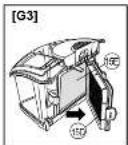
- Remove the Hepa filter (15D) from the dust collection system (15) [Fig. G3].
- Remove the sponge filter (15E).
- If the Hepa filter (15D) and the sponge filter (15E) are clogged with dust, wash them carefully with cold water. Take care not to damage it and let it dry completely.
• Refit the Hepa filter (15D) and the sponge filter (15E) on the dust collection system (15). - Insert the dust collection system (15).
- Insert the dust collection system before restarting the appliance.
CLEANING THE OUTLET FILTER (16)
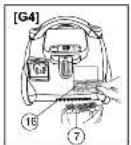
- Press the interlock of the outlet filter grille (7) and remove the outlet filter (16) [Fig. G4].
- If the outlet filter (16) is clogged with dust, wash it carefully with cold water. Take care not to damage it and let it dry completely.
- Refit the outlet filter (16) in the appliance [Fig. G4].
- Refit the outlet filter grille (7) and snap the interlock in place.

ATTENTION!
Let the filters dry for at least 24 hours after washing them. Do not reinstall the filter if it is damp!
REPLACING THE HEPA FILTER (15D)
- Remove the dust collection system from the appliance [Fig. G1].
- Remove the Hepa filter (15D) from the support and replace it with a new filtering insert [Fig. G3].
- Refit the appliance and insert the dust collection system before restarting it.
REPLACING THE OUTLET AIR FILTER (16)
- Press the interlock of the outlet filter grille (7) and remove the outlet filter (16). Replace it with a new one [Fig. G4].
- Refit the outlet filter grille (7) and snap the interlock in place.
STORING AND CARING FOR THE PRODUCT
The combined brush (4) can be hooked in the relative seat [17A or 17B] when the vacuum cleaner is in the parking position [P - horizontal (F2) or vertical (F3)].
TROUBLESHOOTING
| PROBLEM SOLUTION | |
| The appliance does not go on. | ·Ensure that the plug is connected to the socket.·Make sure the ON/OFF button has been pressed ➊. |
| The appliance turns off during use and does not turn on again. | ·The vacuum cleaner is equipped with a protective motor thermostat that shuts off the appliance in the event of overheating! (caused by obstructing objects or a clogged dust collection system).·If triggered, switch the appliance off by pressing the ON/OFF switch ➊, disconnect the plug from the socket and let it cool down completely for a few hours.·Remove any dust or the obstructing object before restarting the appliance. |
| The vacuum cleaner does not suction well. | ·Electronic power control set to the minimum: Increase the power to Medium or Max.·The dust collection system (15) is full: clean the dust compartment (15A).·The filter is clogged: clean or replace the filter. |
| The clogged filter indicator is on. | ·The dust collection system (15) is full: empty the dust collection compartment (15A).·The filter is clogged: clean or replace the filter.·The clogged filter LED (20) can even light up if the power decreases, caused by an object that is too big clogging the suction pipes: switch the appliance off, disconnect the plug from the socket and remove the object from the vacuum cleaner.·A crevice tool is being used: reduce suction from the electronic power control. |
| The dust collection system does not close correctly. | ·A safety device does not allow the dust collection system to be inserted if the Hepa filter (15D) is missing.·Make sure the Hepa filter is present (15D) and it is fitted correctly. |
EN
The vacuum cleaner produces odours the first few times it is used.
- These odours are harmless and disappear shortly afterwards. Ventilate the room.
DISPOSAL

The product is packaged in recyclable materials. Dispose of packaging in accordance with the environmental protection standards.

The appliance must be disposed of in compliance with EU standard 2002/96/EC. The recyclable materials contained in the appliance must be collected to prevent environmental pollution. For further information contact the local waste authority or the appliance retailer.
ASSISTANCE AND WARRANTY
To request repairs or purchase spare parts please contact IMETEC's authorised customer service centre on the Toll-Free Number below or via the website.
The appliance is covered by the manufacturer warranty. For details, read the attached warranty sheet.
Failure to comply with the instructions for use and maintenance provided in this manual will render the manufacturer's warranty null and void.
Tel. +39.035.688.111 Fax +39.035.320.149
0114(MMY人)
MIOO1523

MANUAL DE INSTRUÇÕES PARA O USO DO ASPIRADOR DE PÓ
PROBLEMAS E SOLUÇÕES PÁG. 31
ELIMINAÇÃO PÁG. 32
ASSISTÊNCIA E GARANTIA
GUIA ILUSTRADO
DADOS TÉCNICOS
PÁG. 32
I-II-III
III
AVISOS SOBRE A SEGURANÇA
PROBLEMAS E SOLUÇÕES
ASSISTÊNCIA E GARANTIA
Tel. +39.035.688.111 Fax +39.035.320.149
0114(MM万人)
MIOO1523
- IMPORTANT!
- INDEX
- SAFETY WARNINGS
- EN
- DESCRIPTION OF THE APPLIANCE AND ACCESSORIES (Fig. A)
- ASSEMBLY
- ACCESSORIES
- Combination carpet/floor brush (4)
- Your appliance is equipped with the following attachments:
- NOTE:
- USE
- MAINTENANCE
- ATTENTION!
- CLEANING THE APPLIANCE
- CLEANING THE COMBINATION BRUSH (4)
- CLEANING THE DUST COLLECTION SYSTEM (15)
- ATTENTION! Empty the dust compartment (15) and clean the filters (15D-15E) after every use.
- CLEANING THE DUST CONTAINER (15)
- CLEANING THE HEPA FILTER (15D) AND THE SPONGE FILTER (15E)
- CLEANING THE OUTLET FILTER (16)
- Let the filters dry for at least 24 hours after washing them. Do not reinstall the filter if it is damp!
- REPLACING THE HEPA FILTER (15D)
- REPLACING THE OUTLET AIR FILTER (16)
- STORING AND CARING FOR THE PRODUCT
- DISPOSAL
- ASSISTANCE AND WARRANTY
- MANUAL DE INSTRUÇÕES PARA O USO DO ASPIRADOR DE PÓ
- AVISOS SOBRE A SEGURANÇA
- PROBLEMAS E SOLUÇÕES
- ASSISTÊNCIA E GARANTIA
Brand : IMETEC
Model : 8096
Category : Vacuum Cleaner