BM14S - Subwoofer DYNAUDIO - Free user manual and instructions
Find the device manual for free BM14S DYNAUDIO in PDF.


| Product Type | Active Subwoofer |
| Brand | Dynaudio |
| Model | BM14S |
| Driver Size | 14 inches |
| Amplifier Power | 150W RMS |
| Frequency Response | 25 Hz – 150 Hz (±3 dB) |
| Crossover Frequency | Adjustable 50–150 Hz |
| Phase Switch | 0° / 180° |
| Inputs | XLR, RCA |
| Dimensions (W x H x D) | 403 x 500 x 450 mm |
| Weight | 29 kg |
| Power Supply | 220-240V AC, 50/60 Hz |
| Standby Power Consumption | < 0.5 W |
| Cabinet Material | MDF with vinyl finish |
| Color | Black |
| Included Accessories | Power cable, user manual |
| Cleaning | Use dry cloth; do not use liquids |
| Safety Features | Overload protection, magnetic shielding |
| Spare Parts Availability | Contact Dynaudio service |
| Repairability | Serviceable by qualified technicians |
Frequently Asked Questions - BM14S DYNAUDIO
User questions about BM14S DYNAUDIO
0 question about this device. Answer the ones you know or ask your own.
Ask a new question about this device
Download the instructions for your Subwoofer in PDF format for free! Find your manual BM14S - DYNAUDIO and take your electronic device back in hand. On this page are published all the documents necessary for the use of your device. BM14S by DYNAUDIO.
USER MANUAL BM14S DYNAUDIO
natural_image
Close-up of a black square speaker with concentric circular sound waves and mounting holes (no text or symbols visible)dynaudioacoustics
IF IT'S THERE - YOU'LL KNOW IT
English
-
Important Safety Instructions .... 1 Intended use .... 2
-
About the BM14S 2
-
About this operating manual .... 3 Used signs and symbols .... 3
-
Getting started....4 Unpacking the subwoofer....4 Grille....4 Controls and connections....5 Connecting the subwoofer....6
-
Operation ....8 Switching the subwoofer on ....8 Adjusting the volume (Gain) ....9 Selecting the subwoofer cut-off frequency (Lowpass) ....9 Setting the phase (Phase)....10 Setting the satellite cut-off frequency (Highpass)....10
-
Troubleshooting ..... 11
-
Maintenance .... 12 Cleaning the subwoofer .... 12 Changing the fuse .... 13
-
Warranty....13
-
Technical Specifications ..... 14
Deutsch
natural_image
Black square speaker with metallic grille and circular head (no visible text or symbols)
natural_image
Black cube-shaped electronic device with a circular lens, shown against a white background (no text or symbols visible)1. Important Safety Instructions

-
Read these instructions.
-
Keep these instructions.
-
Heed all warnings.
-
Follow all instructions.
-
Do not use this apparatus near water.
-
Clean only with dry cloth.
-
Do not block any ventilation openings. Install in accordance with the manufacturer's instructions.
-
Do not install near any heat sources such as radiators, heat registers, stoves, or other apparatus (including amplifiers) that produce heat.
-
Do not defeat the safety purpose of the polarized or grounding-type plug. A polarized plug has two blades with one wider than the other. A grounding type plug has two blades and a third grounding prong. The wide blade or the third prong are provided for your safety. If the provided plug does not fit into your outlet, consult an electrician for replacement of the obsolete outlet.
-
Protect the power cord from being walked on or pinched particularly at plugs, convenience receptacles, and the point where they exit from the apparatus.
-
Only use attachments/accessories specified by the manufacturer.
-
Use only with the cart, stand, tripod, bracket, or table specified by the manufacturer, or sold with the apparatus. When a cart is used use caution when moving the cart/apparatus combination to avoid injury from tip-over.
-
Unplug this apparatus during lightning storms or when unused for long periods of time.
-
Refer all servicing to qualified service personnel. Servicing is required when the apparatus has been damaged in any way, such as power-supply cord or plug is damaged, liquid has been spilled or objects have fallen into the apparatus, the apparatus has been exposed to rain or moisture, does not operate normally, or has been dropped.
-
WARNING: To reduce the risk of fire or electric shock, this apparatus should not be exposed to rain or moisture and objects filled with liquids, such as vases, should not be placed on this apparatus.
-
To completely disconnect this equipment from the mains, disconnect the power supply cord plug from the receptacle.
-
The mains plug of the power supply cord shall remain readily operable.
-
Danger: To reduce the risk of electric shock, do not remove the back panel and do not expose the apparatus to rain or moisture. No user serviceable parts inside. Refer servicing to qualified personnel.

Intended use
The Subwoofer Dynaudio Acoustics BM14S is a loudspeaker with integrated amplifier for the reproduction of deepest audio frequencies. It was developed for the use in a professional studio environment and may be operated also only there. With not intended use security and operability cannot be guaranteed.
2. About the BM14S
The BM14S subwoofer is intended to operate with the BM series monitors. The BM14S will complement stereo and multichannel monitoring equally well and when daisy-chaining of subwoofers is needed, it sports a low level LFE input/output.
For significant control and enhancement of the general performance, the BM14S is a closed cabinet type. This creates an internal pressure by which the woofer gains a considerable amount of precision when it comes to the reproduction of low frequency signals. This precision is easily audible and it augments the feeling of reality that the listener experiences.
The BM14S is very suitable for the following production environments:
- Post Production
• Music Recording and Mixing
• Film Editing (smaller rooms)
• DVD authoring and Mastering - Multichannel Production (Audio or Audio for pictures)
- Broadcast
- Edit suites
• OB vans
3. About this operating manual
Used signs and symbols
Safety signs

The exclamation point within an equilateral triangle is intended to alert the user to the presence of important operating and maintenance (servicing) instructions in the literature accompanying the product.

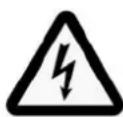
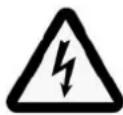
The lightning flash with arrowhead symbol within an equilateral triangle is intended to alert the user to the presence of uninsulated “dangerous voltage” within the product's enclosure that may be of sufficient magnitude to constitute a risk of electric shock to persons.
Signal words
| CAUTION | Indicates a potentially hazardous situation which, if not avoided, could result in damage to equipment. |
| ▲ CAUTION | Indicates in combination with a safety sign a potentially hazardous situation which, if not avoided, could result in minor or moderate injury or damage to equipment. |
| ▲ WARNING | Indicates in combination with a safety sign a potentially hazardous situation which, if not avoided, could result in death or serious injury. |
| ▲ DANGER | Indicates in combination with a safety sign a hazardous situation which, if not avoided, will result in death or serious injury. |
Text markups
| Note: | Additional information is provided, which is important to fully understand the BM14S and how to operate it. |
| ▶ | The arrow will identify steps to be performed. Please follow the instructions carefully. |
| 1. | Multiple steps that should be performed consecutively are numbered. Please follow these instructions carefully. |
| 2. | |
| 3. | |
| italic | The result of a step is printed in italics. This may help you verify the success of a step. |
| bold Controls are printed in bold type face. | |
1
2

3
4. Getting started
Unpacking the subwoofer
- Unpack the subwoofer on a clean, even and soft area; floor carpeting is very suitable.
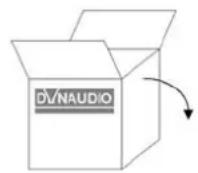
- The packaging should be opened from the top (1). Remove all accessories that come packed with the subwoofer (such as AC power cord and grille). Do not remove the top part of the protective material.
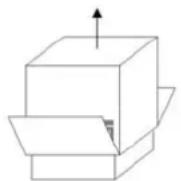
- With the protective material still in place but with accessories removed, carefully tilt the packaging on its side (1) and tilt again to turn it upside-down (2). Ensure that no part of the top-cover is obstructing the opening at the top.
- The outer packaging can now be lifted away from the subwoofer itself (3). Remove the protective material that now is on top.
- Open the bag and remove such from around the base of the subwoofer.
- Again, carefully tilt the subwoofer on its side and again to turn it onto its feet. Note that the top part of the protective material will now come off easily so ensure that the subwoofer doesn't drop or slide away in the process.
Check that the contents are complete:
- Subwoofer: The factory-set power requirements (refer to label on rear of subwoofer) should correspond for the region where the subwoofer was purchased. Refer also to chapter "Important Safety Instructions" on page 1.
- Front baffle grille.
- AC mains lead. The supplied lead should be suitable for the region where the subwoofer was purchased.
- Owners Manual.
Grille
The subwoofer can be operated without the grille. However, it is recommended that the grille is mounted during normal use to help prevent accidental damage or dirt settling on the cone of the loudspeaker. With subwoofers, the influence of the grille on the sound is virtually negligible.
To remove the grille:
▶ Gently pull the grille at all corners.
To fit the grille:
▶ Line up the studs with the corresponding front baffle holes.
▶ Gently push the grille in at all corners.
Note: Be careful when mounting the grille not to touch the cone of the loudspeaker itself.

text_image
DV/NAUDIO DV/NAUDIO 1 2 AC BI POWER Sub Setup LFE LFE/Slave Power On Auto Min Max Gain 50 Hz 150 Hz Lowpass 0° 180° Phase 3 4 5 6 7 SAT/SUB 11 10 9 Left Channel Slave LFE Mode In Out Right Channel Highpass SAT Setup 8Controls and connections
1 AC IN
Mains power input.
2 POWER ON ( Main )
Main power switch (to switch the subwoofer manually on and off).
LED shows operation mode:
• red: subwoofer switched on and in mute mode
- green: subwoofer is activated
3 Power (Mode)
- On: subwoofer is permanently on
• Auto: subwoofer switches on when signal is detected
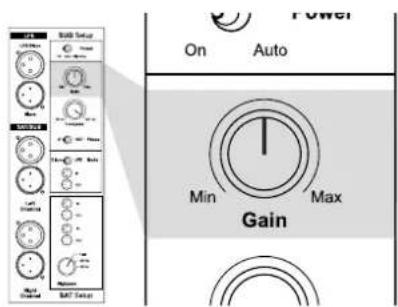
4 G a i n
Subwoofer volume level.
5 Lowpass
Subwoofer lowpass frequency: continuously variable from 50 to 150 Hz.
6 Phase
Phase setting: phase can be set to 0^ or 180^ .
7 M o d e
Subwoofer operation mode LFE or Slave:
• LFE: setting for normal use and Master use
- Slave: setting for second and all following subwoofers
8 High pass
Allows cutting off low frequencies of the signal provided at the SAT/SUB output:
- Flat: signal is not processed
• 60: cut-off frequency at 60 Hz
• 80: cut-off frequency at 80 Hz
9 SAT/SUB (output)
Output for satellite system to be connected. This signal is processed according to the Highpass setting.
10 SAT/SUB (input)
Input for full bandwidth signal. This signal will be processed according to the Highpass setting and provided at the SAT/SUB output.
11 LFE
• LFE/Slave: input for LFE signal
- Slave: output to next subwoofer if installed
Terminal pinout (sockets 9, 10 and 11)
$$ 1 = 0 2 = + 3 = - $$
Connecting the subwoofer
 | CAUTION |
| Damage due to improper connections!Improper connections may damage the device.► Set the mains power switch to OFF before connecting the BM14S.► Only switch the subwoofer on (mains power switch to ON) after all connections and set up steps have been properly completed. |

flowchart
graph TD
    A["LFE/Slave"] --> B["Mode"]
    B --> C["+"]
    C --> D["Gain"]
    D --> E["Phase"]
    E --> F["+"]
    F --> G["SAT/SUB Slave"]
    H["SAT/SUB"] --> I["Lowpass"]
    H --> J["Highpass"]
    I --> K["+"]
    J --> K
    K --> L["+"]
    L --> M["Mode"]
    N["SAT/SUB"] --> O["Highpass"]
    N --> P["Lowpass"]
Subwoofer inputs
The BM14S provides two different signal inputs:
LFE/Slave
This input allows the LFE (Low Frequency Effect) channel to be connected.
The signal is:
- processed and reproduced by the subwoofer
- routed to the Slave output for a second subwoofer to be connected.
The Lowpass control has no impact on this input.
SAT/SUB
This input allows the connection of a full bandwidth signal.
The signal is:
• reproduced by the subwoofer,
- routed to the SAT/SUB output terminals. Low frequencies are cut-off according to the Highpass setting,
- routed to the Slave output for a second subwoofer to be connected. High frequencies are cut-off according to the Lowpass setting.
text_image
1 LFE 2 Stereo LFE LFS/Show Sub SUB Setup Power Slope Radio Radio Radio Sat/Sub Left Channel Right Channel Sat: LLC Mode Sat: 100 MHz Sat: 50 MHz Sat: 50 MHz Sat: 50 MHz Sat: 50 MHz Sat: 50 MHz Sat: 50 MHz Sat: 50 MHz Sat: 50 MHz Sat: 50 MHz Sat: 50 MHz Sat: 50 MHz Sat: 50 MHz Sat: 50 MHz Sat: 50 MHz Sat: 50 kHz Sat: 50 kHz Sat: 50 kHz Sat: 50 kHz Sat: 50 kHz Sat: 50 kHz Sat: 50 kHz Sat: 50 kHz Sat: 50 kHz Sat: 50 kHz Sat: 50 kHz Sat: 50 kHz Sat: 50 kHz Sat: 50 kHz Sat: 50 kHz SAT SetupConnecting a single subwoofer
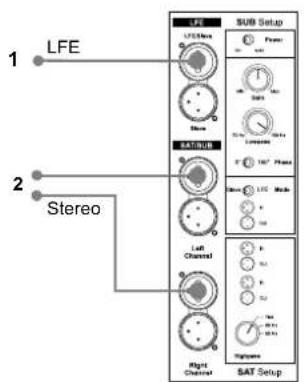
Connecting as LFE channel (1)
▶ Connect subwoofer to LFE/Slave input.
Connecting as subwoofer for satellites (2)
▶ Connect full bandwidth signal to SAT/SUB input. Sub reproduces sum of right and left signal.
Note: • You can also use both connection types. The signals will be combined in the BM14S and routed accordingly. This allows the BM14S to reproduce both the LFE channel information as well as the bass range of the connected satellite system.
- Use Slave mode if you want to use an external bass management system.

text_image
LFE SUB Setup LFE SUB Setup LFE Sub... Stereo LFE Sub... Stereo Sub... Stereo Sub... Stereo Sub... Stereo Sub... Stereo Sub... Stereo Sub... Stereo Sub... Stereo Sub... Stereo Sub... Stereo Sub... Stereo Sub... Stereo Sub... Stereo Sub... Stereo Sub... Stereo Sub... Stereo Sub... Stereo Sub... Stereo Sub... Stereo Sub... Stereo Sub... Stero Sub... Stereo Sub... Stereo Sub... Stereo Sub... Stereo Sub... Stereo Sub... Stereo Sub... Stereo Sub... Stereo Sub... Stereo Sub... Stereo Sub... Stereo Sub... Stereo Sub... Stereo Sub... Stereo Sub... Stereo Sub... Stereo Sub... Stereo Sub... Stereo Sub... Stereo Sub... Steroo Sub... Steroo Sub... Steroo Sub... Steroo Sub... Steroo Sub... Steroo Sub... Steroo Sub... Steroo Sub... Steroo Sub... Steroo Sub... Steroo Sub... Steroo Sub... Steroo Sub... Steroo Sub... Steroo Sub... Steroo Sub... Steroo Sub... Steroo Sub... Steroo Sub... Steroo Sub... Sterooo Sub... Sterooo Sub... Sterooo Sub... Sterooo Sub... Sterooo Sub... Sterooo Sub... Sterooo Sub... Sterooo Sub... Sterooo Sub... Sterooo Sub... Sterooo Sub... Sterooo Sub... Sterooo Sub... Sterooo Sub... Sterooo Sub... Sterooo Sub... Sterooo Sub... Sterooo Sub... Sterooo Sub... Sterooo Sub... Steroo Sub- Stable Setup (Master) LFE LFE/State Power 0.5V 1.5V 2.5V 3.5V 4.5V 5.5V 6.5V 7.5V 8.5V 9.5V 10.5V 11.5V 12.5V 13.5V 14.5V 15.5V 16.5V 17.5V 18.5V 19.5V 20.5V 21.5V 22.5V 23.5V 24.5V 25.5V 26.5V 27.5V 28.5V 29.5V 30.5V 31.5V 32.5V 33.5V 34.5V 35.5V 36.5V 37.5V 38.5V 39.5V 40.5V 41.5V 42.5V 43.5V 44.5V 45.5V 46.5V 47.5V 48.5V 49.5V 50.5V 51.5V 52.5V 53.5V 54.5V 55.5V 56.5V 57.5V 58.5V 59.5V 60.5V 61.5V 62.5V 63.5V 64.5V 65.5V 66.5V 67.5V 68.5V 69.5V 70.5V 71.5V 72.5V 73.5V 74.5V 75.5V 76.5V 77.5V 78.5V 79.5V 80.5V 81.5V 82.5V 83.5V 84.5V 85.5V 86.5V 87.5V 88.5V 89.5V 90.5V 91.5V 92.5V 93.5V 94.5V 95.5V 96.5V 97.5V 98.5V 99.5VMultiple subwoofer connections
The BM14S can be used stand-alone or together with multiple subwoofer units. Using multiple units may be helpful if the listening room is quite large or has difficult acoustic conditions.
When using two or more subwoofers, the first one (designated "Master") controls the following subs (designated "Slave") via a subwoofer cable.
To connect multiple subwoofers:
- Connect the first subwoofer as described before.
- Set Mode switch of first subwoofer to LFE.
- From the Slave output of the first subwoofer connect a XLR cable to the LFE/Slave input of the following subwoofer. This one now becomes the slave.
- Set the Mode switch of the second subwoofer to Slave.
▶ Further subwoofers can be connected in the same way. Set the Mode switch of all following subwoofers to Slave respectively.
Note: • When using multiple subwoofers in a Master-Slave setup, it is recommended that the subwoofers are all the same model. • If you wish to use multiple subwoofers with full individual control, set the Input switch for all to the LFE position. From the source subwoofer output, use a Y-connector.

text_image
LFE SUB Setup LIFE SAR Setup SAR SAR SAR SAR SAR SAR SAR SAR SAR SAR SAR SAR SAR SAR SAR SAR SAR SAR SAR SAR SAR SAR SAR SAR SAR SAR SAR SAR SAR SAR SAR SAR SAR SAR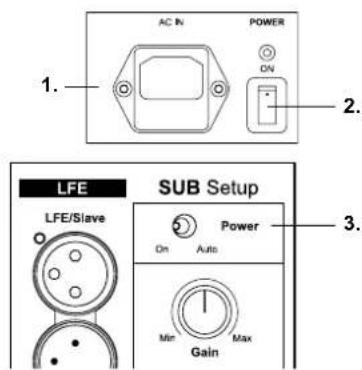
text_image
AC IN POWER ON 1. 2. LFE SUB Setup LFE/Slave Power On Auto Min Gain Max 3.Connecting loudspeakers
If your source provides bass management, you can use the BM14S LFE input alone in LFE or SLAVE mode, depending on the management system capabilities. Avoid double processing if possible.
To connect loudspeakers
- Connect the subwoofer (see "Connecting a single subwoofer" on page 7).
- From the subwoofer SAT/SUB output connect a XLR cable to the inputs of the power amplifier you use for your speakers.
Note: The signals connected to the inputs are provided at the Slave output for connecting another subwoofer. See page 7 to learn more about connecting multiple subwoofers.
5. Operation
Switching the subwoofer on
Once you have ensured yourself that all necessary connections have been made, the subwoofer and the connected components can be switched on.
- Connect the subwoofer to the mains power.
- Switch the subwoofer on with the main POWER switch on the rear panel. The status LED on the rear of the subwoofer will light up red.
- Select a power mode with the Power switch on the rear panel.
Power modes
- On: the subwoofer is switched on permanently
• Auto
- When a music signal is detected, the internal amplifier is activated automatically. The status LED on the back of the subwoofer will light up green. As long as a music signal is available on the subwoofer's input, it will remain switched on.
- After 15 to 20 minutes of not sensing any input music signal, the subwoofer will switch itself to Standby mode automatically. The status LED on the back of the subwoofer will light up red.
Note: To switch the subwoofer completely off, set the main POWER switch to the OFF position.
Adjusting the volume (Gain)

CAUTION
High Sound Levels!
High sound levels can cause auditory defects.
▶ To avoid auditory defects do not listen to high sound levels over a longer period of time.
text_image
On Auto Gain Max Min Gain BAT Setup PowerThe correct volume setting is an important aspect in achieving a well balanced speaker combination.
To adjust the gain:
▶ Adjust the Gain control, until correct setting is reached.
Note: You cannot adjust the volume, when subwoofer is in slave mode. In this case the volume is controlled by the setting of the master subwoofer.
Selecting the subwoofer cut-off frequency (Lowpass)

text_image
LIF LIF/Power Power Power Power LIF/Power LIF/Channel LIF/Channel LIF/Channel LIF/Channel Gain 50 Hz 150 Hz Lowpass 0° ⑤ 180° Phase Min MaxThe Lowpass control allows the frequency range of the subwoofer to be defined. Above the selected frequency the sound level decreases rapidly. The correct setting of this cut-off frequency is important for a well balanced combination of subwoofer and speakers.
To select the cut-off frequency
▶ Set the Lowpass control to the desired frequency between 50 and 150 Hz.
Note: • The Lowpass only works on SAT/SUB input. • Perhaps subwoofer cut-off frequency is already set in the bass management of your source. Please refer to the operating manual of your source. In general use only one bass management system.
▶ Please also heed the instructions given in the operating manual of your loudspeakers.
5. Operation

line
| Frequency | Level (Combined frequency response) | Level (Subwoofer) | Level (Main speakers) | | --------- | ----------------------------------- | ------------------ | --------------------- | | Low | High | High | High | | Mid | Medium | Low | Medium | | High | Low | Low | Low |Setting the phase (Phase)
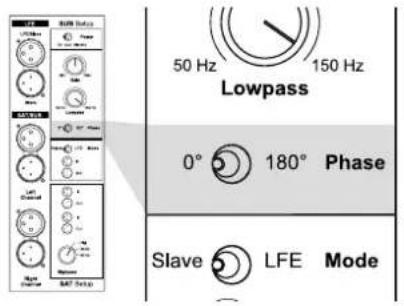
With the phase settings you can adjust the phase relationship between the subwoofer and main speakers. If subwoofer and main speaker are out of phase in relation to each other, it can result in decreased bass output in the frequency response area where they overlap each other.
The phase relationship between subwoofer and satellite speakers is very dependent on relative distance, construction and working principles of the main speakers. The figure on the left shows a case whereby phase of the subwoofer and main speakers are incorrect in the critical overlap area, thus significantly reducing acoustic output in the listening room in that area.
text_image
50 Hz 150 Hz Lowpass 0° 180° Phase Slave LFE ModeTo find the correct phase setting:
- Play a bass-rich track which also covers the overlap area.
- Toggle the Phase switch between 0^ and 180^ . Choose the setting for which you experience the most bass.
Note: You can not set the phase if the subwoofer is in slave mode. In this case the phase is controlled by the setting of the master subwoofer.

text_image
OUT Flat 60 Hz 80 Hz HighpassSetting the satellite cut-off frequency (Highpass)
Depending on the bass capabilities of the speakers, the frequency range of subwoofer and speakers can overlap between 50 Hz and 150 Hz. A bump or a gap in the frequency response and thus a lower sound quality will be experienced if the system is not matched properly. In addition, small speakers and low powered amplifiers will particularly be affected by the low frequency signals, which again has a negative effect on the sound quality. Therefore it makes sense to limit the bass range of the connected speakers (called "satellites" in this case) by a highpass filter. The BM14S provides three settings to achieve this:
- Flat = no limitation
- 60 Hz = frequencies below 60 Hz are cut-off
- 80 Hz = frequencies below 80 Hz are cut-off
To set the cut-off frequency
▶ Switch Highpass control to needed position.
6. Troubleshooting
There may be various reasons why the subwoofer doesn't function properly in a system without it being faulty. The checklist below will help solve problems you may encounter. Before consulting your Dynaudio Acoustics dealer, check this list first.
Check this first:
▶ Check if all signal cables are connected properly.
▶ Check settings in bass management menu of the connected source.
▶ Carefully and gradually increase the subwoofer volume level on the source.
Carefully and gradually increase the subwoofer volume level on the subwoofer Gain control.
| Problem Cause Solution | ||
| The subwoofer switches itself off while music is being played. | There is hardly any low-frequency signal available in the signal. This can happen if the music or movie itself does not contain very low frequencies (e.g. long dialogues). | ► The subwoofer will switch on automatically as soon as low frequent music signals are detected. ► Toggle power switch from Auto to On. |
| The subwoofer will not switch on at all. | AC mains cable has become disconnected(LED does not lit)Mains switch on the back is switched to OFF(LED does not lit) | Make sure to switch the system off first before making any changes!Reconnect mains cable.Switch mains back on.Check if all signal cables are connected properly. |
| The subwoofer will not switch on automatically. | No signal is present on either of the subwoofer's inputs(LED lights red). | Make sure to switch the system off first before making any changes!Check if all signal cables are connected properly.Check if the subwoofer output on the source is engaged. |
| Subwoofer is switched on but no sound from the subwoofer. | No signal is present on either of the subwoofer's inputs.In the source's bass-management set-up, subwoofer has been disabled.Subwoofer volume level has been turned down all the way on the source.Subwoofer volume level has been turned down all the way with the subwoofer's control. | Make sure to switch the system off first before making any changes!Check if all signal cables are connected properly.Check settings in bass management menu of the source.Carefully and gradually increase the subwoofer volume level on the source.Carefully and gradually increase the subwoofer volume level on the subwoofer Gain control. |
7. Maintenance
Cleaning the subwoofer
Dynaudio loudspeakers require no special treatment apart from the kind of careful handling you would normally apply to any high tech product in your home.
DANGER
Dangerous voltage inside!
Cleaning the BM14S or other system components when switched on can lead to damages or electric shock.
▶ Switch off the subwoofer and all other components of your system when cleaning any of these components.
Note: Because many different materials are utilized within the BM14S, all-inone cleaning materials should not be used. Please avoid any aggressive cleaning fluids or special furniture polishes as well.
To clean the subwoofer:
The cabinet and other plain parts should be cleaned with a soft dry or slightly damp cloth.
▶ Dust on the woofer diaphragm may be removed with a fine furniture brush.
Note: Avoid touching the woofer diaphragm as any change of their shape may have an impact on sound quality.
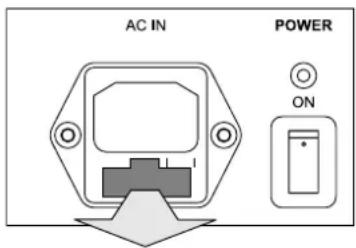
Changing the fuse

WARNING
Risk of fire due to wrong fuse type!
Inserting the wrong fuse type can lead to overheating of the subwoofer.
For continued protection against risk of fire, replace only with same type fuse and rating.
text_image
AC IN POWER ONThe fuse is placed on the rear of the subwoofer below the mains power input. It can be changed without removing the amplifier module.
To change the fuse:
- Switch off the mains power switch and unplug the power cable.
- Pull out the fuse holder
- Replace fuse with same type and rating
- Push fuse holder back firmly until it is locked into position.
8. Warranty
Dynaudio Acoustics provides a transferable one-year limited manufacturer's warranty.
This warranty only covers faults or defects in material and production. Damage caused as a result of abuse, misuse or defective associated electronics is not covered by the warranty.
All warranty claims must be accompanied by a copy of the original purchase invoice and warranties are only valid in the country or market of original origin and distribution. Should warranty service be required, it must be arranged for in the country of purchase by an authorized Dynaudio Acoustics dealer.
- Technical Specifications
| Parameter Data | |
| System Active subwoofer | |
| Bass principle Closed | |
| Frequency response 18 Hz to 250 Hz | (+/-3 dB) |
| Inputs | |
| • LFE/Slave | XLR |
| • SAT/SUB | right/left full bandwidth, XLR |
| Input impedance | |
| • + branch | 20 kOhm |
| • - branch | 10 kOhm |
| Sensitivity 75 mV | RMS to 5 VRMS, adjustable |
| Max. input voltage 10 V | RMS |
| Outputs | |
| • Slave | XLR |
| • SAT/SUB | right/left, Highpass filtered, XLR |
| Output impedance 100 Ohm (each branch) | |
| XLR Pinout 1 = 0 / 2 = + / 3 = - | |
| Mode selector LFE, Slave (Phase and volume controls are bypassed in slave mode) | |
| Phase adjustment 0°, 180° | |
| Highpass | Flat, 60 Hz, 80 Hz |
| Lowpass | 50 Hz to 150 Hz |
| Power modes | On, Auto |
| Amplifier power | 300 W, 4 Ohm |
| Power consumption | |
| • Standby | < 5 W |
| • max. | 500 W |
| Woofer | |
| • Cone | 300 mm/12", long throw, molded MSP (Magnesium Silicate Polymer) cone |
| • Coil | 75 mm/3" voice coil |
| Dimensions, external (height x width x depth) | 36,8 cm x 35,0 cm x 42,0 cm / 14.5" x 13.8" x 16.5"(incl. feet and grille) |
| Cabinet volume | 31 liters |
| Weight | 21 kg |
| Mains | 120 V, 50/60 Hz, Fuse T4 A |
| 220-240 V, 50/60 Hz, Fuse T2 A | |
$$ 1 = 0 2 = + 3 = - $$
text_image
1 LFE 2 Stereo LFE LFE/Line Sub Setup Power Satz Radio Radio Radio Sat/RUB Left Channel Right Channel Sat Setup Radio Radio Radio Sattext_image
LFE SUB Setup LFE SUB Setup LFE SUB Setup LFE Sub... (Slave) Stereo LFE Sub 1 (Master) Sub 2 (Slave) LFE Sub... (Slave) Stereo LFE Sub... (Slave) LFE Sub 2 (Slave) LFE Sub... (Slave) LFE Sub... (Slave) LFE Sub... (Slave) LFE Sub... (Slave) LFE Sub... (Slave) Right Channel SAT Setup Right Channel SAT Setuptext_image
LFE SUB Setup Power Dr. Air Semi Radio Longwave 10" 180" Phase Store UFC Mode Left Channel Radio Channel Sat Setup Stereo To power amplifier or active speakers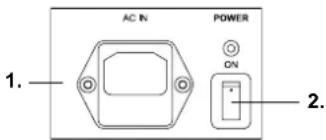
text_image
AC IN POWER ON 1. 2.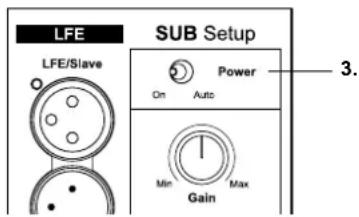
text_image
LFE SUB Setup LFE/Slave Power On Auto Min Gain Max 3.text_image
ON Auto Gainline
| Freqenz | Pegel | | ------- | ----- | | Low | 0 | | Mid | Peak | | High | 0 |text_image
Out Flat 60 Hz 80 Hz HighpassSatelliten-Grenzfrequenz anpassen (Highpass)
c/o TC Electronics A/S
Sindalsvej 34
8240 Risskov
Phone +45 87 - 427 000
Denmark
dynaudioacoustics
IF IT'S THERE - YOU'LL KNOW IT