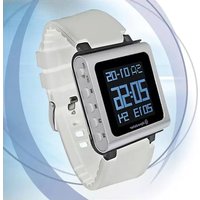
MP-415 - Mp3 player ROADSTAR - Free user manual and instructions
Find the device manual for free MP-415 ROADSTAR in PDF.


| Type de produit | Lecteur MP3 |
| Marque | Roadstar |
| Modèle | MP-415 |
| Dimensions | Environ 100 x 40 x 15 mm |
| Poids | Environ 60 g (avec batterie) |
| Alimentation | Batterie rechargeable lithium-ion intégrée ou 1 pile AAA |
| Formats audio supportés | MP3, WMA, WAV |
| Capacité de stockage | Interne : 8 Go, extensible via carte microSD jusqu'à 32 Go |
| Écran | LCD rétroéclairé (taille 1.8 pouces) |
| Connectivité | USB 2.0 pour transfert de fichiers et charge |
| Radio FM | Oui, avec recherche automatique et mémorisation de stations |
| Enregistrement vocal | Oui, micro intégré, format WAV |
| Fonctions de lecture | Lecture, pause, suivant/précédent, volume, répétition, lecture aléatoire |
| Égaliseur | Préréglages : Normal, Pop, Rock, Jazz, Classique |
| Autonomie | Jusqu'à 12 heures de lecture audio |
| Entretien et nettoyage | Essuyer avec un chiffon doux et sec. Ne pas utiliser de produits chimiques. |
| Sécurité | Ne pas exposer à l'humidité, aux chocs ou aux températures extrêmes. |
| Pièces détachées et réparabilité | Batterie remplaçable par un professionnel. Autres pièces non disponibles. |
| Accessoires inclus | Écouteurs, câble USB, guide de démarrage rapide |
Frequently Asked Questions - MP-415 ROADSTAR
User questions about MP-415 ROADSTAR
0 question about this device. Answer the ones you know or ask your own.
Ask a new question about this device
Download the instructions for your Mp3 player in PDF format for free! Find your manual MP-415 - ROADSTAR and take your electronic device back in hand. On this page are published all the documents necessary for the use of your device. MP-415 by ROADSTAR.
USER MANUAL MP-415 ROADSTAR
MP-415 Instruction Manual
1.5 MP4 watch player


natural_image
White smartwatch with digital display showing time, date, and timestamp (no readable text or symbols beyond clock)Catalogue
I. Introduction ...... 2
II. Notice 2
1. Main Features....2
2. know your player .... 3
2.1 Outlooks and buttons .... 3
2.2 Parts assembling sketch....3
2.2 Key function definition .... 3
2.3 Switch On/Off .... 3
2.4 Low battery ....3
2.5 Clock....4
2.6 Main interface....4
3 Music....4
3.1 Main Menu....4
3.2 Basic operation submenu 4
3.2.1 Repeat....5
3.2.2 Equalizer 5
3.2.3 Variable Speed Playback....5
3.2.4 Replay Mode....5
3.2.5 Change volume .... 5
3.2.6 Exit....5
4 Movie....5
4.1 Main Menu....5
5 Record....6
5.1 Main menu 6
6 Play 6
6.1 Main Menu 6
7 Radio....6
7.1 Main Menu....6
8 Picture....7
8.1 Main Menu....7
8.2 Basic operation and submenu....7
9 Setting....8
9.1 Main Menu....8
10 Convert Video files into AMV format....8
11 Text....8
11.1 Operation instructions ....8
12.Charging....8
- Others....8
13.1 Troubleshooting ....9
13.2 Accessory....10
13.3 Specifications....11
I. Introduction
Congratulations on choosing the Roadstar MP-415 mp4 watch player. Please read manual very carefully so that you can operate all features and functions to get the best performance. The unit is designed for fashionable and sporty convenience, which combines watch, music & video files etc multi functions into one.
This section is set for the users to operate the player properly in order to assure its best performance. Please read it carefully and follow the rules
II. Notice
This section is set for the users to operate the player properly in order to assure its best performance. Please read it carefully and follow the rules
● Avoid high temperature(over 35 degrees Celsius) or low temperature(below minus 5 degrees Celsius).
- Avoid violent hit.
● Avoid chemicals like Benzene, diluent.
● No close to magnetic or electric field.
● Avoid direct light or heating appliances.
- Do not take it apart, repair or reassemble it at discretion.
- Do not use it while cycling, driving and riding on a motorcycle in case of danger.
- Do not listen to it in a high volume in case of damaging hearing.
● Proper classification of discarded package, battery and used electronic products.
1. Main Features
- 1.5-inch 128*128 dot matrix 260K true colors TFT display
•Audio: Support MP3/WMA/WAV audio formats
●Picture Browsing: Support JPEG/BMP/GIF formats
• Video: Support AMV(320*240 or lower resolution)
• Support TXT E-book reading
- Calendar & clock &week day display
Support correct time display same as watch
•FM stereo radio
Powerful automatic or manual tuning capability, save up to 20 channels.
- FM record
When you listen station program, and you can can record the your interested station to recording files
- Driver free USB memory
Manage your files in USB memory without specified software, no need drivers in WIN2000 or furthers.
- Recorder / Repeat
Voice can be recorded and saved in WAV format. Segment repeat available.
- Timing turning off
The player provides Sleep and battery saving mode, more convenience for you!
- Play modes
Normal, Repeat one, Play folder, Repeat folder, Repeat All, random, intro
- Complete dynamical menu
Visualized dynamical menus with text instructions make you easy control.
- Complete dynamical menu
Visualized dynamical menus with text instructions make you easy control.
2. know your player
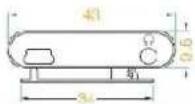
2.1 Outlooks and buttons


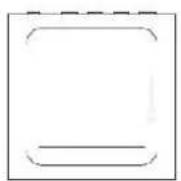
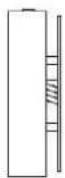
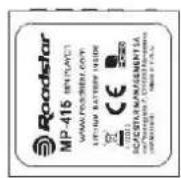
2.2 Parts assembling sketch
1.
2.
3.

5.





2.3 Key function definition
| ON/OFF | Power on or power off switch |
| Previous volume &fast backward | |
| Next volume &fast forward | |
| `M` button | Menu key, short press to confirm and enter, long press back to main menu |
| Long press to power on or off. Short press to play or pause | |
| USB socket | USB plug |
| Earphone jack | 3.5mm earphone jack |
2.4 Switch On/Off
In power off status, turn ON/OFF to 'ON' position to switch on
In power on status, turn ON?OFF to 'OFF' position to switch off
The unit will auto shut down when idle time reach to the user set shutdown time.
Remarks: The unit will not work when the player is connected to PC.
2.5 Low battery
When battery level is low, the player will display prompt and shut down automatically. In that case, do not restart, please charge immediately.
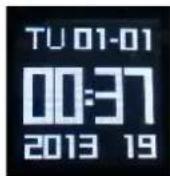
2.6 Clock
The player will automatically enter clock interface when switching on. Short press ▷ button to enter main interface.
2.7 Main interface
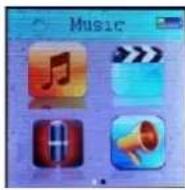
At main interface, press / button to browse different menus.short press M button to enter related menu,long press to go back to main interface.


3 Music
3.1 Main Menu
Select
The interface for music play as follows (if there are lyrics for playing music, long press M button to see the lyrics, if no lyrics, then long press M back to the last main menu):

long press /button when playing will fast backward or fast forward the music;. short press / button to previous/next volume.
3.2 Basic operation submenu
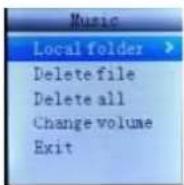
In music playing interface, press 'M' button to enter below menu:

3.2.1 Repeat
Selecting Repeat (Normal, Repeat one, Folder, Repeat folder, Repeat all, Random, Intro) as you wish.
3.2.2 Equalizer
Selecting Equalizer (Natural, Rock, Pop, Classic, Soft, Jazz, DBB) as you wish.
3.2.3 Variable Speed Playback
Selecting Variable Speed Play as you wish.
3.2.4 Replay Mode
It will automatically go to music play interface when enter replay mode, press to set replay beginning A, then press to set replay end B.
Replay times: times of repetition at replay
Replay gap: time of repeating the document again.
3.2.5 Change volume
Change volume as you wish.
3.2.6 Exit
Back to play interface.
Press M button in condition of music pause to exit music play.
Root: listing all documents in the directory.
Delete file: deleting according document as you wish.
Delete all: deleting all the documents in the folder.
Change volume
Exit
4 Movie

4.1 Main Menu
Select
Long press /to fast-backward/-forward, long press M button back to main menu.
5 Record
5.1 Main menu
Select


Short press to start recording, another short pressing the same button to finish recording. Long press M button to store the recording file and back to main interface.
6 Play

6.1 Main Menu
Select
Root: short press M button to enter folder and Select the recoding file needing playing
Delete file: select the file needing deletion, short press M button to confirm and press it again to delete.
Delete all
Change volume
Exit
7 Radio
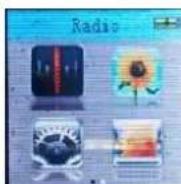
7.1 Main Menu

Basic operation:
Save: select radio frequency and press M button to Select save the radio, press it again to save.
Record: select radio frequency and press M button and Select radio recording and press it again to enter, then press
to start recording.
Delete: select saved radio and press M button to delete it.
Delete all: delete all saved radios.
Auto-search: press M button and again to confirm.(the headset must be Normal band: 87.0-108MHZ(Select radio frequency)

Select auto-search after entering radio mode, press it
ing this action)
rding to local
- 陈成风
ng to local radio frequency)
-
Japan band: 76.1-90MHZ(Select fre
8 Picture

8.1 Main Menu
Select
8.2 Basic operation and submenu
Root: display all pictures

Playback set:
Manual play: Press to enter picture play, and press / to last or next picture
Auto play: Set picture auto play gap (2 to 10 seconds).
Delete file: delete one picture.
Delete all: delete all the pictures.
9 Setting
9.1 Main Menu
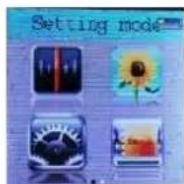
System time: enter submenu system time, press and to adjust date, hour, minute and second. If only adjust one item, press M button to save and exit.
LCD set: short press M button to set dark mode
Language: short press M button to enter, then select according language.
Power off:
Off time:
Short press M button to enter and set time (0-200 seconds) for automatic power off when without any operations (not off when in working)
Sleep time:
Short press M button to enter to shutdown the player by force when in working.
Memory Info: display total, already used memory
Firmware version: version of current software.
Firmware upgrade: upgrade the device to the newest version.
Clock mode: select clock display mode as you wish
The player provides firmware upgrading tool to upgrade or repair firmware in the device.
1、Connect player with PC, making sure it works normally and no other removable discs connecting to PC at that time.
2、Click `setup` of folder Upgrade Tool-V5.46 in CD.
3、Operate Media Player Mass Production Tool in Media Player Utilities 5.46 after installing.
4、Select new version firmware file, the system will remind it is reading the file, waiting for 60 seconds.
5、Click firmware to start upgrading, and upgrading interface as follows:
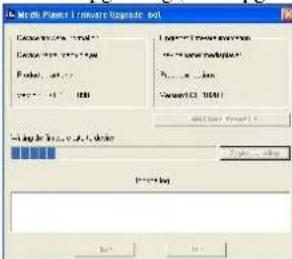
6、Do not disconnect PC and player during firmware upgrading or restoring, the software will pop up a information box saying "upgrade is success, the program will exit!" after finishing. After confirming, the tool will close and restart player automatically, the upgrading is completed.
Remark: The device does not provide firmware, please contact us if needed.

10 Convert Video files into AMV format
Please download the new conversion software from www.roadstar.com website
The below video formats could be converted into AMV format video file by using Video Convert Tool-V4.43 provided in the assorted CD driver:
AVI format (.avi)
Windows Media format (.asf, .wmv & .wma)
MPEG 1 format (.mpg, mpeg &.dat)
Realplayer format (.rm)
Quicktime format (.mov)
MPEG 2 format (.vob)
NOTE: For AMV/AVI Video Converter, please make sure you have installed Microsoft DirectX 9.0 or above. When to convert Real Media, QuickTime, MPEG2 format video files, please install related DirectShow filter at first. Otherwise, AMV/AVI Video Converter can not work normally.
Installation: Put the assorted CD driver onto your computer CD disk driver, open the file clip name Video Convert Tool-V4.43, select program named "Setup.exe" and double click it to run the installation program.
After installation finish, you could find the program named Media Player Utilities 4.43 in your computer, select the
AMV&AVI Video Converter to start your converting.
1. Run "AMV&AVI Video Converter", click

to choose the folder where to save the AMV files, then click

to select the position where the original files are.
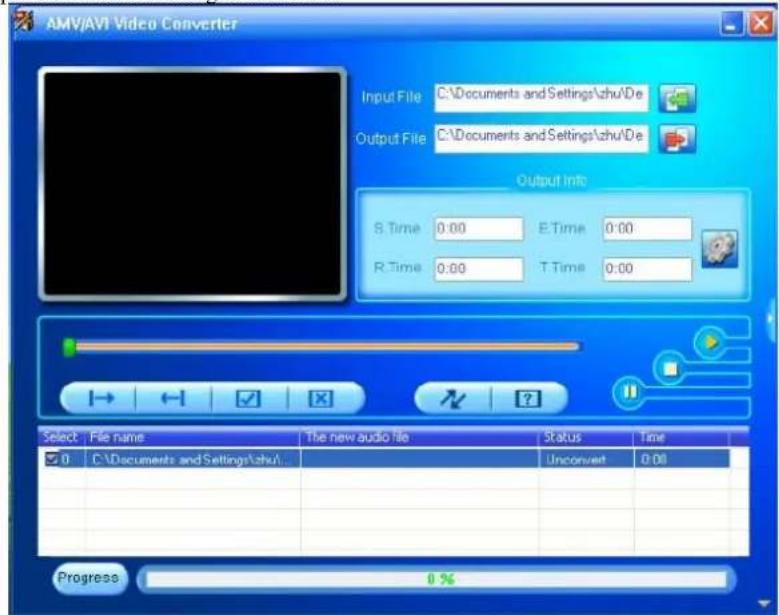
- Select unprocessed AMV/AVI files, then click the icon will be highlighted into and a dialog box will show. Choosing the setting of the AMV/AVI file you want to obtain, then click OK to confirm. (Note: Only pixels in "160 * 120 can be supported for this player at AMV format, pls refer bew)
- Click to start converting。

11 Text

11.1 Operation instructions
Root: display all supported text files
Playback set:
Manual play: press / to read previous or next page
Auto play: set text auto play gap (2-10 seconds)
Delete file: delete single text file
Delete file: delete all text files
Bookmark set under below interface:

Press M button to enter bookmark
Bookmark select: read the page saved last time
Bookmark delete: delete saving read last time
Bookmark add: add page read currently.
12.Charging
Battery Level
The player shows capacity in 5 levels
Battery is full. As time goes on, capacity indication will decrease.
☐ Indicator shows blank when battery almost ran out. You should charge your battery at that time.
■ Power off when not use the player
Battery charge:
- Please switch on the player pressing "Power ON" button before charge.
- Pls connect player to computer via USB cable
13. Others
13.1 Troubleshooting
| The player can not work or LCD can not display contents | ● Check battery capacity● Check power off setting |
| Can not download or failure during data transmission | ● Make sure successful connection between PC and player● Non-exist device● Not formatting● Memory not enough |
| Earphones can not hear the voice | ● Please check whether the volume set to 0;● Please check if there is any problem with the earphone connection. |
| Serious noise | ● Please check if the earphone plug clean, and dirt can lead to noise.● Check if the music files are damaged. Try to identify by listen to other music. If the file has been damaged, it may lead to serious noise or sound jump. |
| Chaos words display | ● Make sure you have chosen correct language |
| Can not play videos, musics and pictures | ● Please check the if the formats are supported or the file is damaged. |
13.2 Accessory
Earphone, USB cable, CD, manual, warranty card, watch wristband, watch spindle
13.3 Specifications
| Display screen | 1.5-inch TFT, resolution: 128*128 |
| PC connection | High speed USB2.0 |
| Memory | 4GB |
| Power, play time | 150mA Lithium battery |
| Video play about 3 hours | |
| Audio play about 8 hours | |
| Recording format | WAV |
| Audio format | MP1/MP2MP3/WMA/WAV |
| Video format | AMV (AVI/WMV/MP4/MTV/3GP/MOV/MPG/DAT/VOB ETC CAN BE TRANSFER INTO AMV TO PLAY) |
| Work temperature | -5°C~40°C |
| Language choice | German, French, Italian, English |
| Radio frequency | 87.5~108.0 frequency band (Select according to local radio frequency) |
| Operating system | Windows2000/XP/Vista |

Roadstar
natural_image
Smartwatch with digital display showing time, date, and timestamp (no readable text or symbols beyond clock)
natural_image
White smartwatch with digital display showing time, date, and timestamp (no readable text or symbols beyond clock)3 Musik
3.1 Hauptmenü
11 Text

11.1 Anleitung
- MP-415 Instruction Manual
- MP4 watch player
- Catalogue
- Introduction
- Notice
- Main Features
- know your player
- Outlooks and buttons
- Parts assembling sketch
- Key function definition
- Switch On/Off
- Low battery
- Clock
- Main interface
- Music
- Main Menu
- Basic operation submenu
- Repeat
- Equalizer
- Variable Speed Playback
- Replay Mode
- Change volume
- Exit
- Movie
- Main Menu
- Record
- Main menu
- Play
- Main Menu
- Radio
- Main Menu
- Basic operation:
- Picture
- Main Menu
- Basic operation and submenu
- Playback set:
- Setting
- Main Menu
- Please download the new conversion software from www.roadstar.com website
- Run "AMV&AVI Video Converter", click
- Operation instructions
- 12.Charging
- Battery Level
- Battery charge:
- Others
- Troubleshooting
- Accessory
- Roadstar
- Musik
- Hauptmenü
- Text
- Anleitung
Brand : ROADSTAR
Model : MP-415
Category : Mp3 player