i.onik BTH-002 - Headphones CnMemory - Free user manual and instructions
Find the device manual for free i.onik BTH-002 CnMemory in PDF.


User questions about i.onik BTH-002 CnMemory
0 question about this device. Answer the ones you know or ask your own.
Ask a new question about this device
Download the instructions for your Headphones in PDF format for free! Find your manual i.onik BTH-002 - CnMemory and take your electronic device back in hand. On this page are published all the documents necessary for the use of your device. i.onik BTH-002 by CnMemory.
USER MANUAL i.onik BTH-002 CnMemory
natural_image
Close-up of a black smartwatch strap with 'ionik' branding, resting on a reflective surface (no text or symbols on the device itself)ANRUFE TÄTIGEN
Bluetooth-Version: Bluetooth V2.1 + EDR
Bluetooth-Profile: Headset, Freihand, A2DP, AVRCP
SWITCHING ON/OFF THE HEADSET 29
PAIRING THE HEADSET WITH BLUETOOTH DEVICES 30
PAIRING THE HEADSET WITH BLUETOOTH MOBILE PHONE 31
PAIRING THE HEADSET WITH BLUETOOTH TRANSMITTER 32
MULTI-PAIR 33
RECONNECTING TO A BLUETOOTH DEVICE 34
WEARING THE HEADSET 35
MAKING CALLS WITH THE HEADSET 36
PLAYING MUSIC 38
RESTORING FACTORY DEFAULTS AND RESETTING 39
LED INDICATOR 39
INDICATION TONE 40
CARE AND MAINTENANCE 41
FAQs 42
SPECIFICATIONS 43
BRIEF INTRODUCTION
Welcome to use this Bluetooth stereo headset, BTH-002. Please read this user's manual carefully before using it.
1. Bluetooth wireless communication technology
Bluetooth is a standard of close range radio-communication technology that was drawn up by Sony Ericsson, IBM, Intel, Nokia and Toshiba. With Bluetooth technology, we can achieve the highest transmission rate among cell phones, computers, printers, PDAs and other devices. The max transmission range of class II is 10 meters while the max transmission range of class I can reach up to 100 meters.
2. About i.onik ^® BTH-002
BTH-002 is a stereo Bluetooth headset. It supports the following Bluetooth profiles:
HSP Headset Profile
HFP Hands-Free Profile
A2DP Advanced Audio Distribution Profile
AVRCP Audio/Video Remote Control Profile
You can enjoy music wirelessly by using the i.onik® BTH-002. Steps as following:
1) Pairing with the Bluetooth mobile phone and PDA which support HFP.
- Answer, end and reject call from the headset
- Redial last number
- Voice dial
- Adjust the volume
- Switch the conversation between the headset and the mobile phone
- Microphone mute
2) Pairing with Bluetooth music devices and Bluetooth transmitter which support A2DP
- Enjoy music wirelessly
- Adjust the volume
- Remote control the function of pause/play
- Remote control last/next song
3) Easy to switch between conversation and music, you will not miss the incoming call during listening to music.
4) Automatic connecting with the last paired device when turn on the headset.
Note: Even though the paired device and headset support the same Bluetooth profiles, the functions may be different due to the specification difference of the paired devices.
OVERVIEW
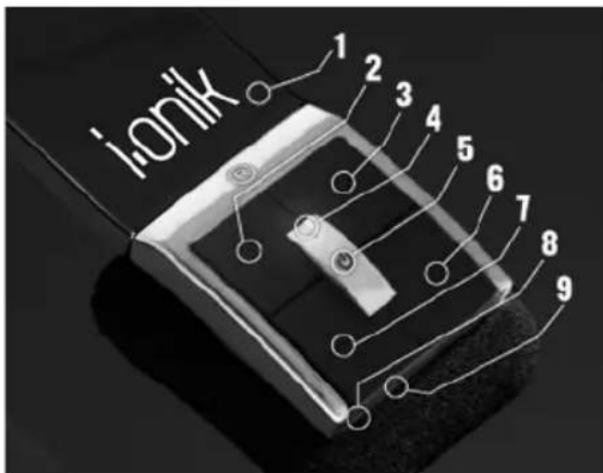
1 rETrACTABLE HEADSET
2 < KEY: prEVIOUS SONG
3 > KEY: NExT SONG
4 LED INDICATOR
5 (MFB) MULTIFUNCTION BUTTON
6 + KEY: VOLUME Up
7 - KEY: VOLUME DOWN
8 CHArGING pOrT
9 BUILT-IN MICrOpHONE
CHARGING THE HEADSET
First time charging
Before you use this Bluetooth headset, please charge the battery of i.onik® BTH-002 fully.
Next time
When you hear three warning tones of "DONG" every 20 seconds, at the same time, the red light blinks two times. It means the battery is low power and need to be charged. There are two types of charging as below:
A. Charging the battery with travel charger
Step 1: Plug the travel charger into standard AC power outlet.
Step 2: Connect the travel charger with the charging port of the headset.
When the red light is on, the headset is charging.
When the red light is off, the headset is charged fully.
It takes about 3-4 hours to charge the headset fully.
B. Charging the battery with USB cable
Step 1: Insert USB charging cable into USB port of PC.
Step 2: Connect charging cable with the charging port of headset.
When the red light is on, the headset is charging.
When the red light is off, the headset is charged fully.
It takes about 3-4 hours to charge the headset fully.
Note: Choosing travel charger or USB cable depends on different countries or areas and actual demands.

Warning:
1) The battery is recycled.
2) Do not dispose of the battery in fire, as it may cause explosion.
SWITCH ON/OFF HEADSET
| FUNCTION OPERATION LED-INDICATOR INDICATION | TONE | ||
| Switch on | Press the MFB button for 3-5 seconds, and release it till the blue LED is on | Blue LED is on for 1 second | A long “DI” tone |
| Switch off Press the | MFB button for 3-5 seconds, and release it till the red LED is on | Red LED is on for 1 second | A long “DI” tone |
Note: In order to save power, the headset will automatically switch off if no devices can be connected within 5 minutes after switching on.
PAIRING THE HEADSET WITH BLUETOOTH DEVICES
| FUNCTION OPERATION LED-INDICATOR INDICATION | TONE | ||
| Enter pairing mode | Make sure the headset is off. Press and hold MFB button for 7-9 seconds, and release it till the red and blue LEDs blink alternately. | Red and blue LEDs blink alternately. | Two "DU" tones |
Note: The pairing mode will last 2 minutes. If the headset still can't pair with any Bluetooth devices after 2 minutes, it will switch into standby mode automatically.
PAIRING THE HEADSET WITH BLUETOOTH MOBILE PHONE
Please make sure your mobile phone has Bluetooth function that can be used. Specific pairing procedures may vary with different mobile phone. Please refer to your mobile phone manual for further information. Steps as follows:
1) Please keep the headset and mobile phone in the range of 1 meter when pairing.
2) Make the headset enter into pairing mode (Please refer to "how to enter into pairing mode").
3) Start the Bluetooth function of mobile phone and search the Bluetooth devices. After searched, select "i.onik BTH-002" in the Bluetooth device list.
4) According to indication, enter password or PIN No: "0000", and press the key of "Yes" or "confirmed".
5) After successful pairing, select "i.onik BTH-002" in the Bluetooth device list, and press "connect".
6) After successful connecting, the blue LED of the headset quickly blinks twice or three times every 4 seconds.
Notes:
- If the pairing is not successful, please switch off headset firstly, and then re-pair according to the steps 1-6 mentioned above.
- After pairing is successful, paired devices will remember each other. Unless pairing information is deleted because of new pairing, no need to pair when use next time. The headset can remember 8 paired devices, when paired devices exceed 8 paired devices, the first one will be replaced.
- If you want to pair the headset with other devices, please pair it with the new device according to steps 1-6 mentioned above.
pAIRING THE HEADSET WITH BLUETOOTH TrANSMITTER MUL
You can enjoy music wirelessly through connecting headset with stereo Bluetooth transmitter. Here take BTT001 (single sale) iPod general Bluetooth transmitter for example. Pairing steps as follows:
1) Keep the Bluetooth transmitter and headset in the range of 1 meter when pairing.
2) Make the headset enter into pairing mode (refer to "How to enter into pairing mode").
3) Turn on the Bluetooth transmitter. It will search Bluetooth device automatically and starts pairing.
4) When the headset requests PIN No, the Bluetooth transmitter needs to respond "0000" automatically.
5) After successful pairing and connecting, the blue LED of headset quickly blinks twice every 4 seconds.
Notes:
1) The pairing password of i.oni® BTH-002 is "0000", so, the headset can't pair with the Bluetooth transmitter which pairing password is not "0000".
2) If the pairing is still not successful after trying several times, please refer to your Bluetooth transmitter manual carefully.
The headset can connect with two devices at most. One is the mobile phone with HFP profile, another is the devices with A2DP profiles. If you want to finish the pairing of several Bluetooth devices, please refer to the following steps:
1) Firstly, pair the headset with Bluetooth transmitter (refer to "pairing headset with Bluetooth transmitter").
2) Switch off the Bluetooth transmitter.
3) Pair and connect the headset with the Bluetooth mobile phone (refer to "pairing headset with Bluetooth mobile phone").
4) Restart Bluetooth transmitter, it will connect with headset automatically.
Notes:
- After successful pairing with several Bluetooth devices, the paired devices will remember each other. Unless pairing information is deleted because of new pairing, otherwise make mobile phone and headset set up hands free connection next time, and re-start the Bluetooth transmitter, then the connection of several devices can be performed.
- For the mobile phone which supports the HSP and A2DP at the same time. It may set up connection with HSP and A2DP simultaneously. At this time, start Bluetooth transmitter may not connect with the headset again.
rECONNECTING TO A BLUETOOTH DEVICE WE
1) Automatic connecting
Every time the headset is switched on, it will connect to last connected device automatically.
2) Manual connecting to last connected HFp device
When the headset is in standby mode and doesn't connect to any HFP devices, short press MFB button twice, it will connect to last connected HFP device automatically.
3) Manual connecting to last connected A2Dp device
When the headset is in standby mode and doesn't connect to any A2DP devices, short press > (next song) button, it will connect to last connected A2DP device automatically.
Notes:
- Before connecting to a Bluetooth device, please turn on the Bluetooth device's Bluetooth function.
- On some Bluetooth devices, take some Nokia mobile phones for example, you have to allow automatic connecting in the mobile phone's settings. Please refer to your mobile phone's manual for further information.
HEADSET
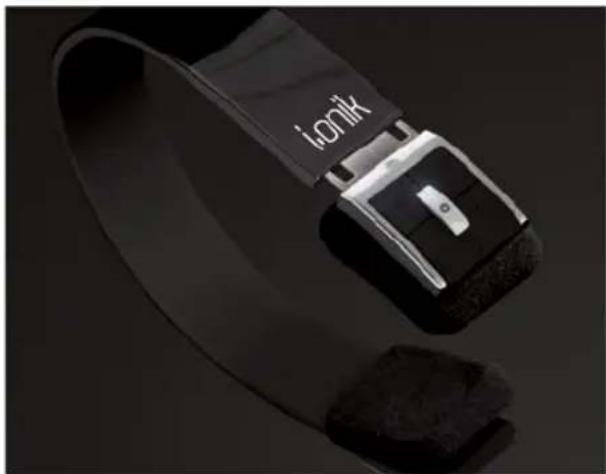
The string of this headset is retractable, please adjust according to the actual use. Logo "L" of headset represents left ear, Logo "R" of headset represents right ear. Please wear the headset according to the indication of the logo.
natural_image
Close-up of a black smartwatch strap with 'ionik' branding, resting on a reflective surface (no text or symbols on the device itself)MAKING CALLS WITH THE HEADSET
| FUNCTION STATUS HEADSET OPERATION | ||
| Voice dial | Standby mode Press and hold > (next song)button for 2s, release it tillhearing indication sound | |
| Redial last number | Standby mode Short press MFB twice quickly | |
| Volume up Conversation mode | Short press or long press + key | |
| Volume down Conversation mode | Short press or long press - key | |
| Answer calling | Ringing | Short press MFB |
| Reject calling Ringing Press and hold MFB for 2s,and release it till hearingindication sound | ||
| End calling Conversation mode | Short press MFB | |
| Call transfer | Conversation mode | Press and hold MFB for 2s, and release it till hearing indication tone |
| Microphone mute | Conversation mode | Quickly press the MFB twice |
| Cancel mute | Conversation mode (mute) | Quickly press the MFB twice |
Warning: Excessive pressure from headphones can cause hearing loss.
Notes:
- Not all the mobile phones support all the functions listed above. Please refer to the instruction of your mobile phone.
- Some functions and indication tones may vary with different mobile phones.
- When the volume is adjusted to max or min, you will hear a indication tone.
- For some mobile phones, when you press the key of accepting on the phone, the conversation will be sent to the mobile phone. At this time, you can switch the call to headset by using the conversation switch button or through operating on the mobile phone. Please refer to the instruction of your mobile phone for further information.
PLAYING MUSIC
When the headset connects with the mobile phone or Bluetooth transmitter which supports A2DP, you can enjoy music through headset wirelessly.
| FUNCTION STATUS HEADSET OPERATION | ||
| Volume up | Playing music Short or long press + key | |
| Volume down | Playing music Short or long press - key | |
| Pause | Playing music | Short press MFB |
| Play | Pausing | Short press MFB |
| Last song | Playing music | Short press < key |
| Next song | Playing music Short press> key | |
Notes:
- For some mobile phones, when they are playing music, the music will transmit to the speaker of mobile phone, you have to choose "transmit the sound through Bluetooth" in the "setting" of music play interface, and then choose "BTH-002" in the device list, the music will be transmitted to the headset. Please refer to the instruction of your mobile phone for further information.
- When the volume of headset is adjusted to max. or min, you will hear a indication tone.
- Remote control the function of last song/next song/pause/revert, it needs your mobile phone or Bluetooth transmitter supports AVRCP. Please refer to the instruction of your mobile phone or Bluetooth transmitter for further information.
RESTORING TO FACTORY DEFAULTS AND RESETTING
Make sure the headset is off, press and hold MFB and + buttons simultaneously for about 8 seconds, release them when you hear two "DU" tones and see red LED is on, now the headset restores to factory defaults, and the pairing information will be deleted. Charge the headset to make it reset.
CHARGINGP MUNNG
LED INDICATOR
| LED INDICATOR STATUS HEADSET | |
| Red LED is on | Charging |
| Red LED is off Finish charging |
| LED INDICATOR STATUS HEADSET | |
| Red and blue LEDs blink alternately | Pairing mode |
| Blue LED quickly blinks once every 2 seconds. | Not connected to a device |
| Blue LED quickly blinks twice every 4 seconds | Set up HFP or A2DP connection |
| Blue LED quickly blinks three times every 2 seconds | Set up HFP and A2DP connection |
| Blue LED gradually turns on and off Conversation mode | |
| Red LED blinks twice every 20 seconds | Low power |
INDICATION TONE
| LED INDICATOR STATUS HEADSET | |
| Two tones every 3 seconds | Conversation mode and microphone mute |
| Three “DU” tones every 20 seconds Low power | |
CARE AND MAINTENANCE
Please read the following suggestions carefully, that will help you to fulfill any warranty obligations and to enjoy this product for many years.
- Keep dry and don't put it in the dump place, in case of effecting the interior circuit of product.
- Don't put the product under sunlight or place it in hot areas. High temperatures will short the life of electronic devices, destroy the battery, or distort certain plastic.
- Don't expose the product in the cold areas. It may damage the internal circuit board.
- Don't try to take apart the product. It may damage the product if you are not professional.
- Neither let the product fall off on the floor nor knock it on hard substances. It may damage interior circuit.
- Don't use intensify chemical or detergent to clean the product.
- Don't scrap the surface with sharp things.
In case the product doesn't function properly, send it to the store you bought it. The staff will help you to solve the problem.
FAQs
Why does red light blink twice every 20 seconds?
Battery is low, need to be recharged.
Why is not the red light bright when charging?
a) Please make sure the charging device connects with headset well.
b) You didn't use the headset for a long time, the battery may dry up. At this time, you have to charge the battery for 30 minutes, and then the red light will be bright.
How far is the effective range between the headset and mobile phone?
According to the Bluetooth standard, the max. controllable range of Class II headset is 10 meters. It varies under different environments.
Why can not my cell phone search and find the headset?
The mobile phone will not find the headset if headset and mobile phone are not under the pairing mode. Make sure the headset is under the pairing mode and in the effective working range, and then the headset can be paired and connected.
Why can not hear the voice?
a) Make sure the headset has been switched on.
b) Make sure the volume is not too low or muted.
c) Make sure the headset connects with the mobile phone correctly.
d) Make sure the distance between the headset and the cell phone is in the normal working scope.
Why is the voice not clear in conversation?
a) Make sure the mobile phone is in a strong signal area.
b) Make sure the headset is in the function range of this product.
Why can't control the function of pause, play, last song and next song when playing music?
This function needs your Bluetooth device supports AVRCP (Audio/Video Remote Control profile).
SPECIFICATIONS
Bluetooth version: Bluetooth V2.1 + EDR
Bluetooth profiles: Headset, hands-free, A2DP, AVRCPAVRCP
Effective range: 10 meters
Working time: Music: Up to 10 hours | Talk: Up to 11 hours
Standby time: Up to 250 hours
Input: DC: 5 V/130 mA
Charging time: Approx. 3 hours
Dimensions: 162 x 153,5 x 32 mm
Weight: Approx. 103 g
Notes:
- This device complies with Part 15 of the FCC Rules. Operation is subject to the following two conditions: (1) this device may not cause harmful interference, and (2) this device must accept any interference received, including interference that may cause undesired operation.
- Changes or modifications not expressly approved by the party responsible for compliance could void the user's authority to operate the equipment.
WARRANTY INFORMATION
One year limited hardware warranty.
This product is covered by a one year warranty against defects in material and workmanship. This warranty excludes the battery, which is covered by a six month warranty.
LIMITATION OF WArrANTY
The above warranty shall not apply to defects resulting from:
Misuse; unauthorized modification; opening for any reason; operation or storage outside the environmental specifications for the product; in-transit damage; improper maintenance; physical damage to the unit, such as a cracked or broken screen or defect resulting from use software, accessories, media, supplies, consumables, or such items not designed for use with the product.
There is no other express warranty, whether written or oral, with respect to this product. Any implied warranty of merchantability or fitness for a particular purpose is limited to the two-year duration of this written warranty.
Some states, provinces, or countries do not allow limitations on how long an implied warranty lasts, so the above limitation or exclusion may not apply to you.
This warranty gives you specific legal rights, and you may also have other rights that vary from state to state, province to province, or country to country.
COPYRIGHT
All rights reserved. No part of this manual may be reproduced, stored in a retrieval system, or transmitted in any form or by any means, electronic, mechanical, photocopying, recording or otherwise, without the prior written permission from the copyright holder. According to copyright law, no recorded data may be used for purposes other than personal enjoyment without permission from the copyright holder.
SUppOrT
For support please call the i.onik® support line on +49 (0) 7664 403 69 12. This support line is available between 9:30 am and 5:30 pm, mon-fri (GMT).
Support issues can also be emailed to support@i-onik.de, please detailed information about the problem you are experiencing.
All information is subject to change without notice.
i. onik®
www.i-onik.de