
D-CJ506CK - Portable CD player SONY - Free user manual and instructions
Find the device manual for free D-CJ506CK SONY in PDF.
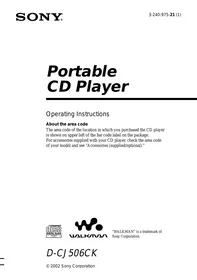


| Product Type | Portable CD Player |
| Brand | Sony |
| Model | D-CJ506CK |
| Dimensions (W x H x D) | 161.0 × 26.3 × 130.3 mm |
| Weight (without accessories) | Approx. 210 g |
| Power supply | 2 LR6 (AA) batteries 3 V DC or AC adapter (DC IN 4.5 V) |
| Battery life (G-PROTECTION 1) | Approx. 32 h (CD audio) / 24 h (MP3) with Sony alkaline batteries |
| Battery life (G-PROTECTION 2) | Approx. 30 h (CD audio) / 24 h (MP3) with Sony alkaline batteries |
| Supported formats | Audio CD (CD-DA), CD-R/RW with MP3 (ISO 9660 Level 1/2, Joliet) |
| Max. number of files/folders | 511 files + 511 folders |
| Displayable characters | A-Z, 0-9, underscore (_); ID3 tag version 1.1 |
| G-PROTECTION function | Enhanced anti-skip (2 levels: 1 for walking, 2 for intense sports) |
| Playback modes | Normal, repeat, single track repeat, shuffle, folder repeat (MP3) |
| Sound equalizer | BASS 1 and BASS 2 (bass boost) |
| AVLS function | Automatic volume limiter to protect hearing |
| Display | LCD with backlight (5 s on batteries, always on with AC adapter) |
| Headphone output | Stereo mini-jack, approx. 5 mW + 5 mW at 24 Ω |
| Included accessories | AC adapter, earphones/headphones, car battery cord, car connection pack, Velcro bands |
| Optional accessories | AC adapter AC-E45HG, car cord DCC-E345, car pack CPA-9C, connecting cord RK-G129/G136, active speakers SRS-A17, headphones MDR-A44L/A110LP, earphones MDR-E848LP/EX70LP |
| Care instructions | Clean the case with a soft, slightly damp cloth; do not use alcohol, benzine, or thinner. Clean the plugs periodically. |
| Safety precautions | Do not expose to rain or moisture; do not look at the laser beam. |
| Operating temperature | 5 °C to 35 °C |
Frequently Asked Questions - D-CJ506CK SONY
User questions about D-CJ506CK SONY
0 question about this device. Answer the ones you know or ask your own.
Ask a new question about this device
Download the instructions for your Portable CD player in PDF format for free! Find your manual D-CJ506CK - SONY and take your electronic device back in hand. On this page are published all the documents necessary for the use of your device. D-CJ506CK by SONY.
USER MANUAL D-CJ506CK SONY
Operating Instructions
About the area code
The area code of the location in which you purchased the CD player is shown on the upper left of the bar code label on the package.
For accessories supplied with your CD player, check the area code of your model and see “Accessories (supplied/optional).”


"WALKMAN" is a trademark of Sony Corporation.
D-CJ506CK
WARNING
To prevent fire or shock hazard, do not expose the unit to rain or moisture.
Do not install the appliance in a confined space, such as a bookcase or built-in cabinet.
To prevent fire, do not cover the ventilation of the apparatus with newspapers, tablecloths, curtains, etc. And don't place lighted candles on the apparatus.
To prevent fire or shock hazard, do not place objects filled with liquids, such as vases, on the apparatus.
Certain countries may regulate disposal of the battery used to power this product. Please consult with your local authority.
CAUTION
• INVISIBLE LASER RADIATION WHEN OPEN - DO NOT STARE INTO BEAM OR VIEW DIRECTLY WITH OPTICAL INSTRUMENTS

The CE mark is valid only for products marketed in the European Union.
Table of Contents
Getting started
Locating the controls 4
Playing an audio CD or MP3 files
- Connect your CD player. 6
- Insert a CD. 6
- Play a CD. 6
Playback options
Playing all the tracks on the CD repeatedly (Repeat play – all the tracks).... 12 Playing a single track (Single play) ...... 12 Playing a single track you've selected repeatedly (Repeat play – a single track)13 Playing all the tracks on the CD in random order repeatedly (Repeat shuffle play) .. 13 Playing all the files in a selected folder repeatedly (Repeat folder play) (MP3 CD only) 14 Playing all the files in a selected folder in random order repeatedly (Repeat folder shuffle play) (MP3 CD only) .... 14
Available features
The G-PROTECTION function ...... 15 Displaying CD text information .... 15 Checking the time remaining on the CD and the number of tracks left .... 16 Checking information on a CD with MP3 files 16 Emphasizing the bass sound (SOUND) .... 17 Protecting your hearing (AVLS) 18 Locking the controls (HOLD) 18 Turning off the operation beep sound ...... 19 Turning off the LCD's backlight 19
Connecting your CD player
Connecting a stereo system 20
Installing in a car
Where to place your CD player 21 Mounting your CD player 21 Replacing the fuse of the car battery cord. 22
Connecting to a power source
Using the dry batteries 23 Using the AC power adaptor 24 Notes on the power source 24
Additional information
Precautions 25 Maintenance 25 Troubleshooting 26 Specifications 28 Accessories (supplied/optional) 29 About "MP3" 30 About "ID3 tag" 31
Locating the controls
For details, see pages in parentheses.
CD player (front)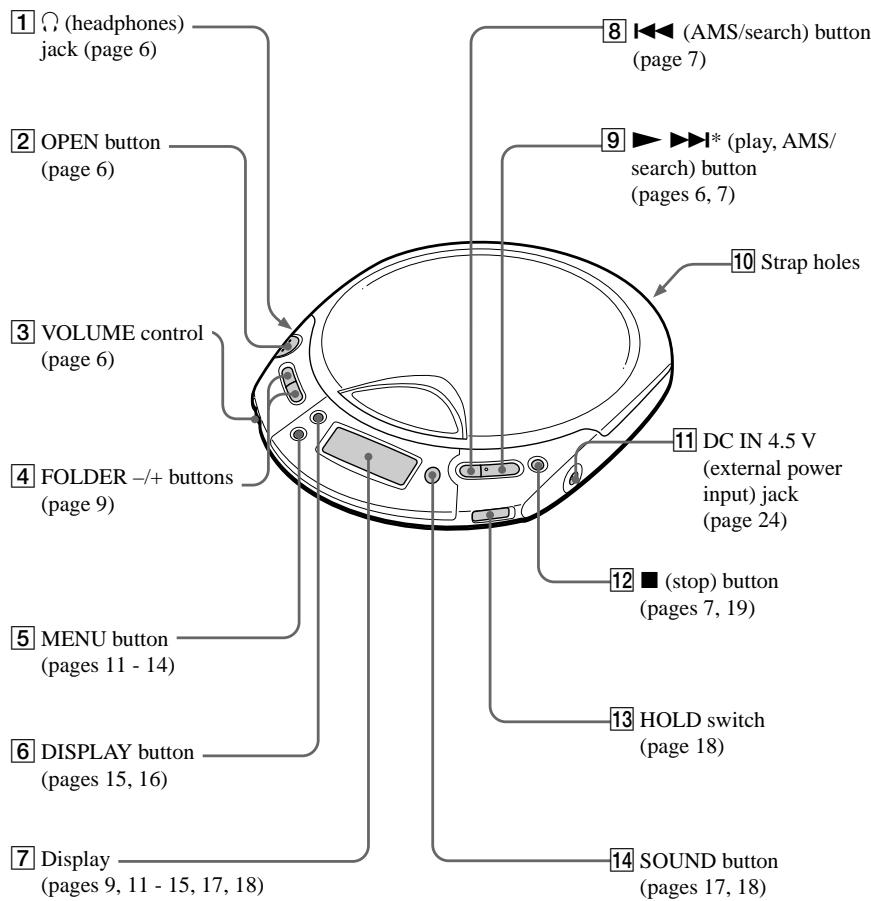
*The button has a tactile dot.
CD player (inside)
15 G-PRO (G-PROTECTION) switch (page 15)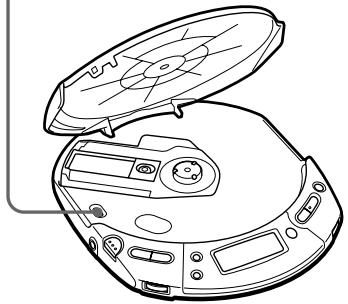
CD player (rear)
16 Battery compartment (pages 23)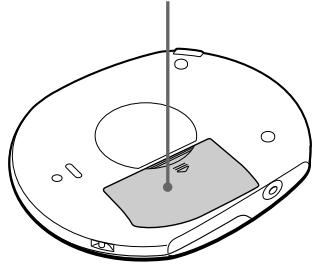
Playing an audio CD or MP3 files
You can also use the dry batteries and house current (AC power adaptor) as a power source.
1. Connect your CD player.
① Connect the car connecting pack. ② Connect the car battery cord.
Note
Turn down the volume of the car cassette deck before inserting the car connecting pack.
Car cassette deck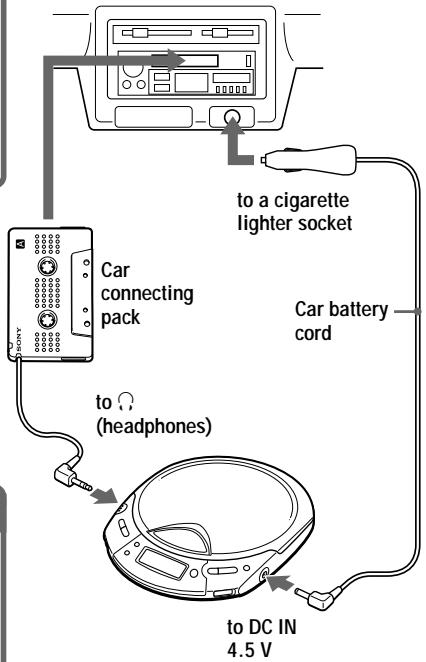
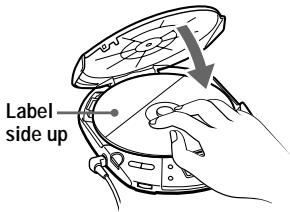
2. Insert a CD.
① Press OPEN to open the lid.
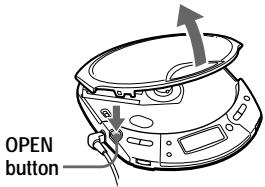
② Place the CD on the tray and close the lid.
- Play a CD.
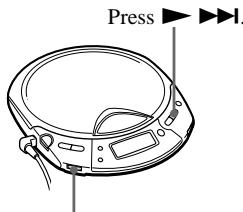
Adjust the volume.
You can also adjust the volume on the car cassette deck.
| To | Press |
| Play (from the point you stopped) | ▶▶▶▶Playback starts from the point you stopped. |
| Play (from the first track) | ▶▶▶▶ for 2 seconds or more |
| Stop | ■*2 |
| Find the beginning of the current track (AMS*1) | ◀◀ once quickly*2 |
| Find the beginning of previous tracks (AMS) | ◀◀ repeatedly*2, *3 |
| Find the beginning of the next track (AMS) | ▶▶▶▶ once quickly*2, *3 |
| Find the beginning of succeeding tracks (AMS) | ▶▶▶▶ repeatedly*2, *3 |
| Go backwards quickly | Hold down ◀◀◀*2 |
| Go forward quickly | Hold down ▶▶▶▶*2 |
*1 Automatic Music Sensor *2 These operations can be done during play. *3 After you have played the last track, you can return to the beginning of the first track by pressing ▶▶▶▶. Similarly, if you are at the first track, you can locate the last track by pressing ◀◀◀.
About the display
- When you press ▶▶▶▶ after changing the CD or turning the player off and on, the total number of tracks in the CD and total playing time appear for about two seconds.
- While a track on the audio CD is playing, the track number and the elapsed playing time of the current track appear.
- While a file on the MP3 CD is playing, the file name and the elapsed playing time of the current file appear.
When closing the lid of the CD player with the power supply attached
While the “CD WALKMAN” flashes in the display, the CD starts rotating and will stop after the CD player reads the disc information. This helps to shorten the waiting time before playback starts.
If the volume level does not increase
If “AVLS” appears in the display, hold down SOUND until “AVLS” disappears from the display. For details, see “Protecting your hearing (AVLS).”
(Continued)
About CD-Rs/CD-RWs and MP3 files
- This CD player can play CD-Rs/CD-RWs recorded in the CD-DA format* and MP3 files recorded in the CD-ROM format, but playback capability may vary depending on the quality of the disc and the condition of the recording device. * CD-DA is the abbreviation for Compact Disc Digital Audio. It is a recording standard used for Audio CDs.
- Finalize the CD-Rs/CD-RWs and MP3 files before use. If you use discs that are not finalized, it will take longer to start playback.
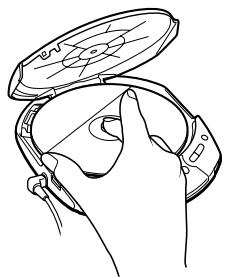
Removing the CD
Remove the CD while pressing the pivot in the center of the tray.
Playing a CD with MP3 files
Prepare the CD player and the CD in the same way as for an audio CD.
(See "About MP3.")
Press ▶▶▶▶I.
The CD player plays all MP3 files on the CD.
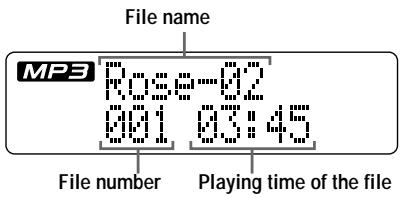
To select a folder
Use FOLDER + to go forward and FOLDER - to go backward.
To select a file
Use ▶▶▶▶ to go forward and ◀◀◀ to go backward.
Notes
- Before playing a file, the CD player reads all file and folder information on the CD. While the player is reading all file information, “CD WALKMAN” and a session number are displayed. While the player is reading all folder information, “READING” is displayed.
- You can use the buttons mentioned in the table on page 7 for additional operations in the same way as when playing an audio CD.
- The CD player can display the playing time up to 99 minutes 59 seconds (“99:59”). If the time is longer than this, the time indication will return to “00:00” but playback will continue.
(Continued)
Example of folder structure and playing order
The playing order of folders and files is as follows:
![graph TD A["CD-R"] --> B["1"] C["CD-RW"] --> B B --> D["①"] B --> E["②"] B --> F["③"] F --> G["④"] F --> H["⑤"] F --> I["⑥"] F --> J["⑦"] F --> K["⑧"] F --> L["⑨"] F --> M["⑩"] F --> N["⑪"] F --> O["⑫"] F --> P["⑬"] F --> Q["⑭"] F --> R["⑮"] F --> S["⑯"] F --> T["⑰"] F --> U["⑱"] F --> V["⑲"] F -->…](/content/2019/08/102151/images/1660faac43ae1f63f3b36bee3df8ff483afb98a996e382f759d0306eb790344b.jpg)
| File mode | Plays all MP3 files from 1, 2, 3...9, 10. |
| Folder mode | Plays all MP3 files in the selected folder.(Example: If you select folder 3, the CD player plays file 4. If you select folder 4, the CD player plays file 5 and 6.) |
Notes
- A folder that does not include an MP3 file is skipped. • Maximum number of folders and files together: 511
- Folder names and file names can be displayed with up to 64 characters. (Joliet extensions)
- The characters A - Z, 0 - 9, and _ can be displayed on this CD player.
- When referring to MP3 CDs, “folder” is equivalent to an “album” and “file” is equivalent to a “track.”
Playback options
You can enjoy various playback options using MENU.
MENU button
Each time you press the button, you can change the playback mode.
![graph TD A["No indication\n(Normal play)"] --> B[""]\n(Repeat all the tracks on the CD)] B --> C["1"] C --> D["Play a single track"] D --> E[""]\n(Repeat a single track you've\nselected)] E --> F["SHUF"] F --> G[""]\n(Repeat all the tracks on the CD in\nrandom order)] G --> H[""]\n(*\n(Repeat all th…](/content/2019/08/102151/images/530940aa2d0913c7a1c496e737ab8ba0bcbd8d633262834b1de4cf35504831c2.jpg)
* You can select this mode only when playing MP3 files.
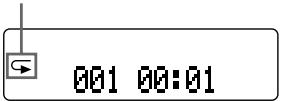
Display
Play mode indication
(Continued)
Playing all the tracks on the CD repeatedly
(Repeat play – all the tracks)
During playback, press MENU repeatedly until “◀” appears.
Audio CD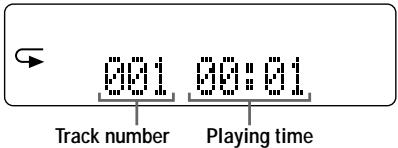
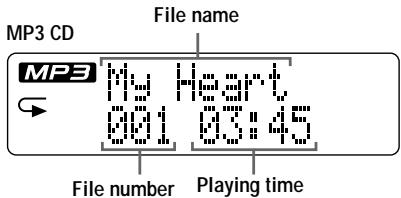
When playing MP3 files
- In normal mode, the CD player plays all the files (up to 511 files) on a CD repeatedly.
- In folder mode, the CD player plays all the files (up to 511 files) in the selected folder repeatedly.
Playing a single track (Single play)
During playback, press MENU repeatedly until "1" appears.
Audio CD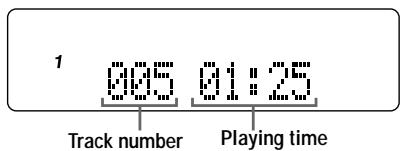
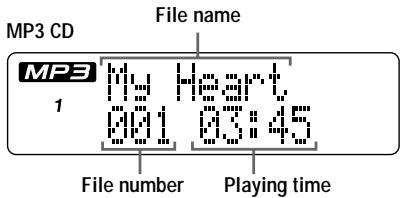
Playing a single track you've selected repeatedly (Repeat play – a single track)
During playback, press MENU repeatedly until "▶1" appears.
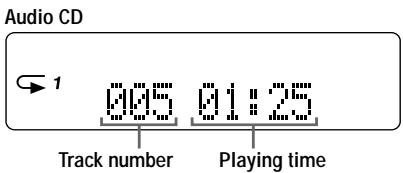
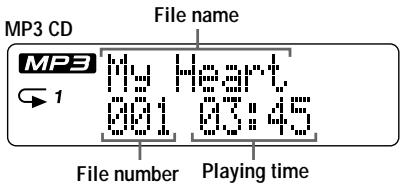
Playing all the tracks on the CD in random order repeatedly (Repeat shuffle play)
During playback, press MENU repeatedly until "← SHUF" appears.
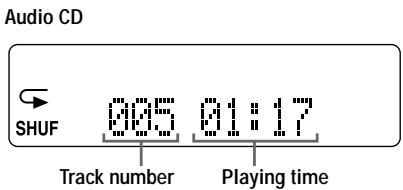
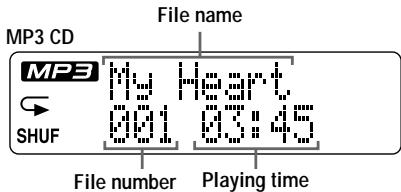
When playing MP3 files
- In repeat shuffle mode, the CD player plays all the files (up to 511 files) on a CD in random order.
- In this mode, you cannot use the FOLDER + or - button.
Playing all the files in a selected folder repeatedly (Repeat folder play) (MP3 CD only)
During playback, press MENU repeatedly until "◀ □" appears.
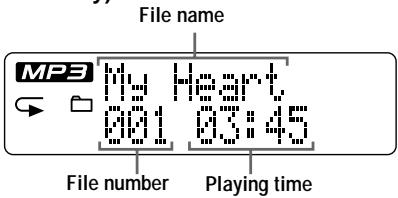
Playing all the files in a selected folder in random order repeatedly (Repeat folder shuffle play) (MP3 CD
only)
During playback, press MENU repeatedly until “← SHUF” appears.
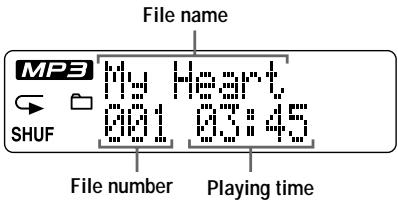
When playing MP3 files
In repeat folder shuffle mode, the CD player plays all the files (up to 511 files) in a selected folder in random order.
The G-PROTECTION function
The G-PROTECTION function has been developed to provide excellent protection against sound skipping while jogging.
When you set the G-PRO switch on your CD player to “2”, the G-PROTECTION function will be enhanced compared to “1.”
To walk with the CD player and enjoy high quality CD sound using the G-PROTECTION function, set the G-PRO switch to “1.” While taking harder exercise, it is recommended that you set it to “2.”
Set G-PRO (under the lid) to "1" or "2."

Note
Sound may skip:
– if the CD player receives stronger continuous shock than expected, - if a dirty or scratched CD is played or - when using poor-quality CD-Rs/CD-RWs or if there is a problem with the original recording device or application software.
Displaying CD text information
When you play an audio CD containing CD text information, the track name, disc name, artist name, etc., appear in the display.
Display on the CD player
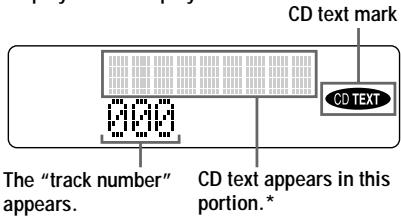
* While the CD player is reading the information on the CD, “READING” appears.
Press DISPLAY.
Each time you press the button, the display changes as follows:
![graph TD A["Display"] --> B["Normal play"] B --> C["Press DISPLAY once."] C --> D["Press DISPLAY twice."] C --> E["Track number, remaining time of the current track and name of the current track/artist name"] D --> F["The number of tracks left**, time remaining on the CD and disc name/artist name"]](/content/2019/08/102151/images/260630b31afc98a4ab6349a86f2c6db152385aa53b5c214527455a6cf27a0466.jpg)
** Not displayed during Single play or Shuffle play.
Note
CD text displayed on this CD player is in English only.
Checking the time remaining on the CD and the number of tracks left
You can check the time remaining on the audio CD and the number of tracks left using DISPLAY.
Press DISPLAY.
Each time you press the button, the display changes as follows.
![graph TD A["Display"] --> B["Normal play"] B --> C["Press DISPLAY once."] C --> D["Press DISPLAY twice."] D --> E["Track number and elapsed playing time"] C --> F["Track number and remaining time of the current track"] D --> G["The number of tracks left* and time remaining on the CD*"]](/content/2019/08/102151/images/7a2a3c025fd380b7558fd6e15dcdc21426f311d0b6258334131355ef534b91ba.jpg)
* Not displayed during Single play or Shuffle play.
Checking information on a CD with MP3 files
You can check information on a CD with MP3 files using DISPLAY.
You can also check ID3 tag (Version 1.1) information if the file has that information stored. (See “About ID3 tag.”)
Press DISPLAY.
Each time you press the button, the display changes as follows.
![graph TD A["Display"] --> B["Normal play"] B --> C["Press DISPLAY once."] C --> D["Press DISPLAY twice."] D --> E["Press DISPLAY three times."] E --> F["Press DISPLAY four times."] B --> G["File name and elapsed playing time"] C --> H["FOLDER <folder name>"] D --> I["ID3 TITLE <file name>"] E --> J[…](/content/2019/08/102151/images/a98bd69f18a8f898c3d37ef2138e0e2032b330edda14dfc234848750fe4153fe.jpg)
Checking the total number of files and folders on a CD with MP3 files
While you are holding down DISPLAY, the total number of files and that of folders are displayed.
Total number of folders
Total number of files
Notes
- If the folder does not have a folder name, "ROOT" appears in the display.
- If the file does not have ID3 tag information, “- - - -” appears in the display.
Emphasizing the bass sound (SOUND)
You can emphasize the bass-boosted sound.
Press SOUND to select "BASS 1" or "BASS 2."
![graph TD A["No indication\n(Normal play)"] --> B["BASS 1"] B --> C["BASS 2"]](/content/2019/08/102151/images/185d000138782ed769316297c73f66202d84d4ae1c1dc847b6e5db194d026f67.jpg)
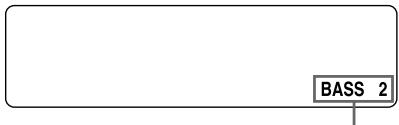
The selected sound mode is displayed.
“BASS 2” enhances the bass sound more than “BASS 1.”
Note
If the sound is distorted when using the SOUND function, turn down the volume.
Protecting your hearing (AVLS)
The AVLS (Automatic Volume Limiter System) function keeps down the maximum volume to protect your hearing.
Hold down SOUND on the CD player until "AVLS" appears in the display.
AVLS
Note
If you use the SOUND function and the AVLS function at the same time, sound may be distorted. If this happens, turn down the volume.
Locking the controls (HOLD)
You can lock the controls on your CD player to prevent accidental button presses.
Slide HOLD in the direction of the arrow.
HOLD
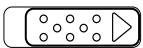
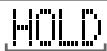
Displayed when the HOLD function is activated.
To unlock the controls
Slide HOLD in the opposite direction of the arrow.
Turning off the operation beep sound
You can turn off the beep sound that is heard from your headphones/earphones when you operate your CD player.
1 Remove the power source (dry batteries or AC power adaptor) from the CD player. 2 Connect the power source while pressing ■ on the CD player.
To turn on the beep sound
Remove the power source and then connect the power source without pressing ■.
Turning off the LCD's backlight
While you are using the dry batteries, the LCD's backlight turns on for about 5 seconds every time you press a button. However, you can turn off the backlight to save the battery power.
1 Remove the dry batteries from the CD player. 2 Insert the batteries while pressing MENU.
To turn on the LCD's backlight
Remove the batteries and then insert the batteries without pressing MENU.
About the LCD's backlight
The LCD's backlight is always turned on when using the AC power adaptor.
Connecting a stereo system
You can listen to CDs through a stereo system and record CDs on a cassette tape. For details, see the instruction manual that comes with the connected device.
Be sure to turn off all connected devices before making connections.
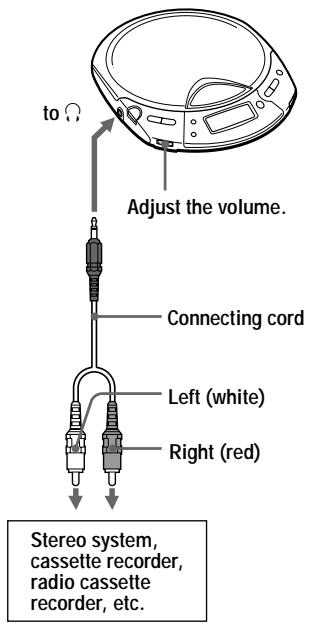
Notes
- Before you play a CD, turn down the volume of the connected device to avoid damaging the connected speakers.
- Use the AC power adaptor for recording. If you use the dry batteries as a power source, batteries may become completely depleted during recording.
- Adjust the volume properly on the CD player and connected device so that the sound will not be distorted or noisy.
About the G-PROTECTION and SOUND functions when using the connecting cord
To record high quality CD sound, set the G-PRO switch to “1.”
Where to place your CD player
• Install the CD player in a location which:
– does not interfere with your driving. – is not dangerous for passengers. – does not interfere with the glove box lid or ashtray. – is stable, and where nothing around it may interfere with installation. – Do not install the CD player near heat sources or where subject to direct sunlight, excessive dust, or moisture (especially on a dashboard).
Please understand that we will not incur any obligations for troubles caused by incorrect installation.
If you have any questions or problems concerning your CD player, please contact your nearest Sony dealer.
Mounting your CD player
Attach the CD player to the console box with the supplied Velcro tapes.
Bottom of the CD player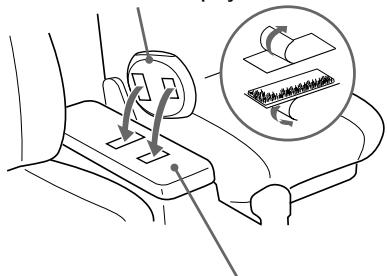
Console box
Notes
- Do not affix Velcro tapes to the name plate or the lid of the battery compartment.
- When you are going to park your car for a long period of time, remove the CD player from the Velcro tapes so that it will not be exposed to direct sunlight.
Note on the car battery cord
The 4.5V DC plug supplied with the car battery cord conforms to the proposed standards of the Japan Electronics and Information Technology Industries Association (JEITA). Do not connect it to other players.
Polarity of the plug (JEITA standards)
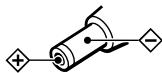
Replacing the fuse of the car battery cord
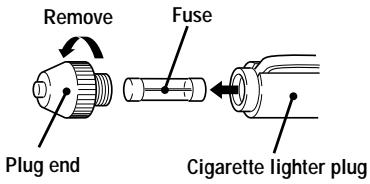
If the CD player does not operate, check the fuse. If it is blown, replace it as follows:
1. Turn off the CD player and remove the cigarette lighter plug from the cigarette lighter socket. 2. Remove the plug end by turning it counterclockwise. 3. Remove the defective fuse from the plug. 4. Insert a new fuse into the plug. 5. Replace the plug end by turning it clockwise.
Notes
- Be sure to use a fuse of the same amperage and length as the one to be replaced. Never use a piece of wire as a substitute for the fuse.
- If the fuse is blown again after replacing it, contact your nearest Sony dealer. In such a case, bring the defective fuse to the dealer with you.
Notes on the car connecting pack
- If no sound is heard or the car connecting pack is ejected, change the direction of playback on the car cassette deck.
- Never insert the cord end of the car connecting pack into the cassette insertion door. Otherwise, the cord may break or the car cassette deck may be damaged.
- You cannot use the car connecting pack with some car cassette decks.
- The cord should be placed so that it does not hinder driving.
- To disconnect the cord from the CD player, pull it out by grasping the plug. Never pull the plug out by the cord.
- With some car cassette decks, you may hear some rattling noise from the car connecting pack. However, this is not a sign of malfunction.
▶ Connecting to a power source
You can use the following power sources:
• LR6 (size AA) alkaline batteries - AC power adaptor
For the battery life, see “Specifications.”
Using the dry batteries
Note
Be sure to remove the AC power adaptor when using the dry batteries.
1 Open the battery compartment lid.
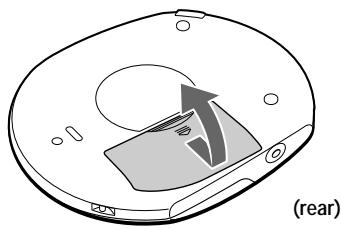
2 Insert two LR6 (size AA) batteries by matching the ⊕ to the diagram in the battery compartment.
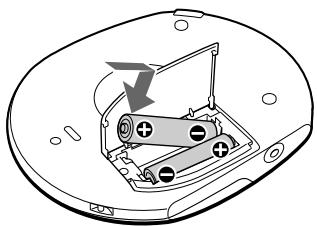
Insert the ⊖ end first (for both batteries).
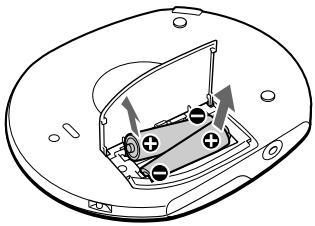
To remove the dry batteries
Remove the batteries as illustrated below.
When to replace the batteries
You can check the remaining power of the batteries in the display.
![graph TD A["Start"] --> B["Battery power is full."] B --> C["..."] C --> D["Battery power is getting low."] D --> E["..."] E --> F["Battery power is low."] F --> G["..."] G --> H["Lo batt* Batteries are depleted."] H --> I["* Beep sounds."]](/content/2019/08/102151/images/1a4bbd7b3f9b77537cf7776c96f4b7a348593e49caaec0bc63d2d842e94ecd67.jpg)
When the batteries are depleted, replace both batteries with new ones.
Notes
- The indicator sections of 772 , roughly shows the remaining battery power. One section does not always indicate one-fourth of the battery power.
- Depending on operating conditions, the indicator sections of 📂 may increase or decrease.
(Continued)
Using the dry batteries
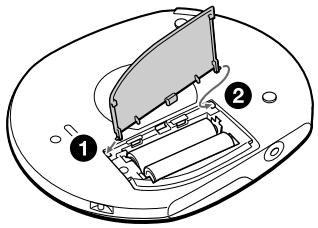
To attach the battery compartment lid
If the battery compartment lid is detached by an accidental drop, excessive force, etc., attach it as illustrated below.
Using the AC power adaptor
Connect the supplied AC power adaptor to the DC IN 4.5 V jack and an AC outlet.
to an AC outlet
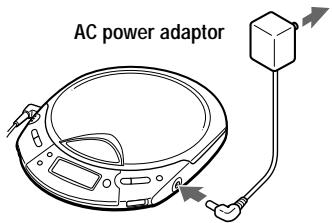
to DC IN 4.5 V
Notes on the power source
Disconnect all power sources when the CD player is not used.
On AC power adaptor
- Use only the AC power adaptor recommended in “Accessories (supplied/ optional).” Do not use any other AC power adaptor. It may cause a malfunction.
Polarity of the plug
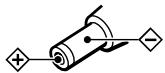
- When disconnecting the AC power adaptor from the AC outlet, grasp the adaptor itself. Do not pull it by the cord.
- Do not touch the AC power adaptor with wet hands.
On dry batteries
- Do not charge the dry batteries.
- Do not throw the batteries into fire.
- Do not carry the batteries with coins or other metallic objects. It can generate heat if the positive and negative terminals of the battery are accidentally contacted by a metallic object.
- Do not mix rechargeable batteries with dry batteries.
- Do not mix new batteries with old ones.
- Do not use different types of batteries together.
- When the batteries are not to be used for a long time, remove them.
- If battery leakage occurs, wipe off any deposit in the battery compartment, and install new batteries. In case the deposit adheres to you, wash it off thoroughly.
Precautions
On safety
- Should any solid objects or liquid fall into the CD player, unplug it and have it checked by qualified personnel before operating it any further.
- Do not put any foreign objects in the DC IN 4.5 V (external power input) jack.
On the CD player
- Keep the lens on the CD player clean and do not touch it. If you do so, the lens may be damaged and the CD player will not operate properly.
- Do not put any heavy object on top of the CD player. The CD player and the CD may be damaged.
- Do not leave the CD player in a location near heat sources, or in a place subject to direct sunlight, excessive dust or sand, moisture, rain, mechanical shock, unleveled surface, or in a car with its windows closed.
- If the CD player causes interference to the radio or television reception, turn off the CD player or move it away from the radio or television.
- Discs with non-standard shapes (e.g., heart, square, star) cannot be played on this CD player. Attempting to do so may damage the CD player. Do not use such discs.
On handling CDs
- To keep the CD clean, handle it by its edge. Do not touch the surface.
- Do not stick paper or tape onto the CD.
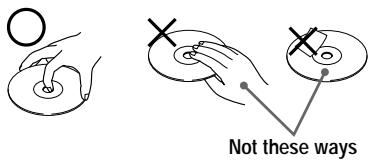
- Do not expose the CD to direct sunlight or heat sources such as hot air ducts. Do not leave the CD in a car parked under direct sunlight.
On headphones/earphones Road safety
Do not use headphones/earphones while driving, cycling, or operating any motorized vehicle. It may create a traffic hazard and is illegal in some areas. It can also be potentially dangerous to play your headsets at high volume while walking, especially at pedestrian crossings. You should exercise extreme caution or discontinue use in potentially hazardous situations.
Preventing hearing damage
Avoid using headphones/earphones at high volume. Hearing experts advise against continuous, loud and extended play. If you experience a ringing in your ears, reduce volume or discontinue use.
Consideration for others
Keep the volume at a moderate level. This will allow you to hear outside sounds and to be considerate to the people around you.
Maintenance
To clean the casing
Use a soft cloth slightly moistened in water or a mild detergent solution. Do not use alcohol, benzine or thinner.
Troubleshooting
Should any problem persist after you have checked these symptoms, consult your nearest Sony dealer.
| Symptom | Cause and/or corrective actions |
| The volume does not increase even if the VOLUME control is adjusted to the maximum level. | → If “AVLS” flashes in the display, hold down SOUND until “AVLS” disappears from the display. (page 7) |
| No sound, or noise is heard. | → Connect the plugs firmly. (page 6)→ Plugs are dirty. Clean the plugs with a dry soft cloth periodically.→ When playing a CD containing both MP3 files and files recorded in a format other than MP3, you selected the latter file type. This CD player can play tracks recorded in the CD-DA format or MP3 files recorded in the CD-ROM format only. (page 8) |
| The playing time is too short when powered with the dry batteries. | → Check that you are using alkaline batteries and not manganese batteries. (page 23)→ Replace the batteries with new LR6 (size AA) alkaline batteries. (page 23) |
| “Lo batt” or “000” appears in the display. The CD does not play. | → Replace the batteries with new LR6 (size AA) alkaline batteries. (page 23) |
| “HI dc In” appears in the display. | → Use only the AC power adaptor or car battery cord in “Accessories (supplied/optional).” (page 29)→ Remove all power sources, then insert the batteries or connect the AC power adaptor again. (pages 6, 23, 24) |
| The CD does not play or “No disc” appears in the display when a CD is placed in the CD player. | → The buttons are locked. Slide the HOLD switch back. (page 18)→ The CD is dirty or defective. (page 25)→ Check that the CD is inserted with the label side up. (page 6)→ Moisture condensation has occurred.Leave the CD player aside for several hours until the moisture evaporates.→ Close the lid of the battery compartment firmly. (page 23)→ Make sure the batteries are inserted correctly. (page 23)→ Connect the AC power adaptor to an AC outlet securely. (page 24)→ Press ▶▶▶▶▶ after one second or more has passed since the AC power adaptor was connected.→ The CD-R/CD-RW is blank.→ There is a problem with the quality of the CD-R/CD-RW, recording device, or application software. (page 8) |
| “HOLD” appears in the display when you press a button, and the CD does not play. | → The buttons are locked. Slide the HOLD switch back. (page 18) |
| Symptom | Cause and/or corrective action |
| Playback starts from the point you stopped. (resume function) | → The resume function is working. To start play from the first track, press ▶▶▶1 for 2 seconds or more, or open the lid of the CD player. Or remove all power sources, then insert the batteries or connect the AC power adaptor again. (pages 6, 7, 23, 24) |
| During playback of an MP3 CD, the CD does not rotate but you can hear the sound normally. | → The CD player is designed to stop the rotation of an MP3 CD during playback to reduce the power consumption. The player is not malfunctioning. |
| “NO FILE” appears in the display after ▶▶▶1 is pressed or the lid of the CD player is closed. | → There are no MP3 files in the CD. → A CD-RW from which the data has been erased is being used. → The CD is dirty. |
| The CD does not start playing. It takes a long time to start playback. | → Finalize the CD. (page 8) |
| When closing the lid of the CD player, the CD starts to rotate. | → The CD player is reading the information on the CD. The player is not malfunctioning. |
| When using a car connecting pack, the sound is distorted or noisy. | → Adjust the volume on the CD player. |
| When using with a connected stereo system, the sound is distorted or noisy. | → Adjust the volume of the CD player and the connected device. (page 20) |
| While playing an MP3 file in the forward or reverse direction quickly, indications on the display become unstable. | → If you use an MP3 file that was compressed with a transfer bit rate setting other than “128kbps,” this phenomenon may happen. We recommend setting the bit rate to “128kbps.” |
Specifications
System
Compact disc digital audio system
Laser diode properties
Material: GaAlAs
Wavelength: λ = 780nm
Emission duration: Continuous
Laser output: Less than 44.6 μW
(This output is the value measured at a distance of 200 mm from the objective lens surface on the optical pick-up block with 7 mm aperture.)
D-A conversion
1-bit quartz time-axis control
Frequency response
20 - 20 000 Hz +1/-3 dB (measured by JEITA CP-307)
Output (at 4.5 V input level)
Headphones (stereo minijack)
Approx. 5 mW + Approx. 5 mW at 24 Ω
Power requirements
For the area code of the model you purchased, check the upper left side of the bar code on the package.
- Two LR6 (size AA) batteries: 3 V DC
- AC power adaptor (DC IN 4.5 V jack): U/U2/CA2/E92/MX2/TW2/BR3 model: 120 V, 60 Hz CED/CET/CEW/CEX/CE7/EE/EE1/E13/G5/ G6/G7/G8/BR1 model: 220 - 230 V, 50/60 Hz CEK/3CE7 model: 230 - 240 V, 50 Hz AU2 model: 240 V, 50 Hz JE.W/E33/EA3/KR4 model: 100 - 240 V, 50/60 Hz HK2 model: 220 V, 50/60 Hz AR1/CNA model: 220 V, 50 Hz
Battery life* (approx. hours)
(When you use the CD player on a flat and stable surface.)
Playing time varies depending on how the CD player is used.
Figures in brackets show the playing time of MP3 files.
| When using | G-PROTECTION function | |
| “1” | “2” | |
| Two Sony alkaline batteries LR6(SG) (produced in Japan) | 32[24] | 30[24] |
* Measured value by the standard of JEITA (Japan Electronics and Information Technology Industries Association).
Operating temperature
5°C - 35°C (41°F - 95°F)
Dimensions (w/h/d) (excluding projecting parts and controls)
Approx. 161.0 × 26.3 × 130.3 mm
(6 3/8 × 1 1/16 × 5 1/4 in.)
Mass (excluding accessories)
Approx. 210 g (7.5 oz.)
Design and specifications are subject to change without notice.
Accessories (supplied/optional)
Supplied accessories
For the area code of the location in which you purchased the CD player, check the upper left side of the bar code on the package.
AC power adaptor (1)
Headphones/earphones (1)
Car battery cord (1)
Car connecting pack (1)
Velcro tape (2)
Optional accessories
| AC power adaptor | AC-E45HG |
| Active speaker system | SRS-A17 |
| Car battery cord | DCC-E345 |
| Car battery cord with car connecting pack | DCC-E34CP |
| Car connecting pack | CPA-9C |
| Connecting cord | RK-G129 |
| RK-G136 | |
| Earphones | MDR-E848LP |
| MDR-EX70LP | |
| Headphones | MDR-A44L |
| MDR-A110LP |
When using optional headphones, use only headphones with stereo miniplugs. You cannot use headphones with micro plugs.
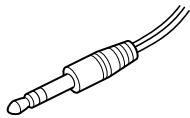
Stereo miniplug
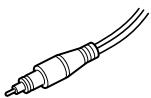
Micro plug
Your dealer may not handle some of the accessories listed above. Please ask the dealer for detailed information about the accessories in your country.
About "MP3"
What is the MP3?
MP3 (MPEG 1 Audio Layer-3) is a standard technology and format for compressing a sound sequence. The file is compressed to about 1/10 of its original size. Sounds outside the range of human hearing are compressed while the sounds we can hear are not compressed.
playable "MP3" files on this player
You can only play MP3 files recorded by following requirements.
USABLE MEDIA
CD-Rs and CD-RWs
USABLE DISC FORMAT
You can use ISO 9660 Level 1/2 and Joliet extension format discs. This unit can display only 1-byte characters. (2-byte characters like those of Japanese are displayed as “−.”)
The major specification of the usable disc format is:
• Maximum directory steps: 8 - Usable characters for a file/folder name: A - Z, 0 - 9, _ (underscore) • Maximum number of characters for a file name: 64 and a 3-character extension code
Notes
- When naming, be sure to add the file extension "mp3" to the file name.
- If you put the extension “mp3” to a file other than an MP3 file, the player cannot recognize the file properly.
- The file name does not correspond to the ID tag.
THE USABLE NUMBER OF FOLDERS/FILES
• Maximum number of folders: 511 • Maximum number of files: 511
SETTINGS FOR COMPRESSION SOFTWARE AND WRITING SOFTWARE
- To compress a source for an MP3 file, we recommend setting the transfer bit rate of the compression software to “44.1 kHz”, “128kbps”, and “Constant Bit Rate”.
- To record up to the maximum capacity, set to the “halting of writing”.
- To record at one time up to the maximum capacity on media that has nothing recorded it, set to “Disc at Once”.
NOTES FOR SAVING FILES ON THE MEDIA
When the disc is inserted, the player reads all the files on that disc. If there are many folders or non-MP3 files on the disc, it may take a long time for play to begin or for the next MP3 file to start play.
Do not save unnecessary folders or files other than MP3 ones in the disc to be used for MP3 listening.
We recommend that you do not save other types files or unnecessary folders on a disc that has MP3 files.
About "ID3 tag"
ID3 tag is a format for adding certain information (track name, album name, artist name, etc.) to MP3 files.
Note
This CD player conforms to Version 1.1 of the ID3 tag format. If you use a version other than 1.1, ID3 tag information will not be displayed correctly but the file can be played back.
- OPERATING INSTRUCTIONS
- ABOUT THE AREA CODE
- WARNING
- TO PREVENT FIRE OR SHOCK HAZARD, DO NOT EXPOSE THE UNIT TO RAIN OR MOISTURE
- CAUTION
- TABLE OF CONTENTS
- GETTING STARTED
- PLAYING AN AUDIO CD OR MP3 FILES
- PLAYBACK OPTIONS
- AVAILABLE FEATURES
- CONNECTING YOUR CD PLAYER
- INSTALLING IN A CAR
- CONNECTING TO A POWER SOURCE
- ADDITIONAL INFORMATION
- LOCATING THE CONTROLS
- CD PLAYER (INSIDE)
- CD PLAYER (REAR)
- CONNECT YOUR CD PLAYER
- NOTE
- INSERT A CD
- ABOUT THE DISPLAY
- WHEN CLOSING THE LID OF THE CD PLAYER WITH THE POWER SUPPLY ATTACHED
- IF THE VOLUME LEVEL DOES NOT INCREASE
- ABOUT CD-RS/CD-RWS AND MP3 FILES
- REMOVING THE CD
- PLAYING A CD WITH MP3 FILES
- PRESS ▶▶▶▶I
- TO SELECT A FOLDER
- TO SELECT A FILE
- NOTES
- EXAMPLE OF FOLDER STRUCTURE AND PLAYING ORDER
- MENU BUTTON
- DISPLAY
- PLAYING ALL THE TRACKS ON THE CD REPEATEDLY
- WHEN PLAYING MP3 FILES
- PLAYING A SINGLE TRACK (SINGLE PLAY)
- PLAYING A SINGLE TRACK YOU'VE SELECTED REPEATEDLY (REPEAT PLAY – A SINGLE TRACK)
- PLAYING ALL THE TRACKS ON THE CD IN RANDOM ORDER REPEATEDLY (REPEAT SHUFFLE PLAY)
- PLAYING ALL THE FILES IN A SELECTED FOLDER REPEATEDLY (REPEAT FOLDER PLAY) (MP3 CD ONLY)
- PLAYING ALL THE FILES IN A SELECTED FOLDER IN RANDOM ORDER REPEATEDLY (REPEAT FOLDER SHUFFLE PLAY) (MP3 CD
- THE G-PROTECTION FUNCTION
- DISPLAYING CD TEXT INFORMATION
- PRESS DISPLAY
- CHECKING THE TIME REMAINING ON THE CD AND THE NUMBER OF TRACKS LEFT
- CHECKING INFORMATION ON A CD WITH MP3 FILES
- CHECKING THE TOTAL NUMBER OF FILES AND FOLDERS ON A CD WITH MP3 FILES
- EMPHASIZING THE BASS SOUND (SOUND)
- PRESS SOUND TO SELECT "BASS 1" OR "BASS
- PROTECTING YOUR HEARING (AVLS)
- LOCKING THE CONTROLS (HOLD)
- TO UNLOCK THE CONTROLS
- TURNING OFF THE OPERATION BEEP SOUND
- TO TURN ON THE BEEP SOUND
- TURNING OFF THE LCD'S BACKLIGHT
- TO TURN ON THE LCD'S BACKLIGHT
- ABOUT THE LCD'S BACKLIGHT
- CONNECTING A STEREO SYSTEM
- ABOUT THE G-PROTECTION AND SOUND FUNCTIONS WHEN USING THE CONNECTING CORD
- WHERE TO PLACE YOUR CD PLAYER
- MOUNTING YOUR CD PLAYER
- NOTE ON THE CAR BATTERY CORD
- REPLACING THE FUSE OF THE CAR BATTERY CORD
- NOTES ON THE CAR CONNECTING PACK
- USING THE DRY BATTERIES
- OPEN THE BATTERY COMPARTMENT LID
- INSERT TWO LR6 (SIZE AA) BATTERIES BY MATCHING THE ⊕ TO THE DIAGRAM IN THE BATTERY COMPARTMENT
- TO REMOVE THE DRY BATTERIES
- WHEN TO REPLACE THE BATTERIES
- TO ATTACH THE BATTERY COMPARTMENT LID
- USING THE AC POWER ADAPTOR
- NOTES ON THE POWER SOURCE
- ON AC POWER ADAPTOR
- ON DRY BATTERIES
- PRECAUTIONS
- ON SAFETY
- ON THE CD PLAYER
- ON HANDLING CDS
- ON HEADPHONES/EARPHONES ROAD SAFETY
- PREVENTING HEARING DAMAGE
- CONSIDERATION FOR OTHERS
- MAINTENANCE
- TO CLEAN THE CASING
- TROUBLESHOOTING
- SPECIFICATIONS
- SYSTEM
- LASER DIODE PROPERTIES
- D-A CONVERSION
- FREQUENCY RESPONSE
- OUTPUT (AT 4.5 V INPUT LEVEL)
- POWER REQUIREMENTS
- BATTERY LIFE* (APPROX. HOURS)
- OPERATING TEMPERATURE
- DIMENSIONS (W/H/D) (EXCLUDING PROJECTING PARTS AND CONTROLS)
- MASS (EXCLUDING ACCESSORIES)
- ACCESSORIES (SUPPLIED/OPTIONAL)
- SUPPLIED ACCESSORIES
- ABOUT "MP
- WHAT IS THE MP
- PLAYABLE "MP3" FILES ON THIS PLAYER
- USABLE MEDIA
- USABLE DISC FORMAT
- THE USABLE NUMBER OF FOLDERS/FILES
- SETTINGS FOR COMPRESSION SOFTWARE AND WRITING SOFTWARE
- NOTES FOR SAVING FILES ON THE MEDIA
- ABOUT "ID3 TAG
Brand : SONY
Model : D-CJ506CK
Category : Portable CD player