HP6565/30 - Epilator PHILIPS - Free user manual and instructions
Find the device manual for free HP6565/30 PHILIPS in PDF.


User questions about HP6565/30 PHILIPS
0 question about this device. Answer the ones you know or ask your own.
Ask a new question about this device
Download the instructions for your Epilator in PDF format for free! Find your manual HP6565/30 - PHILIPS and take your electronic device back in hand. On this page are published all the documents necessary for the use of your device. HP6565/30 by PHILIPS.
USER MANUAL HP6565/30 PHILIPS
Always here to help you
Register your product and get support at
www.philips.com/welcome
HP6565

User manual
ENGLISH 6
DANSK 13
DEUTSCH 21
EAAHNIKA 29
ESPANOL 37
SUOMI 45
FRANÇAIS 52
ITALIANO 60
NEDERLANDS 68
NORSK 76
PORTUGUES 83
PORTUGUES DO BRASIL 91
SVENSKA 99
TÜRKÇE 107
БыгAPСКИ 114
CESTINA 122
EESTI 129
HRVATSKI 136
MAGYAR 144
KA3AKWA 152
LIETUVISKAI 160
LATVIEŠU 168
POLSKI 175
ROMÁNA 183
PYCCKH 190
SLOVENSKY 198
SLOVENsCINA 206
SRPSKI 214
YKPAIHcBKA 222
Introduction
Congratulations on your purchase and welcome to Philips! To fully benefit from the support that Philips offers, register your product at
www.philips.com/welcome.
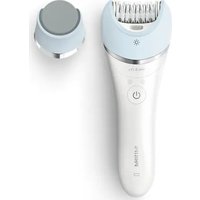
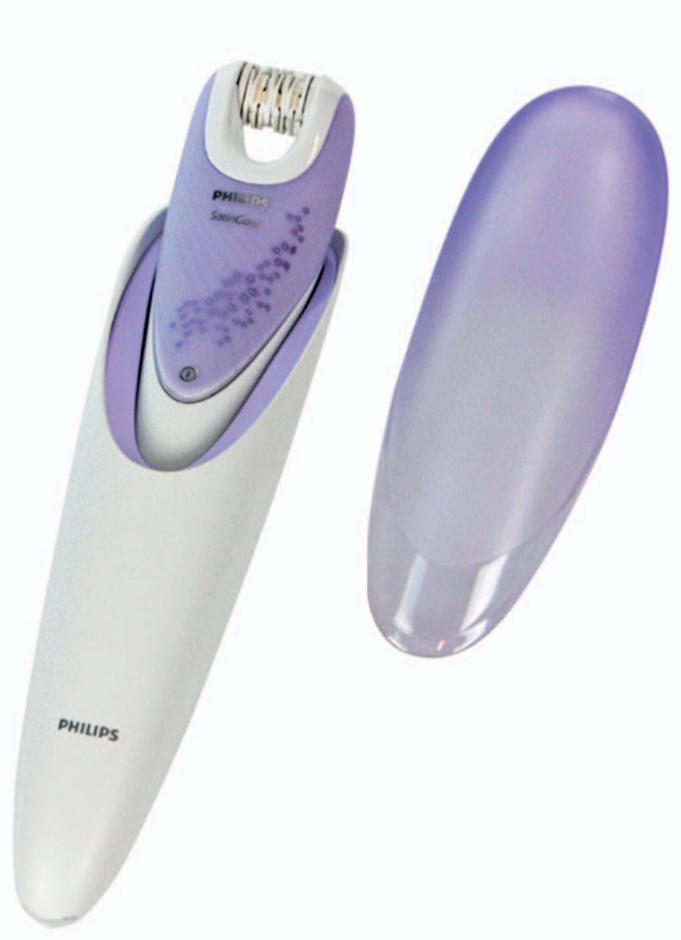
We know it's important for you to be hair free in your intimate areas. The new Philips Satin Intimate makes it safe and easy to remove as much or as little hair as you want yourself. Enjoy desirably smooth longlasting results.
- Reach all areas with the ergonomically s-shaped body and uniquely designed small epilating head.
- Protect delicate skin with the safety bar.
- Gentle on the skin thanks to ceramic textures discs.
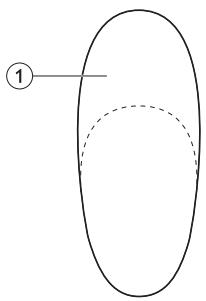
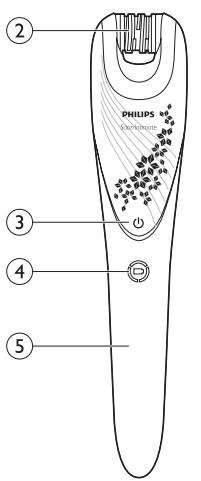
General description (Fig. 2)
1 Charging cap
2 Epilating discs
3 On/off button
4 Charging light
5 Charging pins
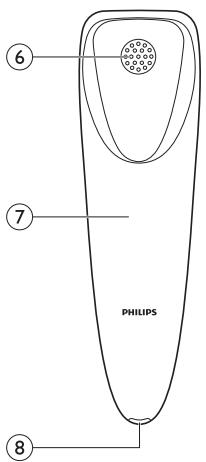
6 Air grille
7 Charging case
8 Socket
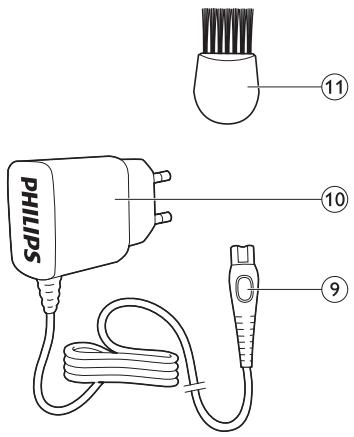
9 Small plug
10 Adapter
11 Cleaning brush
Important
Read this user manual carefully before you use the Intimate areas epilator and save it for future reference.
Danger
- Keep the adapter dry.
- If you charge the epilator in the bathroom, do not use an extension cord.
Warning
- Do not use the appliance if it is damaged.
- This appliance is not intended for use by persons (including children) with reduced physical, sensory or mental capabilities, or lack of experience and knowledge, unless they have been given supervision or instruction concerning use of the appliances by a person responsible for their safety.
- Children should be supervised to ensure that they do not play with the appliance.
Caution
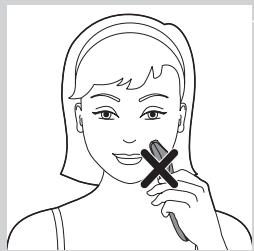
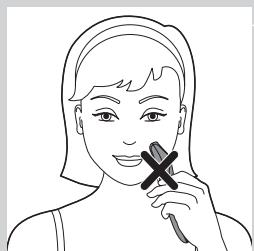
- The epilator is not intended for use on facial areas such as the upper lip.
- To prevent damage and injuries, keep operating appliance away from scalp hair, eyebrows, eyelashes, clothes, threads, cords, brushes etc.
- Do not use the epilator on irritated skin or skin with varicose veins, rashes, spots, moles (with hairs) or wounds without consulting your doctor first. People with a reduced immune response or people who suffer from diabetes mellitus, haemophilia or immunodeficiency should also consult their doctor first.
- Your skin may become a little red and irritated the first few times you use the epilator. This phenomenon is absolutely normal and disappears. As you epilate more often, your skin gets used to epilation, skin irritation decreases and regrowth becomes thinner and softer. If the irritation has not disappeared within three days, we advise you to consult a doctor.
- Do not clean the epilator with water that is hotter than shower temperature (max. 40^ ).
- Never use scouring pads, abrasive cleaning agents or aggressive liquids such as petrol or acetone for cleaning purposes.
Compliance with standards
This Philips epilator complies with all standards regarding electromagnetic fields (EMF).
General

- This symbol means that the Intimate areas epilator is suitable for use in a bath or shower.
Maximum noise level of the epilator: Lc = 77dB(A)
Preparing for use
Charging
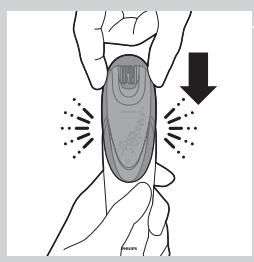
Charging the intimate areas epilator takes approx. 5 hours. When the epilator is fully charged, it has a cordless operating time of up to 30 minutes. If the epilator is not fully charged, the operating time is shorter.
Note: No disposable batteries needed.
1 Switch off the appliance.
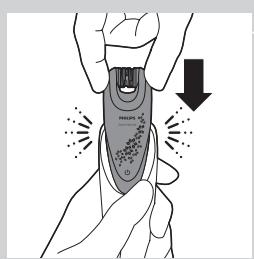
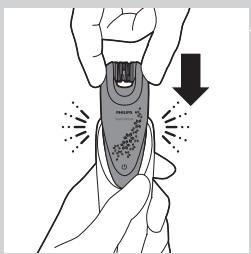
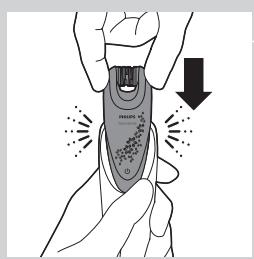
2 Place the appliance in the charging case.
Note: Make sure the charging pins of the epilator are in full contact with the charging case. You hear a click when full contact has been established.
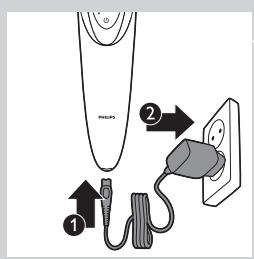
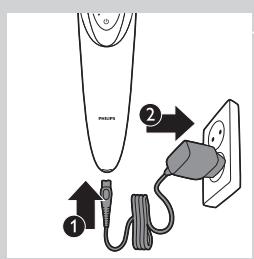
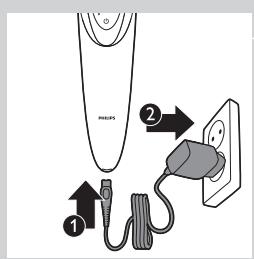
3 Insert the small plug in the bottom of the charging case (1) and insert the adapter into the wall socket(2).
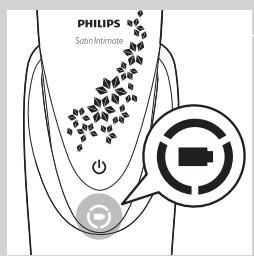
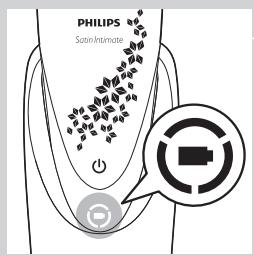
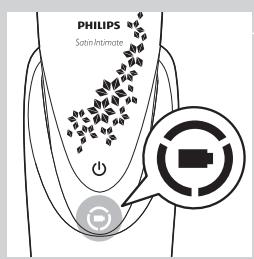
The charging light lights up green continuously to indicate that the appliance is charging.
Note: When the battery is fully charged, the light goes out.
Using the intimate area epilator
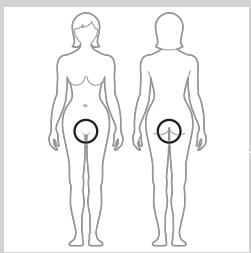
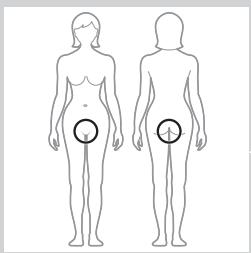
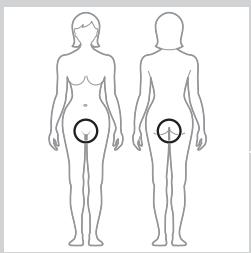
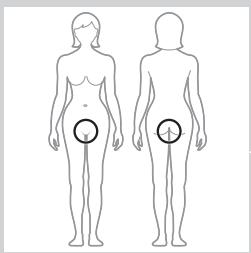
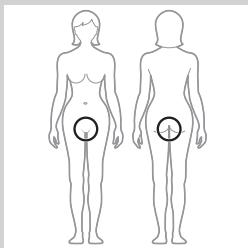
The epilator is primarily intended to remove hairs by the root in the intimate areas. You can also use it to epilate the bikini line, the underarms and hard-to-reach areas such as knees and ankles. The appliance can be used wet or dry.
Epilating tips
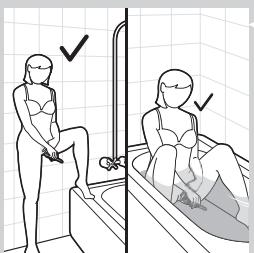
- Wet: We advise you to start epilating on wet skin, as water relaxes the skin and makes epilation less painful and gentler. Use your common shower gel or foam for a smoother epilation.
- Dry: If you epilate dry, epilation is easier just after taking a bath or shower. Make sure your skin is completely dry when you start epilating.
- General: Your skin should be entirely clean and free of oil. We advise you to epilate in the evening, as skin irritation usually disappears overnight.
- General: Epilation is easier and more comfortable when the hairs have a length of 3 - 4mm . If the hairs are longer, we recommend that you shave first and epilate the shorter regrowing hairs after 1 or 2 weeks. Alternatively, you can trim the hairs to 3 - 4mm before you start epilating.
Epilating your intimate area
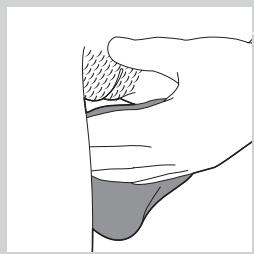
1 Thoroughly clean the area to be epilated.
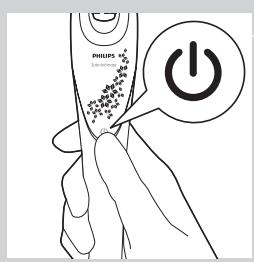
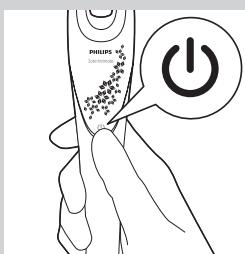
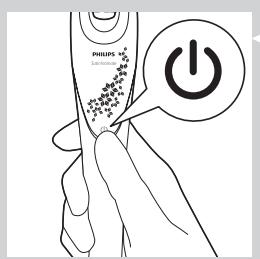
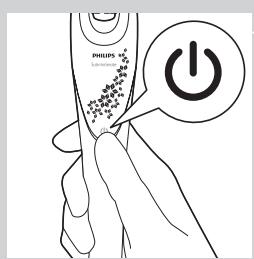
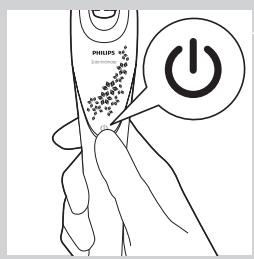
Press the on/off button to switch on the appliance.
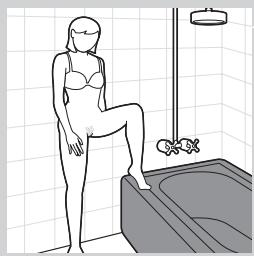
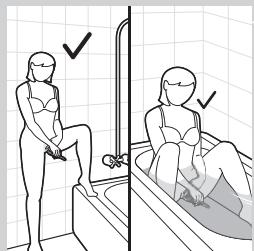
3 Take on of the following positions: place one leg on the bathtub
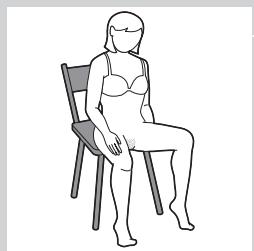
sitting on a chair
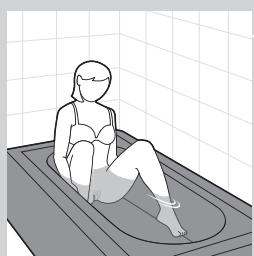
sitting in the bathtub
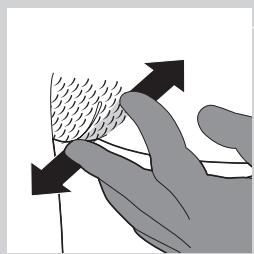
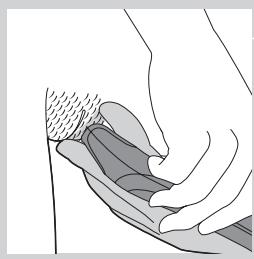
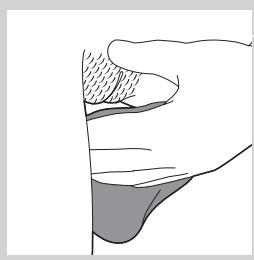
4 With your free hand, stretch the skin with two fingers to make the hairs stand upright.
To protect your skin, the protective bar on the back of the epilating head helps you to keep the epilator at the right angle.
Tip: Spread your legs to achieve some initial stretching of the skin. Stretch the skin further with your fingers. Only stretch in small areas and only place the epilator on thoroughly stretched skin.
5 Place the appliance at an angle of 90^ onto the skin between two fingers and slowly move the appliance against the direction of the hair growth.
Tip: To relax the skin, we advise you to apply a moisturising cream immediately or a few hours after epilation.
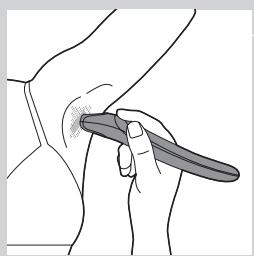
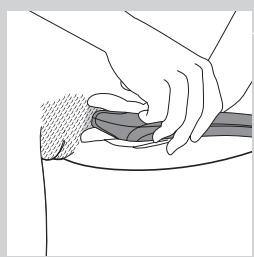
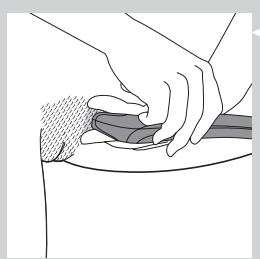
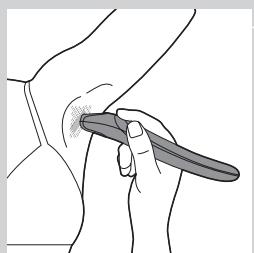
Tip: You can also epilate your bikini line or underarms as shown in the figure. Stretch the skin with your free hand and move the appliance in different directions to catch all hairs.
6 When you have finished epilating, switch off the appliance and clean the epilating head according to the instructions in chapter 'Cleaning and maintenance'.
Caution: Do not use this appliance to epilate eyebrows, eyelashes or other facial areas.
Caution: Do not use this appliance to remove hairs that grow out of moles.
Cleaning and maintenance
Cleaning the intimate area epilator
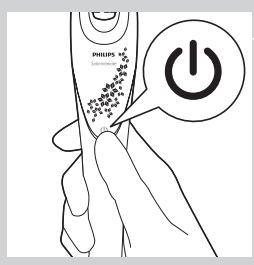
1 Switch off the appliance.
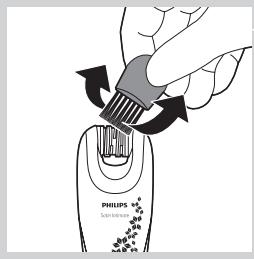
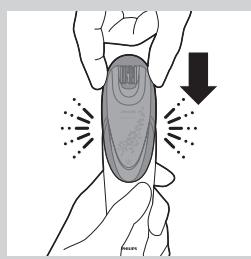
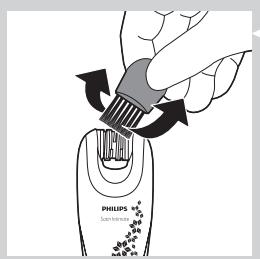
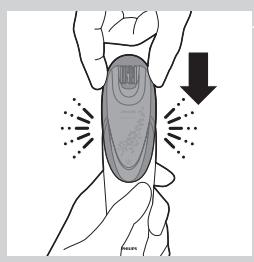
2 Remove loose hairs with the cleaning brush.
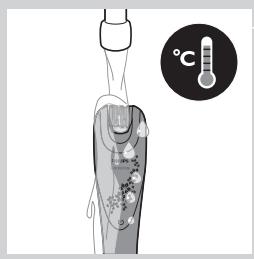
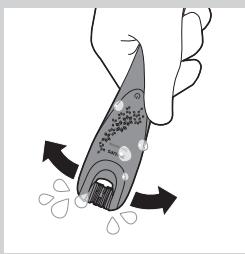
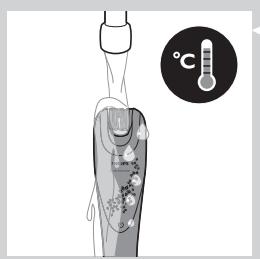
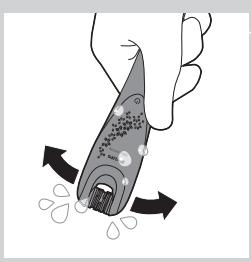
3 Rinse the appliance with water that has a maximum temperature of 40^ .
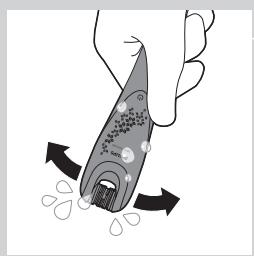
4 Shake off excess water and let the appliance dry.
Storage
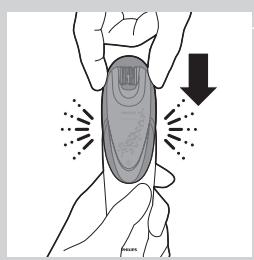
- For protection during storage or travel, store the appliance in the charging case.
Note: Make sure that all parts are dry when you store them.
| Environment | ||
| Epilator | - Do not throw away the appliance with the normal household waste at the end of its life, but hand it in at an official collection point for recycling. By doing this, you help to preserve the environment. | |
| The built-in rechargeable batteries contain substances that may pollute the environment. Always remove the batteries before you discard and hand in the epilator at an official collection point. Disuse of the batteries at an official collection point for batteries. If you have trouble removing the batteries, you can also take the appliance to a Philips service centre. | ||
| Removing the rechargeable batteries | ||
| Only remove the batteries when they are completely empty to avoid a hazard. Never let the batteries come in contact with metal. 1 Make sure the batteries are completely empty. 2 Put the device in the freezer for at least 24 hours to make the material brittle. 3 Wrap the device in a towel. 4 Stamp on it with your foot or use a hammer to break the device. Caution: Only do this while wearing solid shoes. Attempting this with bare feet could cause injuries. 5 Take out the batteries and remove the printed circuit boards from the rechargeable batteries with a screwdriver. Caution: Be careful when using a hammer to avoid a hazard. | ||
| Troubleshooting | ||
| This chapter summarises the most common problems you could encounter with the appliance. If you are unable to solve the problem with the information below, visit www.philips.com/support for a list of frequently asked questions or contact the Consumer Care Centre in your country. | ||
| Problem | Possible cause | Solution |
| The intimate area epilator does not work. | The appliance is not charged. | Charge the appliance. See chapter 'Preparing for use' section 'Charging'. |
Introduktion
Merk: Ingen behov for engangsbattery.
1 Slä av apparatet.
2 Plasser apparatet i ladeenheten.
Merk: Kontroller at ladepinnene på epilatoren er helt i kontakt med ladeenheten. Du hør er klikk nær de er i fullstendig kontakt.
CLOKTe eDINHc KpaKa Ha PbBaHa BaHaTa

ceAHeTe Ha CTOA
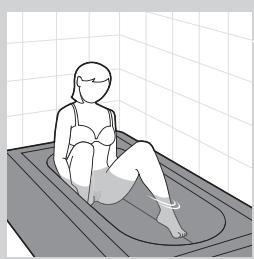
CEaHETe BbB BaHaTa
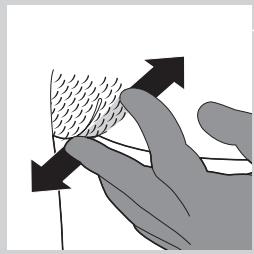
4 CbC CBO6OHaTa cn PbKa n3NbHeTe KOxKaTa C DaBa npbCTa, 3a Da ce H3npaBt KOCMnTe.
3a da npea3n Koxata BN, 3aunTHaTa AaIncha Ha Tbp6a Ha ennnapaata rAba Bn NOMara Da bpxKeTe einnatopa NOA npabuHnBbA.
Cbem:Pa3kpayeme Kpaka,3ga n3nbHeme KOkama.N3nbHeme gonbAHmeAHO KOkama c npcbcm. N3nbBaime KOkama camo B MaKn 30Hn nocmabIme enHaamopca camo Bbpxu n3nbHama KOka.
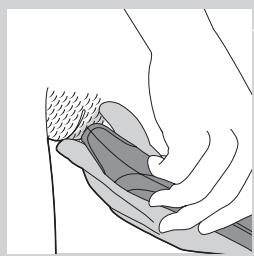
5 NocTaBeTe eHnAToPA BbPxy KOxTa IoA bFb 90°, MeKdY DaBaTa Cn npbCTa, n 6abHO dBXKeTe eHnAToPA cpeu NocOKaTa Ha paCTeK Ha KOCMnTE.
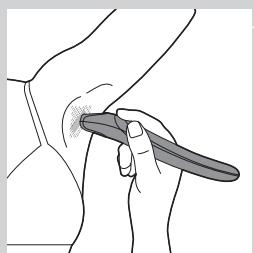
Cbem:3a ga ycnokoinme kokama,cbembame Bn ga hanece me OBAAHRABau Kpem Beghara HAN HRAKO qaca CAeg ennaunma.
Cbbem: Moxeme ga ennnpame cbso 6kHH AnHna ma nn noqMnHnime, kakmo e noka3aHO ha fynypama. N3nbHeme KOxama cBc Cbo6oghama cn pbka ngxeme yega B pa3AnuHn nocOKn, 3a ga yAOBnme BCNUK KOCMN.
6 CλeД kaTo npKIAOHTe c eHnAuaTЯ, n3KIAOHTe ypeДи noUHCTeTe eHnAupaTa rIaBa CnOpeД nHCTpyKUnTe B rAba "IIOuHCTBaHe n NOAApbXkka".
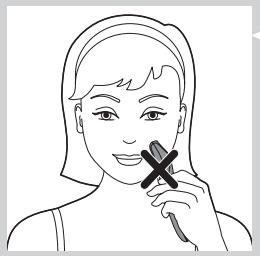
BnHMaHHe: He n3noA3BaIe ypea, 3a Da eINAnpaTe BeKAn, MInAn NAn APyrn 3OHN OT ANUceto.
BnHMaHHe: He n3noA3BaIe ypeDa 3a npemaxBaHe Ha KOCMn, paCTaIu OT 6eKn.
NIOAaPbXka
Nouchtahe Ha enHaaTopa 3a HHTHMn 3OHN

1 N3KAIOUeTe ypeDa.
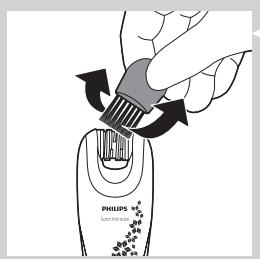
2 NoiuchteTe KOCMnTe C YeTkata 3a NOnuCTBaHe.
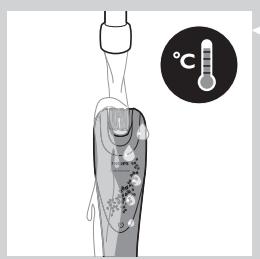
3 N3πλaκHeTe ypeDa c BODa C TemηpaTypa NaH-MHOrO 40^
4 N3tpbckaIte H3AIIHHaTa BOa I OCTaBeTe ypeDa Aa H3cbXHe.
CbxaheHne
- 3a 3auiTa npi CbXpaHHe n PbTyBaHe, DpbKTe ypeDa B KaIbΦa 3a 3apeJkaHe.
3a6eexka: PpOBepeBaIme gaN BCnKu Yacmna ga ca cyxN, npegn ga rnpn6epeme.
Ona3BaHe Ha OKoHaTa CpeDa
ClekpaHaekcnaOtaunHa ypeaHe ro nXbpynTe 3aeHc HOPMaHNTE bntOBn OTnAdbu, a rnpdeaIte B oHnlaennyKt 3a cbipane, KbETo Da b6epeuKpapan. NToToHn HauHn Bne NOMaraTe 3a ONa3BaHeTO Ha OKoHaTa Cpea.
EnHaTOp
BrgpaenTe akymyaTOpHn 6aTePn ncbbpKAT BeuecTbA, KOITOMOKe Da 3ambpCt OKoHaTa CpeDa. HenpemEnHO n3BaDeTe6aTePnInTe, PpeDn Da n3XbPAnTe eNHaTopa nn da ro npdeaaTe B Ophiuaen PyhKT 3a cb6pAnaHe. PpeaTe 6aTePnInTe B Ophiuaen pyhKT 3a cb6pAnaHe Ha 6aTePn. Ako ImaTe np6bEmn npn n3BaJxJaHaHe Ha 6aTePnTE, MoKe Da 3aHeceTe ypeDa B cepBn3eH ueHTbp Ha Philips.
N3BaXdaHeHaakymyAaTopHnTe6aTePm
I3BaJdaIte 6aTePnITe cmo aKO ca HAnbHO n3ToUeHN, 3a da IpeDOrBpaTInTe eBeHTyaHa 3AoN0Akya. Pa3eTe 6aTePnITe OT dOnIp Do MeTaI.
1 YbepTe ce, Ye 6aTepeHrTe ca HnIbAno I3ToUeHN.
2 CLOXKeTe ypeDa BBB φpH3ep 3a ΦoHe 24 Yaca, 3a Da HapPaBnTe MaTePnaAa KpExbK.
3 YBnIteypeaB Kbpna.
4 HactbneTe ypea c kpaK,3a da ro cuynTe,nnn 3n0A3BaTe yk.
BHHMaHHe: HEnpeMeHNo 6oyIte coaHn O6yBKn. He OInTbaIte 6ocn, 3a Da He ce HapaHnte.
5 13BaAeTe 6aTePnHte NOTaeLeTe OT TEx neHaTa PAnTka C NOMOuTa Ha OTBePTKa.
BHHMaHHe: BHIMaBaTe, KOrato n3nOa3BaTe uK, 3a Da n36eHete 3AoNoAkyKa.
OTctpaHbAHe Ha HEN3PpabHoctn
В тази Гава са обобшени нач- YeСТО СршанITE пбошлмИ, кОТо може ДсршпЕ рпи ИЗПОЛЗВАне на урда. Ако He може Тд раЗршпЕ пбошлмЯ спомоштА на ИНфОрмаляТа NO-ДOLУ, ВИЖТЕ спИCBКа C YeСТО 3aДавани ВьпорсИ на aDPEC www.philips.com/support ИМс ce CBpЖeTe C LeHTbpa 3a obCayJKBaHe Na NOTpeBnTeIи BвB BaWaTа DьрЖaBA.
| ПюбLEM | Възможна р comprина | Рeoшениe |
| Енда对接лт заIns毓дз зони п не поти. | Уразьт не e Зраздeн. | Зраздeт уразд. Вижт галава “Пюд�овка за уnotpeба”, раздeн “Зapжданe”. |
Uvod
HHTMAdai aMak 3nAaTOpbIn Ta3aAay
KypbIaFbIHbI eWipiH3.
KaAFAH TYKTepei 甲ETkAmeH aBIn TaCTaHbI3.
3 KyaAaBti TempeatypacbI eH xOfapbl AereHde 40°C 6oAaTbIH cyMeH IaNbIHbI3.
4 ApTbIK cyAbi ciKIN TacTaN, KyaAAbi KeNTipiH3.
CaKtay
- CaKtay Hemece caXaT Ke3iHDe KOpFay yIiH KypaAdbI 3aprTay KOpNycbIHda caKaTahbl3.
Eckepmne: CaKmaFah Ke3ge 6apAbyk 6oAweKmepiH Kypfak eKeHgirH meKcepiH3.
KopshaFAn opta
KpaAdbI e3 KbI3MeTIN KepCteTIN To3FaHHaH KeiH, KyHaJIaKTI yI KOKbICbIMEn bipre TaCTayfa 60MaMaiDbI. OhBiH opHbHa 6yI KpaAdbI apHaBbI XnHAp aAaTbH Jepe RaTa eHaDey MaKCaTbHa eTkizhi3. CoHa ci3 KopwaaFAn aHaAaHbI caKTayfa ce6iH3di Tnir3eCi3.
3nnaTOp
- BekiTlAReH 3apTaIaTbIb6aTapeApda KOp7aFaH opTaHbI IacTaybl MyMKIH 3aTTap 6ap. 3nIARTopDbI apHaBbIK HAY opHbHa TAcTaMaC 6ypbH ePaKaIaHb6aTapeApdbI bIFapbIN aIbHbIB. BaTapeApdbI 6aTapeApfa apHaFAh apHaBbIK HAY opHbHa TAcTaHbIB. BaTapeApdbI bIFapbIN aYDa KbHbIDk TybIHdaca, KypaABi Philips KbIMET KepeTeOpTaIbIFbHa anapyfa Da 6oAAbl.
3apAtaaTaBH 6aTapeAapAbI SwbIfapy
Kayinti KaFdai Tyfbi36ac yiwih BaTapeAapdbH 3ap8bI TOBik 6iTKeHDe FaHa aBbI TaTaHbI. BaTapeAapdbH MeTaFa TIOiHe JKO BepMeH3.
BaTapeaapbIH TObIK 6OcaFaHbIH TeKcepiH3.
MaTePnAaBb6y3y ywiH KypaaBbMz3aTkblka KeMiHae 24 caFaT KOiBbIbI3.
3 KypbIaFbIbI cyIre opaHbI3.
4 OHbIH yCTiHEAraFBiHb36eH 6aCbIHb3 HemeC KpypbIAfbIHb CbIHAbipy yIiH 6aFaHbI naIaaAahbHbI3.
EckepTy: MyHbI Tek MbIKTbI aK KIM KIN TpyFaHaOpIHHaHbI3. MyHbI Kaah aKIneH 6acy Xapakat Tyabipybl MymkiH.
5 BaTapeaapabI sbIFapbIn aBbHb3 KHe 6acbfaH cxema TaKaTaapbH 3apraTaalabH 6TaapeaapadH 6paFbIkw KEmerimeH aBbHb3.
EckepTy: BaAfaHbI NaaAaAHy Ke3iHae KaTePdI 6oAdbIpMay ywiH a6aHaaHbI3.
AkayAbIKTapAbI XOIO
BvTapayda KpybIbIa en JxNKe3DeceTIH McSeAeAp
KINHaKaTaNFaH. TeMeHderi aknapaTTbIH KemerimHe McSeAeHi weWe
aAMacaHbI, JxN KOyblaTbIH cypaKTap TizIMH Kepy yuHn WwWphilips.com/
support Topa6bHa KipH3 HeMece eaiH3deri TybHyyabApDa KoAday
opTaBlbHa Xa6apAacBhlB3.
Ppo6xema
blktmam c6e6e6i
Ueimi
HHTMäi aMak 3NIMARTOpbj XMbICICTEMeH.
Kypa3apraTaMaFaH.
KyaPaaBb3apraTaHb3.(PaHaAaHyFa aHbHay) TaPaybHbH 《3apraTay》6eAmIH KapaHb3.
lvadas
COOTBETCTBNE cTaHdapTAM
AaHbIy 3nAryTop Philips COOTBeTCTByET CTaHApTaM NO 3AEKTPOMaHHTbIM NOAM (3Mn).
06uine CBeDeHnA

- AaHbI CmBOA O3HaayE,HTO 3INIAITOP 4AA YBCTBNTeAbHbIX yHaCTKOB MOXHO IcNOA30BaTb B dywe nn BaHHoN.
- MaKcImaMbHbIy yPoBeHb ηuMa ΣnIaToppa: Lc = 77 dB (A).
NoAroTobKa np6opa Ka pa6ote
3apAka
3apka 3nAToP0a 4yBCTBnTeAhBbIX yAcTkoB 3aHmaeT OKoO 5 yacob. Ppi nIoHoi 3apKe Bpem aBOtOHOMHO pa60tbi 3nAToP oCoCTaIeT MaKcMUM 30 MNHT. Ecm 3nAToP 3apJxH eHIOHOCTbIO, Bpem aBOtOHOMHO pa60tbi COKpaIaeTcR.
Приимеане Oghopa30ьe эменинmaлия He mpe6yomca.
1 Bbikaiouche npn6op.
2 PomeCTIe np60B 3aepAHy beyexoA.
PpmeuHne y6egmecb, 3o 3apgHbIe KOhMaKmbI Ha 3nAmape noaHocMbIO conpNKacaiomcC 3apgHbIM cexAm. Pp noAHom conpNKoCHOBHH KOhMaKMO pa3gacmca ueAouK.
BCTaBbTe MeHbIuI uTEKeB Ba3bEm Ha IHe 3apraHOrO UeXla (1) INoAIAUOHte aAanTep K po3eTke (2).
EcaHnHAnKaTOp HnpepbIBHO rOpNT 3eAehbIM CBeTOM,3HaHT, np6op 3apXkaetc.
PpmeaHne Pocae noAHO 3apgKn Hngkamop 3apgKn rachem.
NcnoB3OBAHHe 3nAIATopa AAA yBCTBNTeAhbIX yAcTkoB
ДэпЯтов в посячесь пданаизауддяддяддяддяддяддяддяддяддяддяддяддяддяддяддяддяддяддяддяддяддяддяддяддяддяддяддяддяддяддяддяддяддяддясгсгсгсгсгсгсгсгсгсгсгсгсгсгсgсgсgсgсgсgсgсgсgсgсgсgсgсgсgсgсgсgсgсgсgсgсgсgсgсgсgc
CobetbI IO npOBeDeHnIO 3nHnAciHn
Ha BλaJHoi KOKe. PeKOMeHApYem HauaTb C ΣπIaIuNn Ha BλaJHoi KOKe, nocKoAky BOda paccIa6IaET KOxy u DeIaet npOceDpy MeHee 60Ie3HeHHo N 60Ie euaIaIeu. AIA KOMΦOpTHo 3πIaIuNn IcNoAByTe O6bUHy IReA DAyIaIuNn NeHy.
Ha cyxoh koxe. Pn npoBeHn 3nnaHn Ha cyxoi Koxe NOMHNT, UTO 3nnaIpyn npoxOHT AerHe cpa3y nocAe npHrTna Dya nn BaHHbI. Pn 3tOM KOka DOAnKHa 6bItb abCOAIOTHO cyxoh.
- 06иne pekomehaun. Koxa doxkna 6btyb cyxohn u chtoi (6e3 kpema n mace). Pekomehdyetc npoBODntb npoceDpy 3nIyauu Buepom, taK KaK BO3MOxHoe pa3dpaJxHeN e Koxn npOXOHT 3a HOyb.
- O6uhe peKoMeHdaaHn. OITMaIbHa dAnHa BOLOCKOB dAn IpocToH n KOMΦOpTHOJ 3nIAUcN COCTaBAAET 3-4 MM. ECAN BOLOCKn DAnHHe, peKoMeHdyem c6pNTb IH N pIOBecTn 3nIAAIZuO uepe3 1-2 HeeAIn, IocAE TORO KAK BOLOCKN HEMHO OTPaCtTy. An6o MoXHo IOdCTPNb BOLOCKN DO AINHbI 3-4 MM nepeA 3nIAUznei.
3nnaaunyBCTBnteIbHbIX yactKOB
TtataeIbHO OuHCTnTe Koxy nepeA 3nnlaunne.
2 HaxmTe KhoNky BkIoueHn/BykIoueHn Aa BkIoueHn np6opa.
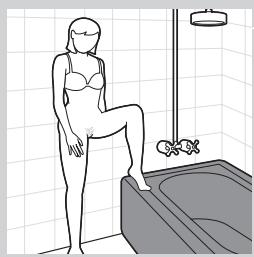
3 BbI6epnte yOo6Hoe NOAOxKeHHe:
CTO, OHa HOra Ha KpOMKe BaHHbI;
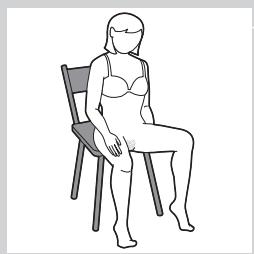
CINHaCTyIe;
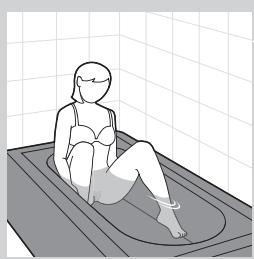
CINBAHHOI.
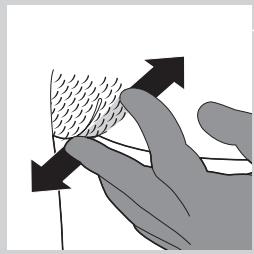
4 AByMa NaIbZaAMn CBO6OaHOH pYKn OTTHe KOxy TaK, YTO6bl BOLOCKN PpHIOAHaAMCb.
3aunTHaHa HacaKa Ha 3aHHe NaHeAe 3nAAuOHHO rOIOBKn NOMoAeT yApEKNBaT eNIArTOP IOA npABnAbHbIM YrAOM n He TpaBMnPOBaT Koxy.
Cobem. Paccmabme Hn, m06bl koxka CaeRk paacmhyacb. CnBHee Hamnime koxky naLzamn. PacmraBaime He6oAwnye yacmkn koxn nogHocme 3nnamop moBko K xopoio harnymo 3one.
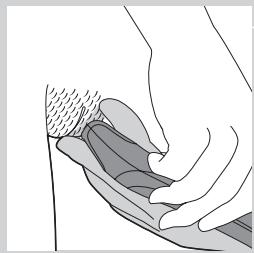
5 PacnoIaIarTe np6Op MeKdA y DByMn PaIbIaMn IOny rIOM 90 K NOBepxHocTn TeLa N MeDAeHNO nepemeuaTe np6Op npOTNB HApBaEHHNPOCTa BOLOC.
Cobem. Aa CMrueHnna Koxn peKomeHgyem Hauocmb Ha Koxy yBaAekHJIOUm Kpem HenocpeGcmbeHHo nocae 3nnAun nn Cnycmr HECKoAboKo YacOB.
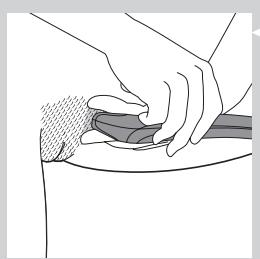
Cobem. Moxho maKxe BblnoHnmb 3nnAaHIO AHHN 6NKHN Hn noogMbIweK, KAK noka3aHO Ha pncyHke. Cbo6ogHoi pykoJ paarmraBaime kOxy n nepemeuaime np60b BP a3hbx HanpaBaeHnx gA ygaehna BCex BOAOCKOB.
6 Iocae 3nnaaun BBkaIOuHTe Pnp6Op n OCHNTe 3nnaauHHyU roAOBky corgaocho HNCTpykLm B rAabe "OcnctKa u yxoA".
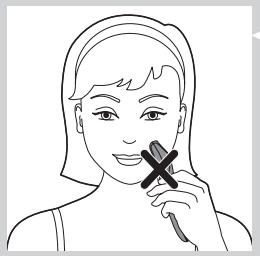
BnmaHne! 3aPpeaaeTcra nCPOb3ObaTb np6Op AIAy 3nnaaun 6poBei, peCHNt HAn APyrnx BOLOC Ha AnCe.
BnmaHne! He nCnoIb3yIe npI6Op AIA ydaIeHna BOLOc Ha yAcTkax C POaHKnAMN.
OuHCTKa n yXoA
OuNTka 3nnAToPA AByyBCTBnTeaHbIX 3OH
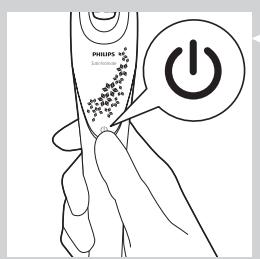
1 Bviklouyte npH6op.
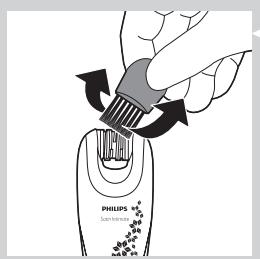
2 YdaANTe BOLOCKN UTeOtuKoI AaOuNCTKN.
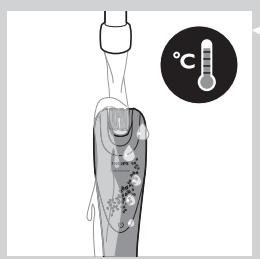
3 OonoocnHTe np60b BOoB TeMpepaTypoH He 6oAee 40^
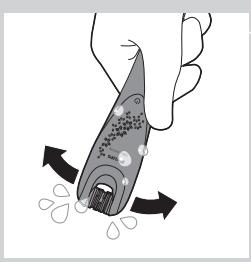
CtpxHnTe n3AnuKn BOaBln BbCyuHnTe np6Op.
XpaHeHne
Korda npibop He nCnoB3yeTcra nn TpaHcnopTppyetcra, xpaHnTe ero B 3apAHHOM YeXe.
PpmeaHne PpeXge yem y6paMb npnbop Ha xpaHHe, y6begmecb, m0 BCE ergoemaun cyxne.
3auneta okpyxauoee cpeDbI
- Посл Okончаня срoka сужби He bivbpaCbBaIte npnbop BmecTe c bItOBbIMN OTXODaMn.пepeДaIte erO B cneuaAIm3npOBaHbIyNHKT DAЯ Даьншеи yTuNIm3aUIM.ЗТИМ Bbl NOMOKeTe 3aUnITNb OkpykaIoU cydY.
3nATop
- BcTpoeHhbIe aKkymyAToBpI coepJkaT BeueCTBa, KOtOpbIe MOryt OKa3aTb HeRaTHBHOE BO3dEiCTBHe Na OkpyKaIOUyIO CpeAdy. Bcerda n3BVeKaIte aKKymyAToBpI nepeI nepeDaueY npu6oBaB IynKT yTuNn3aUnn. AKKymyAToBpI cLeyET yTuNn3nPoBaTb CneuHaN3InPOBaHbIX nyHKtax. EcAn pRn n3BLeueHm nKKymyAToPOb BO3HnKAn 3aTpUdHeHn, nepeJaTe npu6op B cepBnChbI ueHtp Philips.
N3BaeHHe aKKyMyAraTopa
I3bIeAaKMyAaTOpbI I3 np6oPa TOnbKO pni Ix NpHoi pa3paKe, YTO6bI IN6eKaTb BO3MOXhBIX npO6Ie. I36eaiTe KOHTaAaKKMyAaTOPOB C MeTaAMNueCKMIM PpeDMTaMNI.
1 Y6eAnTb B TOM,чTO aKKyMaIaTOPbI NOAHOCTbIO pa3pJxKeHbI.
2 PomeCTHe npH6Op B MOpO3nAbHyIO KaMepy MNHMym Ha 24 yaca, YTO6bl MaTePnaA CTAANOMKIM.
3 3aBepHnTe npH6Op B nOAnToHeu.
4 Pa36eIte np6Op HOrO nn MoAOTKOM.
BnmaHne! O63aTeIbHO HaAeHbTe KpeKkyO 6yYb. IOnbItKa pa36ntb np6op roIoHoroMooKeT pNBeCTn K TpaBMam.
5 N3BIAeKInTe aKKyMaIaTOPbI ydaAnTe neaTHbI PaaTbIC aKKyMaIaTOPOB pNn NOMOu NTBePTKN.
BHHMaHHe! BybTe octopokhBi npi o6paueHnC MoAOTKOM.
Ponck nyctpaHene HcnnpabHocTei
AaHna rIaBa nocBraeHa Hn6oEe pacnpoctpaehnbbm npo6Amam, Bo3NkaiUoMM npu nCnoBzOBaHHn npi6bopa. EcAn camocToTeAhO cPpABHTbcrBo3NkWIMn npo6Amam He yDaeTcR, cm. CnICOK qacto 3aDaBaembIX BOpocOB Ha Be6-CTpaHnue www.philips.com/support nn O6paTntecb V ceHTp noDaePKnn notpeBtMeB B BaWeJ cTpaHe.
PpO6Lema
Bo3MOxHnA
PnpuHna
Cnoco6bpehenia
3HINARTOPAAYyBCTBnTeAbhblx yactKOBHe pa6oTaet.
Прибор He заржен.
3apnepn6op (cm. pa3aen "3apka"B rabe "PtoTobka np6opa ka pa6oTe").
Uvod
BnMaHHa akymyAToPnHex 6aTapei
Aa YHnKHeHH He6e3neKn BnMaTn MOxHa AINe NOBHiCTo PO3paXkeHi 6aTapei. He OOnyckai Te KOHTaKTy 6aTapei i3 MeTaIOM.
1 PēpekohaiTecr, Μιο δaTapei' nobHicTIO po3pAIXeHi.
IoklaItb npictiy MOpO3nAbHy KaMepy 0HaHMeHSe Ha 24 roaHH,io6 MaTepiA CTab AAMKIM.
3aropHiB npucrtpiy puHHNK.
4 TynHtB nIO hBOMy HoroIO uN BApTe MoAOTKOM, 0o6 po36uTH.
Ybara:Po6iTbIeAIISeBMIChOMy B3yTTI.JaKIOpo6HTN Ie 6OcHOrHOIO,MOxHa TpaBMyBaTHCra.
5 BnMItb 6aTapei Ta NAtn 3 HNx 3a OOnOMOIO BVkpyTKn.
Ybara:BukopncTObyHouMoToK,6yAbTe o6epeXHi,io6 yHnKHyTN He6e3neKn.
YcyhenHHHeCtpaBHOCTeH
Y cbyomy po3aii 3bdeHIO OCHOBHI npo6aEMn, kki MOkyTb BHNKHyTN niA
yac BVNKOpncTaHH npicTroIO. JaIc BO Hne B 3mo3i BnpiHTN npo6aEMy 3a
doIOMOrOIO iHOpMauii, nOdaHOI HnKHe, BiBaiaJte Be6-caIT WwW.philips.
com/support dIy nepeRAn dy cnncky aactnx 3aIInTaH b a60 3BepHiTbc4 DO
LcHTpy o6cayroByBaHH KIAeHtIB y CboiKnaiHi.
PpO6Lema
MoxkunBa npnuHa
Bvpiuennn
EniAToPdIaIHTMnHx dIaHOK He npaioe.
Ппсстрин He 止яджево.
3apntb npctpi. YntaTe po3aIn "PiIroTOBka AO BnKOpNCtAHN", niPo3aIn "3apxKaHH".