
P5403 - Projector ACER - Free user manual and instructions
Find the device manual for free P5403 ACER in PDF.


| Type of product | Video projector |
| Brand | Acer |
| Model | P5403 |
| Native resolution | XGA (1024 x 768) |
| Brightness | 3000 ANSI lumens |
| Contrast ratio | 20,000:1 |
| Display technology | DLP |
| Lamp life | Up to 4000 hours (normal), 6000 hours (Eco) |
| Keystone correction | Vertical ±40° |
| Input ports | HDMI, VGA (D-Sub), Composite Video, S-Video |
| Built-in speaker | 2W mono |
| Noise level | 30 dB (Eco) |
| Power consumption | Max 280W |
| Dimensions (W x D x H) | 314 x 223 x 95 mm |
| Weight | 2.5 kg |
| Cleaning | Use a soft, dry cloth to clean the lens and vents. Do not use liquids. |
| Safety | Do not look directly into the lens. Keep away from heat sources. |
| Spare parts / Repairability | Replaceable lamp unit. Consult manual for bulb replacement procedure. |
| General information | Designed for business and education presentations. Supported in Acer's manual database. |
Frequently Asked Questions - P5403 ACER
User questions about P5403 ACER
0 question about this device. Answer the ones you know or ask your own.
Ask a new question about this device
Download the instructions for your Projector in PDF format for free! Find your manual P5403 - ACER and take your electronic device back in hand. On this page are published all the documents necessary for the use of your device. P5403 by ACER.
USER MANUAL P5403 ACER
Copyright © 2010 Acer Incorporated.
Acer Empowering Technology 17
OSD-menu's 18
Kleur 19
Beeld 21
Instelling 23
Beheer 31
Geluld 32
Timer 33
Taal 33
Bijlagen 34
Problemen oplossen 34


Acer Empowering Technology
(P5403/N243/PN-SX12)
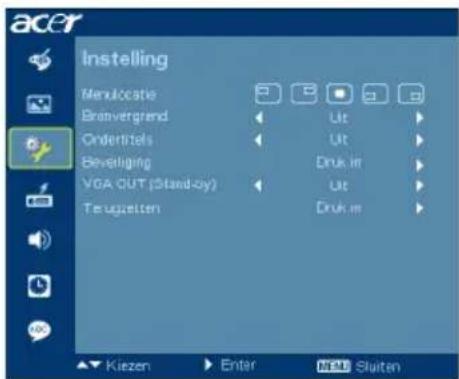
(S5201M/T111B/PS-X11M)
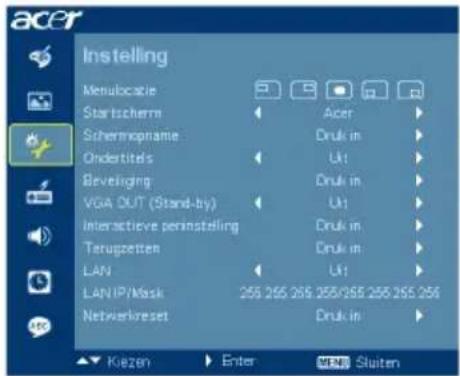


2 DVI-D- & HDMI (HDCP)-timing
| Modi Resolutie | Verticalefrequentie [Hz] | Horizontalefrequentie [KHz] | |
| VGA_60 640 x | 480 59,940 31,469 | ||
| VGA_72 | 72,809 37,861 | ||
| VGA_75 | 75,000 37,500 | ||
| VGA_85 | 85,008 43,269 | ||
| VGA_70 720 x | 400 70,087 31,469 | ||
| VGA_85 | 85,039 37,927 | ||
| SVGA_56 | 800 x 600 56,250 35,156 | ||
| SVGA_60 | 60,317 37,879 | ||
| SVGA_72 | 72,188 48,077 | ||
| SVGA_75 | 75,000 46,875 | ||
| SVGA_85 | 85,061 53,674 | ||
| XGA_60 | 1024 x 768 60,004 48,363 | ||
| XGA_70 | 70,069 56,476 | ||
| XGA_75 | 75,029 60,023 | ||
| XGA_85 | 84,997 68,677 | ||
| SXGA_70 | 1152 x 864 | 70,012 63,851 | |
| SXGA_75 | 75,000 67,500 | ||
| SXGA_85 | 1152 x 864 | 84,990 77,094 | |
| SXGA_60 | 1280 x 1024 | 60,020 | 63,981 |
| SXGA_72 | 72,000 76,970 | ||
| SXGA_75 | 75,025 79,976 | ||
| SXGA_85 | 85,024 91,146 | ||
| QuadVGA_60 | 1280 x 960 | 60,000 60,000 | |
| QuadVGA_75 | 75,000 75,000 | ||
| SXGA+_60 1400 x 1050 | 59,978 65,317 | ||
| UXGA_60 | 1600 x 1200 | 60,000 75,000 | |
| Mac G4 640 x | 480@60Hz 59,940 31 | ,469 | |
| MAC13 640 x | 480@67Hz 66,667 35 | ,000 | |
| Mac G4 800 x | 600@60Hz 60,317 37 | ,879 | |
| MAC16 832 x | 624@75Hz 74,546 49 | ,722 | |
| Mac G4 1024 x | 768@60Hz 60,004 48 | ,363 | |
| MAC19 1024 x | 768@75Hz 75,020 60 | ,241 | |
| MAC21 1152 x | 870@75Hz 75,061 68 | ,681 | |
| WXGA_60 1280 | x 768 59,870 47,776 | ||
| WXGA_75 74,893 | 60,289 | ||
| WXGA_85 84,837 | 68,633 | ||
| WXGA_60 1280 | x 720 60,000 45,000 | ||
| WXGA_60 1280 | x 800 59,810 49,702 | ||
| WXGA+_60 1440 | x 900 59,887 55,935 | ||
| 1680x1050_60 1680 | x 1050 59,954 65 | ,290 | |
| 1920x1080_RB 1920 | x1080 60,000 66 | ,587 | |
| 1920x1080_EIA | 1920 x1080 60,000 67,500 | ||
| acer_16:9 | 1366 x 768 59,790 | 47,712 | |
| acer_timing | 1024 x 600 60,000 37,500 | ||
| VGA_120 | 640 x 480 119,518 | 61,910 | |
| SVGA_120 | 800 x 600 119,854 | 77,425 | |
| XGA_120 | 1024 x 768 | 119,804 | 98,958 |
| 480p | Video (HDMI) | 60 | 31,47 |
| 576p | 50 | 31,25 | |
| 720p_60 | 60 | 45,00 | |
| 720p_50 | 50 | 37,50 | |
| 1080i_60 | 60 | 33,75 | |
| 1080i_50 | 50 | 28,13 | |
| 1080p | 60 | 67,5 | |
| 1080P | 50 | 56,26 | |
| 1080p 1920 x | 1080 24 | 27,00 | |
| 1080p 1920 x | 1080 23,98 | 26,97 | |
3 Component-signaal
| Modi | Resolutie | Verticale frequentie [Hz] | Horizontale frequentie [KHz] |
| 480i | 720 x 480 | 59,94 | 15,73 |
| 480p | 720 x 480 | 59,94 31,47 | |
| 576i | 720 x 576 | 50,00 15,63 | |
| 576p | 720 x 576 | 50,00 31,25 | |
| 720p | 1280 x 720 | 60,00 45,00 | |
| 720p | 1280 x 720 | 50,00 37,50 | |
| 1080i | 1920 x 1080 | 60,00 33,75 | |
| 1080i | 1920 x 1080 | 50,00 28,13 | |
| 1080p | 1920 x 1080 | 60,00 67,5 | |
| 1080p | 1920 x 1080 | 50,00 56,26 | |
| 1080p 1920 | x 1080 24,00 27,00 | ||
| 1080p 1920 | x 1080 23,98 26,97 |
This Class B digital apparatus complies with Canadian ICES-003.
Declaration of Conformity
We,
Acer Incorporated
8F, 88, Sec. 1, Hsin Tai Wu Rd., Hsichih, Taipei Hsien 221, Taiwan
Contact Person: Mr. Easy Lai, e-mail:easy_lai@acer.com.tw
And,
Acer Europe SA
Hereby declare that:
Product: Projector
Trade Name: Acer
Model Number: QNX0011/QNX0012/N243/PN-SX12/T111B/PS-X11M series
Machine Type: P5403/S5201M series
Is compliant with the essential requirements and other relevant provisions of the following EC directives, and that all the necessary steps have been taken and are in force to assure that production units of the same product will continue comply with the requirements.
EMC Directive 2004/108/EC as attested by conformity with the following harmonized standards:
-. EN55022, AS/NZS CISPR22, Class B
-. EN55024
-. EN61000-3-2 Class A
-. EN61000-3-3
Low Voltage Directive 2006/95/EC as attested by conformity with the following harmonized standard:
-. EN60950-1
RoHS Directive 2002/95/EC on the Restriction of the Use of certain Hazardous Substances in Electrical and Electronic Equipment
-. The maximum concentration values of the restricted substances by weight in homogenous material are:
| Lead 0.1% Polybrominated Biphenyls (PBB's) 0.1% | |||
| Mercury | 0.1% | Polybrominated | Diphenyl Ethers (PBDE's) 0.1% |
| Hexavalent Chromium 0 | 1% Cadmium | 0.01% | |
Directive 2009/125/EC with regard to establishing a framework for the setting of ecodesign requirements for energy-related product.
The standards listed below are applied to the product if built with WLAN module or wireless keyboard and mouse.

R&TTE Directive 1999/5/EC as attested by conformity with the following harmonized standard:
• Article 3.1(a) Health and Safety
-. EN60950-1
-. EN62311
• Article 3.1(b) EMC
-. EN301 489-1
-. EN301 489-17
• Article 3.2 Spectrum Usages
-. EN300 328
-. EN301 893 (Applicable to 5GHz high performance RLAN).
Year to begin affixing CE marking 2010.
Easy Lai
Easy Lai /Manager
Regulation Center, Acer Inc.
Jul. 1, 2010 -
Date

Federal Communications Commission Declaration of Conformity
This device complies with Part 15 of the FCC Rules. Operation is subject to the following two conditions: (1) this device may not cause harmful interference, and (2) this device must accept any interference received, including interference that may cause undesired operation.
The following local Manufacturer / Importer is responsible for this declaration:
Product: DLP Projector
Model Number: QNX0011/QNX0012/N243/PN-SX12/T111B/PS-X11M
Machine Type: P5403/S5201M series
Name of Responsible Party: Acer America Corporation
Address of Responsible Party: 333 West San Carlos St.
San Jose, CA 95110
U. S. A.
Contact Person: Acer Representative
Phone No.: 254-298-4000
Fax No.: 254-298-4147



Brand : ACER
Model : P5403
Category : Projector