
Hero 2 - Smartwatch Vivax - Free user manual and instructions
Find the device manual for free Hero 2 Vivax in PDF.
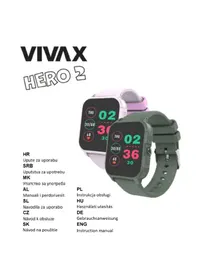


| Product Type | Smartwatch |
| Brand | Vivax |
| Model | Hero 2 |
| Display Type | 1.3-inch TFT LCD |
| Dimensions | 44 x 44 x 10 mm |
| Weight | Approx. 50 g (with strap) |
| Power | Lithium-ion battery 250 mAh |
| Charging | Magnetic USB charging cable |
| Battery Life | Up to 7 days (typical usage) |
| Connectivity | Bluetooth 5.0 |
| Compatibility | iOS 9.0+ and Android 5.0+ |
| Water Resistance | IP68 (1.5m for 30 min) |
| Main Functions | Heart rate monitor, step counter, sleep tracking, notifications, call alerts, sedentary reminder, stopwatch, alarm |
| Sensors | Optical heart rate sensor, accelerometer |
| Maintenance & Cleaning | Wipe with soft damp cloth; avoid alcohol or abrasive cleaners |
| Safety | Not a medical device; remove if skin irritation occurs; keep away from children under 3 years |
| Spare Parts & Repairability | Available through Vivax service centers; replaceable straps, battery replacement by authorized technicians |
| General Information | Operating temperature: -10°C to 50°C; storage temperature: -20°C to 60°C |
Frequently Asked Questions - Hero 2 Vivax
User questions about Hero 2 Vivax
0 question about this device. Answer the ones you know or ask your own.
Ask a new question about this device
Download the instructions for your Smartwatch in PDF format for free! Find your manual Hero 2 - Vivax and take your electronic device back in hand. On this page are published all the documents necessary for the use of your device. Hero 2 by Vivax.
USER MANUAL Hero 2 Vivax
![graph TD A["Povucite u lijevo"] --> B["THU"] B --> C["30/08"] C --> D["68"] D --> E["02"] E --> F["36"] F --> G["30"] G --> H["Povucite u desno"]](/content/2026/05/1011211/images/52e4ebc2e1addf1b1cfb1ad5b144d361b00c45bee75fa6fda15f004ad23afbad.jpg)


CONNECTING THE WATCH AND EXTERNAL DEVICE


access the desired menu, the watch will automatically start measuring. During measurement, the values will display zero, and once the measurement is complete, it will show the measured values. If the watch is unable to read the results, you will be notified. The values will then display zero until the watch goes into standby mode.

Game
There are many interesting games on the watch: Number pairs, 3 to win, Fly a plane, and Maze. You can choose one to play.

Sleep
The watch will display your sleep period from the previous day. (Measurement period: 21:30 - 12:00)
Instructions: swipe left and right, then when you select the desired icon, you can see your sleep interval from the previous day.


Date & Time
You can set the time, set the date, and choose the time display mode.

Message
| m | | Frequency (MHz):2402~2480 | BT Max gain-7.27dBm |
RF frequencies can be used in Europe without restrictions.
When charging the device, the adapter must be placed near the device and must be easily accessible.
Accessories
Battery: 3.7 V 180mAh


PRODUCT INTRODUCTION
Touch to define the number
![graph TD A["Rrèshqit majtas"] --> B["THU 02"] B --> C["30/08"] C --> D["68"] D --> E["30"] E --> F["Rrèshqit djathtas"]](/content/2026/05/1011211/images/9ca39e1cb04a07333344951895cacd993c3fb3c103fcc6bba47b6a01612f7796.jpg)


QUICK PRODUCT USE
Radio frequency interference: Emissions from electronic devices to radio frequencies can interfere with other electronic devices and cause malfunctions. Although this clock complies with EU radio frequency regulations, wireless transmitters of mobile devices and electrical circuits may cause interference with other electronic devices. We therefore recommend that you take the following precautions:
Accessory information
Battery: 3.7 V 180mAh
PRODUCT DETAILS
Package includes: 1x Vivax Hero 2 watch
![graph TD A["Povlecite v levo"] --> B["THU 02"] B --> C["30/08 36"] C --> D["68 30"] D --> E["Povlecite v desno"]](/content/2026/05/1011211/images/0723638f5f9f73ebf6e7341ad57f458eb48660df0ddd22c111d817cc6daa2dd7.jpg)


CONNECTING THE WATCH AND DEVICE
1. Download and installation

Download and install the "HitFit Pro" app from the APP store or Google Play Store
Swipe left

Swipe right
CONNECTING THE WATCH AND DEVICE
![graph TD A["Potiahnite dol'ava"] --> B["THU"] B --> C["02"] C --> D["30/08"] D --> E["36"] E --> F["68"] F --> G["30"]](/content/2026/05/1011211/images/74f6e10c78d773d84aad084ce369ab51710d407f0911d5e499ccf2bf30926d28.jpg)


CONNECTING THE WATCH AND DEVICE


CONNECTING THE WATCH AND THE DEVICE
Heart Rate | 1.4" touch screen
Call & message notification | waterproof
Workout & sleep tracker
PRODUCT DETAILS
Box Accessories: 1x Vivax Hero 2 Watch
1x USB charging cable with magnetic connector
1x User manual with Warranty Declaration and EU Declaration of Conformity
MAIN PARTS
1. Watch button
When the watch is in the off state, long press the watch button for 3 seconds to turn it on, and the main page of the watch will be displayed after booting.
2. Touch screen
Swipe to the right to the menu page, then tap the function icon to enter the corresponding sub-interface.
3. Adjustable wristband


- Charging contacts | 5. Sensors | 6. Charging connector on USB cable
- Correct charging position
PRODUCT QUICK INTRO
Touch dial definition
(1) Long press the main display to enter the setting Theme pages. You can swipe left and right, touch to desired Theme and back to the main display.
(2) Swipe to the right: Display the games list -> 2Number pairs, 3 to win, Fly a plane i Maze
(3) Swipe down: Display Battery, Bluetooth, Date, Brightness, Sports, Alarms, Setting.
(4) Swipe up: Storage information, Heart rate monitoring, Daily activity.
(5) Swipe to the left: Display the static icon list -> Daily activity, Sports, Game, Alarms, Sports record, Sleep, Date&Time, Heart rate, Message, Timer, Setting, click to enter the corresponding function, right stroke to return to the previous level.


PRODUCTS QUICK USE
1. Download and install

You have to download and install the "Hitfit pro" App from APP Store or Google Play Store
2. Connect and synchronize data
2.1. For Android
- Open Hitfit pro → Click "Device" in bottom → "Device Connection" → Searching Device.
Click OK and Click "Pair" to bind watch as below.
- Open "Hitfit pro" - left slide menu bar → Device → select the corresponding device icon → search for the corresponding Bluetooth address pairing
2.2. For iOS
- Open "Hitfit pro" app, "Add device" on "Me" screen to search Bluetooth devices nearby, find watch name "Hitfit pro" and paired it in app. Once Hero 2 is connected it will be shown in the phone's Bluetooth menu screen as below pictures.
- Open "Hitfit pro" → left slide menu bar → Device → select the corresponding device icon → search for the corresponding Bluetooth address pairing.
After connected successfully, as shown by the icon on the right

NOTICE:
Please don't shut the Bluetooth notify service when you are clearing software by background or close background application software. It will affect the sync function between watch and phone if shut it.
Your data will be shown on App accordingly:

BASIC FUNCTION

Daily activity
The watch will display the user's total number of steps on the day, walking distance, calories burned on the same day, and the data will be cleared at 0 o'clock every day.
Operation instructions: The main interface slides left and right and clicks the motion data to switch to the step counter interface. After no operation for 3 seconds, the screen is automatically turned off.

Sports
In sports mode: the single-point function icon allows you to enter sports modes such as walking, running, riding, climbing, and Free sports

Heart Rate
The watch will measure the user's heart rate under the heart rate measurement interface. After the test is completed, the vibration will display the result. After no operation, the screen will automatically go out.
Operating instructions: Heart rate measurement: slide to the left on the main interface and click the heart rate static icon to switch to the heart rate measurement interface. Once the interface is entered, the measurement will start. During the measurement, the interface value will be zero. After the measurement is completed, the value will be displayed. If the result cannot be detected, it will always be displayed. The display value is zero until standby.


Game
There are many interesting games on the watch, including Number pairs, 3 to win, Fly a plane and Maze, you can choose one to play.

Sleep
The watch will display the user's sleep time the night before. (Sleep measurement time 21:30 - 12:00 next day)
Operation instructions: slide the main interface left and right, click sleep to switch to the sleep interface, you can view the sleep time of the previous day.


Date&time
You can set the time, set the date, choose the time display mode.

Message
When connected to Bluetooth, notifications from your phone will be sent to your watch. (You need to open the push switch in the app in advance)

Timer
Swipe left on the main page and click the stop icon static icon to switch to the stopwatch interface. Click to start timing. During the timing, you can pause/start switching with a single touch. Slide the stopwatch function to the right of the stopwatch interface and return to the static function page.

Sports record
If you have done any sports and saved, in this function will show the information of sports record.

Alarms
You can set alarms in the APP, the watch will show the alarms information, when the alarm time is up, the watch will pop up a reminder icon. In the APP alarms setting, if you allow to operate the alarms On/Off in watch, you can also open or close it in the watch.

Setting

- Language: Including different languages you can choose.
- Screen display: Including Change dial, Brightness, Screen time, Turn wrist wake setting.
- Do not disturb: Set enter or exit do not disturb mode. • Vibration: Set vibration intensity.
- System: Including System version, Shut down, Reset settings
WATERPROOF AND DUSTPROOF CAUTION- PROTECTION IP68
Your device is resistant to water and dust, under IP68 protection class.
The following conditions may effect on the water and dust resistance of your phone and should be avoided:
a.) Dropping or throwing your device or subjecting it to other impacts b.) Submerging your device into water for long periods of time, swimming or bathing with your device. c.) Exposing your device to pressurized water or high velocity water
IP68 digits means:
The first digit “6”: No ingress of dust; complete protection against contact (dust tight) following an 8-hour test, resist on dropping on flat surface up to 1,5m high.
The second digit "8": Immersion into water up to 1m in short period, up to 30mins in idle-non usage conditions.
Do not swim or dive with your device in the salt seawater!
If it happens, immediately wash your device in tap water and dry it fully.
The watch supports waterproof and dustproof functions. Please follow the guidelines below to maintain these functions. Otherwise, your device might be damaged.
- Do not use the watch under strong water pressure.
- Do not use the watch when diving, snorkeling, or engaging in other sports in turbulent water.
- Please dry your hands or the watch fully before operating.
- If the watch is exposed to water, dry it fully with a soft cloth. If it is exposed to other liquids (such as salt water, pool water, soapy water, oil, perfume, sunscreen, hand sanitizer) or chemicals (such as cosmetics), wash it with clean water and dry it fully with a soft cloth. Failure to follow these instructions may damage its performance and appearance.
- If the watch is dropped or hit, the waterproof and dustproof functions may be damaged.
- Do not disassemble your watch. The waterproof and dustproof functions may be damaged.
- Do not use the watch in extremely high or low temperature environments.
- Do not use blowers or other heated equipment to dry the watch.
- In a sauna room, the waterproof function may be damaged.
CLEANING AND MANAGEMENT
- Protect the watch from dust, sweat, ink, oil, and chemical products (such as cosmetics, antibacterial sprays, hand sanitizers, detergents, and insecticides). Otherwise, the internal and external parts may be damaged or performance may degrade. If your watch is stained with the above substances, clean it with a lint-free soft cloth.
- When cleaning, do not use soap, detergent, abrasive materials, compressed air, ultrasonic waves, or external heat sources. Otherwise, you may damage your watch. Soap, detergent, hand sanitizer, or detergent residue may cause skin irritation.
- After exercising or sweating, clean your wrist and strap. Use water to clean and dip a small amount of alcohol to wipe, then dry thoroughly.
- If your watch is stained or infiltrated with other objects, please use a wet soft toothbrush to clean it.
SAFETY NOTICES
Read these safety instructions before using your device and store them for possible future reference. Always follow these basic safety precautions when using your watch. This reduces the risk of fire, electric shock, and injury.
CHARGER
If the charger cord is damaged, have it repaired by the manufacturer, its service or a similarly qualified person in order to avoid any hazard.
The charger is not intended for use by persons (including children) with reduced physical, sensory or mental capacity. Persons who have not read the manual, unless they have received explanations by a person responsible for their safety and supervision should not use this unit. Children should be monitored to ensure that they do not play with the charger.
The charger should always be readily accessible. The device should not be exposed to dripping or splashing water. No objects filled with liquids such
as vases shall be placed on the device. Always leave a minimum distance of 10 cm around the unit to ensure sufficient ventilation. Naked flame sources, such as candles, should not be placed on top of the device.
Do not touch the charger, electric wire and power socket with wet hand; otherwise, electric shock may occur.
Radio frequency interference: Radio frequency output from electronic devices can interfere with other electronic equipment and cause malfunctions. Although this device has been designed in accordance with EU regulations on radio frequency emission, smart device wireless transmitters and electrical circuits can cause interference with other electronic equipment. We therefore recommend taking the following precautions:
Aircraft: Wireless equipment can cause interference in aircraft. Turn off your device before boarding the aircraft. Do not use on the ground until allowed to do so by the flight crew.
Medical implants: Medical equipment manufacturers recommend a minimum distance of 15 centimeters between a wireless device and an implanted medical device such as a pacemaker or defibrillator to avoid any interference with the medical device. It is recommended that people fitted with such devices:
If you are fitted with a medical implant and have any questions related to the use of your wireless equipment, you should consult your doctor
Health facilities: Hospitals and health facilities may be using equipment which is particularly sensitive to external radio frequency emissions. Turn off the device when staff or notices tell you to.
Blasting sites and marked areas: Turn off your device in potentially explosive areas. Follow all official instructions.
GENERAL SAFETY PRECAUTIONS AND ADVICES
Read and retain these instructions for future reference.
Warnings: On the product and User Guide instructions should always be adhered to.
Cleaning: Do not use liquid cleaners or aerosol cleaners. Use a damp soft cloth for cleaning.
Adapters: Use certified adapters recommended by producer. Other adapters may be hazardous or void your warranty.
Moisture, Dust & Water: Your device is resistant to falls, shock and water, under IP68 protection class.
What exactly does that mean? The clock is designed as a much more robust than just a regular device, however it is not indestructible! This does not mean that it is completely resistant to all mechanical damages and it is completely waterproof.
Do not swim or dive with your device in the salt seawater!
If it happens, immediately wash your device in tap water and dry unit fully.
Power Sources: For products intended to operate from battery power or other sources, refer to the operating instructions.
Servicing: Do not attempt to service this product yourself as opening or removing covers may expose you to dangerous voltage or other hazards and will void your warranty. Refer all servicing to qualified service personnel.
Heat: The product should be kept away from heat sources such as a radiator, heat register, stove, or other products that generate heat.
Replacement Parts: Unauthorized substitutions when service this product may result in fire, electric shock, or other hazards. Make sure your service technician has used parts specified by the manufacturer.
INTERFERENCE: All wireless devices are susceptible to interference which may affect their performance.
Precautions for use: This watch meets guidelines concerning the exposure to radio waves. Your device is a radio transmitter and receiver. It was designed to meet the limits recommended by international guidelines to limit the exposure to radio waves. These guidelines were developed by and independent scientific organization, The ICNIRP; and include safety margins designed to ensure the protection of all, regardless of age and health.
If you are allergic to material on this watch:
- This watch contains nickel. If your skin is very sensitive or you are allergic to the materials on this watch, please take necessary precautions.
- All materials used on this watch comply with relevant inspection standards such as REACH and RoHS.
Working conditions:
Working Temperature: -20 \~ 40°C
Working humidity: 65+/-20%RH
Operating Frequency Band (RF):
| m | | Frequency (MHz):2402~2480 | BT Max gain-7.27dBm |
RF frequencies can be used in Europe without restrictions
Adapter shall be installed near the equipment and shall be easily accessible.
Accessory information
Battery: 3.7 V 180mAh
Charging: Adapter 5V, 0,3-2A (not included into set)
EU Declaration of Conformity
Hereby, M SAN Grupa d.o.o. declares that the radio equipment type SmartTelephone is in compliance with Directive 2014/53/EU. The full text of the EU declaration of conformity is available at the following internet address:
www.msan.hr/dokumentacijaartikala
Instructions for using your device can be found at http://hr.vivax.com/

Information on Disposal for Users of Waste Electrical & Electronic Equipment (private households)

This symbol on the product(s) and/or accompanying documents means that used electrical and electronic products should not be mixed with general household waste. For proper treatment, recovery and recycling, please take this product(s) to designated collection points where it will be accepted free of charge.
Alternatively, in some countries you may be able to return your products to your local retailer upon purchase of an equivalent new product. Disposing of this product correctly will help save valuable resources and prevent any potential negative effects on human health and the environment, which could otherwise arise from inappropriate waste handling. Please contact your local authority for further details of your nearest designated collection point. Penalties may be applicable for incorrect disposal of this waste, in accordance with your national legislation.
Disposal of waste batteries

Check local regulations for disposal of waste batteries or call your local customer service in order to get instructions on the disposal of old and used batteries. The batteries in this product should not be disposed of with household waste. Be sure to dispose of old batteries in special places for disposal of used batteries that are found in all retail shops where you can buy batteries.
HR
DEAR CUSTOMER!
Thank you for purchasing a Vivax device and we hope you will be satisfied with your choice. If repair of the product is needed during the warranty period, please consult the authorized dealer who sold you the product or contact us at the numbers and addresses below. PLEASE READ THE INSTRUCTIONS PROVIDED WITH THE PRODUCT CAREFULLY BEFORE USING THE PRODUCT!
| JAMSTVENI LIST H | VIVAX |
| MODEL UREĐAJA | |
| SERIJSKI BROJ | |
| DATUM PRODAJE | |
| BROJ RAČUNA PRODAVATELJA | |
| POTPIS I PEČAT PRODAVATELJA |
- With this warranty, M SAN Grupa, as the warranty provider in the Republic of Croatia, guarantees free repair of the product in accordance with applicable regulations and the conditions described in this warranty certificate. With this warranty, we guarantee that the subject of this warranty will operate without errors caused by possible poor workmanship or poor material. All possible defects will be repaired free of charge at an authorized service center within the warranty period.
- WARRANTY CONDITIONS The warranty period begins on the day of purchase of the product and lasts 12 months.
- In case of a defect on the product that is the subject of this warranty, we undertake to repair it as soon as possible, but no later than within 45 days. If the product is not
HR
can be repaired or is not repaired within 45 days, it will be replaced with a new one. The warranty will be extended for the duration of the repair.
Web: https://www.quadra-net.pl/
DEAR CUSTOMER!
Download and Install App:
for Android:
for iOS:


VIVAX
HERO 2
KIDS SMART WATCH

- CONNECTING THE WATCH AND EXTERNAL DEVICE
- GAME
- SLEEP
- DATE & TIME
- MESSAGE
- PRODUCT INTRODUCTION
- TOUCH TO DEFINE THE NUMBER
- QUICK PRODUCT USE
- ACCESSORY INFORMATION
- PRODUCT DETAILS
- CONNECTING THE WATCH AND DEVICE
- DOWNLOAD AND INSTALLATION
- CONNECTING THE WATCH AND THE DEVICE
- MAIN PARTS
- WATCH BUTTON
- TOUCH SCREEN
- ADJUSTABLE WRISTBAND
- PRODUCT QUICK INTRO
- TOUCH DIAL DEFINITION
- PRODUCTS QUICK USE
- DOWNLOAD AND INSTALL
- CONNECT AND SYNCHRONIZE DATA
- FOR ANDROID
- FOR IOS
- NOTICE
- BASIC FUNCTION
- DAILY ACTIVITY
- SPORTS
- HEART RATE
- DATE&TIME
- TIMER
- SPORTS RECORD
- ALARMS
- SETTING
- WATERPROOF AND DUSTPROOF CAUTION- PROTECTION IP
- THE FOLLOWING CONDITIONS MAY EFFECT ON THE WATER AND DUST RESISTANCE OF YOUR PHONE AND SHOULD BE AVOIDED
- IP68 DIGITS MEANS
- CLEANING AND MANAGEMENT
- SAFETY NOTICES
- CHARGER
- GENERAL SAFETY PRECAUTIONS AND ADVICES
- IF YOU ARE ALLERGIC TO MATERIAL ON THIS WATCH
- WORKING CONDITIONS
- OPERATING FREQUENCY BAND (RF)
- EU DECLARATION OF CONFORMITY
- WWW.MSAN.HR/DOKUMENTACIJAARTIKALA
- INFORMATION ON DISPOSAL FOR USERS OF WASTE ELECTRICAL & ELECTRONIC EQUIPMENT (PRIVATE HOUSEHOLDS)
- DISPOSAL OF WASTE BATTERIES
- HR
- DEAR CUSTOMER
Brand : Vivax
Model : Hero 2
Category : Smartwatch