
HF3480 - Light therapy lamp PHILIPS - Free user manual and instructions
Find the device manual for free HF3480 PHILIPS in PDF.
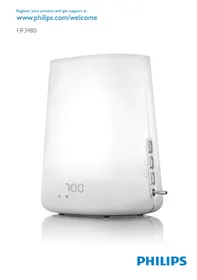


| Product type | Light therapy lamp with dawn simulator and FM radio |
| Brand | Philips |
| Model | HF3480 |
| Dimensions (approx.) | 20 x 15 x 25 cm |
| Weight (approx.) | 1.5 kg |
| Power supply | Mains 230 V, 50 Hz |
| Power consumption | 15 W max |
| Bulb type | Integrated non-replaceable LED bulb (lifespan > 10,000 h) |
| Main functions | Dawn simulation (30 min), light and sound alarm, FM radio, 4 natural sounds (birds, beep, African jungle, wind chime), dusk function (15-120 min), snooze (9 min), light intensity adjustment (1-20), volume adjustment (1-20), display with adjustable brightness (1-4) |
| Care and cleaning | Unplug before cleaning. Use a dry cloth. Do not use abrasive or harsh products. Do not let water enter the device. |
| Safety | Double insulation (class II). Indoor use only. Do not use in a humid room. Ambient temperature 10-35°C. Keep a distance of 40-50 cm from the head. Consult a doctor in case of severe depression. |
| Spare parts and repairability | Non-replaceable bulb. In case of malfunction, contact Philips consumer service or an authorized center. |
| General information | Compliant with EMC standards. International warranty. Registration possible at www.philips.com/welcome. |
Frequently Asked Questions - HF3480 PHILIPS
User questions about HF3480 PHILIPS
0 question about this device. Answer the ones you know or ask your own.
Ask a new question about this device
Download the instructions for your Light therapy lamp in PDF format for free! Find your manual HF3480 - PHILIPS and take your electronic device back in hand. On this page are published all the documents necessary for the use of your device. HF3480 by PHILIPS.
USER MANUAL HF3480 PHILIPS
Congratulations on your purchase and welcome to Philips! To fully benefit from the support that Philips offers, register your product at www.philips.com/welcome.
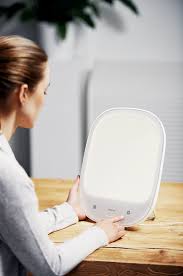
The Philips Wake-up Light helps you wake up more pleasantly. The light intensity of the lamp gradually increases to the set level in the 30 minutes before the set wake-up time. The light gently prepares your body for waking up at the programmed time. To make waking up an even more pleasant experience, you can use natural wake-up sounds or the FM radio.
You can use the dusk function to have the Wake-up Light dim the light and sound gradually before they are completely switched off at the time you set.
The effects of the Wake-up Light
The Philips Wake-up Light gently prepares your body for waking up during the last half hour of sleep. In the early morning hours our eyes are more sensitive to light than when we are awake. During that period the relatively low light levels of a simulated natural sunrise prepare our body for waking up and getting alert. People who use the Wake-up Light wake up more easily, have a better overall mood in the morning and feel more energetic. Because the sensitivity to light differs per person, you can set the light intensity of your Wake-up Light to a level that matches your light sensitivity for an optimal start of the day.
For more information about the Wake-up Light, see www.philips.com.
General description (Fig. 1)
A Vents B Lamp housing C Mains cord D Antenna E Display 1 Light symbol 2 Hour indication of clock time/alarm time 3 Clock time symbol 4 Alarm symbol 5 Radio symbol 6 'Birds' sound symbol 7 'Beep' sound symbol 8 'African jungle' sound symbol 9 'Wind chimes' sound symbol 10 Dusk function symbol 11 Display brightness symbol 12 Minute indication of clock/alarm time 13 Sound level symbol F Function selectors 1 Top function selector: light on/off and light intensity 2 Middle function selector (SET): menu and radio frequency 3 Bottom function selector: radio on/off and volume G Control lever with 'alarm off', 'alarm on' and 'snoopze' positions
Important
- Read this user manual carefully before you use the appliance and save it for future reference.
- This appliance is double insulated according to Class II (Fig. 2).
Danger
Water and electricity are a dangerous combination. Do not use this appliance in wet surroundings (e.g. in the bathroom or near a shower or swimming pool).
- Do not let water run into the appliance or spill water onto the appliance (Fig. 3).
Warning
- Check if the voltage indicated on the appliance corresponds to the local mains voltage before you connect the appliance.
- The appliance is suitable for a mains voltage of 230V and a frequency of 50 Hz. If the mains cord is damaged, you must have it replaced by Philips, a service centre authorised by Philips or similarly qualified persons in order to avoid a hazard.
- This appliance is not intended for use by persons (including children) with reduced physical, sensory or mental capabilities, or lack of experience and knowledge, unless they have been given supervision or instruction concerning use of the appliance by a person responsible for their safety.
- Children should be supervised to ensure that they do not play with the appliance.
- This appliance is for indoor use only (Fig. 4).
Caution
- Do not drop the appliance or expose it to heavy shocks.
- Place the appliance on a stable, level and non-slippery surface.
- Do not use the appliance at room temperatures lower than 10°C or higher than 35°C.
- Make sure the vents in the top and in the bottom of the appliance remain open during use.
- Never use the appliance if the lamp housing or top cover is damaged, broken or missing.
- Consult your doctor before you start using the appliance if you have suffered from or are suffering from serious depression.
- Do not use this appliance as a means to reduce your hours of sleep. The purpose of this appliance is to help you wake up more easily. It does not diminish your need for sleep.
- The appliance has no on/off switch. To disconnect the appliance from the mains, remove the plug from the wall socket. This appliance is only intended for household use, including similar use for instance in hotels.
General
- This appliance allows you to choose the light intensity level you want to wake up to (see section 'Using the lamp', chapter 'Using the appliance'). If you often wake up too early or with a headache, reduce the light level.
- If you share a bedroom with someone else, this person may unintentionally wake up from the light of the appliance, even though this person is further removed from the appliance. This phenomenon is the result of differences in light sensitivity between people.
Electromagnetic fields (EMF)
This Philips appliance complies with all standards regarding electromagnetic fields (EMF). If handled properly and according to the instructions in this user manual, the appliance is safe to use based on scientific evidence available today.
Preparing for use
1 Place the Wake-up Light 40-50cm from your head, for example on a bedside table. Put the plug in the wall socket.
The hour indication on the display starts flashing to indicate that you have to set the clock time (Fig. 5).
Setting the clock
1 Move the middle function selector (SET) up or down to select the hour.
Note: You can only do this when you are in the set clock menu and when the hour indication flashes. If this is not the case, press the middle function selector (SET) two times. You are now in the set clock menu.
2 Press the middle function selector (SET) to confirm. The minute indication starts flashing (Fig. 6). 3 Move the middle function selector (SET) up or down to select the minutes. 4 Press the middle function selector (SET) to confirm. The appliance leaves the menu and the display shows the set clock time.
The appliance is now ready for use.
Note: Every time you remove the plug from the wall socket for more than approximately 15 minutes, you have to set the clock time again in the way described above. To change the set clock time when the plug is still in the wall socket, see section 'Menu functions of middle function selector (SET)' in chapter 'Using the appliance'.
Using the appliance
How to use the 3 function selectors
The control panel has three function selectors. With these selectors you can set all functions of the appliance.
Note: If you do not operate the function selector for 5 seconds when you are in the menu (SET), the appliance automatically leaves the menu and displays the clock time again.
You can operate the function selectors in the following way:
1 Press one of the function selectors to activate the selection mode. 2 Move the function selector up or down to select a setting.
Note: If you want to adjust the light intensity (top function selector) or volume (bottom function selector), you can simply move the function selector up or down right away. You do not have to press the function selector first. 3 Press the same function selector again to confirm the selected setting.
Menu functions of middle function selector (SET)
Below you find a description of all functions that can be set in the menu. These functions appear in the menu in the following order:
Clock time, Alarm time, Alarm sound, Dusk function: You can use the dusk function when you want the light and/or the sound to stay on and dim gradually during a set period of time (15 minutes to 2 hours) before you go to sleep. Display brightness: You can choose a display brightness between 1 and 4.
You can operate the function selectors in the following way:
1 Press the middle function selector (SET) to enter the menu. 2 Move the middle function selector (SET) up or down to select a function. 3 Press the middle function selector (SET) to enter this function. 4 Move the middle function selector (SET) up or down to select a setting. 5 Press the middle function selector (SET) to confirm.
Using the lamp
You can use the appliance as a bedside lamp.
1 To switch on the lamp, press the top function selector (1). Then move the top function selector up or down to select the light intensity level you prefer (2). (Fig. 7)
You can choose a light intensity between 1 and 20.
Note: It takes approx. 1 second for the lamp to go on. This is normal, the lamp needs to heat up.
Note: The light intensity you have selected is automatically set as the light intensity level for the alarm as well.
Tip: When you use the appliance for the first time, set the light intensity to 20. The moment you wake up, check which light intensity level the appliance has reached by slightly moving the top function selector up or down. When you do this, the current alarm light intensity level appears on the display. Set the alarm light intensity to this level for the next day.
2 To switch off the lamp, press the top function selector again.
Note: When you want to check the light intensity without switching on the lamp, you can also move the top function selector up or down to select a setting without pressing the function selector first.
Setting the alarm
When you set the alarm, you choose an alarm time and the type of sound you want to wake up to. The alarm is set when the alarm symbol is visible on the display. The light intensity slowly increases to the selected level during the last 30 minutes before the set alarm time. The sound slowly increases in 90 seconds to the selected level after the set alarm time.
Note: You can set the light intensity by turning the top function selector up or down and you can set the alarm volume by moving the bottom function selector up or down. If you do not want to wake up to the lamp or to a sound, select a light intensity or volume level of 0. See sections 'Using the lamp' and 'Radio/Volume' in this chapter.
1 Push the control lever down to the middle position to switch on the alarm. (Fig. 8) The hour indication of the alarm time flashes (Fig. 9). To adjust the time, follow steps 2 to 5. If the alarm time is correct, just wait a few seconds. 2 Move the middle function selector (SET) up or down to select the hour.
Note: You can only do this when the hour indication flashes. If this is not the case, push the control lever up and down again to enter the alarm time mode. You can also set the alarm time in the menu. See section 'Menu functions of middle function selector (SET)' in this chapter.
3 Press the middle function selector (SET) to confirm. The minute indication of the alarm time starts to flash (Fig. 10). 4 Move the middle function selector (SET) up or down to select the minutes. 5 Press the middle function selector (SET) to confirm or wait for a few seconds. The appliance leaves the menu and the display shows the clock time.
The alarm time is now set.
Switching off the alarm
To switch off the alarm function, push up the control lever to the top position.
Note: The lamp stays on. You can switch off the lamp by pressing the top function selector.
Note: The alarm (sound and/or light) automatically switches off after 90 minutes.
Setting the alarm sound
See section 'Menu functions of middle function selector (SET)' above.
You can choose one of the following sounds:
Radio (Fig. 11) Birds (Fig. 12) - Beep (Fig. 13) - African jungle (Fig. 14)
- Wind chimes (Fig.15)
Snoozing
1 Push down the control lever to the bottom position when the alarm goes off. (Fig. 16) The lamp continues to be on at the selected intensity level, but the alarm sound stops. After 9 minutes, the wake-up sound is automatically played again.
Note: The 9-minute snooze time is fixed. This time cannot be adjusted.
Note: If you push down the control lever with too much force, it may jump back to off position.
Alarm demonstration
If you want to get a quick demonstration (60 seconds) of the gradually increasing light level and sound level, activate the test function of the appliance.
1 Push the control lever down to the bottom position for a few seconds until TEST appears on the display (Fig. 17). 2 Push the control lever down again to stop the demonstration.
Note: The appliance continues to run the alarm demonstration until you push down the control lever again. The test automatically stops after 9 hours.
Radio/volume
1 To switch on the radio, press the bottom function selector. (Fig. 18) 2 To select the desired radio frequency, move the middle function selector (SET) up or down (Fig. 19).
Tip: To scan radio frequencies automatically, press and hold the middle function selector (SET) for about 2 seconds. Tip: To ensure a good radio signal, fully extend the antenna and move it around until you find the position with the best reception. 3 To turn off the radio, press the bottom function selector again.
Volume
1 To set the volume, move the bottom function selector up or down to choose the volume level you prefer.
You can choose a volume level between 1 and 20.
Note: The volume level you have selected is automatically set as the volume level for the alarm as well.
Dusk function
You can use the dusk function when you want the light and/or the sound of the Wake-up Light to stay on and dim gradually during a set period of time (15 minutes to 2 hours) before you go to sleep. The lamp and/or sound switch off automatically after the set time.
1 Follow the steps in section 'Menu functions of middle function selector (SET)' in this chapter to select the dusk function and to set the dusk function time.
Note: You can choose a time from 15 to 120 minutes (15, 30, 60, 90 or 120 minutes).
After the set time, no matter whether only the light and/or the radio are on, the dusk function switches off both light and sound.
Cleaning and maintenance
Never use scouring pads, abrasive cleaning agents or aggressive liquids such as petrol or acetone to clean the appliance.
Regularly remove dust from the outside of the appliance with a dry cloth.
1 Unplug the appliance before you clean it. 2 Clean the outside of the appliance with a dry cloth.
Do not let water run into the appliance or spill water onto the appliance (Fig. 20).
Environment
- Do not throw away the appliance with the normal household waste at the end of its life, but hand it in at an official collection point for recycling. By doing this, you help to preserve the environment (Fig. 21).
Guarantee and service
If you need service or information or if you have a problem, please visit the Philips website at www.philips.com or contact the Philips Consumer Care Centre in your country (you find its phone number in the worldwide guarantee leaflet). If there is no Consumer Care Centre in your country, go to your local Philips dealer.
Guarantee restrictions
For safety reasons, the lamp of this appliance cannot be replaced. If the appliance or the lamp does not work, please visit the Philips website at www.philips.com or contact the Philips Consumer Care Centre in your country (you find its phone number in the worldwide guarantee leaflet). If there is no Consumer Care Centre in your country, go to your local Philips dealer.
The base is only covered by the guarantee if it fails due to a technical problem. The base is not covered by the guarantee if it fails due to misuse or because it has been dropped.
Troubleshooting
This chapter summarises the most common problems you could encounter with the appliance. If you are unable to solve the problem with the information below, contact the Consumer Care Centre in your country.
| Problem | Solution |
| The appliance does not work at all. | Perhaps the plug is not inserted properly in the wall socket. Put the plug properly in the wall socket. |
| Perhaps there is a power failure. Check if the power supply works by connecting another appliance. | |
| The appliance functions properly, but the lamp does not work anymore. | Perhaps the lamp has reached the end of its life. The lamp has an expected life of more than 10,000 hours (more than 7 years of normal use). The life depends on the use of the appliance. In case of heavy use, the lamp may not last as long as you expect. The lamp is not replaceable. If the lamp breaks down, contact the Philips Consumer Care Centre in your country. |
| The appliance becomes hot during use. | This is normal, as the appliance is heated up by the light of the lamp and the electronics. |
| The appliance does not respond when I try to set different functions. | Remove the plug from the wall socket and reinsert it. If you reinsert the plug within approximately 15 minutes, the appliance remembers all settings. If you reinsert the plug after a longer period of time, the appliance remembers all settings except the time. |
| The lamp does not go on when the alarm goes off. | Perhaps you set a light intensity level that is too low. Increase the light intensity level. |
| Perhaps you switched off the alarm function by setting the control lever to the top position. To switch on the alarm function, set the control lever to the middle position | |
| Perhaps the appliance is defective. Contact the Philips Consumer Care Centre in your country. | |
| The lamp does not go on right away when I switch it on. | It takes approx. 1 second for the lamp to go on. This is normal, the lamp needs to heat up. |
| I do not hear the alarm sound when the alarm goes off. | Perhaps you set a sound level that is too low. To set a higher sound level, see chapter 'Using the appliance', section 'Radio/volume'. |
| Perhaps you switched off the alarm function by setting the control lever to the top position. | |
| If you selected the radio as the alarm sound, the radio may be defective. Switch on the radio after you switch off the alarm to check if the radio works. If it does not work, contact the Philips Consumer Care Centre in your country. | |
| The radio does not work. | The radio may be defective. Contact the Philips Consumer Care Centre in your country. |
| The radio produces a crackling sound. | Perhaps the broadcast signal is weak. Move the middle function selector (SET) up or down to adjust the frequency and/or change the position of the antenna by moving it around. Make sure you have unwound the antenna completely. |
| The alarm went off yesterday, but it did not go off today. | Perhaps you switched off the alarm function by setting the control lever to the top position. |
| Perhaps you set a sound level and/or light intensity level that is too low. Set a higher sound and/or light intensity level. | |
| Perhaps there was a power failure that lasted more than approximately 15 minutes. In this case the appliance has remembered all settings except the clock time. The clock time therefore flashes on the display. Set the correct clock time. | |
| The alarm did not go off 9 minutes after I pushed the control lever down to snooze. | Perhaps you pushed the control lever down with so much force that it jumped to off position. |
| Perhaps you set the volume level to 0. | |
| The light wakes me too early. | Perhaps the light intensity level you have set is not appropriate for you. Try a lower light intensity level if you wake up too early. If light intensity 1 is not low enough, move the appliance further away from the bed. |
| The light wakes me too late | Perhaps the appliance is positioned at a lower level than your head. Make sure the appliance is located at a height at which the light is not blocked by your bed, duvet or pillow. Also make sure the appliance is not placed too far away. |
| The lamp flashes. | Perhaps there has been a power failure. It is normal for the lamp to flash after a power failure. |
| Perhaps the appliance is not suitable for the voltage to which it is connected. Make sure that the voltage indicated on the appliance corresponds to the local mains voltage. |
Introduction
Warranty and service
Setting the alarm tone

- THE EFFECTS OF THE WAKE-UP LIGHT
- GENERAL DESCRIPTION (FIG. 1)
- IMPORTANT
- DANGER
- WARNING
- CAUTION
- GENERAL
- ELECTROMAGNETIC FIELDS (EMF)
- PREPARING FOR USE
- SETTING THE CLOCK
- USING THE APPLIANCE
- HOW TO USE THE 3 FUNCTION SELECTORS
- MENU FUNCTIONS OF MIDDLE FUNCTION SELECTOR (SET)
- USING THE LAMP
- SETTING THE ALARM
- SWITCHING OFF THE ALARM
- SETTING THE ALARM SOUND
- SNOOZING
- ALARM DEMONSTRATION
- RADIO/VOLUME
- VOLUME
- DUSK FUNCTION
- CLEANING AND MAINTENANCE
- ENVIRONMENT
- GUARANTEE AND SERVICE
- GUARANTEE RESTRICTIONS
- TROUBLESHOOTING
- INTRODUCTION
- WARRANTY AND SERVICE
- SETTING THE ALARM TONE
Brand : PHILIPS
Model : HF3480
Category : Light therapy lamp