Lino ML180 - Rangefinder LEICA - Free user manual and instructions
Find the device manual for free Lino ML180 LEICA in PDF.


User questions about Lino ML180 LEICA
0 question about this device. Answer the ones you know or ask your own.
Ask a new question about this device
Download the instructions for your Rangefinder in PDF format for free! Find your manual Lino ML180 - LEICA and take your electronic device back in hand. On this page are published all the documents necessary for the use of your device. Lino ML180 by LEICA.
USER MANUAL Lino ML180 LEICA
Leica Lino ML90, ML180
natural_image
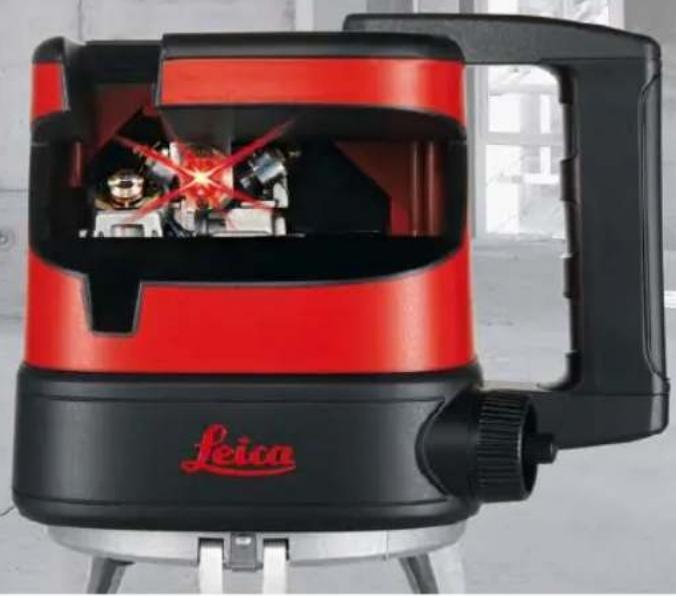
Exterior view of a red and black Feica brand light fixture with visible internal components (no text or symbols)- when it has to be right
Leica
Geosystems
User Manual
Version 785880b
English
Congratulations on your purchase of the Leica Lino ML Series.


Before starting up the instrument for the first time, please read through the entire User Manual paying special attention to the
section "Safety instructions".
Contents
Start up.... 1
Interface 4
Operation 5
Working with receivers 9
Checking the accuracy 16
Technical data 19
Care and transport 21
Safety instructions 23
Warranty 27
Start up
EN
Inserting / replacing batteries
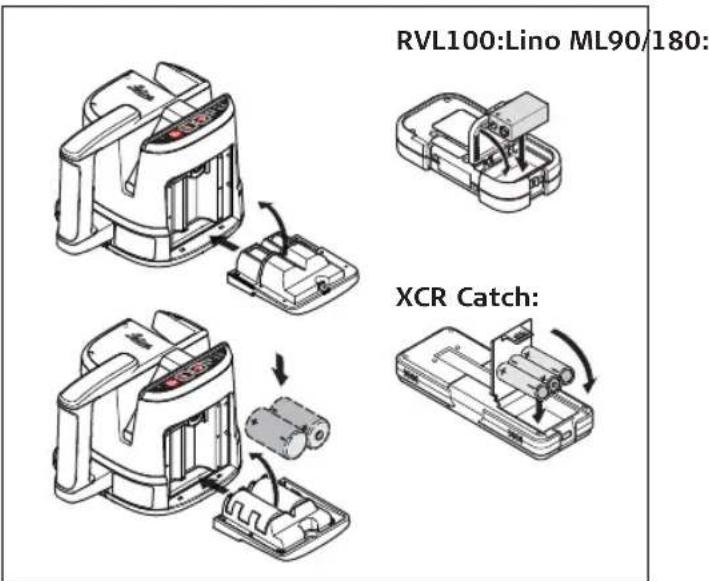
1 Lino ML90/180: Turn the release screw on the battery compartment a 1/4 turn (clock wise) with the help of a coin or a flat head screw driver to unlock the battery compartment.
2 Open the battery compartment cover and insert the batteries, observing the correct polarity.
text_image
RVL100:Lino ML90/180: XCR Catch:EN
3 Insert the battery compartment cover on the bottom side first and then insert the compartment completely until it is fully closed.
4 Then lock the compartment by turning the release screw a 1/4 turn (counter clock wise).
The battery symbol ⑥ lights up when the battery voltage is too low. Replace the batteries as soon as possible.
- Insert the batteries observing the correct polarity
- Use alkaline batteries or rechargeable batteries only.
- Remove the batteries if the instrument is not to be used for a long period of time (to prevent corrosion).
Charging the rechargeable battery pack / first-time use
- In case that your Lino ML is equipped with a rechargeable battery pack you can recharge the battery pack with the supplied Lino ML charger (Art Nr. 784967) by connecting the charger to the jack on the battery door.
- The battery must be charged prior to first use because it is delivered with as low an energy content as possible.
- A full charging cycle takes 8 hours and the charging will automatically stop after a full cycle. Each time the charger is connected to the unit a charging cycle will be initiated. See also battery status indications on the interface in section "Interface" on page 4.
- The permissible temperature range for charging is between 0^ and +40^ / +32^ and +104^ . For optimal charging we recommend charging the batteries at a low ambient temperature of +10^ to +20^ / +50^ to +68^ if possible.
- It is normal for the battery to become warm during charging.

text_image
Diagram of a portable device with labeled components and indicator lights, including a 8-hour power plug and terminal blocks.① LED off: not connected
② LED lights continuously: charging for 8h
③ LED blinks: connected but not charging, online operation possible
④ Jack for battery charger

WARNING:
Using a battery charger not recommended by Leica Geosystems can destroy the batteries. This can cause fire or explosions.
Precautions:
Only use chargers recommended by Leica Geosystems to charge the batteries.
Interface
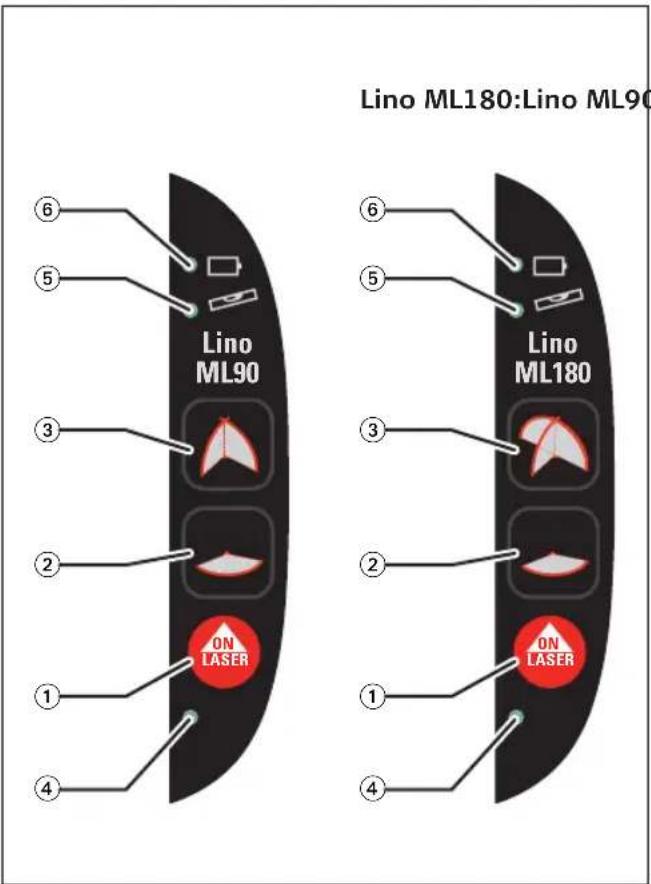
Keypad and control elements
① LASER key
② Horizontal MODE key
③ Vertical MODE key
Display
④ LED 1 system indicator:
- off: system off
- permanent green: system on
⑤ LED 2 level indication:
- off: levelled
- permanent red: out of level
⑥ LED 3 battery indication:
- off: battery full - blinking: approx. 2 hours of use - permanent red: unit switched off due to battery too low
Special display notices:
Falling below or exceeding the permissible temperature range: The laser switches off and all LEDs flash.
Environmental conditions might lead to shut off of the laser before the actual operation temperature limits are reached.
text_image
Lino ML180:Lino ML90 ⑥ ⑤ Lino ML90 ③ ② ① ④ ⑥ ⑤ Lino ML180 ③ ② ① ④ ON LASER ON LASEROperation
Switching on/off
• ON: Briefly press the LASER key ①.
• OFF: Briefly press the LASER key ①.
Laser functions
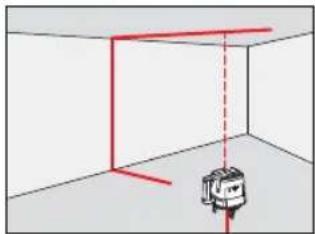
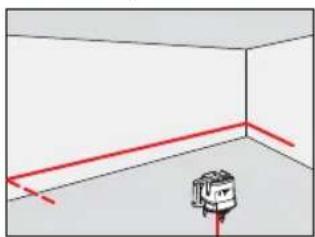
Pressing the MODE key ② and ③ activates the following laser functions:
| Key press | ML90 vertical | ML180 vertical | horizontal |
| (key 3) | (key 3) | (key 2) | |
| default | laser A+B on | laser A+B+C on | laser D on |
| 1x | laser B on | laser A+B on | laser D off |
| 2x | all vertical lasers off | all vertical lasers off | repeat default |
| 3x | repeat default | repeat default |
The plumb beam will be on upon start up of the unit and will automatically turn off after 180 sec. To switch the plumb beam back on short press any mode key ② and ③ (see page 4).
A

natural_image
Simple 3D diagram of a room with a small object and red dashed lines indicating measurement or projection (no text or symbols)B
natural_image
Simple 3D diagram showing a red line and a small object in a room with dashed lines, no text or symbols present.C

natural_image
Diagram showing a vehicle inside a room with red lines indicating measurement or alignment, no text or symbols present.D
natural_image
Simple 3D diagram of a room with red lines and a small object at the bottom (no text or symbols)EN
Self-levelling and Lock functions
The instrument automatically levels itself within the specified leveling range (Refer to section "Technical data" on page 19).
Leveling process is indicated by the LEDs. See Interface description on page 4.
Using the Laser with a receiver
To be able to detect the laser lines over long distances (> 15 m) or in unfavourable lighting conditions, a laser receiver can be used. Laser lines can be detected by a receiver that is able to detect pulsed laser lines. The lines of the Lino ML are permanently pulsed and are compatible with the range of recommended Leica laser receivers.

See section "Working with receivers" on
page 9.
Applications
EN

natural_image
Three mechanical devices with labeled components and directional arrows indicating motion (no text or symbols present)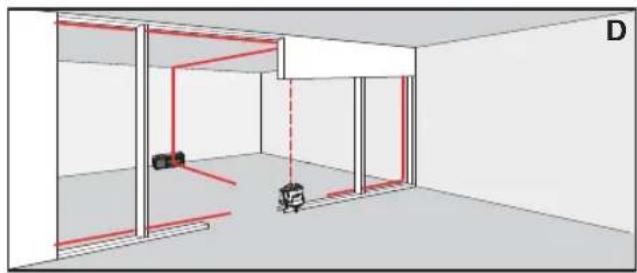
natural_image
Interior view of a room with red safety lines and a small robot, no text or symbols present
natural_image
3D architectural rendering of a room with walls, windows, and two small objects, connected by red lines (no text or symbols)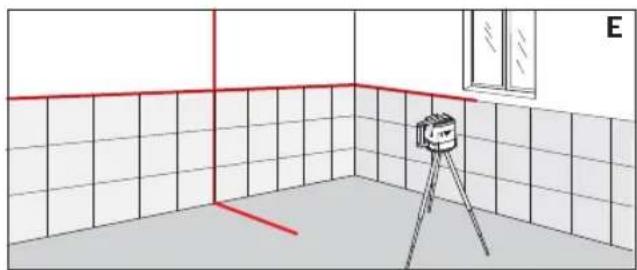
natural_image
Interior view of a room with tiled walls, a camera on a tripod, and a window (no text or symbols)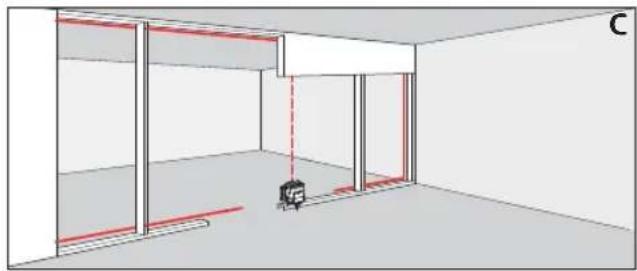
natural_image
Interior view of a room with walls, windows, and a small object in the corner (no text or symbols visible)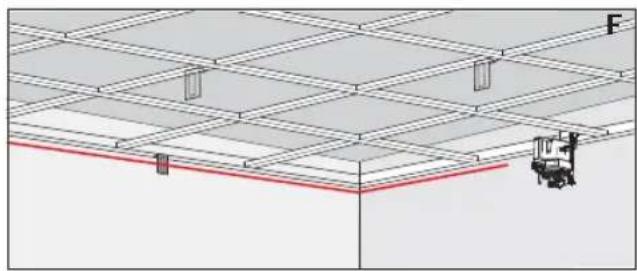
natural_image
Architectural floor plan showing grid layout and a small mechanical component (no text or labels)EN
Manual fine adjustment of vertical lines
The Lino ML90 and ML180 lasers feature the possibility to manually turn the unit 360° around its center axis and the possibility to fine adjust the unit by ±4° turning around the plumb axis. On the ML180 the fine adjustment can be set to its 0° position by pressing both mode keys ② and ③ (see page 4) at the same time for more than 2 seconds.
By turning the adjustment knob the laser beams can be aligned manually.
Additionally to the manual fine adjustment possibility described above, the Lino ML180 has the possibility to automatically align itself to the position of the Leica XCR Catch remote/receiver. For a detailed description of all functions, please, refer to the section "Working with receivers" from page 9.
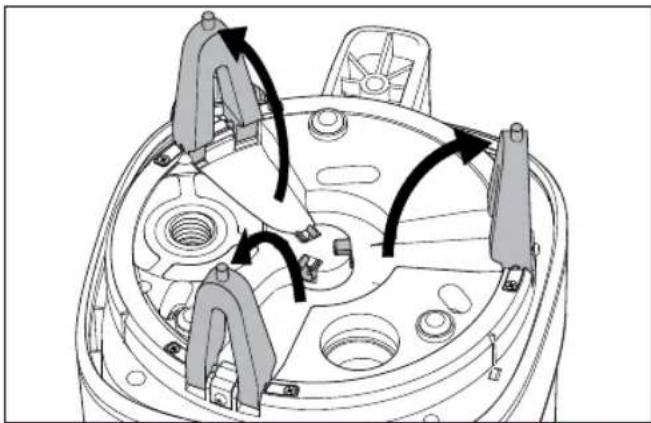
natural_image
Technical diagram of a mechanical component with directional arrows indicating motion or flow (no text or symbols present)
Working with receivers
Leica RVL100
The Leica RVL100 is a robust and easy to use laser receiver and can be used with all Leica Lino line lasers.
Keypad
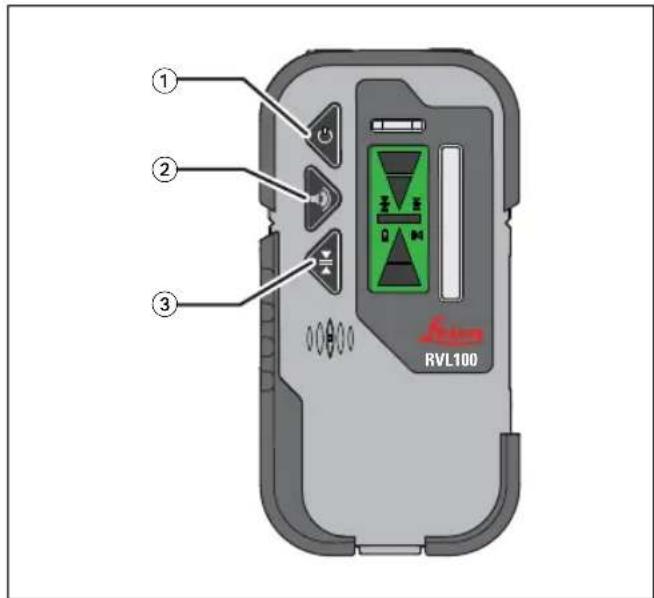
text_image
① ② ③ RVL100① ON/OFF key: switch the receiver on/off
② Beeper key: change the sound level of the beeper
③ Sensitivity key: switch sensitivity (±1mm/±3mm)
Display status symbols

text_image
① ② ③ ④ RVL100 ⑤ ⑥ ⑦ ⑧ ⑨① Sensitivity : fine ±1 mm (default)
② Sensitivity : coarse ±3 mm
③ Battery status: full
④ Battery status: low
⑤ Beep medium
⑥ Beep high
⑦ Beep off
⑧ Move receiver down
⑨ Move receiver up
EN
Leica XCR Catch
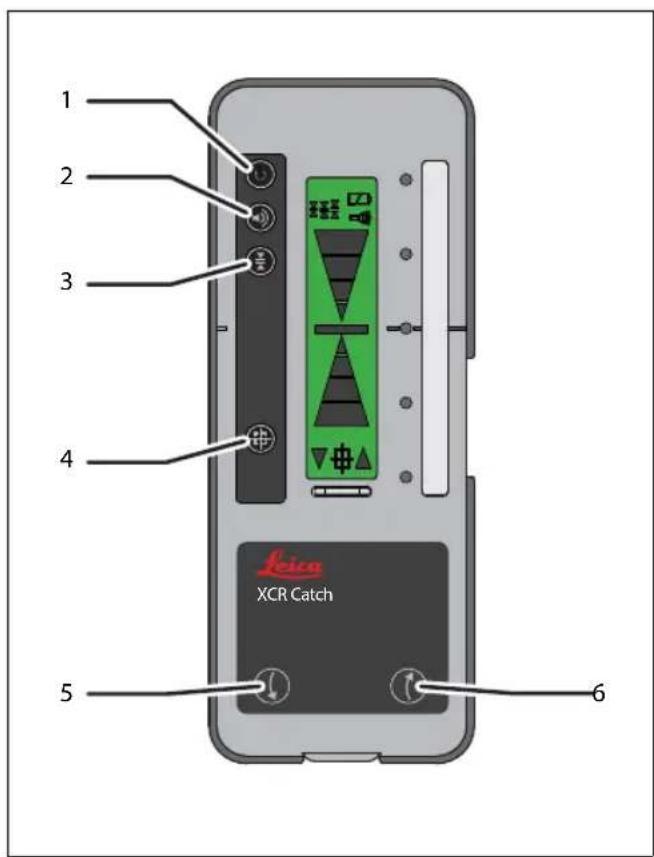
The Leica XCR Catch is a combined laser receiver and remote control for the Leica Lino ML180.
Keypad
text_image
1 2 3 4 5 6 Icica XCR Catch① ON/OFF key
② Beeper key
③ Sensitivity key
④ Auto alignment key - Press 2 sec
⑤ Direction key down
⑥ Direction key up
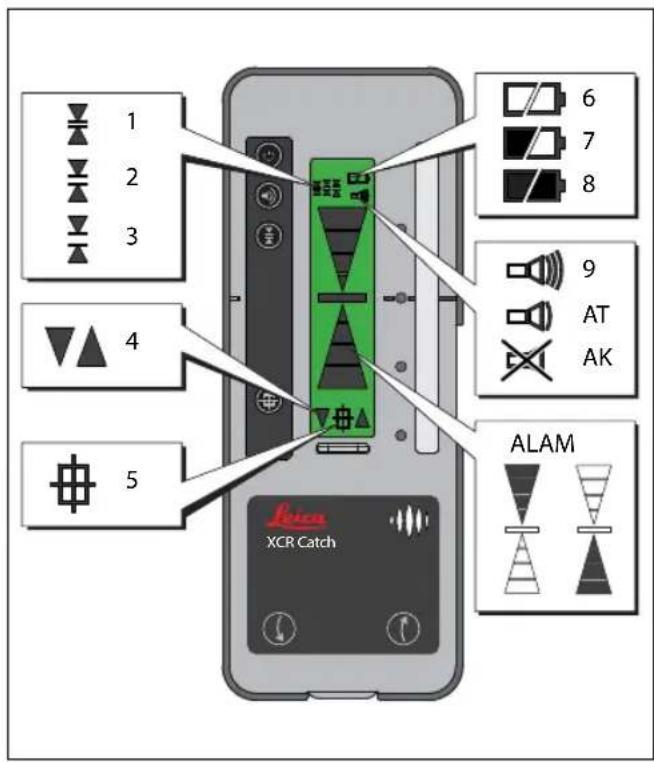
Display status symbols
text_image
1 2 3 4 5 6 7 8 9 AT AK ALAM XCR Catch① Sensitivity: fine ±1 mm
② Sensitivity: medium ±3 mm (default)
③ Sensitivity: coarse ±5 mm
④ Remote arrows and direction keys
⑤ Alignment activated
⑥ Battery: empty
⑦ Battery status: medium
⑧ Battery status: full
⑨ Beep high
⑩ Beep low
⑪ Beep off
⑫ Move receiver down
⑬ Move receiver up
EN
Pairing the Leica XCR Catch with the Leica ML180 Laser
The Leica XCR Catch remote/receiver works exclusively with the Leica Lino ML180 line laser. The receiver that is included in the package is already paired with the laser and only communicates with this specific laser. If you want to pair another Leica XCR Catch with your laser you will need to redo the pairing procedure as described below.
When setting up the Leica Lino ML180 for radio pairing make sure that no other Leica XCR Catch is in operation in the area to avoid accidental pairing with this remote.
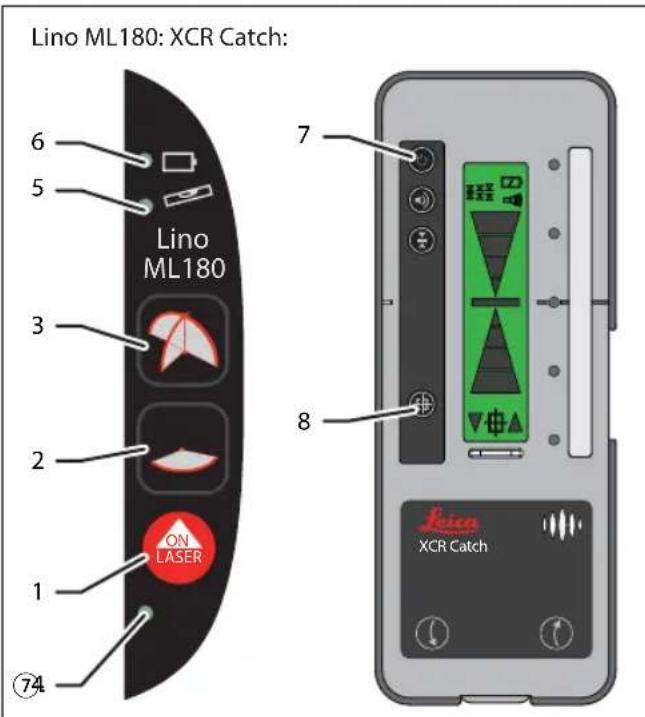
Pairing procedure:
1 Turn laser OFF ①.
2 Press and hold both buttons Horizontal MODE ② and Vertical MODE ③.
3 Turn laser ON ①.
4 Laser is in pairing mode (LED ④⑤⑥ blinking slowly in sequence).
5 Turn Receiver ON
6 Press button Auto alignment ⑧ of receiver.
7 Pairing process is complete (LED ④⑤⑥ blinking rapidly in sequence for 20 sec).
text_image
Lino ML180: XCR Catch: 6 5 Lino ML180 3 2 ON LASER 1 ⑦4 7 8 Leica XCR CatchIf the laser is in pairing mode and does not receive the signal from the remote, it will turn off after 30 seconds.
The pairing procedure can be repeated anytime. A Leica Lino ML180 laser and the paired Leica XCR Catch remote will stay paired until they are actively paired with another device.
Leica XCR Catch alignment features
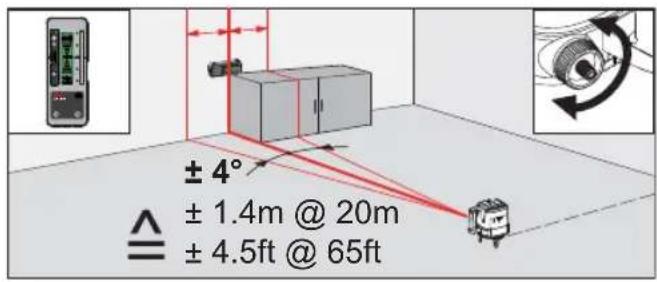
Manual alignment
text_image
± 4° ± 1.4m @ 20m ± 4.5ft @ 65ft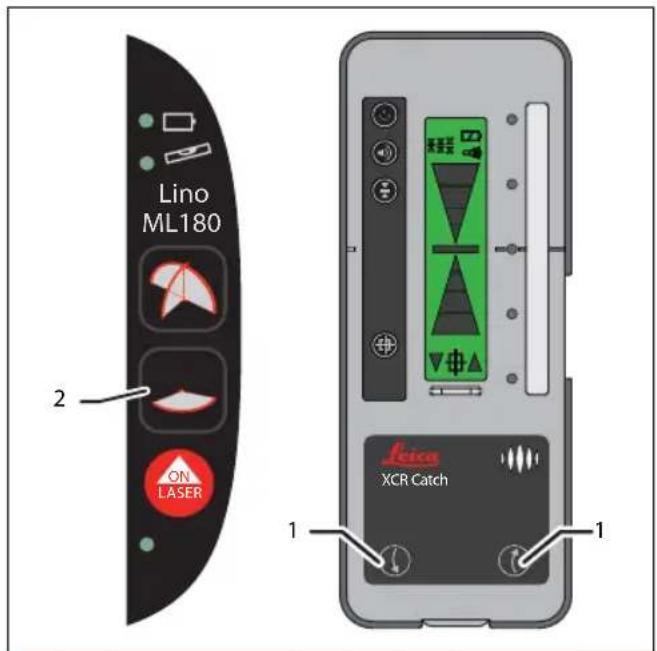
text_image
Lino ML180 2 ON LASER 1 XCR Catch 11 Set up the laser unit at the initial position.
2 Switch off the horizontal laserbeam with key ②.
3 Pre-align the laser (V line) within ±4^ of the desired final alignment position.
4 Remotely align the laser with the direction keys ①.
EN
Automatic alignment (single mode)
In single alignment mode the Leica XCR Catch will automatically align the Leica Lino ML180 laser once and will then deactivate the alignment feature.

text_image
Auto 1x ± 4° ± 1.4m @ 20m ± 4.5ft @ 65ft
text_image
1 2 3 4 Jica XCR Catch 31 Set up the laser unit at the initial position.
2 Pre-align the laser (V line) within ±4^ of the desired final alignment position.
3 Select the sensitivity ① to be used during alignment. Adjustment features for beeper and sensitivity are deactivated during the automatic alignment process.
4 Press auto alignment key ② for 2 sec. until 2 red LEDs blink. Horizontal laserline will be shut off during automatic alignment.
5 Predefine a scan direction by pressing the direction keys ③ accordingly within the first 3 sec.
If no direction is predefined the unit will start looking for the receiver in a predefined sequence (middle - left - right).
To deactivate the auto alignment process press the alignment key ② or press the On/Off button.
6 The auto alignment process will move the laser unit until it is precisely aligned with the Leica XCR Catch receiver.
7 When the receiver detects the exact position it will sound a beep for 2 sec. and will display the lighted green LED ④ and the middle position. The auto alignment process will be terminated when middle position has been found.
The receiver will deactivate the auto alignment if no laser signal is found or the signal is permanently lost within a time frame of 45 sec. The receiver will display all 5 LEDs blinking and will sound 3 short beeps. To reinitiate the receiver press any key.
Automatic alignment (continuous mode)
In continuous alignment mode the Leica XCR Catch will automatically align the Leica Lino ML180 laser and will then monitor and readjust the alignment continuously.

text_image
Auto ∞ ± 4° ± 1.4m @ 20m ≡ ± 4.5ft @ 65ft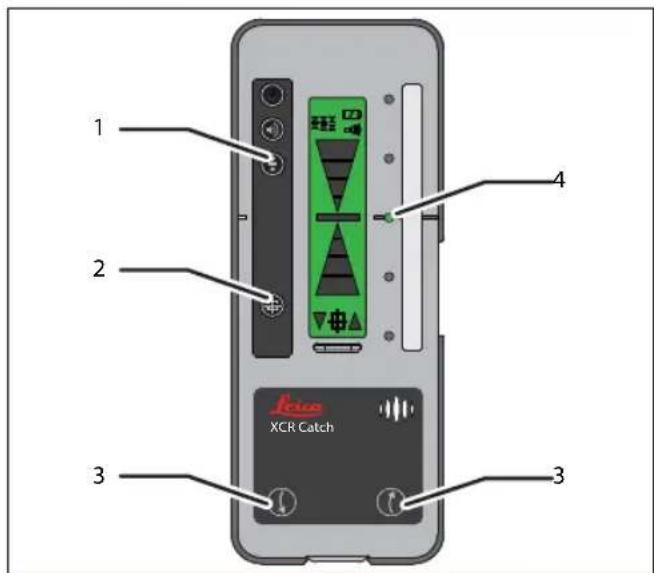
text_image
1 2 3 4 XCR Catch1 Repeat steps 1-3 from section "Automatic alignment (single mode)" on page 14.
2 Press auto alignment key ② and sensitivity key ① together for 2 sec. Horizontal laserline will be shut off during automatic alignment.
3 Predefine a scan direction by pressing the direction keys ③ accordingly within the first 3 sec.
If no direction is predefined the unit will start looking for the receiver in a predefined sequence (middle - left - right).
To deactivate the auto alignment process press the alignment key ② again for 2 sec.
4 The auto alignment process will move the laser unit until it is precisely aligned with the Leica XCR Catch receiver.
5 When the receiver detects the exact position it will beep for 2 sec. and will display the lighted green LED ④ and the middle position.
6 The Leica XCR Catch makes the laser follow the movements of the Leica XCR Catch and will continuously keep monitoring and readjusting the alignment after the middle position has been found. To stop this continuous process press the alignment key ② or the On/Off button.
The receiver will automatically deactivate the auto alignment in case no laser signal is found or in case the signal is permanently lost after more than 45 sec. The receiver will display all 5 LEDs blinking and will sound 3 short beeps. To reinitiate the receiver press any key.
EN
Checking the accuracy
Checking the accuracy of the Leica Lino ML90 and ML180 laser unit
Check the accuracy of your Leica Lino regularly and particularly before important measuring tasks.
Checking the accuracy of the levelling
text_image
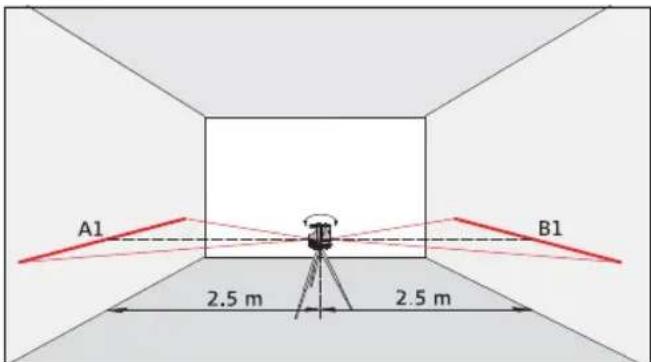
A1 B1 2.5 m 2.5 mSet the instrument on a tripod half-way between two walls (A+B) that are approx. 5 m apart.
Allow the instrument to level. Direct the instrument at wall A and switch on the instrument. Activate the horizontal laser line and mark the position of the line on wall A ( A1). Rotate the instrument by 180^ and mark the horizontal laser line in exactly the same way on wall B ( B1).
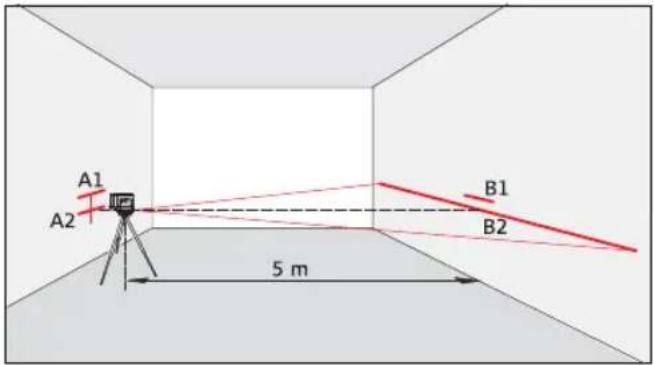
text_image
A1 A2 B1 B2 5 mThen place the instrument at the same elevation as close as possible to wall A and again mark the horizontal laser line on wall A ( A2). Rotate the instrument by 180^ again and mark the laser on wall B ( B2). Measure the distances of the marked points A1-A2 and B1-B2. Calculate the difference of the two measurements. If the difference does not exceed 2 mm, then the Leica Lino is within tolerance.
|(A1 - A2) - (B1 - B2)| ≤ 2 mm
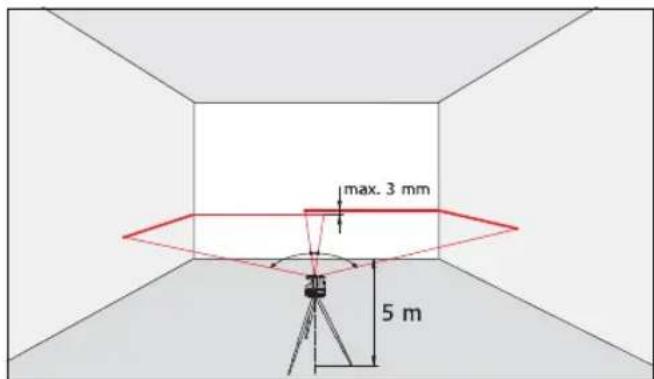
Checking the accuracy of the horizontal line
text_image
max. 3 mm 5 mSet up the instrument on an even and flat surface. Allow the instrument to level.
Position the instrument approx. 5 m away from the wall. Direct the instrument at the wall and switch on the horizontal and front vertical Laser line and mark the intersection point of laser crosshairs on the wall. Swivel the instrument to the right and then to the left. Observe the vertical deviation of the horizontal line from the marking. If the difference does not exceed 3 mm, then the Leica Lino is within tolerance.
Checking the accuracy of the vertical line

text_image
max. 2 mm 1.5 mSet up the instrument on an even and flat surface or on a stable tripod. Allow the instrument to level. As reference, use a plumb-bob and attach it as close as possible to an approx. 3 m high wall. Position the instrument at a distance of approx. 1.5 m from the wall at an elevation of approx. 1.5 m. Direct the instrument at the wall and switch on the laser. Activate one of the vertical laser lines. Rotate the instrument and align it with the bottom of the plumb line. Now read off the maximum deviation of the laser line from the top of the plumb line. If the difference does not exceed 2 mm, then the Leica Lino is within tolerance.

Checking the accuracy of the vertical plumbing
Set up the instrument on an even and flat surface. Allow the instrument to level.
Checking the upper plumbing point:

text_image
B1 B2 max. 2 mm 1.5 m 1 2 A1Checking the lower plumbing point:
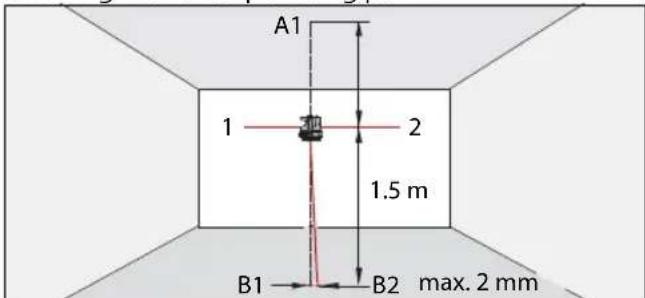
text_image
A1 1 2 1.5 m B1 B2 max. 2 mmSet up the laser on its tripod or wall mount bracket near point A1 at a minimum distance of 1.5 m from point B1. The horizontal laser is aligned in direction 1. Mark the laser dots A1 and B1 with a pin. Rotate the instrument by 180^ so that it points in the opposite direction of direction 1. Adjust the instrument so that
the laser beam hits point A1 exactly. If point B2 is no further than 2 mm away from point B1, then the Leica Lino is within tolerance.
Should your Leica Lino be outside of the specified tolerance, please contact an authorised dealership or Leica Geosystems.
Technical data
EN
Leica Lino ML90 and ML180
| Lino ML90 Lino ML180 | ||||
| Operation range * (with receiver at the center of the line) | up to 100 m 32 | 8 ft up to 100 m 328 ft | ||
| Self leveling accuracy (@25°C/77°F) | 0.7 mm @10 m 1 | /32 inch @30 ft 0 | .7 mm @10 m 1/32 inch @30 ft | |
| Self-levelling range +/- 5° | ||||
| Self leveling time < 10 sec. | ||||
| Angular accuracy 0.2 mm/m | ||||
| Laser diode type 635 nm, laser class 2 | ||||
| Fan angle 120° | ||||
| Protection IP54 | ||||
| Operation temperature -10 - +45°C | 14°F - +113°F - | 10 - +45°C 14°F - | +113°F | |
| Storage temperature | -25 - +70°C | -13°F - +158°F | -25 - +70°C | -13°F - +158°F |
| Battery type | Type D, 2 x 1,5V | |||
| Average battery operation time alkaline / NiMH | 20 hrs (Alkaline)16 hrs (rechargeable) | 10 hrs (Alkaline)12 hrs (rechargeable) | ||
| Dimensions | 250 x 159 x230 mm | 9.9 x 6.3 x9.1 inch | 250 x 159 x230 mm | 9.9 x 6.3 x9.1 inch |
| Weight with batteries | 2200 g | 77 oz | 2200 g | 77 oz |
* depending on lighting conditions All rights reserved for changes (on drawings, descriptions and technical data).
Leica RVL100 and XCR Catch
| RVL100 XCR Catch | ||||
| Reception range up to 80 | m 265 ft up to 100 | m 328 ft | ||
| Smart Targeting range* - | - up to 50 m 160 ft | |||
| Sensitivity (switchable) ±1 | mm/±3 mm ±0,04/±0,12 inch | ±1 mm/±3 mm/±5 mm | ±0,04/±0.12/±0,2 inch | |
| Length of reception window | 42 mm 1,65 inch 86 mm 3,4 inch | |||
| Protection IP54 IP65 | ||||
| Operation temperature | -10 - +50°C | 14°F - +122°F | -10 - +50°C | 14°F - +122°F |
| Storage temperature | -25 - +70°C | -13°F - +158°F | -25 - +70°C | -13°F - +158°F |
| Battery type | 1x 6LR61, 9V | 3x 1,5V AA | ||
| Dimensions | 147.5 x 75.5 x 29.5 mm | 5.8 x 2.9 x 1.2 inch | 190.5 x 75.5 x 29.5 mm | 7.5 x 3.0 x 1.2 inch |
| Weight with batteries | 260 g 9.1 oz | 310 g | 10.8 oz | |
* Range for Smart Targeting can be reduced when working outdoors or close to metal structures
NiMH battery pack (part no. 784966)
| Input voltage | 3.3 V |
| Input current | 2 A |
| Charge time | 8 h |
NiMH charger/adapter (part no. 784967)
| Input voltage | 100-240 V AC 50-60 Hz |
| Output voltage | 3.3 V |
| Output current 2 A |
Care and transport
Transport
Transport in the field
When transporting the equipment in the field, always make sure that you
- either carry the product in its original transport-container.
• or carry the tripod with its legs splayed across your shoulder, keeping the attached product upright.
Transport in a road vehicle
Never carry the product loose in a road vehicle, as it can be affected by shock and vibration. Always carry the product in its transport container and secure it.
Shipping
When transporting the product by rail, air or sea, always use the complete original Leica Geosystems packaging, transport container and cardboard box, or its equivalent, to protect against shock and vibration.
Shipping, transport of batteries
When transporting or shipping batteries, the person in charge of the product must ensure that the applicable national and international rules and regulations are observed. Before transportation or shipping, contact your local passenger or freight transport company.
Storage
Product
Respect the temperature limits when storing the equipment, particularly in summer if the equipment is inside a vehicle. Refer to "Technical Data" for information about temperature limits.
NiMH Batteries
- Refer to "Technical Data" for information about storage temperature range.
- A storage temperature range of 0^ to +20^/32^ to 68^ in a dry environment is recommended to minimize self-discharging of the battery.
- At the recommended storage temperature range, batteries containing a 10% to 50% charge can be stored up to one year. After this storage period the batteries must be recharged.
- Remove batteries from the product and the charger before storing.
• After storage recharge batteries before using. - Protect batteries from damp and wetness. Wet or damp batteries must be dried before storing or use.
Alkaline Batteries
If the equipment is to be stored for a long time, remove the alkaline batteries from the product in order to avoid the danger of leakage.
EN
Cleaning and Drying
Product and Accessories
- Blow dust off optical parts.
- Never touch the glass with your fingers.
- Use only a clean, soft, lint-free cloth for cleaning. If necessary, moisten the cloth with water or pure alcohol.
- Do not use other liquids; these may attack the polymer components.
Damp Products
- Dry the product, the transport container, the foam inserts and the accessories at a temperature not greater than 40^ / 104^ and clean them.
- Do not repack until everything is completely dry.
Cables and Plugs
- Keep plugs clean and dry.
- Blow away any dirt lodged in the plugs of the connecting cables.
Safety instructions
The person responsible for the instrument must ensure that all users understand these directions and adhere to them.
Symbols used
The symbols used have the following meanings

WARNING:
Indicates a potentially hazardous situation or an unintended use which, if not avoided, will result in death or serious injury.

CAUTION:
Indicates a potentially hazardous situation or an unintended use which, if not avoided, may result in minor injury and/or appreciable material, financial and environmental damage.

Important paragraphs which must be adhered practice as they enable the product to be used technically correct and efficient manner.
Permitted use
- Projection of horizontal and vertical laser lines and laser dots
Prohibited use
• Using the product without instruction
• Using outside the stated limits
- Deactivation of safety systems and removal of explanatory and hazard labels
- Opening of the equipment by using tools (screw-drivers, etc.), as far as not specifically permitted for certain cases
- Carrying out modification or conversion of the product
- Deliberate dazzling of third parties; also in the dark
- Inadequate safeguards at the surveying site.
Limits of use

Refer to section "Technical data".
The Leica Lino is designed for use in areas permanently habitable by humans. Do not use the product in explosion hazardous areas or in aggressive environments.
Areas of responsibility
Responsibilities of the manufacturer of the original equipment Leica Geosystems AG, CH-9435 Heerbrugg (for short Leica Geosystems):
Leica Geosystems is responsible for supplying the product, including the User Manual in a completely safe condition.
EN
Leica Geosystems is not responsible for third party accessories.
Responsibilities of the person in charge of the instrument:
The person in charge of the instrument has the following duties:
• To understand the safety instructions on the product and the instructions in the User Manual.
- To be familiar with local safety regulations relating to accident prevention.
Noise emissions

CAUTION:
The A-weighted sound pressure level of the signal sound is > 80 db(A) at a distance of one meter.
Do not hold the laser receiver directly to your ear!
Hazards in use

CAUTION:
Watch out for erroneous measurements if the instrument is defective or if it has been dropped or has been misused or modified.

Carry out periodic test measurements.
Particularly after the instrument has been subject to abnormal use, and before, during and after important measurements.
Refer to section "Checking the accuracy of the Leica Lino".

WARNING:
Flat batteries must not be disposed of with household waste. Care for the environment and take them to the collection points provided in accordance with national or local regulations.
The product must not be disposed of with the household waste.
Dispose of the product appropriately in accordance with the national regulations in force in your country.
Always prevent access to the product by unauthorised personnel.
Product specific treatment and waste management information can be downloaded from the Leica Geosystems home page or received from the Leica Geosystems dealer.

WARNING
Using a battery charger not recommended by Leica Geosystems can destroy the batteries. This can cause fire or explosions.
Precautions:
Only use chargers recommended by Leica
Geosystems to charge the batteries.
Electromagnetic Compatibility (EMC)

WARNING
The Leica Lino conforms to the most stringent requirements of the relevant standards and regula-
tions. Yet, the possibility of it causing interference in other devices cannot be totally excluded.
FCC Statement, Applicable in U.S.

WARNING
This equipment has been tested and found to comply with the limits for a Class B digital device, pursuant to part 15 of the FCC rules.
These limits are designed to provide reasonable protection against harmful interference in a residential installation. This equipment generates, uses and can radiate frequency energy and, if not installed and used in accordance with the instructions, may cause harmful interference to radio communication.
However, there is no guarantee that interference will not occur in a particular installation.
If this equipment does cause harmful interference to radio or television reception, which can be determined by turning the equipment off and on, the user is encouraged to try to correct the interference by one or more of the following measures:
- Reorient or relocate the receiving antenna.
- Increase the separation between the equipment and the receiver.
- Connect the equipment into an outlet on a circuit different from that to which the receiver is connected.
- Consult the dealer or an experienced radio/TV technician for help.

WARNING
Changes or modifications not expressly approved by Leica Geosystems for compliance could void the user's authority to operate the equipment.

EN
Laser classification
The Leica Lino produces visible laser beams, which are emitted from the instrument:
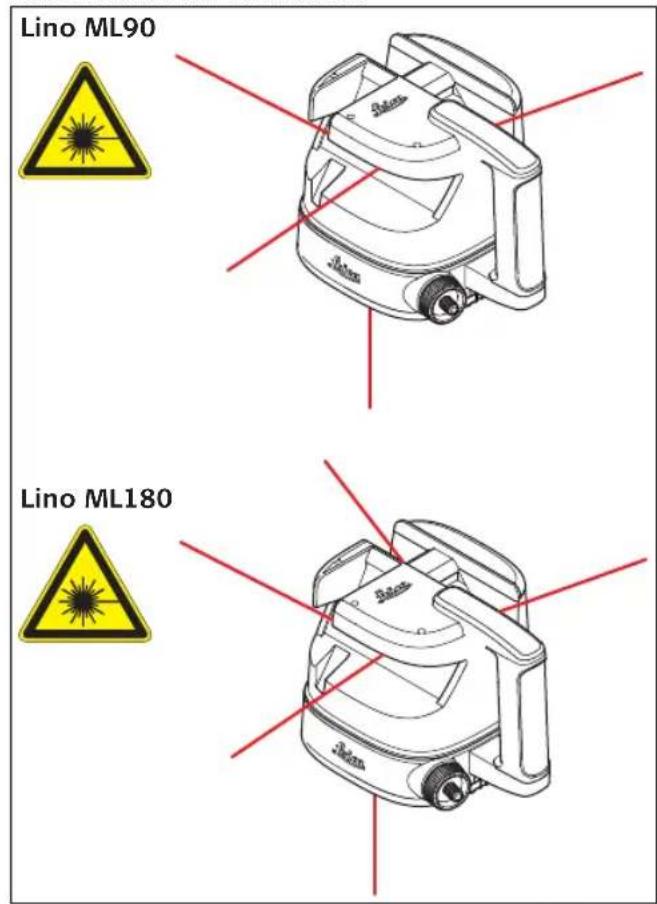
text_image
Lino ML90 Lino ML180It is a Class 2 laser product in accordance with:
- IEC 60825-1: 2014-03 "Radiation safety of laser products"
Laser Class 2 products:
Do not stare into the laser beam or direct it towards other people unnecessarily. Eye protection is normally afforded by aversion responses including the blink reflex.

WARNING:
Looking directly into the beam with optical aids (e.g. binoculars, telescopes) can be hazardous.

CAUTION:
Looking into the laser beam may be hazardous to the eyes.
| Description Value |
| Maximum peak radiant output power < 1.0 mW |
| Wavelength 638 nm |
| Pulse duration 70 μs |
| Pulse repetition frequency 10 kHz |
| Beam divergence 180° |
Labeling
Lino ML90

text_image
Type: Leica Line ML90 Art No.: 784437 www.leica.com/ML90.com Made in China Swiss Technology by Leca Technologies CE C O E S O R S O R S O R S O R S O R S O R S O R S O R S O R S O R S O R S O R S O R S O R S O R S O R S O R S O R S O R S O R S O R S O R S O R S O R S O R S O R S O R S O R S O R S O R S O R S O R S O R S O R 2Lino ML180
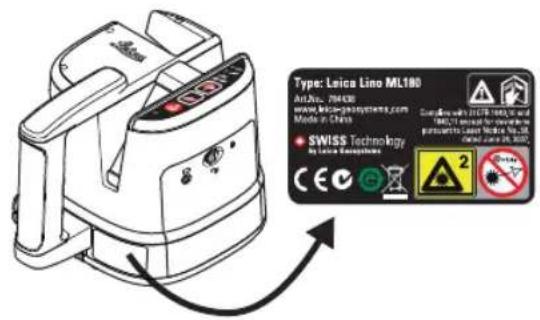
text_image
Type: Leica Lino ML180 Art No.: 264430 www.leica-genyosystems.com Mode of Class SWISS Technology by Liao Technologies CE C G A² No. 2Warranty
This product comes with a three* year warranty from Leica Geosystems.
More detailed information can be found at:
www.leica-geosystems.com/registration
All rights reserved for changes (drawings, descriptions and technical specifications).
*) To receive the three year warranty, the product must be registered on our website
www.leica-geosystems.com/registration
within eight weeks of the purchase date. If the product is not registered, a two year warranty applies.