ManualGo.com
 HR6070 - Blender PHILIPS - Free user manual and instructions
Find the device manual for free HR6070 PHILIPS in PDF.


Download the instructions for your Blender in PDF format for free! Find your manual HR6070 - PHILIPS and take your electronic device back in hand. On this page are published all the documents necessary for the use of your device. HR6070 by PHILIPS.
USER MANUAL HR6070 PHILIPS
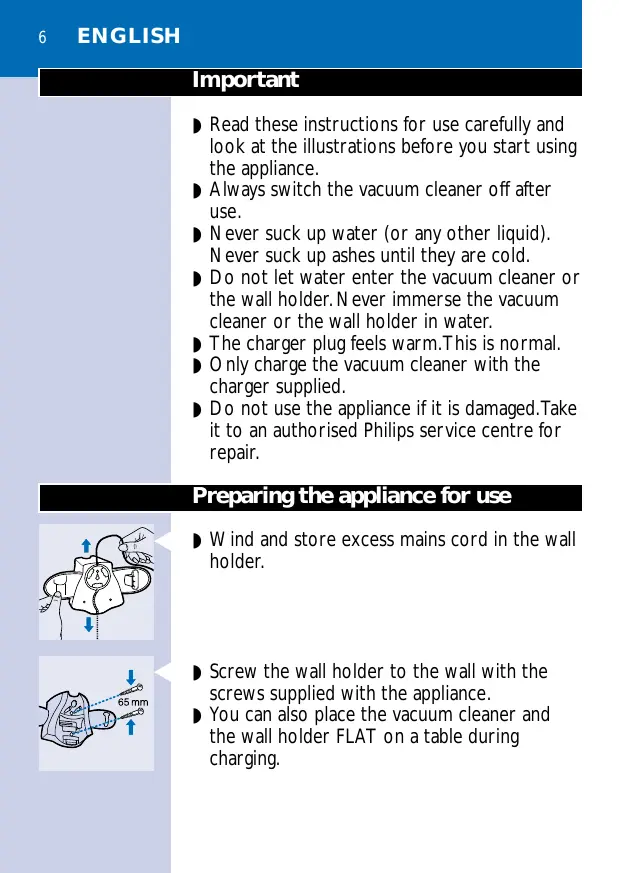
Important ◗ Read these instructions for use carefully and look at the illustrations before you start using the appliance. ◗ Always switch the vacuum cleaner off after use. ◗ Never suck up water (or any other liquid). Never suck up ashes until they are cold. ◗ Do not let water enter the vacuum cleaner or the wall holder. Never immerse the vacuum cleaner or the wall holder in water. ◗ The charger plug feels warm.This is normal. ◗ Only charge the vacuum cleaner with the charger supplied. ◗ Do not use the appliance if it is damaged.Take it to an authorised Philips service centre for repair.
Preparing the appliance for use and store excess mains cord in the wall
the wall holder to the wall with the
C ◗ Screw screws supplied with the appliance. ◗ You can also place the vacuum cleaner and the wall holder FLAT on a table during charging.
crevice tool, floor nozzle and the stick
C ◗ The can be attached to the wall holder by pushing them into the appropriate fastening slots.
Charging the appliance
Make sure that the slide switch of the vacuum cleaner is in the off position (0) during charging.The appliance will not charge if the slide switch is in another position.
Insert the charger plug into the wall socket.
Always put the vacuum cleaner back onto the holder after use to recharge the batteries, even if the batteries are still almost fully charged.
indicator light will come on to indicate
C ◗ The that the appliance is charging. The indicator light will stay on as long as the appliance is connected to the wall holder and the plug is in the wall socket. The indicator light does not give any information about the charge level of the built-in batteries. Charge the appliance for at least 16 hours before you use it for the first time. Recharge the appliance as soon as the motor power decreases noticeably.
ENGLISH If you are not going to use the appliance for a longer period of time, we advise you to remove the charger plug from the wall socket to save energy.
Set the slide switch to position I for normal suction power. Set it to position II for turbo suction power.
Connecting accessories
Hard floors and carpets
Use the floor nozzle for vacuum cleaning hard floors and carpets.
Assemble the fluff collector onto the nozzle of the appliance or onto the floor nozzle. Use the fluff collector to remove hair or fluff.
Pass the fluff collector gently over the hairs or fluff to be removed.The hairs or fluff will be worked loose from the surface, collected and then sucked up.
Hard-to-reach places
Use the crevice tool for vacuum cleaning hard-to-reach places.
You can assemble the stick for extra reach when cleaning hard floors, carpets and hard-to-reach areas. Push the narrow part of the stick into the hole in the handle until you hear a click.
can switch the appliance on by means of
C ◗ You the slide switch on the handle of the stick. The appliance may only be used in position II (turbo suction power) if the stick is attached.
To detach the stick, press the release button underneath the handle of the vacuum cleaner and pull the stick out of the appliance.
ENGLISH Press the break button and open the vacuum cleaner over a dustbin.
Remove the dustbag from the dust compartment.
Empty the dustbag and the dust compartment.
◗ Clean the dustbag with a brush or with a normal vacuum cleaner if it is very dirty.
Replacing the dustbag
Slide the ring holding the edge of the dustbag upwards and remove the old dustbag.
Slide the new dustbag onto the dustbag frame.
Push the ring down to fasten the dustbag.
Push the point of the dustbag inwards.
Cleaning the appliance
◗ You can clean the appliance with a damp cloth. Remove the mains plug from the wall socket before cleaning the wall holder. Do not let water enter the vacuum cleaner or the wall holder. Never immerse the vacuum cleaner or the wall holder in water. ◗ If necessary, clean the dust compartment and the dustbag with cold or lukewarm water.The dust compartment and the deflector may NOT be cleaned in a dishwasher. Never use the vacuum cleaner when the dustbag or dust compartment is still wet.
New (replacement) dustbags are available under type no. HR6918. Contact your Philips dealer.
ENGLISH If you have any difficulties obtaining dustbags or other accessories for this appliance, please contact the Philips Customer Care Centre in your country or consult the worldwide guarantee leaflet.
NiCd/NiMH batteries can be harmful to the environment and may explode if exposed to high temperatures or fire. Remove the batteries when you discard the appliance. Do not throw the batteries away with the normal household waste, but hand them in at an official collection point.You can also take the batteries to a Philips service centre, which will dispose of them in an environmentally safe way. Only remove the batteries if they are completely empty.
Let the appliance run until it stops, undo the screws and open the vacuum cleaner.
Cut the connecting wires one by one and remove the batteries.
If you need information or if you have a problem, please visit the Philips Web site at www.philips.com or contact the Philips Customer Care Centre in your country (you will find its phone number in the worldwide guarantee leaflet). If there is no Customer Care Centre in your country, turn to your local Philips dealer or contact the Service Department of Philips Domestic Appliances and Personal Care BV.