
Z31037 - Jump rope CRIVIT - Free user manual and instructions
Find the device manual for free Z31037 CRIVIT in PDF.


| Product Type | Sports Watch |
| Brand | Crivit |
| Model | Z31037 |
| Display Type | LCD |
| Screen Size | 1.3 inches |
| Resolution | 240 x 240 pixels |
| Dimensions | 45 x 45 x 12 mm |
| Weight | 60 g |
| Battery Type | Lithium-Ion 200 mAh |
| Battery Life | Up to 7 days typical use |
| Charging Time | Approx. 2 hours |
| Charging Method | USB magnetic charging cable |
| Water Resistance Rating | IP68 (up to 1.5m for 30 min) |
| Connectivity | Bluetooth 5.0 |
| Compatibility | iOS 10+ and Android 5.0+ |
| Sensors | Heart rate monitor, 3-axis accelerometer |
| Functions | Step counting, sleep tracking, notifications, alarms, stopwatch |
| Material | Plastic case, silicone strap |
| Operating Temperature | -10°C to 50°C |
| Storage Temperature | -20°C to 60°C |
| Languages Supported | English, German, French, Spanish, Italian, Dutch, etc. |
| Package Contents | Device, charging cable, user manual |
| Warranty | 2 years |
| Certifications | CE, RoHS |
Frequently Asked Questions - Z31037 CRIVIT
User questions about Z31037 CRIVIT
0 question about this device. Answer the ones you know or ask your own.
Ask a new question about this device
Download the instructions for your Jump rope in PDF format for free! Find your manual Z31037 - CRIVIT and take your electronic device back in hand. On this page are published all the documents necessary for the use of your device. Z31037 by CRIVIT.
USER MANUAL Z31037 CRIVIT
Operation and Safety Notes
FI
HYPPYNARU
natural_image
Color palette bar with grayscale shades and a central crosshair symbol (no text or labels)

GB / IE Operation and safety notes Page 6
natural_image
Color palette bar with grayscale swatches and a central target symbol (no text or labels)A


natural_image
Cross-sectional diagram of a mechanical component with two upward arrows indicating direction (no text or labels)B


C


Table of Contents
Properuse......Page 7
Description of parts......Page 7
Technical data......Page7
Supply scope......Page 8
Safety information......Page 8
Safety advice concerning batteries ......Page 9
Before use
Inserting / replacing the battery......Page 10
Preparing for use ......Page 10
Cleaning and care......Page 12
Disposal Page 12
Proper use / Description ... / Technical data
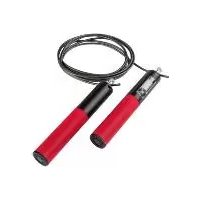
Skipping Rope
- Proper use
The product is not intended for commercial use. Please read through the instructions carefully before use.
● Description of parts
1 Handle
2 LC display
3 Battery compartment
4 Battery
5 Battery compartment cover
6 Skipping rope
7 Rope holder
8 DOWN button
9 SET button
10 UP button
11 RESET/ON button

- Technical data
Power supply: 1 x 3 V battery
-
(CR2032 button cell battery)
Skipping rope length:
3.00 m (suitable for up to 1.90 m body height)
Adjustable setting for
body weight (W):
20-110 kgs
Adjustable setting for
training duration (T):
1-60 mins.
Readable number of skips (L):
0-9999
Readable calorie consumption (C):
0-999 kcals
Supply scope / Safety information
Supply scope
1 Skipping rope with computer
1 x 3 V= battery (CR2032 button cell battery)
1 Set of directions for use

Safety information
KEEP ALL THE SAFETY ADVICE AND INSTRUCTIONS IN A SAFE PLACE FOR FUTURE REFERENCE!


DAK WALKINGS!
OF LIFE AND ACCIDENT TO INFANTS AND CHILDREN! The product is not a toy
and must not be used as such. Always keep small children away from the product, it is not suitable for them.

CAUTION! DANGER TO LIFE! DANGER OF INJURY! DANGER OF DAMAGE TO PROPERTY!
Do not leave children unsupervised with the product. Children can become entangled in the product and can strangle themselves or trip over it. There is danger of loss of life through strangulation and also risk of injury and damage to property.

This product is not intended to be used by persons (including children) with restricted physical, sensory or mental abilities or with insufficient experience and / or knowledge, unless they are supervised by a person who is responsible for their safety or they have received instruction on how to use the product from such a responsible person.

The product should be used and stored in weather sheltered places only.

Only use the product in rooms, in which you can keep sufficient distance (at least 2 × 2 × 2m ) from persons/objects, so that injuries and damage to property are avoided.
Safety information
■ Before using for the first time, have a general fitness check carried out by your doctor.
- Don't forget to include warm up and cool down periods.
■ Only have repairs carried out by a suitably qualified or experienced specialist.
● Safety advice concerning batteries
WARNING! RISK OF FATAL INJURY! Batteries
can be swallowed, which is potentially life threatening. If a battery is swallowed, medical help must be sought immediately.
CAUTION! DANGER OF EXPLOSION!

Never recharge batteries! Do not short-circuit batteries! Overheating, fire or destruction of es might result.
■ Remove spent batteries from the product immediately. Otherwise the batteries are more likely to leak.
- Keep batteries away from children. Do not throw batteries into a fire. Never short-circuit them or take them apart.
■ Make sure you fit the battery with the right polarity (+ and -).
■ Only use batteries of the specified type.
If you disregard these instructions and advice, the batteries may discharge beyond their terminal voltage. Thus increasing the chance of leakage. If the battery in your product has leaked, remove it immediately to prevent damage to the product!
Spent or damaged batteries may irritate the skin on contact; so always wear suitable protective gloves in these circumstances!
- Do not let the fluid from a leaking battery come into contact with your skin, eyes or mucous membranes. In the event of contact with fluid leaking from a battery, thoroughly flush the affected area with water and / or seek the advice of a doctor!


Safety ... / Before use / Preparing for use
■ Remove the battery from the product if it has not been used for a long period.
■ ▲ WARNING! Insert or change the battery, please make sure that the LC-display 2 is off.
Before use
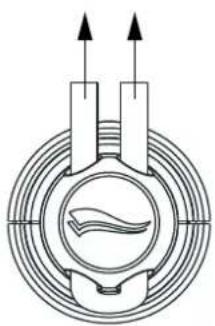
■ Fasten the skipping rope 6 to the rope holder 7 and set the correct rope length. Proceed as shown in fig A.
■ Remove the insulating strips before first use.
- Inserting / replacing the battery
☐ Proceed with the insertion / changing of the battery as shown in fig. B and C.

● Preparing for use
☐ First enter your body weight (W), so that the computer in the handle 1 can count the number of skips / rope revolutions (L), the training duration (T) and the calorie consumption (C).

Setting body weight:
- Press the RESET / ON button 11. The LC display 2 switches itself on.
- Press the SET button 9. The figure in the W box (weight) on the LC display 2 flashes.
- Enter your current body weight in kgs (20-110) by means of the UP 10 and DOWN buttons 8. Hold the buttons down longer to speed up the input process.
- Press the SET button 9 again to confirm the set body weight.
Preparing for use
Setting training duration:
-
Press the SET button 9, until the figure in the T box (time) on the LC display 2 flashes.
-
Enter the desired training duration in minutes (1-60) by means of the UP 10 and DOWN buttons 8.
-
Press the SET button 9 again to confirm the set training duration. The desired training duration appears in box T.
Note: if a training duration has not been set, then the computer measures the training duration automatically. At the training start the reading is 0. At the end of training the reading stops automatically.
Note: in order to save the battery, the skipping rope computer switches itself off automatically after approx. 8 minutes, in which there has been no rope movement or pressing of any buttons. You must then enter your body weight (W) and desired training duration (T) again.
Training:
-
Begin the training. The computer starts automatically.
-
The LC display shows
-
the set body weight in box W,
- the remaining / counting training duration in box T,
- the number of skips / rope revolutions in box L (from the 6^th skip onwards),
- the calorie consumption in box C.
Note: you hear an acoustic signal as soon as the set training duration has elapsed and the computer then stops automatically. The current values flash up in the LC display 2.
Note: press the RESET / ON button ^11 to delete the set body weight and the set training duration, or to reset to the factory setting.
Cleaning and care / Disposal
- Cleaning and care
- Do not use any corrosive or abrasive cleaning agents.
Otherwise the product will be damaged.
☐ Use only a dry, fluff-free cloth for cleaning.
- Disposal

The packaging is made entirely of recyclable materials, which you may dispose of at local recycling facilities.
Contact your local refuse disposal authority for more details of how to dispose of your discarded product.

When your product has come to the end of its life, please do not throw it out with your household refuse, but in the interests of the environment take it to a suitable centre where it can be disposed of properly. Your local council will be able to tell you where the collection centres are located and their opening times.
Defective or exhausted batteries must be recycled in accordance with Directive 2006 / 66 / EC. Return the batteries and / or the product through the appropriate collection facilities.

Improper disposal of batteries can damage the environment!
Batteries must not be disposed of with the household refuse. They may contain toxic heavy metals and require to be handled as special waste. The chemical symbols of heavy metals are as follows: Cd = cadmium, Hg = mercury, Pb = lead. For this reason, you must dispose of discarded batteries at a communal disposal centre.
12 GB/IE
crivit —SPORTS—


natural_image
Color palette bar with grayscale swatches and a central target symbol (no text or labels)EMC CE


Sisällysluettelo
natural_image
Color palette bar with grayscale swatches (no text or symbols)



natural_image
Pure geometric lines and shapes without any text, numbers, or symbols
natural_image
Color palette bar with grayscale shades and a central crosshair symbol (no text or labels)
IAN 69330
Milomex Ltd.
c/o Milomex Services
Hilltop Cottage
Barton Road
Pulloxhill
Bedfordshire
MK45 5HP
UK
Model no.: Z31037
Version: 10/2011
© by ORFGEN Marketing
Last information update · Tietojen tila
Informationsstatus · Tilstand af information


- HYPPYNARU
- Table of Contents
- Proper use / Description ... / Technical data
- Skipping Rope
- - Proper use
- ● Description of parts
- - Technical data
- Supply scope / Safety information
- Supply scope
- Safety information
- DAK WALKINGS!
- OF LIFE AND ACCIDENT TO INFANTS AND CHILDREN! The product is not a toy
- CAUTION! DANGER TO LIFE! DANGER OF INJURY! DANGER OF DAMAGE TO PROPERTY!
- ● Safety advice concerning batteries
- WARNING! RISK OF FATAL INJURY! Batteries
- CAUTION! DANGER OF EXPLOSION!
- Safety ... / Before use / Preparing for use
- Before use
- - Inserting / replacing the battery
- ● Preparing for use
- Setting body weight:
- Preparing for use
- Setting training duration:
- Training:
- Cleaning and care / Disposal
- - Cleaning and care
- - Disposal
- Improper disposal of batteries can damage the environment!
- EMC CE
- Sisällysluettelo
Brand : CRIVIT
Model : Z31037
Category : Jump rope