
AZ2760 - Portable CD player PHILIPS - Free user manual and instructions
Find the device manual for free AZ2760 PHILIPS in PDF.
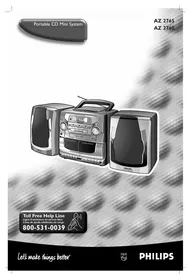


| Product Type | Portable CD player with radio and cassette deck |
| Power supply | Mains (AC) or 6 R20/UM1/D batteries (not provided) |
| Main functions | CD playback (random, repeat, program up to 20 tracks), FM/AM radio (29 presets), double cassette deck, cassette recording (CD and radio), 3.5mm headphone jack |
| Maintenance and cleaning | Clean cassette heads with an alcohol-dipped cotton swab after 50 hours of use; do not touch the CD lens; clean CDs from center to edge with a soft cloth |
| Safety | Compliant with FCC Part 15 and 21 CFR 1040.10; do not expose to moisture or rain; do not open the casing; use only recommended accessories |
| Spare parts and repairability | 1 year free replacement warranty; repair only by approved center; no user serviceable parts; keep serial number |
| General information | Detachable speakers (impedance ≥4Ω); telescopic FM antenna; built-in AM antenna; remote control (model AZ2765) |
Frequently Asked Questions - AZ2760 PHILIPS
User questions about AZ2760 PHILIPS
0 question about this device. Answer the ones you know or ask your own.
Ask a new question about this device
Download the instructions for your Portable CD player in PDF format for free! Find your manual AZ2760 - PHILIPS and take your electronic device back in hand. On this page are published all the documents necessary for the use of your device. AZ2760 by PHILIPS.
USER MANUAL AZ2760 PHILIPS
Return your Warranty Registration card today to ensure you receive all the benefits you're entitled to.
- Once your Philips purchase is registered, you're eligible to receive all the privileges of owning a Philips product.
- So complete and return the Warranty Registration Card enclosed with your purchase at once. And take advantage of these important benefits.
Warranty Verification
Registering your product within 10 days confirms your right to maximum protection under the terms and conditions of your Philips warranty.
Owner Confirmation
Your completed Warranty Registration Card serves as verification of ownership in the event of product theft or loss.
Model Registration
Returning your Warranty Registration Card right away guarantees you'll receive all the information and special offers which you qualify for as the owner of your model.
Know these safety symbols
CAUTION

RISK OF ELECTRIC SHOCK DO NOT OPEN
RISK OF ELECTRIC SHOCK DO NOT OPEN

CAUTION: TO REDUCE THE RISK OF ELECTRIC SHOCK, DO NOT REMOVE COVER (OR BACK). NO USER-SERVICEABLE PARTS INSIDE. REFER SERVICING TO QUALIFIED SERVICE PERSONNEL.

This “bolt of lightning” indicates uninsulated material within your unit that may cause an electrical shock. For the safety of everyone in your household, please do not remove product covering.
The "exclamation point" calls attention to features for which you should read the enclosed literature closely to prevent operating and maintenance problems.

The "exclamation point" calls attention to features for which you should read the
enclosed literature closely to prevent operating and maintenance problems.
Model No.
Enter below the Serial No. which is located on the rear of the cabinet. Retain this information for future reference.
WARNING: TO PREVENT FIRE OR SHOCK HAZARD, DO NOT EXPOSE THIS EQUIPMENT TO RAIN OR MOISTURE.
CAUTION: To prevent electric shock, match wide blade of plug to wide slot, and fully insert.
CAUTION
FIRE OR SHOCK HAZARD, DO NOT EXPOSE THIS EQUIPMENT TO RAIN OR MOISTURE.
CAUTION: To prevent electric shock, match wide blade of plug to wide slot, and fully insert.
CAUTION
Use of controls or adjustments or performance of procedures other than herein may result in hazardous radiation exposure.
ATTENTION
The set complies with the FCC-Rules, Part 15 and with 21 CFR 1040.10.
Operation is subject to the following two conditions:
- This device may not cause harmful interference, and
- This device must accept any interference received, including interference that may cause undesired operation.
Safety instructions. 2, 4 + 6 CD Player 12-14
Limited warranty. 7 Cassette recorder. 15
Controls. 8 Recording. 15-16
Power supply. 9 Maintenance. 17
Speakers. 10 Troubleshooting. 18
Digital tuner 11
English: This digital apparatus does not exceed the Class B limits for noise emissions from digital apparatus as set out in the Radio Interference Regulations of the Canadian Department of Communications.
IMPORTANT SAFETY INSTRUCTIONS - Read before operating equipment
This product was designed and manufactured to meet strict quality and safety standards. There are, however, some installation and operation precautions which you should be particularly aware of.
- Read these instructions - All the safety and operating instructions should be read before the appliance is operated.
- Keep these instructions - The safety and operating instructions should be retained for future reference.
- Heed all warnings - All warnings on the appliance and in the operating instructions should be adhered to.
- Follow all instructions - All operating and use instructions should be followed.
- Do not use this apparatus near water - for example, near a bathtub, washbowl, kitchen sink, laundry tub, in a wet basement or near a swimming pool, etc.
- Clean only with a damp cloth. The appliance should be cleaned only as recommended by the manufacturer.
- Install in accordance with the manufacturer's instructions. Do not block any of the ventilation openings. For example, the appliance should not be situated on a bed, sofa, rug, or similar surface or placed in a built-in installation, such as a bookcase or cabinet that may impede the flow of air through the ventilation openings.
- Do not install near any heat sources such as radiators, heat registers, stoves, or other apparatus (including amplifiers) that produce heat.
- Do not defeat the safety purpose of the polarized or grounding-type plug. A polarized
Polarized Plug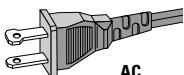
plug has two blades with one wider than the other. A grounding type plug has two blades and a third grounding prong. The wide blade or the third prong are provided for your safety. When the provided plug does not fit into your outlet, consult an electrician for replacement of the obsolete outlet.
- Protect the power cord from being walked on or pinched particularly at plugs, convenience receptacles, and the point where they exit from the apparatus.
- Only use attachments/accessories specified by the manufacturer.
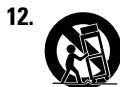
Use only with a cart, stand, tripod, bracket, or table specified by the manufacturer, or sold with the apparatus. When a cart is used, use caution when moving the cart/apparatus combination to avoid injury from tip-over.
- Unplug this apparatus during lightning storms or when unused for long periods of time.
- Refer all servicing to qualified service personnel. Servicing is required when the apparatus has been damaged in any way, such as power-supply cord or plug is damaged, liquid has been spilled or objects have fallen into the apparatus, the apparatus has been exposed to rain or moisture, does not operate normally, or has been dropped.
LIMITED WARRANTY
PORTABLE AUDIO
One Year Free Exchange
This product must be carried in for an exchange.
WHO IS COVERED?
You must have proof of purchase to exchange the product. A sales receipt or other document showing that you purchased the product is considered proof of purchase. Attach it to this owner's manual and keep both nearby.
WHAT IS COVERED?
Warranty coverage begins the day you buy your product. For one year thereafter, a defective or inoperative product will be replaced with a new, renewed or comparable product at no charge to you. A replacement product is covered only for the original warranty period. When the warranty on the original product expires, the warranty on the replacement product also expires.
WHAT IS EXCUSED?
Your warranty does not cover:
- Labor charges for installation or setup of the product, adjustment of customer controls on the product, and installation or repair of antenna systems outside of the product. Product repair and/or part replacement because of misuse, accident, unauthorized repair, or other cause not within the control of Philips Consumer Electronics Company.
- Reception problems caused by signal conditions or cable or antenna systems outside the unit.
- A product that requires modification or adaptation to enable it to operate in any country other than the country for which it was designed, manufactured, approved and/or authorized, or repair of products damaged by these modifications.
- Incidental or consequential damages resulting from the product. (Some states do not allow the exclusion of incidental or consequential damages, so the above exclusion may not apply to you. This includes, but is not limited to, prerecorded material, whether copyrighted or not copyrighted.)
- A product used for commercial or institutional purposes.
WHERE IS EXCHANGE AVAILABLE?
You may exchange the product in all countries where the product is officially distributed by Philips Consumer Electronics Company. In countries where Philips Consumer Electronics Company does not distribute the product, the local Philips service organization will attempt to provide a replacement product (although there may be a delay if the appropriate product is not readily available).
BEFORE REQUESTING EXCHANGE...
Please check your owner's manual before requesting an exchange. Adjustments of the controls discussed there may save you a trip.
EXCHANGING A PRODUCT IN U.S.A., PUERTO RICO OR U.S.VIRGIN ISLANDS...
Contact your dealer to arrange an exchange. Or, ship the product, insured and freight prepaid, and with proof of purchase enclosed, to the address listed below.
Small Product Service Center
Philips Service Company
907 Snapps Ferry Road, Plant 2, Building 6
Greeneville, TN 37743
(In U.S.A., Puerto Rico and U.S. Virgin Islands, all implied warranties, including implied warranties of merchantability and fitness for a particular purpose, are limited in duration to the duration of this express warranty. But, because some states do not allow limitations on how long an implied warranty may last, this limitation may not apply to you.)
EXCHANGING A PRODUCT IN CANADA...
Please contact Philips at:
1-800-661-6162 (French Speaking)
1-800-363-7278 (English Speaking)
(In Canada, this warranty is given in lieu of all other warranties. No other warranties are expressed or implied, including any implied warranties of merchantability or fitness for a particular purpose. Philips is not liable under any circumstances for any direct, indirect, special, incidental or consequential damages, howsoever incurred, even if notified of the possibility of such damages.)
TO GET OUT-OF-WARRANTY EXCHANGE...
In U.S.A., Puerto Rico or U.S. Virgin Islands, contact Philips Service Company at (800) 851-8885 to obtain the cost of out-of-warranty exchange. Then carefully pack the product and ship it to the Small Product Service Center (address listed above). In Canada, call the phone number listed above under "Exchanging a Product in Canada" to obtain the cost of out-of-warranty exchange.
REMEMBER...
Please record the model and serial numbers found on the product below. Also, please fill out and mail your warranty registration card promptly. It will be easier for us to notify you if necessary.
MODEL#
SERIAL#
This warranty gives you specific legal rights. You may have other rights which vary from state/province to state/province.
Philips Service Solutions Group, P.O. Box 2976, Longview, Texas 75606, (903) 242-4800
EL6095T002/MAC5433/1-97
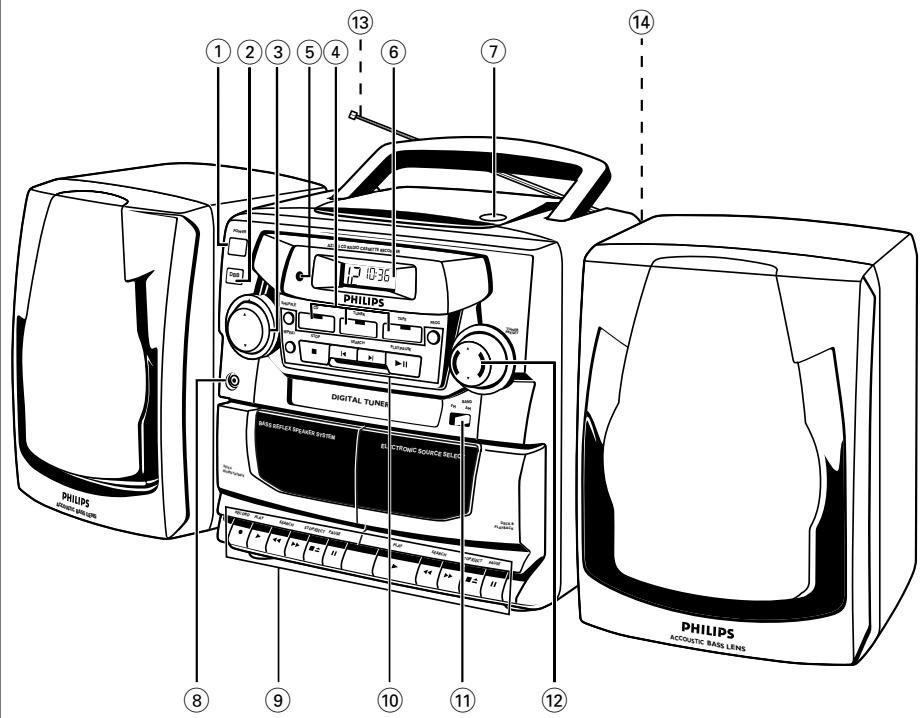
TOP AND FRONT PANELS
① POWER-ON/OFF switch ② DBB (Dynamic Bass Boost) - to enhance bass response ③ VOLUME - to adjust volume level ④ CD, TUNER, TAPE - to select the source of sound ⑤ REMOTE SENSOR - for the remote control (for AZ 2765 model only) ⑥ CD Display - to show the CD functions ⑦ OPEN - to open/close the CD door ⑧ 3.5 mm jack for stereo headphone connection
Note: Connecting headphones will mute the speakers
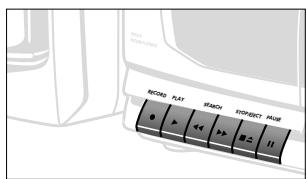
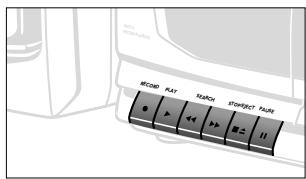
CASSETTE RECORDER:
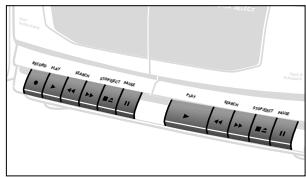
Deck 1:
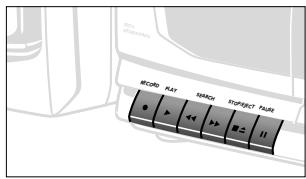
RECORD - to start recording
PLAY - to start playback
SEARCH << or >> - to fast rewind/wind the tape
STOP-EJECT - to stop the tape and to open the cassette door
PAUSE II - to interrupt recording or playback
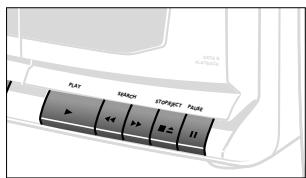
Deck 2:
PLAY - to start playback
SEARCH << or >> - to fast rewind/wind the tape
STOP-EJECT - to stop the tape and to open the cassette holder
PAUSE II - to pause recording or playback
CD PLAYER:
SHUFFLE - to play tracks CD/ program in random order
REPEAT - to repeat a track/ CD/ program
STOP - to stop playback
- to erase a program
SEARCH 1/<<,
CD: - to skip or search a passage/ track backwards or forward
Tuner: - to tune to a station (down,up)
PLAY/PAUSE - to start or pause CD play
PROG - to program and review programmed track numbers
CD: - to program and review programmed track numbers
Tuner: - to program tuner preset stations
TUNER:
BAND - to select FM/ AM waveband 12 PRESET▼,▲-to select a preset station (down,up)
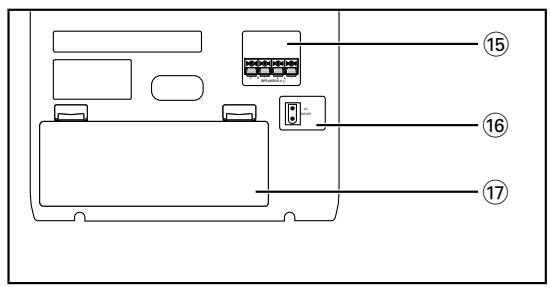
BACK PANEL
13 Telescopic antenna - to improve FM reception (14) Speaker levers - to unlock the loudspeaker boxes 15 Speaker - loudspeaker terminals 16 AC MAINS - inlet for power cord 17 Battery door - to open the battery compartment
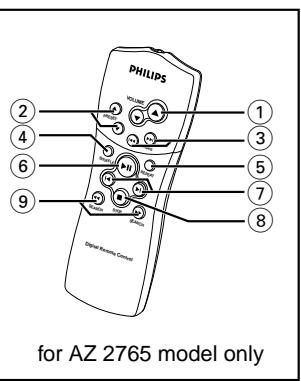
REMOTE CONTROL (for AZ 2765 model only)
1 VOLUME▲,▼ - adjusts volume level (2) PRESET ▲,▼ - (up, down) selects a preset radio station TUNING (down, up) tunes to radio stations 4 SHUFFLE - to play CD tracks in random order 5 REPEAT - repeats a track/ CD program/ entire CD (6) ▶ - starts CD playback/ interrupts CD playback 7 ▲,▶ - skips to the beginning of a current track/ previous/ subsequent track (8) STOP - stops CD playback or erases a CD program SEARCH ◀,▶ - searches backwards or forwards within a track/CD
Whenever convenient, use the power supply if you want to conserve battery life. Make sure you remove the plug from the set and wall outlet before inserting batteries.
BATTERIES (OPTIONAL)
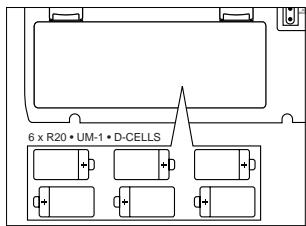
- Open the battery compartment and insert six batteries, type R-20, UM-1 or D-cells, (preferably alkaline) with the correct polarity as indicated by the "+" and "-" symbols inside the compartment.
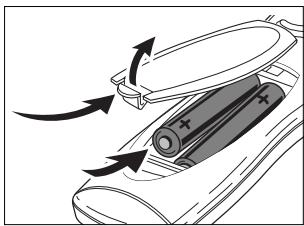
Remote control (supplied)
Open the battery compartment and insert two batteries, type AAA, R03 or UM4 (preferably alkaline).
- Replace the compartment door, making sure the batteries are firmly and correctly in place. The set is now ready to operate. Incorrect use of batteries can cause electrolyte leakage and will corrode the compartment or cause the batteries to burst. Therefore:
- Do not mix battery types: e.g. alkaline with carbon zinc. Only use batteries of the same type for the set.
- When inserting new batteries, do not try to mix old batteries with the new ones.
- Remove the batteries if the set is not to be used for a long time.
Using AC POWER
- Check if the power voltage as shown on the type plate on the base of the set corresponds to your local power supply. If it does not, consult your dealer or service center.
- Connect the power cord to the MAINS inlet and the wall outlet. The power supply is now connected and ready for use.
- To switch off completely, withdraw the power cord from the wall outlet.
- Disconnect the power cord from the wall outlet to protect your set during heavy thunderstorms.
Batteries contain chemical substances, so they should be disposed of properly.
The type plate is located on the bottom of the set.
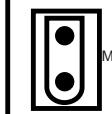
AC MAINS
Switching POWER on/off: Save energy
Whether you are using mains or battery supply, to avoid unnecessary energy consumption always push the POWER button to the off position after using the set.
SPEAKERS
REMOVABLE LOUDSPEAKERS
Taking off the speakers
Keep the lever (found on the back corner of the speaker) pressed and slide the speaker upwards.
Attaching the speakers
Slide the speakers from above into the sleeves on the sides of the cabinet. The speakers will click into position.
CONNECTING THE SPEAKERS
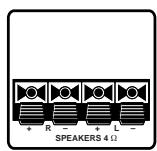
- Connect the right speaker to the R terminal, with the red marked wire to "+" and the black wire to "-".
- Clip the exposed portion of wire into the corresponding color terminal.
- Repeat the wiring procedure for the left speaker to terminal L, making sure that you connect the red wire to "+" and black to "-".
Note:
- Speakers with an impedance of 4 Ohms or higher other than as supplied may be used instead. Speakers with a lower impedance, however, are unsuitable and will damage your set.
- When headphones are inserted into the headphone jack the speakers are disconnected.
GENERAL OPERATION
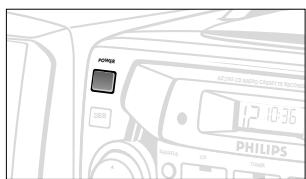
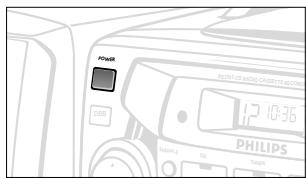
- Press POWER to on position.
- A source indicator lights up.
- Select and press your source button CD, TUNER or TAPE.
- The selected source indicator lights up.
- Operate the sound source according to the instructions in the relevant chapter about the function.
- Adjust the sound using the VOLUME and DBB controls.
- For AZ 2765 model only: The volume level is briefly indicated in the display when you press VOLUME▼, ▲ on the set or remote control.
- Press POWER to the off position to switch off the set.
- The selected source indicator goes out.
TUNING TO RADIO STATIONS
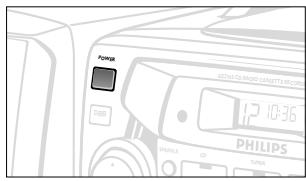
- Press POWER to the on position.
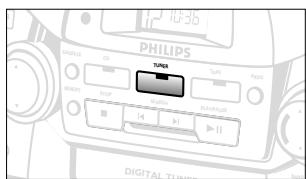
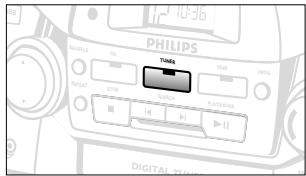
- Press the TUNER source button.
- The TUNER indicator lights up.
- Press BAND once or more to select the desired FM/AM waveband.
- To tune to a radio station, press SEARCH or for more than 1 second and release when the frequency in the display starts to change.
- The radio automatically tunes to a station with sufficient reception. The display shows Sr h during automatic tuning.
- Repeat step 4 until you find the desired station.
- To tune to a weak station, press SEARCH or briefly and repeatedly until the correct frequency is shown.
To improve radio reception
- For FM, pull out the telescopic antenna. Incline and turn the antenna. Reduce its length if the signal is too strong (very close to a transmitter).
- For AM, the set is provided with a built-in antenna, so the telescopic antenna is not needed. Direct the antenna by turning the whole set.
- Adjust the sound using VOLUME and DBB.
- Press POWER to the off position to switch off the set.
- The TUNER indicator goes out.
Programming radio stations
You can store up to a total of 29 radio stations in the memory.
- Tune to your desired station (see Tuning to radio stations).
- Press PROG to activate programming.
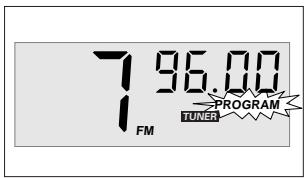
- Display: PROGRAM flashes.
- Press PRESET or ▲ once or more to allocate a number from 1 to 29 to this station.
- Press PROG again to confirm the setting.
- Display: PROGRAM disappears, the preset number and the frequency of the preset station are shown.
- Repeat the above four steps to store other stations.
- You can overwrite a preset station by storing another frequency in its place.
Tuning to preset stations
Press PRESET or ▲ once or more until the desired preset number appears in the display.
DISPLAY INDICATION FOR CD FUNCTIONS
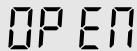
COPEN
CD door open
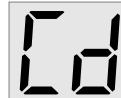
CD inserted
- In stop mode
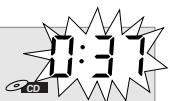
total track number and total playback time
During CD playback
Elapsed playback time of current track and current track number
- PAUSE
elapsed playback time freezes and flashes
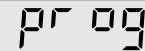
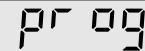
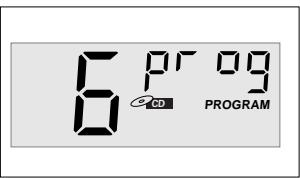
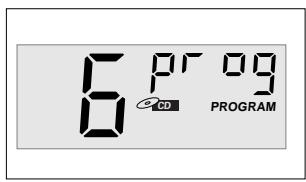
prog
and PROGRAM;
when you program a selected track number
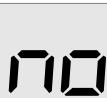
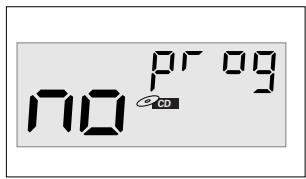
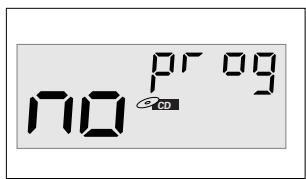
no
program cancelled/ PROG pressed for more than 2 seconds
no d 15E
no disc/error in CD operation or with the CD (see Troubleshooting)
FULL
program memory full
- SHUFFLE/ REPEAT
modes
when the respective mode is activated

REPEAT ALL

CD
PROGRAM
CD
PLAYING A CD
- Press POWER to on position.
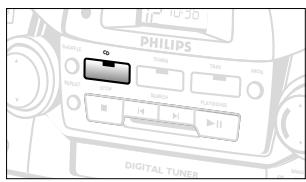
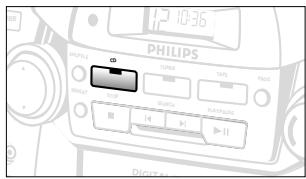
- Press CD source button.
- The CD indicator lights up.
- To open the CD door, press OPEN on the CD door.
- Insert a CD with the printed side facing up and press the CD door gently to close.
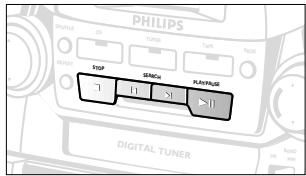
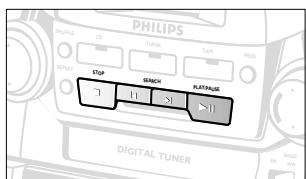
- Press PLAY/PAUSE ▶ on the set to start playback.
- Adjust the sound using VOLUME and DBB.
- To interrupt playback press PLAY/PAUSE ▶ II. To resume, press PLAY/PAUSE ▶ II again.
- To stop CD play, press STOP.
- Press POWER to off position to switch off the set.
- The CD indicator goes out.
Note: CD playback will also stop when:
- you press the CD door open; TUNER or TAPE source is pressed;
- The CD has reached the end.
Selecting a different track
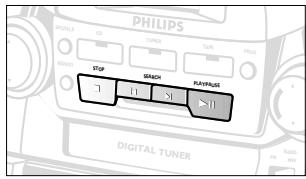
During playback, you can use the SEARCH keys to select a particular track.
- If you have selected a track number in the stop or pause position, press PLAY/PAUSE ▶ II to start playback.
- Press SEARCH ▶ once briefly for the next track, or press repeatedly until the desired track number appears in the display.
- Press SEARCH once briefly to return to the beginning of the current track.
- Press SEARCH ◀◀ more than once briefly for a previous track.
Finding a passage within a track
- Press and hold down SEARCH ◀ or ▶.
- The CD is played at high speed and low volume.
- When you recognize the passage you want, release the SEARCH control.
DIFFERENT PLAY MODES: SHUFFLE AND REPEAT
The SHUFFLE and REPEAT buttons allow you to select various play modes. The modes can be selected or changed during playback.
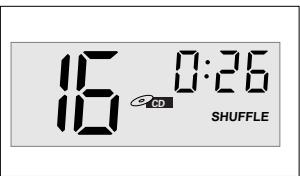
SHUFFLE - all tracks are played in random order. REPEAT - plays the current track continuously. REPEAT ALL - repeats the entire CD.
- In the stop position or during playback, select your play mode by pressing SHUFFLE or REPEAT once or more until the desired play mode is shown.
- You can use SEARCH or to skip tracks during the SHUFFLE/REPEAT modes.
The SHUFFLE/REPEAT play options can be combined and used with a program: e.g. SHUFFLE REPEAT ALL - repeats the entire CD in random order.
- To return to normal playback, press SHUFFLE/REPEAT until the various SHUFFLE/REPEAT modes are no longer shown.
- You can also press STOP to quit the play mode.
Programming track numbers
You may store up to 20 tracks in the desired sequence. If you like, store any track more than once.
- In the stop position, press SEARCH or for your desired track.
- When your chosen track number appears, press PROG once to store the track.
- The display shows 'pr og' and PROGRAM and the selected track number.
- Repeat steps 1. and 2. to select and store all desired tracks in this way.
Reviewing your set program
- In the stop position, press and hold down PROG for one second or more.
The display shows all your stored track numbers in sequence.
- You can also review the program during playback. To play your program, press PLAY/PAUSE II.
Erasing a program
You can erase the contents of the memory by:
- pressing the CD door open;
- pressing TUNER or TAPE source button;
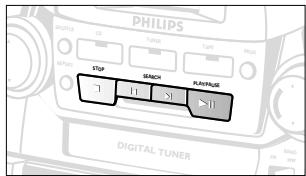
- pressing STOP twice during playback or in stop position.
PLAYING A CASSETTE
- Press POWER to turn on.
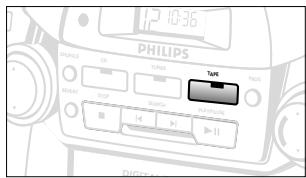
- Press TAPE source button.
- The TAPE indicator lights up.
- Press STOP-EJECT to open the cassette holder and insert a cassette.
- Press the cassette holder shut.
- Press PLAY ▶ to start playback.
- Adjust the sound using the VOLUME and DBB.
- To pause playback, press PAUSE II. To resume, press the key again.
- By pressing ◀ or ▶, fast winding of the tape is possible in both directions. To stop fast winding, press STOP-EJECT.
- To stop the tape, press STOP-EJECT.
- The keys are automatically released at the end of the tape, except if PAUSE II has been activated.
- Press POWER to the off position to switch off the set.
- The TAPE indicator goes out.
Continuous Playback
- Repeat steps 1 - 4 above, but load both decks. Press PLAY on deck 2 and deck 2 will start.
- Press PAUSE II on deck 1 and then PLAY. As soon as deck 2 stops (end of tape or STOP-EJECT▲ pressed), PAUSE II on deck 1 is released and deck 1 will start playback.
GENERAL INFORMATION ON RECORDING
- Recording is permissible insofar as copyright or other rights of third parties are not infringed.
- Recording is only possible on deck 1.
- This deck is not suitable for recording on CHROME (IEC II) or METAL (IEC IV) type cassettes. For recording, use NORMAL type cassettes (IEC I) on which the tabs have not been broken.
- The best recording level is set automatically. Altering the VOLUME and DBB controls will not affect the recording in progress.
- At the very beginning and end of the tape, no recording will take place during the 7 seconds, when the leader tape passes the recorder heads.
- To protect a tape from accidental erasure, have the tape in front of you and break out the left tab. Recording on this side is no longer possible. To record over this side again, cover the tabs with a piece of adhesive tape.
RECORDING
Dubbing: Copying from deck 2 to 1
For best results, use mains power or fresh batteries.
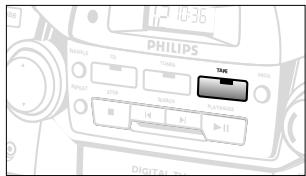
- Select TAPE source.
- Press both STOP-EJECT keys and insert a recorded tape into deck 2 and a suitable tape for recording in deck 1.
- Press PAUSE II on deck 1 and then RECORD ●
- To start dubbing, press PLAY ▶ on deck 2. PAUSE II on deck 1 is then released.
- By pressing PAUSE II on deck 1, you can omit undesired passages while deck 2 continues. Press deck 1 PAUSE II to resume dubbing.
- Pressing PAUSE II on deck 2 will create pauses.
- To stop recording, press both STOP-EJECT keys.
SYNCHRO START CD RECORDING
- Select CD source.
- Insert a CD and if desired, program track numbers.
- Press STOP-EJECT to open the cassette holder. Insert a blank tape.
- Press the cassette holder shut.
- Press RECORD to start recording.
- Playing of the CD program starts automatically from the beginning of the program. It is not necessary to start the CD player separately.
- For brief interruptions press PAUSE II. To resume recording, press PAUSE II again.
- To stop recording, press STOP-EJECT ▲
To select and record a particular passage
During CD playback, press and hold down the SEARCH or on the set to find your passage.
- Press PLAY/PAUSE to put the CD player on pause at the selected passage.
- Recording will begin from this exact point in the track when you press RECORD.
Recording from the radio
- Select TUNER mode and BAND.
- Tune to the desired radio station (See TUNING TO RADIO STATIONS).
- Press STOP-EJECT of deck 1 to open the cassette holder and insert a blank tape.
- Press the cassette holder shut.
- Press RECORD ● to start recording.
- For brief interruptions, press PAUSE II. To resume recording, press PAUSE II again.
- To stop recording, press STOP-EJECT ▲
PRECAUTIONS AND SYSTEM MAINTENANCE
- Place the set on a hard, flat surface so that the system does not tilt.
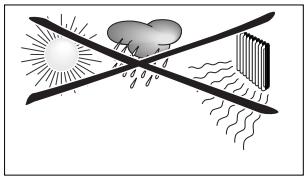
- Do not expose the set, batteries, CDs or cassettes to humidity, rain, sand or excessive heat caused by heating equipment or direct sunlight.
- Do not cover the set. Adequate ventilation with a minimum gap of 15 cm between the ventilation holes and surrounding surfaces is necessary to prevent heat build-up.
- The mechanical parts of the set contain self-lubricating bearings and must not be oiled or lubricated.
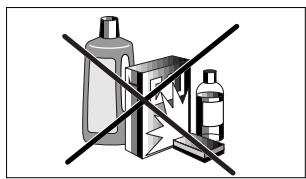
- To clean the set, use a soft, slightly dampened chamois leather. Do not use any cleaning agents containing alcohol, ammonia, benzene or abrasives as these may harm the housing.
Tape deck maintenance
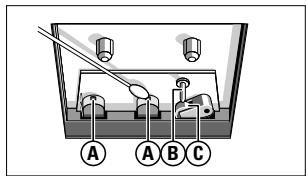
To ensure quality recording and playback of the tape deck, clean parts A, B and C shown in the diagram below, after approx. 50 hours of operation, or on average once a month. Use a cotton bud slightly moistened with alcohol or a special head cleaning fluid to clean both decks.
- Open the cassette holder by pressing STOP-EJECT
- Press PLAY ▷ and clean the rubber pressure rollers (C)
- Press PAUSE II and clean the magnetic heads (A) and also the capstan (B).
- After cleaning, press STOP-EJECT ▲
Cleaning of the heads can also be done by playing a cleaning cassette through once.
CD player and CD handling
- The lens of the CD player should never be touched!
- Sudden changes in the surrounding temperature can cause condensation to form and the lens of your CD player to cloud over. Playing a CD is then not possible. Do not attempt to clean the lens but leave the set in a warm environment until the moisture evaporates.
- Use only Digital Audio CDs.
- Always shut the CD door to keep the CD compartment dust-free. To clean, dust the compartment with a soft dry cloth.
- To take a CD out of its box, press the center spindle while lifting the CD. Always pick up the CD by the edge and replace the CD back in its box after use to avoid scratching and dust.
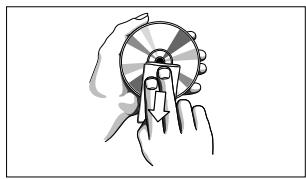
- To clean the CD, wipe in a straight line from the center towards the edge using a soft, lint-free cloth. Do not use cleaning agents as they may damage the disc.
- Never write on a CD or attach any stickers to it.

TROUBLESHOOTING
If a fault occurs, first check the points listed below before taking the set for repair.
If you are unable to remedy a problem by following these hints, consult your dealer or service center.
WARNING: Do not open the set as there is a risk of electric shock. Under no circumstances should you try to repair the set yourself, as this would invalidate the warranty.
PROBLEM
-POSSIBLE CAUSE - REMEDY
No sound/power
VOLUME is not adjusted - Adjust the VOLUME - Headphones connected - Disconnect headphones - Power cord not securely connected - Connect AC power cord properly - Batteries dead/ incorrectly inserted - Insert (fresh) batteries correctly
Display does not function properly/ No reaction to operation of any of the controls
- Electrostatic discharge
- Switch off the set, disconnect the power plug, and reconnect after a few seconds.
CD playback does not work.
- The CD is badly scratched or dirty.
- Replace or clean the CD (see MAINTENANCE).
- The laser lens is steamed up.
- Wait until the lens has acclimatized.
The CD skips tracks.
- The CD is damaged or dirty.
- Replace or clean the CD.
- SHUFFLE or a program is active.
- Quit SHUFFLE/PROGRAM mode(s).
Poor cassette sound quality.
Dust and dirt on the heads, etc. - Clean deck parts, etc., see maintenance. - Use of incompatible cassette types (METAL or CHROME). - Only use NORMAL (IEC I) for recording.
Recording does not work.
- Cassette tab(s) may be broken.
- Apply a piece of adhesive tape over the missing tab space.
For AZ 2765 model only
Remote control does not function properly
- Batteries dead/ incorrectly inserted
- Insert (fresh) batteries correctly
- Distance between the set too large
- Reduce the distance
Environmental information
All unnecessary packaging material has been omitted. The packaging can be easily separated into three materials: cardboard, polystyrene and plastic.
Your set consists of materials which can be recycled if disassembled by a specialized company. Please observe the local regulations regarding the disposal of packing materials, dead batteries and old equipment.
Small Product Service Center
Philips Service Company
907 Snapps Ferry Road, Plant 2, Building 6
Greeneville, TN 37743 USA
Philips Service Solutions Group, P.O. Box 2976, Longview, Texas 75606, USA, (903) 242-4800
EL6095T001/MAC5433/1-97
COMMANDS
TOP AND FRONT PANELS
Tuning to preset stations
You can erase the contents of the memory by:
- pressing the CD door open;
- pressing TUNER or TAPE source button;
- pressing STOP twice during playback/ in stop position
- The display shows 'no' 'pr' 'pri' 'pri' 'pri' 'pri' 'pri' 'pri' 'pri' 'pri' 'pri' 'pri' 'pri' 'pri' 'pri' 'pri' 'pri' 'pri' 'pri' 'pri' 'pri' 'pri' 'pri' 'pri' 'pri' 'pri' 'pri' 'pri' 'pri' 'pri' 'pri' 'pri' 'pri' 'pri' 'pri' 'pri
CASSETTE PLAYBACK
- POSSIBLE CAUSE
- REMEDY
Small Product Service Center
Philips Service Company
907 Snapps Ferry Road, Plant 2, Building 6
Greeneville, TN 37743 USA
10 CD PLAYER:
Programming track numbers
-POSSIBLE CAUSE - REMEDY
A Division of Philips Electronics North America Corporation
Knoxville, Tennessee 37914-1810, U.S.A.

Meet Philips at the internet http://www.philipsusa.com
CLASS 1
LASER PRODUCT
- RETURN YOUR WARRANTY REGISTRATION CARD TODAY TO ENSURE YOU RECEIVE ALL THE BENEFITS YOU'RE ENTITLED TO
- WARRANTY VERIFICATION
- OWNER CONFIRMATION
- MODEL REGISTRATION
- KNOW THESE SAFETY SYMBOLS
- RISK OF ELECTRIC SHOCK DO NOT OPEN
- MODEL NO
- CAUTION
- ATTENTION
- IMPORTANT SAFETY INSTRUCTIONS - READ BEFORE OPERATING EQUIPMENT
- LIMITED WARRANTY
- PORTABLE AUDIO
- WHO IS COVERED
- WHAT IS COVERED
- WHAT IS EXCUSED
- WHERE IS EXCHANGE AVAILABLE
- BEFORE REQUESTING EXCHANGE
- EXCHANGING A PRODUCT IN U.S.A., PUERTO RICO OR U.S.VIRGIN ISLANDS
- EXCHANGING A PRODUCT IN CANADA
- TO GET OUT-OF-WARRANTY EXCHANGE
- REMEMBER
- TOP AND FRONT PANELS
- TUNER
- BACK PANEL
- REMOTE CONTROL (FOR AZ 2765 MODEL ONLY)
- BATTERIES (OPTIONAL)
- REMOTE CONTROL (SUPPLIED)
- USING AC POWER
- SWITCHING POWER ON/OFF: SAVE ENERGY
- SPEAKERS
- REMOVABLE LOUDSPEAKERS
- TAKING OFF THE SPEAKERS
- ATTACHING THE SPEAKERS
- CONNECTING THE SPEAKERS
- NOTE
- GENERAL OPERATION
- TUNING TO RADIO STATIONS
- TO IMPROVE RADIO RECEPTION
- PROGRAMMING RADIO STATIONS
- TUNING TO PRESET STATIONS
- DISPLAY INDICATION FOR CD FUNCTIONS
- PLAYING A CD
- SELECTING A DIFFERENT TRACK
- FINDING A PASSAGE WITHIN A TRACK
- DIFFERENT PLAY MODES: SHUFFLE AND REPEAT
- PROGRAMMING TRACK NUMBERS
- REVIEWING YOUR SET PROGRAM
- ERASING A PROGRAM
- PLAYING A CASSETTE
- CONTINUOUS PLAYBACK
- GENERAL INFORMATION ON RECORDING
- RECORDING
- DUBBING: COPYING FROM DECK 2 TO
- SYNCHRO START CD RECORDING
- TO SELECT AND RECORD A PARTICULAR PASSAGE
- RECORDING FROM THE RADIO
- PRECAUTIONS AND SYSTEM MAINTENANCE
- TAPE DECK MAINTENANCE
- CD PLAYER AND CD HANDLING
- TROUBLESHOOTING
- PROBLEM
- NO SOUND/POWER
- DISPLAY DOES NOT FUNCTION PROPERLY/ NO REACTION TO OPERATION OF ANY OF THE CONTROLS
- CD PLAYBACK DOES NOT WORK
- THE CD SKIPS TRACKS
- POOR CASSETTE SOUND QUALITY
- RECORDING DOES NOT WORK
- FOR AZ 2765 MODEL ONLY
- REMOTE CONTROL DOES NOT FUNCTION PROPERLY
- ENVIRONMENTAL INFORMATION
- COMMANDS
- CASSETTE PLAYBACK
Brand : PHILIPS
Model : AZ2760
Category : Portable CD player