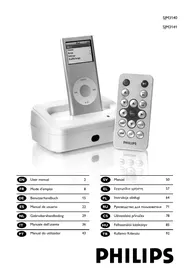
SJM3142 - Mp3 player PHILIPS - Free user manual and instructions
Find the device manual for free SJM3142 PHILIPS in PDF.


| Brand | PHILIPS |
| Model | SJM3142 |
| Product Type | Docking Station for iPod |
| Dimensions (approx.) | 100 x 80 x 30 mm |
| Weight (approx.) | 150 g |
| Power Supply | 12V DC Power Adapter (included) |
| Connectivity | USB, S-Video, 3.5mm audio output |
| iPod Compatibility | All iPod models with dock connector (via interchangeable adapters) |
| Main Functions | Charging, syncing with computer, audio playback on hi-fi system, photo/video display on TV |
| Remote Control | Included (model SJM3141 only, CR2025 battery) |
| Supplied Accessories | Power adapter, USB cable, S-Video cable, stereo audio cable, instruction manual |
| Care and Cleaning | Clean with a dry cloth. Do not use liquids. |
| Safety | Complies with FCC Part 15 Class B. WEEE marking. Do not expose to rain or moisture. |
| Spare Parts and Repairability | Refer all repairs to qualified personnel. Do not remove the cover. |
| General Information | Fixed docking station for iPod. Allows charging, syncing, and playing multimedia content. |
Frequently Asked Questions - SJM3142 PHILIPS
User questions about SJM3142 PHILIPS
0 question about this device. Answer the ones you know or ask your own.
Ask a new question about this device
Download the instructions for your Mp3 player in PDF format for free! Find your manual SJM3142 - PHILIPS and take your electronic device back in hand. On this page are published all the documents necessary for the use of your device. SJM3142 by PHILIPS.
USER MANUAL SJM3142 PHILIPS
| EN | User manual | 2 |
| FR | Mode d'emploi | 8 |
| DE | Benutzerhandbuch | 15 |
| ES | Manual de usuario | 22 |
| NL | Gebruikershandleiding | 29 |
| IT | Manuale dell'utente | 36 |
| PT | Manual do utilizador | 43 |
| SV | Manual | 50 |
| EL | Εγχειρίδιο χρήστη | 57 |
| PL | Instrukcja obsługi | 64 |
| RU | Руководство для пользователя | 71 |
| CS | Uživatelská příručka | 78 |
| HU | Felhasználói kézikönyv | 85 |
| TR | Kullanıcı Kılavuzu | 92 |
PHILIPS
EN
Contents
Package Contents 3
Features....3
What can you do with the SJM3140 and SJM3141 .... 4
Setup for your Docking Station 4
Playing Music through External Speakers or a Stereo ..... 4
Display photos or video on a TV or other video device ..... 5
Remote Operation 5
FCC Compliance 6
Industry Canada Statement 7
Technical Support....7
Limited One Year Warranty 7
Package Contents & Features
Congratulations on purchasing the Philips Docking Cradle for iPod. It serves as a convenient home base for charging, syncing and more. It works with all iPod models that have a dock connector, so if you own more than one iPod, you can keep just one Dock connected to your computer, stereo or TV.
Any model of iPod with a dock connector can fit into a single Dock through the use of interchangeable inserts called Dock Adapters*. You simply insert the Dock Adapter that fits your particular iPod model, and then plug in your iPod. When you want to connect a different-size iPod, simply pop out the Dock Adapter and insert a new one.
*Dock adapters not included.
Package Contents
- Docking Station for iPod
- Power adapter
- USB cable
- S-Video cable
- Stereo Audio Cable.
- Instruction Manual
- Remote (Model SJM3141 only)
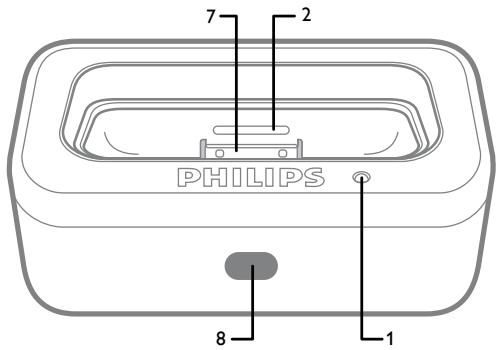
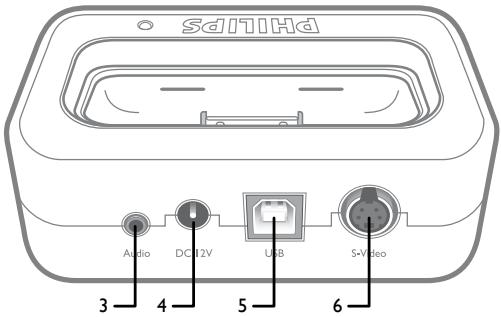
Features
- Green LED Indicator
- Slots for removing dock adapter
- 3.5mm Audio Out Jack
- DC Power Jack
- USB Connector (connects to the computer)
- S-Video Out Jack
- iPod connector
- IR sensor for remote (Model SJM3141 only)
What can you do with the SJM3140 and SJM3141
- Connect the Dock to your computer with the USB cable, and then place your iPod in the Dock to sync and charge the battery. No more reaching behind the computer to plug it in.
- Connect the Dock to an electrical outlet using the Power Adapter, and then place your iPod in the Dock to charge the battery.
- Connect the Dock to a stereo or speakers using the supplied stereo audio cable to play music from iPod.
- Display photos or video on a TV or other video device using the supplied S-video cable if you have an iPod with a color display.
Setup for your Docking Station
- Remove all package contents
- Locate your dock near your Computer, Stereo or TV.
- For Sync and Charging, Connect one end of the supplied USB cable to the USB port on your computer and the other end of the cable to the jack labeled USB on your docking station.
- For Stereo Playback, Connect the Red and White RCA connectors on one end of the supplied Audio cable to the Audio in RCA jacks on your stereo, connect the other end with 3.5mm plug to the jack labeled Audio on your docking station.
- For Video and Photo Playback, Connect one end of the supplied S-Video cable to the S-Video in jack on your television, connect the other end to the jack labeled S-Video on your docking station.
- Connect the Power cord to an electrical Outlet and the other end of the power cord to the DC 12V jack on the back of your docking station.
- Remove the plastic tab from the Remote (SJM3141 only)
Playing Music through External Speakers or a Stereo
Using the iPod Dock, you can play music from your iPod over externally powered speakers or a home stereo. The Dock includes a stereo audio cable with RCA plugs. This cable is used with speaker systems and home stereos with Audio in RCA Jacks. Some speaker systems will only have a 3.5mm audio in jack. With this type of speaker system you will need to use an audio cable with 3.5mm stereo plugs on both ends.
(A standard 3.5mm to 3.5mm audio cable is not included.)
To use your iPod with the Dock to play your music through speakers or a stereo:
- Insert the appropriate dock adapter for your specific iPod model.
- Place iPod in the Dock.
- Use the supplied audio cable to connect the Dock's Audio out jack to your home stereo or speaker system's Audio in RCA jacks.
Installation & Remote Operation
- Use the iPod control wheel to navigate iPod menus and play songs. (Note for SJM3140: Volume can only be increased or decreased by using the volume control on your home stereo or speaker system.)
To play music when the Dock is connected to your computer, iPod must not be enabled for use as a disk (for information about using iPod as a disk, consult your iPod user manual.)
*Dock adapters not included.
Display photos or video on a TV or other video device
Using the iPod Dock, you can display photos or video if you have an iPod with a color display. You need an S-Video cable which is included in the additional accessories.
To use your iPod with the dock to display photos or video on a TV or other video device:
- Place iPod in the Dock.
- Use the S-Video cable to connect the Dock's S-Video out jack to your TV or other video device.
- Use the iPod control wheel to navigate the iPod menus and display photos or videos. (Note for SJM3140: Volume can only be increased or decreased by using the volume control on your TV or video device.)
To display photos or videos when the Dock is connected to your computer, iPod must not be enabled for use as a disk.
(for information about using iPod as a disk, consult your iPod user manual.)
The iPod will charge and the charge LED will illuminate any time the iPod is docked and:
- The Power adapter is connected to a live wall power outlet.
- The dock is connected to the USB port on a computer and the Computer is “awake” and connected to a power outlet, OR is running on a charged battery pack.
Remote Operation
(For Model SJM3141 Only)
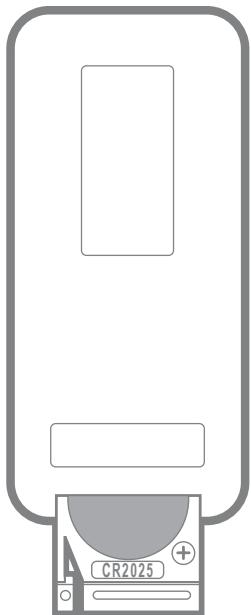
- Remove the Plastic tab from the battery before using the remote.
- Make sure the iPod is in the Dock and the Dock is connected to your stereo or TV.
- Make sure the Power adapter is connected to a power outlet.
- Point the remote control toward the sensor on the docking station.
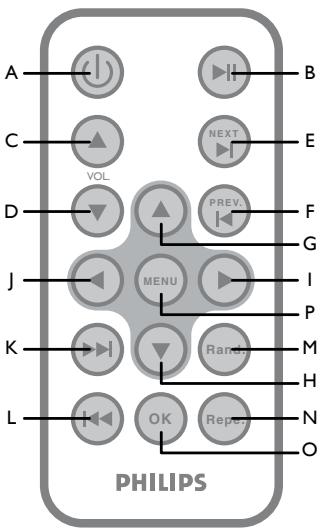
A) Power -Turn the dock power on and off. Dock power must be on in order to use the remote control. iPod will be charged with dock power on or off.
B) Play/Pause - Play/pause a song or video.
C) Volume Up - Increase the dock audio output volume.
D) Volume Down - Decrease the dock audio output volume.
E) Next - Skip to next song or video.
F) Backward - Skip to previous song or video.
G) Up - Scroll up through menus.
H) Down - Scroll down through menus.
I) Next Playlist - Scrolls to next playlist.
J) Previous Playlist - Scrolls to previous playlist.
K) Fast Forward - Press and hold to fast-forward search.
L) Rewind - Press and hold to fast-rewind search.
M) Random - Toggles between Off, Song Shuffle, and Album shuffle.
N) Repeat - Toggles between Off, Repeat a single song, and repeat all songs.
O) OK - Select current menu, playlist, song or video.
P) Menu - Used to go back to previous menu
Notes on using the remote control:
- The remote control will only increase and decrease the dock's output volume. The remote control will not control the iPod's volume.
- Replace with type 3V CR2025 battery
- The battery life is approximately one year. If the remote is not functioning please replace the battery (see Replacing the battery).
- Remove the batteries when the remote is not in use for an extended period of time.
- Stay within a range of 16' (4.88 meters) and 60°.
FCC Compliance
This device complies with Part 15 of the FCC Rules. Operation is subject to the following two
conditions:
- this device may not cause harmful interference, and
- this device must accept any interference received, including interference that may cause undesired operation.
Note!
This equipment has been tested and found to comply with the limits for a Class B digital device, pursuant to Part 15 of the FCC Rules. These limits are designed to provide reasonable protection against harmful interference in a residential installation. This equipment generates, uses and can radiate radio frequency energy and, if not installed and used in accordance with the instructions, may cause harmful interference to radio communications. However, there is no guarantee that interference will not occur in a particular installation. If this equipment does cause harmful interference to radio or television reception, which can be determined by turning the
Technical Support & Warranty
equipment off and on, the user is encouraged to try to correct the interference by one or more of the following measures:
- Reorient or relocate the receiving antenna.
- Increase the separation between the equipment and receiver.
- Connect the equipment to an outlet on a circuit different from that to which the receiver is connected.
- Consult the dealer or an experienced radio/TV technician for help. Any unauthorized modification to this equipment could result in the revocation of the authorization to operate the equipment.
Industry Canada Statement
This Class B digital apparatus complies with Canadian ICES-003.
Technical Support
Email: accessorysupport@philips.com
Limited One Year Warranty
Philips warrants that this product shall be free from de-fects in material, workmanship and assembly, under nor-mal use, in accordance with the specifications and warnings, for one year from the date of your purchase of this product. This warranty extends only to the original purchaser of the product, and is not transferable. To exercise your rights under this warranty, you must provide proof of purchase in the form of an original sales receipt that shows the product name and the date of purchase. For customer support or to obtain warranty service, please call 919-573-7863. THERE ARE NO OTHER EXPRESS OR IMPLIED WARRANTIES. Philips' liability is limited to repair or; at its sole option, replacement of the prod-uct. Incidental, special and consequential damages are disclaimed where permitted by law. This warranty gives you specific legal rights. You may also have other rights that vary from state to state.
All rights reserved. iPod is a registered trademark of Apple Computer, Inc.


DFU "Information to the Consumer"
Disposal of your old product
Your product is designed and manufactured with high quality materials and components, which can be recycled and reused.
When this crossed-out wheeled bin symbol is attached to a product it means the product is covered by the European Directive 2002/96/EC
Please inform yourself about the local separate collection system for electrical and electronic products.
Please act according to your local rules and do not dispose of your old products with your normal household waste. The correct disposal of your old product will help prevent potential negative consequences for the environment and human health.
Table des Matières
Industry Canada Statement 13
Support Technique 14
Garantie 14
Industry Canada Statement
This Class B digital apparatus complies with Canadian ICES-003.
Support technique
Courriel : accessorysupport@philips.com
Garantie
http://www.philips.com/support


Technical Support 21
Garantie 21
This Class B digital apparatus complies with Canadian ICES-003.
E-mail: accessorysupport@philips.com
Garantie
http://www.philips.com/support


Afstandsbediening
E-mail: accessorysupport@philips.com
Garantie
http://www.philips.com/support


Email: accessorysupport@philips.com
Garanzia
http://www.philips.com/support


Conformidade FCC
Fjärrkontrollen
(endast modell SJM3141)
E-post: accessorysupport@philips.com
Garanti
http://www.philips.com/support


WEEE-märkning i DFU: "Information till konsumenten"
Email: accessorysupport@philips.com
Εγγύηση
http://www.philips.com/support


Email: accessorysupport@philips.com
Gwarancja
http://www.philips.com/support


Соответствие FCC
D‡lkovŽ ovl‡d‡n'
(pouze u modelu SJM3141)
Soulad s pravidly FCC
Email: accessorysupport@philips.com
Záruka
http://www.philips.com/support


FCC-megfelelőség
Email: accessorysupport@philips.com
Garancia
http://www.philips.com/support


FCC uyumluluğu
Email: accessorysupport@philips.com
Garanti
http://www.philips.com/support


Specifications are subject to change without notice
Trademarks are property of
Philips Accessories and Computer Peripherals
©2007 Philips Accessories and Computer Peripherals,
Ledgewood, NJ USA
IMPORTANT SAFETY INSTRUCTIONS

I. Read these Instructions.
2. Keep these Instructions.
3. Heed all Warnings.
4. Follow all instructions.
5. Do not use this apparatus near water.
6. Clean only with a dry cloth.
7. Do not block any of the ventilation openings. Install in accordance with the manufacturers instructions.
8. Do not install near any heat sources such as radiators, heat registers, stoves, or other apparatus (including amplifiers) that produce heat.
9. Do not defeat the safety purpose of the polarized or grounding - type plug. A polarized plug has two blades with one wider than the other. A grounding type plug has two blades and a third grounding prong. The wide blade or the third prong are provided for your safety. When the provided plug does not fit into your outlet, consult an electrician for replacement of the obsolete outlet.
10. Protect the power cord from being walked on or pinched particularly at plugs, convenience receptacles, and the point where they exit from the apparatus.
II. Only use attachments/accessories specified by the manufacturer.
12. Use only with a cart, stand, tripod, bracket, or table specified by the manufacturer, or sold with the apparatus. When a cart is used, use caution when moving the cart/apparatus combination to avoid injury from tip-over.
13. Unplug this apparatus during lightning storms or when unused for long periods of time.
14. Refer all servicing to qualified service personnel. Servicing is required when the apparatus has been damaged in any way, such as power-supply cord or plug is damaged, liquid has been spilled or objects have fallen into the apparatus, the apparatus has been exposed to rain or moisture, does not operate normally, or has been dropped.
WARNING: The apparatus shall not be exposed to dripping or splashing and no objects filled with liquids, such as vases, shall be placed on the apparatus.
The “bolt of lightning” is intended to alert the user to the presence of uninsulated “dangerous voltage”
within the product's enclosure that may be of sufficient magnitude to constitute a risk of electric shock to persons

CAUTION: TO REDUCE THE RISK OF ELECTRIC SHOCK, DO NOT REMOVE COVER (OR BACK). NO USER-SERVICEABLE PARTS INSIDE. REFER SERVICING TO QUALIFIED SERVICE PERSONNEL.
The “exclamation point” calls attention to features for which you should read the enclosed
literature closely to prevent operating and maintenance problems.
CONSIGNES DE SÉCURITÉ IMPORTANTES


- PHILIPS
- EN
- CONTENTS
- PACKAGE CONTENTS & FEATURES
- PACKAGE CONTENTS
- FEATURES
- WHAT CAN YOU DO WITH THE SJM3140 AND SJM3141
- SETUP FOR YOUR DOCKING STATION
- PLAYING MUSIC THROUGH EXTERNAL SPEAKERS OR A STEREO
- TO USE YOUR IPOD WITH THE DOCK TO PLAY YOUR MUSIC THROUGH SPEAKERS OR A STEREO
- INSTALLATION & REMOTE OPERATION
- DISPLAY PHOTOS OR VIDEO ON A TV OR OTHER VIDEO DEVICE
- TO USE YOUR IPOD WITH THE DOCK TO DISPLAY PHOTOS OR VIDEO ON A TV OR OTHER VIDEO DEVICE
- THE IPOD WILL CHARGE AND THE CHARGE LED WILL ILLUMINATE ANY TIME THE IPOD IS DOCKED AND
- REMOTE OPERATION
- NOTES ON USING THE REMOTE CONTROL
- FCC COMPLIANCE
- NOTE
- TECHNICAL SUPPORT & WARRANTY
- INDUSTRY CANADA STATEMENT
- TECHNICAL SUPPORT
- LIMITED ONE YEAR WARRANTY
- DFU "INFORMATION TO THE CONSUMER
- TABLE DES MATIÈRES
- SUPPORT TECHNIQUE
- GARANTIE
- AFSTANDSBEDIENING
- GARANZIA
- CONFORMIDADE FCC
- FJÄRRKONTROLLEN
- GARANTI
- WEEE-MÄRKNING I DFU: "INFORMATION TILL KONSUMENTEN
- GWARANCJA
- СООТВЕТСТВИЕ FCC
- D‡LKOVŽ OVL‡D‡N
- SOULAD S PRAVIDLY FCC
- ZÁRUKA
- FCC-MEGFELELŐSÉG
- GARANCIA
- FCC UYUMLULUĞU
- IMPORTANT SAFETY INSTRUCTIONS
- CONSIGNES DE SÉCURITÉ IMPORTANTES
Brand : PHILIPS
Model : SJM3142
Category : Mp3 player