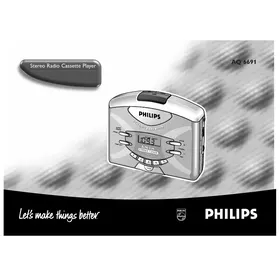
AQ6691 - Mp3 player PHILIPS - Free user manual and instructions
Find the device manual for free AQ6691 PHILIPS in PDF.


| Product type | MP3 player / Radio / Cassette |
| Brand | PHILIPS |
| Model | AQ6691 |
| Mains power supply | 3V DC adapter (not included), center pin 1.3 mm, 3.5 mm jack, negative pole at center |
| Battery power | 2 alkaline R6/UM3/AA batteries (not included) |
| Display | 24-hour clock, FM ST, PRESET, LOCK indicators, battery status |
| Radio functions | AM/FM, manual and auto tuning, 10 presets (5 per band) |
| Cassette functions | Play, stop, fast forward/rewind, auto stop at end of tape |
| Sound amplification | Adjustable volume, switchable DBB (Dynamic Bass Boost) |
| Audio output | Stereo headphone jack (headphone cable serves as FM antenna) |
| Lock | LOCK function to prevent accidental operation |
| Memory protection | Retains time and presets for about 30 minutes when changing batteries or power source |
| Reset | RESET button accessible with the tip of a headphone or pen |
| Included accessories | Stereo headphones AY3360, belt clip |
| Maintenance | Clean cassette heads monthly with a cotton swab soaked in alcohol or a cleaning cassette; use a soft cloth for the exterior |
| Listening safety | Listen at moderate volume to avoid hearing damage; do not use headphones while driving or cycling |
| Dimensions (estimated) | Approximately 140 x 90 x 30 mm (not communicated) |
| Weight (estimated) | Approximately 250 g (not communicated) |
Frequently Asked Questions - AQ6691 PHILIPS
User questions about AQ6691 PHILIPS
0 question about this device. Answer the ones you know or ask your own.
Ask a new question about this device
Download the instructions for your Mp3 player in PDF format for free! Find your manual AQ6691 - PHILIPS and take your electronic device back in hand. On this page are published all the documents necessary for the use of your device. AQ6691 by PHILIPS.
USER MANUAL AQ6691 PHILIPS
Stereo Radio Cassette Player
AQ 6691
Let's make things better

PHILIPS
INDEX
Norge
Philips Consumer Electronics
Glaslaan 2
5616 JB Eindhoven, The Netherlands
English 4
Francais 10
Espanol 16
Deutsch 22
Nederlands 28
Italiano 34
Portugues 40
Dansk 46
Svenska 52
Suomi 58
EeAnviKa 64
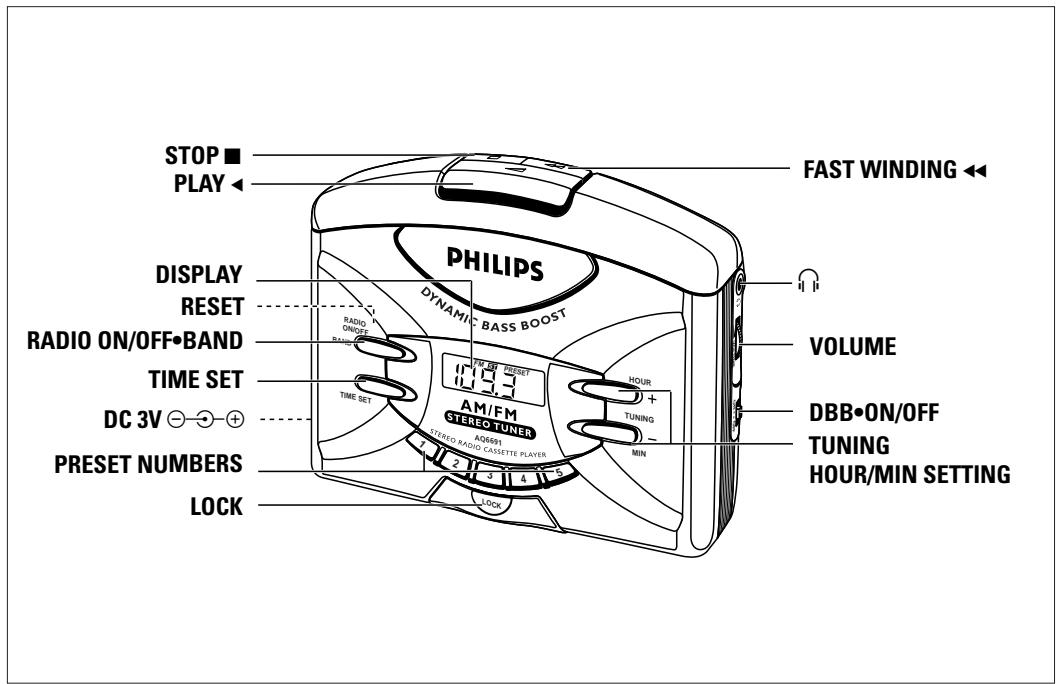
POWER SUPPLY
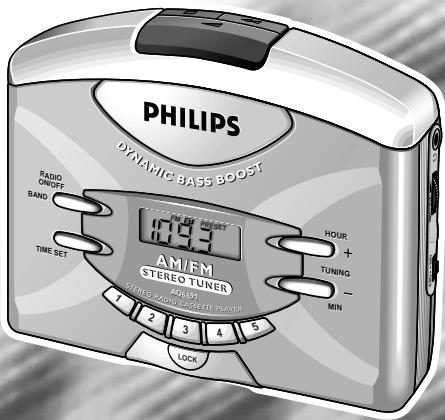
SETTING THE CLOCK
RADIO RECEPTION
POWER SUPPLY
Mains Adapter (not included)
The voltage of the 3V adapter must match with the local voltage. The 3.5mm adapter plug's 1.3mm centre pin must also be connected to the minus pole
- Connect the mains adapter to the set's DC 3V socket and a wall socket.
- Always disconnect the mains adapter if you are not using it.
Battery (not included)
- Open battery door and insert two alkaline batteries, type R6, UM3 or AA as indicated.
- Remove the batteries from the set if they are exhausted or not to be used for a long time.
- When the batteries are running low, flashes in the display. If the radio is on, it will automatically switch off.
- It may be necessary to reprogramme your preset stations.
SETTING THE CLOCK
Clock display
The time is displayed using the 24-hour clock system. The clock display is shown when the radio and cassette functions are switched off.
1 Press TIME SET.
- The clock digits flash for about 5 seconds when you press TIME SET.
2 To set the hour/minutes, press HOUR or MIN while the display is still flashing.
-
With your finger held down on HOUR, the hour increases steadily as a number from 0-23. Release HOUR when you reach the correct hour setting.
With your finger held down on MIN, the minutes increase rapidly and continuously. Press briefly and repeatedly if you need to adjust the minutes slowly. -
When the clock digits stop flashing, the time is set.
RADIO RECEPTION
1 Connect headphones to the socket.
2 Press RADIO ON/OFF-BAND to switch on the radio.
3 Press RADIO ON/OFF·BAND again to select AM or FM waveband.
- The display shows the radio station details throughout the radio mode.
FM ST appears on the display when you are receiving a FM stereo transmission.
4 Select your station by pressing one of the preset numbers (1-5), or by using the TUNING controls + or -.
TUNING
To improve reception:
FM: The headphone cord functions as the FM-aerial. Extend it fully and position the cord.
AM: Uses the built-in aerial. Turn the set to find the best position.
5 Adjust the sound with VOLUME and DBB ON/OFF (Dynamic Bass Boost).
6 To switch off the radio, press RADIO ON/OFF-BAND once or more until OFF appears briefly.
- The display returns to clock time.
TUNING
Manual tuning
- Press TUNING + or - briefly, once or more until the right frequency is found. In this way, the frequency can be changed step by step.
Automatic tuning
1 Press and hold down the TUNING + or - control until the display frequency starts to run.
2 When a station of sufficient strength has been found tuning stops, or you can stop automatic tuning by pressing either TUNING + or - control again.
3 Repeat steps 1 and 2 until you have found the desired station.
SELECTING & STORING FREQUENCIES: PRESETS
You can store the frequencies of up to 10 radio stations in the memory, 5 on each wave band. A stored frequency is only erased from the memory by storing another frequency in its place.
1 Select your wave band and tune to your desired station (See previous chapter on TUNING).
2 Press one of the preset numbers (1-5) for 2 seconds or more to store your station.
- PRESET appears in the display.
3 To listen to a preset station, select your wave band and then press the preset number of your desired station.
Erasing the PRESET Memory
- Use the tip of the headphone plug or a ballpoint pen to press RESET found on the back of the cassette door.
- The display shows 0:00. All previous preset stations are erased and the clock time will need to be re-entered.
CASSETTE PLAYBACK
GENERAL INFORMATION
CASSETTE PLAYBACK
1 Connect headphones to the socket.
2 Open the cassette door and insert a tape.
3 Press the door lightly to shut.
4 To start playback, press . The display shows ERE throughout tape mode.
5 Adjust the sound with VOLUME and the DBB ON/OFF (Dynamic Bass Boost).
6 To fast wind, press . Press to stop fast winding.
7 To stop, press and the set is switched off.
- At the end of a tape, the cassette keys are automatically released and the set switched off.
- OFF appears briefly before the display returns to clock time.
Accessories (included)
1x AY 3360 stereo headphones, 1x Belt clip
Using the Belt Clip
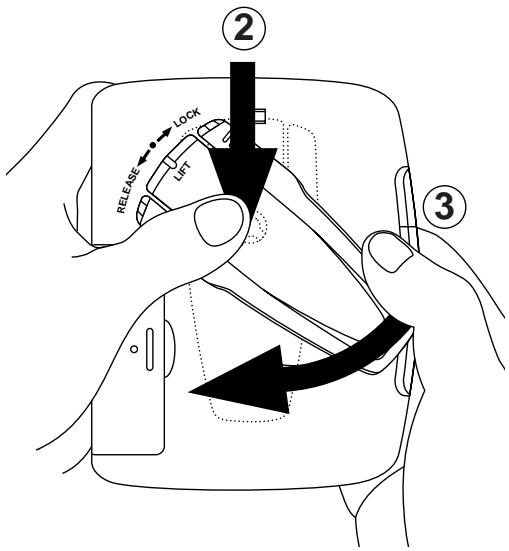
1 To attach: position shaped grip on reverse of clip to fit into belt clip hole ①.
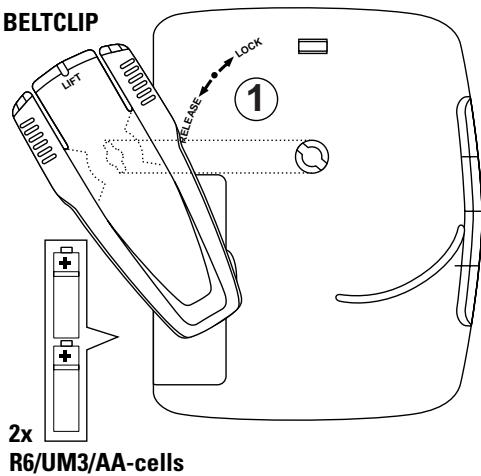
2 Push the belt clip down ② and turn ③ to LOCK as indicated on the set.
3 To detach: gently lift belt clip and turn to RELEASE as indicated on the set.
GENERAL FEATURES
Reset button
Should you receive external interference e.g. static electricity from carpets, thunderstorms, etc. which affects the display and electronic functions of your set, the RESET button allows you to clear all data (e.g. time setting, presets) from your set and to start up again.
- Use the tip of the headphone plug or a ballpoint pen to press RESET found on the back of the cassette door.
Memory protection
The memory protection acts as a backup should there be a power failure or interruption.
When changing batteries or power supply, the time setting, presets and the last station listened to are retained for about 30 minutes. This allows you to change batteries or power supply without having to set your stored data all over again.
Note: The clock time freezes during memory protection, so you may have to adjust the time when battery/ power supply is resumed.
Locking
This control helps to prevent any of the other front panel controls from being accidentally pressed when you are listening to the radio or when you are not using the radio.
1 Press LOCK.
appears when LOCK is activated.
2 To deactivate the LOCK function, press LOCK again.
disappears from the display.
TAKE CARE WHEN USING HEADPHONES
Hearing Safety: Listen at a moderate volume. Use at high volume can impair your hearing!
Traffic Safety: Do not use headphones while driving or cycling as you may cause an accident!
MAINTENANCE
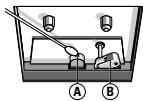
- Clean the tape heads every month with a cotton bud dipped in alcohol, or by playing through a cleaning tape.
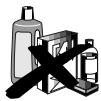
- Use a soft damp cloth to wipe off dust and dirt. Don't use benzene or corrosives to clean the set.
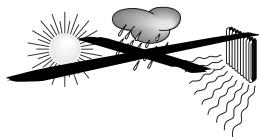
- Don't expose the set or cassettes to rain, moisture, sand or to excessive heat e.g. cars parked in direct sunlight.
- Don't use C-120 tapes.


ENVIRONMENTAL NOTE
- The packaging has been minimized so that it is easy to separate into two materials: cardboard and plastic. Please observe the local regulations regarding the disposal of these packaging materials.
- Please inquire about local regulations on how to hand in your old set for recycling.
- Batteries contain chemical substances, so they should be disposed of properly.
TROUBLESHOOTING
If a fault occurs, first check the points listed below before taking the set for repair. If you are unable to remedy a problem by following these hints, consult your dealer or service centre.
WARNING: Under no circumstances should you try to repair the set yourself, as this will invalidate your guarantee.
Hum when using mains adapter
- Adapter used is unsuitable
- Use a good quality regulated 3V DC adapter
Poor sound/no sound
- Headphone plug not fully inserted
- Insert plug fully
Volume is turned down - Turn up volume
Tape head dirty - Clean tape head (see MAINTENANCE)
Severe radio hum/distortion
FM aerial (headphone cord) not fully extended
- Extend FM aerial fully
- Set too close to TV, computer, etc.
-
Move set away from other electrical equipment
-
Batteries weak
- Insert fresh batteries
Front panel controls/ display does not function properly
- Electrostatic discharge
- Use the tip of the headphone plug/ball-point pen to press RESET and then reprogramme settings
The model number is found at the back of the set and the production number in the battery compartment. This product complies with the radio interference requirements of the European Union.
ALIMENTATION
REGLAGE D'HORLOGE
RECEPTION RADIO
ALIMENTATION
Este control可以帮助 you to get the best sound and quality from your radio.
Manuell stationsinstalling

Printed in Hong Kong
Ttext/RM/9942

- INDEX
- NORGE
- POWER SUPPLY
- SETTING THE CLOCK
- RADIO RECEPTION
- MAINS ADAPTER (NOT INCLUDED)
- BATTERY (NOT INCLUDED)
- CLOCK DISPLAY
- 1 PRESS TIME SET
- TUNING
- TO IMPROVE RECEPTION
- MANUAL TUNING
- AUTOMATIC TUNING
- SELECTING & STORING FREQUENCIES: PRESETS
- ERASING THE PRESET MEMORY
- CASSETTE PLAYBACK
- GENERAL INFORMATION
- ACCESSORIES (INCLUDED)
- USING THE BELT CLIP
- GENERAL FEATURES
- RESET BUTTON
- MEMORY PROTECTION
- LOCKING
- TAKE CARE WHEN USING HEADPHONES
- MAINTENANCE
- ENVIRONMENTAL NOTE
- TROUBLESHOOTING
- HUM WHEN USING MAINS ADAPTER
- POOR SOUND/NO SOUND
- SEVERE RADIO HUM/DISTORTION
- FRONT PANEL CONTROLS/ DISPLAY DOES NOT FUNCTION PROPERLY
- ALIMENTATION
- REGLAGE D'HORLOGE
- RECEPTION RADIO
- MANUELL STATIONSINSTALLING
Brand : PHILIPS
Model : AQ6691
Category : Mp3 player