TWO120 - Scale Eldom - Free user manual and instructions
Find the device manual for free TWO120 Eldom in PDF.


| Product Type | Digital Bathroom Scale |
| Brand | Eldom |
| Model | TWO120 |
| Dimensions | 30 x 30 x 2.5 cm |
| Weight | 1.2 kg |
| Power Source | 2 x AAA batteries (included) |
| Display | LCD screen, 4-digit |
| Capacity | 180 kg / 396 lb |
| Graduation | 100 g / 0.2 lb |
| Auto-On | Step on to activate |
| Auto-Off | After 10 seconds of inactivity |
| Overload Indication | Display shows "Err" or "OL" |
| Low Battery Indication | Icon on display |
| Material | Tempered glass platform, plastic base |
| Unit Switch | kg / lb / st |
| Surface | Non-slip texture |
| Cleaning | Wipe with damp cloth; do not immerse |
| Safety | CE approved, anti-slip pads |
| Spare Parts | Contact Eldom customer service |
| Warranty | 2 years |
Frequently Asked Questions - TWO120 Eldom
User questions about TWO120 Eldom
0 question about this device. Answer the ones you know or ask your own.
Ask a new question about this device
Download the instructions for your Scale in PDF format for free! Find your manual TWO120 - Eldom and take your electronic device back in hand. On this page are published all the documents necessary for the use of your device. TWO120 by Eldom.
USER MANUAL TWO120 Eldom
natural_image
Digital kitchen digital measuring device with four white oval cutouts on black surface (no visible text or symbols)INSTRUKCJA OBSŁUGI
ELETRONICZNA WAGA OSOBOWA TWO120
SKALA OCENY MIĘŚNI I KOŚCI
This product is specially designed to test body fat/hydration, help keep a close eye on the daily change of your body fat, hydration,m and weight, providing information for your reference. Base on the analysis of your height, weight and age etc., it tells your body fat status and gives you an idea of your body condition. Please read this instruction carefully before use.
User-friendly Tips
During Measuring
A. Always remove your shoes and socks, wipe clean your feet before using.
B. It is advisable to take measurement at the same time of the day.
C. Measured result could be misleading after intensive exercise, excessive dieting or under extreme dehydration condition.
D. Always weigh/use the scale on a hard and flat surface. When you are measuring, please keep still.
E. The body fat/hydration measured data of the following people may have deviation:
- Children under 10 or adult over 70 (can only use the device under normal weighing mode)
- Body building athletes or other occupational athletes.
F. People with the following conditions should not use the device:
- Pregnant women
- Those on dialysis treatment
- Those who use heart pacemaker or with other implanted medical device.
Safety Warning
The Fat% Hydration% Muscle% content evaluated by this device is only for reference (not for medical purpose). If your Fat% Hydration% content is over/below normal level, please consult your doctor for more advice.
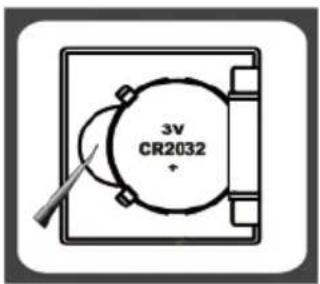
Battery
Please remove the isolation sheet from the battery contact before use.
BATTERY REPLACEMENT:
- Open the battery cover at the bottom of the device.
- Carefully lever the battery and take it out.
- Insert a new battery and press it gently until the retaining clip snaps in place.
Please pay attention to the polarization. - Close the lid.
Used batteries should be discarded in special collection bins.
LCD Display
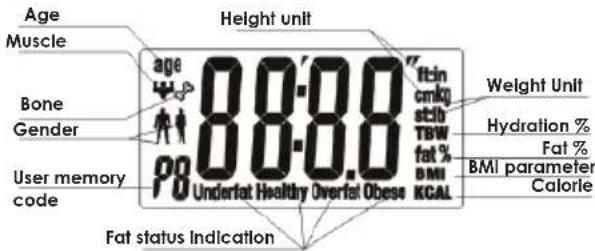
TECHNICAL DETAILS
- weight capacity 150kg (330lb)
- resolution 100g (0,2lb)
- accuracy of measurement: 1kg
- power: CR2032
Key Illustration (Touch button)
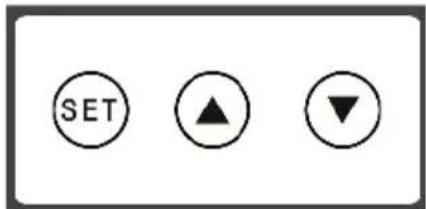
SET Turn on the scale and prompt to next parameter. (Please refer to the Setting Personal Parameter overleaf)
Advance the value by one interval each press. Continuous pressing will speed up the advance of value.
Decrease the value by one interval each press. Continuous pressing will speed up the decrease of value.
To Set Weight Unit
- Tape or knock the scale gently and it will get ready for use when screen shows "0,0kg" after "8888" and you can press ▲ and ▼ to switch within different units (kg/lb/st:lb)
For weight only
- Tape or knock the scale.
- Step on the scale gently, position your feet evenly near the center and keep ypour body still until the scale stabilizes your weight.
- The scale will be auto off if no further using.
For weight, body fat, hydration, muscle and bone percentage
Press "SET" key for seconds to set your personal data when the screen shows "0,0kg.
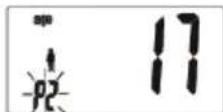
Press ▲ or ▼ key to select a number from P0 to P9 as your personal code. Please press "SET" to confirm
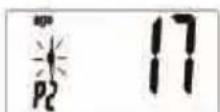
Press ▲ or ▼ key to choose ♀ Male or ♀ Female. Please press "SET" to confirm
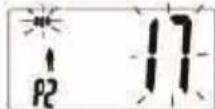
Press ▲ or ▼ key to reach your target age (10-80). Please press "SET" to confirm.
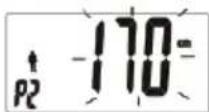
Press ▲ or ▼ key to reach your target height (100-240 cm). Please press "SET" to confirm.
Step on the scale gently and keep your bare feet in touch with the electrodes. Stand still and erect to get your weight measured and your body fat, hydration, muscle and bone percentage will be displayed respectively on the screen within seconds. These results will be repeated for two times and the scale will be auto off no further using.
The personal data will be stored once you set. Just confirm your code when you use scale again and your other information will be showed so there is no need to program them again.
Body fat and hydration ranges table.
| Age | Female Male | Display | |||
| Fat % | Hydration % | Fat % | Hydration % | ||
| <=30 | 4.0-20.5 | 66.0-54.7 | 4.0-15.5 | 66.0-58.1 | Underfat |
| 20.6-25.0 | 54.6-51.6 | 15.6-20.0 | 58.0-55.0 | Healthy | |
| 25.1-30.5 | 51.5-47.8 | 20.1-24.5 | 54.9-51.9 | Overfat | |
| 30.6-80.0 | 47.7-13.8 | 24.6-80.0 | 51.8-13.8 | Obese | |
| >30 | 4.0-25.0 | 66.0-51.6 | 4.0-19.5 | 66.0-55.4 | Underfat |
| 25.1-30.0 | 51.5-48.1 | 19.6-24.0 | 55.3-52.3 | Healthy | |
| 30.1-35.0 | 48.0-44.7 | 24.1-28.5 | 52.2-49.2 | Overfat | |
| 35.1-80.0 | 44.6-13.8 | 28.6-80.0 | 49.1-13.8 | Obese | |
Body muscle and bone ranges table
| Age | Female | Male | ||
| Muscle % | Bone % | Muscle % | Bone % | |
| 16-50 | >31 | >8 | >38 | >10 |
BMI parameter
| Low Normal | Overweight | Fat | |
| <18.5 | 18.5~25 | 25~30 | >30 |
Warning Indications
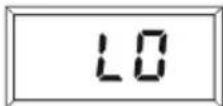
Low Battery Indication.
The battery power is running low, please replace with a new battery.
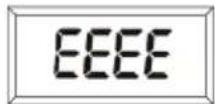
Over-load Indication
The weighing subject on the platform exceeds the maximum
capability of scale. Please step off to avoid damage.
If body percentage is less than 5%, then screen will show "ErL". If more than 50% it will display "ErH" and "Er1" indicates that the measuring makes an error.
Safety instructions
This appliance is only intended for domestic use.
Do not step on the scale when it is wet.
- Do not step on the scale with wet feet.
■ Store the scale in dark and dry place.
During storage do not place any other items on it.
The precision of the scales indications depends on the way it is operated.
Use it carefully. Do not jump on the scale or drop it.
■ Clean with moist soft cloth without using chemical detergents.
Clean dry. Do not immerse in water.
Only authorized service point can make any repairs. Any modernizations or using the spare parts or elements other that original is not allowed and can be dangerous to life.
ENVIRONMENTAL PROTECTION
- the appliance is made of materials which can be recycled,
- it should be handed over to the applicable collection point for the recycling of electrical and electronic equipment
STUPNICE HODNOCENÍ SVALŮ A KOSTÍ
| Věk | Žena | Muž | ||
| Svaly % Svaly Kosti % | Kosti % | |||
| 16-50 | >31 | >8 | >38 | >10 |
PARAMETR BMI

- INSTRUKCJA OBSŁUGI
- ELETRONICZNA WAGA OSOBOWA TWO120
- SKALA OCENY MIĘŚNI I KOŚCI
- User-friendly Tips
- During Measuring
- Safety Warning
- Battery
- BATTERY REPLACEMENT:
- TECHNICAL DETAILS
- To Set Weight Unit
- For weight only
- For weight, body fat, hydration, muscle and bone percentage
- Body muscle and bone ranges table
- BMI parameter
- Warning Indications
- Safety instructions
- ENVIRONMENTAL PROTECTION
- PARAMETR BMI
Brand : Eldom
Model : TWO120
Category : Scale