
Qualcore 1030 4G - Tablet Overmax - Free user manual and instructions
Find the device manual for free Qualcore 1030 4G Overmax in PDF.


| Brand | Overmax |
| Model | Qualcore 1030 4G |
| Category | Tablet |
| Display | 10.1 inches, IPS LCD, 1280x800 pixels |
| Operating System | Android 10 |
| Processor | Quad-core 1.5 GHz Cortex-A53 |
| RAM | 2 GB |
| Storage | 32 GB, expandable via microSD |
| Battery | 6000 mAh, up to 8 hours usage |
| Rear Camera | 5 MP, autofocus |
| Front Camera | 2 MP |
| Connectivity | 4G LTE, Wi-Fi 802.11 b/g/n, Bluetooth 4.2, GPS |
| SIM Card | Micro-SIM (one slot for 4G data) |
| Ports | Micro USB, 3.5mm headphone jack, microSD slot |
| Sensors | Accelerometer, ambient light sensor, proximity |
| Dimensions | 240 x 170 x 9 mm |
| Weight | 550 g |
| Power Supply | 5V/2A via Micro USB |
| Maintenance | Clean with a soft, dry cloth. Do not use liquid cleaners. |
| Safety | Avoid moisture, extreme temperatures, and drops. Use only certified charger. |
| Spare Parts | Contact Overmax authorized service center for replacements. |
| Repair Information | Battery is not user-replaceable. Refer to manual for guided troubleshooting. |
Frequently Asked Questions - Qualcore 1030 4G Overmax
User questions about Qualcore 1030 4G Overmax
0 question about this device. Answer the ones you know or ask your own.
Ask a new question about this device
Download the instructions for your Tablet in PDF format for free! Find your manual Qualcore 1030 4G - Overmax and take your electronic device back in hand. On this page are published all the documents necessary for the use of your device. Qualcore 1030 4G by Overmax.
USER MANUAL Qualcore 1030 4G Overmax
To switch on the tablet, press and hold the power button for several seconds.
Opening the device
- Switch off your tablet before installing or replacing the battery, SIM, or memory card.
- Remove the back cover.
- Hold the SIM card with the cut corner oriented as shown and slip it into the card holder.
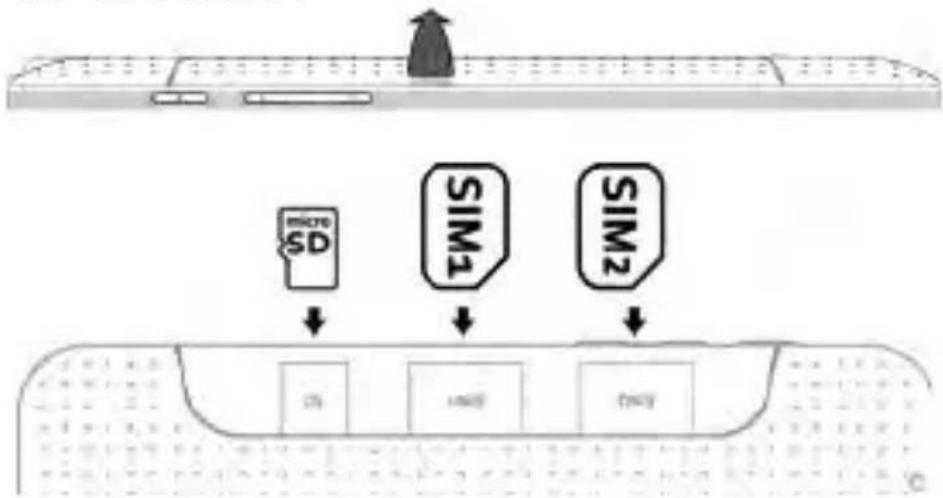
flowchart
graph TD
    A["MicroSD"] --> B["DS"]
    C["SIM1"] --> D["SMI2"]
    E["SIM2"] --> F["DTY"]
    style A fill:#f9f,stroke:#333
    style B fill:#ccf,stroke:#333
    style C fill:#cfc,stroke:#333
    style D fill:#fcc,stroke:#333
    style E fill:#cff,stroke:#333
    style F fill:#ffc,stroke:#333
- Insert the memory card into the card slot with the metal contacts facing down until it inserts to the right position.
- Press the cover gently back into place until you hear a click.
Charging the Battery
When you first get your new tablet you'll need to charge the battery.
- Connect the adapter to the charger jack. Ensure that the adapter is inserted with the correct orientation. Do not force the connector into the charger jack.
- Connect the charger to a standard AC wall outlet.
- Disconnect the charger when the battery is fully charged.
Keys Explained
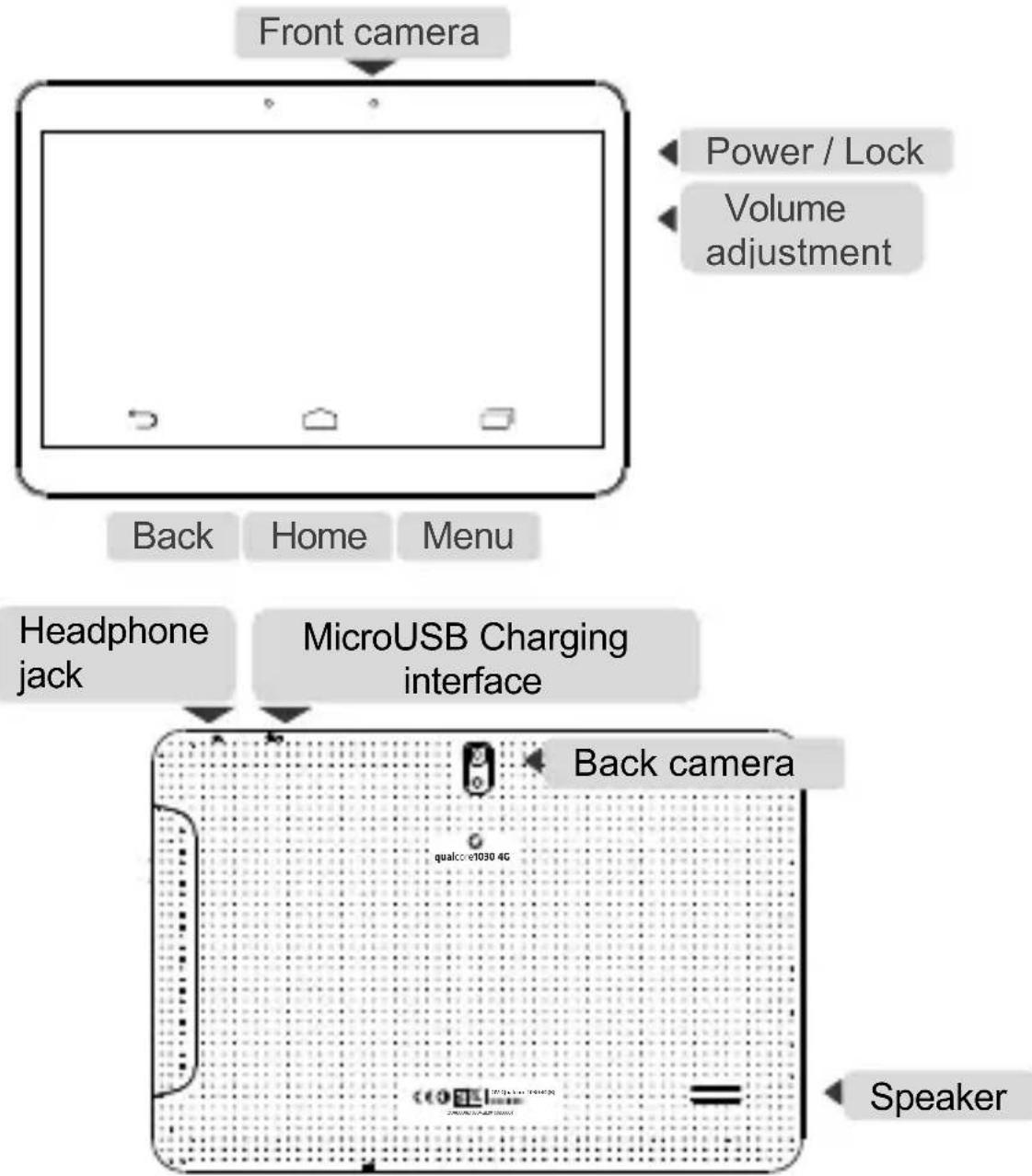
flowchart
graph TD
    A["Front camera"] --> B["Back"]
    B --> C["Home"]
    C --> D["Menu"]
    E["Power / Lock"] --> F["Volume adjustment"]
    G["Headphone jack"] --> H["MicroUSB Charging interface"]
    I["Back camera"] --> J["Speaker"]
Menu
Press to get the options for the current screen.
Home
Press to return to the Home Screen from any.
Back
Press to go to the previous screen.
Power
Press to switch your tablet to Sleep mode. Press to wake
up your tablet. Hold to turn on Airplane mode, or to power off.
Waking Up Your Tablet
Press Power Key to activate your screen display.
Tap the

icon, drag to the right
Turning On Wi-Fi
Wi-Fi provides wireless Internet access over distances of up to about 300 feet.
- Press Home key > tap Ⓞ > Settings.
- Click OFF next to the Wi-Fi menu to turn it on, click ON you can turn off the Wi-Fi function.
Connecting to a Wi-Fi Network
- Press Home key > tap (☑) > Settings > Wi-Fi.
When the Wi-Fi is on, the Wi-Fi access points, or “hotspots”, that your tablet has detected are displayed with their names and security settings. - Tap an access point to connect to it.
Bluetooth
Bluetooth is a short-range wireless communication technology. Tablets or other devices with Bluetooth capabilities can exchange information wirelessly within a distance of about 10 meters. The Bluetooth devices must be paired before the communication is performed.
-
Press Home Key > tap ⚪> Settings.
-
Click 04 next to the Bluetooth menu to turn it on,
When Bluetooth is on, the ✕ icon will appear in the status bar.
- Tap Bluetooth. Your tablet will show all visible Bluetooth devices in range.
- Tap the device you want to pair with and operate according to the message prompt.
When both devices to be paired accept the connection, the pairing is completed.
Taking Pictures with Your Camera
Your tablet has camera function. Open it by pressing Home Key >
tap > Camera.
Tap to take a picture. To view it, just tap the picture in the right corner of the screen.
Information
More information about the use of the device and the system can be found at: www.overmax.eu
Witaj!
- Tap an access point to connect to it.
Bluetooth
Brand : Overmax
Model : Qualcore 1030 4G
Category : Tablet