S0322 - Wandhalterung Ricoo - Kostenlose Bedienungsanleitung
Finden Sie kostenlos die Bedienungsanleitung des Geräts S0322 Ricoo als PDF.


Waehlen Sie Ihre Sprache und Ihre E-Mail-Adresse: wir senden Ihnen eine speziell uebersetzte Version.
Benutzerfragen zu S0322 Ricoo
0 Frage zu diesem Gerät. Beantworten Sie die, die Sie kennen, oder stellen Sie Ihre eigene.
Eine neue Frage zu diesem Gerät stellen
Noch keine Fragen. Stellen Sie die erste.
Laden Sie die Anleitung für Ihr Wandhalterung kostenlos im PDF-Format! Finden Sie Ihr Handbuch S0322 - Ricoo und nehmen Sie Ihr elektronisches Gerät wieder in die Hand. Auf dieser Seite sind alle Dokumente veröffentlicht, die für die Verwendung Ihres Geräts notwendig sind. S0322 von der Marke Ricoo.
BEDIENUNGSANLEITUNG S0322 Ricoo
text_image
Typ: 50322 Scope of the delivery Lieferumfang A Wall mount Dwanchalter 2 pcsStk. B Concrete anchor Barrowd of Dose 2 pcsStk. C Mx x 12000 4 pcsStk. D Mx x 12000 4 pcsStk. E Mx x 12000 4 pcsStk. F Mx x 12000 4 pcsStk. G Mx x 12000 4 pcsStk. H Paddle stopper Konzernstoffen 1 pcsStk. I Alterschuld Brusselabung 1 pcsStk. J Cuckshelder Rachshering 1 pcsStk. Please note: The numbering on the plastic bag may difficult. Bitte beachten: die Durchnummerierung auf den Passkabel kann abweichend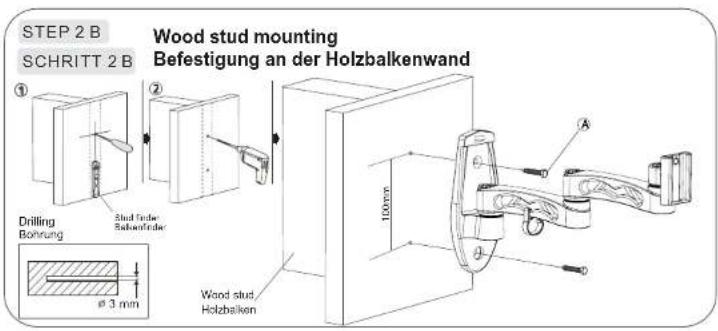
text_image
STEP 2 B SCHRITT 2 B Wood stud mounting Befestigung an der Holzbalkenwand Drilling Bohrung Stud fader Sabonfeder 100mm A Wood stud, Holzbalken Ø 3 mm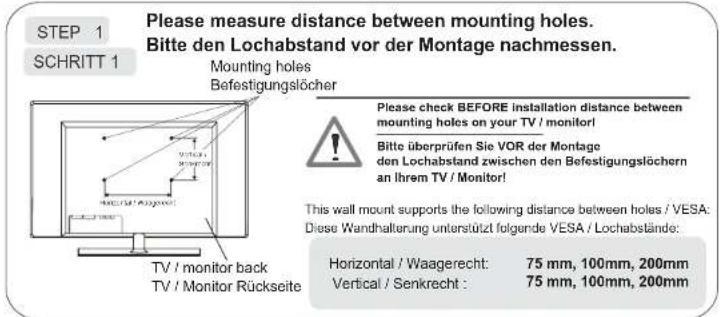
text_image
STEP 1 SCHRITT 1 Please measure distance between mounting holes. Bitte den Lochabstand vor der Montage nachmessen. Mounting holes Befestigungslöcher Please check BEFORE installation distance between mounting holes on your TV / monitor! Bitte überprüfen Sie VOR der Montage den Lochabstand zwischen den Befestigungslöchern an Ihrem TV / Monitor! This wall mount supports the following distance between holes / VESA: Diese Wandhalterung unterstützt folgende VESA / Lochabstände: Horizontal / Waagerecht: 75 mm, 100mm, 200mm Vertical / Senkrecht : 75 mm, 100mm, 200mm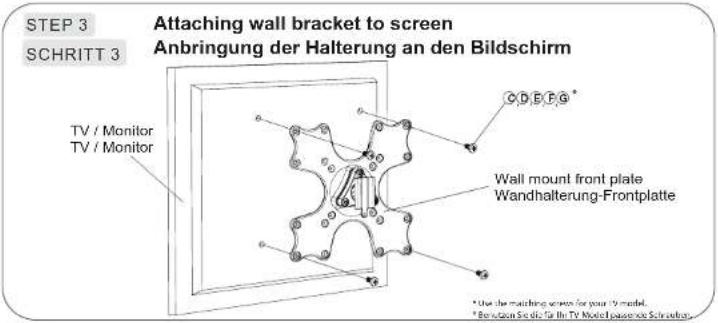
text_image
STEP 3 SCHRITT 3 Attaching wall bracket to screen Anbringung der Halterung an den Bildschirm TV / Monitor TV / Monitor CDEFG* Wall mount front plate Wandhalterung-Frontplatte * Use the matching screen for your TV model. * Reaction Sclec for the TV Model passover Schmittan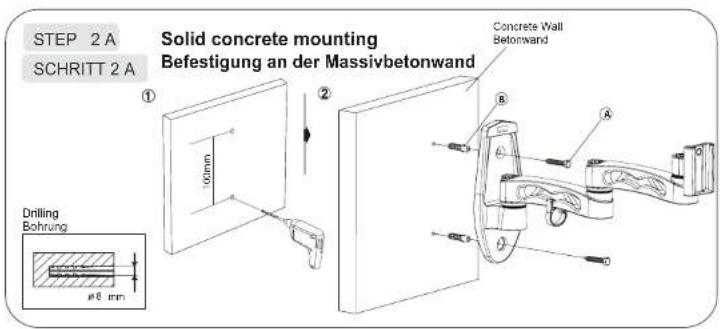
text_image
STEP 2 A SCHRITT 2 A Solid concrete mounting Befestigung an der Massivbetonwand Concrete Wall Befonwand Drilling Bohrung Ø8 mm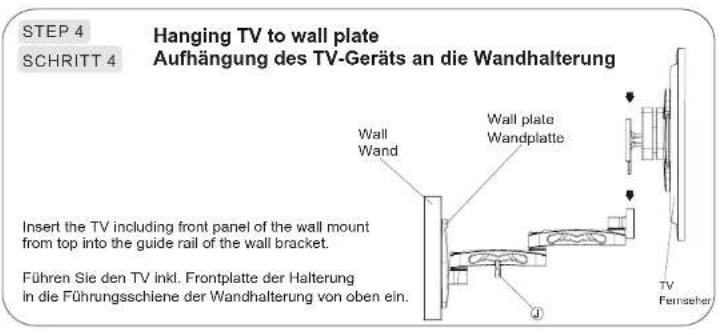
text_image
STEP 4 SCHRITT 4 Hanging TV to wall plate Aufhängung des TV-Geräts an die Wandhalterung Insert the TV including front panel of the wall mount from top into the guide rail of the wall bracket. Führen Sie den TV inkl. Frontplatte der Halterung in die Führungsschiene der Wandhalterung von oben ein.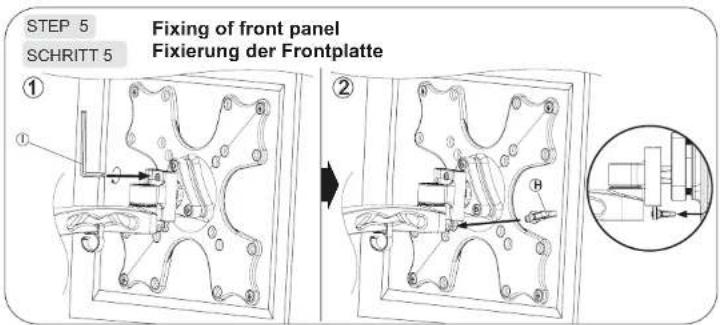
text_image
STEP 5 Fixing of front panel SCHRITT 5 Fixierung der Frontplatte ① ②